Files Inspector Pro: See What Fills Your Drive, Then Free It
Files Inspector is a free Windows disk space analyzer from Chemtable Software that shows what is taking up each drive (pictures, videos, downloads, programs, folders) and lets you delete it or uninstall it on the spot. Files Inspector Pro adds lossless JPEG compression and costs $12.75 for 2 PCs on the order page with the 25% code CHT-25 (regular price $17), a lifetime license with a year of updates.
When Windows warns that the C: drive is nearly full, the hard part isn't deleting things; it's knowing what is safe to delete. Files Inspector doesn't decide for you. It shows you where the space went, sorted by size, and leaves the call to you.
Quick facts
- Developer: Chemtable Software, the maker of Reg Organizer and Soft Organizer
- Latest version: 4.55, released June 16, 2026
- Platform: Windows 11, 10, 8 and 7, 32-bit and 64-bit
- Price: free edition; Pro Home License, 2 PCs: $12.75 with code CHT-25 ($17 without); Pro Home License, 5 PCs: $15.75 with the code ($21 without)
- What Pro adds: lossless compression of JPEG photos
- License: lifetime use, one year of updates and priority support
- Guarantee: 30-day money-back guarantee
- What we checked: the installer from files.chemtable.com (18 MB, file version 4.55.0.0, dated June 16, 2026, with a valid digital signature), the version history back to 4.0, and the order page prices for the 2-PC and 5-PC Pro licenses with and without code CHT-25 on November 15, 2026. We didn't scan a drive or compress photos with it.
Before you buy
- The free edition is the full analyzer. Pro adds only photo compression, so buy it only if you keep a large JPEG library and want it smaller.
- The buttons on this page add code CHT-25 to the order page. If you see $17 instead of $12.75, type CHT-25 into the "I have a coupon code" box.
- The license keeps working after the first year; new versions after that need a renewal.
- The 30-day refund covers orders from Chemtable's own store, which is where the order page sends you.
Download Free TrialBuy 2-PC Home License ($12.75)Buy 5-PC Home License ($15.75)
Overview
Files Inspector opens on a summary screen: one bar per category (Pictures, Applications and Games, Downloads, Video, Music) and one per drive, each with its size, plus a running "Space freed in this session" counter at the bottom. Click a category to drill in, or switch to the tree view to browse every folder by size. Chemtable's own description sums up the idea: it helps "in situations where it is impossible to make a decision whether some information is useful or not without human help."
Version 4.0 (May 2024) widened the scan to cameras and iOS and Android phones, put rarely used applications on the main screen and added an address bar for jumping to any path. The 4.x releases since then have mostly improved the built-in uninstaller, which shares its engine with Soft Organizer.
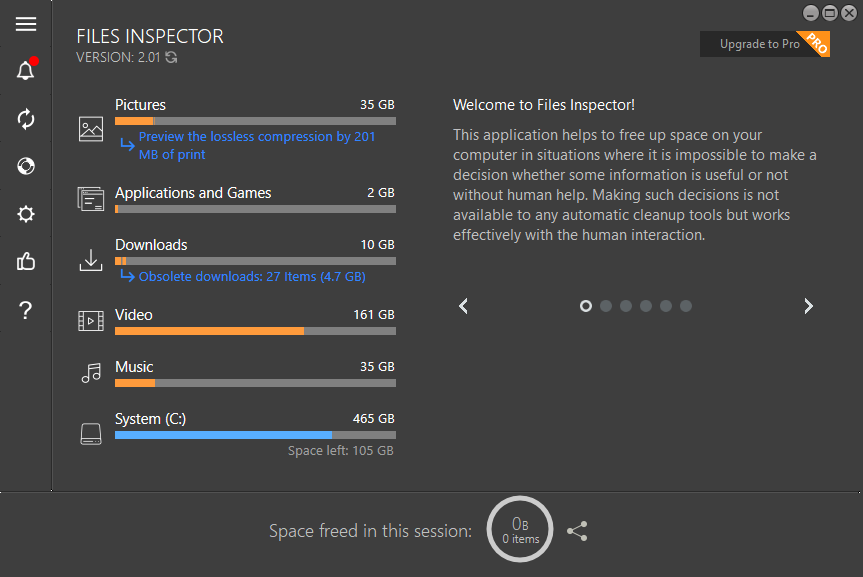
The Files Inspector main screen (version 2.01): 35 GB of pictures with a lossless-compression preview link, 10 GB of downloads including 27 obsolete ones (4.7 GB), 161 GB of video, and 105 GB left on the 465 GB system drive.
Features
Express analysis by file type
Files Inspector's express scan totals your folders, documents, images, videos, music and other files and shows the result within moments of starting, as bars you can click into. It also flags obsolete downloads, old files sitting in the Downloads folder, which on most PCs are the easiest gigabytes to win back.
A folder tree sorted by size
Files Inspector's advanced analyzer shows every file and folder on a drive with its size and share of the total, so the biggest folders float to the top. Chemtable sped up NTFS scanning in version 3.0, and 4.0 runs device scans in parallel. You can delete files and folders right from the list; deleted items go to the Recycle Bin, so a mistake can be undone.

The tree view in Files Inspector 3.0: on this C: drive, Users takes 46.7 GB (72%), Windows 10.7 GB and Program Files 4.2 GB, with pagefile.sys and swapfile.sys listed too.
An uninstaller with leftover search
Files Inspector's Applications and Games section removes programs and then looks for their leftovers, using the same Full Uninstall technology as Soft Organizer. Filters show large, new and rarely used applications, traced installs record every change for an exact removal, and recent versions find drivers, services and startup entries, force-remove programs whose uninstaller fails, and warn before you remove Steam while its games are still installed.

Applications and Games in Files Inspector 3.0: programs split into newer and older, sizes and install dates, a "Traced" tag on qBittorrent, and Removed Applications Leftovers and Installed Applications Updates on the left.
Lossless photo compression (Pro)
Files Inspector Pro recompresses JPEG photos without lowering their quality, which Chemtable says shrinks them by about 10% on average. You get a before-and-after preview with the saving for each image, and the change can be undone. On 35 GB of photos, 10% is roughly 3.5 GB; on a small library it's hardly worth paying for.

The Decreased Image Preview window: a 962 KB photo shrinks by 71 KB (7%) with no visible difference, and the note "The decrease can be undone".
Benefits
- You decide what goes. No automatic "clean" button deleting things you might need.
- Two jobs in one tool: find big files and uninstall the programs taking space, with their leftovers.
- Low risk: deleted files go to the Recycle Bin, and photo compression can be reversed.
- Cheap: the free edition costs nothing, and Pro is $12.75 once for two PCs.
Real-World Uses
- A full laptop SSD: find the 20 GB of old installers in Downloads and the game you haven't launched in a year.
- A photo-heavy PC: shrink a large JPEG archive by around a tenth without touching quality (Pro).
- Before a Windows upgrade that needs free space: see in a minute where you can get it.
- Checking a phone or camera connected to the PC to see what's filling it.
Who It's For, and Who Should Skip It
Files Inspector suits everyday Windows users who want a friendlier view of their disk than Explorer, and anyone who likes to choose what to delete rather than trust an automatic cleaner. Pro is for people with large JPEG collections.
Skip Pro if your photos are mostly RAW, PNG or HEIC, or already stored in the cloud: the compression only works on JPEG. If you want automatic junk cleanup of caches and temporary files, Chemtable's Reg Organizer does that. There's no Mac version.
Usage Guide
- Download files-inspector-setup.exe (about 18 MB) and install it with administrator rights.
- Let the main screen finish its scan, then click the biggest bar, or Obsolete downloads, to see the files behind it.
- Select what you don't need and delete it; it goes to the Recycle Bin. Empty the bin when you're sure.
- Open Applications and Games to remove large or rarely used programs together with their leftovers.
- With Pro, open Pictures, preview the lossless compression and apply it.
Where it falls short
- Pro is a thin upgrade. One feature, JPEG compression, with savings of about 10%.
- Slow scans on some systems. A user on Chemtable's own testimonials page reported the scan stuck at "Gathering Data" at 12% for hours.
- No duplicate finder. It shows big files and folders, not identical copies.
- Almost no independent reviews. SourceForge and Slashdot list it with no ratings yet.
What Users Say
Quoted on Chemtable's testimonials page
Dave: "It really tells me quickly what files take up the most space."
David Fitzpatrick: "Very in depth scanning and removal of unneeded files. Very quick and efficient!"
Markku H: "Good stuff! Simply to use and works fine. The developers have thought even on the small things. Amazing!"
Miltiadis Flamouris: "The program either goes very slow, either have some bugs. It stucks under “Gathering Data” at 12% for several hours. I had to close it and re-open it via Task Manager, I’ve try several times but it keeps the same trouble. Too bad…"
Terry Gaige, cautious about paying: "I want to see how much I just had removed helps or hurts me before I go PRO on them".
These come from the vendor's page, which keeps a couple of critical comments alongside the praise. Users like how quickly it shows where the space went; the complaints are about scan speed on some PCs and whether Pro is worth paying for. We found no independent reviews with ratings.
Comparisons
Files Inspector Free vs Pro
The free edition includes the express analysis, the folder tree, obsolete downloads, file deletion, phone and camera scanning and the uninstaller with leftover search. Pro adds lossless JPEG compression, plus a year of priority support.
Files Inspector vs Windows Storage settings
Windows' Storage page groups usage into broad categories and offers cleanup recommendations. Files Inspector goes further into folders, lists old downloads and rarely used apps, removes program leftovers, and scans connected phones and cameras. If Storage Sense already keeps you under control, you won't need it.
Editions and Pricing
| Edition | Price with CHT-25 | Regular price | PCs | Includes |
|---|
| Files Inspector (free) | Free | Free | Any | Disk analysis, deletion, uninstaller with leftover search |
| Pro Home License (2-PC) | $12.75 | $17.00 | 2 | Lossless JPEG compression, lifetime use, 1 year of updates |
| Pro Home License (5-PC) | $15.75 | $21.00 | 5 | Same as the 2-PC license, for five computers |
Each button below orders that license, with code CHT-25 already added. Prices were checked on the order page on November 15, 2026.
Buy 2-PC Home License ($12.75)Buy 5-PC Home License ($15.75)
FAQs
Is Files Inspector free?
Yes. Files Inspector's disk analysis, file deletion and uninstaller are free. Only lossless photo compression needs a Pro license key, which you enter in the same program.
Does Files Inspector delete files permanently?
No. Files Inspector moves deleted files and folders to the Recycle Bin, so you can restore them until you empty it. Only when a program's traces can't go to the Recycle Bin does it ask you to confirm a permanent delete.
Does Files Inspector Pro's photo compression reduce quality?
No. Files Inspector Pro's JPEG compression is lossless, so the image looks the same, and the change can be undone. The saving is around 10% per photo on average.
Can Files Inspector scan my phone?
Yes. Since version 4.0, Files Inspector can analyze iOS and Android phones, cameras and other devices connected to the PC, selected right on the main screen.
Does the Files Inspector Pro license expire?
No. A Files Inspector Pro license gives lifetime use with one year of updates and priority support; after that, the version you have keeps working.
What if I lose my Files Inspector Pro key?
Chemtable's key recovery page emails the key automatically to the address used for the order.
System Requirements
- Windows 11, 10, 8 or 7, 32-bit or 64-bit
- 256 MB RAM or more
- 50 MB of disk space
- Administrator rights
Conclusion
Files Inspector is a good free disk space analyzer: it shows quickly where the space went, flags old downloads and unused programs, and removes programs with their leftovers, all without deleting anything you didn't pick. The Pro upgrade is worth $12.75 only if you have a big JPEG library and want about 10% of it back without losing quality. Everyone else can stay on the free edition.
Download Free TrialBuy 2-PC Home License ($12.75)Buy 5-PC Home License ($15.75)