Advanced SystemCare 20 PRO: IObit's One-Click PC Cleaner and Tune-Up Suite
Advanced SystemCare 20 PRO is IObit's all-in-one Windows maintenance tool: one scan clears junk files and browsing traces, fixes the registry and startup list, checks your security settings and patches outdated software, with extra privacy and ransomware protection on top. Version 20 replaced Advanced SystemCare 19 in September 2026 and adds Custom Clean for finding junk, duplicate and large files. It's a yearly subscription, $19.99 for one PC for a year on the order page (list price $29.99), and it runs on every Windows version from XP to 11.
It's aimed at people who want their PC kept tidy without learning what a startup service or a prefetch cache is. You press one big Scan button, and the program decides what to clean.
Quick facts
- Version: 20.0.1.256 (installer dated October 16, 2026). Version 20 was released on September 9, 2026, replacing version 19.
- Developer: IObit
- Platform: Windows 11, 10, 8.1, 8, 7, Vista and XP
- Price: $19.99 for one PC for one year on the order page. The list price is $29.99 a year, and multi-PC plans are available
- Free version: Advanced SystemCare Free does the basic cleanup and speed-up
- Guarantee: 60-day money-back guarantee, with conditions (see below)
- What we checked: installer version 20.0.1.256 (58.3 MB, signed by IObit Co., Ltd.) downloaded from IObit on October 27, 2026, the order page price of $19.99 for one PC for one year, and the plan prices on IObit's product page, all on October 27, 2026. We didn't run the scan on a test PC or measure boot times
Before you buy
- It's a subscription that renews. The PRO license runs for a year (18 months on the 3-PC plan) and then renews. Several Trustpilot reviewers complain about renewals they didn't expect, so note the renewal date, or turn off auto-renewal in your account if you'd rather decide each year.
- Expect offers for other IObit products. The Speed Up screen suggests installing Driver Booster and IObit Uninstaller, and the Action Center recommends other software (you can hide it). BetaNews advises declining any optional offers during installation.
- The speed claims are IObit's own. "Up to 2× faster" is marketing. Independent reviewers have found it cleans a lot, but how much faster your PC gets depends on how cluttered it was.
- Try the free version first, not the refund. IObit's 60-day money-back guarantee doesn't cover a change of mind or being unhappy with what the program does. It covers buying the wrong product or the same one twice, an auto-renewal you got no reminder for, a license code that never arrives, and technical problems support can't fix.
Download Free TrialBuy Now
Overview
Advanced SystemCare 20 is organized into six sections down the left side: Care (the main scan), Custom Clean, Speed Up, Protect, Software Updater and Action Center. Most people will live in Care, where a large Scan button runs everything in AI Mode, or let AutoCare do it in the background.
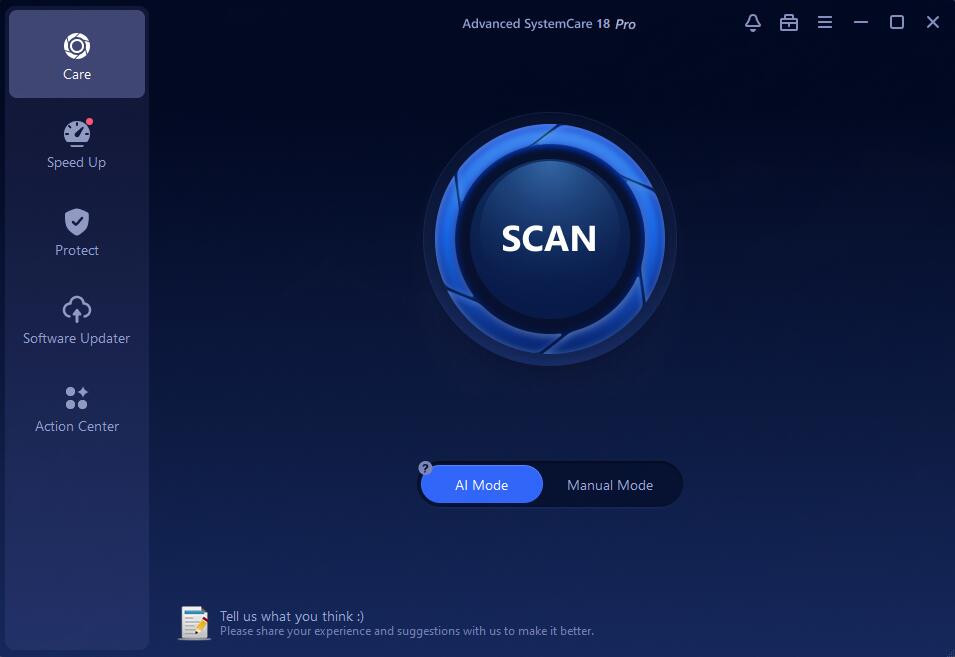
The Care screen in Advanced SystemCare 20 Pro, with AI Mode and Manual Mode below the Scan button and the six sections on the left.
Version 20 adds three things. Custom Clean finds junk, duplicate and large files on the drive you choose. Smart Scan, IObit's new scan engine, runs several modules at the same time to shorten scans. And the Performance Monitor now shows network upload and download speeds and disk temperature alongside RAM, CPU and disk use. The Safe Folder for ransomware protection arrived in version 19.
Features
A one-click scan with 16 modules
Advanced SystemCare's Care scan covers privacy traces, junk files, invalid shortcuts, registry cleaning and defragmenting, system and internet optimization, hard drive defragmenting and SSD trimming, antivirus and firewall status, outdated drivers and software, spyware, security weaknesses, missing Windows patches and disk errors. AI Mode picks what to run based on your PC. Manual Mode lets you tick the modules yourself, review every finding, and add items to an Ignore List so they're never flagged again. After a scan you can have it fix everything and then shut down, restart, hibernate or sleep the PC.
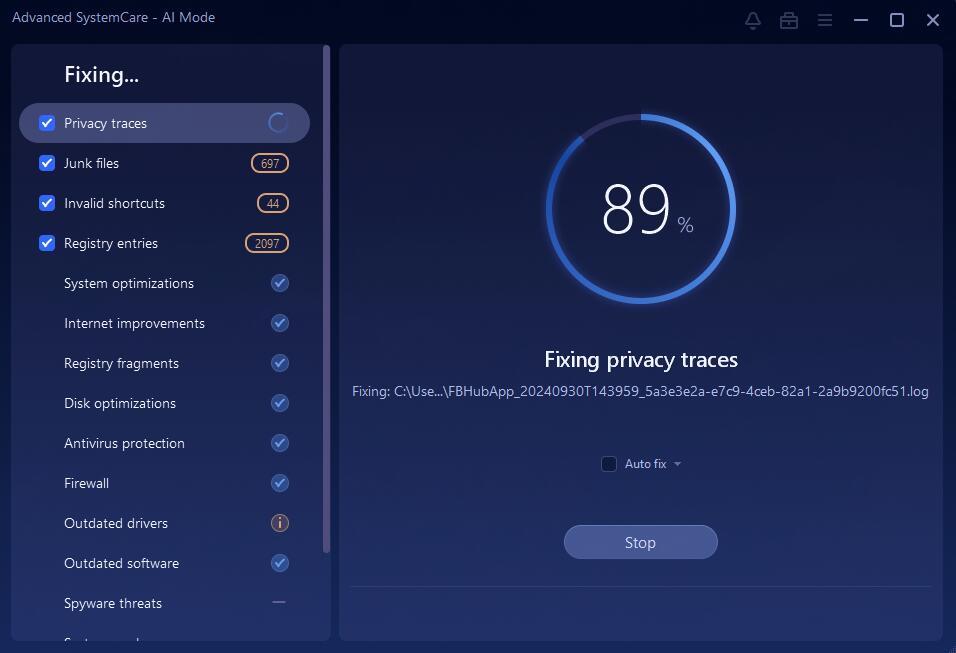
Manual Mode fixing the selected items, with counts for privacy traces, registry entries, system optimizations and outdated software.
Custom Clean: junk, duplicate and large files (new in version 20)
Advanced SystemCare 20's Custom Clean scans one drive at a time for three kinds of space-wasters: junk files, duplicate files and large files. You pick the drive from a menu, click Scan, then open each category to see the files before you click Clean Now. Duplicates and large files are marked "Review before cleaning", because a big video or a second copy of a photo isn't junk to everyone, and IObit's own manual warns you to check them before deleting.

Custom Clean results from IObit's manual: 982 junk files (889.9 MB), 29,964 duplicate files (4.0 GB) and 158 large files (5.3 GB), with the duplicates and large files marked Review before cleaning.
Speed Up: Turbo Boost, startup and RAM tools
Advanced SystemCare's Turbo Boost stops unnecessary services and background apps, with Work, Game and Economy (battery-saving) modes. The Startup Optimizer shows how much each startup item slows boot time, and lets you disable or delay it, along with browser startup items, services and scheduled tasks. Real-time TuneUp adds the Performance Monitor (RAM, CPU, disk and network use, plus CPU, GPU and disk temperatures) and, in PRO, automatic RAM cleaning and AutoCare, which runs maintenance in the background.
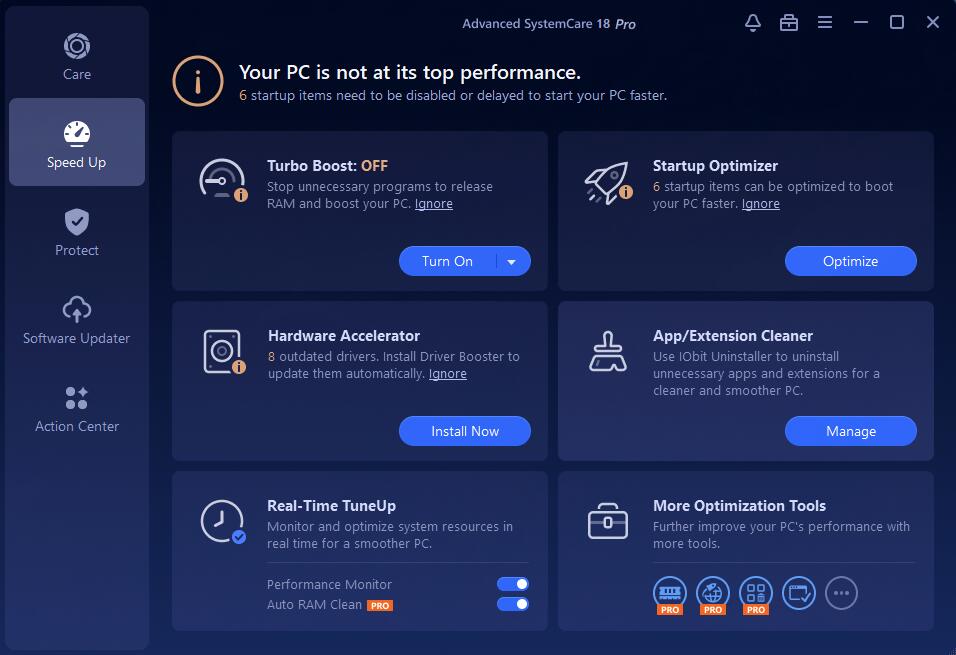
The Speed Up screen: Turbo Boost, Startup Optimizer (32 items to optimize on this PC), Real-Time TuneUp, and two panels that offer to install Driver Booster and IObit Uninstaller.
Protect: Safe Folder, anti-tracking and browser protection
Advanced SystemCare PRO's Safe Folder blocks unauthorized access and ransomware from the files and folders you add to it. Protect also includes anti-tracking that clears browsing traces automatically, fingerprint protection that hides your browser's digital fingerprint, browser and email protection, surfing protection against phishing and suspicious downloads, and ad removal. It's a privacy layer, not a replacement for your antivirus: the scan only checks that one is turned on.

Safe Folder, switched on and ready for you to add files or folders to protect.
Software Updater and a Toolbox of extra utilities
Advanced SystemCare's Software Updater finds outdated programs and updates them in one click. The Toolbox holds 23 tools in System Optimize, Security & Repair and System Clean groups, such as Smart RAM, Internet Booster, a file shredder, large file finder, duplicate file scanner, empty folder scanner, undelete, Disk Doctor and a process manager. Some download on first use, and a Featured Products group links to separate programs, some from other companies. Rescue Center undoes changes made by registry fixes, system and startup optimization, Internet Boost and registry defrag, and manages System Restore points.
Benefits
- Maintenance you don't have to remember. AutoCare and scheduled scans keep junk and startup clutter from piling up.
- Several tools in one subscription. Cleaner, startup manager, software updater, privacy tools and a toolbox would otherwise be separate downloads.
- An undo button. Rescue Center can reverse registry, startup and internet changes, which makes it safer to let an automatic tool loose.
- It still supports old PCs. Few maintained tools still list Windows 7, Vista and XP.
Real-World Uses
- A family laptop that boots slowly after years of installed apps: the Startup Optimizer shows which items to delay or disable.
- A nearly full C: drive: Junk File Clean, the large file finder and the duplicate scanner find the gigabytes to delete.
- A gaming session: Turbo Boost's Game Mode stops background services for the duration.
- Shared or public-facing PCs: Privacy Sweep and anti-tracking clear browsing traces for all user accounts.
- A folder of tax records or family photos: Safe Folder adds a ransomware barrier around it.
Who It's For
Advanced SystemCare PRO suits home users who want one tool to keep a Windows PC tidy with little effort, and who don't mind an interface that promotes other IObit products. If you're comfortable using Windows' own Storage Sense, Task Manager startup list and Windows Security, you'll get less out of it. If you dislike subscriptions, look at the free version or a one-time-purchase cleaner.
Usage Guide
- Install. Download the 58 MB installer and run it. Decline any optional offers you don't want. To activate PRO, click Enter Code at the bottom left of the main screen, paste your license code and click Register Now.
- Check the settings first. IObit recommends choosing your settings before the first scan, for example which browser data Privacy Sweep may delete, so you don't lose saved logins.
- Run a scan. On the Care screen, leave AI Mode on and click Scan, or switch to Manual Mode to pick modules.
- Free up space. In Custom Clean, choose the drive, scan, and open Duplicate Files and Large Files to untick anything you want to keep before clicking Clean Now.
- Review and fix. Click each module under Summary to see what it found, right-click anything you want to keep and choose Ignore, then click Fix.
- Speed up. In Speed Up, turn on Turbo Boost and run the Startup Optimizer.
- Protect. In Protect, switch on Safe Folder and add your important folders.
- Undo if needed. Rescue Center lists each change and has an Undo Changes button, plus System Restore points.
What Users Say
Tech Advisor (Advanced SystemCare 14 Pro review, 2021)
Chris Martin, Managing Editor of Tech Advisor, reviewed version 14 Pro and called it "A comprehensive PC cleaner application covering all the bases at a reasonable price making it easy to recommend." His listed pros were a "Clean & stylish interface", "Solid performance" and a "Wide range of tools". In his test it found 1.3 GB of junk files and 1,713 registry entries to fix, and Turbo Boost stopped 45 apps and released 652 MB of RAM.
His criticisms: "It’s a shame you can’t really choose what junk you want to be deleted", and "Elsewhere things get a bit convoluted as the software asks you to install other separate tools like IObit Uninstaller, Smart RAM and Internet Booster." He also noted that "the Action Center is merely a list of offers on other IObit software."
Trustpilot (IObit as a company)
IObit's Trustpilot page shows a TrustScore of 4.6 out of 5 from 2,439 reviews, covering all its products. Long-time users are loyal: "I've used Advanced System Care now for many, many years and I always recommend it to all who ask." — John Reed
The one- and two-star reviews mostly concern billing and ads rather than the cleaning itself:
- "IObit charged me for a subscription I cancelled a year ago." — Aleksey
- "Watch a film and an IObit ad pops up in the middle of the screen." — Michael Hill
- "A company that gives out "free" software, but misuses the software to spam its users with commercials and pop ups" — Guest_MKII
- Even a four-star reviewer, Peter, wrote: "I would have given it 5 stars if I had received at least two alerts two months before the expiration date."
Users quoted on IObit's PRO page
"I have been using ASC for years now. I have recently tested the latest version. And it is by far the most comprehensive version to date." — Brendon O Rourke
"I have purchased many different software programs to speed up and fix problems with my PC. Unfortunately, most of them really didn't help or make a difference until I tried out Advanced SystemCare." — Lyle Stelmaschuk
"The program is easy to use and very intuitive. The included tools are truly all-inclusive and after running the program my computer is more responsive." — Anthony Baker
The pattern: users like the one-click convenience, the breadth of tools and how much the scan finds, and many have used it for years. The complaints are about subscription renewals, pop-up offers for other IObit products, and having little control over exactly which junk files get deleted.
Comparisons
Advanced SystemCare Free vs PRO
Advanced SystemCare Free gives you a quicker startup, junk cleaning, one-click RAM release and email protection. PRO adds deeper cleaning of hidden junk, registry cleaning, automatic RAM release and AutoCare, real-time protection, Safe Folder, one-click software updates, automatic sweeping of online traces, blocking of untrusted programs, identity protection and premium technical support.
Advanced SystemCare PRO vs Ultimate
Advanced SystemCare Ultimate is IObit's edition that adds virus protection to the same cleanup and speed-up tools. If you already use Windows Security or another antivirus, PRO is enough. If you want one IObit product for both cleanup and malware protection, compare Ultimate.
Editions and Pricing
| Plan | List price | IObit store price on October 27, 2026 | Term |
|---|
| 1 PC | $29.99 | $16.77 | 1 year |
| 2 PCs + 1 PC free | $59.98 | $18.99 | 1 year |
| 3 PCs | $89.97 | $19.99 | 18 months |
| 5 PCs | $149.95 | $29.99 | 1 year |
The Buy Now buttons on this page go to a one-PC, one-year plan at $19.99. IObit runs promotions almost constantly, so its own store prices change often. The multi-PC plans add family sharing, and the 3- and 5-PC plans add priority support.
FAQs
Is Advanced SystemCare PRO safe to use on my PC?
Advanced SystemCare PRO is a legitimate program from a long-established developer, and it keeps backups in Rescue Center so you can undo what a scan changed. Download it only from IObit, decline optional offers during setup, and check Privacy Sweep's settings so it doesn't clear browser data you want to keep.
Does Advanced SystemCare PRO replace my antivirus?
No. Advanced SystemCare PRO removes spyware, checks that your antivirus and firewall are on, and adds privacy and ransomware protection, but it isn't a full antivirus. Keep Windows Security or another antivirus running alongside it.
Does Advanced SystemCare PRO renew automatically?
Advanced SystemCare PRO is sold as a subscription, and buyers report that it renews unless they turn renewal off. Check your order confirmation and IObit account for the renewal setting, and if you're charged for a renewal you got no reminder email about, IObit's refund policy covers that within 60 days.
Can I move my Advanced SystemCare PRO license to a new PC?
Yes. IObit's support site has a "Transfer to Another PC" option for moving a license, and you can export your license for backup from My Subscription inside the program.
Will Advanced SystemCare PRO really make my PC twice as fast?
Advanced SystemCare PRO's "2× faster" figure is IObit's own claim. A PC with a cluttered startup list and a full drive will feel noticeably faster after a scan, while a clean, recent PC will gain little.
I have Advanced SystemCare 19 PRO. Do I get version 20 free?
Yes, while your subscription is active. Advanced SystemCare PRO updates itself to the latest version when Update automatically is ticked in Settings (it is by default), so a current 19 PRO license runs version 20 without buying again.
What's the difference between Advanced SystemCare 19 and 20?
Advanced SystemCare 20 adds Custom Clean (junk, duplicate and large files on a chosen drive), the Smart Scan engine that runs modules in parallel, and network speed and disk temperature monitoring. The Care scan, Speed Up, Protect and Toolbox carry over from version 19.
Does Advanced SystemCare still work on Windows 7 and XP?
Yes. IObit lists Windows 11, 10, 8.1, 8, 7, Vista and XP for Advanced SystemCare, which is unusually wide support for a current tool.
System Requirements
- Windows 11, 10, 8.1, 8, 7, Vista or XP
- 300 MB of free disk space
- Screen resolution of 1024 x 768 or higher
- Internet connection for activation, updates and the Software Updater
Conclusion
Advanced SystemCare 20 PRO is the easy option for keeping a Windows PC tidy: one scan, automatic maintenance, and a toolbox you'd otherwise assemble from a dozen downloads, at a low first-year price. The trade-offs are an interface that keeps advertising other IObit products, little control over what the junk cleaner deletes, and a subscription you should keep an eye on at renewal time. Try the free version first, since IObit's refund policy doesn't cover a change of mind.
Download Free TrialBuy Now