IObit Malware Fighter PRO: Anti-Malware with a Bitdefender Engine for Windows
IObit Malware Fighter PRO is a Windows anti-malware program that pairs IObit's own engine with a Bitdefender engine and an anti-ransomware engine, and adds real-time guards for your files, webcam, USB drives and browser passwords. IObit sells it at $19.95 for the first year on one PC (list price $39.95), and the free edition is the same download with the Pro features locked.
It's built for home users who want more than Windows Security's defaults without paying for a full internet security suite: one window with scans, browser protection and a password-locked Safe Box for sensitive files.
Quick facts
- Developer: IObit
- Version: 13.5.0.1684
- Platform: Windows 11, 10 and 8
- Engines: IObit Anti-malware Engine, plus Bitdefender and Anti-ransomware engines in Pro
- Price: $19.95 per year for 1 PC, $22.95 for 2 PCs, $23.99 for 3 PCs (IObit's product page)
- Free edition: yes, with the IObit engine and basic guards
- Refunds: 60-day money-back guarantee
What we checked: the installer from IObit's download link on October 22, 2026, file version 13.5.0.1684 (64.8 MB), and that IObit's own "1 PC" Buy Now button opens the same order (product 45045940) as our Buy Now button, on October 22, 2026. We didn't run malware samples against it or measure detection rates.
Before you buy
- No recent lab scores. IObit Malware Fighter has no recent published detection results from labs like AV-Test or AV-Comparatives, so you can't compare its detection rate with mainstream antivirus suites. IObit points to an OPSWAT certification instead.
- Two Pro engines start switched off. According to IObit's manual, the Bitdefender and Anti-ransomware engines are off by default even after you activate Pro. Turn them on in Security Guard.
- It's a subscription. The discounted price is per year. Check the renewal terms at checkout, since IObit's Trustpilot complaints often concern renewals that people didn't expect.
- Expect promotions. The app shows banners for other IObit products and recommends third-party programs in its Action Center.
Download Free TrialBuy Now
Overview
IObit Malware Fighter is organised around six sections in a left sidebar: Home, Scan, Browser Protect, Security Guard, Tools and Action Center. The home screen shows one of four status messages, from "Your PC is protected" to "Your PC may be in danger" when the database is outdated or you haven't scanned for three days, with a Smart Scan button underneath.
Free and Pro share one installer. Entering a license code turns on the Pro engines and guards, automatic program and database updates, and premium support. IObit says the Pro edition uses a 209 million-entry virus database, against 9 million in the free edition.
Features
Three engines, including Bitdefender
IObit Malware Fighter PRO runs IObit's Anti-malware Engine all the time and adds two engines you can switch on: a Bitdefender engine for real-time detection and an Anti-ransomware engine that watches for unauthorised file encryption. The Bitdefender engine is the main reason to pick Pro over the free edition, which only has IObit's engine.
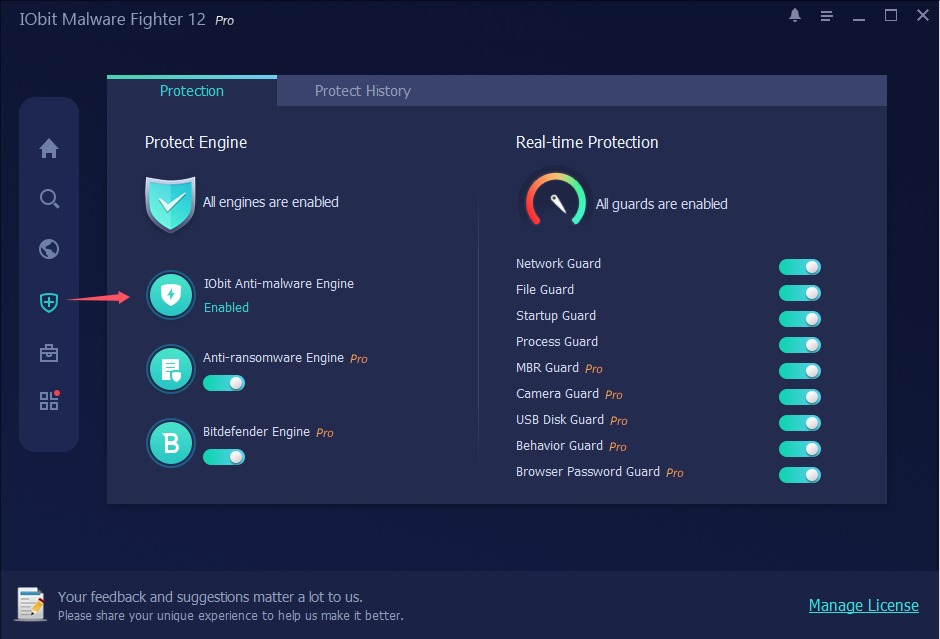
Security Guard in IObit Malware Fighter 13 Pro: the IObit, Anti-ransomware and Bitdefender engines on the left, and nine real-time guards on the right, five of them marked Pro.
Nine real-time guards
IObit Malware Fighter PRO's Security Guard has nine guards. Network, Startup, Process, Behavior and Browser Password guards work in both editions. Pro adds:
- File Guard: scans unknown files when you run them
- MBR Guard: blocks attacks on the master boot record, like GoldenEye/Petya
- Camera Guard: stops unknown programs from using your webcam
- USB Disk Guard: stops infections spreading from USB drives
Browser protection
IObit Malware Fighter PRO's Browser Protect section watches for changes to your homepage and search engine, scans downloads, locks your DNS settings against tampering, and, with IObit's Surfing Protection extension, blocks dangerous sites, ads and phishing in Gmail, Outlook and Yahoo Mail. Anti-Tracking, which clears tracking data when you close Chrome, Edge, Firefox or Internet Explorer, is Pro-only.
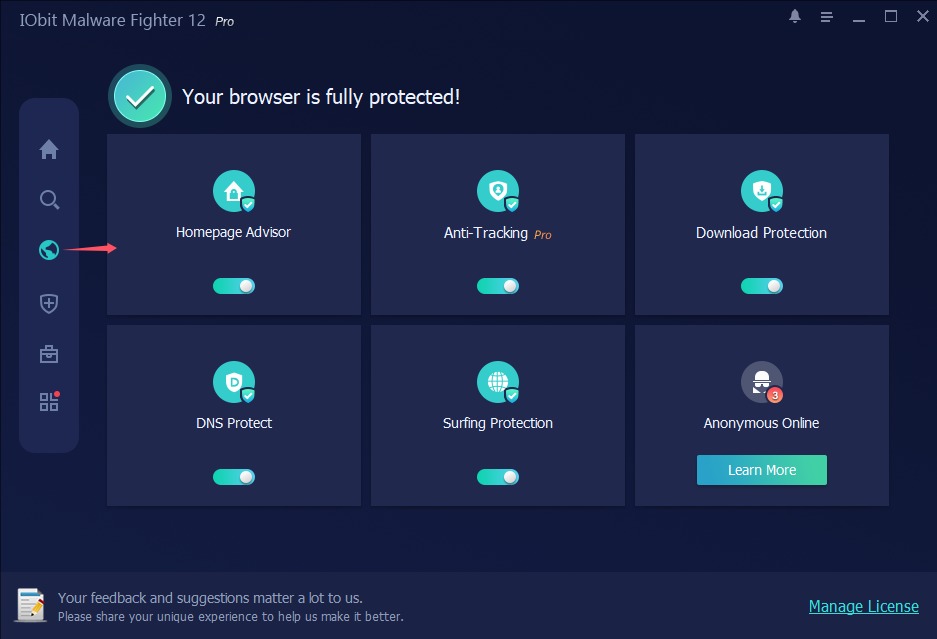
Browser Protect: Homepage Advisor, Anti-Tracking (Pro), Download Protection, DNS Protect and Surfing Protection switched on, and an "Anonymous Online" tile that promotes a VPN.
Safe Box for private files
IObit Malware Fighter PRO's Safe Box locks the files and folders you add to it against unauthorised access, and you can set a password so nobody can open them without it. It's also IObit's answer to ransomware: protected documents can't be encrypted by an attacker.
Flexible scans
IObit Malware Fighter PRO offers Smart Scan for critical areas, Full Scan for every drive, Custom Scan for chosen folders (or drag-and-drop), and a right-click scan in File Explorer. You can schedule automatic scans and have it remove threats and then shut down, restart, hibernate or sleep the PC.
Benefits
- A second opinion with a known engine. The Bitdefender engine adds a widely used detection engine on top of IObit's.
- Privacy guards in one place. Webcam, USB and browser password protection come in the same app.
- Cheap for a whole household. Three PCs cost $23.99 a year on IObit's page.
- Easy to try. The free edition installs from the same file, and Pro has a 60-day refund window.
Real-World Uses
- A family PC: USB Disk Guard and Download Protection stop the usual infections from school memory sticks and dodgy downloads.
- A work-from-home laptop: Camera Guard blocks programs from switching on the webcam, and Safe Box locks client files.
- After a browser hijack: Homepage Advisor flags changes to the homepage and search engine, and a Full Scan cleans up the adware behind them.
- Older relatives' PCs: a scheduled Smart Scan and automatic updates keep things checked without anyone remembering to do it.
Who It's For, and Who Should Skip It
IObit Malware Fighter PRO suits home users who want an inexpensive extra layer with webcam, USB and browser guards, and who are comfortable with IObit's other tools.
Skip it if you want protection backed by independent lab results: a mainstream antivirus suite or Microsoft Defender has those. Skip it too if in-app offers for other products annoy you, or if you need Windows 7 support, which the current manual no longer lists. Businesses should look at managed endpoint security instead.
Usage Guide
- Install: download the installer from IObit and run it. It installs the free edition.
- Activate Pro: click Enter Code at the bottom right of the main screen, paste your license code and click Register Now.
- Turn on the Pro engines: open Security Guard and switch on the Anti-ransomware and Bitdefender engines, which are off by default.
- Add the browser extension: in Browser Protect, enable Surfing Protection and install IObit's extension when asked.
- Run a Full Scan: from Scan, run a Full Scan once, then set Auto Scan for regular Smart Scans.
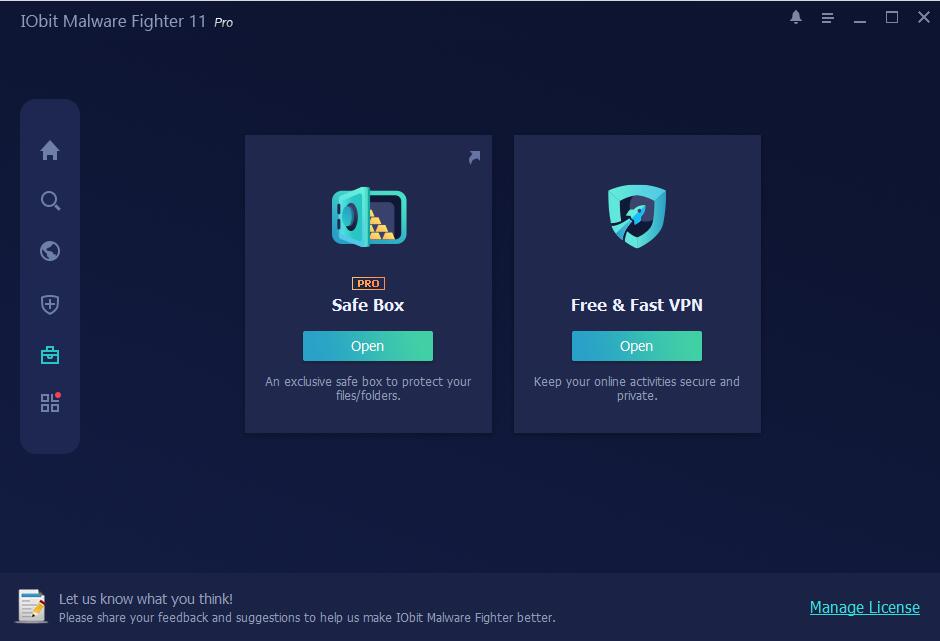
The Tools screen: Safe Box (Pro) with an Open button, and a "Free & Fast VPN" tile that recommends a third-party VPN. The bottom banner advertises Advanced SystemCare 19.
Where it falls short
- Upselling inside a security app. The Action Center recommends other IObit and third-party programs, the Tools and Browser Protect screens include VPN recommendations, and banners advertise other IObit products. On Trustpilot, a common complaint about IObit is that "you can't stop the ads, other than by uninstalling their products."
- False positives. The manual has a whole section on reporting false positives, so plan to whitelist the odd legitimate program.
- Cancellation and renewal complaints. Recent 1-star reviews of IObit describe renewal and cancellation problems, including a charge for a renewal the customer couldn't find a way to cancel.
- Not a full suite. There's no firewall, parental controls or password manager of its own. Browser Password Guard protects passwords your browser stores, nothing more.
What Users Say
IObit on Trustpilot
IObit as a company has a TrustScore of 4.6 from 2,511 reviews on Trustpilot, with a split picture: 69% five-star and 18% one-star. Few reviews name Malware Fighter. One long-time customer, Chaplain Lori (5 stars), writes: "I have used ASC Ultimate for years, as well as the Malware Fighter and more."
A Pittsburgh Professional Film reviewer (5 stars) sums up the positive side: "Have used IObit products for several years. Few issues, none critical."
The 1-star side
The negative reviews are mostly about billing and ads rather than protection:
"could not find the subscription end button." Dariusz Krol, 1 star, who was charged for a renewal on a laptop he no longer used
"they are a gateway into all their main programmes that you have to pay for" Michael Hill, 1 star, on IObit's free programs
"I got pointers to websites, none of which helped." Lawrence H Flesh, 1 star, who cancelled his order after failing to install a product
Testimonials on IObit's page
IObit's product page quotes long-time users. They're the vendor's selection:
"Some years ago somebody drew my attention to IObit Malware Fighter. First I was sceptic. But after installing it, it became my favourite anti-malware program. It is very easy to use. Through the years it already has detected several threats and removed it." Peter Stoffers
The pattern
Loyal users like IObit's tools for being easy and inexpensive, and many have used them for years. Critics complain about ads in the free programs, renewals they couldn't cancel, and support that sends links rather than solving problems. None of the reviews we found measure how well Malware Fighter catches threats.
Comparisons
PRO vs Free
IObit Malware Fighter Free keeps the IObit engine, the 9 million-entry database, Network, Startup, Process and Behavior guards, browser protection and manual updates. PRO adds the Bitdefender and Anti-ransomware engines, the 209 million-entry database, File, MBR, Camera and USB guards, Anti-Tracking, Safe Box, automatic updates and premium support.
IObit Malware Fighter PRO vs Advanced SystemCare Ultimate
IObit also sells Advanced SystemCare Ultimate, which combines PC cleanup and speed-up tools with virus protection. Pick Malware Fighter PRO if you only want security features. Pick the Ultimate bundle if you also want IObit's cleanup tools.
Editions and Pricing
| Edition | Price | List price | Devices |
|---|
| Free | $0 | - | Any |
| PRO, 1 year | $19.95 | $39.95 | 1 PC |
| PRO, 1 year | $22.95 | $46.95 | 2 PCs |
| PRO, 1 year | $23.99 | $54.95 | 3 PCs |
Prices are from IObit's product page on October 22, 2026, and change with IObit's frequent sales. The Buy Now button on this page opens the 1-PC plan.
FAQs
Can IObit Malware Fighter PRO replace Windows Defender?
IObit Malware Fighter PRO is designed to run as your real-time protection, with its own and Bitdefender's engines. Without published lab results to go on, it's the safer choice as a second layer next to Microsoft Defender rather than your only antivirus.
Does IObit Malware Fighter PRO work on Windows 7?
IObit Malware Fighter's current manual lists Windows 11, 10 and 8 only. If you're on Windows 7, try the free edition before you pay.
Is the Bitdefender engine on automatically in IObit Malware Fighter PRO?
No. IObit Malware Fighter PRO's Bitdefender and Anti-ransomware engines are off by default. Turn them on in Security Guard after you activate your license.
How do I report a false positive in IObit Malware Fighter?
IObit Malware Fighter has a Report False Positive link at the bottom left of the scan results. You can also add the file to the White List so it isn't scanned again.
Can I move my IObit Malware Fighter PRO license to a new PC?
Yes. IObit's support center has a "Transfer to Another PC" page, and the Manage License screen lets you export your license.
Can I get a refund on IObit Malware Fighter PRO?
Yes. IObit offers a 60-day money-back guarantee on IObit Malware Fighter PRO and has a Refund Request page in its support center.
System Requirements
- Windows 11, 10 or 8
- 1 GHz or faster processor
- 2 GB of RAM
- 1,000 MB of free disk space
- 1024 x 768 screen resolution or higher
Conclusion
IObit Malware Fighter PRO is worth $19.95 a year if you want a cheap extra layer of protection with a Bitdefender engine, ransomware defence and webcam, USB and browser guards in one easy app. The main reason not to buy it is trust in the numbers: there are no recent independent lab results, and the app pushes other products while IObit's renewals draw complaints. Install the free edition first, and if you buy Pro, turn on both extra engines and keep an eye on the renewal date.
Download Free TrialBuy Now