IObit Software Updater PRO: Automatic Updates for Your Windows Programs
IObit Software Updater PRO is a Windows utility that finds your outdated programs and updates them for you, from a database of more than 1,100 supported apps, with automatic and scheduled updates and a restore point before each install. It runs on Windows 11 down to XP and costs $12.97 a year for 3 PCs on IObit's product page, and the free edition does one-click updates with a limit of two batch updates a day.
It's for the person who keeps clicking "remind me later" on Chrome, Zoom, 7-Zip and VLC update prompts, or who has a family PC where nothing has been updated since it was set up.
Quick facts
- Current version: IObit Software Updater 9.2.0 (installer 9.2.0.13), released October 8, 2026. Version 9.0 launched on July 15, 2026.
- Developer: IObit
- Runs on: Windows 11, 10, 8.1, 8, 7, Vista and XP. No Mac version.
- Supported programs: 1,100+ apps, from browsers and AI tools to runtimes and media players
- Price: yearly subscription, $12.97 for 3 PCs (regular price $29.99) or $11.97 for 1 PC (regular $19.99) on IObit's product page. The $12.97 order through the Buy Now button below is a bundle: Software Updater 9 PRO (1 year, 3 PCs) plus Driver Booster 14 PRO (2 months, 3 PCs) as a free gift
- Free edition: one-click updates, restore points and setup-file cleanup, with batch updates limited to 2 a day and no automatic updates
- Money-back guarantee: 60 days
- Download: 22.8 MB installer
- What we checked: the installer we downloaded from IObit on October 21, 2026 is IObit Software Updater file version 9.2.0.13 (22.8 MB), digitally signed by IObit Co., Ltd. IObit's product page showed the prices above on October 21, 2026. We couldn't load the order page from our location to confirm the final checkout price, and we didn't run updates on a test PC.
Before you buy
IObit Software Updater PRO is a subscription that renews automatically. If you only want one year, turn off auto-renewal in your Verifone (2Checkout) account under My Products, where IObit's FAQ says to click "Stop automatic subscription renewal". Install the free edition first: its scan shows exactly which of your programs it recognizes, and the PRO license only turns on features in the same program, so there's nothing to reinstall when you upgrade.
Download Free TrialBuy Now
Overview
IObit Software Updater has three tabs. My Software scans your installed programs in seconds and lists the outdated ones with the current version and the new version side by side, so you can see what's changing before you click. Each row has its own Update button, and an Update Now button at the top updates everything you've ticked. Recommendation is a catalog for installing new programs, and IObit Picks is a store of discounted software, mostly IObit's own.
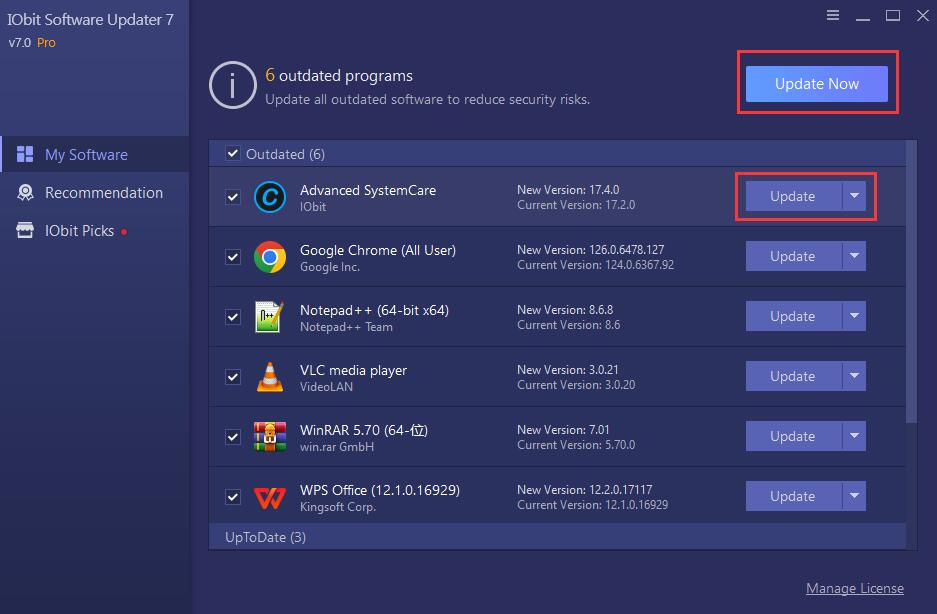
The My Software tab of IObit Software Updater 9 Pro, from IObit's user manual: 7 outdated programs including Advanced SystemCare, Beyond Compare, Git, Google Chrome, iTop Easy Desktop and Notepad++, each with its current and new version, an Update button per program and Update Now at the top.
Each update runs in three stages: it downloads the official installer (with resumable downloads, so a stopped download picks up where it left off), creates a Windows System Restore point, then installs. Setup files are deleted afterwards. Version 9 added a download system that picks the fastest source, including IObit's own mirror server, and grew the database to more than 1,100 programs.
Features
Unlimited one-click batch updates
IObit Software Updater PRO updates as many outdated programs as you tick in one pass, with no daily limit. The free edition updates programs one at a time without limit but allows only 2 batch updates a day. While it works, you can tick Automatically reboot PC or Automatically shut down PC, minimize the window and walk away. A countdown appears at the end, so you can still cancel the reboot.
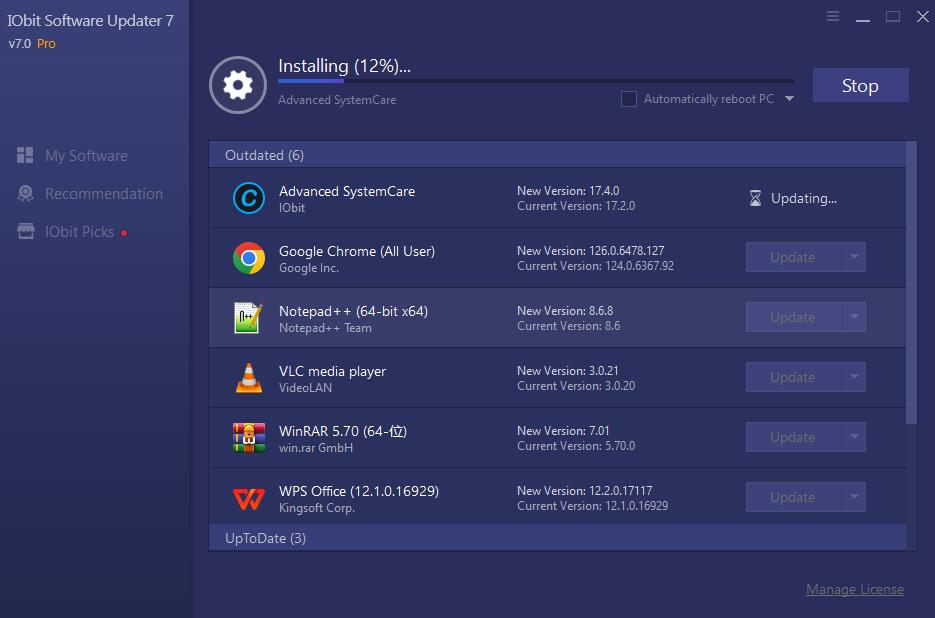
A batch update in progress: Advanced SystemCare downloading at 89%, the other outdated programs queued, and the Automatically reboot PC checkbox next to the Stop button.
Automatic updates, in real time or on a schedule
IObit Software Updater PRO can update programs without you opening it. The first time PRO runs, it puts all your installed programs on an Auto Update List, and programs you install later are added the next time it starts. In Settings you choose one of three methods: just notify me, update the list in real time as updates appear, or update it at a scheduled time (for example every day at 17:00). The free edition only notifies you.
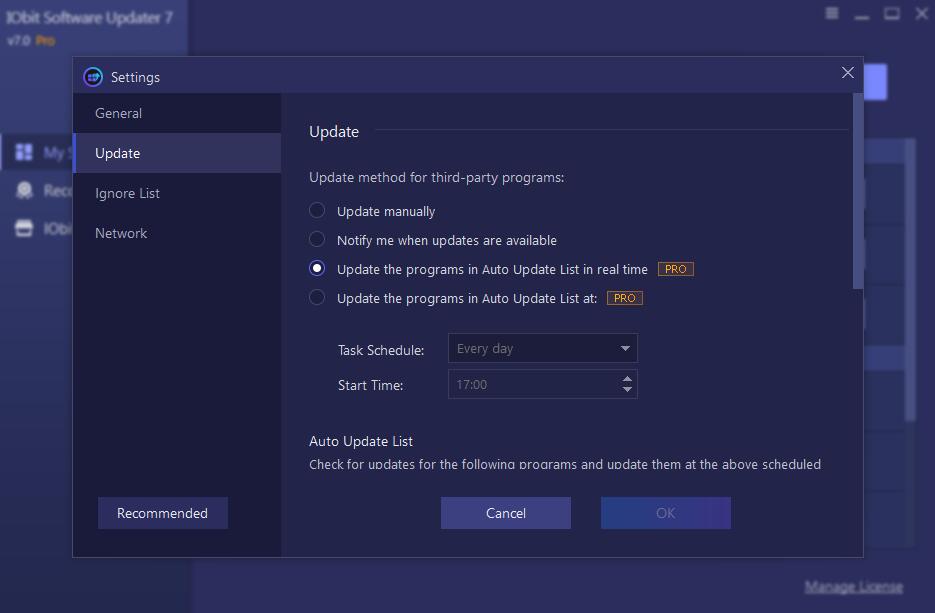
Settings, Update: notify only, update the Auto Update List in real time (PRO), or update it on a schedule with a Task Schedule and Start Time (PRO).
An Ignore List for programs you want to keep as they are
IObit Software Updater lets you skip one update or every future update of a program, from the arrow next to its Update button or a right-click. Skipped programs go to the Ignore List in Settings, where you can remove them later to get notifications again. That matters for software where a new major version costs money or breaks a plugin, such as an older Beyond Compare license.
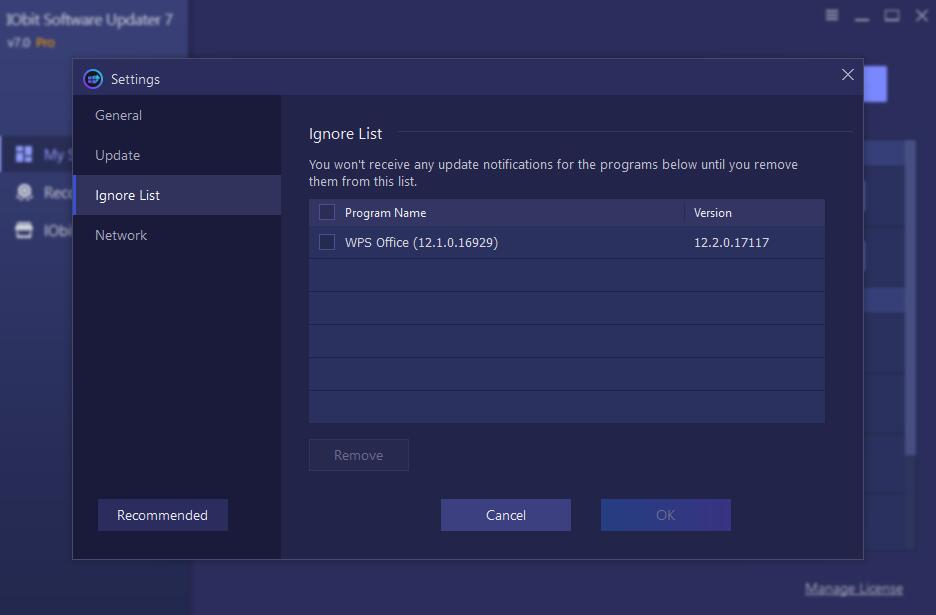
The Ignore List in Settings, with Beyond Compare 4.2.4 excluded from version 5.2.3 and a Remove button to start getting its updates again.
Restore points and clean installs
IObit Software Updater creates a System Restore point before installing any update, an option that's on by default in both editions, so a bad update can be rolled back from Options > Restore. It downloads official installers rather than repackaged ones, deletes the setup files when it's done, and IObit says each update in the database is tested so it doesn't install bundled extras.
Bulk installs for a new or reset PC
IObit Software Updater's Recommendation tab installs popular programs you don't have yet, several at once. It's sorted into AI Hub, Productivity, Security, Internet, Multimedia, Runtimes and Utilities & Tools, shows each installer's size, and a right-click opens the program's website or EULA. After a Windows reinstall you tick the browser, archiver, media player and runtimes you always use and install them in one go.
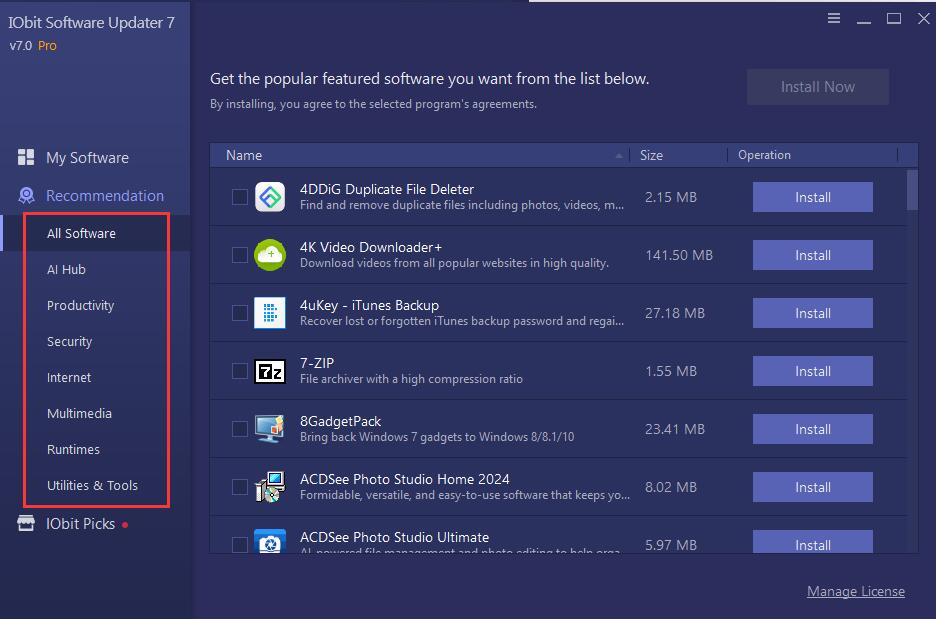
The Recommendation tab: categories on the left (All Software, AI Hub, Productivity, Security, Internet, Multimedia, Runtimes, Utilities & Tools), programs with their download size and an Install button, and Install Now for the ticked ones.
Benefits
- Fewer known holes. Attacks often target old versions of browsers, PDF readers and runtimes with published vulnerabilities. A tool that updates them on a schedule closes those gaps without depending on you remembering.
- Your time back. Updating ten programs by hand means ten websites or ten update prompts. Here it's one tick box and one button, or nothing at all with automatic updates.
- A way back if an update goes wrong. The restore point before each install means a broken update is an inconvenience, not a reinstall.
- Cheap for a household. $12.97 a year covers 3 PCs, so the whole family's computers get the same treatment.
Real-World Uses
- A parent's or grandparent's PC. Set PRO to update the Auto Update List every evening and the programs stay current without phone calls asking what "a new version is available" means.
- A freshly reinstalled Windows. Use Recommendation to install the browser, 7-Zip, VLC and the Visual C++ runtimes in one batch, then let My Software keep them current.
- A small office with three PCs. One 3-PC license keeps the same apps current on each machine on a schedule outside working hours, with automatic shutdown at the end.
- A plugin-dependent setup. Put the audio or design program whose plugins break on major upgrades on the Ignore List, and let everything else update.
Who It's For, and Who Should Skip It
It's for Windows home users and small offices who want third-party programs updated without thinking about it, and who'd rather pay a few dollars a year than manage it by hand. It's also a good fit for older PCs still on Windows 7, Vista or XP, which many newer tools no longer support.
Skip it if you use a Mac (there's no Mac version), if you're comfortable with Windows' built-in winget upgrade --all command or another free package manager, or if most of your software already updates itself (Chrome, Edge, Firefox, Steam and Microsoft 365 do). It's also the wrong buy if you dislike promotions for a vendor's other products inside a utility, because IObit Picks and IObit's offers are part of the program. IT departments managing many PCs need a central patch-management tool instead.
Usage Guide
- Install it. Download the 22.8 MB installer (iobit-software-updater-setup.exe) and double-click it. Read each setup screen, since IObit installers can offer other products.
- Let it scan. On first launch it scans your programs in seconds and lists the outdated ones under My Software.
- Activate PRO. Click Enter Code at the bottom right, paste the license code from your order email and click Activate. Manage License then shows the license status.
- Update. Click Update on one program, or tick several and click Update Now. Tick Automatically reboot PC if you're leaving the PC alone.
- Exclude what you don't want. Use the arrow next to Update to ignore a version or all updates of a program.
- Automate. Open Settings, Update, and choose real-time updates or a scheduled time for the Auto Update List.
- Undo if needed. If something misbehaves after an update, go to Options > Restore and pick the restore point it created.
Where it falls short
- It only knows the programs in its database. IObit Software Updater covers 1,100+ apps, but niche or business software won't appear at all. IObit's FAQ asks you to send missing program names through Feedback. Early versions were weak here: in 2019 reviewers found other updaters detecting far more outdated programs.
- Promotions for other IObit products. The IObit Picks tab sells IObit's other software at discounts, and TechRadar called the advertising of IObit's other products intrusive, especially for free users.
- It updates, it doesn't vet. A new version of a program can still have its own bugs. The restore point helps, but you'll still be the first to find out.
- Auto-renewing subscription. Some Trustpilot reviewers of IObit products say they couldn't find how to cancel a subscription. The steps are in IObit's FAQ (see Before you buy).
- Windows only. There's no Mac or Linux version.
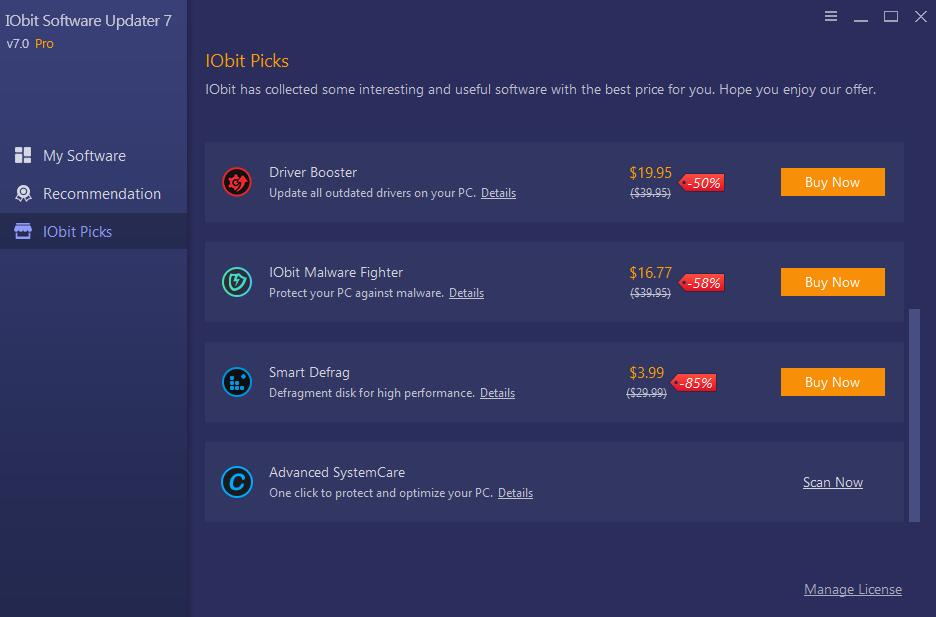
The IObit Picks tab inside the program: discounted offers for Driver Booster, IObit Malware Fighter, Smart Defrag and iTop Screen Recorder, each with a Buy Now button.
What Users Say
Opinions split along a familiar line for IObit: people who use Software Updater like how little effort it takes, while the criticism is mostly about IObit's promotions and, in older versions, how many programs it recognized. Most independent reviews were written for earlier versions, so we note the version and date with each.
TechRadar
Stefan Ionescu reviewed the fourth version for TechRadar in March 2022. His verdict: "Outdated software can cause usability flaws and security mishaps. It's necessary to ensure that the software programs installed on your computer are constantly updated. With a tool like IObit Software Updater, doing so is as effortless as possible."
He listed as reasons to buy "Relatively cheap", "Automatic scans and updates", "User-friendly software", "Quick to download and install" and "Free version available", and as reasons to avoid "The free version has limited features", "IObit tries to upsell you with other software packages" and "Windows-only, No macOS version". On the ads he wrote: "IObit tries hard to advertise its other software products on the Software Updater. These advertisements can be intrusive, especially for free users." His conclusion: "it's often the cheapest option among competitors and a good deal relative to the features you get."
Download sites and test roundups
MajorGeeks users rate IObit Software Updater 2 out of 5 from 93 votes, a low score for a download site, with no written reviews alongside it.
ThinkMobiles tested version 3.0.1 in its roundup of software updaters and listed as pros "Data backups", "Integration in the context menu", "Real-time monitoring" and "Ignore list, 1-click update", and as cons "Automatic update in Pro only", "Ads in free version" and "2 program updates a day in free version".
BetaNews covered the very first release in February 2019. Chris Wiles found that "Sadly the Software Updater has, at least at this stage, a limited database", and that the Recommendation list "doesn't state the version number of the recommended apps". Version 9 now shows each program's version and supports 1,100+ apps, so treat this as history.
Forums
In a January 2019 MalwareTips thread about an early version, Burrito wrote: "Ok, I just tried it. Don't bother. It's VERY Beta. It detects very little." roger_m added: "Last week on one of my computers Software Updater found and installed about 14 or so updates. I just installed Patch My PC and it found a further 35 updates." The same thread also had defenders of IObit's tools, but the detection gap was the main complaint at the time.
Trustpilot (IObit as a company)
IObit's Trustpilot page covers all its products, not Software Updater alone. When we looked on October 21, 2026 it showed a TrustScore of 4.6 from about 2,500 reviews, with 69% five-star and 18% one-star. One reviewer, Big Montana, listed it among the IObit tools they like: "IObit has lots of good software, like Advance System Care, IObit Uninstaller, Smart Defrag, IObit Software Updater". The one-star reviews are about IObit in general: Michael Hill's is titled "Too many ads from them.", and Dariusz Krol's "No cancelation button" says "I did not , could not find the subscription end button."
On IObit's own page
IObit quotes Softpedia: "IObit Software Updater was designed to simplify the task of keeping all the applications on your computer up-to-date. It can check for new versions and install them automatically, even without user input." User Joshua Irving: "I love the automatic aspect of the updates. It's fast and efficient, and it also creates a restore point prior to install just in case something goes wrong." And Nico Bremmer: "its good that you seen your old and the new version of the program you wanna update." These are testimonials the vendor chose, so read them as the best case.
The pattern: people like the one-click updates, the restore points and the low price. The complaints are about IObit's promotions, auto-renewing subscriptions, and, in reviews of early versions, programs it didn't detect. MajorGeeks' 2/5 user rating suggests not everyone is won over.
Comparisons
IObit Software Updater Free vs PRO
| Feature | Free | PRO |
|---|
| One-click updates | Yes | Yes |
| Restore points and setup-file cleanup | Yes | Yes |
| Batch updates | 2 a day | Unlimited |
| Automatic updates when available | No | Yes |
| Scheduled updates | No | Yes |
| Auto-patch vulnerable software | No | Yes |
| Exclusions and custom auto-update list | No | Yes |
| Premium technical support | No | Yes |
If you update a handful of programs once a week, the free edition does the job. PRO earns its price when you want updates to happen without you.
IObit Software Updater vs the updater inside Advanced SystemCare and IObit Uninstaller
IObit's Advanced SystemCare and IObit Uninstaller include a Software Updater feature of their own. IObit's FAQ says the stand-alone IObit Software Updater supports updating more programs and adds the Recommendation catalog for installing new software, so if you already own one of those suites, try its built-in updater before buying this.
IObit Software Updater vs winget
Windows 10 and 11 include the free winget package manager, which can update many programs with one command. It's free and has no promotions, but it's a command-line tool with no restore points or schedule of its own. IObit Software Updater gives you a point-and-click list, restore points and a built-in schedule, and it still runs on Windows 7, Vista and XP.
Editions and Pricing
| Edition | Price | License term | PCs |
|---|
| Free | $0 | No time limit | Any |
| PRO, 1 PC | $11.97 (regular $19.99) | 1 year, auto-renews | 1 |
| PRO, 3 PCs | $12.97 (regular $29.99) | 1 year, auto-renews | 3 |
Prices are from IObit's product page on October 21, 2026. With only a dollar between them, the 3-PC plan is the better buy even for two computers. Every purchase has a 60-day money-back guarantee.
FAQs
Does IObit Software Updater update Windows itself or my drivers?
No. IObit Software Updater updates third-party programs such as browsers, media players and runtimes. Windows updates come from Windows Update, and IObit sells driver updates separately as Driver Booster.
Can I move my IObit Software Updater PRO license to a new computer?
Yes. IObit Software Updater PRO licenses can be moved to another PC for free while the license is still valid, according to IObit's FAQ, which links to a Transfer to Another PC page.
Why doesn't IObit Software Updater show one of my programs?
IObit Software Updater only lists programs in its database of 1,100+ apps. IObit's FAQ asks you to click Feedback and send the program's name so it can be added.
Does IObit Software Updater still work on Windows 7 or XP?
Yes. IObit lists Windows 11, 10, 8.1, 8, 7, Vista and XP as supported for version 9. Keep in mind that many programs themselves have dropped those systems, so some updates won't be offered there.
How do I get a refund for IObit Software Updater PRO?
IObit Software Updater PRO is covered by IObit's 60-day money-back guarantee. Requests go through the Refund Request link in the Support menu of IObit's website.
Can I change the language of IObit Software Updater?
Yes. In IObit Software Updater, open the Options icon at the top right, choose Settings and pick a language. Volunteer translators have localized it into many languages.
System Requirements
- Windows 11, 10, 8.1, 8, 7, Vista or XP
- 300 MB of free disk space
- 1024 x 768 screen resolution or higher
- An internet connection to download updates
Conclusion
At $12.97 a year for three PCs, IObit Software Updater PRO is worth it if you want your Windows programs updated without lifting a finger: the scheduled Auto Update List, unlimited batch updates and a restore point before every install are exactly what a family or small-office PC needs. The main reason not to buy it is the IObit way of doing things: promotions for other IObit products inside the program, an auto-renewing subscription, and a database that won't cover every niche app. If you're happy running a command, winget does much of this for free. Start with the free edition, check that it finds the programs you care about, and upgrade if you want it to run on its own.
Download Free TrialBuy Now