Advanced SystemCare PRO with 2 Free Gifts: Clean, Speed Up and Protect Three Windows PCs
Your PC used to start in seconds. Now it takes minutes, the C: drive is nearly full, and a dozen programs you never asked for launch at startup. You could hunt through Settings, Task Manager and temp folders yourself, or you could let one tool do the routine maintenance for you, on every PC in the house.
Advanced SystemCare PRO from IObit is that tool. One scan clears out junk files, caches and leftovers, trims startup programs, and checks your privacy and security settings, then it keeps doing that automatically in the background. This pack covers three PCs for a year and adds two more IObit PRO tools as free gifts.
Quick facts
- Version: 19.6.0
- Developer: IObit
- Runs on: Windows 11, 10, 8, 7, Vista and XP
- What's in the pack: Advanced SystemCare PRO for 1 year on 3 PCs, plus Driver Booster PRO and Smart Defrag PRO free for 3 months, as IObit's offer page lists them
- Price: $21.98 USD for the pack
- Free edition: the download is Advanced SystemCare Free, and the PRO key adds features such as Auto Care, Auto RAM Clean, Anti-Tracking and Safe Folder
- Guarantee: 60-day money-back guarantee
- Download size: about 61 MB
Before you buy: know what renews and what doesn't
The Advanced SystemCare PRO license runs for one year, and the two gift tools are free for three months. IObit's paid licenses are generally subscriptions, so check your renewal settings after buying. Also expect IObit to suggest its other products inside the app. Even happy customers on Trustpilot mention the frequent upsell offers.
Overview
The program opens on its Care screen: one big SCAN button and a switch between AI Mode, which builds a cleaning plan for you, and Manual Mode, where you pick what to check. A sidebar leads to Speed Up, Protect, Software Updater and the Action Center.
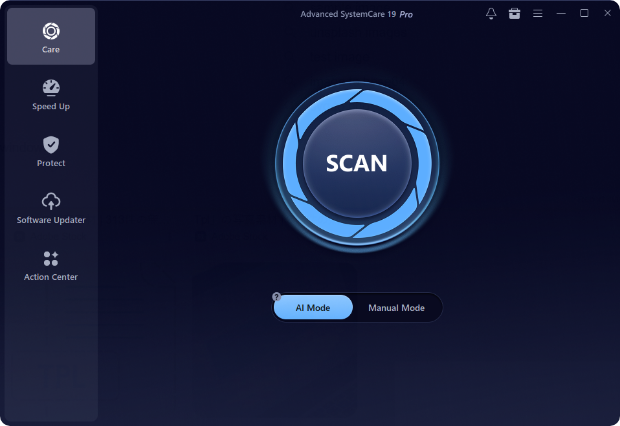
Advanced SystemCare 19 Pro's Care screen: the SCAN button with AI Mode selected (Manual Mode beside it), and the Care, Speed Up, Protect, Software Updater and Action Center sections on the left.
Features
AI-powered junk and registry cleaning
The scan finds junk files, caches, logs and leftovers from apps and browsers, including deep within Windows 11, and offers to clean invalid registry entries. IObit's AI Mode learns how you usually optimize and adjusts its plan, and the PRO Disk Deep Clean goes after hard-to-find leftovers. A Large File Finder helps you spot what's really eating your disk.
Faster startup and smoother running
The Startup Optimizer shows every startup item with its boot time and how many users disable it, and optimizes them in one go, along with services, scheduled tasks and browser startup items. Work Mode temporarily shuts down unneeded services and background apps to free memory for the task at hand, and in PRO, Auto Care and Auto RAM Clean keep things tuned without you clicking anything.
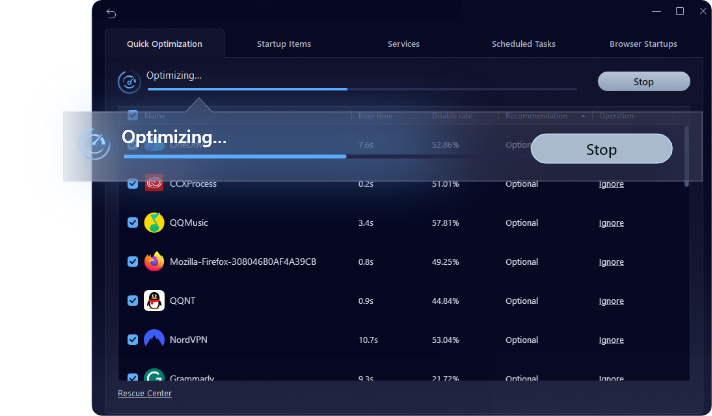
Quick Optimization in progress, with tabs for Startup Items, Services, Scheduled Tasks and Browser Startups, and each startup program's boot time and disable rate (IObit's image adds a zoomed "Optimizing" banner).
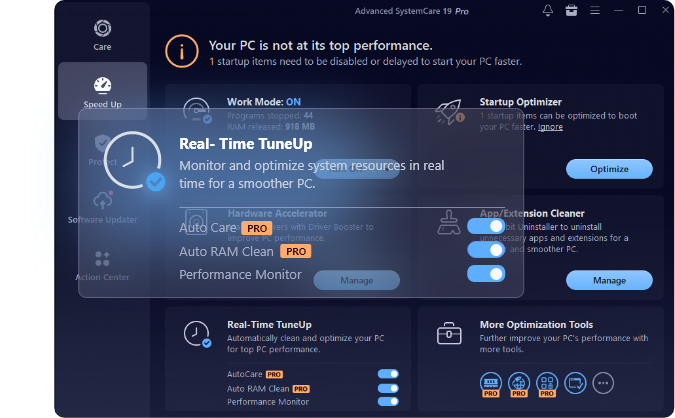
The Speed Up section: Work Mode on, Startup Optimizer, Hardware Accelerator, App/Extension Cleaner and Real-Time TuneUp with its PRO-only Auto Care and Auto RAM Clean switches (IObit's image enlarges the TuneUp panel).
Privacy and security protection
The Protect section checks that Windows Defender and the firewall are on, and adds browser protection (email protection, ad removal, surfing protection, homepage advisor). PRO adds Anti-Spyware, a Safe Folder that guards sensitive files from ransomware and unauthorized apps, Anti-Tracking that clears browsing traces automatically, Fingerprint Protection to mask your digital fingerprint, and a Private Box.
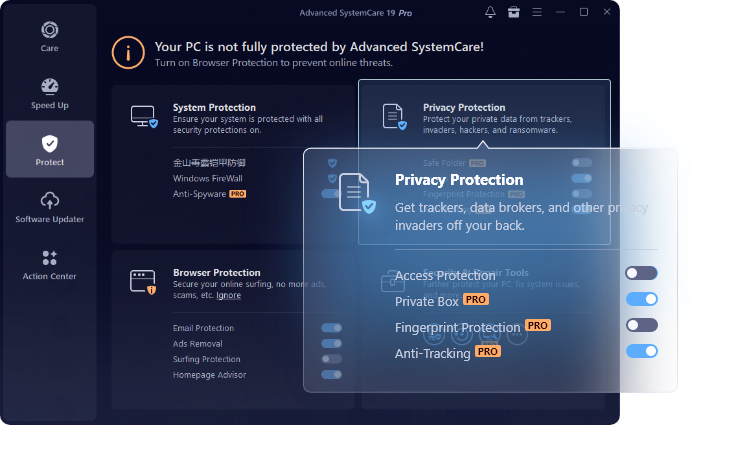
The Protect section: System Protection, Browser Protection and Privacy Protection, with PRO features Private Box, Fingerprint Protection and Anti-Tracking shown in the enlarged panel.
Software Updater and the two gift tools
The built-in Software Updater finds outdated programs and updates them with one click. The gifts round out the pack: Driver Booster PRO finds and updates outdated hardware drivers, and Smart Defrag PRO defragments and optimizes hard drives for faster file access.
Benefits
The biggest benefit is set-and-forget maintenance. After the first cleanup, Auto Care and Auto RAM Clean keep working in the background, so a PC stays tidy without anyone remembering to run a tool.
The pack is also good value for a household: three PCs covered for less than many single-PC utilities, plus two extra tools to try.
And it puts a lot of scattered Windows settings, such as startup apps, services, browser privacy and Defender status, in one friendly place, which helps less technical family members keep their own PCs healthy.
Real-World Uses
- The slow family laptop. Run the AI scan, trim startup apps, and let Auto Care keep it clean afterwards.
- A full C: drive. Use Disk Deep Clean and the Large File Finder to win back gigabytes.
- Gaming or video editing. Switch on Work Mode to free memory while a demanding app runs.
- Privacy on a shared PC. Let Anti-Tracking clear browsing traces and keep sensitive documents in the Safe Folder.
- Old drivers after a Windows update. Use the Driver Booster PRO gift to bring them up to date.
Who It's For
Advanced SystemCare PRO suits home users and families who want their Windows PCs kept clean and quick without learning the details, especially with several older or busy computers to look after. Experienced users who prefer to manage startup items and disk space by hand, or who dislike upgrade prompts, may get less from it.
Usage Guide
- Install and launch. Run the installer and open Advanced SystemCare.
- Activate PRO. Enter the license code from your order email to switch the free edition to PRO, and repeat on up to three PCs.
- Run the first scan. On the Care screen, keep AI Mode on and click SCAN, then review and fix what it finds.
- Optimize startup. In Speed Up, open the Startup Optimizer and disable or delay what you don't need.
- Turn on automatic care. Switch on Auto Care and Auto RAM Clean under Real-Time TuneUp.
- Set up protection. In Protect, enable the browser and privacy protections you want.
- Install the gifts. Install Driver Booster PRO and Smart Defrag PRO with the codes IObit provides.
Tips
- Review before you clean. Glance through the scan results, especially registry and large-file suggestions, before fixing everything.
- Use Manual Mode if you prefer to choose exactly what gets checked.
- Watch the renewal. Decide before the year ends whether you want to continue.
What Users Say
Tech press
TechRadar (Cat Ellis), reviewing an earlier version, Advanced SystemCare 12 Pro, rated it 4.5 out of 5: "The latest version of IObit's premium PC cleanup tool looks familiar, but has a lot to offer under the hood, including tools to tackle emerging threats like cryptojackers. It can have a noticeable effect on your computer's performance and boot time, and automated cleaning will help keep it running smoothly in the long run." Pros listed: "Clean, customizable interface", "New security tools for online threats" and "One-click and automated cleanup". Cons: "Can't exclude individual files found during scans" and "Some icons tricky to see".
CNET, as quoted on IObit's site: "Advanced SystemCare has a simple design that's good for making your computer work better. It's easy for both new and experienced computer users. The program's impact might be different for everyone, but it's useful for both everyday and work situations."
Customers on IObit's site
Lyle Stelmaschuk: "I have purchased many different software programs to speed up and fix problems with my PC. Unfortunately, most of them really didn't help or make a difference until I tried out Advanced System Care. I love that there are so many options and solutions to fix any problem. It's amazing how much faster my PC is now after the first scan and repair."
Richard Preston, on the privacy features: "I especially like the sensitive area access permission pop-up. The first time an app tries to access sensitive files, a window opens to either allow access or deny. Once permission is granted for an app, the pop-up no longer occurs for that app."
Richard Beavers: "I turned to ASC years ago using the free version at first. Finding that I no longer suffered from the niggles and bloating that occurs I upgraded to the Paid version and have never looked back since."
Trustpilot
IObit rates 4.6 out of 5 on Trustpilot from about 2,400 reviews across its products. These excerpts were read through a summarizer, so treat the wording as close but not guaranteed exact. Big Montana, 5 stars: "IObit has lots of good software, like Advance System Care, IObit Uninstaller, Smart Defrag..." Mrs J Bebbington, 5 stars: "I love IOBIT software especially the bundles offered at massively reduced cost." Stuart, 5 stars, adds a caveat many share: "Their suite of programs have kept my computers running in top shape for years. The only thing I don't like...they are always trying to sell you on others..." Other recurring complaints concern pop-up promotions and confusion over subscription renewals.
The recurring themes
People like how easy it is, the one-click and automatic cleanup, and the value of IObit's bundles, and long-time users say their PCs feel faster. The common complaints are the frequent upsell prompts and renewal confusion, plus TechRadar's wish for finer control over what gets cleaned. Results vary from PC to PC, as even CNET's comment notes.
Comparisons
Free vs. PRO
The free edition handles basic scanning and cleaning. PRO adds automatic care, Auto RAM Clean, deeper cleaning, and the privacy tools: Anti-Spyware, Safe Folder, Anti-Tracking, Fingerprint Protection and Private Box.
This pack vs. a single PRO license
IObit also sells Advanced SystemCare PRO alone for 1 PC. This Family Pack covers 3 PCs and adds Driver Booster PRO and Smart Defrag PRO for three months, at a higher but still low price.
PRO vs. Ultimate
Advanced SystemCare Ultimate adds a full antivirus engine to the same optimization tools. Choose it if you want one product to replace your antivirus.
Editions and Pricing
The offer sold here is the Family Pack at $21.98 USD: Advanced SystemCare PRO for 1 year on 3 PCs, with Driver Booster PRO and Smart Defrag PRO free for 3 months. IObit sells single-PC and multi-PC PRO licenses separately, and every purchase carries a 60-day money-back guarantee.
FAQs
Does it still work on Windows 7 or XP?
Yes. IObit lists support for Windows 11 and 10 all the way back to 8, 7, Vista and XP.
Can I install it on three different PCs?
Yes. This license covers 3 PCs, so you can activate it on three computers in your home.
What happens after the 3 months for the gifts?
The gift PRO licenses for Driver Booster and Smart Defrag last 3 months. After that you can renew them or keep using their free editions.
Is it safe to clean the registry?
Advanced SystemCare's registry cleaner targets invalid and outdated entries, and you can review results before fixing them. As with any system tool, review what's selected rather than cleaning blindly.
Can I get a refund?
IObit offers a 60-day money-back guarantee, and its support site has a refund request page.
Will it replace my antivirus?
No. PRO adds anti-spyware and privacy protection, but it works alongside Windows Defender or your antivirus. IObit's Ultimate edition includes a full antivirus.
System Requirements
- Operating system: Windows 11, 10, 8, 7, Vista or XP
- Disk space: about 61 MB for the installer, plus room for the program
- Internet: needed for activation, Software Updater and the gift tools' driver downloads
Conclusion
Advanced SystemCare PRO with 2 Free Gifts is an inexpensive way to put three Windows PCs on autopilot maintenance: cleaning, startup optimization, memory management and privacy protection in one easy app, with Driver Booster PRO and Smart Defrag PRO thrown in to try.
Just go in knowing it renews yearly and that IObit will promote its other products along the way. If you want simple, automatic PC upkeep for the whole household, it's hard to beat on price.