IObit Uninstaller PRO: Remove Stubborn Programs, Leftovers and Bloatware from Windows
IObit Uninstaller PRO is a Windows uninstaller that removes programs, Windows apps, pre-installed bloatware and browser extensions completely, including the leftover files and registry entries Windows' own uninstall leaves behind, and it can force out more than 4,000 programs that refuse to uninstall normally. It's a yearly subscription with a $19.99 list price for one PC (IObit's store often sells it for less), and a free edition covers the basics.
It's for anyone whose PC is cluttered with trial software, manufacturer extras and that one program whose uninstaller just says "Windows cannot find Uninstall.exe".
Quick facts
- Current version: IObit Uninstaller 16.0.0, released September 9, 2026
- Developer: IObit
- Runs on: Windows 11, 10, 8/8.1 and 7
- Price: $19.99 a year for 1 PC list price. IObit's product page showed a sale price of $14.77 a year, and 3 PCs for $16.77 a year.
- Free edition: batch uninstall, Windows app removal and drag-and-drop uninstall. PRO adds force uninstall, automatic leftover cleanup, bloatware and plug-in removal.
- Money-back guarantee: 60 days
- Download: 16.3 MB web installer that fetches the current version
- What we checked: IObit's update page and press release list version 16.0.0, released September 9, 2026. The PRO download link served a 16.3 MB web installer digitally signed by IObit on October 20, 2026, and IObit's product page listed 1 PC at $19.99 a year (on sale at $14.77) the same day. We couldn't load the order page from our location to confirm the final price, and we didn't uninstall programs with it ourselves.
Before you buy
IObit Uninstaller PRO is a subscription that renews every year. The most common complaints about IObit on Trustpilot are renewals people didn't expect, trouble finding where to cancel, and refunds refused, so note the renewal date and switch off auto-renewal if you only want one year. The free edition also shows offers for IObit's other products, and TechRadar noticed the installer offering Dashlane during setup: read each installer screen and untick anything you don't want. Try the free edition first, since it already handles ordinary uninstalls.
Download Free TrialBuy Now
Overview
IObit Uninstaller opens on a Programs list: every installed program with its size and install date, filters for Bundleware, Logged Programs, Large Programs and Infrequently Used, and a search box at the top. A sidebar on the left switches to Software Health, plug-in and app management, and the toolbox. Tick one or several programs, click Uninstall, and it runs each program's own uninstaller, then scans for what was left behind.
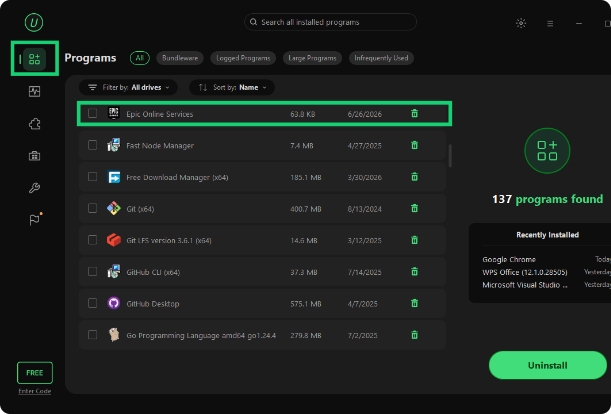
The Programs list in IObit Uninstaller 16, from IObit's guide (shown in the free edition, with the FREE badge at the bottom left): 137 programs found, each with its size and install date, filter tabs across the top and the Uninstall button.
Features
Force uninstall for 4,000+ stubborn programs
IObit Uninstaller PRO removes programs that won't uninstall the normal way, because their uninstaller is broken, they're missing from Control Panel or Windows reports an error. It locates the program and its leftover files, folders and registry entries, creates a system restore point, and then removes everything. IObit names programs such as MPC-HC, IntelliJ IDEA and Rockstar Games among the 4,000+ it handles.
Automatic leftover cleanup
IObit Uninstaller PRO cleans up automatically after every uninstall, including ones you start from Windows Settings, and its deep scan finds leftover files and registry entries other uninstallers miss. Install Monitor records what a setup program changes (files, services, scheduled tasks, DLLs), so an app installed while it's running can later be removed completely.
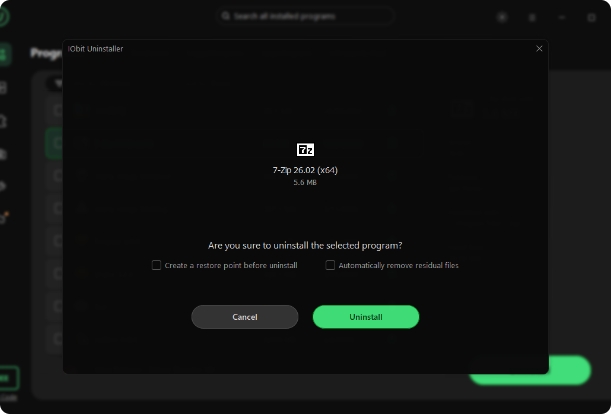
The uninstall confirmation for 7-Zip, from IObit's guide: tick boxes to create a restore point before uninstalling and to remove residual files automatically.
Bloatware and Windows app removal
IObit Uninstaller PRO removes pre-installed apps and system extras that Windows Settings won't let you remove easily. IObit lists Microsoft Edge, OneDrive and Copilot among them, along with manufacturer bundles and Microsoft Store apps. Batch uninstall clears several at once, and Hunter mode lets you drag a target icon onto any window to uninstall the program behind it, handy when you don't know its name.
Browser plug-in cleanup
IObit Uninstaller PRO sorts browser extensions into trusted, ad-injecting and malicious ones, shows what other users say about each, and removes the ones that change your search engine or inject ads. That's often the fix when a browser keeps redirecting searches.
Software Health, Software Relocation and updates
IObit Uninstaller's Software Health scan checks for uninstall leftovers, outdated software, redundant files, programs with uninstall problems, permissions and pop-up notifications in one pass, with a Fix All button. Version 16 added Software Relocation, which moves installed programs and their large files from a full C: drive to another drive without reinstalling them. PRO also updates outdated programs in one click and includes a secure file shredder.
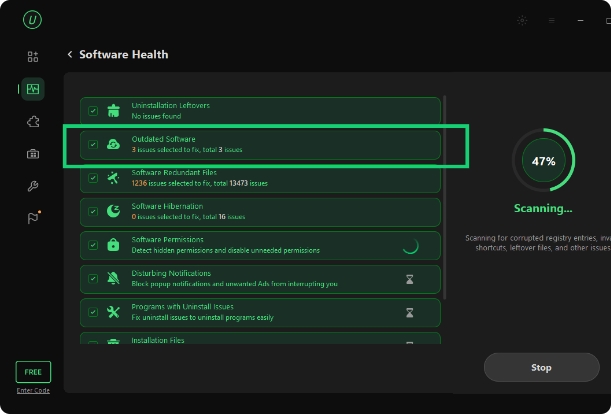
A Software Health scan at 47%, from IObit's guide: uninstall leftovers, outdated software, redundant files, hibernated software, permissions, notifications and programs with uninstall issues.
Benefits
- Disk space back. Leftovers and bloatware add up, and relocating large programs frees up a crowded C: drive.
- Fewer mystery problems. Clearing half-removed programs and their registry entries avoids conflicts when you reinstall them.
- A safety net. The restore point before each uninstall lets you undo a removal that went wrong.
- Cleaner browsers. Unwanted toolbars and ad-injecting extensions go in the same sweep.
Real-World Uses
- A new laptop: batch-remove the manufacturer's trial apps and pre-installed extras in one go.
- A game launcher that won't uninstall: force-remove it and its leftover folders and registry keys.
- A full C: drive: move a large program and its data to a second drive with Software Relocation.
- A hijacked browser: find and remove the extension that keeps redirecting searches.
- Testing software: let Install Monitor record a trial install, then remove every trace when you're done.
Who It's For, and Who Should Skip It
IObit Uninstaller PRO suits Windows users who install and remove a lot of software, fight stubborn programs or bloatware, and want leftovers cleaned automatically.
Skip it if you only uninstall a program now and then: Windows' own Apps settings or the free edition of IObit Uninstaller are enough. Skip it too if you dislike subscriptions and in-app offers for other products, or if you're on a Mac. People who want a free, ad-free alternative often choose a free open-source uninstaller instead.
Usage Guide
- Install and launch. Run the downloaded web installer, which fetches the current version. Read each setup screen and untick any extra offers.
- Activate PRO. Click "Enter Code" at the bottom left and paste your license code.
- Find the program. Use the Programs list, the filters or the search box. Tick several to batch-uninstall.
- Uninstall. Click Uninstall, tick "Create a restore point" and "Automatically remove residual files", and confirm.
- Clean up. Review the leftovers it finds and delete them, then run Software Health for a wider check.
Where it falls short
- Upsells and pop-ups. Trustpilot reviewers complain about frequent reminders and offers for other IObit products, and TechRadar flagged a Dashlane offer during setup.
- Billing complaints. One-star reviews describe unexpected renewals, a hard-to-find cancel option and refused refunds.
- Leftover scans need judgment. A deep registry scan can flag entries shared with other programs. Keep the restore point option ticked.
- Windows only. There's no Mac or Linux version.
What Users Say
TechRadar
Alex McOmie's TechRadar review (October 2020) called it "incredibly easy to use, with a comprehensive set of features for uninstalling and updating your apps", and concluded: "IObit Uninstaller is the perfect option if you're looking for an easy way to uninstall your applications." On the downside, TechRadar listed "Relatively inactive support forums" and "Subtly tries to install Dashlane on your device", and found the interface "isn't particularly sleek, even looking slightly low-res compared to other apps we've tested."
Trustpilot: the praise
IObit as a company scores 4.6 out of 5 from 2,491 reviews (69% five-star, 18% one-star), and it replies to every negative review, usually within 24 hours.
- M Mussry (5 stars, October 2026), on IObit Uninstaller: "It reliably removes programs I don't want any more, including all the left over files and registry entries"
- Wayne (5 stars, October 2026): "Quick Easy and did exactly what was needed"
- Khalifa jnr (5 stars, October 2026): "great software, been using it for a while now and so far no complaints."
Trustpilot: the complaints
- Michael Hill (1 star, October 2026), on the ads: "you get reminded of them a number of times every single day."
- Dariusz Krol (1 star, October 2026): "could not find the subscription end button."
- Aleksey (1 star, August 2026): "IObit charged me for a subscription I cancelled a year ago."
- Stephanie Woods (1 star, September 2026): "When you contact them for refunds, THEY REFUSE!"
Users quoted by IObit
- James Gresley: "IObit's Uninstaller works extremely well, scrubbing the leftovers out of my system."
- Ivan White: "IObit uninstaller has come a long way, I have used it for a long time, I love it, it is very thorough"
The pattern: long-time users like how thoroughly it removes programs and leftovers, and the restore points. The complaints are almost never about uninstalling itself: they're about pop-up offers, renewals and refunds.
Comparisons
IObit Uninstaller PRO vs. IObit Uninstaller Free
IObit Uninstaller Free batch-uninstalls programs, removes Windows apps and supports drag-and-drop uninstall. PRO adds automatic leftover cleanup after every uninstall, force removal of 4,000+ stubborn programs, deep scanning, removal of pre-installed apps and malicious browser extensions, real-time install monitoring, one-click software updates and premium support. If you only remove the odd program, Free is enough.
IObit Uninstaller PRO vs. Windows' own uninstall
Windows Settings runs each program's own uninstaller and stops there. IObit Uninstaller PRO adds the leftover scan, force removal, batch uninstall, bloatware removal and browser cleanup.
Editions and Pricing
| Edition |
List price |
Sale price on IObit's page |
PCs |
| Free | $0 | - | Any |
| PRO, 1 year | $19.99 | $14.77 | 1 |
| PRO, 1 year | $59.93 | $16.77 | 3 |
Prices from IObit's IObit Uninstaller PRO page on October 20, 2026. Both PRO plans renew yearly and come with a 60-day money-back guarantee. The 3-PC plan was only $2 more than 1 PC at the time.
FAQs
Is IObit Uninstaller PRO safe to use?
IObit Uninstaller PRO is digitally signed by IObit and can create a system restore point before every uninstall, so you can roll back if a removal goes wrong. Read the setup screens carefully, since the installer may offer other software.
Does IObit Uninstaller PRO renew automatically?
Yes. IObit Uninstaller PRO is a yearly subscription. Switch off auto-renewal in your IObit order if you don't want a second year, and keep the order email in case you need the 60-day refund.
Can IObit Uninstaller remove Microsoft Edge or OneDrive?
Yes. IObit Uninstaller 16 lists Microsoft Edge, OneDrive and Copilot among the pre-installed components it can remove. Removing Edge can affect Windows features that rely on it, so create a restore point first.
Does IObit Uninstaller work on Windows 7?
Yes. IObit Uninstaller 16 supports Windows 11, 10, 8/8.1 and 7.
Can I move my IObit Uninstaller PRO license to a new PC?
Yes. IObit's support center has a "Transfer to Another PC" option for moving a license, and a "Resend Code" option if you've lost it.
Is there a Mac version of IObit Uninstaller?
No. IObit Uninstaller is Windows only. IObit's Mac product is MacBooster, a separate cleanup app.
System Requirements
- Operating system: Windows 11, 10, 8/8.1 or 7
- Internet: needed for the web installer, software updates and activation
Conclusion
IObit Uninstaller PRO is worth the small yearly fee if you regularly fight stubborn programs, bloatware or leftover clutter on Windows: force uninstall, automatic leftover cleanup and Software Relocation do things Windows can't. The main reason to hesitate is IObit's business habits, with frequent offers and a subscription that renews unless you stop it. Start with the free edition, upgrade if you need force removal, take the 3-PC plan if it's only a couple of dollars more, and switch off auto-renewal if you don't want a second year.
Download Free TrialBuy Now