Short answer
Start with the free Windows Security app that comes with Windows: a full scan plus a Microsoft Defender offline scan removes most spyware. If you want stronger, always-on protection that also blocks spyware and adware before they install, the best buy is Bitdefender Antivirus Plus: $34.99 for the first year on three devices (regular $69.99), with a 30-day free trial and some of the best independent lab scores in the business.
On a tight budget, IObit Malware Fighter PRO ($19.95 for the first year) adds a Bitdefender engine and browser hijack protection, and MalwareFox Premium ($24 a year) is a light antivirus with a free adware Browser Cleaner. For a second opinion next to the antivirus you already have, use SUPERAntiSpyware Free Edition (free), Auslogics Anti-Malware ($29.95 a year for 3 PCs) or Spybot Home Edition ($23.99 a year).
At a glance
| Spyware remover |
Price checked November 14, 2026 |
Real-time protection |
Free version or trial |
Best for |
| Bitdefender Antivirus Plus |
$34.99 first year, 3 devices ($24.99 for 1 device) |
✓ Replaces Defender |
✓ 30-day full trial, no card |
Best protection overall |
| IObit Malware Fighter PRO |
$19.95 first year, 1 PC |
✓ Bitdefender engine plus 9 guards |
✓ Free edition |
Cheapest real-time protection |
| MalwareFox Premium |
$24.00 a year, 1 PC |
✓ Replaces Defender |
✓ 15-day trial, then free scanner |
Light PCs, adware clean-up |
| Spybot Home Edition |
$23.99 a year |
✓ Live Protection |
✓ Free edition, no refunds |
Immunization against tracking sites |
| Auslogics Anti-Malware |
$29.95 a year, 3 PCs |
✗ Scans only |
✓ Trial cleans once |
Second opinion beside your antivirus |
| SUPERAntiSpyware Free Edition |
Free |
✗ Manual scans and updates |
✓ Free for good |
Best free spyware remover |
How we picked
- We started from the spyware and adware removal tools listed on this site and kept only products that are still sold, still updated and run on Windows 11. Old names that are no longer maintained were left out.
- We compared what each one does about spyware and adware: real-time blocking, on-demand scans, browser hijack and tracking protection, and how it handles what it finds (quarantine, repair).
- We checked every price on the order page, the free edition or trial each vendor offers and what it leaves out, and each vendor's refund terms.
- We downloaded or sized the installers and read their file versions, and gathered user reviews from Trustpilot plus independent reviews and lab results where they exist.
What we checked: order-page prices for all five paid products, the SUPERAntiSpyware Pro cart, the IObit Malware Fighter 14.0.0.1766 and SUPERAntiSpyware 27.0.1292 installers, and Bitdefender's current Windows build (27.0.65.370), on November 14, 2026. We compared features, prices, trials and published test results, and didn't run our own malware samples against any of these tools.
How to remove spyware for free first: Windows Security
Every copy of Windows 10 and 11 already includes a free spyware remover: Microsoft Defender Antivirus, inside the Windows Security app. Before you pay for anything, run it properly. Most "free spyware removal" searches end here, and for plenty of infections this is enough.
- Update first. Open Windows Security, go to Virus & threat protection and check for protection updates, so the scan knows the newest threats.
- Run a full scan. Under Scan options, pick Full scan. A quick scan only checks the usual hiding places; spyware that hides elsewhere needs the full one.
- Run an offline scan. In the same list, choose Microsoft Defender Antivirus (offline scan). The PC restarts and Defender scans from the Windows Recovery Environment before Windows loads, which makes it much harder for persistent malware to hide. Save your work first, because the restart is immediate. The results appear later under Protection history.
- Block adware installers. Under App & browser control, open Reputation-based protection and turn on Potentially unwanted app blocking. That stops many bundled toolbars and "PC cleaner" offers that come with free downloads.
- Clean up by hand. In Settings, uninstall programs you don't remember installing, and remove unknown extensions from every browser. If the homepage or search engine keeps changing back, reset the browser's settings.
When is that not enough? When Defender says the PC is clean but the pop-ups, redirects or new toolbars keep coming back. Adware and potentially unwanted programs often aren't "malware" in Defender's eyes, so a second-opinion scanner that targets them, such as SUPERAntiSpyware, finds what it lets through. And when you want stronger always-on protection, including web filtering, ransomware protection and better scores in the independent labs, a paid antivirus such as Bitdefender is the step up.
Antivirus or second-opinion scanner: which kind of anti-spyware do you need?
The tools in this article do two different jobs, and mixing them up is the most common buying mistake.
Real-time protection (pick one)
Bitdefender Antivirus Plus, MalwareFox Premium and Spybot Home Edition register with Windows as your antivirus, and Microsoft Defender steps aside. IObit Malware Fighter PRO also runs real-time guards. They block spyware as it arrives. Run only one real-time antivirus at a time: two live scanners slow the PC and can block each other.
Second-opinion scanners (add one)
SUPERAntiSpyware Free Edition and Auslogics Anti-Malware don't watch the PC all the time. They scan when you (or a schedule) tell them to, and they're built to run next to Defender or another antivirus without conflict. They're what you reach for when your antivirus says "clean" and the PC still acts infected.
1. Bitdefender Antivirus Plus: the best spyware protection overall
Bitdefender Antivirus Plus · $34.99 for the first year on 3 devices (regular $69.99 a year); a 1-device plan is $24.99 for the first year (regular $49.99) · Windows 7 SP1 to 11, plus macOS, Android and iOS on the same subscription · 30-day free trial, no credit card · Current Windows build 27.0.65.370 (November 9, 2026)
Best for: anyone who wants one program that blocks spyware, adware, ransomware and scam sites without babysitting.
Bitdefender Antivirus Plus is the pick here for one reason the others can't match: independent proof. Bitdefender's product page cites an AV-TEST average protection score of 5.96 out of 6 from January 2011 to August 2026, and Bitdefender is a regular in AV-TEST's and AV-Comparatives' results. None of the other tools in this article has current lab results of its own. For spyware specifically, Bitdefender's scanning is backed by Advanced Threat Defense, which watches what running programs do and stops one the moment it behaves like malware, and by web protection that blocks malicious and phishing sites before anything downloads.
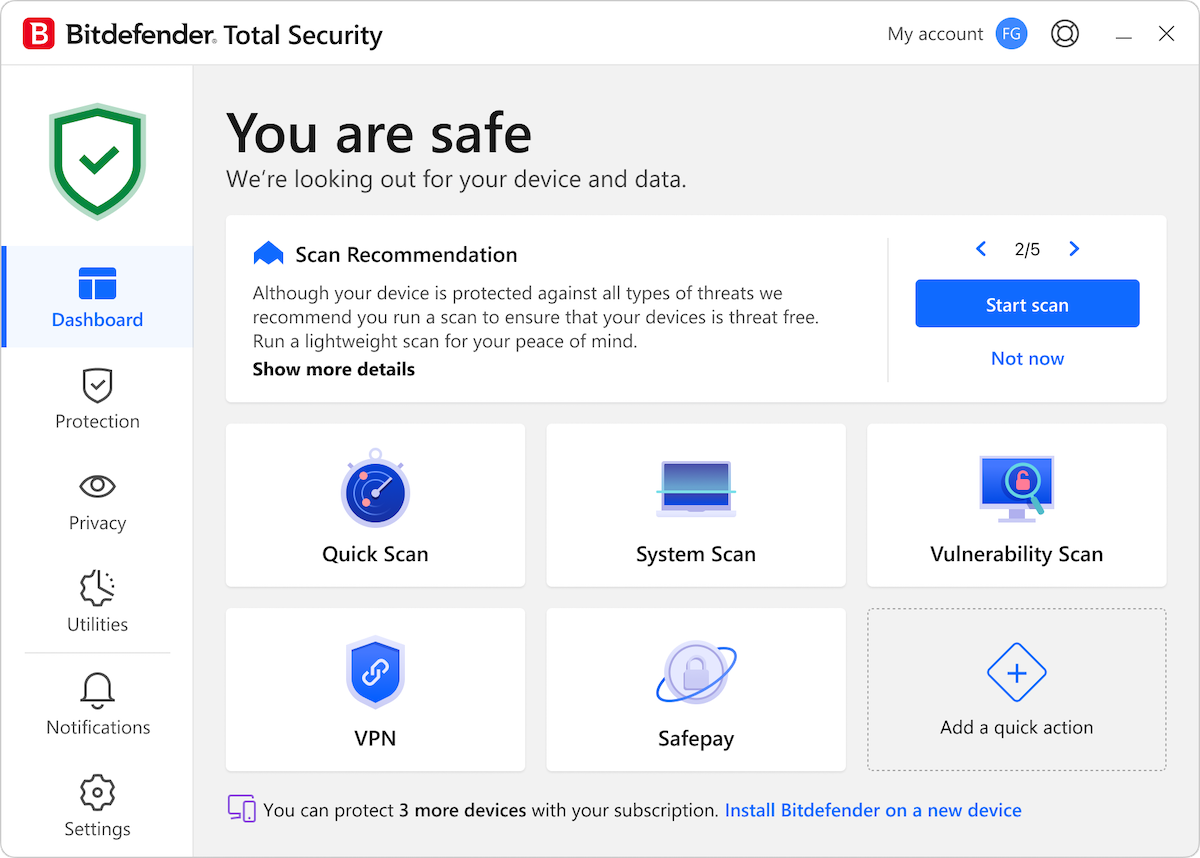
The Bitdefender dashboard on Windows: a scan recommendation and quick actions for Quick Scan, System Scan, Vulnerability Scan, VPN and Safepay. This copy's title bar says Total Security, which shares the Antivirus Plus interface.
Day to day it's a set-and-forget app: everything is managed through a free Bitdefender Central account, it updates itself, and Autopilot suggests the next step (turn on ransomware remediation, run a scan) instead of nagging. One subscription now covers Windows, Mac, Android and iPhone, and the 3-device plan costs only $10 more than one device in the first year. It includes Bitdefender VPN with 200 MB of traffic per device per day, which is a taste rather than a full VPN.
What we like
- Top independent lab results year after year
- Blocks spyware, adware and phishing sites in real time
- Full 30-day trial with no credit card
- One subscription for Windows, Mac, Android and iOS
Watch out for
- First-year prices; it renews at $49.99 or $69.99 a year unless you turn renewal off
- Setup runs through an online account, which some people find confusing
- No firewall or parental controls at this level (those are in Total Security)
What users say
Bitdefender scores 4.4 out of 5 from 12,729 reviews on Trustpilot. A long-time user, Dr Paresh Gadhavi (June 2026), writes: "Frequently highly rated in industry tests. In benchmarking etc. Very easy to set up. I find it gives hard and proficient real-time protection. Without the false positives." The complaints are mostly about billing, not protection. Sue Schultz (2 stars, October 2026): "This is a good product with deceptive billing." Jung M (October 2026) gave 5 stars but added: "I wish Bitdefender would be SIMPLER to install as it can be confusing if proper care is not taken."
Start Bitdefender Free TrialBuy Bitdefender Antivirus Plus
2. IObit Malware Fighter PRO: cheapest real-time spyware and adware protection
IObit Malware Fighter PRO · $19.95 for the first year on 1 PC (list $39.95); $22.95 for 2 PCs, $23.99 for 3 · Windows 11, 10, 8 and 7 · Free edition from the same installer · Version 14.0.0.1766 (November 2026)
Best for: home users who want real-time guards and browser hijack protection for the least money.
IObit Malware Fighter PRO combines IObit's own anti-malware engine with a Bitdefender engine and an anti-ransomware engine, then adds nine real-time guards (file, startup, process, MBR, camera, USB disk, behavior, network and browser password). For adware, its Browser Protect section is the useful part: Homepage Advisor warns when your homepage or search engine is changed, DNS Protect stops malware from redirecting your traffic, Download Protection scans what you download, and Anti-Tracking clears tracking cookies when you close the browser. Version 14 adds AI Script Guard, which checks scripts as they're about to run, including ones started by AI agents, and IObit says the full scan is up to 30% faster.
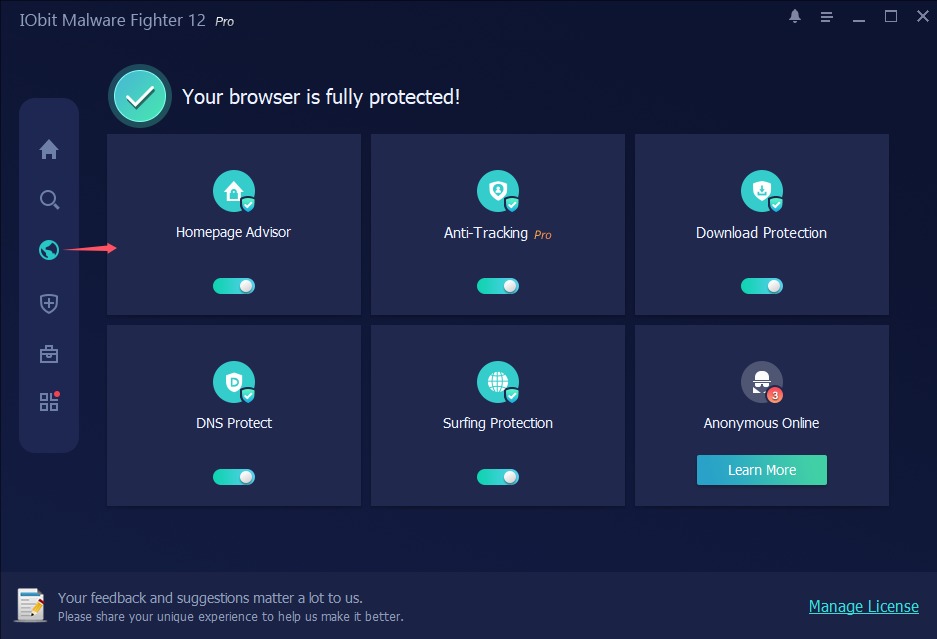
Browser Protect in IObit Malware Fighter 14 Pro: Homepage Advisor, Anti-Tracking (Pro), Download Protection, DNS Protect and Surfing Protection switched on, and a tile promoting a VPN.
The catch is evidence and upselling. IObit Malware Fighter has no recent published results from AV-TEST or AV-Comparatives, so you're trusting the Bitdefender engine inside it rather than a test of the product. The two Pro engines start switched off even after you activate Pro (turn them on in Security Guard), and the app promotes other IObit products and a VPN. IObit's 60-day money-back guarantee covers wrong purchases, unexpected renewals and problems support can't fix, not a change of mind, so install the free edition first and see how it runs on your PC.
What we like
- Lowest first-year price for real-time protection here
- Bitdefender engine plus homepage, DNS and download protection
- Camera, USB and browser password guards included
- Still supports Windows 7
Watch out for
- No recent independent lab scores for the product itself
- Pro engines are off until you switch them on
- In-app promotions for other IObit products
- Refunds aren't given for a change of mind
What users say
IObit as a company scores 4.6 from 2,511 Trustpilot reviews, with 69% five-star and 18% one-star. Few name Malware Fighter. One long-time customer, Chaplain Lori: "I have used ASC Ultimate for years, as well as the Malware Fighter and more." The 1-star reviews are about billing and ads, such as Dariusz Krol, who "could not find the subscription end button", and Michael Hill, who called IObit's free programs "a gateway into all their main programmes that you have to pay for".
Download IObit Malware Fighter FreeBuy IObit Malware Fighter PRO
3. MalwareFox Premium: a light antivirus with a free adware cleaner
MalwareFox Premium · $24.00 a year for 1 PC; $36 for 3 devices, $48 for 5 · Windows 11 to 7, x86 and ARM64 · 15-day Premium trial, then a free scanner · 60-day money-back guarantee · Version 26.0.0.31
Best for: older or slower PCs, and anyone fighting browser hijackers and adware toolbars.
MalwareFox Premium began as the kind of small scanner people ran when a browser started opening strange search pages, and that job is still in it: the Browser Cleaner removes hijackers, adware and unwanted toolbars, and it stays free after the trial ends. Premium turns it into a full antivirus built on K7 Computing's engine, with real-time protection, a ransomware shield, a behavior blocker, web protection through a browser extension and a basic firewall. MalwareFox says it stays under 50 MB of RAM and 1% CPU in normal use, and it doesn't show "your PC is at risk" scare screens.
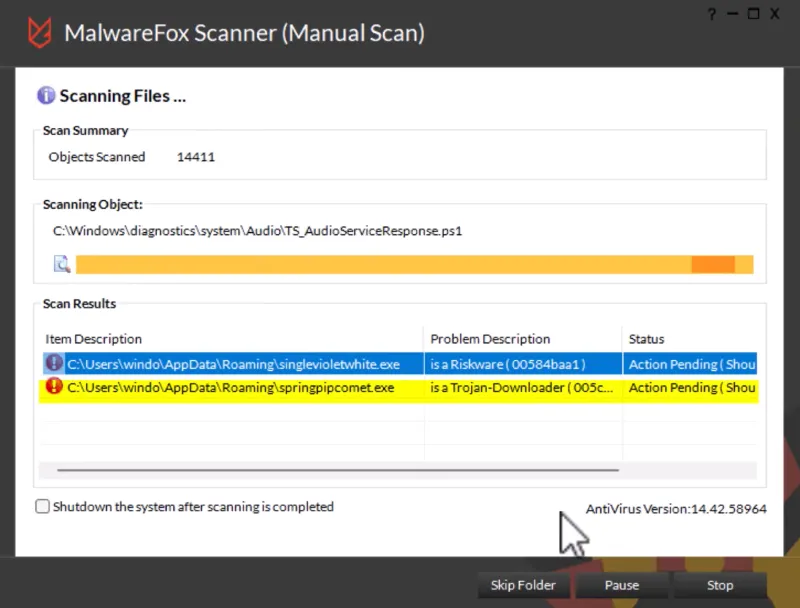
A MalwareFox manual scan in progress: 14,411 objects scanned, with a Riskware file and a Trojan-Downloader found in the AppData\Roaming folder.
The weak spot is outside proof. The 99.3% protection score MalwareFox quotes from AV-Comparatives belongs to K7's engine, not to a test of MalwareFox itself. It also replaces Defender rather than running beside it, and the installer is big for a "lightweight" tool (about 263 MB, because the virus definitions ship inside it).
What we like
- Free Browser Cleaner for hijackers, adware and toolbars
- Light on RAM and CPU, no scare screens
- 60-day money-back guarantee for any reason
- Runs on ARM64 Windows 11 PCs too
Watch out for
- No lab test of the product itself, only of K7's engine
- Replaces Defender, so it isn't a second scanner
- Older reviews complain about slow support answers
What users say
MalwareFox scores 4.8 out of 5 on Trustpilot, but from only 61 reviews. Daniel Warren (5 stars, May 2026): "Mine worked - MalwareFox flagged a fileless malware attack that my previous software never would have caught". On AlternativeTo, suzannextgen wrote that it "Got rid of annoying adware popup from chrome which my antivirus program couldn't." The criticism is about support: Harlen (1 star, January 2023) wrote, "I contacted support to cancel my auto-renewal as I am no longer using the program."
Download MalwareFox Free TrialBuy MalwareFox Premium
4. Spybot Home Edition: the classic spyware remover, with immunization
Spybot Home Edition · $23.99 a year · Windows 7 to 11, 32-bit and 64-bit · Free edition for scanning and immunization; no refunds on purchases · Spybot - Search & Destroy 2.9.85.5
Best for: Spybot fans who want the free scanner to run on its own, and blocking tracking and ad sites at the browser level.
Spybot Home Edition is the paid version of Spybot - Search & Destroy, the free tool many people remember cleaning adware and toolbars off the family PC. Home Edition adds an antivirus engine, Live Protection that checks programs before they start, automatic updates and scheduled scans. Its standout feature for spyware is immunization: it adds known malicious and tracking sites to the Windows hosts file and to your browsers, so they're blocked before anything loads. For adware that keeps coming back, it can repair from a Protected Repair Environment, outside the running Windows session.

A Spybot system scan with 168 results: DownloadSponsor settings, DoubleClick tracking cookies and a generic trojan, each with a threat-level bar (vendor screenshot from version 2.7; the layout is the same in 2.9).
Be honest with yourself about what you're buying, though. The program itself hasn't had a new build since 2.9.85.5 in February 2023; only the signatures keep updating. Independent labs stopped testing Spybot years ago, and reviewers who ran malware samples against it found weak detection. Buy it as a cheap, familiar extra layer and a way to keep Spybot's immunization current, not as your only protection.
What we like
- Immunization blocks tracking and malicious sites in the browser
- Good at stubborn adware, with a Protected Repair Environment
- Free edition for scanning and immunization
- Still supports Windows 7 and 8.1
Watch out for
- No new program build since February 2023
- Weak detection in reviewers' malware tests
- Slow full scans and a dated interface
- Purchases can't be refunded
What reviewers say
TechRadar's verdict: "Spybot - Search & Destroy has earned its reputation as one of the biggest names in malware protection, but this hasn't been enough for it to garner attention from third-party testing labs." It still concludes that "for the price, it's better than nothing and can complement Microsoft Defender's more capable platform." SafetyDetectives was harsher: "It failed to detect most malware samples on my device, it allowed access to every dangerous website I visited". A user quoted on Spybot's own page tells the other side: "after about 5 other free products failed to remove this incredibly annoying file, I tried spybot and was thrilled to see that it was finally gone!!"
Download SpybotBuy Spybot Home Edition
5. Auslogics Anti-Malware: a second-opinion scanner for 3 PCs
Auslogics Anti-Malware · $29.95 a year for 3 PCs, before tax · Windows 11 to 7 · Free trial scans and cleans once · 30-day refund · Version 1.23.0.4 (May 19, 2026)
Best for: keeping your current antivirus and adding a scheduled second scan on up to three PCs.
Auslogics Anti-Malware is built to run beside your main antivirus, not to replace it, so you don't have to uninstall Defender or anything else to use it. It offers quick, deep and custom scans that look beyond files on disk: running processes, programs set to start with Windows, scheduled tasks, suspicious registry entries, temporary folders and tracking cookies. Finds go to a quarantine you can restore from, an ignore list keeps your own files out of later scans, and you choose the heuristic level (Disable, Lazy, Normal or High), trading more new-threat catches for more false alarms. The full version adds scheduled scans and unlimited clean-ups.
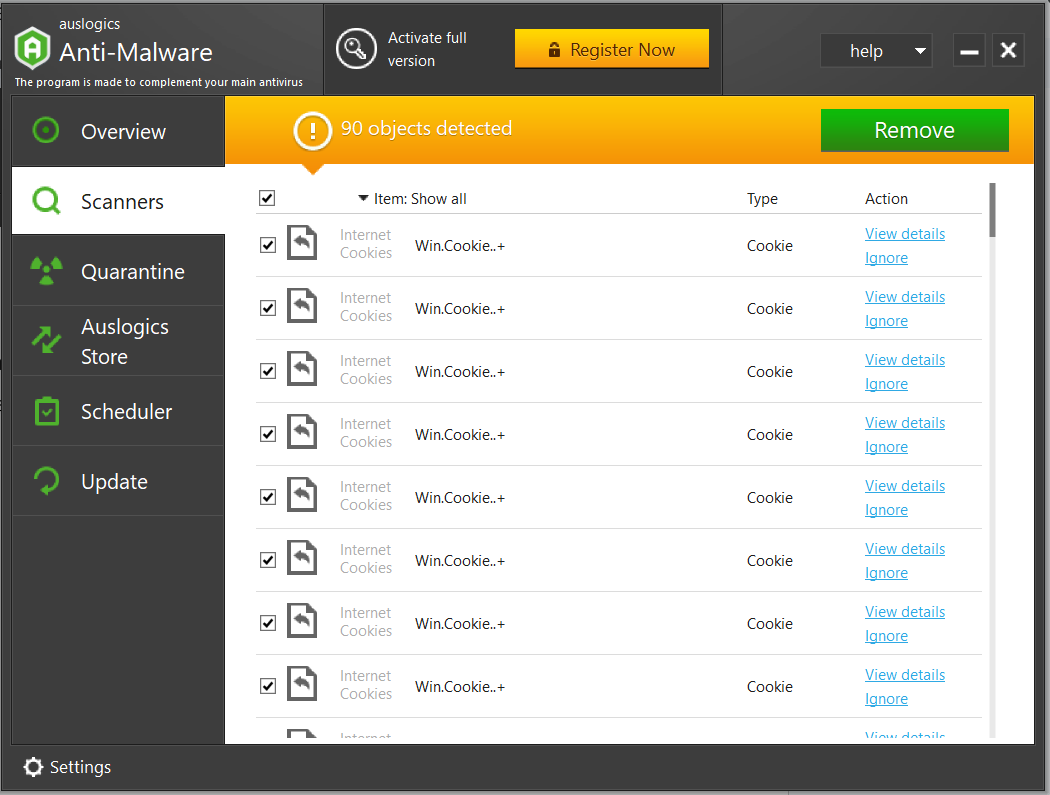
An Auslogics Anti-Malware scan reporting 90 objects. Every row visible here is an internet cookie, each with View details and Ignore links.
That screenshot shows the thing to know about any spyware scanner's numbers: tracking cookies count as detections, so "90 objects detected" can mean 90 cookies and no malware at all. Auslogics Anti-Malware has no real-time protection and no published lab results, and its small 16 MB installer reflects a narrow job. It's a sensible backstop for a family's three PCs, not a replacement for an antivirus.
What we like
- Runs next to Defender or any antivirus without conflict
- One license covers 3 PCs
- Checks startup items, tasks, registry and cookies
- Quarantine, ignore list and adjustable heuristics
Watch out for
- No real-time protection
- No independent lab results
- Yearly subscription that renews automatically
- Cookie counts make scan totals look scarier than they are
What users say
Auslogics as a company scores 4.3 from 2,010 Trustpilot reviews, most of them about its other programs. Reviews that name Anti-Malware are older but specific. Vincent Carr (5 stars, December 2017): "The Anti-Malware has found items that my anti-virus has allowed through." The recurring complaint is the subscription: Paul Galbraith (1 star, June 2026) titled his review "Bait and switch subscription trap."
Download Auslogics Anti-Malware Free TrialBuy Auslogics Anti-Malware
6. SUPERAntiSpyware Free Edition: the best free spyware remover
SUPERAntiSpyware Free Edition · Free · Windows 11, 10, 8.1, 8 and 7 · 28 MB installer · Version 27.0.1292 (November 13, 2026) · Paid Professional X Edition: $19.95 for the first year on 3 PCs
Best for: a free second opinion when Defender says "clean" and the pop-ups say otherwise.
SUPERAntiSpyware Free Edition is the free spyware remover we'd install first. It's made to run alongside Microsoft Defender rather than replace it, and it targets exactly what antivirus programs tend to let through: spyware, adware, potentially unwanted programs, hijackers, keyloggers and rootkits. It runs quick, complete and critical point scans, quarantines what it finds so you can restore a false alarm, and its System Investigator and repair tools fix settings that malware breaks, such as a disabled Task Manager or a broken internet connection. The newest build adds a Windows Security page to System Investigator, so you can see Defender's status at a glance.
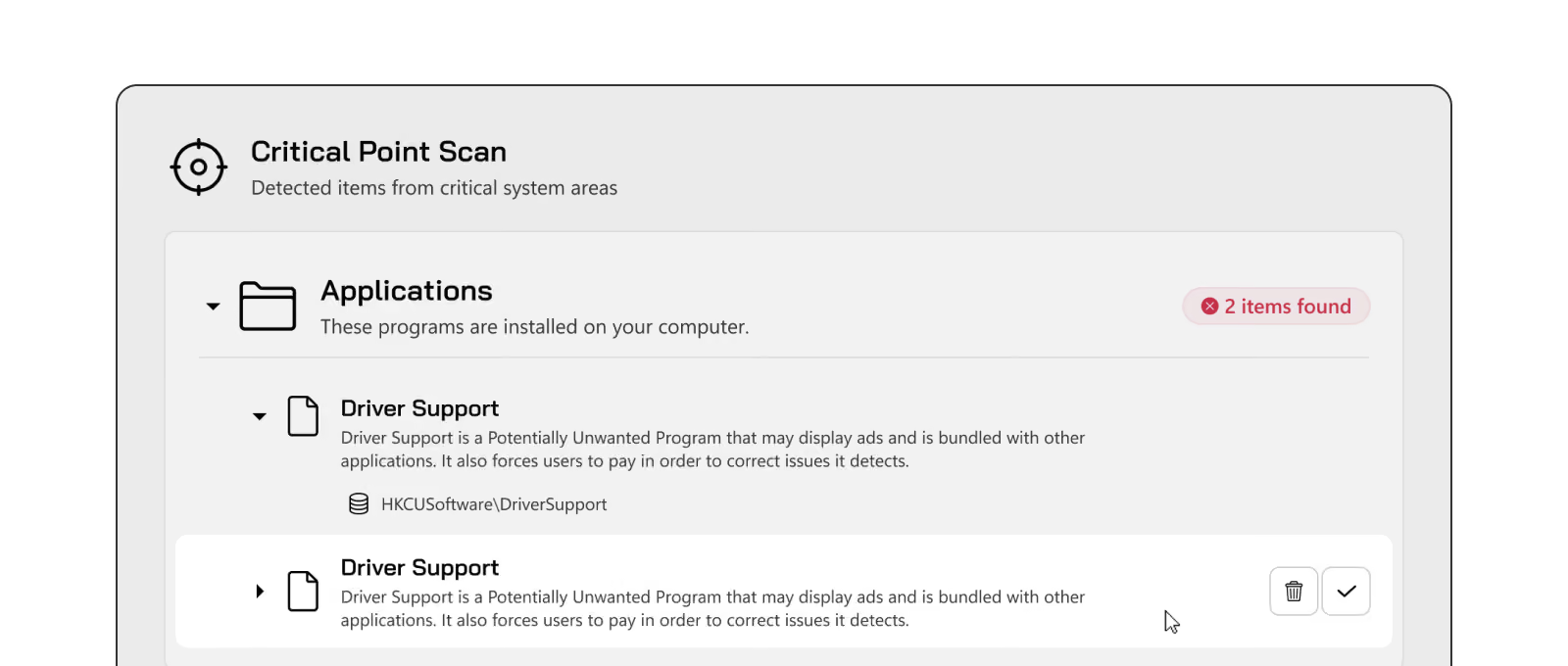
A SUPERAntiSpyware Critical Point Scan: 2 items found under Applications, both "Driver Support", described as a potentially unwanted program that may display ads and is bundled with other applications.
The free edition has limits that matter. It has no real-time blocking: it only removes threats when you run a scan. There are no scheduled scans or automatic updates either, so update the definitions by hand before every scan or you'll be scanning with old ones. The paid Professional X Edition adds all three. Its cart price is $19.95 for the first year on 3 PCs, renewing at $74.95 a year, and the cart also adds LiveTech support, free for the first month and then $19.95 a month unless you cancel it.
What we like
- Free, and runs beside Defender without conflict
- Targets adware and potentially unwanted programs
- Repair tools for settings malware breaks
- Small 28 MB installer, current build
Watch out for
- No real-time blocking in the free edition
- Definitions must be updated by hand
- Pro renews at $74.95 and the cart adds a monthly support plan
What users say
SUPERAntiSpyware scores 4.2 from 351 reviews on Trustpilot, and much of the praise is for its live support technicians. Steve S. (5 stars, April 2026): "The technician was courteous, easy to understand and immediately solved my problem." The 1-star reviews are about renewals of the paid edition. Thomas Gavlick (May 2026): "I cancelled my subscription because they tripled their fee from 21.95 to 74.95." Richard Bristow (September 2026): "when you renew they automatically sign you up for their LiveTech support, it's hidden in the small print somewhere."
Download SUPERAntiSpyware Free
Prices and download sizes compared
First-year price at checkout (USD)
SUPERAntiSpyware Free Edition (free)$0.00
IObit Malware Fighter PRO (1 PC)$19.95
Spybot Home Edition$23.99
MalwareFox Premium (1 PC)$24.00
Auslogics Anti-Malware (3 PCs)$29.95
Bitdefender Antivirus Plus (3 devices)$34.99
Order-page prices checked on November 14, 2026, before sales tax. Bitdefender's and IObit's are first-year discounts: Bitdefender's 3-device plan renews at $69.99 a year (a 1-device plan is $24.99 for the first year), and IObit's list price is $39.95.
Installer size (MB)
Auslogics Anti-Malware16.0 MB
SUPERAntiSpyware Free Edition28.2 MB
Spybot Home Edition62.1 MB
IObit Malware Fighter PRO64.7 MB
MalwareFox Premium262.5 MB
Sizes of the vendors' installers in November 2026. Bitdefender installs from your Bitdefender Central account, so there's no single installer file to compare. A bigger installer isn't a heavier program: MalwareFox ships its virus definitions inside the installer.
Which spyware removal software should you choose?
| Your situation |
Pick |
Why |
| You want one program that protects you and you won't think about again | Bitdefender Antivirus Plus | The only tool here with top independent lab scores, plus web and ransomware protection |
| Defender says the PC is clean, but pop-ups and redirects continue | SUPERAntiSpyware Free Edition | Free, runs beside Defender and targets adware and potentially unwanted programs |
| You want real-time protection for the lowest price | IObit Malware Fighter PRO | $19.95 for the first year with a Bitdefender engine and browser protection |
| An older or slower PC | MalwareFox Premium | Light on RAM and CPU, with a free Browser Cleaner for hijackers |
| A second scan on three family PCs, keeping your antivirus | Auslogics Anti-Malware | $29.95 a year covers 3 PCs and it doesn't conflict with your antivirus |
| You already use and like Spybot | Spybot Home Edition | Keeps immunization and scans running on their own for $23.99 a year |
Who should skip each one
- Skip Bitdefender Antivirus Plus if you want a firewall, parental controls or a full VPN in the same app: those come with Bitdefender's bigger suites.
- Skip IObit Malware Fighter PRO if in-app offers for other products bother you, or if you want protection backed by recent lab tests.
- Skip MalwareFox Premium if you want to keep Defender or another antivirus as your main protection, since MalwareFox replaces it.
- Skip Spybot Home Edition if it would be your only protection: its detection is weak in reviewers' tests and the program hasn't had a new build since 2023.
- Skip Auslogics Anti-Malware if you have no antivirus at all, because it has no real-time protection.
- Skip SUPERAntiSpyware Free Edition if you won't remember to update and scan by hand; the free edition does nothing in between.
What commonly goes wrong
- Running two real-time antiviruses. Bitdefender, MalwareFox and Spybot's Live Protection each take over from Defender. Adding a second always-on scanner slows the PC and can make both misbehave. Pair one real-time product with an on-demand scanner instead.
- Panicking at big numbers. Scan totals often count tracking cookies. Open the list before deciding the PC is badly infected.
- Scanning with old definitions. SUPERAntiSpyware Free and other manual scanners only know what their last update taught them. Update, then scan.
- Removing a scan result that wasn't malware. Rootkit and heuristic finds can be false alarms. Quarantine first, and delete only once you're sure; Spybot warns that rootkit-scan deletions can't be undone.
- Forgetting the browser. Adware often lives in a browser extension or a changed search setting. Remove unknown extensions and reset the browser, or the pop-ups come back after every scan.
- Surprise renewals. Every paid tool here is a yearly subscription that renews automatically, often at a higher price than the first year. Note the renewal date, and check the cart for add-ons such as SUPERAntiSpyware's LiveTech support plan.
- Expecting any tool to catch everything. No scanner finds every threat. That's why a second opinion helps, and why an infection that survives two good scanners may need a Windows reset.
FAQs
How do I remove spyware from Windows for free?
Use Windows Security first: update it, run a full scan, then run a Microsoft Defender Antivirus offline scan, which restarts the PC and scans before Windows loads. If pop-ups or redirects remain, add SUPERAntiSpyware Free Edition as a second-opinion scanner, update its definitions and run a complete scan. Both are free.
Is Windows Defender enough anti-spyware protection?
For many careful users, yes: Microsoft Defender catches most spyware and costs nothing. It's weaker against adware and potentially unwanted programs unless you turn on Potentially unwanted app blocking, and paid antivirus such as Bitdefender Antivirus Plus adds stronger web filtering, ransomware protection and better independent lab scores.
What is the best free spyware remover?
SUPERAntiSpyware Free Edition is the best free spyware remover in this comparison. It's free for good, runs next to Defender, targets adware and potentially unwanted programs, and has repair tools. Its free edition only works when you run a scan and update it by hand.
What's the difference between spyware and adware?
Spyware secretly collects information, such as what you browse, what you type or your passwords, and sends it to someone else. Adware's main job is showing ads: pop-ups, injected ads, a hijacked homepage or search engine. Adware often tracks you too, which is why spyware and adware removal tools such as SUPERAntiSpyware and MalwareFox's Browser Cleaner deal with both.
Can I run a spyware remover alongside my antivirus?
Yes, if it's an on-demand scanner. SUPERAntiSpyware Free Edition and Auslogics Anti-Malware are built to run beside Defender or another antivirus. Bitdefender Antivirus Plus, MalwareFox Premium and Spybot Home Edition are real-time antiviruses themselves, so use only one of them at a time.
How do I know if my PC has spyware?
Common signs are a homepage or search engine that changes by itself, new toolbars or browser extensions you didn't add, pop-up ads outside web pages, a PC that suddenly runs slower or a webcam light that turns on unexpectedly. A full scan with Windows Security, followed by a second scan with a tool such as SUPERAntiSpyware Free Edition, is the quickest way to check.
Is Spybot Search & Destroy still good?
Spybot Search & Destroy still works and its signatures are still updated, but the program hasn't had a new build since February 2023 and reviewers' malware tests found weak detection. Spybot Home Edition is fine as a $23.99 extra layer, especially for its immunization, but not as your only protection.
Do spyware removal tools work on Mac or phones?
Only Bitdefender Antivirus Plus covers Mac, Android and iPhone, on the same subscription as Windows. MalwareFox's 3-device and 5-device plans add its Android app. IObit Malware Fighter, Spybot, Auslogics Anti-Malware and SUPERAntiSpyware are Windows only.
Conclusion
Start with what you already have: a full scan and an offline scan in Windows Security cost nothing and remove most spyware. Add SUPERAntiSpyware Free Edition when adware and pop-ups survive that.
If you want to stop spyware and adware arriving in the first place, buy Bitdefender Antivirus Plus. It's the one product here with years of top independent lab results, it covers Windows, Mac, Android and iPhone, and at $34.99 for three devices in the first year it costs only a little more than the smaller single-PC tools. Try it free for 30 days first, and turn off automatic renewal if you don't want to pay the regular price later. On a tighter budget, IObit Malware Fighter PRO is the cheapest real-time option at $19.95 for the first year.
Start Bitdefender Free TrialBuy Bitdefender Antivirus Plus