Spybot Home Edition: Spybot's Anti-Spyware With an Antivirus Engine and Live Protection
Spybot Home Edition is a $23.99-a-year Windows security program from Safer-Networking Ltd. that takes the free Spybot - Search & Destroy spyware scanner and adds an antivirus engine, Live Protection that checks programs before they start, and automatic signature updates. It's meant for home users who want Spybot running on its own, without having to remember to update and scan by hand.
Spybot has been around since 2000, and plenty of people know it as the free tool that cleaned up adware and toolbars on the family PC. The free edition still exists, but it only scans when you tell it to and only updates when you click Update. Home Edition is the cheapest way to make Spybot a full-time guard instead of an occasional cleaner.
Quick facts
- Developer: Safer-Networking Ltd., Greystones, County Wicklow, Ireland
- Current build: Spybot - Search & Destroy 2.9.85.5, released February 2023 (one installer for every edition; the license key decides which edition you get)
- Platform: Windows 7, 8, 8.1, 10 and 11, 32-bit and 64-bit. No Mac or Linux version
- Price: $23.99 for a 12-month subscription on the order page, renewing yearly
- Trial: no timed trial; the free edition is the vendor's way to try before you buy
- Refunds: the vendor's sales terms say downloadable products are not refundable
- What we checked: the installer spybotsd-2.9.85.5.exe (62 MB, file version 2.9.85.5, digitally signed by Safer-Networking Ltd.) downloaded from the vendor's site, and the order-page price of $23.99 for the yearly Home Edition with no discount or tax line, both on November 8, 2026. We didn't install it or run a malware scan.
Before you buy
The program itself hasn't had a new build since 2.9.85.5 in February 2023; the malware signatures keep updating, but the interface and engine wrapper are the same as then. Independent labs don't test Spybot any more, and two review sites that ran malware samples against it found weak detection (see What Users Say). Purchases can't be refunded, so install the free edition first and make sure it runs well on your PC.
Download Free TrialBuy Now
Overview
Spybot - Search & Destroy comes in five editions that all install from the same file. The free edition covers anti-spyware scanning, system immunization, startup tools and a rootkit scan. Home Edition keeps all of that and adds the things that make a security program work in the background: an antivirus engine, real-time Live Protection, signature updates several times a day, task scheduling, and the Protected Repair Environment.
What Home Edition doesn't include are the power-user tools of the Professional Edition: Anti-Beacon Plus (telemetry blocking), System Registry Repair, the Secure Shredder, the Script Editor, command line tools and priority support. For most home users that's no loss, since those tools are aimed at people who like to dig into Windows.
Setup is designed to be hands-off. During installation you can accept the defaults and Spybot configures itself, with Live Protection switched on. After that the simple Start Center shows three things: when you last scanned, whether immunization is applied, and when signatures were last updated.
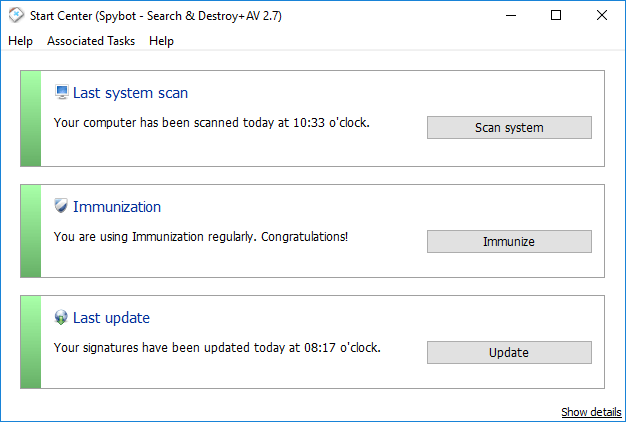
The simple Start Center: last system scan, immunization status and last signature update, each with a one-click button (vendor screenshot from version 2.7; the layout is the same in 2.9).
Features
Two scanners: Spybot's anti-spyware plus an antivirus engine
Spybot Home Edition scans with Spybot's own anti-spyware engine, which goes after adware, tracking software, keyloggers and other unwanted programs, and with a licensed antivirus engine for trojans and other malware. Safer-Networking describes the antivirus part as an award-winning engine used by top-rated products on AV-Test and AV-Comparatives, but doesn't name it. A system scan covers your Windows partition, and the results list shows each find with its location and threat level. Fix selected removes the ticked items to quarantine.

Scan results grouped by threat: DoubleClick tracking cookies, a DownloadSponsor setting and a generic trojan, with Fix selected at the bottom right. This test scan reports 168 results in just over two hours.
Live Protection blocks bad programs before they run
Spybot Home Edition's Live Protection watches every new and running process and blocks a malicious one before it starts. It's on by default after installation. If you already run another antivirus with real-time protection, Safer-Networking recommends turning off the real-time guard in one of the two programs to avoid conflicts, and its FAQ also suggests switching Live Protection off if the PC feels slow opening programs.
Signature updates several times a day, in the background
Spybot Home Edition downloads new anti-spyware and antivirus signatures multiple times a day without asking. In the free edition you update by hand, and the antivirus signatures don't exist at all. The Update window logs both downloads separately, so you can see what arrived.
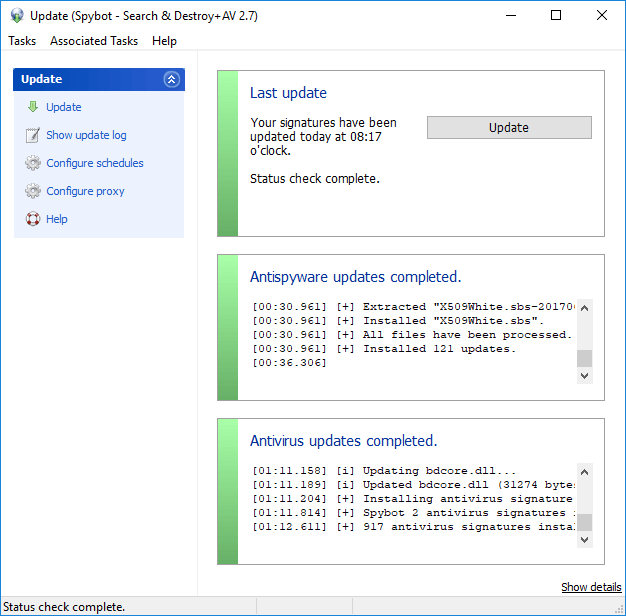
The Update window after a full update: one log for the anti-spyware files, one for the antivirus signatures.
Immunization blocks known bad sites, cookies and plugins
Spybot Home Edition's immunization adds known malicious and tracking sites to the Windows hosts file and to your browsers, so they're blocked before anything loads. It supports many popular browsers, including Firefox, Chrome, Opera and Internet Explorer, and portable browser installs can be added in Settings. You can undo it in one click if a site you trust stops working.
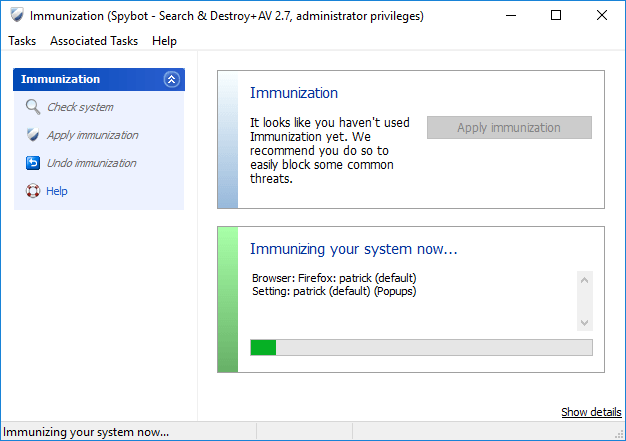
Immunization in progress on a Firefox profile, with Check system and Undo immunization on the left.
Scheduled scans, updates and immunization
Spybot Home Edition can create Windows Task Scheduler jobs for updates, system scans and immunization; task scheduling is only in the licensed editions. By default a system scan runs on the first of every month and updates run three minutes after every start-up, and you can change both in Settings > Schedule.
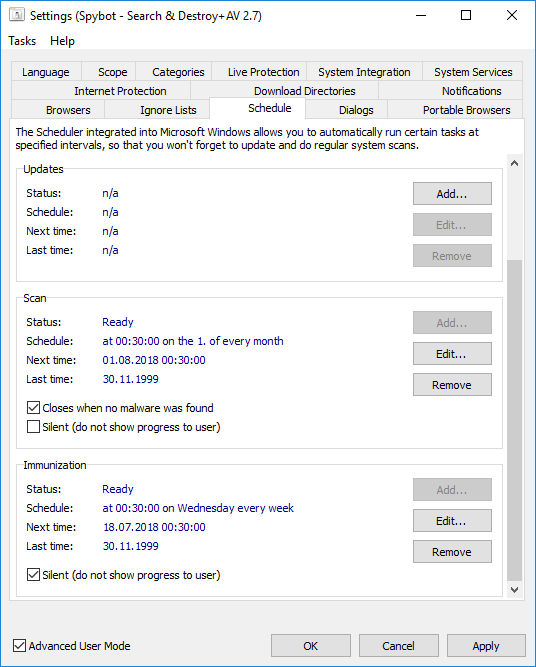
The Schedule tab: a monthly scan and a weekly silent immunization, with Add and Edit buttons for each task.
Protected Repair Environment for stubborn infections
Spybot Home Edition can open a separate, protected Windows desktop and run its Start Center there, using the same desktop separation that the Windows login screen and UAC prompts use. Malware and keyloggers running on your normal desktop can't interact with Spybot while it cleans. It's the tool to reach for when an infection keeps closing or hijacking your security software.
Startup tools and rootkit scan
Spybot Home Edition keeps the free edition's Startup Tools, a set of tabs for autorun entries, services, browser pages, the hosts file, scheduled tasks and running processes, and the Rootkit Scan, which looks for software hiding itself in the file system, registry and process lists. Both are powerful and need care: the vendor warns that rootkit finds aren't always malware and that Startup Tools can change the registry.
Benefits
- It runs without you. The free edition depends on you remembering to update and scan. Home Edition updates itself several times a day and scans on a schedule.
- Cheap for a year of cover. At $23.99 it costs less than most antivirus suites, and you can buy several copies at once for the family's PCs.
- Two layers in one program. The spyware engine is still Spybot's strength, and the antivirus engine covers what spyware signatures don't.
- Privacy extras the big suites rarely have. Immunization blocks trackers and bad sites before a page loads.
Real-World Uses
- A parent's PC that gets used by everyone. Live Protection catches the dodgy download the kids click, and immunization blocks known malware sites in the browsers they use.
- Cleaning up adware that keeps coming back. Run a system scan, fix the finds, then switch to the Protected Repair Environment if the adware fights back.
- A second layer next to Microsoft Defender. Turn off Spybot's Live Protection and keep its scheduled scans and immunization as a second opinion, as the vendor's FAQ describes.
- An older Windows 7 or 8.1 machine. Spybot 2.9 still supports both, which many current security suites have dropped.
Who It's For, and Who Should Skip It
Home Edition suits a home user who already likes Spybot's free scanner and wants it to work in the background, at a low yearly price. It's also a reasonable buy for someone who mainly cares about adware, tracking cookies and unwanted programs rather than the newest ransomware.
Skip it if you want lab-tested antivirus protection: no major lab has tested Spybot in years, and Microsoft Defender, which is already in Windows, is tested regularly. Skip it too if you need a Mac or phone version, a firewall, a VPN or a password manager, because Spybot has none of these. And if you want to block Windows telemetry or shred files, go straight to the Professional Edition, which costs $9 a year more.
Usage Guide
- Install: download the installer from the vendor, run it and accept the User Account Control prompt. Pick your language and click Next until the Spybot Edition page.
- Enter your license key: paste the key from your purchase receipt e-mail, click Verify, and finish the installation. If the free edition is already installed, click "Free Edition" in the Start Center instead, then Your License > Enter a new license key.
- Update first: click Update in the Start Center. A scan won't start automatically until signatures are installed.
- Scan: click Scan system, wait for it to finish, then Show Scan Results and Fix selected.
- Immunize: close your browsers, click Immunize, then Check system and Apply immunization.
- Check the schedule: tick Advanced User Mode, open Settings > Schedule and adjust the scan and update times.
Where it falls short
- Detection hasn't been verified by labs. TechRadar notes that AV-Test stopped testing Spybot in 2017, and its own test file got past Spybot's real-time guard.
- Slow full scans. Reviewers timed full scans at 15 minutes for TechRadar and around two hours for SafetyDetectives and WizCase, and there's no quick-scan button.
- A dated, confusing interface. The Start Center is simple, but the advanced views lead to the same tools by several routes, which reviewers found confusing.
- It conflicts with other real-time scanners. Windows disables Defender when Spybot's Security Center service is running, and running two live guards can slow the PC.
- Rootkit scan false alarms. The vendor itself says rootkit-scan finds are not necessarily malware, and deleting them can't be undone from quarantine.
What Users Say
Spybot gets very different reactions depending on who's judging it. Long-time users remember it as the tool that removed what nothing else could, while reviewers who test antivirus detection rates are much less kind to the current paid editions.
TechRadar (Sead Fadilpašić, review updated April 2025)
TechRadar lists "Easy to use", "Immunization tools", "Fast scans", "Free version available" and "Paid plans affordable" as reasons to buy, and "Limited information about threats", "Windows only", "No independent lab tests" and "Clunky interface" as reasons to avoid. Its verdict:
"Spybot - Search & Destroy has earned its reputation as one of the biggest names in malware protection, but this hasn't been enough for it to garner attention from third-party testing labs. Plus, it's overdue for a much-needed overhaul as its interface looks old and clunky. Otherwise, it's a cheap and decent solution. Just don't expect much."
On protection, the reviewer wrote that Spybot "performed okay when scanning (if we gloss over the fact that it got completely stuck when scanning at one time), but it failed to prevent downloading a test malware file on our system. Instead, Microsoft Defender jumped in to protect us."
The final verdict ends on a fair note for Home Edition buyers: "Still, for the price, it's better than nothing and can complement Microsoft Defender's more capable platform."
Detection tests: SafetyDetectives and WizCase
Tyler Cross at SafetyDetectives (review updated August 2025) was blunt: "Spybot Search & Destroy underperformed in most of my tests. It failed to detect most malware samples on my device, it allowed access to every dangerous website I visited, and it lacks additional features like a firewall, a VPN, and parental controls." He also noted that "it doesn't seem to have received any significant upgrades (outside of virus definition updates) for several years."
WizCase reached a similar result: "The system scan was really slow, and it took around 2 hours to check my main drive. The scan detected 2 of 4 EICAR malware samples, but Spybot couldn't detect 2 malware samples hidden in zip files." Both sites recommend Norton instead, so read them as tests by reviewers who favor the big suites.
2-spyware.com (Jake Doevan, updated October 2026)
2-spyware.com scores Spybot 6.4 out of 10 and calls it a "Useful second-opinion scanner, aging build". Its verdict: "Spybot Search & Destroy is a respected veteran that still works. The company is active, the forum answers questions, and detection updates keep coming." It adds that "With no new build since 2023, the paid editions are harder to recommend as your only protection, especially as purchases cannot be refunded."
User reviews
Trustpilot shows a 3.9 TrustScore for safer-networking.org from only 6 reviews. One three-star reviewer, Charles Ward (October 2024), wrote: "Effective and reliable software most of the time, but a very unintuitive user interface that requires tedious learning".
The Home Edition page on the vendor's site carries user reviews, including this one: "I spent several hours trying to remove a particular adware file that kept attempting to break through my avg antivirus. after about 5 other free products failed to remove this incredibly annoying file, I tried spybot and was thrilled to see that it was finally gone!!"
Another user quoted on that page liked that "The design of this program is really simple, with practically four buttons, to do everything, but still, it has many options," but disliked its "relatively high Ram Consumption"; Safer-Networking's note says this was fixed in Spybot 2.7.
The recurring themes: people like Spybot's low price, its free edition and its knack for removing adware other tools miss. The complaints are about an old-fashioned, confusing interface, slow full scans and, from the testing sites, weak detection of current malware by the antivirus side.
Comparisons
Spybot Home Edition vs the free edition
The free edition is a manual spyware scanner with immunization, startup tools and a rootkit scan. Home Edition adds the antivirus engine, Live Protection, automatic updates, scheduling and the Protected Repair Environment. If you only want an occasional second-opinion scan, the free edition is enough.
Spybot Home Edition vs Microsoft Defender
Defender is free, built into Windows and regularly tested by independent labs; Spybot isn't. What Spybot adds is its spyware and adware focus, immunization against trackers and its startup tools. Many users run Spybot's scanner alongside Defender rather than replacing it.
Editions and Pricing
All editions use the same installer and differ by license key. Prices are for 12 months; the Home price is the one we saw on the order page, and the others are from our checks of the same order page on November 8, 2026.
| Edition |
Price per year |
For |
What it adds |
| Free | $0 | Home use | Anti-spyware scan, immunization, startup tools, rootkit scan |
| Home | $23.99 | Home use | Antivirus, Live Protection, auto updates, scheduling, Protected Repair Environment |
| Professional | $32.99 | Experienced home users | Anti-Beacon Plus, registry repair, Secure Shredder, script editor, command line tools, priority support |
| Corporate | $49.99 | Businesses | Professional's tools, licensed for business use |
| Technician's | $69.00 | IT technicians | FileAlyzer, RegAlyzer, portable use on PCs you support |
FAQs
Can I run Spybot Home Edition alongside Microsoft Defender?
Spybot Home Edition registers itself as an antivirus with Windows, so Windows switches Defender off. Safer-Networking's FAQ explains how to stop Spybot's Security Center service so Defender comes back, and recommends keeping only one real-time guard active to avoid conflicts.
Does Spybot Home Edition work on Windows 11?
Yes. Spybot 2.9.82 added full Windows 11 support in December 2021, and the current 2.9.85.5 build runs on Windows 7 through 11. Windows XP and Vista are only supported by the old Spybot 2.4.
Can I get a refund for Spybot Home Edition?
No. Safer-Networking's sales terms say downloadable products are not refundable and that you should evaluate the free version before ordering.
What happens when the Spybot Home Edition year ends?
Spybot Home Edition is a 12-month subscription that renews yearly, and the vendor says it reminds you before renewal.
Does one Spybot Home Edition license cover several PCs?
The Home Edition is priced per copy, and the order page lets you choose how many copies you need, with volume prices for larger quantities.
Can I use Spybot Home Edition at work?
The Home and Professional editions are Spybot's personal editions. For a company PC the vendor offers the Corporate Edition, and for technicians who clean customers' PCs, the Technician's Edition.
How much disk space does Spybot Home Edition need?
Spybot Home Edition needs about 750 MB of disk space for a licensed edition according to the vendor's compatibility page; the FAQ puts it at about 500 MB for Spybot plus 500 MB for the antivirus part.
Is Spybot 3 coming?
Safer-Networking has been working on Spybot 3 for years, and its stand-alone Secure Shredder already uses the Spybot 3 interface, but Spybot - Search & Destroy itself is still version 2.9.85.5, and no release date for version 3 has been announced.
System Requirements
- Windows 11, 10, 8.1, 8 or 7, 32-bit or 64-bit
- Pentium 4 2.4 GHz or any AMD64 or Intel64 processor
- 1 GB of RAM or more
- 750 MB of free disk space for a licensed edition
- An internet connection for signature updates and license activation
Conclusion
Spybot Home Edition is worth $23.99 if you already trust Spybot's spyware scanner and want it updated and scanning on its own, especially on an older Windows 7 or 8.1 PC or as a companion to another tool. The one reason to buy it is that it turns the free scanner into a set-and-forget guard for very little money. The main reason not to is that the antivirus side has no recent lab results and failed the testers who checked it, on a program build that dates from February 2023. Try the free edition first, since there are no refunds, and if you want a single, lab-tested antivirus, look elsewhere.
Download Free TrialBuy Now