Spybot Professional Edition: Spybot's Full Personal Toolkit, Telemetry Blocking Included
Spybot Professional Edition is a $32.99-a-year Windows security program from Safer-Networking Ltd. for experienced home users. It combines Spybot's anti-spyware scanner with an antivirus engine and Live Protection, and adds Anti-Beacon Plus to block Windows and app telemetry, plus a registry repair tool, a secure file shredder, a script editor for your own detection rules and command line tools.
If you've used the free Spybot - Search & Destroy for years and like poking around in the advanced views, Professional is the edition that opens up everything Spybot has for a home PC. It's also the cheapest way to get Anti-Beacon Plus, which Safer-Networking otherwise sells as a separate subscription.
Quick facts
- Developer: Safer-Networking Ltd., Greystones, County Wicklow, Ireland
- Current build: Spybot - Search & Destroy 2.9.85.5, released February 2023; the same installer serves every edition and your license key switches on Professional
- Includes: Spybot Anti-Beacon Plus (a separate program, latest version 5.1.1 from March 2025)
- Platform: Windows 7, 8, 8.1, 10 and 11, 32-bit and 64-bit
- Price: $32.99 for 12 months on the order page, renewing yearly
- Trial and refunds: no timed trial (the free edition is the vendor's try-before-you-buy), and downloadable purchases are not refundable
- What we checked: the installer spybotsd-2.9.85.5.exe (62 MB, file version 2.9.85.5, digitally signed by Safer-Networking Ltd.) downloaded from the vendor's site, and the order-page price of $32.99 for the yearly Professional Edition with no discount or tax line, both on November 8, 2026. We didn't install it or test its detection.
Before you buy
Spybot's main program hasn't had a new build since February 2023, though signatures still update daily and Anti-Beacon was updated in 2025. No independent lab has tested Spybot's antivirus in years, and reviewers who ran malware samples against it found weak detection. You can't get a refund, so run the free edition on your PC first.
Download Free TrialBuy Now
Overview
Safer-Networking pitches Professional at "the experienced private user". Left at its defaults it behaves like the Home Edition: scans, Live Protection, background updates several times a day and immunization against known bad sites and trackers. The difference is in the advanced tools, which you reach by ticking Advanced User Mode in the Start Center.
Those tools let you fine-tune Spybot's language, Live Protection, scan and update schedules, system services and ignore lists; repair broken registry entries; shred files so they can't be recovered; and write your own detection scripts. Professional also comes with priority support and a license for Anti-Beacon Plus, Spybot's separate anti-telemetry program.
Features
Anti-Beacon Plus stops telemetry from Windows and your apps
Spybot Professional Edition includes Anti-Beacon Plus, which blocks the usage data that Windows and other software send home. The free Anti-Beacon covers Windows, antivirus and third-party telemetry; the Plus edition adds Office, browser, game, OEM and driver telemetry and a Live Monitor that shows trackers as they're blocked. You click the center wheel to protect, or pick a preset and switch individual blocks on or off. Bought alone, Anti-Beacon Plus is its own yearly subscription, so Professional covers both programs for one price.
Antivirus, Live Protection and automatic updates
Spybot Professional Edition scans with Spybot's anti-spyware engine and a licensed antivirus engine, blocks malicious processes before they start with Live Protection, and downloads new signatures several times a day in the background. It can also schedule scans, updates and immunization through Windows Task Scheduler, and run its Start Center on a separate protected desktop that malware can't touch.

A system scan in progress, with the extended antivirus tests on the system partition (vendor screenshot from version 2.7).
System Registry Repair for broken paths and missing files
Spybot Professional Edition's System Registry Repair cleans up broken registry entries in categories where it can make a difference, such as broken application paths, missing help files, broken shortcuts and missing shared DLLs. It can delete an entry or repair it by locating a moved file, and it backs up what it fixes. Safer-Networking is refreshingly honest here: it says registry cleaners can't really speed up a PC and recommends this tool only for experienced users.
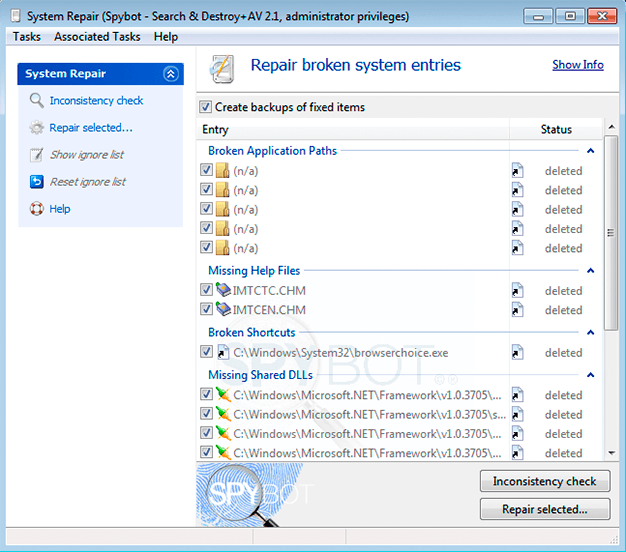
System Repair after an inconsistency check, with "Create backups of fixed items" ticked (screenshot from an older 2.1 build).
Secure Shredder deletes files for good
Spybot Professional Edition's Secure Shredder overwrites files in several passes so they can't be recovered from a magnetic hard drive. Templates add common targets in one click, such as the Temp folder and browser cache and cookie files.
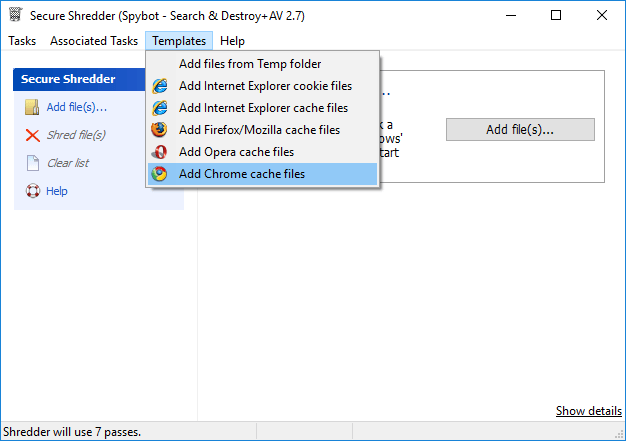
The Shredder's Templates menu; the status bar shows it will use 7 passes.
Script Editor for your own detection rules
Spybot Professional Edition lets you write detection patterns yourself in Spybot's OpenSBI syntax and Pascal, to find and remove files you regard as unwanted even when Spybot's signatures don't. You compile and run scripts in the editor and read the output in its own tab.
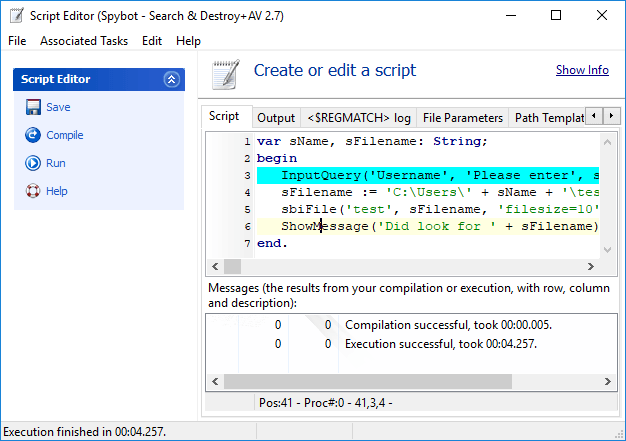
A six-line script in the Script Editor, compiled and executed successfully.
Command line tools and startup control
Spybot Professional Edition includes command line tools for file scans, system scans, immunization, cleaning and updating, so you can drive Spybot from batch files, PowerShell scripts or the Windows scheduler without anyone clicking anything. Startup Tools add tabs for autorun entries, services, the hosts file, browser pages, scheduled tasks, Winsock LSPs and running processes.
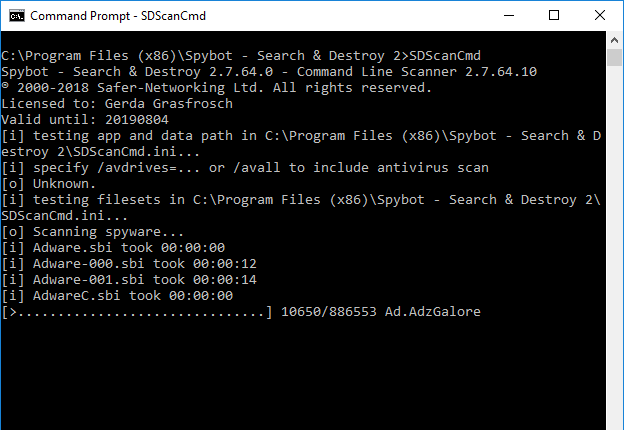
SDScanCmd, the command line scanner, working through the adware signature files.
Benefits
- Two privacy tools for one price. Spybot's tracker immunization and Anti-Beacon's telemetry blocking together cover both the websites and the software that collect data about you.
- Control instead of black-box protection. You decide which drives get scanned, when updates run, what's ignored and what loads at startup.
- Help when you need it. Priority support is only in Professional and the business editions.
- Only $9 more than Home. For that you get every advanced tool Spybot makes for home use.
Real-World Uses
- Cutting Windows 10 or 11 telemetry. Apply Anti-Beacon's preset, then add the Office and browser blocks that only the Plus edition covers.
- Selling or passing on a PC. Use the Secure Shredder on personal folders on a hard drive before it changes hands.
- Removing one stubborn program Spybot doesn't detect. Write a short script that finds its files and registry keys, then run it on a schedule.
- Running scans from a batch file. Use the command line scanner in a script that scans and logs every night.
Who It's For, and Who Should Skip It
Professional is for the home user who likes control: someone who already knows Spybot's advanced views, wants telemetry blocking, and is comfortable with registry tools and scripts. It's a good fit if you planned to buy Anti-Beacon Plus anyway.
Skip it if you just want protection that runs by itself; the Home Edition does that for less. Skip it too if you need a lab-tested antivirus as your only protection, a Mac or mobile version, or extras like a firewall, VPN or password manager. For a company PC, Safer-Networking sells the Corporate Edition instead, and SSD owners should know the vendor describes the Shredder as a tool for magnetic hard drives.
Usage Guide
- Install: run the installer from the vendor, accept the User Account Control prompt and choose your language. On the Spybot Edition page, paste the license key from your receipt e-mail and click Verify.
- Already on the free edition? Click "Free Edition" in the Start Center, then Your License > Enter a new license key.
- Update and scan: click Update, then Scan system, and use Fix selected on the results.
- Switch to the advanced tools: click Show details at the bottom right and tick Advanced User Mode. Settings, Startup Tools, System Repair, Secure Shredder and the Script Editor appear.
- Set up Anti-Beacon: install Spybot Anti-Beacon, the separate program that comes with Professional, then click the center wheel to protect or choose a preset.
- Back up first: create a Windows restore point before using System Repair or deleting rootkit-scan finds, as the vendor recommends.
Where it falls short
- Unverified detection. AV-Test stopped testing Spybot in 2017, and TechRadar's test file got past Live Protection.
- Power tools can break things. Startup Tools and System Repair change the registry, and rootkit-scan deletions can't be restored from quarantine.
- Slow, confusing interface. Full scans took up to two hours for some reviewers, and the advanced views reach the same tools by different routes.
- Conflicts with other real-time scanners. Windows turns Defender off while Spybot's Security Center service runs, and two live guards can slow program start-up.
What Users Say
TechRadar (Sead Fadilpašić, updated April 2025)
TechRadar describes the Professional tier's extras as "anti-beacon privacy protection and anti-telemetry tool, system registry repair to do some basic cleanup and repairs toward improving user experience, priority customer support, secure file shredder with multiple passes, a simple script editor, and command line tools to schedule tasks without user interaction."
It liked the scan options, noting that "Spybot is capable of performing more than one scan simultaneously," and that immunization is "particularly handy if you share a PC with someone with a cavalier approach to link-clicking."
The verdict is lukewarm: "Spybot - Search & Destroy is a rather mediocre cybersecurity app that has a confusing user interface, looks very obsolete, and is missing many features you'd expect in a paid antivirus service, like a password manager, a VPN, or at least firewall."
Malware tests: SafetyDetectives and WizCase
SafetyDetectives (Tyler Cross, updated August 2025) wrote that its "malware scanner performed poorly in all my tests, missing most of my malware samples", and that "Spybot also doesn't use machine learning to detect zero-day threats."
WizCase found that "the real-time security failed to spot malware samples during my testing" and that the rootkit scan "highlighted multiple threats in its results, but I found that most of these weren't actual rootkits." Both sites steer readers to Norton, so they're written from the viewpoint of the big security suites.
2-spyware.com (Jake Doevan, updated October 2026)
2-spyware.com gives Spybot 6.4 out of 10 and lists "Anti-Beacon Plus included in Professional" and "Deep tools for advanced users: startup editor, rootkit scan, scripting" among the pros. Its cons include "No new program build since February 2023" and "Advanced tools can break things if used carelessly". It says "Professional makes sense if you also want Anti-Beacon Plus and the advanced repair tools."
Users
Trustpilot shows a 3.9 TrustScore for safer-networking.org from just 6 reviews. A five-star reviewer, Dave (February 2021), wrote that "their product spybot antibeacon makes it soooo easy to block telemetry, plus it even has an option to reapply the blocks". Charles Ward (three stars, October 2024) found it "Effective and reliable software most of the time, but a very unintuitive user interface that requires tedious learning".
A review on the vendor's Professional Edition page, titled "Powerful & Low Cost", says: "Moving on towards the professional version, it's a one stop shop for anything and everything you may need an an antivirus and/or antimalware solution. Moreso, the expert and advanced settings are very powerful tools in managing a secure IT environment." Another user there wrote that "even the free version worked like a champ!" after five other free tools failed to remove an adware file.
The recurring themes: users value the telemetry blocking, the deep tools and the price. Reviewers criticize the dated, confusing interface and, in hands-on tests, the antivirus detection.
Comparisons
Spybot Professional vs Spybot Home
Both have the antivirus engine, Live Protection, automatic updates, scheduling and the Protected Repair Environment. Professional adds Anti-Beacon Plus, System Registry Repair, the Secure Shredder, the Script Editor, command line tools and priority support for $9 more a year.
Spybot Professional vs Spybot Corporate
The vendor's edition table gives Professional and Corporate exactly the same features. Professional is a personal edition for home use; Corporate is the license for business PCs and costs $49.99.
Editions and Pricing
One installer for all editions; the license key decides the features. Yearly prices from the order page on November 8, 2026.
| Feature |
Free |
Home ($23.99) |
Professional ($32.99) |
| Anti-spyware, immunization, startup tools, rootkit scan | Yes | Yes | Yes |
| Antivirus, Live Protection, auto updates, scheduling | No | Yes | Yes |
| Protected Repair Environment | No | Yes | Yes |
| Anti-Beacon Plus | No | No | Yes |
| Registry repair, Secure Shredder, Script Editor, command line tools | No | No | Yes |
| Priority support | No | No | Yes |
For business use there are two more editions: Corporate ($49.99 a year, Professional's tools on a business license) and Technician's ($69.00 a year, adding FileAlyzer, RegAlyzer and portable use on PCs you support).
FAQs
Is Anti-Beacon a separate download from Spybot Professional Edition?
Yes. Spybot Anti-Beacon is its own program with its own download on the vendor's site. The Professional Edition includes Anti-Beacon Plus, so you install both Spybot - Search & Destroy and Anti-Beacon.
Can I upgrade from Spybot Home to Professional?
Spybot Professional Edition uses the same program as Home, so switching is a matter of entering a Professional license key in the License Overview window; nothing has to be reinstalled.
Can I get my money back if Spybot Professional doesn't suit me?
No. Safer-Networking's terms say downloadable products are not refundable and ask buyers to evaluate the free version first.
Will Spybot Professional's registry repair make my PC faster?
Spybot Professional Edition's System Registry Repair isn't sold as a speed-up tool. Safer-Networking says registry cleaners can't really speed up a system and that this tool is for fixing broken entries, such as moved help files.
Does Spybot Professional Edition run on Windows 11?
Yes. Full Windows 11 support arrived in Spybot 2.9.82 in December 2021, and 2.9.85.5 runs on Windows 7 through 11.
Can I schedule scans from Spybot Professional Edition without opening it?
Yes. Spybot Professional Edition creates Windows Task Scheduler tasks for scans, updates and immunization, and its command line tools can be called from batch files or PowerShell.
Can I buy Professional for several family PCs at once?
Yes. The order page lets you choose the number of copies, with volume prices for larger quantities.
System Requirements
- Windows 11, 10, 8.1, 8 or 7, 32-bit or 64-bit
- Pentium 4 2.4 GHz or any AMD64 or Intel64 processor
- 1 GB of RAM or more
- 750 MB of free disk space for a licensed edition, plus under 100 MB for Anti-Beacon
- An internet connection for updates and license activation
Conclusion
Spybot Professional Edition is the Spybot to buy if you want the tools, not just the protection. The best reason to buy it is value: telemetry blocking with Anti-Beacon Plus, a shredder, registry repair and scripting on top of Spybot's scanner, all for $32.99 a year. The main reason not to is that its antivirus is unproven in independent tests and the main program hasn't changed since February 2023. Treat it as a privacy and cleanup toolkit that works next to a lab-tested antivirus such as Defender, try the free edition first, and it's good value for a hands-on Windows user.
Download Free TrialBuy Now