Spybot Anti-Beacon Plus: One-Click Blocking of Windows, Browser and Office Telemetry
Spybot Anti-Beacon Plus is a $21.99-a-year Windows privacy tool from Safer-Networking Ltd., the makers of Spybot - Search & Destroy, that stops Windows and the programs on it from sending usage data home. The free Anti-Beacon blocks Windows, antivirus and third-party analytics telemetry; Plus adds browsers, Microsoft Office, games and OEM and driver software to the list.
Windows 10 and 11 report a steady stream of diagnostics, advertising IDs and "experience" data to Microsoft, and turning it all off by hand means hunting through Settings, group policies, services and the hosts file, then doing it again after the next feature update. Anti-Beacon packs those changes into switches called immunizers, applies them with one click on the center wheel, and puts them back after each logon.
Quick facts
- Developer: Safer-Networking Ltd., Greystones, Ireland
- Current version: Anti-Beacon 5.4. The 5.4 line first appeared in November 2025, and the installer on the vendor's site was last updated on June 23, 2026. Anti-Beacon is still being worked on, unlike Spybot - Search & Destroy itself, whose last program build (2.9.85.5) dates from February 2023
- Platform: Windows 10 and Windows 11. No Mac or Linux version
- Price: $21.99 for a 12-month subscription on the order page, renewing yearly (the vendor lists it at 19.99 € a year)
- Free edition: the same installer, with no time limit; it covers Windows, antivirus and third-party analytics telemetry only
- Also included in: Spybot Professional Edition, which bundles Anti-Beacon Plus with the Spybot antivirus
- Languages: more than 30, including English, German, French, Spanish, Russian, Japanese and Chinese
- What we checked: the installer SpybotAntiBeacon-5.4-setup.exe (24.5 MB, file version 5.4, digitally signed by Safer-Networking Ltd.) downloaded from the vendor's site, and the order-page price of $21.99 for the yearly Anti-Beacon Plus subscription with no discount line, both on November 8, 2026. We didn't install it or measure the blocked connections ourselves.
Before you buy
Install the free edition first. It's the same program, it shows you exactly what Anti-Beacon changes, and if a Windows feature you rely on stops working you'll find out before you've paid. The vendor's sales terms say downloadable products are not refundable, so the free edition is your trial. If you also want an antivirus from Spybot, look at Spybot Professional Edition instead, which already includes Anti-Beacon Plus.
Download Free TrialBuy Now
Overview
Anti-Beacon started as a small free tool aimed at Windows 10 telemetry and has grown into a privacy manager for the whole PC. Each immunizer is a bundle of configuration changes for one product or service, such as Microsoft Cortana, the Windows Steps Recorder or a laptop maker's feedback program. Switch it to Block and the telemetry stops; switch it to Permit and the change is undone.
Version 5.1 (February 2025) added immunizers for Windows Copilot and Windows Recall, Microsoft Edge tab preloading and Edge's default-browser setting, Firefox's search telemetry, Adobe Acrobat Reader, game analytics from Unity and Paradox Interactive, and app analytics services such as Sentry, Datadog and Braze. The 5.4 releases that followed keep the same layout.
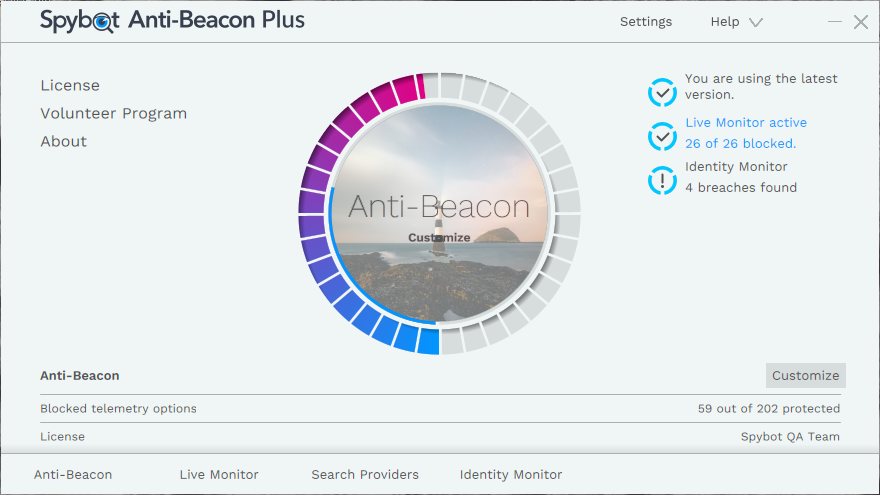
The Anti-Beacon Plus main window (version 4.2 interface): the center wheel applies protection, and the panel below shows how many telemetry options are blocked and whose license is active.
Features
Telemetry blocking beyond Windows
Spybot Anti-Beacon Plus sorts its immunizers into Operating System, Preinstalled Manufacturer Software, Third Party Analytics, Antivirus, Games, Hardware Drivers, Browser, Office Software and Apps. The free edition stops at Windows, antivirus and analytics telemetry; Plus adds the browser, Office, game and OEM and driver categories, which is where much of the remaining background traffic on a typical PC comes from. In the vendor's 4.2 screenshot the Browser group alone held 22 immunizers.
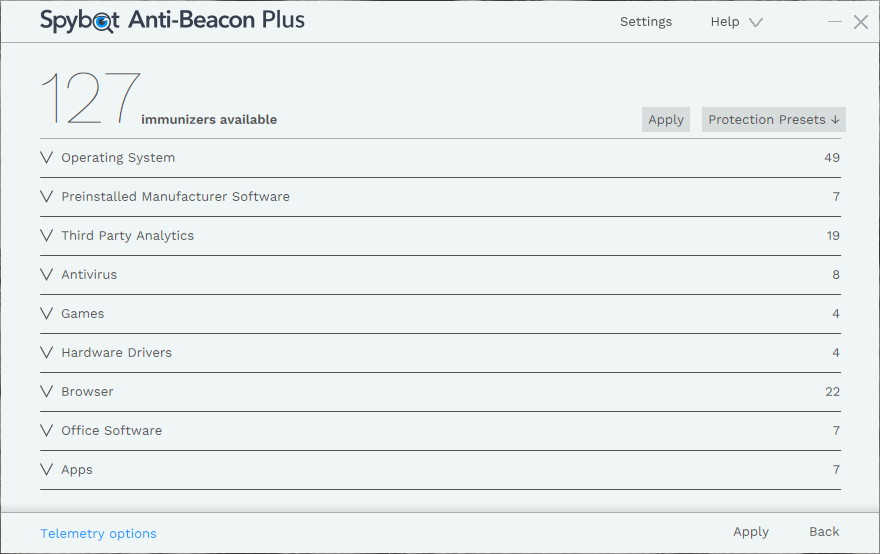
The Customize screen (version 4.2): 127 immunizers grouped by category, with the Protection Presets menu and the Apply button at the top.
Presets, or control over every switch
Spybot Anti-Beacon gives you protection presets so you can pick a level, click Apply and be done. If you want more, each immunizer has its own Block/Permit slider, a count of the items it changes, and a description of what it blocks, so you can leave, say, location services alone while blocking advertising IDs. Some immunizers, such as Windows Optional Telemetry, are only recommended for maximum privacy, since they block more Microsoft servers.
A Live Monitor that counts what tried to phone home
Spybot Anti-Beacon's Live Monitor, added in version 4.1, logs every telemetry connection attempt it sees and whether it was blocked, grouped by product. Since 5.1 it also draws what you've blocked so far. It even estimates the CO₂ each attempt costs, which is more novelty than necessity, but the attempt counts are a useful sanity check that protection is working. Plus users get the Live Monitor Plus view.
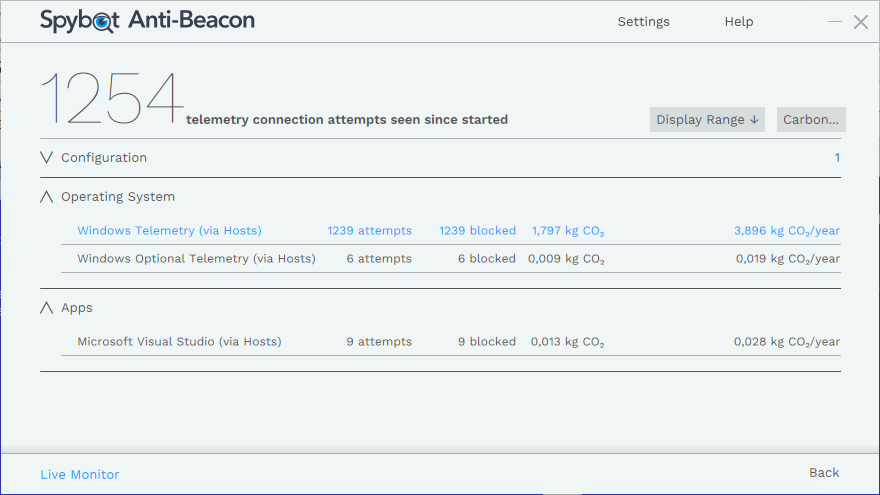
The Live Monitor (version 4.1): 1,254 telemetry connection attempts seen, with Windows Telemetry, Windows Optional Telemetry and Microsoft Visual Studio attempts all blocked through the hosts file, and a CO₂ estimate for each.
Re-immunization after updates
Spybot Anti-Beacon can refresh its immunization at each logon. Windows updates and app updates often switch telemetry settings back on without telling you, so this setting quietly re-applies your choices every time you restart, instead of leaving you to notice months later.
Explanations for each blocked item
Spybot Anti-Beacon's product page documents the immunizers one by one: what each telemetry source sends, and for antivirus vendors such as AVG, Avast, COMODO and Lavasoft, how well they inform users and ask for consent. That transparency is the main difference from tweak tools that simply flip registry values without telling you why.
Benefits
- Less time in Settings. The changes that would take an evening of group-policy and hosts-file editing happen in one click, and you can see and undo each one.
- Coverage past Microsoft. Browsers, Office, games and the software your PC maker preinstalled all send data too; Plus is the cheap way to cover those without learning each one's settings.
- It stays done. Re-immunization at logon deals with the most annoying part of privacy tweaking on Windows, settings that reset after updates.
- Proof it's working. The Live Monitor shows the attempts it caught, which a list of toggles can't.
Real-World Uses
- Turning off Copilot and Recall on a new Windows 11 laptop, along with the maker's customer-feedback program, without digging through policy editors.
- A gaming PC where the game launchers and engines report analytics in the background: the Games immunizers block them while the games keep running.
- A home office PC with Microsoft Office and Edge, where you want the Office and browser telemetry gone but still need the apps to work.
- Setting up a relative's computer with a preset, then leaving re-immunization on so it stays private without you checking it after every update.
Who It's For, and Who Should Skip It
Good fit: Windows 10 and 11 users who care about telemetry but don't want to maintain a list of registry tweaks, and who use the browsers, Office and games that the free edition doesn't cover. It suits people who want a readable explanation of each change and an easy way back.
Skip it if: you only want Windows telemetry blocked, since the free edition already does that. Skip it on servers and business machines managed by group policy, where an admin should set telemetry centrally (one user reported it didn't write its hosts entries on Windows Server 2022). If you're on Mac or Linux there's nothing here for you, and if you want your whole connection hidden, a VPN or a filtering DNS service does a different and broader job. Buyers who also want Spybot's antivirus get Anti-Beacon Plus inside Spybot Professional Edition.
Usage Guide
- Download and install the Anti-Beacon installer from the vendor and run it. The same installer covers Free and Plus.
- Enter your license key: click License in the program, then Enter License Key, and paste the key from your purchase confirmation email.
- Protect: click the center wheel to apply the default protection, or open Protection Presets and pick a level, then click Apply.
- Customize: click Customize to see every category, open an immunizer to read what it blocks, and move its slider to Block or Permit.
- Turn on re-immunization in Settings so your choices come back after each logon.
- Check the Live Monitor after a day of normal use to see what tried to connect and what was stopped.
Tip: if something in Windows stops working
Open Customize and switch immunizers back to Permit one at a time until the feature returns. The vendor notes that some changes are only undone after a reboot, so restart before you decide an immunizer wasn't the cause. A Windows restore point before the first run costs a minute and makes the whole thing reversible.
Where it falls short
- Breaking things: blocking telemetry can disable Windows features that share the same services, and some forum users over the years blamed Anti-Beacon for problems that went away when they uninstalled it.
- Newest Windows builds lag: in September 2026 a user reported the Live Monitor stayed at zero on Windows 11 26H2, and the support team hadn't tested 26H2 yet. The FAQ still names Windows 11 22H2 as the latest version it supports.
- 5.4 bugs reported on the forum: an "Access Violation" popup after hours of use (the suggested fix was switching re-immunization off and on), and a Plus license on Windows Server 2022 that reported "protected" while leaving the hosts file empty.
- License hiccups: an October 2026 buyer saw a "license broken" message and Plus features locked after entering a new key; support handles these by email.
- Documentation is thin: the changelog stops at 5.1.1, so what changed in each 5.4 update isn't spelled out.
What Users Say
Anti-Beacon gets far fewer reviews than Spybot's antivirus, but the reviews it does get are consistent: reviewers who pan Spybot's malware protection single out Anti-Beacon as the part worth having, while forum users argue about whether blocking telemetry breaks Windows.
Review sites
Tyler Cross at SafetyDetectives was unimpressed by Spybot's antivirus but wrote: "On the bright side, the anti-tracking tools are pretty good." He added: "I like that you can give each company a different set of rules. There are 3 different security presets to pick from, or if you're feeling brave you can delve into Spybot's labyrinth of menus and customize the rules yourself." His reservation: "Admittedly, even though I liked this feature a lot, a good VPN is much more effective at safeguarding your overall privacy by encrypting your web traffic."
Osama Zahid at WizCase scored Spybot as a whole 3.4 out of 10 in a review updated in October 2026, yet called Anti-Beacon "among Spybot's best tools. It's an elegant anti-tracking feature that checks all the apps on your system and informs you about the ones that can track and monitor your information."
MajorGeeks' long-standing listing describes an early version as "an all-or-nothing program as it does not allow users to select what they want to disable. But you can easily revert to default by simply clicking undo or returning to the restore point." That criticism is out of date: current versions have presets and a slider for every immunizer.
Users on forums and Trustpilot
On Trustpilot, where Safer-Networking has a 3.9 TrustScore from only 6 reviews, Dave wrote in February 2021 that "their product spybot antibeacon makes it soooo easy to block telemetry".
A January 2020 thread on the PC Review forums shows the split. Moderator V_R: "Anti Beacon can and will break things its not intended to. Source: I used to use it and ended up getting rid of it." nivrip: "I too used it for a short while a few years back but found all sorts of problems developed on my PC. All the problems disappeared when I uninstalled it." Moderator muckshifter disagreed: "I use Spybot Anti-Beacon, I have no 'problems' with it."
On Spybot's own support forum, 2026 reports center on version 5.4. Tinkerski, after buying Plus for Windows Server 2022 in April: "It runs, every time it shows that it's checking everything and says it is protected. No errors are generated. But, the HOSTS file is empty." MrMajorThorburn on Windows 11 in March: "I am getting this popup after a few hours of use every day." gandu in September: "In Windows 11 26H2, the live monitor always stayed at zero." oso in October: "I can't edit the Plus-only features and the homepage of the UI says my license is broken and to reinstall it." A staff member replied to each thread, passing the hosts-file report to the developers and offering a workaround for the popup.
The themes
People like how little effort it takes, the per-company control, and the fact that it explains its changes. The complaints are about side effects on Windows, bugs on the newest Windows builds and on Windows Server, and occasional license activation trouble. Nobody reviewed here questions that it blocks what it says it blocks on a normal Windows 10 or 11 PC.
Comparisons
Anti-Beacon Plus vs Spybot Professional Edition
Spybot Professional Edition costs $32.99 a year on the order page and includes Anti-Beacon Plus along with Spybot's antivirus, Live Protection and extra tools. If you'd buy both, Professional is the better deal. If you already have an antivirus you're happy with (Microsoft Defender included), Anti-Beacon Plus on its own is $11 a year cheaper and does the privacy job alone. Spybot Home Edition ($23.99) does not include Anti-Beacon Plus.
Anti-Beacon Plus vs doing it yourself
Everything Anti-Beacon changes can be done by hand with Windows Settings, the group policy editor, the services console and the hosts file, and free tweak tools cover much of Windows' own telemetry too. What the subscription buys is the browser, Office, game and OEM lists kept up to date as products add new tracking, the Live Monitor, and settings that re-apply after updates.
Editions and Pricing
| Edition | Price | Term | What it covers |
|---|
| Anti-Beacon Free | Free | No time limit | Windows, antivirus and third-party analytics telemetry |
| Anti-Beacon Plus | $21.99 | 12-month subscription | Everything in Free, plus Office, browser, games and OEM and driver telemetry, and Live Monitor Plus |
| Spybot Professional Edition | $32.99 | 12-month subscription | Anti-Beacon Plus together with the Spybot antivirus and its tools |
The vendor's site also shows an Anti-Beacon Home tier between Free and Plus (Free plus the games, driver and OEM immunizers, without browsers and Office). Plus is the full set, and it's the edition sold on our order page.
FAQs
Does Spybot Anti-Beacon Plus block Copilot and Recall on Windows 11?
Yes. Spybot Anti-Beacon has had Windows CoPilot and Microsoft Windows Recall immunizers since version 5.1 in February 2025. Switch them to Block in Customize, or apply a preset that includes them.
Is Spybot Anti-Beacon still updated?
Yes. Spybot Anti-Beacon is at version 5.4, first released in November 2025, with the vendor's installer last updated on June 23, 2026 and 5.4 bug reports answered by staff on the forum through October 2026. That's a different story from Spybot - Search & Destroy, whose program hasn't had a new build since February 2023.
Can I use Spybot Anti-Beacon alongside Microsoft Defender or another antivirus?
Yes. Spybot Anti-Beacon isn't an antivirus and doesn't scan files, so it runs next to Defender or any other security suite. The one thing to watch is a security program that guards the hosts file: Spybot's support staff asked a user whose hosts entries weren't written whether real-time protection from another program could be blocking it.
What happens when my Anti-Beacon Plus subscription ends?
Spybot Anti-Beacon Plus is a 12-month subscription that renews yearly, and the vendor reminds you before renewal. Without a valid license you're left with the free edition's Windows, antivirus and analytics immunizers.
Do I need to reinstall to upgrade from the free edition?
No. Spybot Anti-Beacon Free and Plus use the same installer. Click License in the program, then Enter License Key, and paste the key from your purchase confirmation.
Can I get a refund on Spybot Anti-Beacon Plus?
Probably not. Safer-Networking's sales terms treat downloaded software as non-refundable, which is why it's worth running the free edition for a while before you buy.
Is there a way to get Anti-Beacon Plus free?
Spybot Anti-Beacon has a Volunteer Program: users who help the team with the information it asks for on its support forum can earn a lifetime license.
System Requirements
- Windows 10 or Windows 11 (the vendor's FAQ was written for Windows 11 22H2; users run it on 25H2)
- Administrator rights, since it changes system settings, services and the hosts file
- About 25 MB for the installer
Conclusion
Spybot Anti-Beacon Plus is worth $21.99 a year if you already use the free edition, it hasn't broken anything you need, and you want the same treatment for your browsers, Office, games and OEM software. The reason to buy it is simple: it turns hours of privacy tweaking into a click, and keeps it applied after Windows updates. The reason to hold off is that the free edition already handles Windows itself, and the newest Windows 11 builds and Windows Server have open bug reports, so check it on your own machine first. If you also want Spybot's antivirus, buy Spybot Professional Edition instead, which includes Anti-Beacon Plus.
Download Free TrialBuy Now