Spybot Technician's Edition: Spybot's Business Toolkit for People Who Fix Other People's PCs
Spybot Technician's Edition is a $69-a-year Windows license from Safer-Networking Ltd. for IT technicians. It has every tool in Spybot - Search & Destroy's business line, including the antivirus engine, Live Protection, Anti-Beacon Plus, registry repair, a shredder, scripting and command line scanners, and it's the only edition that adds the FileAlyzer and RegAlyzer analysis tools and lets you run Spybot from a portable device on the PCs you support.
Anyone who has cleaned up a neighbor's laptop or a small office's workstations knows the routine: plug in a USB stick, scan, dig through startup entries, look at a suspicious file, check the registry. Technician's Edition puts the tools for each of those steps in one license.
Quick facts
- Developer: Safer-Networking Ltd., Greystones, County Wicklow, Ireland
- Current build: Spybot - Search & Destroy 2.9.85.5, released February 2023; the same installer serves all editions
- Exclusive to this edition: FileAlyzer, RegAlyzer, and use of a portable device on systems you support
- Platform: Windows 7, 8, 8.1, 10 and 11, 32-bit and 64-bit
- Price: $69.00 for 12 months on the order page, renewing yearly
- Trial and refunds: no timed trial; the vendor asks you to evaluate the free edition first, and downloadable purchases aren't refundable
- What we checked: the installer spybotsd-2.9.85.5.exe (62 MB, file version 2.9.85.5, digitally signed by Safer-Networking Ltd.) downloaded from the vendor's site, and the order-page price of $69.00 for the yearly Technician's Edition with no discount or tax line, both on November 8, 2026. We didn't install a Technician's license or try the portable mode.
Before you buy
The main Spybot program is still build 2.9.85.5 from February 2023, and its antivirus hasn't been tested by independent labs in years. As a technician you'll get the most from Spybot's spyware, startup and analysis tools, not from relying on it as the only antivirus. The license can't be refunded, so check the free edition on your usual systems first.
Download Free TrialBuy Now
Overview
Safer-Networking describes the Technician's Edition as "an extended set of tools for technicians who want to have a deeper look into all parts of the operating system": to analyze problems, check configurations, define their own rules, and maintain computers in workgroups or whole companies. On your own PC it runs as a full Spybot with Live Protection. On the systems you look after, the license also covers running Spybot from a portable device without installing it permanently.
Like the Corporate Edition, it scans with two engines, Spybot's anti-spyware engine and a licensed antivirus engine. It also has every advanced tool of the Professional and Corporate editions, plus two stand-alone Safer-Networking utilities that otherwise aren't part of any Spybot license.
Features
Portable use on the PCs you support
Spybot Technician's Edition is the only Spybot license that covers running Spybot from a portable device on systems you support, where it isn't permanently installed. That's the license you need to carry Spybot from one customer's PC to the next instead of buying a copy for each machine you clean.
FileAlyzer shows what's inside a suspicious file
Spybot Technician's Edition includes FileAlyzer, which opens a file and shows its basic content, a hex viewer and interpreted views of complex structures. For Windows programs that means PE headers, sections, imports, exports, resources, a disassembler, Authenticode signatures and packer detection; it also reads Linux ELF files, Android and iOS apps, archives and dozens of data formats, and it can look a file up on VirusTotal. FileAlyzer also generates OpenSBI file parameters, so you can turn what you find into your own Spybot detection rule.
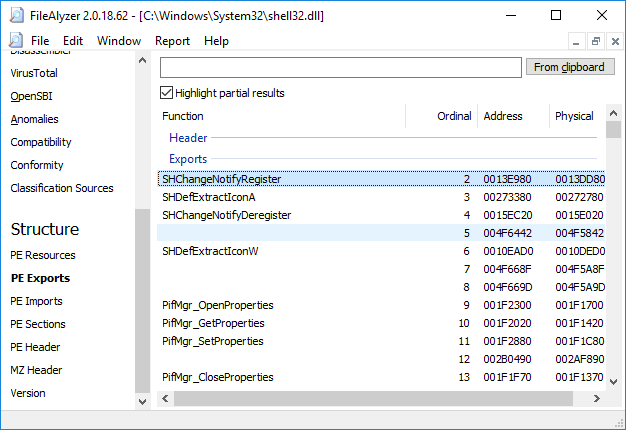
FileAlyzer listing the exported functions of shell32.dll, with VirusTotal, OpenSBI and the PE structure views in the left pane.
RegAlyzer, a registry editor built for digging
Spybot Technician's Edition includes RegAlyzer, Safer-Networking's alternative to regedit. It adds support for exotic value types, background and regular-expression search, better bookmarks, .reg files shown in the familiar style, and a history view. Version 2 adds tabs, value interpretations and snapshots of registry hives you can compare later to see what changed.
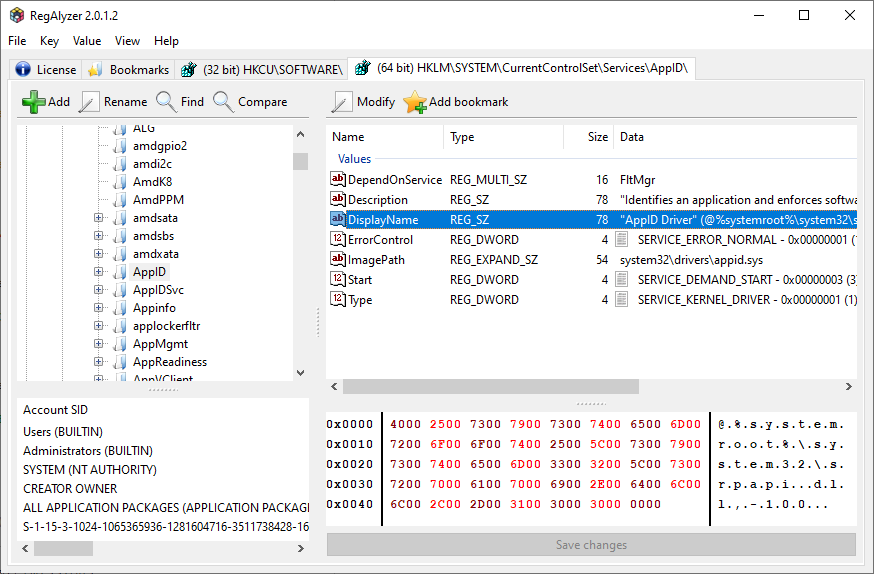
RegAlyzer 2 with three tabs open on the AppID service key: values, the account permissions and a hex view of the selected string.
Startup Tools for autoruns, services and processes
Spybot Technician's Edition's Startup Tools show what loads at start-up and what's running, in tabs for autorun entries, advanced startup, system services, installed software, browser pages, the hosts file, Winsock LSPs, scheduled tasks and Explorer plugins. The process list shows each process's modules, threads, handles, memory pages and connections, with a "Hide legit" filter to cut out known Windows entries.
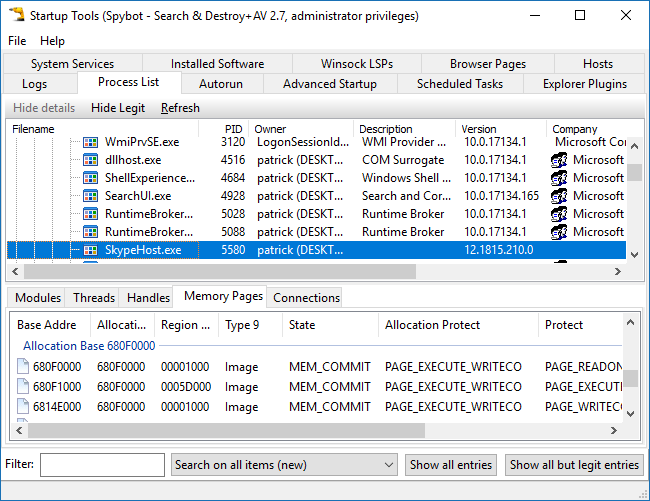
The Process List tab with memory pages for a selected process, and the tabs for autoruns, services, hosts and more (vendor screenshot from version 2.7).
Command line tools for unattended jobs
Spybot Technician's Edition has command line tools for file scans, system scans, immunization, cleaning and updating, so you can run them from batch files, PowerShell scripts or the Windows scheduler without user interaction. It also has the Script Editor, where you write detection rules in OpenSBI syntax and Pascal.
Protected Repair Environment for infections that fight back
Spybot Technician's Edition can open the Start Center on a separate secure Windows desktop, using the same separation as the Windows login screen and UAC prompts, so keyloggers and malware can't interfere while you clean. Its other repair tools include System Registry Repair and a multi-pass Secure Shredder.
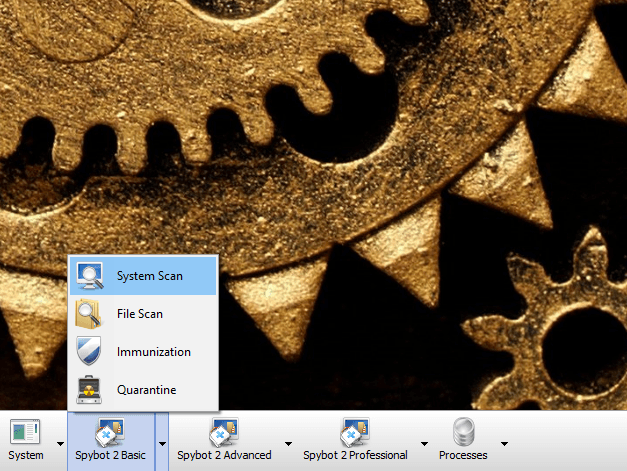
The Protected Repair Environment's own desktop, with menus for basic, advanced and professional Spybot tools on its taskbar.
Benefits
- One license for your toolkit, not per customer PC. Portable use on the systems you support is part of the license.
- Analysis and removal in one place. Find a suspicious file, inspect it in FileAlyzer, check the registry in RegAlyzer, then write an OpenSBI rule to remove it everywhere.
- Automation for routine work. Command line scanners and scheduling let you script scans and updates across machines.
- Telemetry blocking included. Anti-Beacon Plus comes with the business editions too.
Real-World Uses
- A home-call PC repair service. Run Spybot from your portable device on a customer's infected laptop, clean it, then immunize the browsers before you leave.
- Investigating an unknown executable. Open it in FileAlyzer to check its signature, packer, imports and VirusTotal result before deciding whether it's malware.
- Tracking what an installer changed. Take a RegAlyzer snapshot of a registry hive, install the program, and compare.
- Looking after a small office. Schedule command line scans and updates on the workstations and review the logs.
Who It's For, and Who Should Skip It
Technician's Edition is for freelance technicians, small IT shops and the "family IT person" who cleans several PCs and wants to look under the hood. If FileAlyzer and RegAlyzer are tools you'd actually open, it's the only Spybot edition that has them.
Skip it if you're protecting your own home PC: Home ($23.99) or Professional ($32.99) cover that for less. Skip it for a company's own workstations too, where the Corporate Edition ($49.99) has the same protection without the technician tools. And if you need centrally managed endpoint security with a console and lab-tested detection, Spybot isn't that kind of product.
Usage Guide
- Install on your own PC: run the installer from the vendor, accept the User Account Control prompt, choose your language, and paste your Technician's license key on the Spybot Edition page, then click Verify.
- Update: click Update in the Start Center so the anti-spyware and antivirus signatures are current.
- Open the advanced tools: click Show details and tick Advanced User Mode to reach Startup Tools, System Repair, the Shredder and the Script Editor.
- Analyze: open suspicious files in FileAlyzer and the registry in RegAlyzer.
- Clean a stubborn infection: switch to the Protected Repair Environment, scan and fix; create a restore point before deleting rootkit-scan finds.
- Automate: call the command line scanner from a batch file or set up scans and updates in Settings > Schedule.
Where it falls short
- No central management. There's no admin console; each machine is handled locally or by scripts.
- Detection isn't independently verified. AV-Test stopped testing Spybot in 2017, and testers at TechRadar, SafetyDetectives and WizCase saw malware get past it.
- Rootkit scan noise. The vendor warns rootkit finds aren't necessarily malware, and WizCase found most of its rootkit hits were false positives.
- An old-fashioned interface. TechRadar calls it "a bit old school in appearance", and the advanced views reach the same tools by several routes.
What Users Say
There are almost no reviews of the Technician's Edition itself, so these are reviews of Spybot - Search & Destroy in general, which shares its scanner and interface.
TechRadar (Sead Fadilpašić, updated April 2025)
TechRadar's pros are "Easy to use", "Immunization tools", "Fast scans" and "Paid plans affordable"; its cons are "Limited information about threats", "Windows only", "No independent lab tests" and "Clunky interface". It noted that "there isn't much information about what each malicious program or file is other than its category, type, location, threat level, and rule, so you'll need to do your own research" (that research is what FileAlyzer is for).
Its conclusion: "Still, for the price, it's better than nothing and can complement Microsoft Defender's more capable platform."
SafetyDetectives and WizCase
SafetyDetectives (Tyler Cross, updated August 2025) said Spybot "failed to detect most of the 1,000 malware samples I buried on my test device" and that it "lacks a quick scan option, which is somewhat frustrating since its scanner took nearly 2 hours for me and the rootkit scan requires you to leave your computer alone."
WizCase's tester wrote that "The rootkit scan highlighted multiple threats in its results, but I found that most of these weren't actual rootkits." Both sites recommend Norton instead.
2-spyware.com and users
2-spyware.com (Jake Doevan, updated October 2026) rates Spybot 6.4 out of 10 and notes that "Technician's is the only edition that also includes FileAlyzer and RegAlyzer". Its verdict calls Spybot "a respected veteran that still works", while warning that "The main program is showing its age".
A user review on the vendor's Technician's Edition page praises "Host File Protection, Browser Guards, Realtime Spyware and Malware Protection, Process Control, Deep System Scanning", with the con that "it consumes a lot of system resources and some of the scans can take a while, depending on the size of your system and the configurations of the scan you choose."
On Trustpilot, safer-networking.org has a 3.9 TrustScore from 6 reviews; one reviewer found it "Effective and reliable software most of the time, but a very unintuitive user interface that requires tedious learning".
The recurring themes: people value Spybot's deep system tools and its knack for removing adware; reviewers fault its old interface, slow full scans and weak results in malware-sample tests.
Comparisons
Technician's vs Corporate Edition
Both are business editions with the same scanning, Live Protection, Anti-Beacon Plus and advanced tools. Technician's adds FileAlyzer, RegAlyzer and the right to run Spybot from a portable device on systems you support, for $69.00 instead of $49.99 a year.
Technician's Edition vs the free FileAlyzer and RegAlyzer
FileAlyzer and RegAlyzer can be downloaded on their own from Safer-Networking's site, and RegAlyzer has a separate paid Plus subscription. The Technician's Edition bundles them with the full Spybot license, which makes sense if you'll use Spybot anyway.
Editions and Pricing
Yearly prices from the order page on November 8, 2026. All editions install from the same file.
| Edition |
Price per year |
Use |
Tools |
| Home | $23.99 | Personal | Anti-spyware, antivirus, Live Protection, auto updates |
| Professional | $32.99 | Personal | Home plus Anti-Beacon Plus, registry repair, shredder, scripting, command line |
| Corporate | $49.99 | Business | Same tools as Professional |
| Technician's | $69.00 | Business, technicians | Corporate plus FileAlyzer, RegAlyzer and portable use |
FAQs
Does the Spybot Technician's Edition license cover my customers' PCs?
Spybot Technician's Edition covers your own system and running Spybot from a portable device on the systems you support, where it isn't permanently installed. A customer who wants Spybot installed and protecting their PC full-time needs their own license.
Is there a separate download for Spybot Technician's Edition?
No. Spybot Technician's Edition uses the same Spybot - Search & Destroy 2.9.85.5 installer as the other editions; your license key decides the edition.
Can I buy several Technician's licenses for my team?
Yes. The order page lets you set the number of copies, with volume prices for larger quantities.
Can I get a refund on Spybot Technician's Edition?
No. Safer-Networking's terms say downloadable products aren't refundable and ask you to evaluate the free version before ordering.
Does Spybot Technician's Edition support Windows XP or Vista machines?
No. The current Spybot 2.9 runs on Windows 7 to 11. Safer-Networking lists Windows XP and Vista as supported only up to Spybot 2.4.
Does Spybot Technician's Edition work alongside a customer's existing antivirus?
Spybot Technician's Edition can, but the vendor recommends keeping only one real-time guard active. Disable Spybot's Live Protection or the other program's real-time protection to avoid conflicts.
System Requirements
- Windows 11, 10, 8.1, 8 or 7, 32-bit or 64-bit
- Pentium 4 2.4 GHz or any AMD64 or Intel64 processor
- 1 GB of RAM or more
- 750 MB of free disk space for a licensed edition
- An internet connection for updates and license activation
Conclusion
Spybot Technician's Edition is worth $69 a year to a technician who will use what makes it different: portable use on customers' PCs, FileAlyzer for picking apart suspicious files and RegAlyzer for the registry, on top of Spybot's startup tools, scripting and command line scanners. That toolkit is the one reason to buy it. The main reason not to is the scanner underneath: an antivirus with no recent lab results on a program build from February 2023, so pair it with a lab-tested antivirus rather than relying on it alone. For your own PC or an office's workstations, the cheaper editions make more sense.
Download Free TrialBuy Now