Spybot Corporate Edition: Spybot's Full Tool Set on a License for Business PCs
Spybot Corporate Edition is the $49.99-a-year business license of Spybot - Search & Destroy, the Windows anti-spyware and antivirus program from Safer-Networking Ltd. It has the same tools as the personal Professional Edition (two scan engines, Live Protection, automatic updates, Anti-Beacon Plus, registry repair, a shredder, a script editor and command line tools) and can run completely without user interaction, which is what a small business's workstations need.
The Home and Professional editions are personal licenses. If the PC belongs to a company, Corporate is the Spybot edition meant for it, and its scripting lets an administrator tell Spybot what software the company itself regards as unwanted.
Quick facts
- Developer: Safer-Networking Ltd., Greystones, County Wicklow, Ireland
- Current build: Spybot - Search & Destroy 2.9.85.5, released February 2023 (one installer for every edition)
- Licensed for: business use, priced per copy with volume prices
- Platform: Windows 7, 8, 8.1, 10 and 11, 32-bit and 64-bit
- Price: $49.99 per copy for 12 months on the order page, renewing yearly
- Trial and refunds: no timed trial; the vendor asks buyers to evaluate the free version first, and downloadable purchases are not refundable
- What we checked: the installer spybotsd-2.9.85.5.exe (62 MB, file version 2.9.85.5, digitally signed by Safer-Networking Ltd.) downloaded from the vendor's site, and the order-page price of $49.99 for one yearly Corporate Edition copy with no discount or tax line, both on November 8, 2026. We didn't deploy it on a network or test its detection.
Before you buy
Spybot Corporate has no central management console: each PC is set up and run locally, or through scripts and the Windows scheduler. Its antivirus hasn't been tested by independent labs in years, and the program build dates from February 2023. For a business that needs audited, centrally managed endpoint protection, this isn't that product. Purchases can't be refunded, so test the free edition on one workstation first.
Download Free TrialBuy Now
Overview
Safer-Networking's pitch for Corporate is flexibility for different people in the same company. It "may be configured to have complete protection against malware and viruses, including Live Protection, completely without user interaction." Advanced users can set their own security options, and "the system administrator might even define special programs or files that are regarded as unwanted in your company. They will then be searched and destroyed by Spybot."
In the vendor's edition table, Corporate ticks exactly the same boxes as Professional. The difference is the license: Corporate is a business edition, priced without tax on the vendor's site like the Technician's Edition, while Home and Professional are personal editions.

The Corporate Edition Start Center in Advanced User Mode, with Live Protection, Internet protection and update status at the top right and the Basic, Advanced and Professional tool groups below (vendor screenshot from version 2.7).
Features
Protection that runs without the user
Spybot Corporate Edition combines Spybot's anti-spyware engine with a licensed antivirus engine, Live Protection that blocks malicious processes before they start, and signature updates several times a day in the background. Scans, updates and immunization can be scheduled through Windows Task Scheduler, so staff never need to open Spybot. Immunization blocks known malicious sites, tracking cookies and bad browser plugins in Firefox, Chrome, Opera and Internet Explorer, among others.
Command line tools for scripts and scheduled jobs
Spybot Corporate Edition includes command line tools for file scans, system scans, immunization, cleaning and updating. The vendor suggests running them from PowerShell scripts, batch files or the Windows scheduler, so an administrator can scan and update workstations without user interaction.
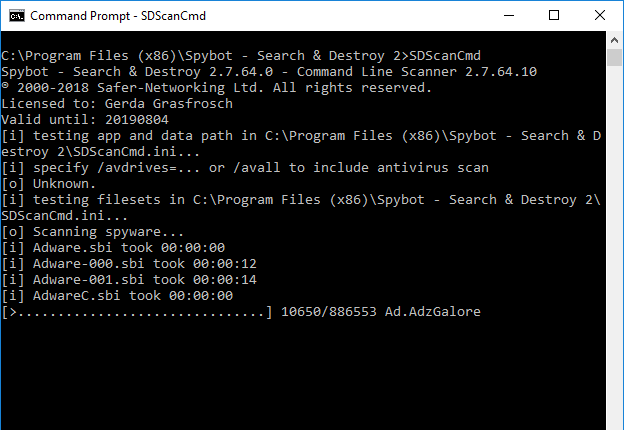
SDScanCmd, the command line scanner, showing the license, its options for including the antivirus scan and the progress of a spyware scan.
Script Editor: define what your company calls unwanted
Spybot Corporate Edition's Script Editor lets an administrator write detection rules in Spybot's OpenSBI syntax and Pascal, so programs or files the company doesn't allow, such as an unapproved toolbar or game, are found and removed by Spybot like malware. Scripts compile and run inside the editor, with an output tab for testing.
Settings to control scope, schedule and services
Spybot Corporate Edition's Settings let you choose the scan scope (including all users, even those not logged in), the malware categories, browsers, ignore lists, the schedule, notifications, system services, a proxy for updates and download folders that get extra scrutiny.
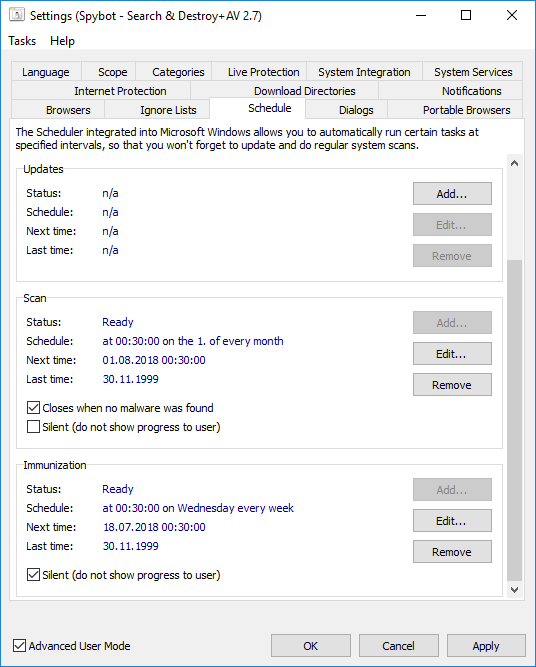
The Settings window's Schedule tab: a monthly scan, a weekly silent immunization and an update task ready to add, plus the other tabs from Language to Portable Browsers.
Anti-Beacon Plus, repair tools and priority support
Spybot Corporate Edition includes Anti-Beacon Plus, which blocks telemetry from Windows, Office, browsers, games and OEM drivers; System Registry Repair for broken entries; the Protected Repair Environment, which runs Spybot on a separate secure desktop; a multi-pass Secure Shredder; and priority support from Safer-Networking.
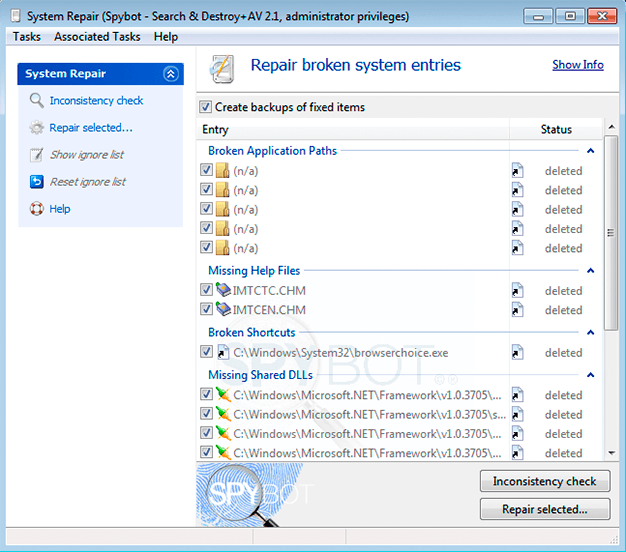
System Repair after an inconsistency check, with backups of fixed items switched on (screenshot from an older 2.1 build).
Benefits
- The right license for company PCs at a low per-seat price, with volume prices for more copies.
- No user involvement. Protection, updates and scans run in the background or from scripts.
- Company-specific rules. Scripting turns your software policy into something Spybot enforces.
- Privacy for the business. Anti-Beacon Plus cuts telemetry from Windows and Office on workstations that handle customer data.
Real-World Uses
- A five-PC office with no IT department. Install Corporate on each workstation with default settings and Live Protection, and let the schedule handle scans and updates.
- Enforcing a no-toolbars rule. Write an OpenSBI script that detects the toolbar's files and registry entries, and Spybot removes it on every scheduled scan.
- Nightly scans from a batch file. Use the command line scanner with the Windows scheduler and keep the logs.
- A second layer next to Defender. Keep Defender's real-time protection, turn Spybot's Live Protection off, and use Spybot for immunization, scheduled spyware scans and telemetry blocking.
Who It's For, and Who Should Skip It
Corporate fits small businesses, home offices registered as companies and organizations that want Spybot on work PCs under the right license, managed machine by machine. It suits an owner or part-time admin who's comfortable with scripts and the Windows scheduler.
Skip it if you need a cloud console, central reporting, policy deployment or lab-tested detection: business endpoint suites do that and Spybot doesn't. Skip it for a personal PC, where Professional has the same tools for $32.99. If you're a technician servicing other companies' PCs, the Technician's Edition adds portable use, FileAlyzer and RegAlyzer.
Usage Guide
- Install: run the installer on each workstation, accept the User Account Control prompt and choose a language. On the Spybot Edition page, paste the Corporate license key from your receipt e-mail and click Verify.
- Choose the setup style: "I want to be protected without having to attend to it myself" for a hands-off install, or the custom option for more control.
- Update and scan: click Update, then Scan system, and Fix selected on the results.
- Set the schedule: tick Advanced User Mode, open Settings > Schedule, and add update, scan and immunization tasks.
- Decide on Live Protection: if the PC has another real-time antivirus, disable one of the two in Settings > Live Protection.
- Add company rules: write and test detection scripts in the Script Editor, and call the command line tools from your own scripts.
Where it falls short
- Weak results in hands-on tests. TechRadar's test file got past Live Protection, and SafetyDetectives and WizCase saw most or half of their samples missed.
- Slow full scans with no quick scan. Reviewers timed full scans at up to two hours on one drive.
- Defender is switched off. Windows disables Defender while Spybot's Security Center service runs; the vendor's FAQ explains how to stop the service if you want Defender back.
- Explorer and performance issues. The vendor's FAQ covers Explorer crashing on right-click (fixed by removing Spybot's Explorer integration) and slower program start-up caused by Live Protection.
What Users Say
Reviews cover Spybot - Search & Destroy as a whole rather than the Corporate license, which uses the same program.
TechRadar (Sead Fadilpašić, updated April 2025)
TechRadar found installation "a relatively easy and speedy process" and liked that the first-run choice between automatic and manual setup works "for both beginners who don't have much technical know-how and experienced users". On scan speed, "it took about 15 minutes to scan about 390GB," though "the system scan did get stuck once for us, standing at 99.7% for 40 minutes".
Its verdict: "Spybot - Search & Destroy has earned its reputation as one of the biggest names in malware protection, but this hasn't been enough for it to garner attention from third-party testing labs. Plus, it's overdue for a much-needed overhaul as its interface looks old and clunky. Otherwise, it's a cheap and decent solution. Just don't expect much."
SafetyDetectives and WizCase
SafetyDetectives (Tyler Cross, updated August 2025), which also covered Spybot's business plans, wrote: "I was also disappointed in Spybot's customer support, which failed to respond to my emails." Its headline finding was that Spybot "failed to detect most malware samples on my device".
WizCase concluded that "Its scans fail to detect malware, its real-time protection is ineffective, it's missing features like a firewall, and the interface is highly outdated." Both reviews point readers to Norton.
2-spyware.com
2-spyware.com (Jake Doevan, updated October 2026) scores Spybot 6.4 out of 10, praising its "Deep tools for advanced users: startup editor, rootkit scan, scripting" and noting that "Detection updates and forum support are active in 2026". Its main criticism: "No new program build since February 2023".
Users
The vendor's Corporate Edition page quotes a user called Skikrazi: "After 2 weeks of struggling trying to remove Coupon Dropdown, I finally tried Spybot 2.0 and it was the only one that worked--after trying Malwarebytes anti-Malware, McAfee and many others." Another user there wanted better live detection: "Other softwares fails to detect it, but Spybot Search & Destroy can do so through the scanning function. In the next review, Spybot Search & Destroy can improve this detection function in realtime protection."
On Trustpilot, safer-networking.org has a 3.9 TrustScore from only 6 reviews, including a three-star review calling it "Effective and reliable software most of the time, but a very unintuitive user interface that requires tedious learning".
The recurring themes: users credit Spybot with removing adware other tools miss and like the price; reviewers criticize slow scans, an outdated interface, weak real-time detection and slow e-mail support.
Comparisons
Spybot Corporate vs Spybot Professional
Same features in the vendor's edition table. Professional ($32.99) is a personal license; Corporate ($49.99) is the business license.
Spybot Corporate vs Spybot Technician's
Technician's ($69.00) adds FileAlyzer, RegAlyzer and the right to run Spybot from a portable device on systems you support. For a company's own workstations, Corporate has everything needed.
Editions and Pricing
Yearly prices per copy from the order page on November 8, 2026. All editions install from the same file.
| Edition |
Price per year |
License |
Tools |
| Home | $23.99 | Personal | Anti-spyware, antivirus, Live Protection, auto updates, scheduling |
| Professional | $32.99 | Personal | Home plus Anti-Beacon Plus, registry repair, shredder, scripting, command line, priority support |
| Corporate | $49.99 | Business | Same as Professional |
| Technician's | $69.00 | Business, technicians | Corporate plus FileAlyzer, RegAlyzer, portable use |
FAQs
Does Spybot Corporate Edition have a central management console?
No. Spybot Corporate Edition is installed and configured on each PC. Central control comes from its command line tools, scripts and the Windows scheduler, not from a console.
How many PCs does one Spybot Corporate license cover?
Spybot Corporate Edition is sold per copy: you choose how many copies you need on the order page, and larger quantities get volume prices.
Can Spybot Corporate scan all user accounts on a shared PC?
Yes. In Settings > Scope, Spybot Corporate Edition can scan the running system and all of its users, including those not logged in, as long as it runs with administrator rights.
Does Spybot Corporate Edition work through a company proxy?
Spybot Corporate Edition's Internet Protection settings let you choose Spybot's proxy setting or your own proxy for downloading updates.
Can we get a refund for unused Corporate licenses?
No. Safer-Networking's terms say downloadable products aren't refundable and that there are no cancellations of online orders, so evaluate the free version first.
Which Windows versions can Spybot Corporate protect?
Spybot Corporate Edition 2.9.85.5 runs on Windows 7, 8, 8.1, 10 and 11. Windows XP and Vista machines are only supported by the old Spybot 2.4.
System Requirements
- Windows 11, 10, 8.1, 8 or 7, 32-bit or 64-bit
- Pentium 4 2.4 GHz or any AMD64 or Intel64 processor
- 1 GB of RAM or more
- 750 MB of free disk space for a licensed edition
- Administrator rights to install and an internet connection for updates
Conclusion
Spybot Corporate Edition is a fair buy at $49.99 per PC for a small business that already relies on Spybot and wants it on work machines under a proper business license, running hands-off with scheduled jobs and company-specific detection scripts. That combination of the full tool set, scripting and a business license is the reason to buy it. The main reason not to is that it's a 2023-era program with unproven antivirus detection and no central console, so it works best as a privacy and anti-spyware layer next to Defender or a lab-tested endpoint product, not as a company's only protection. Try the free edition on one workstation first, since there are no refunds.
Download Free TrialBuy Now