Bitdefender Antivirus Plus: Top-Rated Malware Protection for Windows, Mac, Android and iOS
Bitdefender Antivirus Plus is Bitdefender's entry-level paid antivirus, now a single subscription that protects Windows PCs, Macs, Android phones and iPhones against malware, ransomware, phishing and scam sites. It costs $24.99 for the first year on one device ($49.99 a year after that), and you can try the full product free for 30 days.
It's for people who want strong, quiet protection without paying for a full security suite: one laptop, or a small household with a few devices, where the main worries are ransomware, dodgy links and scam messages rather than parental controls or identity monitoring.
Quick facts
- Current Windows version: 27.0.64.366, released October 19, 2026
- Developer: Bitdefender
- Runs on: Windows 7 SP1, 8.1, 10 and 11, macOS Big Sur 11.3 or later, Android and iOS, all under one subscription
- Price: $24.99 for the first year on 1 device, then $49.99 a year. 3 devices: $39.99 first year ($69.99 regular). 5 devices: $79.99
- Free trial: 30 days with every feature, no credit card, through a free Bitdefender Central account
- Money-back guarantee: 30 days from purchase or from each automatic renewal
- Included VPN: 200 MB of traffic per device per day
- What we checked: Bitdefender's support site listed 27.0.64.366, released October 19, 2026, as the current Windows version on October 20, 2026, and Bitdefender's store listed Antivirus Plus for 1 device at $24.99 for the first year (regular price $49.99) on October 20, 2026. We didn't install it or test its malware detection ourselves.
Before you buy
The $24.99 price is a first-year discount. Bitdefender Antivirus Plus is a subscription that renews automatically at the regular price ($49.99 for one device) unless you turn renewal off in your Bitdefender Central account. Bitdefender emails you before it bills you, and you can ask for a refund within 30 days of a renewal. If you have several devices, the 3-device plan at $39.99 for the first year costs little more than one.
Start Free TrialBuy Now
Overview
After you buy or start the trial, everything runs through Bitdefender Central, an online account where you download the app and add devices. On Windows the app opens on a Dashboard that tells you if you're safe, shows Autopilot's next recommendation (enable ransomware remediation, run a scan) and gives you quick-action tiles for Quick Scan, System Scan, Vulnerability Scan, VPN and Safepay. Protection, Privacy, Utilities, Notifications and Settings sit in the sidebar. For most people it's a set-and-forget app: it scans, updates itself every hour and stays out of the way.
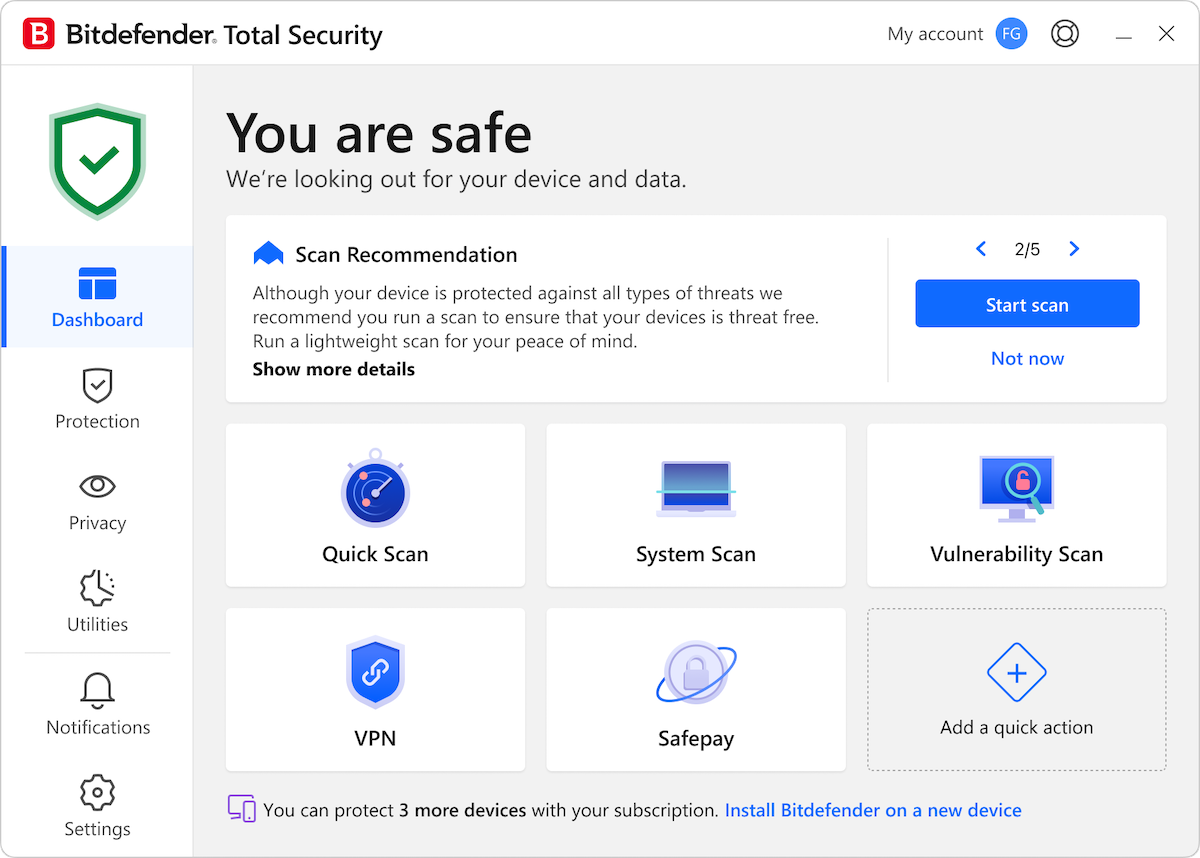
The Bitdefender dashboard on Windows, from Bitdefender's support site. This copy's title bar reads Bitdefender Total Security, which uses the same interface as Antivirus Plus: a scan recommendation, quick actions for scans, VPN and Safepay, and how many more devices the subscription covers.
Features
Malware protection that leads the independent tests
Bitdefender Antivirus Plus blocks viruses, worms, Trojans, ransomware, zero-day exploits, rootkits and spyware. Besides signature scanning, its Advanced Threat Defense watches what running apps do and stops one the moment it behaves like malware. Bitdefender's product page cites an AV-TEST average protection score of 5.96 out of 6 from January 2011 to August 2026, against 5.90 for Norton and 5.50 for McAfee.
Multi-layer ransomware protection
Bitdefender Antivirus Plus adds a data-protection layer that guards your documents, pictures, videos and music against encryption, working with Advanced Threat Defense. Ransomware Remediation, which Autopilot suggests switching on, can restore files that ransomware started to encrypt.
Web, phishing and scam protection
Bitdefender Antivirus Plus scans links before you open them, blocks phishing pages and fake shops in real time, and recognizes scams arriving by SMS or social media. Network Threat Prevention stops exploits, botnet-related URLs and brute-force attacks at the network level, before they reach your files.
Vulnerability scan, Wi-Fi advisor and Safepay
Bitdefender Antivirus Plus checks your PC for outdated or vulnerable software, missing Windows security patches and unsafe settings, and assesses the security of the Wi-Fi network and router you're connected to. Safepay opens banking and shopping sites in a separate, locked-down browser, and can fill in card details for you.
Basic VPN and quiet profiles
Bitdefender Antivirus Plus includes Bitdefender VPN with 200 MB of traffic a day (about 6 GB a month), enough to protect email and browsing on public Wi-Fi but not for streaming. Unlimited traffic is a paid Premium VPN add-on. Game, movie and work profiles pause pop-ups and background tasks while you play, watch or work.
Benefits
- One subscription, every platform. The same license now covers a Windows laptop, a Mac, an Android phone or an iPhone.
- Protection without babysitting. Autopilot and hourly updates mean you rarely need to open the app.
- Scam defense where people get caught. Link scanning and scam detection cover the fake shops and SMS tricks that catch even careful users.
- Cheaper than a full suite. You get the core protection without paying for parental controls, firewalls or identity tools you may not need.
Real-World Uses
- A home laptop: keep Windows protected from ransomware and phishing emails with nothing to configure.
- Online banking: open your bank in Safepay so a keylogger or a fake page can't capture your login.
- A coffee-shop session: switch on the VPN to encrypt email and browsing on public Wi-Fi.
- A mixed household: the 3-device plan covers a Windows PC, a Mac and a phone.
- An older PC: run the Vulnerability Scan to find outdated apps and missing patches.
Who It's For, and Who Should Skip It
Bitdefender Antivirus Plus suits individuals and small households who want top-tested malware, ransomware and scam protection at a low first-year price, and who are happy managing it through an online account.
Skip it if you want a firewall, parental controls, anti-theft or a device optimizer: those are in Bitdefender Total Security. Skip it too if you need a full VPN for streaming, since the included one stops at 200 MB a day. And if you dislike subscriptions that renew at a higher price, Windows' built-in Microsoft Defender costs nothing, though it lacks Safepay, the vulnerability scan and Bitdefender's scam filters.
Usage Guide
- Create your account. Start the free trial or buy, and create a Bitdefender Central account with your email address.
- Download and install. In Central, go to My Devices, install Bitdefender on the device you're using, or send the install link to another device.
- Remove other antivirus software if the installer asks, since two real-time scanners conflict.
- Follow Autopilot. Accept its recommendations, such as enabling Ransomware Remediation and running a first scan.
- Pin your quick actions. Add the scans or tools you use most to the Dashboard.
- Check renewal settings. In Central, decide whether automatic renewal should stay on.
Where it falls short
- Billing surprises. The steepest complaints on Trustpilot are about renewals: being charged again, sometimes twice, and support cases that took weeks to settle.
- Installation can confuse. The account-first setup through Bitdefender Central trips up some buyers, including one who asked for a refund on day one after failing to install it.
- Limited VPN. 200 MB a day is fine for email and browsing, not for video.
- Old hardware. Bitdefender warns that performance may be affected on devices with old-generation CPUs, and Windows needs 2.5 GB of free disk space.
- Occasional false positives. Like any antivirus it sometimes flags legitimate files or scripts, though reviewers say Bitdefender fixes reported cases in updates.
What Users Say
Bitdefender has a very large review footprint. On Trustpilot it scores 4.4 out of 5 from 12,729 reviews (69% five-star, 17% one-star), and Bitdefender replies to 99% of negative reviews, usually within 48 hours. Reviews cover all Bitdefender products.
The praise
- Dr Paresh Gadhavi (Trustpilot, June 2026): "Frequently highly rated in industry tests. In benchmarking etc. Very easy to set up. I find it gives hard and proficient real-time protection. Without the false positives. Simple graphical interface. Lightweight on the system. Highly recommend after using for +7 years."
- BurroBabe (Trustpilot, July 2026): "The on screen interface is intuitive and the support they offer, real live people who are knowledgeable and patient, the best I've ever experienced."
- Donnie Roland (Trustpilot, June 2026): "This is the best online security I've ever used. Great product, great customer service. I highly recommend Bitdefender."
- Evosus (Trustpilot, 5 stars, October 2026): "It blocked the virus and saved my files!!!"
- Nickname (Trustpilot, 5 stars, October 2026): "Excellent support and a genuine commitment to resolving false positives"
The complaints
- Sue Schultz (Trustpilot, 2 stars, October 2026): "This is a good product with deceptive billing." She adds: "Then they bill again even though I have auto renewal turned off."
- Michael Monical (Trustpilot, 1 star, October 2026): "I give up and am asking for my refund at day 1 of a 30 day refund window."
- Jung M (Trustpilot, 5 stars, October 2026), despite the rating: "I wish Bitdefender would be SIMPLER to install as it can be confusing if proper care is not taken."
The pattern
Long-time users praise the protection, the light system load and the support staff. The negative reviews are mostly about the business side, renewals and billing, plus a minority who found installation through the online account confusing. Bitdefender's product page also points to a PCMag review from April 2026 and quotes CNET's "One of the Best Antivirus Options on the Market!", both quoted on its product page.
Comparisons
Antivirus Plus vs. Total Security
Bitdefender Antivirus Plus covers malware, ransomware, web and scam protection, Safepay and the basic VPN. Total Security adds a privacy firewall, parental control, anti-theft and a device optimizer. Choose Antivirus Plus if you only want the protection layer.
Antivirus Plus vs. Microsoft Defender
Microsoft Defender comes with Windows and gives solid baseline protection at no cost. Bitdefender Antivirus Plus adds multi-layer ransomware remediation, scam and fake-shop blocking, Safepay, a vulnerability scan, a basic VPN and coverage for Macs and phones under the same subscription.
Editions and Pricing
| Plan |
First year |
Regular price |
Devices |
| 1 year, 1 device | $24.99 | $49.99 a year | 1 |
| 1 year, 3 devices | $39.99 | $69.99 a year | 3 |
| 1 year, 5 devices | $79.99 | $79.99 a year | 5 |
| 2 years, 1 device | $99.99 | $99.99 per 2 years | 1 |
US prices from Bitdefender's store on October 20, 2026, before sales tax. First-year discounts change with Bitdefender's campaigns.
FAQs
What happens when my Bitdefender Antivirus Plus subscription renews?
Bitdefender Antivirus Plus renews automatically at the regular price ($49.99 a year for one device) unless you turn renewal off. Bitdefender emails you before billing, starting 30 days ahead, and you can request a refund within 30 days of the renewal date.
Can I use one Bitdefender Antivirus Plus license on Windows and a Mac?
Yes. Bitdefender Antivirus Plus is now sold as a multiplatform subscription, so a device slot can be a Windows PC, a Mac, an Android phone or an iPhone. Buy the 3- or 5-device plan to mix them.
Does Bitdefender Antivirus Plus still support Windows 7?
Yes. Bitdefender lists Windows 7 with Service Pack 1, Windows 8.1, 10 and 11 for Antivirus Plus, with 2 GB of RAM and 2.5 GB of free disk space.
How do I move Bitdefender Antivirus Plus to a new computer?
Log in to your Bitdefender Central account, go to My Devices and install Bitdefender on the new computer. If the old computer is no longer in use, you don't need an extra device slot.
Is the VPN in Bitdefender Antivirus Plus unlimited?
No. Bitdefender Antivirus Plus includes Bitdefender VPN with 200 MB of traffic per device per day. Unlimited traffic needs the paid Premium VPN.
How often does Bitdefender update?
Bitdefender updates its virus definitions daily and checks for updates every hour after you start your computer. Major program updates arrive about every four weeks, rolled out gradually.
Do I need a credit card for the free trial?
No. The Bitdefender Antivirus Plus 30-day trial needs only a free Bitdefender Central account, and it includes the complete product.
System Requirements
- Windows: Windows 7 with Service Pack 1, 8.1, 10 or 11, 2 GB RAM, 2.5 GB free disk space
- macOS: Big Sur 11.3 or later, 1 GB free disk space, Safari, Firefox or Chrome
- Mobile: Android and iOS apps
- Other: an active internet connection
Conclusion
Bitdefender Antivirus Plus is worth buying if you want some of the best-tested malware and ransomware protection available, plus scam blocking and Safepay, for a low first-year price, now on Windows, Mac and phones alike. The one reason to buy it is protection that consistently tops the independent labs while staying light on your PC. The main reason to hesitate is the renewal: the price roughly doubles after the first year and renews automatically, so note the date. Start with the 30-day trial, and buy the 3-device plan if you have more than one device.
Start Free TrialBuy Now