Bitdefender Digital Identity Protection: Breach Alerts, Dark Web Monitoring and a Map of Your Digital Footprint
Bitdefender Digital Identity Protection is a web-based privacy monitoring service for one person: it watches the open web and the dark web for your email addresses and phone numbers, alerts you when they show up in a new data breach, and shows you which companies hold your data and how to clean that up. It runs in the Bitdefender Central website, so there's nothing to install, and it costs $79.99 a year ($39.99 for the first year on the order page on November 15, 2026) or $7.99 a month.
It's a privacy tool, not an identity theft insurance plan. It won't watch your credit file, it doesn't need your Social Security number, and it doesn't pay out if someone opens a loan in your name. If that's what you're after and you live in the US, the service you want is Bitdefender Identity Theft Protection, which is compared further down.
Quick facts
- Developer: Bitdefender
- What it is: an online monitoring service with a web dashboard in Bitdefender Central; no app or installer
- Covers: one person, with up to 10 email addresses, 5 phone numbers, your full name and up to 2 inboxes (one Gmail, one Outlook)
- Price: $79.99 a year, or $7.99 a month; the first year is discounted to $39.99 on the yearly plan
- Trial: none; there's a 30-day money-back guarantee instead
- Refund: within 30 days of the purchase or of an automatic renewal
- Not included: credit monitoring, identity theft insurance, automatic data broker removal
- What we checked: Bitdefender's US price list showed Digital Identity Protection at $39.99 for the first year (regular price $79.99) and $7.99 a month, Bitdefender's setup guide lists the limits above (10 email addresses, 5 phone numbers, one Gmail and one Outlook inbox), and the product page says there is nothing to download, all on November 15, 2026. We didn't sign up or run a scan with our own data.
Before you buy
- The first-year price doubles at renewal. $39.99 is a first-term price. The subscription renews automatically at the renewal price ($79.99 a year at the regular rate) unless you turn auto-renewal off in Bitdefender Central.
- It tells you what to do; you do the work. Digital Identity Protection finds breaches and accounts and gives you step-by-step advice and pre-written emails, but it doesn't remove your data from data brokers or close accounts for you.
- You may already have it. Bitdefender Ultimate Security includes Digital Identity Protection along with device protection, a VPN and a password manager, so check your subscriptions before buying it separately.
Buy Now
Overview
Most people have accounts they forgot about years ago: a forum, a shop they used once, an app that no longer exists. Each one still holds an email address, often a password, sometimes a phone number or a birth date, and each one can leak. Bitdefender Digital Identity Protection is built around that problem. Give it an email address and it searches breach data and the dark web for it, then lists the services linked to you so you can change passwords, turn on two-factor authentication or delete the accounts you no longer need.
Everything happens in a dashboard inside Bitdefender Central, the same account site that manages Bitdefender's antivirus subscriptions. The dashboard has tabs for Digital Footprint, Dark Web Monitoring, Fraud Assistance and News, plus Data Brokers and Event History under More. Bitdefender sells it on its own and also includes it in the Ultimate Security plans.
Features
An Identity Protection Score with a risk map
Bitdefender Digital Identity Protection rates your exposure with a score from 0 to 100, based on how many breaches you've been linked to and what kind of data leaked. Next to it, a risk map places each exposure by how common it is and how much harm it can do: a leaked IP address barely matters, a leaked username and password matters a lot. An "Increase your score" panel lists the actions that raise it.

The dashboard: a 71/100 score, the risk map, and a breach of bvdinfo.com with a Take action now button.
Dark web monitoring with a breach-by-breach action plan
Bitdefender Digital Identity Protection checks breach data on the dark web for your name, email addresses, usernames, passwords, postal address, phone number, Social Security number and card details, and alerts you when one turns up. Each breach has a Take action page that lists exactly what leaked and what to do: change the password, turn on two-step verification, delete the account, or report that you never had one. You mark each step as done, and the tab tracks how much of the list you've finished.

Dark Web Monitoring: one personal data exposure, how it compares with other Bitdefender users, and the share of recommended actions completed.
A list of every company that holds your data
Bitdefender Digital Identity Protection's Digital Footprint tab shows the companies and services that may hold your personal data, including old accounts you've forgotten. Click Manage your data on any of them to see what data it likely holds and how to protect or delete the account. For services you still use, it can send a data access request; for ones you don't, it can send a formal deletion request using a pre-written message, and it tracks the 30 days the company has to answer.
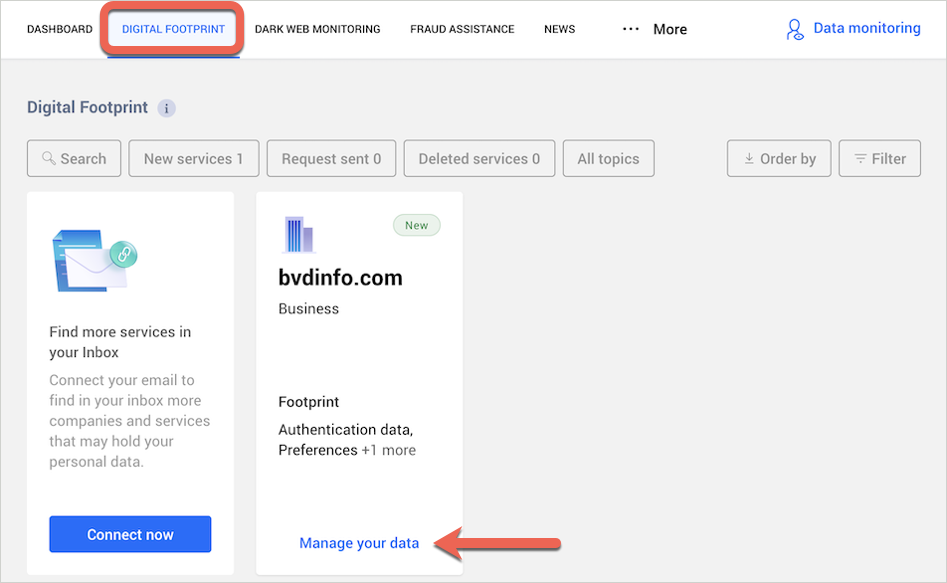
The Digital Footprint tab from Bitdefender's setup guide: one service found, with filters for new services, requests sent and deleted services.
Inbox scanning to find forgotten accounts
Bitdefender Digital Identity Protection can connect to one Gmail and one Outlook inbox and read them for sign-up and order emails, which turns up services a breach scan would never find. You have to give it full access to the mailbox, and the analysis can take hours. Once it's done, you can revoke that access in your Google or Microsoft account settings.
Fraud Assistance and data broker guides
Bitdefender Digital Identity Protection's Fraud Assistance tab walks you through what to do after tax identity fraud, credit card fraud and other scams, including where to report it. It's available in Australia, Germany, Spain, France, Italy, the Netherlands, the UK and the US. The Data Brokers tab lists 8 large US data brokers, such as Spokeo, BeenVerified and White Pages, with a link to search each one and a link to file a removal request.
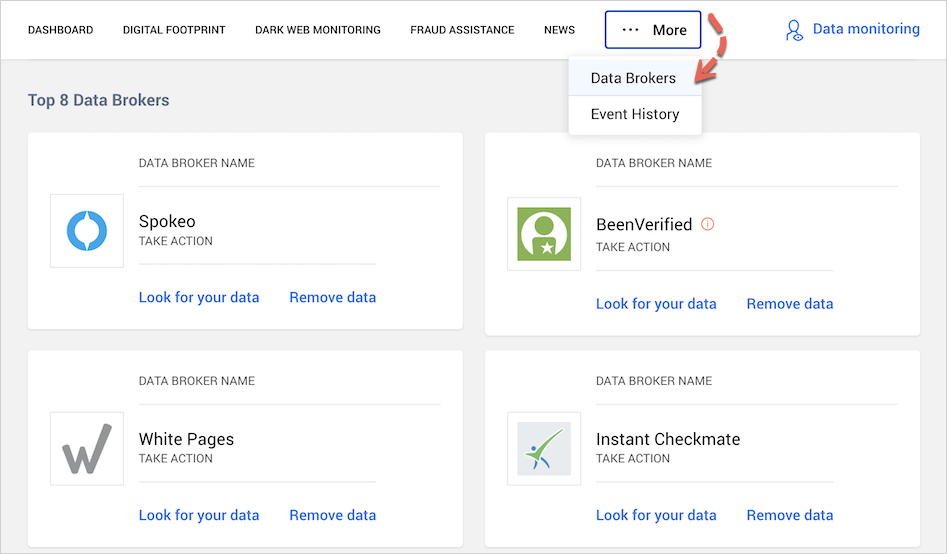
The Data Brokers page under More, with Look for your data and Remove data links for each broker.
Benefits
- You hear about a breach from Bitdefender, not from the news. Alerts arrive when your address appears in new breach data, which gives you time to change a reused password before someone tries it elsewhere.
- Old accounts become visible. The footprint list and inbox scan show you accounts you'd never think to close, and closing them is the most reliable way to shrink what the next breach can take.
- It explains, not just alerts. Each breach comes with what leaked and what to do about it, which suits people who don't follow security news.
- No software on your devices. It's a website, so it works the same on a Windows PC, a Mac or a Chromebook.
Real-World Uses
- You got a "your data was in a breach" email from a company and want to know what else is out there. Add your main email address and work through the Dark Web Monitoring list.
- You've used the same password for years. The breach details show which sites leaked it, so you know which logins to change first.
- You're tidying up a 15-year-old email account. Connect the inbox, then use the deletion requests to close the shops and forums you no longer use.
- You keep getting spam texts. Add your phone numbers and see which breaches and data brokers have them.
Who It's For, and Who Should Skip It
Good fit: one person who wants a clear, guided view of their breach exposure and digital footprint, and is willing to do the cleanup by hand. It's also worth a look if you already pay for Bitdefender Total Security or Premium Security and want the identity side without moving to Ultimate Security.
Skip it if:
- you want your data removed from data brokers automatically; a dedicated data removal service checks hundreds of brokers and files the opt-outs for you
- you're in the US and worried about credit fraud (loans or cards opened in your name); you need credit monitoring and insurance, which is Bitdefender Identity Theft Protection or a similar service
- you want to cover a whole household; this plan watches one person's details
- you already have Bitdefender Ultimate Security, which includes it
Usage Guide
- Activate it. Open the confirmation email after your order and click GET STARTED. You land in Bitdefender Central; sign in or create an account, and the subscription attaches to it. (You can also enter the activation code under My Subscriptions.)
- Start onboarding. Click Begin, enter the main email address you use for online accounts, and type in the security code Bitdefender emails to it.
- Wait for the first scan. It checks the web and breach data for that address; PCMag found it took about a minute.
- Add more details. Click Data monitoring at the top right and add your full name, more email addresses (up to 10) and phone numbers (up to 5). Each one is verified with a code, so you can only monitor details you control.
- Work through the findings. Start with Dark Web Monitoring, open each breach with Take action, do the steps and click Mark as done. Then go through Digital Footprint and delete what you don't use.
- Keep an eye on alerts. New breaches arrive by email; the Event History tab logs every action and lets you undo a mistaken one.
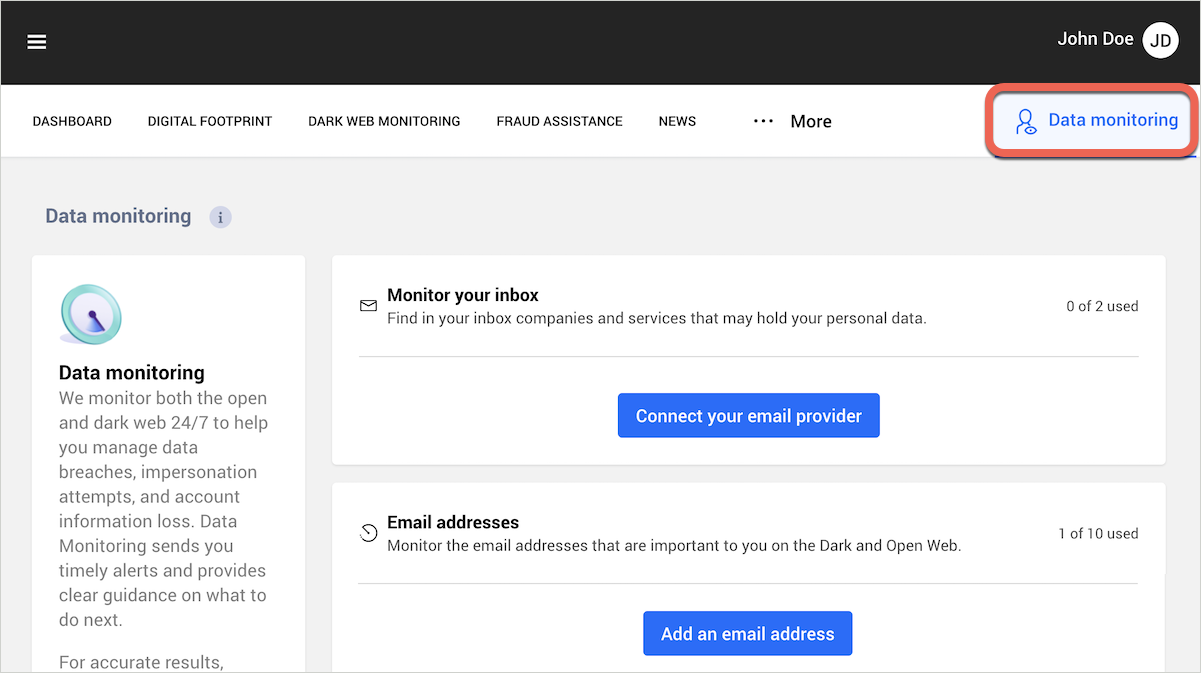
The Data monitoring page: 0 of 2 inboxes connected and 1 of 10 email addresses used.
Where It Falls Short
- Only 8 data brokers, and no automatic removal. Dedicated removal services check dozens to hundreds of brokers and send the opt-outs themselves. Here you search each broker and fill in its form yourself.
- The same advice for every breach. PCMag found every listed breach said to change the password and enable multi-factor authentication, even for breach collections that aren't tied to any one website.
- The score can be slow to respond. PCMag marked five actions as done without the score moving.
- Long lists are tedious. The breach list shows 10 at a time and jumps back to the top each time you return from a breach, which PCMag found annoying with more than 50 breaches.
- No mobile app. It's web-only, so alerts come by email and you check the details in a browser.
- Cancelling auto-renewal is a common complaint. Several Trustpilot reviews are about the subscription renewing (see below).
What Users Say
Independent reviews of Digital Identity Protection agree on the same picture: well organized and informative, but manual, and priced high for what it does at the regular rate. User reviews that name this service are few, and the negative ones mostly concern billing.
PCMag (Neil J. Rubenking, April 20, 2026): 3.5 out of 5, "Good"
PCMag tested the service with its own data and liked how it presents breaches:
"Bitdefender does an unusually detailed and informative job organizing and presenting its findings. It also offers active help with actions to improve your privacy, and its explanatory articles help you understand what's important."
It was blunt about the data broker feature: "Compared with an actual personal data removal service, Bitdefender's data broker feature is almost laughably limited."
And on value: "I wouldn't pay $79.99 per year for that, but if you opt for the maxed-out Bitdefender Ultimate Security suite, Digital Identity Protection is included."
TechRadar (Alex McOmie, updated July 15, 2025): 3 out of 5
"Bitdefender covers the basics well for basic identity protection, but Norton LifeLock and other top competitors provide more robust tools for security, recovery, and reimbursement."
TechRadar praised the dashboard's risk maps and graphs, but had a poor support experience: "The Bitdefender support system may be able to address any issues you run through, however we never received an answer to a question that was quite simple."
All About Cookies (Mary James and Kalleigh Lane, updated April 29, 2026)
The reviewers signed up with their own details and sent a deletion request through the service, which worked. Their verdict is that it "is mostly a manual service".
On the upside: "We were impressed with the design, tools, and educational elements available to us." On the downside: "Bitdefender's option requires a lot more manual effort," and "There are no apps for Bitdefender Digital Identity Protection."
Trustpilot: 4.4 out of 5 from 13,008 reviews (all Bitdefender products)
Bitdefender's Trustpilot score covers its antivirus products too, and only a handful of reviews name this service. Some excerpts:
- Miroslav (5 stars, May 22, 2026): "Total Security plus BD Identity Protection is a winning combination."
- Leon Lovecraft, "Good software bad service" (1 star, June 18, 2026): "Good software, terrible business practice. It's not possible to turn off the subscription autorenewal for Bitdefender Digital Identity Protection."
- Geoff, "Bitdefender Digital Identity software waste of money" (1 star, July 2025): "I paid for a years subscription for the Bitdefender Digital Identity Protection. All this does is send you emais sbout stuff that is in news anyway."
The recurring themes: reviewers like the clear dashboard, the detail on each breach and the explanations that come with it. They criticize the small data broker list, the lack of automatic removal, the regular price, and, among users, the auto-renewal.
Comparisons
Digital Identity Protection vs Bitdefender Identity Theft Protection
The names are close, but the two services do different jobs. Digital Identity Protection is about your online privacy: breaches, leaked passwords, the accounts and data brokers that hold your details. It needs only an email address to start and isn't limited to the US.
Bitdefender Identity Theft Protection is about financial identity theft in the US: it needs your Social Security number, watches your credit file (one bureau on Standard, three on Premium), alerts you to new credit applications, SSN misuse and, on Premium, change-of-address requests, and adds identity theft insurance of up to $1 million or $2 million plus restoration specialists who do the paperwork if it happens. It costs more ($129.99 a year for Standard at the regular price). The two overlap only on dark web monitoring.
Digital Identity Protection vs Bitdefender Ultimate Security
Bitdefender Ultimate Security is the company's top device suite: antivirus for up to 5 Windows, Mac, Android and iOS devices, an unlimited VPN, a password manager and scam protection, with Digital Identity Protection included. If you also need antivirus, the bundle is usually better value than buying the two separately. Ultimate Security Plus, sold in the US, adds Identity Theft Protection on top.
Digital Identity Protection vs data removal services
Data removal services scan many data broker and people-search sites and file opt-out requests on your behalf, again and again. Digital Identity Protection lists 8 brokers and leaves the requests to you, but it covers breaches, leaked passwords and your account footprint, which removal services mostly don't. They solve different halves of the same problem.
Editions and Pricing
| Plan | Regular price | Price on November 15, 2026 | Covers |
|---|
| Digital Identity Protection, yearly | $79.99 a year | $39.99 for the first year | 1 person |
| Digital Identity Protection, monthly | $7.99 a month | $7.99 a month | 1 person |
Prices are in US dollars, plus applicable tax. Both plans renew automatically. The Buy Now button opens Bitdefender's Digital Identity Protection page, where you choose the plan.
FAQs
Does Bitdefender Digital Identity Protection include identity theft insurance?
No. Bitdefender Digital Identity Protection monitors and advises, but it has no insurance, credit monitoring or restoration service. Those come with Bitdefender Identity Theft Protection, which is sold only in the US.
Can I use Bitdefender Digital Identity Protection outside the US?
Yes. Bitdefender Digital Identity Protection is a web service that only needs an email address, and its fraud guides cover Australia, Germany, Spain, France, Italy, the Netherlands, the UK and the US. The data broker list is US-focused, and its removal requests follow California's privacy law.
Do I need to install anything for Bitdefender Digital Identity Protection?
No. Bitdefender Digital Identity Protection runs in the Bitdefender Central website. There's no desktop or mobile app for it; alerts and weekly reports come by email.
Can I monitor my partner's email address with Bitdefender Digital Identity Protection?
Only if they can give you the verification code. Bitdefender Digital Identity Protection sends a code to every email address and phone number you add, so a subscription in practice covers one person's details.
How do I get a refund or stop Bitdefender Digital Identity Protection from renewing?
Bitdefender Digital Identity Protection can be refunded within 30 days of the purchase or of an automatic renewal by contacting Bitdefender's refunds team. You can turn off auto-renewal in Bitdefender Central or by emailing Bitdefender's cancellation address; Bitdefender emails you before each renewal charge.
Does connecting my Gmail to Bitdefender Digital Identity Protection give Bitdefender access to my emails?
Yes. The inbox scan in Bitdefender Digital Identity Protection needs full access to the mailbox so it can find sign-up and order emails. It's optional; you can skip it and monitor email addresses only, or revoke the access in your Google or Microsoft account once the scan is done.
I already have Bitdefender Total Security. Is Digital Identity Protection included?
No. Bitdefender Total Security and Premium Security don't include Digital Identity Protection; Ultimate Security does. With Total Security you can either add Digital Identity Protection on its own or upgrade to Ultimate Security.
System Requirements
- A current web browser and an internet connection
- A Bitdefender Central account (free to create)
- Inbox scanning: one Gmail and one Outlook account at most
Conclusion
Bitdefender Digital Identity Protection is worth it at the $39.99 first-year price for one person who wants a clear, guided cleanup of their breach exposure, and less so at $79.99 a year. The one reason to buy it is how well it explains each breach and turns it into a short to-do list, together with a footprint list that finds the old accounts you forgot. The main reason not to: it does nothing automatically, its data broker coverage is thin, and it isn't identity theft protection. If you're in the US and worried about credit fraud, Bitdefender Identity Theft Protection is the service to look at, and if you also need antivirus, Bitdefender Ultimate Security includes this service already.
Buy Now