Bitdefender Premium Security: Total Security Plus an Unlimited VPN and AI Scam Protection
Bitdefender Premium Security is Bitdefender's security suite for Windows, Mac, Android and iOS that adds an unlimited VPN, AI-powered scam protection for email and text messages, and a system-wide ad blocker to everything in Total Security. It costs $49.99 for the first year on up to 5 devices in Bitdefender's Black Friday sale (62% off, until December 15, 2026), then renews at up to $129.99 a year. It's for people who would otherwise pay for antivirus and a VPN separately.
Total Security, the plan below it, limits the VPN to 200 MB a day per device, which a few minutes of video uses up. Premium Security removes that cap, so the VPN becomes something you can leave on at the coffee shop, the airport or a hotel.
Quick facts
- Developer: Bitdefender
- Windows version: 27.0.64.366, released October 19, 2026 (the same app as Total Security, with the extra features switched on)
- Platforms: Windows 7 SP1 to 11, macOS Big Sur 11.3 or later, Android 7.0 or later, iOS 15 or later
- Plans: Individual (1 member, up to 5 devices) or Family (5 members, up to 25 devices)
- Price: $49.99 for the first year of the Individual plan until December 15, 2026 (regular price $129.99), then billed at the renewal price, up to $129.99 a year
- VPN: unlimited traffic, more than 3,000 servers in over 100 countries
- Trial: free 30-day trial, activated by creating a Bitdefender Central account
- Refund: within 30 days of the purchase or of an automatic renewal
- What we checked: Bitdefender's support site listed 27.0.64.366, released October 19, 2026, as the current Windows version, and on November 12, 2026 Bitdefender's store listed Premium Security at $49.99 for the first year on 5 devices (regular price $129.99) and the Family plan at $79.99 (regular price $169.99). There's no public installer file: the trial and the paid app are downloaded from a Bitdefender Central account. We didn't install it or run our own malware or VPN speed tests, so the test results below come from independent labs and reviewers.
Before you buy
- The renewal price is much higher. $49.99 is a first-year sale price. The subscription renews automatically at the renewal price, up to $129.99 a year, unless you turn auto-renewal off in Bitdefender Central (My Subscriptions) after you buy.
- Email Protection needs full access to your mailbox. It works only with Gmail and Outlook.com accounts, and you have to grant Bitdefender permission to read your messages.
- Most extras are Windows-first. The firewall, Safepay, OneClick Optimizer and anti-theft are Windows features. Macs, iPhones and Android phones get the antivirus or web protection, the VPN, the password manager and the scam tools.
Start Free TrialBuy Now
Overview
Bitdefender sells four consumer plans that build on each other: Antivirus Plus, Total Security, Premium Security and Ultimate Security. Premium Security is the third step. It contains the whole Total Security suite (antivirus, ransomware protection, firewall, Safepay banking browser, password manager, parental control on the Family plan), then adds three things: the Premium VPN with no data limit, Scam Protection Pro with the Scamio Pro chatbot and email scanning, and a system-wide ad blocker and anti-tracker.
Everything is managed from Bitdefender Central, a web account where you install protection on new devices, see alerts and manage the subscription. On Windows it's a single app; on a Mac, iPhone or Android phone you install Bitdefender's apps for each platform.
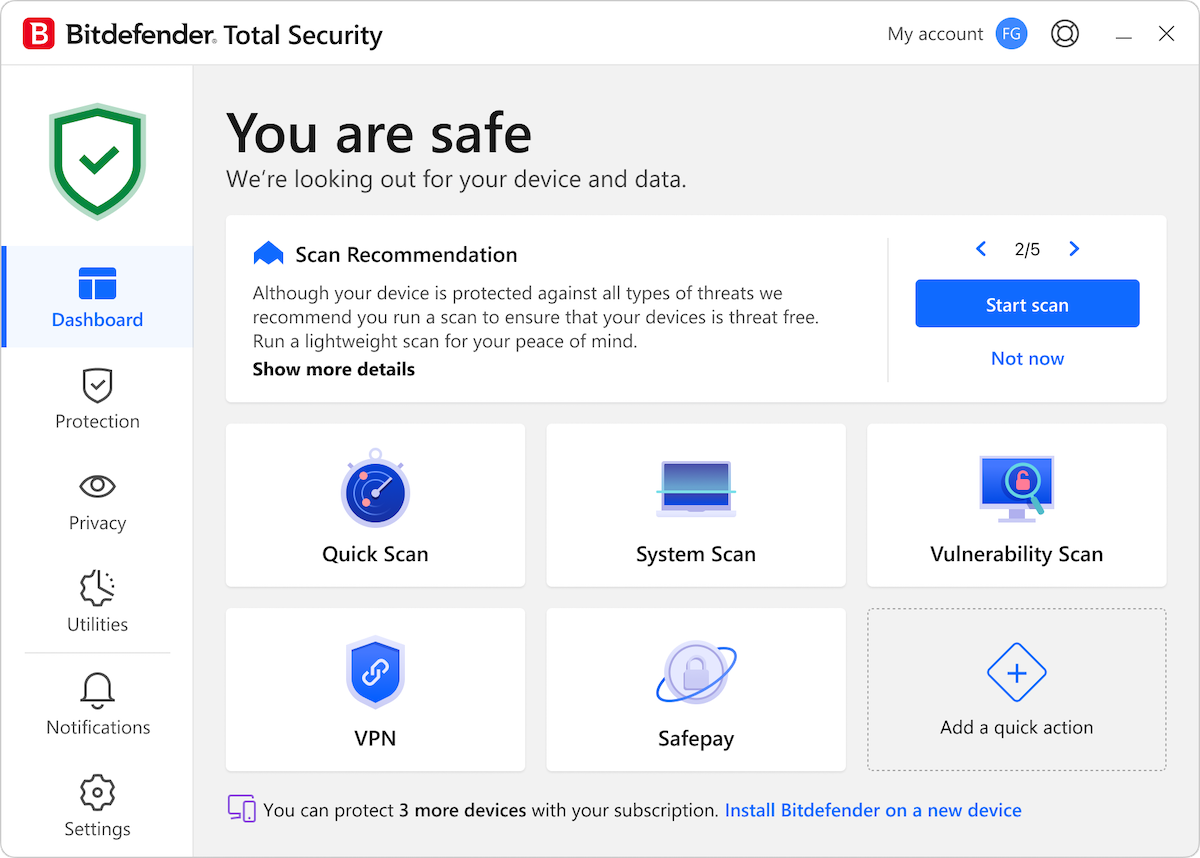
The Windows dashboard: a "You are safe" status, a scan recommendation and quick actions for scans, the VPN and Safepay. The title bar reads Total Security, which shares this interface with Premium Security.
Features
A VPN with no data cap
Bitdefender Premium Security includes the Premium VPN with unlimited traffic on every covered device, with more than 3,000 servers in over 100 countries. You connect from the Bitdefender app or the system tray and can pick a country (and a city in some countries), or let it choose the fastest server. PCMag notes that Bitdefender now runs its VPN on IPVanish's network, with the WireGuard, OpenVPN and IKEv2 protocols, split tunneling for sites and apps you want to keep outside the tunnel, and on Windows an App Traffic Optimizer that gives up to three apps priority bandwidth.

The VPN in Bitdefender's newer desktop app (macOS shown): connected to Austria, with connection time, secured traffic, the hidden IP address, an ad and tracker blocker shortcut and the Kill-Switch.
Scam Protection Pro and the Scamio Pro chatbot
Bitdefender Premium Security adds Scam Protection Pro, a set of anti-scam tools that runs on top of the regular web protection. Web Scam Protection looks for the newest scam patterns while you browse, Scam Radar warns about scam outbreaks in your area, Remote Access Scam Protection watches for the behavior of fake "tech support" callers on Windows, and the mobile apps check SMS messages (Android and iOS), chat apps such as WhatsApp, Messenger, Telegram and Discord (Android) and calendar invites (iOS).
Scamio Pro is the AI assistant: you paste a suspicious link, upload a screenshot or describe a message, and it tells you whether it looks like a scam. PCMag points out it only talks about security and scams, so it isn't a general chatbot.

The Scam Protection Pro pane on Windows, under Protection, before setup: automatic threat detection, scam alerts and Scamio Pro.
Email Protection for Gmail and Outlook
Bitdefender Premium Security's Email Protection scans your Gmail or Outlook.com mailbox on Bitdefender's servers and marks every incoming message as safe or unsafe, so a phishing email is flagged even when you read it on a phone with no Bitdefender app. On Windows it also filters spam in Outlook and Thunderbird. The catch: you have to give Bitdefender access to the whole mailbox, and other webmail providers aren't supported.

Setting up Scam Protection Pro on Windows: three parts are enabled automatically, and Email Protection starts when you add a Gmail or Outlook account.
The full Total Security suite underneath
Bitdefender Premium Security includes every Total Security feature: real-time antivirus with behavior monitoring (Advanced Threat Defense), multi-layer ransomware protection, network threat prevention, anti-phishing and anti-fraud filtering, a vulnerability scan, cryptomining protection, the Windows firewall, Safepay for banking, webcam and microphone protection, OneClick Optimizer, anti-theft for Windows laptops and a file shredder. The password manager works across browsers and devices, and Data Breach Detection lists the companies that have leaked your email address.
The ad blocker and anti-tracker work system-wide rather than only in one browser, and on the Family plan every member also gets Parental Control for their children: content filtering, screen-time routines, location and activity reports.
Benefits
- One subscription instead of two. A good standalone VPN costs about as much as the gap between Total Security and Premium Security, and here it's managed from the same account.
- Protection where scams actually arrive. Most scams now come by text message, chat and email rather than by malware download, and Premium is the first Bitdefender tier that checks those channels.
- Little to configure. Autopilot makes the security decisions on Windows, and the scam tools switch on in one setup screen.
Real-World Uses
- Working from cafes and hotels: leave the VPN on all day on a laptop and phone without watching a data counter.
- Protecting a parent from phone scams: install it on their phone and laptop, add their Gmail account, and let Scam Protection Pro flag fake delivery texts and "bank" emails. They can ask Scamio Pro about anything that looks odd.
- Streaming abroad: connect to a server in another country with unlimited traffic.
- A mixed household of Windows PCs, Macs and phones: 5 devices on one Individual plan, or 25 devices for 5 people on the Family plan.
Who It's For, and Who Should Skip It
Buy it if you want top-tested malware protection and would actually use a VPN regularly, or if someone in your home is a likely scam target. During the Black Friday sale it costs only $5 more than Total Security for the first year.
Skip it if you never use a VPN: Total Security has the same malware protection. If you already pay for a VPN you like, Premium mostly duplicates it. If your main worry is identity theft and data leaks, look at Ultimate Security, which adds dark web monitoring. And if you have only one Windows PC and want the lowest price, Antivirus Plus covers the essentials.
Usage Guide
- Create your account. Use the trial or Buy Now button, then sign in to Bitdefender Central with the email address you bought with. The subscription appears under My Subscriptions.
- Install it. In Central, open My Devices and click Install Protection. Download the app on the current device or send a download link to another one.
- Turn off auto-renewal if you don't want it. In Central, go to My Subscriptions, then My Payments, and switch off automatic renewal. You can still renew manually later.
- Set up Scam Protection Pro. On Windows, open Protection, then Scam Protection Pro, click Set up, and add your Gmail or Outlook account if you want Email Protection.
- Connect the VPN. Use Connect to VPN in the dashboard's quick actions or the system tray icon, and choose a location from the Locations list.
Where It Falls Short
- Heavy scans can slow modest PCs. PCWorld measured large drops in benchmark scores while a full scan ran on the same Bitdefender engine, even though the idle impact is light.
- Parental control filtering isn't airtight. PCMag lists "Parental content filter not fully effective" among its cons.
- The password manager is basic. PCMag's other con: "Password manager lacks advanced features".
- Billing complaints are common. Most of Bitdefender's 1-star Trustpilot reviews are about automatic renewals and cancelling them, not about the protection.
What Users Say
Reviewers rate Bitdefender Premium Security highly for protection and value. Customers are split: most praise the protection and support, while a vocal minority complain about renewal charges.
PCMag (Neil J. Rubenking, updated April 20, 2026): 4.5 out of 5, "Outstanding"
PCMag's bottom line: "Bitdefender Premium Security combines award-winning security with a scam-detection chatbot, server-level email protection, and a VPN with no bandwidth or server limits."
Pros: "Award-winning device-level security", "VPN with no limits", "Identifies dangerous email in the cloud", "Scam Protection Pro offers interactive security", "Online management and remote control" and "Many bonus features". Cons: "Email protection limited to Gmail and Outlook", "Parental content filter not fully effective", "Password manager lacks advanced features" and "Relatively expensive".
On setting up Email Protection: "you'll get warnings that Bitdefender can read all your messages and even send messages on your behalf." PCMag keeps Total Security as its Editors' Choice "because Bitdefender's VPN is good but not among the absolute best."
Tom's Guide (Nikita Achanta, May 21, 2026): Editor's Choice
Tom's Guide tested Ultimate Security, the tier above, which shares Premium's app. "What truly impressed me in my testing was Bitdefender's low system impact as even with full system scans running, it didn't deter internet speeds or tank the frame rate in intensive games." Its reasons to avoid were "Windows can't be viewed in full-size" and "Separate mobile app for VPN".
Independent lab tests (as reported by PCWorld, April 2026)
AV-Test, January and February 2026: 100 percent of 285 zero-day attack samples and 12,728 widespread malware samples caught. AV-Comparatives Real-World Protection, February and March 2026: 99.5 percent of 200 test cases, with one false positive. These tests were run on Bitdefender's Windows engine, which Premium Security uses.
Trustpilot: 4.4 out of 5 from 12,715 reviews (all Bitdefender products)
Bitdefender's Trustpilot page showed 69 percent 5-star and 17 percent 1-star reviews on October 18, 2026. Excerpts from that month:
- "It just works, and has for many years." (Mike S, 5 stars, October 15, 2026)
- "Bitdefender is easy to use, it works well and the technical support is excellent." (Daniel Leclerc, 5 stars, October 15, 2026)
- "Bitdefender has been for me almost an install and forget package, particularly in the last couple of years" (James, 5 stars, October 13, 2026)
- "This is a good product with deceptive billing." (Sue Schultz, 2 stars, October 17, 2026)
- "Forced to enter payment details for AutoRenewal & now they've removed the links for disabling it." (JXL7, 1 star, October 7, 2026)
Reviews Bitdefender shows on its Premium Security page
Bitdefender reprints Trustpilot reviews it chose, all positive, such as: "Bitdefender is simply the best protection you buy. Not only does it give you peace of mind, but they make it easy for anyone to install and manage." (BurroBabe, July 6, 2026)
The recurring themes: reviewers praise the detection rates, the low impact during everyday use, the unlimited VPN and the scam tools. The complaints are about price after the first year, automatic renewals, the Gmail-and-Outlook-only email scanning and a basic password manager.
Comparisons
Premium Security vs Total Security
Bitdefender Total Security has the same malware protection, firewall, Safepay and password manager, but its VPN is capped at 200 MB a day per device and it has no Scam Protection Pro, Email Protection or system-wide ad blocker. In the Black Friday sale the difference is $5 for the first year ($44.99 vs $49.99) and $20 a year at the regular prices ($109.99 vs $129.99).
Premium Security vs Ultimate Security
Bitdefender Ultimate Security adds Digital Identity Protection: dark web monitoring, a digital footprint report and real-time data breach alerts. It costs $69.99 for the first year in the sale ($159.99 regular). Choose it if your email addresses and phone numbers have already shown up in breaches.
Premium Security vs Norton 360 Deluxe
PCMag names Norton 360 Deluxe as the closest rival: five suite licenses and five VPN licenses at a regular price of $119.99 a year, "just slightly less than Bitdefender Premium's price", and it's PCMag's Editors' Choice for a suite with a VPN.
Editions and Pricing
| Plan | Covers | Black Friday price | Regular price |
|---|
| Premium Security Individual, 1 year | 1 member, 5 devices | $49.99 | $129.99 |
| Premium Security Individual, 2 years | 1 member, 5 devices | $119.99 | $259.99 |
| Premium Security Family, 1 year | 5 members, 25 devices, parental control | $79.99 | $169.99 |
| Premium Security Family, 2 years | 5 members, 25 devices, parental control | $159.99 | $339.99 |
US prices from Bitdefender's store on November 12, 2026, before sales tax. The Black Friday prices are valid in the US and Canada until December 15, 2026 and apply to the first term only; renewals may be billed at the regular price.
FAQs
How much does Bitdefender Premium Security cost after the first year?
Bitdefender Premium Security renews automatically at the renewal price, which may be up to the regular price of $129.99 a year for the Individual plan or $169.99 for the Family plan. Bitdefender emails you before it bills, starting 30 days before the expiry date.
How do I cancel Bitdefender Premium Security's automatic renewal?
Turn it off in Bitdefender Central under My Subscriptions, then My Payments, using the email address you bought with. Bitdefender also accepts cancellations at cancel@bitdefender.com.
Can I get a refund on Bitdefender Premium Security?
Yes. Bitdefender refunds Premium Security if you ask within 30 days of the first purchase or of an automatic renewal, by writing to refunds@bitdefender.com.
Is the VPN in Bitdefender Premium Security really unlimited?
Yes. Bitdefender Premium Security includes unlimited encrypted VPN traffic on Windows, macOS, Android and iOS, with the full server list. Only the lower tiers, Antivirus Plus and Total Security, cap it at 200 MB a day per device.
Does Bitdefender Premium Security work on a Mac and an iPhone?
Yes, but with fewer features than on Windows. Bitdefender Premium Security on a Mac has malware scanning, ransomware protection for Time Machine backups, web protection, the VPN and the password manager. On an iPhone it's web protection, the VPN, the password manager and the scam tools for SMS and calendar invites, since iOS doesn't allow antivirus scanning.
Does Bitdefender Premium Security include identity theft protection?
Only a data breach check for your email address. Dark web monitoring and real-time breach alerts are in Ultimate Security, and identity theft insurance only in the US-only Ultimate Security Plus tiers.
Can I upgrade from Total Security to Premium Security?
Yes. Bitdefender offers upgrades from Bitdefender Central near the end of a subscription or earlier, depending on how much time is left. The installed Windows app stays the same; the extra features switch on with the new subscription.
System Requirements
- Windows: Windows 7 with Service Pack 1, 8.1, 10 or 11, 2 GB RAM, 2.5 GB free disk space
- macOS: macOS Big Sur (11.3) or later, 1 GB free disk space, Safari, Firefox or Chrome
- iOS: iOS 15 or later
- Android: Android 7.0 or later
- All platforms: an internet connection and a Bitdefender Central account
Conclusion
Bitdefender Premium Security is the best value in Bitdefender's line-up at $49.99 if you'll use the VPN: you get one of the best-tested malware engines, a VPN with no data cap and real scam protection for email and texts, on 5 devices. The one reason to buy it is that it replaces two subscriptions with one. The main reason not to is the renewal price: at up to $129.99 a year it's no longer cheap, so set a reminder or turn off auto-renewal and decide again in a year. If you never use a VPN, Total Security protects you just as well for less.
Start Free TrialBuy Now