Bitdefender Antivirus for Mac: Lab-Topping Malware Protection That Stays Out of Your Way
Bitdefender Antivirus for Mac is real-time antivirus for macOS Big Sur 11.3 or later that blocks Mac malware, ransomware and adware, protects your Time Machine backups and flags phishing sites in Safari, Chrome and Firefox. Its regular price is $49.99 a year for one Mac or $69.99 for three, and on November 15, 2026 Bitdefender's US store listed the first year at $30.99 for one Mac and $34.99 for three. It's for Mac owners who want strong protection they can set and forget, without paying for a full security suite.
Macs aren't immune: adware, fake app installers and info-stealers aimed at macOS are common, and phishing pages don't care which computer you use. Bitdefender's Mac app scored full marks at AV-Test in 2026 and is an Editors' Choice at PCMag.
Quick facts
- Developer: Bitdefender
- Version: 10.3.6.18, released October 13, 2026
- Platform: macOS Big Sur 11.3 or later, including macOS Tahoe 26 and Golden Gate 27, native on Apple silicon
- Plans: 1 or 3 Macs, for 1, 2 or 3 years
- Price: $49.99 a year for 1 Mac, $69.99 for 3 Macs (regular prices, plus tax)
- Trial: 30-day full trial, no credit card, through a Bitdefender Central account
- VPN: Bitdefender VPN included, limited to 200 MB a day per device
- Refund: within 30 days of the purchase or of an automatic renewal
- What we checked: Bitdefender's support site listed 10.3.6.18, released October 13, 2026, as the current version, and on November 15, 2026 Bitdefender's US store listed the 1-year plan at $30.99 for 1 Mac (regular $49.99) and $34.99 for 3 Macs (regular $69.99), with the 2- and 3-year plans at their regular prices. There's no public installer: the trial and the paid app download from a Bitdefender Central account. We didn't install it or run our own malware tests, so the protection results below come from independent labs and reviewers.
Before you buy
- The first-year price is a promotion. The subscription renews automatically at the renewal price, which may be up to the regular $49.99 or $69.99 a year, unless you turn auto-renewal off in Bitdefender Central.
- It covers Macs only. If your household also has Windows PCs, iPhones or Android phones, Bitdefender Total Security covers all of them under one plan.
- The VPN is a taster. 200 MB a day is enough for checking email on hotel Wi-Fi, not for streaming. Unlimited VPN is a separate subscription.
Start Free TrialBuy Now
Overview
Bitdefender Antivirus for Mac (PCMag calls it Antivirus Plus for Mac) is the Mac member of Bitdefender's consumer line. It runs Bitdefender Shield, the real-time scanner, in the background and leaves the decisions to Autopilot, which also shows recommendations at the top of the window, such as turning on Time Machine protection or adding the browser extension. Detection is done largely in the cloud, so the app is light on the Mac itself.
The main window has a simple menu on the left (Dashboard, Protection, Privacy, Notifications) and buttons for Quick Scan, System Scan, Safe Files and Web Protection. PCMag's April 2026 review notes the newer version adds a Chat Protection button and relabels the main protection button.

The Bitdefender Antivirus for Mac dashboard: a "You are safe" status, a system scan recommendation, Quick Scan and System Scan, Safe Files switched on, and Web Protection showing which browsers have the extension. This is the layout before the latest redesign.
Features
Real-time protection against Mac and Windows malware
Bitdefender Antivirus for Mac blocks and removes viruses, Trojans, spyware, keyloggers, worms, ransomware and adware as files arrive, and it also catches Windows malware, so you don't forward an infected attachment to a PC user. You can run a Quick Scan, a full System Scan or a custom scan of any folder, and compressed archives are scanned automatically. There's no scan scheduler: Bitdefender relies on real-time protection, so run one full scan after installing.
Safe Files and Time Machine Protection against ransomware
Bitdefender Antivirus for Mac's Safe Files stops untrusted apps from changing the folders you protect. Desktop, Documents, Downloads and Pictures are protected by default, you can add more, and Application Access lets you allow or block individual apps. Time Machine Protection keeps other apps from tampering with your backups, so you can restore your files if ransomware does get through.
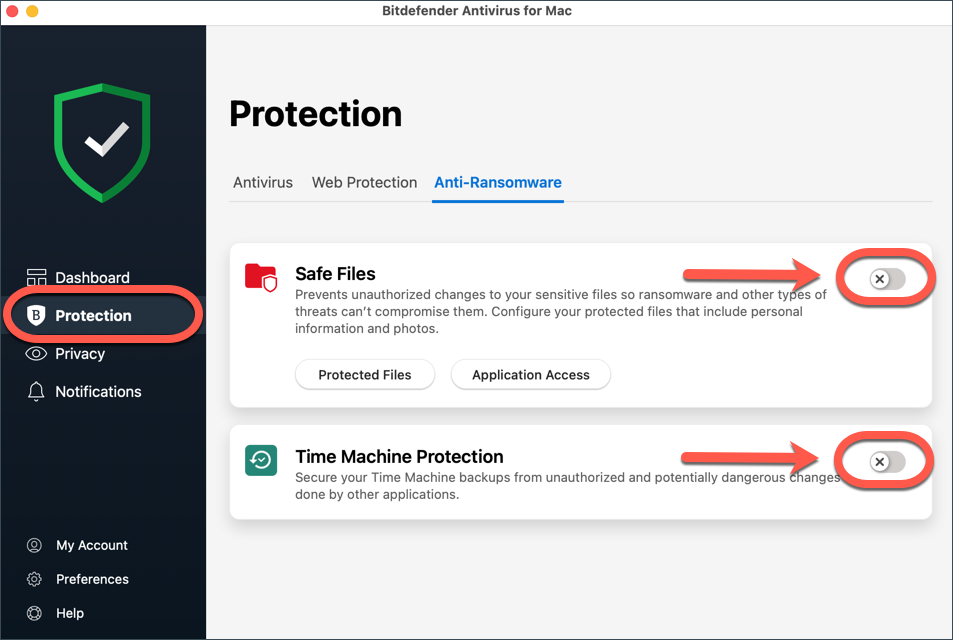
The Protection screen's Anti-Ransomware tab, with the Safe Files switch, the Protected Files and Application Access buttons, and the Time Machine Protection switch (both shown turned off in Bitdefender's support article on disabling them).
Web protection, anti-tracker and Chat Protection
Bitdefender Antivirus for Mac adds the TrafficLight extension to Safari, Chrome and Firefox. It blocks phishing and fraudulent pages, marks dangerous links in search results, and includes an anti-tracker that shows and blocks the trackers on each site. The newer Chat Protection flags dangerous links shared in chats. In PCMag's own phishing test the Mac app scored 100 percent, though Macworld saw it miss pages in Safari (more below).
Adware removal and a basic VPN
Bitdefender Antivirus for Mac detects and removes adware, browser hijackers, unwanted toolbars and other browser add-ons that push ads. It also includes Bitdefender VPN with 200 MB of encrypted traffic a day per device (about 6 GB a month), which Macworld found supports WireGuard and OpenVPN, auto-connects on unsecured Wi-Fi and has a kill switch. Unlimited VPN traffic needs Bitdefender Premium VPN.
Benefits
- Protection you don't have to manage. Autopilot handles decisions, and Macworld found the background protection "largely invisible".
- A second line of defence for your backups. If ransomware does get through, Time Machine Protection keeps the copy you'd restore from out of its reach.
- Low cost for one or three Macs. The first-year price is less than many Mac utilities.
Real-World Uses
- A family MacBook that downloads everything: real-time scanning catches fake installers and adware before they settle in.
- A freelancer's Mac full of client work: Safe Files protects the project folders, and Time Machine Protection keeps the backup safe from ransomware.
- A Mac in a mixed office: Windows malware in email attachments gets caught before it's forwarded to PC colleagues.
- An older relative who clicks links: TrafficLight and Chat Protection warn before they open a phishing page.
Who It's For, and Who Should Skip It
Buy it if you have one to three Macs and want top lab scores, ransomware protection for your files and backups, and an app that doesn't slow you down.
Skip it if you also need to protect Windows PCs or phones: Bitdefender Total Security covers Windows, Mac, Android and iOS devices under one plan. Skip it if you want a full VPN in the box (Norton AntiVirus Plus includes one, at a higher price), or if you depend on scheduled scans, which Bitdefender doesn't offer. If you only want an occasional malware check, Bitdefender's free Virus Scanner for Mac may be enough.
Usage Guide
- Start the trial or buy. Use the Start Free Trial button to create a Bitdefender Central account, or buy a subscription and activate it in Central with the same email address.
- Install it. In Central, open My Devices, choose Install Protection and download the Mac installer. Open it and follow the prompts.
- Grant the permissions. macOS asks you to allow Full Disk Access and Bitdefender's network extension in System Settings. Protection isn't complete until you do.
- Follow the Autopilot recommendations. Turn on Time Machine Protection, Safe Files and the TrafficLight extension in each browser you use.
- Run a full System Scan once. There's no scheduler, so do it right after installing. After that, real-time protection does the work.
Where It Falls Short
- Web protection depends on your browser. Macworld found Safari "allowing nearly every phishing and scam link" from a Gmail spam folder, Firefox missed some clone sites, and Chrome did best.
- Some scripts ran before macOS stopped them. In Macworld's test, several malicious developer scripts and fake installers got onto the Mac before Apple's XProtect and Gatekeeper blocked them.
- No scheduled scans, no log export, and no firewall of its own: it relies on the macOS firewall.
- Chat Protection is new. Macworld says it "successfully identifies obvious scams but currently struggles with more sophisticated social engineering attempts".
What Users Say
Bitdefender Antivirus for Mac is one of the best-reviewed Mac antivirus apps: perfect lab scores, an Editors' Choice at PCMag and TechRadar's top Mac pick. The criticism is about web protection and missing extras, not the core engine.
PCMag: 4.5 out of 5, Editors' Choice (Neil J. Rubenking, April 12, 2026)
PCMag's bottom line: "Bitdefender Antivirus Plus for Mac gets high marks in our own hands-on testing and from independent labs. You can set it, forget it, and rest assured that your Mac is protected." Pros: "Perfect and near-perfect scores from testing labs", "Protects files and backups from ransomware", "Includes VPN", "No-hassle Autopilot mode", "Chat protection flags dangerous links" and "Blocks trackers in browsers". Con: "Full access to VPN features requires a separate subscription".
In PCMag's hands-on test a scan of nearly 90 malware samples "detected and quarantined 88% of them, including all ransomware samples", and a full scan took 44 minutes. PCMag names it an Editors' Choice "alongside Norton AntiVirus Plus, which offers a full-scale VPN without the limits Bitdefender imposes, but at a significantly higher price."
Macworld: 4 out of 5 (Chris Barylick, July 2, 2026)
Macworld tested version 10.3.2.2 on macOS Tahoe 26.5.1 with more than 150 malware samples and found it detected "more than 95% of malware samples while maintaining extremely fast scanning performance". A Quick Scan took 4 minutes 29 seconds, and a System Scan of more than 800 GB took 47 minutes 8 seconds. Its verdict: "Bitdefender Antivirus for Mac continues to deliver some of the strongest malware detection available for macOS while remaining lightweight enough to leave running continuously." On the downside: "Web Protection is inconsistent."
TechRadar: Best antivirus protection for Macs overall (Benedict Collins, updated August 2026)
"Bitdefender is the top pick for MacOS for a reason. In our own testing and that of the third-party labs it is simply unrivaled." Reasons to avoid: "Scans can take longer than other services", "200MB/day VPN usage cap" and "Scans can only be initiated manually".
Independent labs
- AV-Test: Antivirus for Mac 10.3 scored 6 out of 6 for protection, performance and usability in both the March 2026 and June 2026 macOS tests.
- AV-Comparatives: PCMag reported 99.4 percent protection against Mac malware in the test it cited in April 2026, and Macworld reported 100 percent detection and an Approved Security Product certification in the Mac Security Test published June 17, 2026.
Trustpilot: 4.4 out of 5 from about 13,000 reviews (all Bitdefender products)
Bitdefender's Trustpilot page covers every product, with 69 percent 5-star and 17 percent 1-star reviews in November 2026. Mac owners who mention their Macs are positive:
- "Great suite of products which have protected my Macs, my iPhones, my Windows tablet, my iPads, my wife's Mac, iPhone and iPad" (Garry Bower, 5 stars, November 12, 2026)
- "The product runs well is easy to install on multiple devices and offers a complete solution for security on a PC or Mac." (customer, 5 stars, November 9, 2026)
The 1- and 2-star reviews are mostly about billing, such as "Blindsided with renewal I didn't want, no notice." (Todd Miller, 2 stars, October 27, 2026).
The recurring themes: reviewers and labs agree the malware engine is among the best on macOS and barely affects performance, and they like Safe Files and the hands-off Autopilot. The complaints are inconsistent phishing protection in Safari, no scheduled scans, the capped VPN, and, from customers, automatic renewals.
Comparisons
Antivirus for Mac vs Bitdefender Total Security
Bitdefender Total Security includes the same Mac protection and adds Windows, Android and iOS coverage under one plan, with the full Windows suite (firewall, Safepay, password manager). Choose Antivirus for Mac if every computer in the house is a Mac; choose Total Security for a mixed household.
Antivirus for Mac vs Norton AntiVirus Plus
PCMag gives both its Editors' Choice for Mac antivirus. Norton includes a full VPN without Bitdefender's 200 MB daily limit, but at a significantly higher price. If you don't need the VPN, Bitdefender is the better value.
Editions and Pricing
| Term | Macs | Price on November 15, 2026 | Regular price |
|---|
| 1 year | 1 | $30.99 | $49.99 |
| 1 year | 3 | $34.99 | $69.99 |
| 2 years | 1 | $89.99 | $89.99 |
| 2 years | 3 | $99.99 | $99.99 |
| 3 years | 1 | $99.99 | $99.99 |
| 3 years | 3 | $129.99 | $129.99 |
US prices before sales tax. Promotional prices apply to the first term only. On the 1-year plan, three Macs cost just $4 more than one in the promotion.
FAQs
Do I need antivirus on a Mac if macOS has XProtect?
Not strictly, but it helps. Bitdefender Antivirus for Mac adds real-time scanning, ransomware protection for your files and Time Machine backups, and phishing protection in your browsers, which XProtect and Gatekeeper don't cover. In Macworld's test the two worked together, with macOS blocking some samples Bitdefender let onto the disk.
Does Bitdefender Antivirus for Mac work on Apple silicon Macs?
Yes. Bitdefender Antivirus for Mac has run natively on Apple silicon since version 9.0.0.3 in June 2021, without Rosetta 2, and it supports macOS Tahoe 26 and Golden Gate 27.
Will Bitdefender Antivirus for Mac slow down my Mac?
Not noticeably, according to testers. Bitdefender Antivirus for Mac scored 6 out of 6 for performance at AV-Test in 2026, and Macworld found that even scans of an 800 GB drive had very little impact on responsiveness.
How do I turn off automatic renewal?
Bitdefender Antivirus for Mac renews automatically if you enrolled when you bought it. Switch it off in Bitdefender Central under My Subscriptions, then My Payments, or write to cancel@bitdefender.com. Bitdefender emails you starting 30 days before the subscription expires.
Can I get a refund?
Yes. Bitdefender refunds Antivirus for Mac if you write to refunds@bitdefender.com within 30 days of your first purchase or of an automatic renewal.
I replaced my Mac. Do I need a new license?
No. Sign in to Bitdefender Central, go to My Devices and install Bitdefender Antivirus for Mac on the new Mac. If the old one is no longer in use, it doesn't take a slot on your subscription.
System Requirements
- Operating system: macOS Big Sur 11.3 or later, Intel or Apple silicon
- Disk space: 1 GB free
- Browsers for web protection: Safari, Firefox, Google Chrome
- VPN: macOS Sierra 10.12 or later
- Other: an internet connection and a Bitdefender Central account
Conclusion
Bitdefender Antivirus for Mac is worth buying if you want the strongest malware protection on macOS for little money and no fuss: perfect AV-Test scores, ransomware protection for your files and Time Machine backups, and an app that stays out of your way. The one reason to buy it is that engine. The main reason to hesitate is web protection, which was patchy in Safari in Macworld's test, so use Chrome or Firefox with the extension if phishing is your main worry. With three Macs costing barely more than one in the first year, take the 3-Mac plan if you have more than one.
Start Free TrialBuy Now