Bitdefender SecurePass: A Simple, Low-Cost Password Manager for Every Device
Bitdefender SecurePass is a password manager that saves, generates and fills your passwords in Chrome, Edge, Firefox and Safari on Windows and Mac, and in apps for iPhone and Android. It costs $29.99 a year or $2.99 a month, with no first-year discount on November 15, 2026. It's for people who want the basics done well (sync, autofill, safe sharing) and may already get it free inside a Bitdefender security suite.
If you still reuse a handful of passwords or keep them in a spreadsheet, a password manager is the single biggest fix you can make. SecurePass keeps that fix simple. Power users looking for passkeys, emergency access or hardware security keys will find it thin.
Quick facts
- Developer: Bitdefender
- Current version: browser extension 2.2.0, updated November 10, 2026. iOS app 2.5.1
- Platforms: browser extensions for Chrome, Edge and Firefox (Windows 7 or later) and Safari (macOS 10.14 or later), iOS 15 or later, Android 9.0 or later, and a web client
- Price: $29.99 a year or $2.99 a month, plus tax
- Included in: Bitdefender Total Security, Premium Security and Ultimate Security
- Trial: 30-day full trial through a Bitdefender Central account
- Refund: 30-day money-back guarantee
- What we checked: on November 15, 2026 Bitdefender's US store listed SecurePass at $29.99 a year and $2.99 a month with no promotion, the Chrome Web Store showed extension version 2.2.0 with a 4.7 rating from 663 ratings and 100,000 users, and the iOS App Store showed a 4.6 rating from 319 ratings. We didn't set up a vault ourselves, so the hands-on findings below come from independent reviewers and users.
Before you buy
- Check whether you already have it. Bitdefender Total Security, Premium Security and Ultimate Security include SecurePass, so don't pay for it twice.
- There's no free plan. After the 30-day trial SecurePass needs a subscription, while Bitwarden and Proton Pass have free tiers.
- You need two passwords. SecurePass asks for your Bitdefender account login and a separate master password, and the master password can't be recovered without the recovery key you save at setup.
Start Free TrialBuy Now
Overview
SecurePass replaced Bitdefender's older Password Manager and is, in Bitdefender's words, "built on open-source technology". On a computer it lives in your browser as an extension, with a side menu for My vault, Generate, Sharing, Security and Settings. On a phone it's an app that plugs into the iOS and Android autofill system. A web client at securepass.bitdefender.com shows the same vault from any browser, though it can't autofill or save new passwords.
Your vault is end-to-end encrypted with a master password that Bitdefender doesn't store. If you forget it, the recovery key you downloaded during setup resets it; lose both and support can only wipe the vault so you can start again.
Features
Save, generate and autofill passwords
Bitdefender SecurePass offers to save each new login you type, fills it in next time, and creates strong passwords with its generator: you set the length and which upper-case letters, numbers and special characters to use, and a generator history keeps what you made. The vault also stores credit cards (filled in at checkout), identities and secure notes, organized into folders.
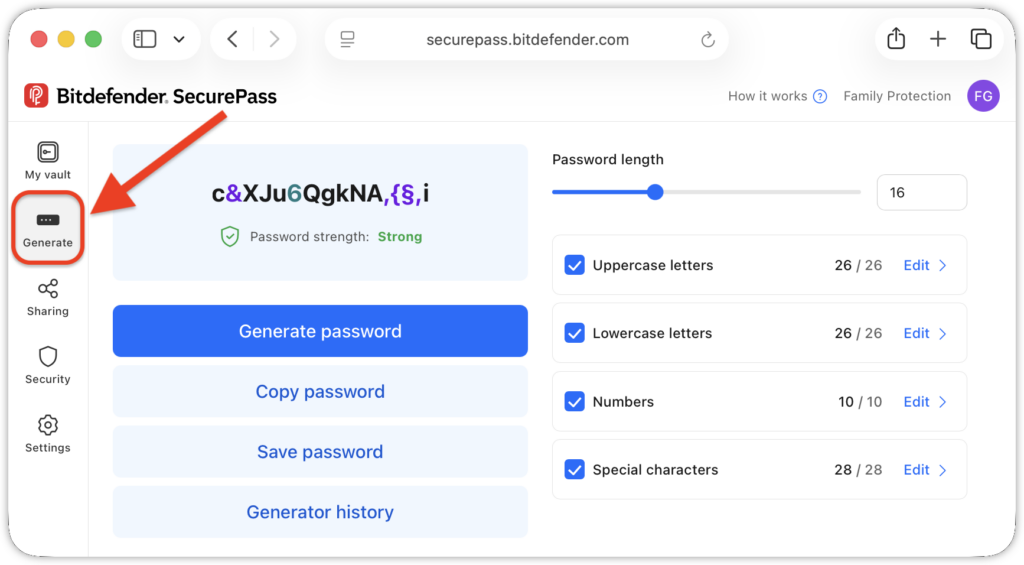
The Generate page in the SecurePass web client: a 16-character password rated Strong, a length slider, the upper-case, lower-case, number and special-character sets, and buttons to copy or save the password or see the generator history.
Share passwords by link, with people or with groups
Bitdefender SecurePass can share a login as a link with an expiry date, a usage limit and its own password, so you can send it to someone who doesn't use SecurePass. You can also share items with other SecurePass users you add as trusted contacts, or with groups, setting read, write or grant rights for each one.
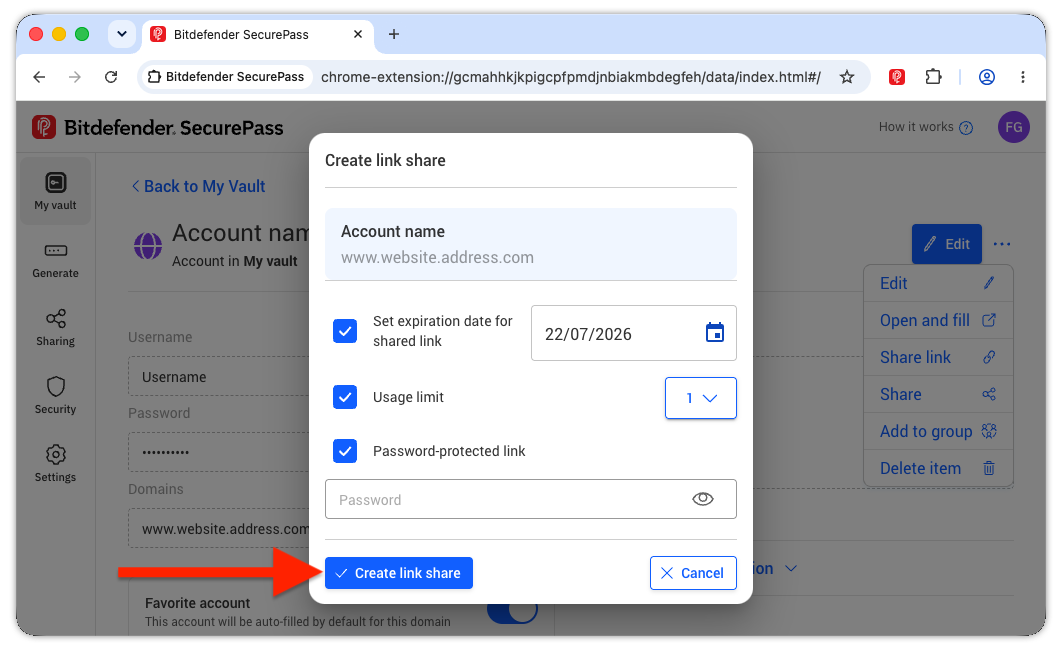
Creating a share link in the Chrome extension: an expiration date for the link, a usage limit of 1, and a password to protect it. The item menu also offers Open and fill, Share and Add to group.
Security report and 2FA codes
Bitdefender SecurePass's security report lists breached, weak, old (unchanged for more than six months) and duplicate passwords, and logins saved for websites flagged as risky. It can also act as your two-factor authenticator: scan a site's 2FA QR code and SecurePass shows the one-time codes next to the login.
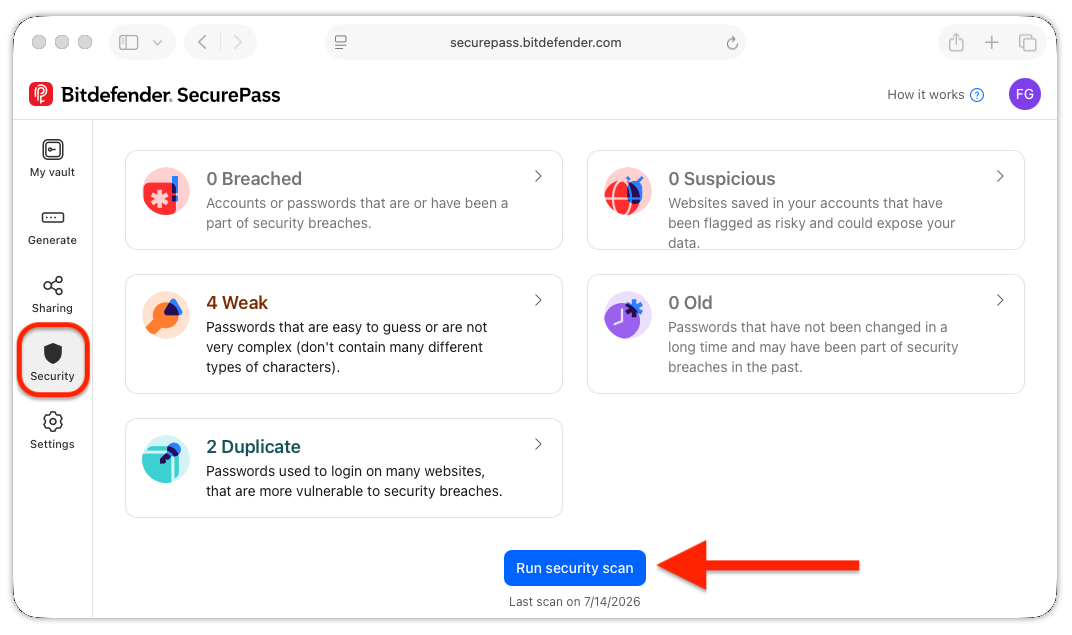
The Security page: 0 breached, 0 suspicious, 4 weak, 0 old and 2 duplicate passwords, with a Run security scan button.
Easy import, PIN sign-in and remote lock
Bitdefender SecurePass imports from 1Password, Bitwarden, Dashlane, LastPass, Keepass, RoboForm, Kaspersky, SaferPass, Bitdefender's older Password Manager and Wallet, and the Chrome, Edge and Firefox password stores. A PIN can replace the master password for everyday use, and a Lock account button signs you out on every device at once if one is lost or stolen.
Benefits
- Your passwords everywhere. The same vault fills logins in four browsers and on your phone.
- Safer sharing with family. A password-protected link that expires beats texting a password.
- One less subscription if you already pay for a Bitdefender suite that includes it.
Real-World Uses
- Cleaning up reused passwords: import from your browser, run the security report, and replace the weak and duplicate ones with generated passwords.
- Sharing the streaming and Wi-Fi logins: put them in a family group, or send a one-use link to a house guest.
- Leaving Bitdefender Password Manager or another app: export the old vault and import it in a few clicks.
- A lost phone: press Lock account from your laptop so nobody can open the vault on it.
Who It's For, and Who Should Skip It
Buy it, or use the copy in your suite, if you want a straightforward password manager from a security company you already use, mainly for saving, filling and sharing logins.
Skip it if you want passkeys, hardware security keys, emergency access for a relative or file attachments: PCMag recommends NordPass and Proton Pass, and Bitwarden offers more for less. Skip it too if you want a free password manager, since SecurePass has no free tier.
Usage Guide
- Activate it. Start the trial or buy, and activate the subscription in your Bitdefender Central account. If it came with your suite, it's already there.
- Install it. In Central, select SecurePass in the left menu, then install the browser extension for Chrome, Edge, Firefox or Safari, or the app from the App Store or Google Play.
- Create your master password and save the recovery key. Download the recovery key PDF and keep it somewhere safe and offline.
- Import your passwords. Export them from your browser or old password manager, then use Settings, Import passwords in SecurePass.
- Turn on autofill on your phone in the iOS AutoFill and Passwords settings or Android's autofill service, and run the security report.
Where It Falls Short
- No passkeys, no hardware keys, no real emergency access. PCMag found SecurePass "doesn't support passkey creation or storage", allows only authenticator-app or email 2FA on the account, and limits emergency access to handing someone your recovery key.
- Identity autofill is weak. PCMag's newest test version "failed to prompt me to auto-fill data, such as my address, name, or phone number".
- It's cloud-only and signs you out often. App Store and Chrome Web Store reviewers complain about frequent re-logins, "no internet connection" errors and having no local copy of the vault.
- Clunky on Android. PCMag had to enter the master password twice on multi-step login forms and found it slow to open in Edge.
What Users Say
Users in the app stores rate SecurePass well for ease of use and sharing. Professional reviewers see it as a basic manager that makes most sense inside a Bitdefender bundle.
PCMag: 3 out of 5 (Kim Key, November 10, 2025)
PCMag's bottom line: "Bitdefender SecurePass works well to sync your credentials across devices, but it requires a subscription and lacks the premium features you get with other paid apps." Pros: "Easy credential capture and replay", "Secure password sharing options" and "Clean, minimal app interface". Cons: "Ineffective identity auto-filling", "No emergency access" and "Slow Android app performance".
On sharing: "I like the link-sharing method because it makes it easy to send credentials to people who don't all use the same password management app." Its conclusion: "It represents value as part of Bitdefender's Total Security suite".
Security.org: 8.9 out of 10 (updated May 13, 2026)
"If you're considering a Bitdefender digital security package that includes SecurePass, you should feel confident in this password manager. However, if you don't mind spending a bit more, there are better password managers out there."
App Store: 4.6 out of 5 from 319 ratings (US)
- "Good to be able to share with spouse. Wish they had an auto user name based on emails previously used with other passwords. The price is good - mine was included in the overall bundle." (I-am-3rd)
- "I was hesitant about switching to this after R.I.P password manager got killed off, but this new version seems a bit better imo. I've had some issues logging in sometimes. Other than that it's good." (Annoyed_Customer_Wow)
- "This app relies on and internet connection in order to retrieve the passwords you save, yet will often inexplicably be unable to connect to the internet." (ljohn87, May 21, 2025)
- "I regularly receive an error message that I have no internet connection. It's cloud only and doesn't provide an option for local storage" (RatingNicknameHere, April 1, 2025)
Chrome Web Store: 4.7 out of 5 from 663 ratings, 100,000 users
- "Real good so far. Much better than the last password vault." (Azziza Robinson, November 7, 2026)
- "The mobile app is great, though sometimes I have to log in before the password or bitdefender secure opens." (Ronelle Herbert, November 4, 2026)
- "I like this new password vault but it seems to be incompatible with safepay, which is very annoying." (Scott!, November 12, 2026)
- "It conflicts with autofill in google sometimes and that gets in the way of trying to select a password." (Angelyn Kempe, November 2, 2026)
Trustpilot: 4.4 out of 5 from about 13,000 reviews (all Bitdefender products)
Bitdefender's Trustpilot page covers every product, with 69 percent 5-star and 17 percent 1-star reviews in November 2026, mostly about automatic renewals. One SecurePass user wrote: "While working with SecurePass I got multiple messages to renew the subscriptions despite the fact that all invoices were paid" (Walter Simmen, 5 stars, September 24, 2026).
The recurring themes: people like the clean design, easy setup, sharing and the price, especially when it comes with a suite. The complaints are frequent sign-ins, connection errors from the cloud-only vault, clashes with Chrome's own autofill and Bitdefender Safepay, and the missing advanced features reviewers expect from a paid manager.
Comparisons
SecurePass vs Bitdefender Total Security
Bitdefender Total Security includes SecurePass along with antivirus and scam protection for up to 5 Windows, Mac, Android and iOS devices. If you need antivirus anyway, the suite gets you the password manager at no extra cost; buy SecurePass alone only if you're happy with your current protection.
SecurePass vs Bitwarden
PCMag points out that Bitwarden's paid plan costs $10 a year and adds data breach scanning, emergency access and file attachments, and Bitwarden also has a free plan. SecurePass's advantages are its simpler interface and the convenience of one account with your Bitdefender security.
Editions and Pricing
| Plan | Price on November 15, 2026 | What you get |
|---|
| SecurePass, 1 year | $29.99 | Password manager on all your browsers and phones |
| SecurePass, monthly | $2.99 a month | The same, billed monthly ($35.88 over a year) |
| Total, Premium or Ultimate Security | Suite price | SecurePass included with antivirus and more |
US prices before sales tax. The subscription renews automatically unless you switch it off in Bitdefender Central.
FAQs
Can Bitdefender see my passwords in SecurePass?
No. Bitdefender SecurePass encrypts your vault end to end with your master password, which Bitdefender doesn't store, and Bitdefender told PCMag that "no one else, including Bitdefender, can access" a user's vault.
What happens if I forget my SecurePass master password?
Bitdefender SecurePass lets you reset it with the recovery key you saved during setup, from "Lost password?" on the sign-in screen. Without the key, support can only reset the account, which permanently erases the vault.
I used Bitdefender Password Manager. How do I move to SecurePass?
Export your data from Bitdefender Password Manager under Settings, Export data, then in SecurePass go to Settings, Import passwords and upload the file.
Does Bitdefender SecurePass support passkeys?
Not according to PCMag's November 2025 review: SecurePass didn't support creating or storing passkeys, or hardware security keys for signing in.
Can I use SecurePass without installing anything?
Yes, partly. Bitdefender SecurePass has a web client at securepass.bitdefender.com that shows and edits your vault in any browser, but it can't autofill or save new logins; for that you need the extension or the app.
Can I get a refund?
Yes. Bitdefender SecurePass has a 30-day money-back guarantee; write to refunds@bitdefender.com within 30 days of your purchase or of an automatic renewal.
System Requirements
- Windows: Windows 7 or later with Google Chrome 109, Microsoft Edge (Chromium 109) or Mozilla Firefox 65 or later
- macOS: macOS 10.14 Mojave or later with Chrome 109, Edge (Chromium 109), Firefox 65 or Safari 12 or later
- iOS: iOS 15.0 or later
- Android: Android 9.0 or later
- All platforms: a Bitdefender account and an internet connection
Conclusion
Bitdefender SecurePass is a good choice if it comes with your Bitdefender suite, or if you want a plain, easy password manager and like keeping everything with one security company. The one reason to buy it is simplicity: saving, filling, generating and sharing passwords across every browser and phone works well. The main reason not to is value on its own: at $29.99 a year it lacks passkeys, emergency access and offline access, which cheaper or free rivals offer. Try it for 30 days and import your passwords; if the sign-ins and missing features don't bother you, it'll serve you well.
Start Free TrialBuy Now