Bitdefender Family Plans: Security, Parental Control and a VPN for 5 People and 25 Devices
Bitdefender Family Plans are the family editions of Bitdefender Total Security, Premium Security and Ultimate Security: one subscription that protects 5 family members on up to 25 Windows, Mac, Android and iOS devices, with Bitdefender's Parental Control for the children. In Bitdefender's Black Friday sale (until December 15, 2026) the first year costs $69.99 for Total Security Family, $79.99 for Premium Security Family and $89.99 for Ultimate Security Family, about half the regular prices.
They're for households that would otherwise juggle several antivirus licenses, a VPN and a separate parental control app, and want one person to see and manage it all.
Quick facts
- Developer: Bitdefender
- Plans: Total Security Family, Premium Security Family, Ultimate Security Family (plus Ultimate Security Plus Family tiers in the US)
- Covers: 5 members, each with their own Bitdefender account, and up to 25 devices in total
- Windows version: 27.0.64.366, released October 19, 2026
- Platforms: Windows 7 SP1 to 11, macOS Big Sur 11.3 or later, Android 7.0 or later, iOS 15 or later
- Price: from $69.99 for the first year until December 15, 2026 (Total Security Family, regular price $139.99), then billed at the renewal price
- Parental Control: up to 5 child profiles, included in every family plan and not in the individual plans
- Refund: within 30 days of the purchase or of an automatic renewal
- What we checked: Bitdefender's support site listed 27.0.64.366, released October 19, 2026, as the current Windows version, and on November 12, 2026 Bitdefender's store listed Total Security Family at $69.99 for the first year (regular price $139.99), Premium Security Family at $79.99 (regular $169.99) and Ultimate Security Family at $89.99 (regular $199.99). We didn't install it or set up child profiles ourselves, so the parental control findings below come from Bitdefender's guides and independent reviewers.
Before you buy
- The renewal price is about twice the sale price. The subscriptions renew automatically, at up to $139.99, $169.99 or $199.99 a year, unless the Family Manager turns auto-renewal off in Bitdefender Central.
- Parental Control is strongest on Windows and Android. On iPhones and iPads it works through Apple's Screen Time, and on Macs some features are limited.
- The VPN is capped on Total Security Family. Only Premium and Ultimate Security Family include unlimited VPN traffic for every member.
- There's no free trial of a family plan. You can try the individual products free for 30 days, or rely on the 30-day refund.
Download Free TrialBuy Now
Overview
Bitdefender no longer sells a separate "Family Pack". Instead, each of its three main suites comes in an Individual edition (1 member, 5 devices) and a Family edition (5 members, 25 devices). The family editions add two things besides the extra seats: every member gets their own account under one Family Manager, and the family gets Parental Control for up to 5 children.
The Family Manager invites members from Bitdefender Central and can make another adult a Secondary Manager. Adults manage their own security, privacy and identity settings; teenagers get age-appropriate rules with some freedom; younger children get stricter filtering.

Bitdefender Central's My Subscriptions page with a Premium Security Family Plan: each member gets a separate account, added with Add members. Child profiles live under Parental Control.
Features
Parental Control dashboard for each child
Bitdefender Family Plans include a Parental Control dashboard in Bitdefender Central for each child: daily internet time and a by-hour chart, the child's location on a map, a list of blocked sites from the past 7 or 30 days, and a Stop internet button that cuts the connection on the child's devices at once. Children can ask for more time, and you can grant it with Reward.

A child's dashboard: Teen filter, 4 devices, 7h 31m online today, the hourly internet time chart (highlighted by Bitdefender), Reward, Stop internet and Locate.
Age-based content filtering, Safe Search and YouTube restrictions
Bitdefender Family Plans set up content filtering automatically from each child's birth date, blocking categories such as explicit content, gambling, chat or social networks. You can switch any category between Allowed and Blocked, add exceptions for individual sites, and turn on Safe Search and YouTube restricted mode. Routines (Focus time, Family time, Bedtime) and daily limits control when the internet works at all.
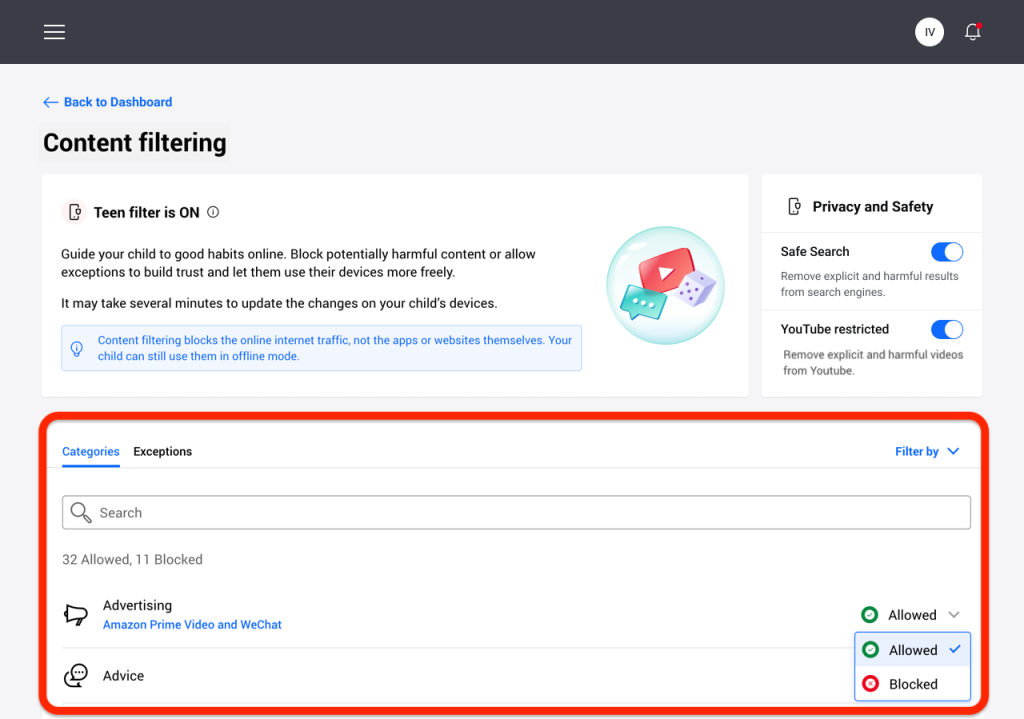
Content filtering with the Teen filter on: 32 categories allowed and 11 blocked, plus Safe Search and YouTube restricted. The note says filtering blocks internet traffic, not the apps themselves.
Total Security Family: the security suite for everyone
Bitdefender Total Security Family gives every device real-time antivirus, ransomware protection, web and phishing protection and, on Windows, the firewall, Safepay banking browser and OneClick Optimizer. It includes the password manager, Email Protection for up to 10 mailboxes and Parental Control. Its VPN is the limited one, 200 MB a day per device.
Premium Security Family: unlimited VPN for every member
Bitdefender Premium Security Family adds unlimited VPN traffic for all 5 members, Scam Protection Pro with the Scamio Pro chatbot and SMS and chat scanning on phones, and a system-wide ad blocker and anti-tracker. For a family with teenagers on public Wi-Fi, this is the plan that removes the VPN data cap.
Ultimate Security Family: identity monitoring for each member
Bitdefender Ultimate Security Family adds Digital Identity Protection for every member: continuous dark web monitoring, an identity protection score and real-time breach notifications. In the US, the Ultimate Security Plus Family tiers add identity theft insurance and credit monitoring, which need each adult's Social Security number.
Benefits
- Low cost per person. At $69.99 for 5 members, Total Security Family works out to about $14 a person for the first year.
- One place to see everything. The Family Manager sees the subscription, every member and every child's activity in Bitdefender Central.
- Privacy for adults. Adult members have their own accounts, so the manager doesn't see their browsing or passwords.
Real-World Uses
- A family with two young children: give each child a profile, assign their tablet and laptop, and set Bedtime and a daily limit.
- Grandparents in another house: add them as members so their PC and phone are protected and you can help from Central.
- Teenagers who use public Wi-Fi: Premium Security Family gives each of them the unlimited VPN on their own account.
- A household that already had a data breach scare: Ultimate Security Family monitors each adult's email addresses and phone numbers.
Who It's For, and Who Should Skip It
Buy it if you have three or more people to protect, or children whose screen time and web access you want to manage, and you'd like antivirus and parental control from the same company. Premium Security Family is the sweet spot for most families: $10 more than Total Security Family in the sale, with the unlimited VPN.
Skip it if you need deep monitoring of your child's social media, messages or calls, or geofence alerts when they leave school: TechRadar points out Bitdefender has none of these, and dedicated parental control apps do. An all-iPhone family also gets less from it, since iOS filtering runs through Apple's Screen Time anyway. And one or two people are better served by the cheaper Individual plans.
Usage Guide
- Buy and sign in. Choose a family plan with the Buy Now button, then sign in to Bitdefender Central with the email address you bought with. You're the Family Manager.
- Turn off auto-renewal if you don't want it. In Central, open My Subscriptions, then My Payments.
- Invite the members. In My Subscriptions, click Add members and enter each adult's or teen's email address. Each one creates their own account and installs Bitdefender on their devices.
- Create child profiles. Open Parental Control in Central, click New profile, and enter the child's name, photo and birth date. Bitdefender applies age-based filtering at once.
- Install the Parental Control app on the child's device. You need the device in hand: sign in with your Central account in the app and assign the device to the child's profile. Set a parental PIN so the child can't sign out.
Where It Falls Short
- No social media monitoring or geofencing. TechRadar lists both as reasons to avoid it, along with no keyword alerts.
- Filtering isn't airtight. PCMag lists "Parental content filter not fully effective" in its reviews of Premium and Ultimate Security, and Bitdefender's own guide notes that filtering blocks internet traffic, not the apps themselves, so they still work offline.
- Android filtering needs the VPN connection. TechRadar notes that content filtering and safe browsing require an active VPN connection, according to Bitdefender's Google Play listing.
- Setup needs physical access. You can't install the Parental Control app on a child's phone remotely.
What Users Say
Reviewers like the screen-time tools and the value of getting a full security suite with parental control. They miss the advanced monitoring that dedicated parental control apps offer.
TechRadar (Krishi Chowdhary, September 10, 2026)
"Bitdefender's parental controls include excellent screen-time and internet-time scheduling, along with category-level web filtering and location tracking." The verdict adds: "the parental controls lack certain advanced features such as social media monitoring, geofencing, and keyword alerts."
Reasons to buy: "Pre-defined age-based restrictions", "Lots of support options", "Intuitive graphical dashboard", "Affordable per-child cost" and "Extra cybersecurity tools". Reasons to avoid: "No social media monitoring" and "No geofencing".
On Apple devices: "Windows and Android get full, unrestricted enforcement of every feature, whereas macOS and iOS are noticeably more limited, largely due to Apple's own platform restrictions." And the conclusion: "Bitdefender's family packages are ideal for parents looking for all-round security protection for their children rather than a dedicated, comprehensive parental control app."
PCMag (Neil J. Rubenking, April 2026)
PCMag's reviews of Premium Security (4.5 out of 5) and Ultimate Security (4.5, Editors' Choice) explain the family model: "you can purchase a five-device individual subscription or a 25-device family subscription. With the family subscription, you get parental control, but otherwise, it's just a difference in the number of devices covered." Both list "Parental content filter not fully effective" among the cons, and PCMag notes McAfee+ covers unlimited devices for $149.99 a year, "$20 less than Bitdefender's price for a 25-license family pack."
Tom's Guide (Nikita Achanta, May 21, 2026): Editor's Choice
"If you want to protect your computers as well as your smartphones from malware and constant threats, there are few options better than Bitdefender. With many plans available for consumers, families and business, Bitdefender does its bit to protect you from malware, scams, and threats which may seem invisible to you at first."
Trustpilot: 4.4 out of 5 from 12,715 reviews (all Bitdefender products)
Bitdefender's Trustpilot page showed 69 percent 5-star and 17 percent 1-star reviews on October 18, 2026. Excerpts from that month:
- "Bitdefender has been for me almost an install and forget package, particularly in the last couple of years" (James, 5 stars, October 13, 2026)
- "Bitdefender is easy to use, it works well and the technical support is excellent." (Daniel Leclerc, 5 stars, October 15, 2026)
- "This is a good product with deceptive billing." (Sue Schultz, 2 stars, October 17, 2026)
- "Forced to enter payment details for AutoRenewal & now they've removed the links for disabling it." (JXL7, 1 star, October 7, 2026)
Reviews Bitdefender shows on its family page
Bitdefender reprints Trustpilot reviews it chose, all positive, such as: "I have gained complete confidence in this company over the last 6 years I have used Bitdefender to keep my mind at ease, my computer safe, and my data guarded at all times!" (C. M. Beal)
The recurring themes: parents like the scheduling, the age-based presets and the price per person. The complaints are the missing social media and geofencing features, weaker control on Apple devices, and, as with all Bitdefender plans, automatic renewal billing.
Comparisons
Family plans vs Individual plans
The software is the same. A family plan covers 5 members and 25 devices instead of 1 member and 5 devices, and adds Parental Control and member management. In the sale, Total Security costs $44.99 for one person and $69.99 for the family.
Bitdefender Family Plans vs McAfee+
McAfee+ covers unlimited devices for $149.99 a year at the regular price, which PCMag notes is $20 less than Premium Security Family. Bitdefender's 25 devices are plenty for most households, and in this sale its family plans cost far less for the first year.
Bitdefender Family Plans vs a dedicated parental control app
Apps such as Bark or Qustodio monitor social media and messages and offer geofence alerts, which Bitdefender doesn't. Google Family Link is free and covers screen time and filtering on Android. Bitdefender makes sense when you also want antivirus, a VPN and identity monitoring for the adults.
Editions and Pricing
| Family plan (5 members, 25 devices) | Black Friday, 1 year | Regular, 1 year | 2 years | What it adds |
|---|
| Total Security Family | $69.99 | $139.99 | $139.99 (regular $279.99) | Security suite, password manager, Email Protection, Parental Control |
| Premium Security Family | $79.99 | $169.99 | $159.99 (regular $339.99) | Unlimited VPN, Scam Protection Pro, ad blocker |
| Ultimate Security Family | $89.99 | $199.99 | $179.99 (regular $399.99) | Dark web monitoring and breach alerts for each member |
| Ultimate Security Plus Family (US) | $99.99 | $269.99 | $539.99 (no sale price) | Identity theft insurance, credit monitoring |
US prices from Bitdefender's store on November 12, 2026, before sales tax. The 1-year Black Friday prices are valid in the US and Canada until December 15, 2026 and apply to the first term only. The Buy Now button opens Bitdefender's family plans page with the three main plans; the Plus Family tiers are on Bitdefender's Ultimate Security page.
FAQs
Is Bitdefender Family Pack still sold?
No. Bitdefender Family Pack has been replaced by the family editions of Total Security, Premium Security and Ultimate Security, each covering 5 members and 25 devices.
Is Parental Control included in Bitdefender's individual plans?
No. Bitdefender Parental Control is only in the family plans. All three family plans include the same Parental Control features.
Can family members see each other's activity on a Bitdefender Family Plan?
No. Adults and teens on a Bitdefender Family Plan have their own Bitdefender accounts. The Family Manager manages the subscription and the children's Parental Control profiles, not the other adults' browsing.
How much does a Bitdefender Family Plan cost after the first year?
Bitdefender Family Plans renew automatically at the renewal price, up to the regular $139.99 (Total Security Family), $169.99 (Premium Security Family) or $199.99 (Ultimate Security Family) a year. Bitdefender emails the Family Manager before it bills.
Can I get a refund on a Bitdefender Family Plan?
Yes, within 30 days of the purchase or of an automatic renewal, by writing to refunds@bitdefender.com.
Does Bitdefender Parental Control work on iPhone?
Yes, with limits. On iOS, Bitdefender Parental Control works through Apple's Screen Time and a child Apple account rather than its own filtering engine, so Windows and Android devices get more control.
System Requirements
- Windows: Windows 7 with Service Pack 1, 8.1, 10 or 11, 2 GB RAM, 2.5 GB free disk space
- macOS: macOS Big Sur (11.3) or later, 1 GB free disk space
- iOS: iOS 15 or later (Parental Control app: iOS 13 or later)
- Android: Android 7.0 or later (Parental Control app: Android 6.0 or later)
- All platforms: an internet connection and a Bitdefender Central account for each member
Conclusion
A Bitdefender Family Plan is a strong buy in this sale for a household of three or more: top-tested protection for up to 25 devices, solid screen-time and filtering tools for the children, and separate accounts for the adults, from $69.99 for the first year. Premium Security Family at $79.99 is the one most families should pick, because it adds the unlimited VPN for everyone. The main reason not to buy it is if you need to monitor a teenager's social media or get geofence alerts; a dedicated parental control app does that better. And note the renewal price, roughly double, before the second year.
Download Free TrialBuy Now