360 Total Security: Free Windows Antivirus and PC Cleanup, With a Paid Ad-Free Tier
360 Total Security is a free antivirus and PC care suite for 64-bit Windows 10 and 11 from the Chinese company Qihoo 360. The free edition scans for malware, blocks ransomware and cleans up junk files; Premium costs US$19.99 a year (or $49.99 once for a lifetime license) and removes the ads while adding a firewall, a driver updater and a file shredder.
It suits a home user who wants one free app that both checks for threats and tidies a slow PC. It also carries more history than most antivirus brands, from a 2015 test-lab scandal to a US export blacklisting in 2020, so read the "Before you buy" box before you install it.
Quick facts
- Developer: Qihoo 360 (the site's footer names Beijing Qihu Keji Co., Ltd.), Beijing, China
- Latest version: 12.0.0.1234 (full installer dated November 6, 2026)
- Platforms: Windows 10 and 11, 64-bit only. Version 12 doesn't support 32-bit Windows, Windows 8.1, 8, 7, Vista, XP or Windows Server
- Free edition: antivirus, anti-ransomware, secure online shopping, Full Check, Cleanup, Speedup and a toolbox, with ads
- Premium: $12.99 a quarter, $19.99 a year or $49.99 lifetime; the annual plan covers unlimited devices
- Refunds: the license agreement allows a full refund of the current billing period within 30 days of purchase, requested by email to support@360safe.com
- Account: the free version works without a 360 account; some membership services need sign-in
- What we checked: the full offline installer (205.5 MB, file version 12.0.0.1234, digitally signed by Beijing Qihu Technology Co., Ltd.) and the US Premium prices on the order page, both on November 16, 2026. We didn't run our own malware detection test.
Before you buy: the company's record
The 2015 test scandal. In a joint statement reported on May 1, 2015, the three main independent antivirus labs, AV-Comparatives, AV-TEST and Virus Bulletin, said in a joint statement that Qihoo 360 had sent them product versions with its own detection engine switched off and Bitdefender's engine switched on, the opposite of what customers got by default. The labs said the default setup "would provide a considerably lower level of protection and a higher likelihood of false positives", and withdrew all the certifications and rankings Qihoo had earned that year (The Register's report). Qihoo answered that rival Chinese vendors gamed the tests too; the labs rejected that argument.
No recent lab results. AV-TEST's public results list Qihoo 360 products only up to October 2017, so there's no current independent detection score to compare with Microsoft Defender, Bitdefender or Kaspersky.
US Entity List. On June 5, 2020 the US Commerce Department's rule 85 FR 34495 added "Qihoo 360 Technology Company" (China) and "Qihoo 360 Technology Co. Ltd." (listed under the UK) to the Entity List, saying there was reasonable cause to believe they posed a significant risk of involvement in procuring commodities and technologies for military end-use in China. The listing restricts US exports to the company. It doesn't ban the software for consumers, but some employers and government users avoid security software from listed companies.
Bundling and uninstall complaints. Several recent one-star reviews on Trustpilot say the program arrived bundled with other software and was hard to remove (quoted below).
Download FreeBuy Premium
Overview
360 Total Security is the Windows suite of Qihoo 360, whose site says it has been "guarding your digital life since 2009". It mixes two kinds of tools that most vendors sell separately: an antivirus (virus scan, real-time protection, ransomware blocking, a sandbox) and a PC tune-up kit (junk cleanup, startup speedup, driver updates). The idea is that one window, opened once a week, covers both.
Version 12 has a redesigned interface with a left-hand menu: Full Check, Virus Scan, Speedup, Cleanup, Privacy, Toolbox and Account. It also changed the system floor: the current build is for 64-bit Windows 10 and 11 only, so an old Windows 7 PC can't run it.
The free edition is free indefinitely and shows ads and offers; Premium is what you pay for here. Its headline benefit is the ad-free experience, plus a set of extra tools listed below.
Features
Virus Scan and real-time protection, free
360 Total Security scans the areas of your PC you choose, sorts findings into high- and medium-risk groups, and lets you review them before you click Resolve. Real-time protection and anti-ransomware protection run in the background in the free edition too, and a secure shopping mode guards online payments.
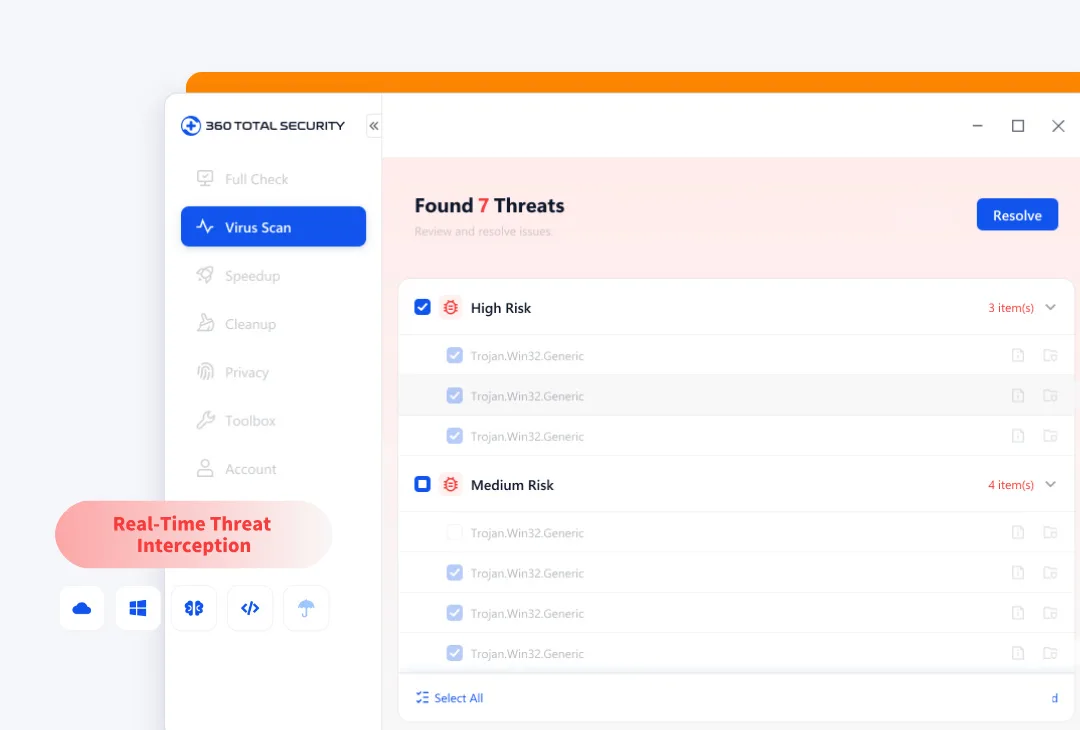
The vendor's image of the version 12 Virus Scan screen: 7 threats found, split into High Risk and Medium Risk lists with a Resolve button.
Full Check: security, speed and cleanup in one pass
360 Total Security's Full Check runs the virus scan, cleanup and performance checks together and shows everything that needs attention in one list. You choose what to fix, skip or repair, so nothing is deleted without a click from you.
Cleanup and Speedup for older PCs
360 Total Security's Cleanup offers Basic Cleanup (plug-ins and junk), System Cleanup (with a choice of drives) and Privacy Cleanup (usage traces). Speedup has a one-click optimization, a boot-time view and a startup manager that shows which programs and services start with Windows.
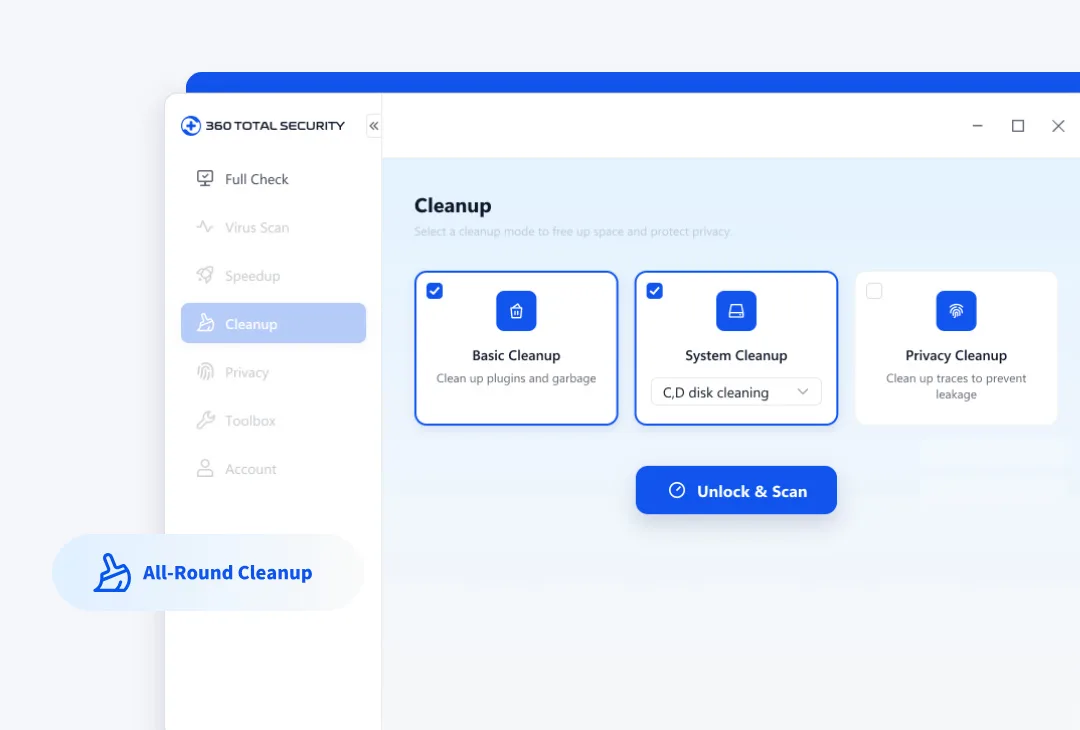
The vendor's image of the Cleanup screen: Basic Cleanup, System Cleanup (C and D drive) and Privacy Cleanup, with an "Unlock & Scan" button.
Toolbox: sandbox, network diagnostics, ransomware decryption
360 Total Security's Toolbox gathers dozens of extras: an isolated sandbox for running doubtful programs, network diagnostics, a ransomware decryption tool, game boost, system disk slimming, browser protection, Windows vulnerability repair and a desktop organizer. Some are free and some are marked Premium.
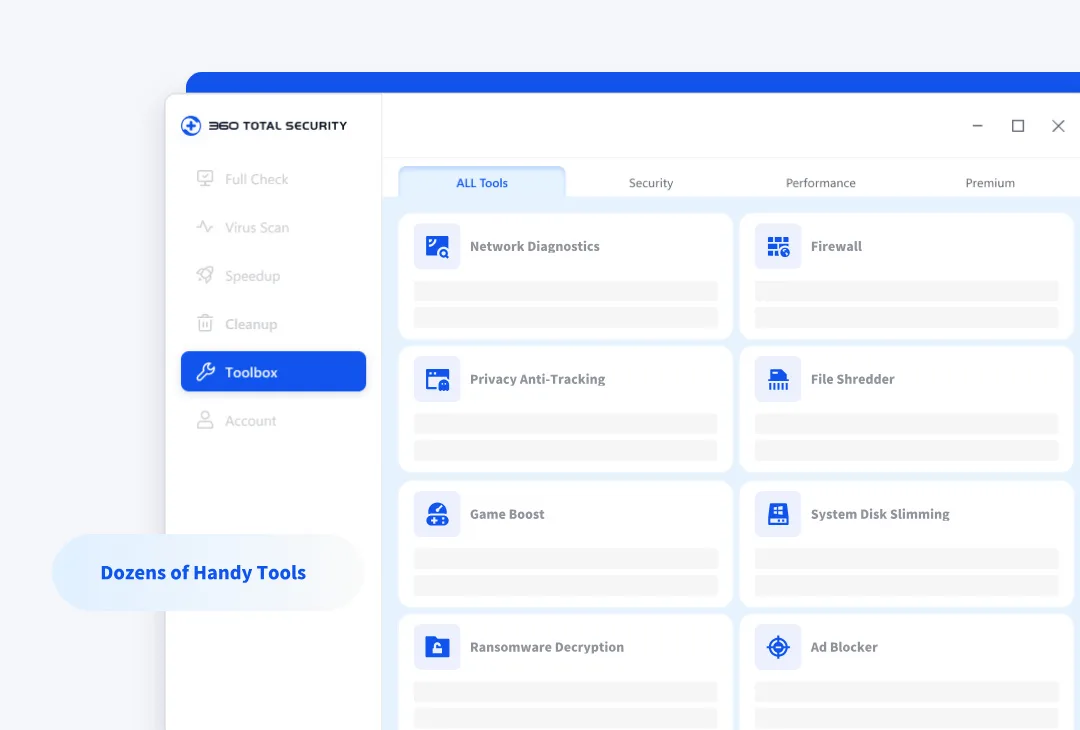
The vendor's image of the Toolbox: All Tools, Security, Performance and Premium tabs, with Network Diagnostics, Firewall, Privacy Anti-Tracking, File Shredder, Game Boost and Ransomware Decryption tiles.
What Premium adds
- No ads in the app
- Firewall that warns when apps go online
- Driver Updater with backup and one-click restore
- Privacy Anti-Tracking, Privacy Cleaner and Data Shredder
- Scheduled Cleanup, Registry Cleaner, Disk Analyzer and Duplicate File Cleaner
- Data Shield for locking private files, and priority support
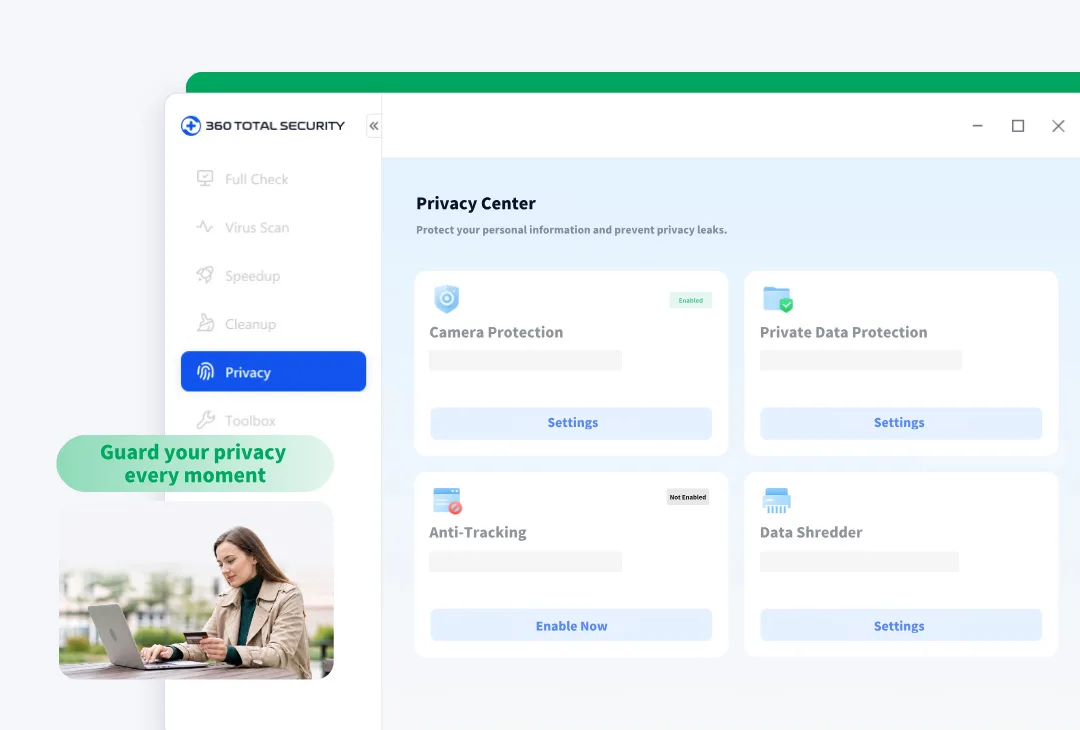
The vendor's image of the Privacy Center: Camera Protection (enabled), Private Data Protection, Anti-Tracking (not enabled) and Data Shredder.
Benefits
- One app instead of three. You get a scanner, a cleaner and a startup manager without installing separate tools.
- Usable for free. The core protection costs nothing, so you can judge the program before paying a cent.
- Cheap Premium. $19.99 a year for unlimited devices is far below most paid suites, and a one-off $49.99 license avoids renewals.
- No account needed for the free edition.
Real-World Uses
- A family laptop that's slowing down: run Full Check once a week to scan, clear junk and trim the startup list in one go.
- Trying an unknown download: open it in the sandbox first, so it can't change the real system.
- Several home PCs: one annual Premium plan covers every machine, with the ads gone on all of them.
- A PC that won't connect: Network Diagnostics checks the connection and offers fixes.
Who It's For, and Who Should Skip It
A good fit if you want a free, all-in-one Windows suite, you're comfortable with its history, and you'd pay a small amount to get rid of ads.
Skip it if:
- you want an antivirus with current, independent lab scores: Microsoft Defender (built into Windows) and Bitdefender are tested every few months
- you work for a business or public body with rules on suppliers on the US Entity List
- you run 32-bit Windows or Windows 7/8.1: version 12 won't install
- you need Mac protection: this is a Windows product
Usage Guide
- Download from the official site (the button below). The default button gets a small online installer; the full offline installer is about 205 MB.
- Install: run the file, click Install, and read every screen. Untick anything you didn't ask for.
- Run Full Check from the first screen and review each item before clicking Repair.
- Review notifications and protection settings in Settings.
- To go Premium, pick a plan on the order page, which works with a 360 account sign-in.
- To uninstall, use Windows Settings, Apps, Installed apps.
Where it falls short
- Protection quality is unproven lately. TechRadar's December 2020 test found "an unusual number of false positives" (six clean files flagged out of 50 GB), and its own test ransomware encrypted all 11,000 sample files; the Document Protector backup only covered Office files and PDFs up to 100 MB.
- Ads in the free edition. Reviewers since 2018 have complained about ads and offers on the desktop and in the app. Premium is the way to remove them.
- Extra software offers. Digital Citizen noted the installer "tries to install additional software that you did not ask for".
- Bitdefender and Avira engines are gone. Older versions let you switch on Bitdefender and Avira engines; TechRadar found they had been dropped.
What Users Say
Trustpilot: 4.6 out of 5 from 885 reviews
Trustpilot's 885 reviews (814 in the last 12 months) are 74% five-star and 9% one-star, with little in between. Short, positive reviews dominate:
- Bakht Karam (5 stars, November 10, 2026): "I used to encounter virus problem. It just made my work easier and saved my time and syetems"
- Alpha Konteh R (5 stars, November 11, 2026): "it fast to scan and very much effective and reliable for such etc."
- Ram Kumar (5 stars, November 10, 2026), titled: "Good App for Speeding up PC"
The one-star reviews are about how the program arrived and how hard it is to remove:
- Haseeb Ahmad (August 22, 2026): "I never even chose to install this thing. It came bundled with another program and snuck onto my PC"
- Bungie Cat (July 25, 2026): "Downloaded its self on my laptop and had no option to uninstall. Had to wipe my computer"
- goofe goobere (October 15, 2026), titled: "This application BSODs your computer."
- Nicolae Mihaila (July 13, 2026): "I don't recommend it, they are not serious.....they are starting to cheat, I bought the license 2 years ago". 360 replied asking him to contact support@360safe.com.
TechRadar (Mike Williams, December 2020)
TechRadar's lead security reviewer tested both editions. On performance: "it didn't seem to make the tiniest difference to performance". On the free edition: "Qihoo 360 Total Security Free delivers reasonable protection in some areas, but falls down in others, and these security holes make it difficult to recommend overall."
The verdict: "There are loads of features on offer, but most are below-par, and 360 Total Security isn't accurate enough to be your sole antivirus app." On Premium: "360 Total Security Premium is absolutely crammed with features, but none of them are good enough to justify handing over your cash."
Digital Citizen (first published February 2018)
Digital Citizen liked the setup: "We liked the fact that you can use an offline installer, and that there is no personal information required from the user before installing it."
Its protection tests were harsh: "The antivirus engine that it uses by default is weak and cannot stop malware and ransomware from destroying everything you have on your computer". It also found "the user interface is filled with advertisements that are displayed in all the corners of this product, and also on your desktop."
The pattern: everyday users on Trustpilot mostly like how fast and simple it is and that it's free, while professional reviewers (whose tests are a few years old and predate version 12) found the protection weaker than the leading brands and the ads intrusive. The serious complaints are about bundled installs and removal.
Comparisons
360 Total Security vs Microsoft Defender
Microsoft Defender is already in Windows 10 and 11, is free with no ads, and appears in current lab tests. 360 Total Security adds cleanup, speedup and a toolbox on top. If protection is your only goal, Defender is the safer choice; 360 makes sense only if you want its extra PC care tools in the same app.
Free vs Premium
The free edition has the same core antivirus and anti-ransomware protection. Premium removes ads and adds the firewall, driver updater, data shredder, anti-tracking, scheduled cleanup and priority support. TechRadar found no significant difference in antivirus protection between the two.
Editions and Pricing
| Plan | Price (USD) | Term | What you get |
|---|
| Free | $0 | Unlimited | Antivirus, anti-ransomware, secure shopping, cleanup, speedup; with ads |
| Premium Quarterly | $12.99 | 3 months | Every Premium feature |
| Premium Annual | $19.99 | 1 year | Every Premium feature, unlimited devices |
| Premium Lifetime | $49.99 | One-time payment | All current Premium features, VIP support |
All three Premium plans are on one order page: the Buy Premium button opens it, and you choose the plan there. The quarterly price works out higher per month than the annual plan, so the annual or lifetime plan is the better buy if you keep it more than a few months.
FAQs
Is 360 Total Security safe to use?
360 Total Security is a signed, legitimate antivirus from an established company, but whether you trust it is a judgment call: the vendor was caught gaming lab tests in 2015, has no recent AV-TEST results, and the company was added to the US Entity List in 2020. Many home users run it without problems; cautious users pick a regularly tested antivirus instead.
Does 360 Total Security run on Windows 7?
No. 360 Total Security version 12 supports only 64-bit Windows 10 and 11. It doesn't support 32-bit Windows, Windows 8.1, 8, 7, Vista, XP or Windows Server.
How many PCs does 360 Total Security Premium cover?
360 Total Security's annual Premium plan covers unlimited devices with one plan, according to the order page.
Can I get a refund for 360 Total Security Premium?
Yes, within 30 days. 360 Total Security's license agreement allows a full refund of the current billing period if you ask within 30 days of the purchase, by email to support@360safe.com, and you say whether to keep or cancel auto-renewal.
Does 360 Total Security Premium renew automatically?
The quarterly and annual 360 Total Security plans are subscriptions that renew automatically. Under the license agreement, if you asked 360 to cancel auto-renewal at least 10 days before the next period and were charged anyway, you can ask for a refund. The lifetime plan is a one-time payment.
Can I run 360 Total Security alongside another antivirus?
Running two real-time antivirus programs at once usually causes conflicts. The 360 Total Security FAQ itself advises closing other security installers before installing or updating it.
How do I uninstall 360 Total Security?
360 Total Security says to remove it from the installed apps list in Windows Settings. Some Trustpilot users report trouble removing it; if the normal uninstall fails, contact 360 support before trying third-party removal tools.
System Requirements
- Windows 10 or Windows 11, 64-bit
- About 206 MB for the full offline installer, plus space for the program and updates
- Internet connection for cloud scanning, virus definition updates and Premium activation
Conclusion
360 Total Security packs a lot into a free download, and Premium is cheap: $19.99 a year for every PC in the house, or $49.99 once. The one reason to buy Premium is to keep 360's all-in-one cleanup and toolbox while getting rid of its ads.
The main reason not to: you can't check how well it protects you today. AV-TEST hasn't published a result for it since 2017, the 2015 test-cheating episode is on record, and the company is on the US Entity List. If protection is what you're paying for, a regularly tested antivirus is the better use of the money. If you already use the free edition and like it, Premium is a fair price to make it quieter.
Download FreeBuy Premium