Exdisk Partition Manager: Give a Full C Drive More Space Without Reinstalling Windows
Exdisk Partition Manager is a Windows disk tool from the 360 Total Security family that moves free space from another partition (such as D:) into a full C drive, and also splits, merges, resizes and wipes partitions. It runs on Windows 11, 10, 8 and 7. The download is free; a license with unlimited resizing costs US$49.95 a year or $69.95 once.
A red C drive is one of the most common Windows headaches: updates fail, apps won't install, and the PC crawls, while drive D sits half empty. Windows' own Disk Management can only grow C into empty space right next to it. Exdisk is built to get around that in a couple of clicks.
Quick facts
- Developer: part of Qihoo 360's 360 Total Security product line; the installer is signed by Beijing Qihu Technology Co., Ltd.
- Latest version: 1.0.0.1001 (installer dated September 15, 2026)
- Platforms: Windows 11, 10, 8 and 7
- Drives: internal HDDs and SSDs, external drives, USB flash drives
- Price: $19.95 a month, $49.95 a year or $69.95 lifetime
- Free version: free download; the paid plans add unlimited partition resizing and all premium features
- What we checked: the installer (146 MB, file version 1.0.0.1001, digitally signed by Beijing Qihu Technology Co., Ltd.) and the US prices on the order page, both on November 16, 2026. We didn't resize a partition with it.
Download FreeBuy Now
Overview
Exdisk is a version 1.0 product, one of three stand-alone utilities (with ArcPro and RecoverlyX) that 360 sells next to its antivirus. 360 Total Security's own toolbox also has a "C Drive Expansion" tile; Exdisk is the full stand-alone tool.
The program opens on Expand C Drive, with the rest of the toolkit in a left-hand menu: Move files, Split Disk, Merge Disks and Manage Disks. Every change is shown as a preview of the new disk layout before anything is applied.
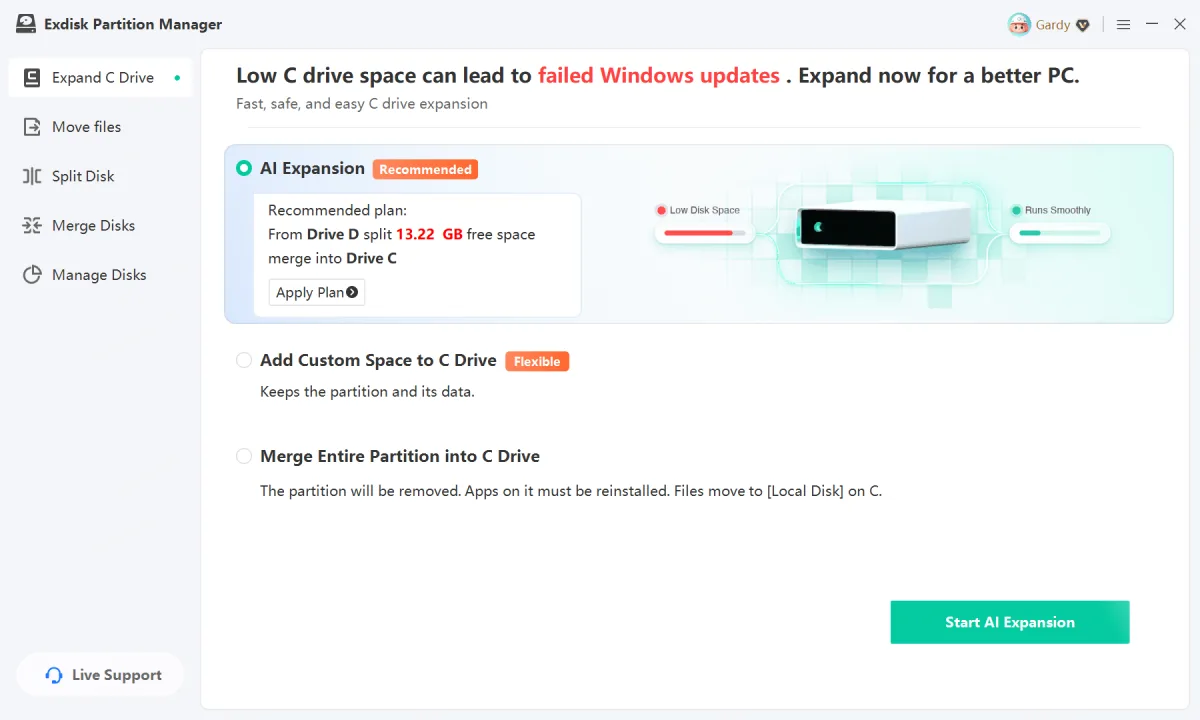
Exdisk's Expand C Drive screen: the recommended AI Expansion plan (split 13.22 GB of free space from drive D and merge it into C), with Add Custom Space to C Drive and Merge Entire Partition into C Drive as the other options.
Features
Three ways to extend the C drive
Exdisk Partition Manager offers AI Expansion, which proposes a plan from your current free space; Add Custom Space to C Drive, which keeps the source partition and its data and moves only the amount you set with a slider; and Merge Entire Partition into C Drive, which removes the other partition and moves its files to a folder on C. With the last option, apps installed on that partition must be reinstalled.
Split, merge, resize and move partitions
Exdisk Partition Manager splits a large partition into several, merges partitions back together (including ones that aren't next to each other, which Windows Disk Management can't do), and changes the size or position of a partition without touching the files on it.
Create, format, delete and hide partitions
Exdisk Partition Manager turns unallocated space into a new drive, reformats a partition with storage errors, deletes partitions you no longer need, and hides a drive from File Explorer until you show it again.
Wipe data before you sell a PC
Exdisk Partition Manager erases a disk or partition so that ordinary recovery tools can't bring the data back, which is what you want before you sell, return or hand over a machine. The site doesn't name the wipe method or standard it uses.
Real-World Uses
- Windows Update keeps failing: move 20 GB from D: into C: and let the update finish.
- A laptop shipped with a tiny C partition: merge the near-empty data partition into C.
- A new 2 TB drive: split it into partitions for games, photos and backups.
- Selling an old PC: wipe the data partitions first.
Who It's For, and Who Should Skip It
A good fit if your C drive is full, there's free space on another partition, and you'd rather not use the command line or reinstall Windows.
Skip it if the free space is already right next to C (Windows Disk Management's "Extend Volume" does that for free), if you need to do this once (a one-month license is $19.95), or if you want a tool with years of reviews behind it: MiniTool Partition Wizard, AOMEI Partition Assistant and EaseUS Partition Master are long established. Mac and Linux users need something else.
Usage Guide
- Back up anything important. Partition changes are safe in normal operation, but a power cut midway can still cost you data.
- Download and install Exdisk; it shows your disk layout with the free space marked.
- On Expand C Drive, pick AI Expansion, or choose the source partition and drag the slider to set how much to move.
- Check the preview of the new layout, then click Start. Keep a laptop plugged in until it finishes.
Where it falls short
- New and unreviewed. Version 1.0 has no independent reviews or tests yet.
- Free version limits aren't spelled out. The paid plans list "Unlimited Partition Resizing", so expect the free version to limit resizing, but Exdisk doesn't say how.
- Pricey for a one-off job. $19.95 for one month is a lot for a single C drive extension.
- Wipe method not stated. If you need a named standard (for example for company disposal rules), use a tool that documents it.
What Users Say
Exdisk is too new to have independent reviews on review sites, in app stores or in tech magazines. The three five-star testimonials on its website are labelled as adapted from reviews on the Chinese product page, with the display names changed for English readers, so we don't quote them here.
Comparisons
Exdisk vs Windows Disk Management
Windows Disk Management is free and built in, but it can only extend C into unallocated space directly to its right, and merging partitions means deleting one first. Exdisk takes space from a partition anywhere on the disk, merges non-adjacent partitions and keeps the source partition's data, with a preview before it acts.
Editions and Pricing
| Plan | Price (USD) | Term | Includes |
|---|
| 1 Month | $19.95 | 1 month | Unlimited partition resizing, all premium features |
| 1 Year | $49.95 | 12 months | Unlimited use for a full year |
| Lifetime | $69.95 | One-time payment | All features, no renewal |
All three plans are on one order page; the Buy Now button opens it and you choose the plan there. The lifetime license costs only $20 more than one year, so it's the better buy unless you need Exdisk just once.
FAQs
Will I lose my files when Exdisk extends the C drive?
Exdisk Partition Manager moves free space at the partition level and leaves files, apps and Windows in place in normal operation, according to 360. The exception is "Merge Entire Partition into C Drive", which removes the other partition: its files move to C, but apps installed there must be reinstalled. Back up first either way.
Does Exdisk work on Windows 7?
Yes. Exdisk Partition Manager supports Windows 11, 10, 8 and 7.
Can Exdisk partition a USB flash drive?
Yes. Exdisk Partition Manager handles external hard drives and USB flash drives the same way as internal HDDs and SSDs.
Can I cancel an Exdisk operation after seeing the preview?
Yes. Exdisk Partition Manager shows the resulting disk layout before applying any change, and you can cancel if it isn't what you expected.
System Requirements
- Windows 11, 10, 8 or 7
- About 146 MB for the installer
- Internal HDD/SSD, external drive or USB flash drive
Conclusion
Exdisk Partition Manager does one job most people need sooner or later: it grows a full C drive with space from another partition, without a reinstall, and shows you the result before it acts. The interface is plain and the three expansion options cover the usual cases. The reasons to hold back: it's a version 1.0 with no independent reviews, the free version's limits aren't spelled out, and $19.95 a month is steep for one job. Try the free download on your own disk layout first; if you'll manage partitions more than once, the $69.95 lifetime license is the plan to buy.
Download FreeBuy Now