MalwareFox Premium: A Light, Quiet Antivirus for Windows at $24 a Year
MalwareFox Premium is a Windows antivirus and anti-malware program that adds real-time protection, a ransomware shield and a behavior blocker on top of a free on-demand scanner. It's built on K7 Computing's detection engine, runs on Windows 7 through 11, and costs $24 a year for one PC, with a 15-day free trial of every Premium feature and a 60-day money-back guarantee.
It's aimed at people who are tired of security suites that nag, upsell and slow the PC down. You get a short list of protection features, a plain dashboard, and a price the vendor says doesn't jump at renewal.
Quick facts
- Version: 26.0.0.31 (the installer's file version)
- Developer: MalwareFox; the installer is digitally signed by MalwareFox Inc, and the scanning engine comes from K7 Computing
- Platform: Windows 11, 10, 8.1, 8 and 7 (the site also lists Vista SP2 and XP SP3), x86 or ARM64 on Windows 11. A separate Android app is on Google Play
- Price: $24 a year for one PC; $36 a year for 3 devices and $48 a year for 5 devices (Windows and Android)
- Free version: the on-demand scanner and browser cleaner stay free after the trial
- Trial: 15 days with all Premium features, no credit card needed
- Guarantee: 60-day money-back guarantee, for any reason
- What we checked: the installer from malwarefox.com is 262.5 MB (275,282,744 bytes), file version 26.0.0.31, signed by MalwareFox Inc; on the order page the 1-PC plan was $24.00 and the 3-device plan $36.00, each renewing every 12 months, on November 8, 2026. We didn't run the program against live malware.
Before you buy
- It replaces Microsoft Defender. MalwareFox registers as your main antivirus and Defender steps aside. It isn't meant to run as a second scanner next to another paid antivirus.
- The single-PC plan is Windows only. To protect an Android phone too, take the 3-device or 5-device plan.
- It's a yearly subscription. When it lapses, real-time protection and virus definition updates stop and you're back to the free manual scanner.
- The download is big for a "lightweight" tool: about 263 MB, because the virus definitions ship inside the installer.
Download Free TrialBuy Now
Overview
MalwareFox began as a small anti-malware scanner, the kind you ran when a browser started opening strange search pages. It has since grown into a full antivirus: MalwareFox licensed K7 Computing's detection engine and wrapped it in its own interface. The vendor quotes a 99.3% protection score for that engine from AV-Comparatives testing; that figure belongs to K7's engine, not to a separate lab test of MalwareFox itself.
The main window is a single dark dashboard. A shield tells you whether the system is secured, the middle row shows when definitions were last updated, the definition and program versions, and the days left on your subscription, and a Protection Summary panel counts threats detected, malicious and phishing URLs blocked and firewall attacks blocked. Five big buttons along the bottom open Scan, Update, Tools, Backup and Wi-Fi Advisor.
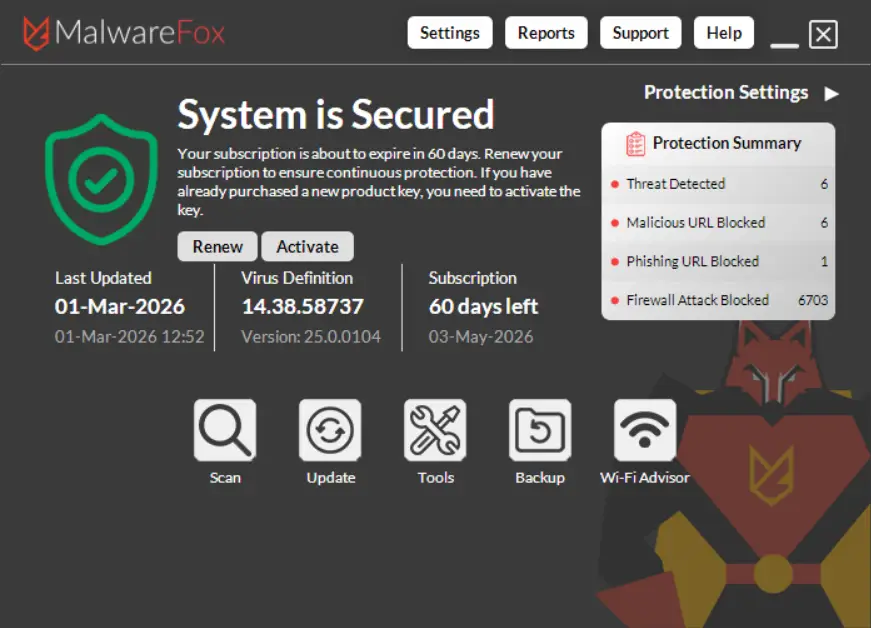
The MalwareFox dashboard: protection status, definition and program version, subscription days left, the Protection Summary counters, and the Scan, Update, Tools, Backup and Wi-Fi Advisor buttons.
Features
Real-time protection that stays in the background
MalwareFox Premium watches files and programs as they run and stops threats as they appear, instead of waiting for you to start a scan. The vendor says it stays under 50 MB of RAM and under 1% CPU during normal use, and schedules deep scans for when the PC is idle. It doesn't show "your PC is at risk" scare screens or upgrade pop-ups; alerts appear only when it finds something.
Ransomware Lockdown and file backup
MalwareFox's ransomware shield blocks programs that try to encrypt your files without permission, stopping the encryption before files are lost. A built-in Backup tool keeps copies of the folders you choose, so if something slips through, or you delete a file by mistake, you can restore it from the dashboard.
Behavior Blocker for zero-day and fileless attacks
MalwareFox's Behavior Blocker judges programs by what they do, not only by a signature match, so it can stop malware that's too new to be in the definitions, and fileless attacks that run from scripts or memory without dropping an obvious file on disk.
Manual scanner that names what it finds
MalwareFox's scanner shows the file it's checking, a running count of scanned objects, and a results list with each item's path, its classification (riskware, trojan-downloader and so on) and the pending action. You can skip a folder, pause, or tick a box to shut the PC down when the scan finishes. This scanner stays free after the trial.
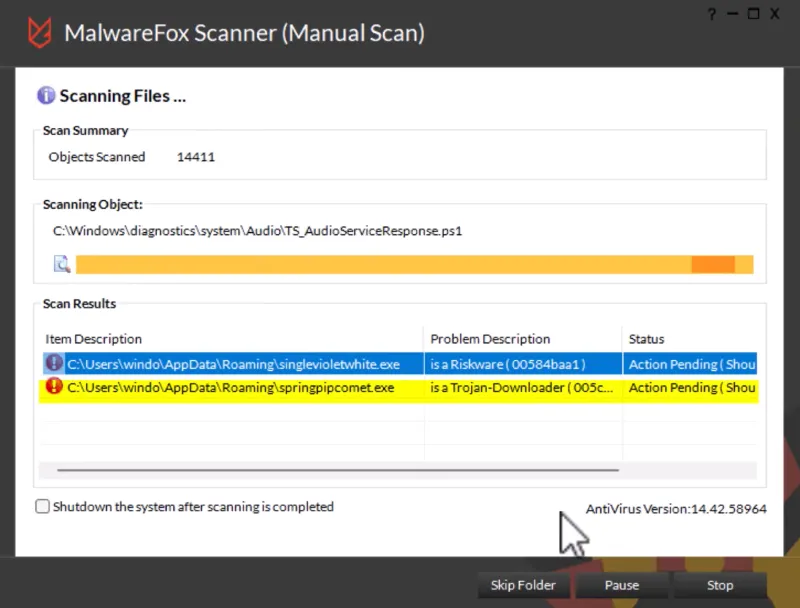
A manual scan in progress: 14,411 objects scanned, with a Riskware file and a Trojan-Downloader found in the user's AppData folder and waiting for action.
Browser Cleaner and web protection
MalwareFox's Browser Cleaner removes browser hijackers, adware and toolbars you never asked for, and clears privacy traces in one click; this is the job MalwareFox was first known for, and it's included in the free version. Premium adds web protection through the MalwareFox browser extension, which blocks malicious sites, phishing pages and drive-by downloads.
Firewall, Wi-Fi advisor and the extras
MalwareFox Premium also includes a firewall that watches incoming and outgoing connections, a Wi-Fi Security Advisor that checks your network for weak or suspicious settings, a privacy cleaner, secure file deletion, parental control with content filtering and time limits, and an anti-spam filter for email. These are basic versions of what full security suites offer, bundled in rather than sold as add-ons.
Benefits
- A price you can plan for. Many big-name antivirus brands sell a cheap first year and charge two or three times as much at renewal. MalwareFox says its renewal price is the same as the first year's, and it sends a reminder before it renews.
- Less noise. No daily pop-ups, no upsell screens for VPNs or identity protection, so you only hear from it when it has found something.
- Room for an older PC. A small memory footprint and idle-time scans suit a laptop that already struggles with a heavy suite.
- A safety net while you decide. The 15-day trial plus the 60-day refund window give you more than two months to see whether it fits.
Real-World Uses
- Your browser's home page keeps changing. Run the free scan and Browser Cleaner to remove the hijacker and the extensions that came with it, then decide if you want real-time protection.
- Your Norton or McAfee renewal just doubled. Swap it for MalwareFox Premium at $24 a year and keep real-time and ransomware protection.
- A family with Windows PCs and Android phones. The 3-device plan covers a mix of both for $36 a year, with anti-theft tracking on the phones.
- A home office worried about ransomware. Turn on the ransomware shield and point the Backup tool at your work folders, so an attack doesn't cost you the documents.
Who It's For, and Who Should Skip It
MalwareFox Premium suits home users who want plain, low-maintenance protection on one to five devices, people with older or modest PCs, and anyone who dislikes renewal-price games. It's an easy recommendation for someone who'd otherwise rely on Defender alone but wants ransomware protection and a second opinion on suspicious downloads.
Skip it if you want a full suite with a password manager, VPN and identity monitoring built in (DigitBin's review lists their absence as a minus), if you need a Mac version, or if you're choosing for a company: there's no central console for managing many business PCs. And if you're happy with Microsoft Defender and careful about what you download, the free on-demand scanner may be all you need from MalwareFox.
Usage Guide
- Download and install. Run MalwareFox-Installer.exe (about 263 MB) with an administrator account. The vendor says installation takes under a minute and adds no bundled software.
- Start the trial or activate. Register for the 15-day Premium trial, or enter the license key you received by email after buying. The Activate button on the dashboard takes a new key.
- Update first. Click Update so the virus definitions are current before the first scan.
- Run a full scan. Click Scan, let it finish, then review the results list and remove or quarantine what it found.
- Set up backup. Open Backup and add the folders you can't afford to lose.
- Install the browser extension for web protection, and check Protection Settings to confirm real-time and ransomware protection are on.
Where it falls short
- Support complaints. MalwareFox's Trustpilot score is high, but its 1-star reviews from 2021 to 2023 are all about support: slow or no answers to refund and auto-renewal cancellation requests. Keep your order email so you can cancel through the payment processor if you need to.
- Little independent testing of the product itself. The 99.3% lab score is for K7's engine. We found no current lab test or major magazine review of MalwareFox as a product, so most of the evidence is user reviews and smaller tech blogs.
- No quick scan was one of DigitBin's complaints, so a full scan is the usual choice.
- Basic extras. The firewall, parental control and anti-spam tools are simple compared with what a dedicated tool or a big suite offers.
What Users Say
Reviews of MalwareFox are mostly positive, and they mostly praise the same things: it's light, it caught something another product missed, and it doesn't nag. The complaints are about support, not detection. Many reviews are a few years old and describe the earlier, scanner-first version of the program, so we've noted dates where they were shown.
Trustpilot: 4.8 out of 5 from 61 reviews
Trustpilot notes that MalwareFox hasn't invited customers to review recently, and only 8 reviews arrived in the last 12 months. Recent ones are positive:
- Daniel Warren, "Fileless Malware protection" (5 stars, May 2026): "Mine worked - MalwareFox flagged a fileless malware attack that my previous software never would have caught"
- Muhammed Auwalu, "Powerful Malware Remover" (5 stars, May 2026): "It is a powerful anti-malware program. Easy to use and set up, and fair pricing. Highly recommended"
- Mayur Lokhande, "Best antimalware" (5 stars, April 2026): "Good antimalware. Works as advertised and don't require a large amount of resources"
- Renier Smith (5 stars, August 2026): "A big shout out to the MalwareFox Team for great support service!"
The negative reviews are older, and all about support:
- Doty Brown, "Terrible Support!" (1 star, March 2021): "I like their product, but their support is TERRIBLE!! I asked for a refund, and will be using a different product."
- Michel Vanherreweghe, "Terrible support" (1 star, 2022): "support is terrible: my license had expired, so I renewed it"
- Harlen, "No response from Support" (1 star, January 2023): "I contacted support to cancel my auto-renewal as I am no longer using the program."
Tech sites
TechLila (Rajesh Namase, updated March 2026): "MalwareFox does not attempt to compete with large, feature-packed security mega-suites and that appears intentional. Performance remains its strongest asset. Protection runs quietly in the background, scans are moderate in resource usage, and the software avoids intrusive prompts. The interface could benefit from a visual refresh, but functionally it remains clear and easy to use."
DigitBin (Nikhil Azza) calls it "one of the best anti-malware programs I have used." Its pros include "Easy to install and setup", "Superfast scanning" and "It doesn't interfere with the system's performance." Its cons: "Absence of Quick Scan", "Does not provide features like Password Vault, VPN, etc." and "Firewall protection absent". That last point no longer fits the current Premium version, which has a firewall and counts blocked attacks on its dashboard.
Softpedia, as quoted on MalwareFox's own reviews page: "MalwareFox is handy malware scanner that successfully identified and handled ransomware files during our tests, sending them to the quarantine in no time. Also, it remained light on system resources consumption throughout its runtime"
AlternativeTo and user feedback
- Mycobacterium Leprae on AlternativeTo (June 2024): "Fast detection of malware, and advanced heuristics under the hood."
- georgekasiouras on AlternativeTo (October 2017): "It's a lightweight and effective Anti-Malware. I've been using it for months now and I'm pretty pleased with it!"
- suzannextgen on AlternativeTo (November 2017): "Got rid of annoying adware popup from chrome which my antivirus program couldn't."
MalwareFox's own reviews page collects feedback sent through the program. Two examples:
- Zdravko, Croatia: "Program is excellent, ESET Smart Security 10 and Malwarebytes 2.2 failed to recognize " launchpage.org " as malware which was present in all browsers. Malwarefox has successfully solved, as well as several other hidden threats."
- Mark Trown, Australia: "Fantastic thank you for removing myway from my laptop. Malware that my installed antivirus McAfee should have stopped."
The pattern: people like MalwareFox for being light and quiet, and many first found it when it removed a browser hijacker or adware that their main antivirus missed. The criticism is about slow answers on refunds and renewals, not about missed malware, and it's concentrated in 2021 to 2023. There's a gap in serious, recent independent testing, which is worth knowing before you trust it as your only antivirus.
Comparisons
MalwareFox Free vs Premium
The free version keeps the on-demand scanner and Browser Cleaner, which is enough to clean up an infection you already have. Premium adds what prevents the next one: real-time protection, the ransomware shield, the behavior blocker, backup and restore, virus definition updates and priority support.
MalwareFox vs Microsoft Defender
Defender is free and built into Windows. MalwareFox replaces it rather than running beside it, so the reason to pay is what it adds: a separate engine (K7's) with its own detections, the dedicated ransomware shield and backup, the browser cleaner and web extension, and support you can email.
MalwareFox vs the big suites
Norton, McAfee and similar suites bundle VPNs, password managers and identity monitoring, and usually raise the price sharply after the first year. MalwareFox does less, costs $24 every year for one PC, and leaves those extras to separate tools you may already have.
Editions and Pricing
| Plan | Price | Devices | What it adds |
|---|
| Free | $0 | 1 Windows PC | On-demand scanner and Browser Cleaner |
| Premium, Single Device | $24 a year | 1 Windows PC | Real-time, ransomware and zero-day protection, backup, updates |
| Premium, Three Devices | $36 a year | 3, Windows and Android | Cloud management, app privacy audit, Android anti-theft |
| Premium, Five Devices | $48 a year | 5, Windows and Android | Same as Three Devices |
The Buy Now button on this page is for the Single Device plan. Payment is handled by Verifone (2Checkout), and the license key arrives by email.
FAQs
Can I run MalwareFox alongside another antivirus?
MalwareFox Premium is designed to be your main antivirus: it registers with Windows and Microsoft Defender switches off. Running it next to another paid real-time antivirus isn't recommended, since two real-time scanners tend to conflict. The free on-demand scanner can be used as a second opinion.
Does the MalwareFox price go up after the first year?
MalwareFox says no: the renewal costs the same as the first year ($24, $36 or $48), you get an email before it renews, and you can cancel auto-renewal from your account.
What happens when the MalwareFox trial ends?
After 15 days, MalwareFox's real-time protection and virus definition updates stop. The manual scanner keeps working for free, and buying a key restores everything without reinstalling.
Is there a MalwareFox version for Mac or iPhone?
No. MalwareFox runs on Windows, and there's an Android app on Google Play. The 3- and 5-device plans cover a mix of Windows PCs and Android devices.
How do I get a refund for MalwareFox?
MalwareFox offers a 60-day money-back guarantee for any reason: email support within 60 days of purchase. Because some older reviews mention slow replies, keep your order confirmation, which also has the payment processor's contact details.
Does MalwareFox collect my data?
MalwareFox says it collects only your email address for license delivery and anonymized threat telemetry, keeps no browsing logs, and doesn't sell data or show ads.
Will MalwareFox work on an old Windows 7 PC?
Yes. MalwareFox supports Windows 7 and later (the site also lists Vista SP2 and XP SP3) and needs 1 GB of RAM on 32-bit Windows or 2 GB on 64-bit, plus 1 GB of free disk space.
System Requirements
- Windows 11, 10, 8.1, 8 or 7 (also Vista SP2 and XP SP3)
- x86 processor, or ARM64 on Windows 11
- 1 GB RAM (32-bit) or 2 GB RAM (64-bit)
- 1 GB free disk space
- Internet connection for activation and updates; administrator rights to install
Conclusion
MalwareFox Premium is worth $24 a year if you want a quiet, low-cost antivirus for a home Windows PC and you're tired of renewal-price jumps and constant upsells. The one reason to buy it is the combination of real-time and ransomware protection with a light footprint and a flat yearly price. The main reason to hesitate is evidence: the product itself has little recent independent lab testing, and older reviews describe slow support. Use the 15-day trial and the 60-day guarantee to judge it on your own PC, and pick a big suite instead if you want a VPN and password manager in the same box.
Download Free TrialBuy Now