Orange Defender Antivirus: Avira's Scan Engine in a Small Windows Package
Orange Defender Antivirus is a basic Windows antivirus from Innovative Solutions (the makers of DriverMax) that runs Avira's virus scanning engine under its own interface, for $35 a year on one PC. It suits someone who wants a plain scanner with a per-app safety rating, but it has no independent lab results of its own, and several security vendors have flagged it as a potentially unwanted program.
If you've ever wanted to see at a glance which programs on your PC are talking to the internet, and block the ones you don't trust, that's the part of Orange Defender that goes beyond a standard virus scan. The scanning itself is Avira's.
Quick facts
- Version: 4.12.0.240 (installer dated June 12, 2023)
- Developer: Innovative Solutions, Bucharest, Romania
- Platform: Windows 11, 10, 8.1, 8, 7 and Vista, 32-bit and 64-bit
- Scan engine: Avira's engine and database updater, downloaded after installation
- Price: $35 for 1 year on 1 PC; 3-PC, 5-PC, monthly and 2-year plans also sold
- Trial: the free version includes 30 days of antivirus protection
- Refund: 30-day no-questions-asked refund
- Renewal: subscriptions renew automatically; you can turn auto-renewal off
- What we checked: the installer downloaded from the vendor on November 3, 2026 is version 4.12.0.240, 10.0 MB, digitally signed by Innovative Solutions Grup SRL; the 1-year, 1-PC plan cost $35.00 on the order page on November 3, 2026. We didn't run malware samples through it, and no independent lab has tested it.
Before you buy
- Several antivirus vendors flag it. PCRisk's removal guide (updated September 6, 2021) lists it as a potentially unwanted application, with detections from Avast (FileRepMalware [PUP]), BitDefender (Application.Deceptor.APC), ESET-NOD32 (Win32/InnovativeSolutions.C Potentially Unwanted) and Kaspersky (Not-a-virus:Downloader.Win32.OrangeDev.a). If you run any of those alongside it, expect warnings.
- No lab results. Orange Defender doesn't appear in AV-Test or AV-Comparatives reports. Its detection is Avira's, but without Avira's own cloud lookups.
- Slow development. The current installer dates from June 2023, and the screenshots on the vendor's site still show version 3.0 from 2017.
- Free alternatives use the same engine. Avira's own free antivirus runs the same signatures with Avira's cloud protection added.
Download Free TrialBuy Now
Overview
Orange Defender is a small installer, about 10 MB, that fetches its real engine after setup: Innovative Solutions' terms say the program downloads Avira's virus scanning engine and database updater, plus open-source OpenVPN components for a VPN that's free for both free and paying users. Around that engine, Innovative Solutions built its own dashboard in the same style as DriverMax: a home screen with protection status, a list of running apps with safety scores, and a world map of where your PC's internet connections go.
It's a Windows-only, single-purpose tool. There's no password manager, no parental controls and no Mac or phone version. Innovative Solutions is best known for DriverMax and Advanced Uninstaller PRO.
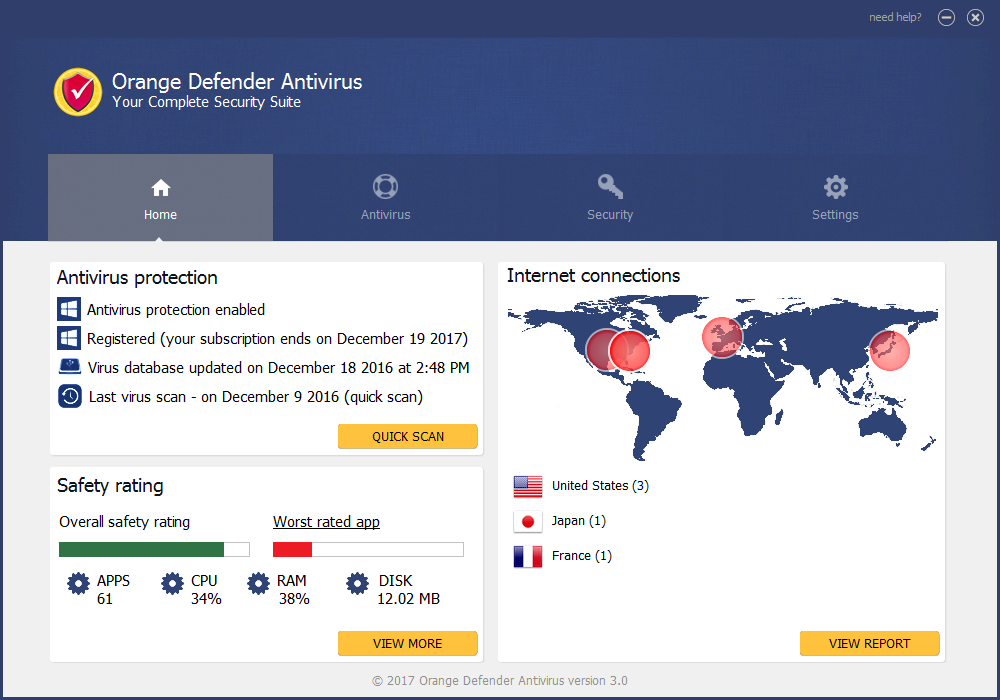
The home screen: protection status, last scan, an overall safety rating for 61 apps, and a map of internet connections by country (version 3.0 shown).
Features
Four kinds of scan
Orange Defender Antivirus offers a quick scan of the most important areas, a full scan after an infection, a removable drives scan for USB sticks, and a custom scan where you pick folders and file types. Results list each detection with its name and path, and you can disinfect one file or all of them.

Choosing a scan type: quick, full, removable drives or custom (version 3.0 shown).
Live scanner and automatic updates
The PRO version of Orange Defender keeps a live scanner running in the background and pushes virus database updates to you as they're released. The free version gets antivirus protection for 30 days.
A safety rating for every running app
Orange Defender scores each running program with a safety bar and shows its CPU, RAM and disk use. From the same panel you can open firewall actions to allow or block that program's internet access, which is handy when an unfamiliar process keeps phoning home.
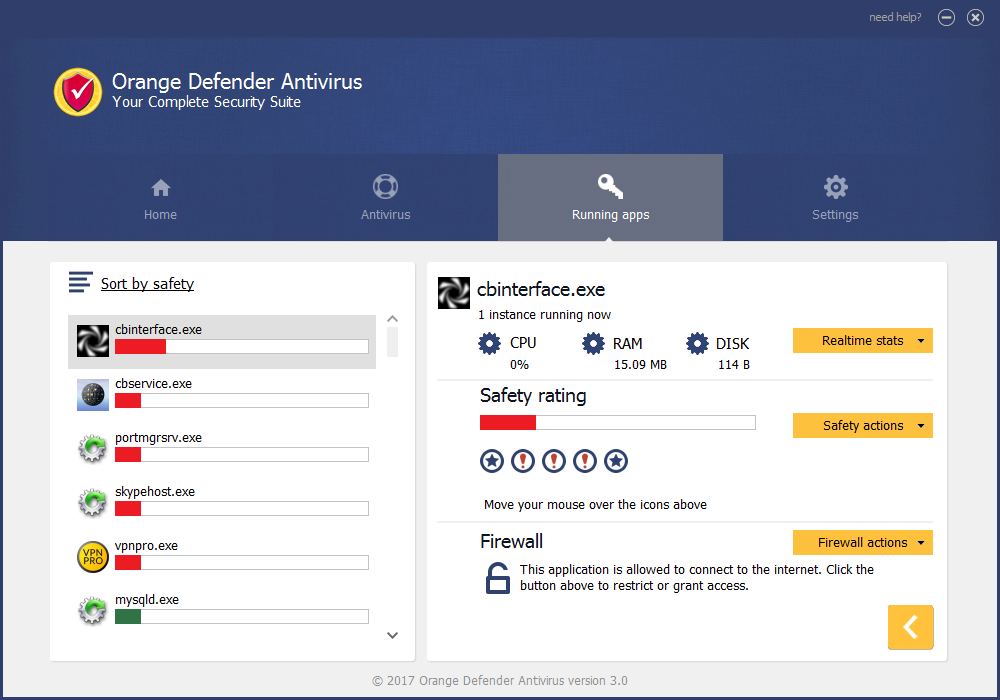
Running apps sorted by safety, with resource use, safety actions and firewall actions for the selected program (version 3.0 shown).
Startup and browser checks
Orange Defender checks for viruses added to your Windows startup, flags new startup items added since the last scan, and scans your browser's temporary files for malware. A one-button PC cleanup clears what it finds.
Free VPN
Orange Defender includes a VPN built on OpenVPN, free for both trial and paying users. The vendor doesn't publish server locations or a logging policy for it.
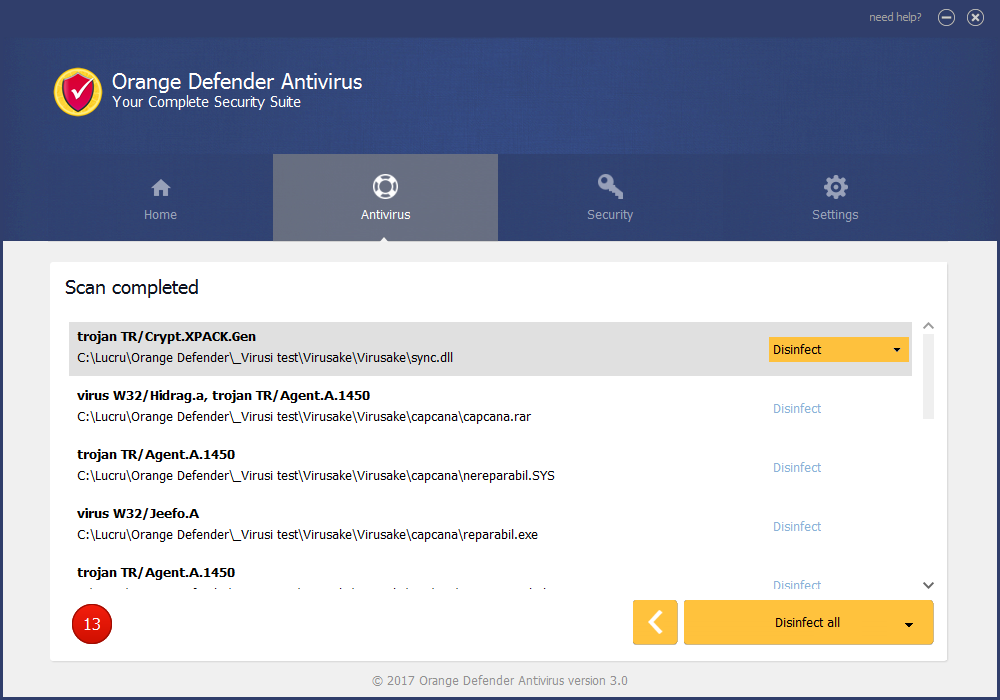
A completed scan of a test folder: 13 detections with Avira-style names such as TR/Crypt.XPACK.Gen, each with a Disinfect option (version 3.0 shown).
Benefits
- Proven signatures: Avira's engine is a long-established detection engine, so the basic scanning isn't home-made.
- Light footprint: a 10 MB installer and a simple four-tab interface that won't overwhelm a casual user.
- Visibility: the running-apps view and connection map show what's active on your PC, which most free scanners don't.
- Cheap multi-PC plans: 3 PCs for $48 a year or 5 PCs for $65 a year.
Real-World Uses
- Scanning a USB stick from a print shop or classroom before opening any files on it.
- Finding which background process is using the network on an older Windows 7 or 8.1 PC, and blocking it.
- Running a second-opinion scan with Avira's signatures on a PC that already has another antivirus, during the trial.
- Checking what's been added to Windows startup after installing a batch of free programs.
Who It's For, and Who Should Skip It
It fits someone who already uses DriverMax or Advanced Uninstaller PRO, likes that interface, and wants a simple paid scanner with per-app internet control on a Windows PC, including older Windows 7 and 8 machines.
Skip it if you want proof of protection: there are no lab results to point to, and Microsoft Defender, built into Windows 10 and 11, is tested by the labs every few months at no cost. Skip it too if you'd rather have the Avira engine with Avira's cloud protection, which Avira's own free antivirus provides, or if you need a Mac, Android or iPhone version.
Usage Guide
- Download the installer with the button on this page and run it. Setup is a standard Windows installer signed by Innovative Solutions.
- Stay online after setup: Orange Defender downloads the Avira scan engine and the latest virus database before it can scan.
- On the Home tab, check that antivirus protection shows as enabled and the virus database date is today's.
- Open the Antivirus tab, choose Quick scan, and click Next. Run a Full scan once if you suspect an infection.
- Review the results and use Disinfect, or Disinfect all, on the detections you trust.
- Open Security (Running apps), sort by safety, and use Firewall actions to block any program you don't want online.
- To buy, choose the plan for 1, 3 or 5 PCs and enter the license in the program.
Where it falls short
- No cloud lookups: security testers on MalwareTips note that it uses the Avira SDK without Avira's cloud, which is where much of Avira's fast detection of new threats comes from.
- Distribution through other installers: PCRisk reports that it has been offered as an extra inside other programs' setups, which is the main reason for the PUP labels.
- Little support activity: the vendor's contact page still showed a Christmas-leave notice on November 3, 2026, and there are no release notes or a version history.
- Basic protection only: there's no ransomware shield, web filtering or browser extension listed among its features.
What Users Say
Orange Defender has very few reviews anywhere. There are no Trustpilot, Capterra or G2 pages for it, and the independent comments we found come from a security forum and a few download and removal sites.
MalwareTips forum (March 2022)
A member asked whether the program was legit after seeing it in Softpedia's list of updated security programs. The replies:
Shadowra (malware tester): "I know this software it uses Avira SDK. In other words, it has an Avira base, but does not use its Cloud which is very efficient.... Skip it completely"
roger_m: "It's not a fake. The publisher has been around since 1997 and as has been mentioned, it uses Avira sigantures. But it's certainly not worth using."
LeMinhThanh (developer of LMT AntiMalware): "Malwarebytes detects it is a PUP"
ChoiceVoice: "company is legit. they have best free uninstaller around. their AV though, used to be a paid demand scanner with no real time protection, i am unsure if that is still true. and it used to use the avira engine. so to me, just use free avira or a free demand scanner like malwarebytes."
Removal and download sites
PCRisk (Tomas Meskauskas, updated September 6, 2021) classifies it as a potentially unwanted application because it "is distributed through the 'installers' of other programs," and adds: "It is currently unconfirmed whether Orange Defender Antivirus is one of these rogue PUAs, but it is a strong possibility." PCRisk sells its own cleaner, so weigh that accordingly.
Free Download Manager lists version 4.12.0.240 with a 3.8 out of 5 rating from just 5 votes.
The common thread
Nobody who has looked at Orange Defender calls it a fake: the company is real and the engine is Avira's. The recurring verdict is that it adds little over Avira's own free product, lacks the cloud protection that makes Avira strong, and carries PUP detections from major vendors. We found no reviews from paying users describing their experience.
Comparisons
Orange Defender vs Avira Free Antivirus
Orange Defender uses Avira's scan engine and signature updates, so detection of known malware should be close. Avira's own product adds its cloud protection and is free, while Orange Defender adds the running-apps safety view and per-app firewall controls for $35 a year.
Orange Defender vs Microsoft Defender
Microsoft Defender is built into Windows 10 and 11, costs nothing, and appears in AV-Test and AV-Comparatives reports. Orange Defender has no such results.
Editions and Pricing
There's one PRO edition, sold by term and number of PCs. Prices are the vendor's list prices in US dollars.
| Plan |
1 PC |
3 PCs |
5 PCs |
| 30 days (billed monthly) | $15 | $21 | $30 |
| 1 year | $35 | $48 | $65 |
| 2 years | $49 | $69 | $95 |
FAQs
Is Orange Defender Antivirus a fake antivirus?
No. Orange Defender Antivirus is a real product from Innovative Solutions, a Romanian company that also makes DriverMax, and its scanning is done by Avira's engine. It is, however, flagged as a potentially unwanted program by Avast, BitDefender, ESET and Kaspersky, mainly because of how it has been distributed.
Which antivirus engine does Orange Defender use?
Orange Defender uses the virus scanning engine and database updater from Avira, which it downloads after installation, according to the vendor's terms.
Does Orange Defender renew automatically?
Yes. Orange Defender subscriptions are set to auto-renew at checkout, and the order page says you can turn auto-renewal off at any time.
Can I get a refund for Orange Defender?
Orange Defender comes with a 30-day no-questions-asked refund: ask within 30 calendar days of purchase. After that, the vendor offers no refunds.
Does Orange Defender work on Windows 11?
Yes. Orange Defender version 4.12 supports Windows 11 and 10, as well as 8.1, 8, 7 and Vista, in both 32-bit and 64-bit editions.
Is there a Mac or Android version of Orange Defender?
No. Orange Defender is Windows-only.
Do I have to pay for the Orange Defender VPN?
No. The OpenVPN-based VPN in Orange Defender is free for both free and paying users, according to the vendor's terms.
How many PCs does one Orange Defender license cover?
One Orange Defender license covers 1, 3 or 5 PCs, depending on the plan you buy.
System Requirements
- Windows 11, 10, 8.1, 8, 7 or Vista, 32-bit or 64-bit
- About 10 MB for the installer, plus space for the Avira engine and virus database
- An internet connection to download the scan engine and updates
Conclusion
Orange Defender Antivirus is a real, signed product running a respected engine, and its running-apps view with per-app internet blocking is a genuinely useful extra. But at $35 a year it's hard to recommend over free options: Avira's own antivirus gives you the same signatures plus cloud protection, Microsoft Defender is built in and lab-tested, and Orange Defender carries PUP flags from four major vendors and shows little sign of active development. The one reason to buy it is if you specifically want that simple app-safety dashboard on an older Windows PC; the main reason not to is that you'd be paying for Avira's engine without Avira's best protection. Try the 30-day trial first, and keep the 30-day refund window in mind.
Download Free TrialBuy Now