DriverMax: A Driver Updater That Shows You the Install Record Before You Click
DriverMax is a Windows driver updater from Innovative Solutions that scans your PC, finds newer drivers, and shows how many other people installed each one successfully. The scan, driver backup and restore are free. The free version installs two drivers a day, and a PRO licence, $34.65 a year at checkout, removes that cap. It runs on Windows 11, 10, 8.1, 8 and 7.
You know the moment. Windows Update says everything is fine, yet the Wi-Fi drops every hour, the laptop won't wake from sleep, or a device sits in Device Manager with a yellow mark. Most driver updaters answer with a list of "outdated" drivers and a big Update All button. DriverMax 18 takes a more careful line: it tells you what happened to everyone else who installed that exact package before you do.
Quick facts
- Version: 18.0.326 (64.7 MB Windows installer, MSI, dated November 4, 2026)
- Developer: Innovative Solutions
- Platforms: Windows 11, 10, 8.1, 8 and 7, 64-bit and 32-bit, plus the matching Windows Server editions
- Driver catalogue: over 2,300,000 devices
- Free version: unlimited scans, backups and restores, 2 driver installs a day and 10 a month, no account needed
- PRO price at checkout: $34.65 for 1 year (40% off $57.75), $89.40 for a lifetime licence, $19.90 for 30 days
- Licence: one PC at a time, movable to another PC
- Guarantee: 30-day money-back guarantee
- Languages: 14
- What we checked: the current installer, version 18.0.326 (67,883,008 bytes), from the vendor's download link, and the order page prices for the 1-year ($34.65), lifetime ($89.40) and 30-day ($19.90) licences on November 12, 2026. We didn't install drivers with it on a test PC.
Download Free TrialBuy Now
Overview
DriverMax has been around for well over a decade, and version 18 is a rebuilt program with a new dark interface and four tabs: Drivers, Backup, History and Settings. You press Scan this PC, and within seconds it reads every device from Windows, matches them against its catalogue, and marks the ones with a newer driver.
What sets it apart is the reliability record under each driver. Instead of stars, you see a count such as "Installed successfully by 129 of 129 users". Packages with fewer than five installs show no figure at all, and packages that keep failing stop being offered. The developer's view is simple: newer doesn't always mean better for drivers, so you should see the evidence first.
The business model is just as plain. Everything works in the free version except one thing: how many drivers you can install. Free users get two a day and ten a month. PRO removes the cap and changes nothing else.
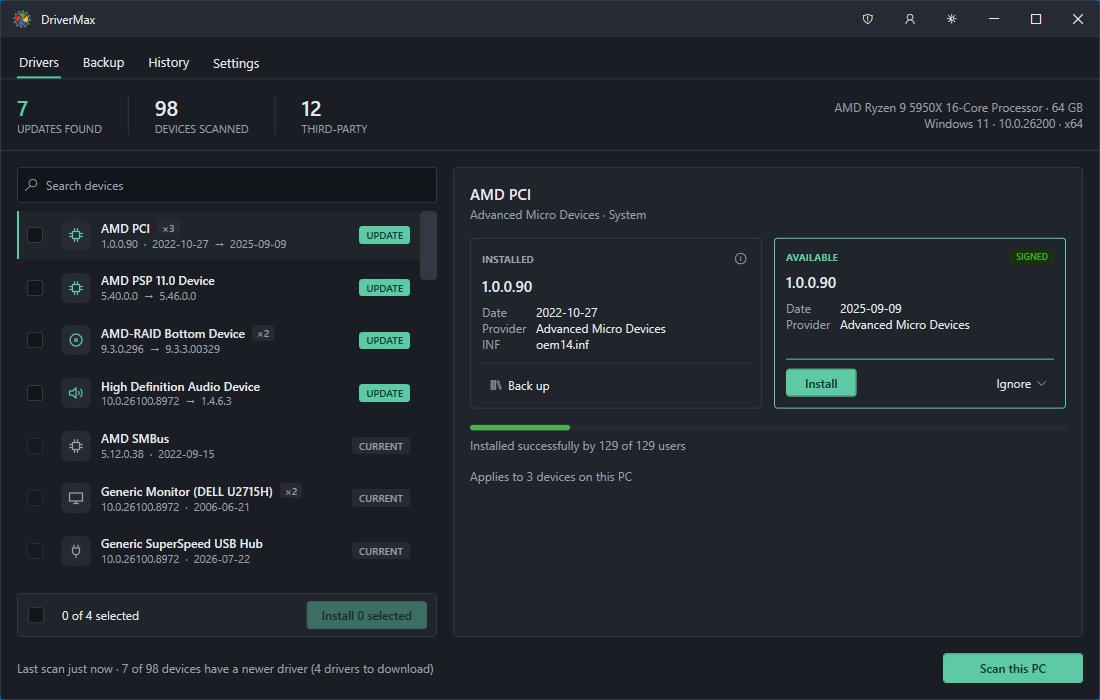
The Drivers tab: 7 updates found across 98 devices, with the installed and available versions side by side and "Installed successfully by 129 of 129 users" under the selected driver.
Features
An install record for every driver
DriverMax shows how each exact driver package behaved for its other users: how many installed it and how many of those installs finished. Below five installs it prints "too few installs to say" rather than a misleading 100%. A package that fails too often is withheld, so it never appears in your list. The match itself is made on your device's hardware and compatible IDs, then weighed against the driver's date, its declared operating system and that install record.
Two ways back before every install
Before DriverMax replaces a driver, it copies the current one out of the Windows driver store into an archive on your PC and asks Windows for a restore point (ticked by default). If Windows refuses to make the restore point, DriverMax says so instead of pretending. If Windows decides to keep the driver it already had, the app tells you that too, rather than reporting a success.
Back up every driver on the PC
DriverMax's Back up all button copies each third-party driver into an archive, skipping the drivers that ship with Windows. Run it before you reinstall Windows, then restore the lot afterwards, including the network driver you'd otherwise have no way to download. The Backup tab lists each saved driver with its version, size and date, and links to your restore points.
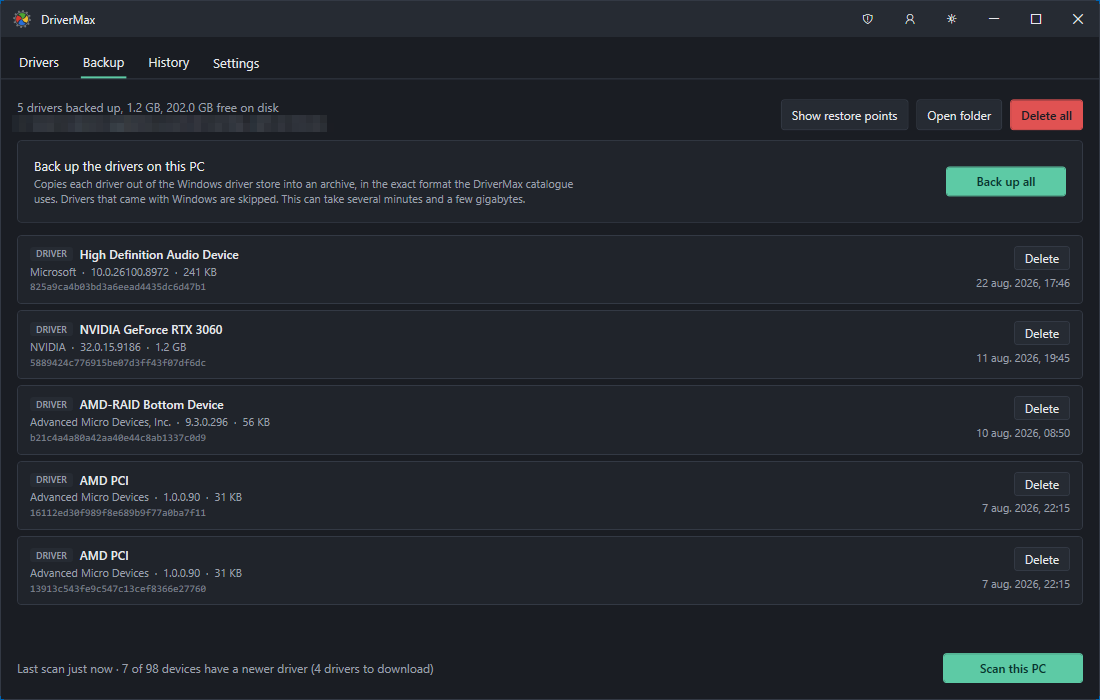
The Backup tab with five archived drivers (audio, NVIDIA GeForce RTX 3060, AMD), plus the Back up all, Show restore points and Open folder buttons.
Signed and scanned packages
DriverMax scans driver packages for threats before offering them and checks their signatures. Each driver card shows a Signed badge when the package carries one, so you can tell before you press Install. Every install is a button you press on a driver you picked, after a dialog naming the version going on and the version coming off.
Scheduled scans, history and quiet self-updates
DriverMax runs scheduled scans in the background, so a new driver doesn't wait until you remember to look. The History tab logs each update it found, downloaded or installed, with dates. The app also updates itself while the PC is idle, with no restart prompts, and it flags devices that Windows has no driver for at all.
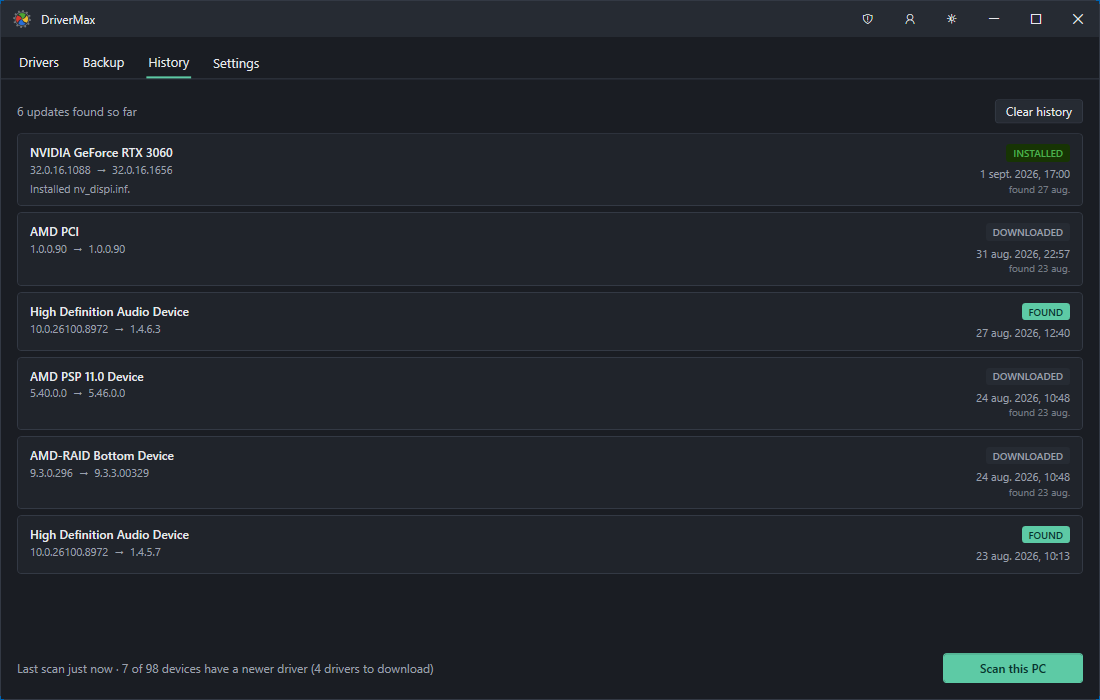
The History tab: six driver updates marked Found, Downloaded or Installed, each with the old and new version numbers.
Older Windows treated properly
DriverMax 18 supports Windows 7, 8 and 8.1 as well as 10 and 11, in 32-bit and 64-bit. Older Windows versions install drivers with a different command than Windows 11, and DriverMax detects which one it's running on and uses the right one. That matters most on the old laptops where finding drivers by hand is hardest.
Benefits
- Fewer bad updates. Seeing that a driver worked for 129 of 129 people, or that nobody has tried it yet, helps you skip the update that breaks sleep or audio.
- A safe way back. The archive plus the restore point means a bad driver costs you a rollback, not an evening.
- Reinstalls without the hunt. A full driver backup turns a fresh Windows install into a restore job instead of a search across manufacturers' sites.
- No pressure to pay up front. You can scan and back up forever for free, and many PCs only need a handful of drivers anyway.
Real-World Uses
- The rebuilt PC. You've just reinstalled Windows on a desktop and a dozen devices need drivers. That's where the free limit bites and a 30-day or yearly PRO licence earns its price in one afternoon.
- The old laptop. A Windows 7 or 8.1 machine whose manufacturer stopped posting drivers years ago. DriverMax still supports it and finds what the support site no longer lists.
- Before a Windows reinstall. Run Back up all, copy the archive to a USB drive, reinstall, and restore, network driver included.
- The family IT helper. Check each household PC every few months. The free version is often enough for two or three drivers per machine.
Who It's For, and Who Should Skip It
DriverMax fits Windows users who want driver updates without blindly trusting the newest version number, people looking after older PCs, and anyone about to reinstall Windows who wants a full driver backup first.
Skip it if your PC is working fine: updating working drivers for their own sake is how many of the complaints below began. Gamers who only care about the graphics driver are better served by the GPU maker's own app (NVIDIA App, AMD Software). And there's no Mac or Linux version.
Usage Guide
- Install it. Download the installer (an MSI of about 65 MB) and run it. Windows asks for permission once, because installing drivers needs administrator rights. No account is needed.
- Back up first. Open the Backup tab and press Back up all. It can take several minutes and a few gigabytes.
- Scan. On the Drivers tab press Scan this PC. Devices with a newer driver show an UPDATE tag.
- Read the record. Click a device to see the installed and available versions, the Signed badge and the install success count.
- Install. Press Install on the driver you want, or tick several and press Install selected. Restart if Windows asks.
- Activate PRO if you buy. The PC you buy on is activated automatically. For another PC, open the account button in the title bar, choose "I have a registration code" and enter the DMXN code from your email.
Before you buy
- Try the free version first. It has no time limit, so you can see what DriverMax finds on your PC before paying anything.
- One PC per licence. The standard licence covers one computer at a time. You move it by pressing Release in Settings, and a seat unused for 30 days frees itself.
- Subscriptions vs lifetime. The 30-day and 1-year licences are billed for that period. At checkout the lifetime licence costs about 2.6 times the 1-year price.
- Have a DriverMax 17 code? An unused one still works in version 18. A redeemed one lives on your DriverMax 17 account, so sign in with it. Free and promotional DriverMax 17 codes don't carry over.
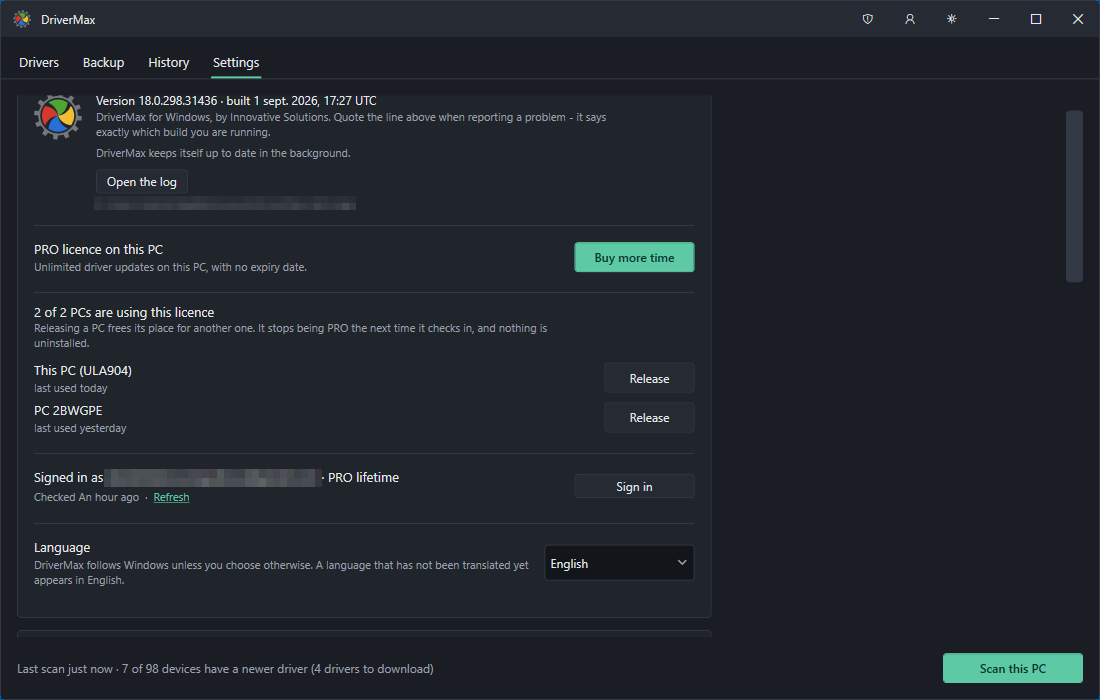
The Settings tab: the PRO licence, the two PCs using it with Release buttons, the signed-in account and the language setting.
Where it falls short
- Driver updates can still go wrong. Recent Trustpilot reviewers describe an incompatible storage driver that stopped Windows from booting, and updates stuck "in progress". The archive and restore point exist for exactly this, so keep them switched on.
- No network, no downloads. After a fresh Windows install without a network driver, DriverMax can't fetch anything. Without a backup, you'll need a phone tethered over USB or a USB Wi-Fi stick to get online once.
- Some security tools have flagged it. One Trustpilot reviewer says Windows and Malwarebytes flagged it, and AlternativeTo still carries a bundleware warning. The vendor says the current installer contains only DriverMax and its updater, with nothing else offered during setup.
- Support goes through the app. The developer asks you to use the in-app contact form (Settings, Help and contact) rather than email, and several reviewers complain about unanswered emails.
- Older reviews describe an older program. Most negative reviews were written about DriverMax 17 and earlier, which required an account and registration emails. Version 18 dropped that, so some complaints may no longer apply, and some may.
What Users Say
DriverMax gets mixed reviews: download sites and their editors are positive, while the few Trustpilot reviewers are mostly unhappy. Most of the reviews below predate version 18.
Download sites and their users
FileHorse lists DriverMax 18.0 with a user rating of 7.6 out of 10 from 319 votes. Its editor's review lists as pros "Automatic Driver Updates & Notifications", "Backup & Restore Driver Functionality", "Extensive Driver Database Coverage" and "Easy-to-Use and Intuitive Interface", and as cons "Limited Features in Free/Demo Version", "Advertisements and Upsell Prompts" and "Restricted Daily Driver Downloads".
Softpedia, as quoted on the DriverMax site: "We can say that DriverMax is a reliable choice when it comes to keeping your system fully functional and up to date. It saves you a great amount of time by automatically searching the web and installing drivers, so you don't have to."
NightFalconHD, a CNET user, as quoted on the DriverMax site: "The software scans all drivers and checks to see if there are any good current updates for them and notifies you about them and just to mention how easy the interface is anyone can use it."
A FileHorse user, as quoted on the DriverMax site: "Very good driver update program! Easy to use and found all installed drivers. If you only need to update a few driver, go for the free version. Must-have software!"
Trustpilot
drivermax.com has a TrustScore of 2.4 from 8 reviews, mostly 1-star. The profile is unclaimed and DriverMax doesn't invite reviews there.
Chazz, 1 star, "Crashed my system. No support or response." (February 2026): "DriverMax just crashed my laptop. It installed a incompatible driver that doesn't belong on this machine." They add that support didn't help and they asked for a refund.
Ekkehart Wartstein, 1 star, "Free version is a hoax" (January 2026): "If you try to use it, it asks you to register before it will update anything." Their registration emails never arrived. Version 18 no longer needs an account for free use.
Laszlo Barchet, 1 star (September 2025): "Many of them sent message "Installed" but in the main window there is a status" that stayed in progress for more than a day.
Albert Nigretti, 1 star, "Do not purchase Driver Max" (March 2025): "Driver max is the worst driver software I have ever used". They report server errors near the end of their subscription.
TonyFord.us, 5 stars (July 2021): "DriverMax has never downloaded the wrong drivers unlike Windows 10". They found it reliable on two computers and good at finding drivers for older hardware.
AlternativeTo and the press
On AlternativeTo, DriverMax averages 2.5 out of 5 from 4 ratings. bopperjr346 (4 stars, 2019) wrote: "DriverMax is still the most reliable free option that I am aware of." Sharif (2 stars, 2015) complained: "Very Limited - Free version let you download 2 drivers per day". luminex (2 stars, 2013) said: "It suggests officially not existing newer version of intel video driver."
PCWorld reviewed a much older version in January 2012 and concluded: "DriverMax offers free driver updates, but the process is clunky and time-consuming." The reviewer did credit it because it "does create a system restore point for you before installing drivers", a safety step version 18 still takes.
The recurring themes: people like how easily DriverMax finds drivers, especially for older hardware, and its backup and restore. The complaints are about the two-a-day free limit, drivers that didn't install or didn't suit the machine, and slow support. Version 18 answers some of this directly (no account for free use, the install record, the in-app contact form), but it's too new to have many reviews of its own.
Comparisons
DriverMax vs Windows Update and manufacturers' apps
Windows Update installs the drivers Microsoft has approved, and the GPU and laptop makers' own apps keep their own hardware current. Both are free and safe defaults. DriverMax is worth adding when a device has no driver at all, when the manufacturer has abandoned your model, or when you want a full driver backup before a reinstall.
DriverMax vs other driver updaters
Tools like Driver Booster, Driver Easy and Ashampoo Driver Updater also scan, update and back up drivers. DriverMax's difference is the per-package install record and the honest free tier: unlimited scans and backups with a small daily install cap, instead of a scan-only free version.
Editions and Pricing
| Edition |
Price at checkout |
Term |
Driver installs |
| Free | $0 | No time limit | 2 a day, 10 a month |
| PRO 30 days | $19.90 | 30 days, 1 PC | Unlimited |
| PRO 1 year | $34.65 (40% off $57.75) | 1 year, 1 PC | Unlimited |
| PRO lifetime | $89.40 (40% off $149) | No renewal, 1 PC | Unlimited |
The developer also sells a 2-year licence and a lifetime licence for unlimited PCs. Every paid plan has the same features, and the only thing PRO adds is the unlimited installs.
FAQs
Is DriverMax really free?
Yes. DriverMax's free version has no time limit and no account requirement. It scans, shows the install records, backs up and restores without limits, and installs two drivers a day and ten a month.
Can I get a refund if DriverMax doesn't work for me?
Yes. DriverMax comes with a 30-day money-back guarantee. Contact the developer within 30 days of buying.
Can I move my DriverMax licence to a new PC?
Yes. DriverMax's Settings tab lists every PC using your licence with a Release button. Release the old PC and activate the new one with your code. If the old PC is gone, its seat frees itself after 30 days unused.
Do I lose DriverMax PRO when I reinstall Windows?
No. Release the PC in DriverMax's Settings before wiping it, or simply enter your registration code again afterwards.
Why does DriverMax offer a driver that isn't on the manufacturer's website?
Manufacturers release drivers more often than they update their download pages, and many updates reach hardware partners months before they're listed publicly. DriverMax's catalogue includes those. Most are digitally signed by the manufacturer, and the app shows which ones are.
What does the percentage under each DriverMax driver mean?
It's a count of real installs of that exact package by other DriverMax users and how many succeeded. It isn't a star rating, and below five installs no figure is shown.
Does DriverMax work offline or behind a proxy?
DriverMax needs an internet connection to look up and download drivers, but it uses the same connection and proxy settings as Windows. Without a connection the scan still lists your devices, it just can't show updates.
How do I uninstall DriverMax?
Uninstall DriverMax from Windows Settings, Apps, like any other program. Drivers it already installed stay in place.
System Requirements
- Windows 11, 10, 8.1, 8 or 7, 64-bit or 32-bit
- The matching Windows Server editions
- About 65 MB for the installer, plus space for driver backups (a few gigabytes for a full backup)
- An internet connection to look up and download drivers
- Administrator rights to install drivers
Conclusion
Start with the free version: for most PCs it's all you need. Scans, backups and restores cost nothing, and two installs a day covers the occasional missing or broken driver. The reliability record is the one reason to choose DriverMax over other updaters, because it lets you skip the driver that went wrong for other people.
Buy PRO only when you're rebuilding a PC or reviving an old one and need many drivers at once. Then a 30-day licence or the 1-year plan at $34.65 pays for itself in a single sitting. The main reason to hold back is the risk every driver updater carries: recent reviews describe drivers that didn't suit the machine. So back up first, and don't update drivers that already work.
Download Free TrialBuy Now