Short answer: on Windows 11, update drivers for free first: open Settings > Windows Update > Advanced options > Optional updates > Driver updates, then use Device Manager for a single device, and get graphics and laptop-specific drivers from NVIDIA, AMD, Intel or your PC maker's app. If a device still has no working driver, or you're setting up a PC with a page of unknown devices, Driver Easy finds and installs them in one click and backs up each old driver first ($29.95 a year for 3 PCs at checkout). For one or two drivers, DriverMax's free version installs two a day at no cost.
At a glance
| Method | Cost | What it covers | Easy rollback | Use it when |
|---|
| Windows Update, Optional updates | Free | Drivers Microsoft has approved for your hardware | Through Device Manager | Always, first |
| Device Manager | Free | One device at a time | ✓ Roll Back Driver | One device has a yellow warning |
| PC maker's or GPU maker's app | Free | That maker's hardware only | Varies | Laptops, graphics cards |
| Driver Easy | $29.95 a year for 3 PCs, $39.95 for 1 PC; free scan | The whole PC in one scan | ✓ Driver Recovery | Many drivers missing, or the free ways failed |
| DriverMax Free | Free, 2 installs a day, 10 a month | The whole PC in one scan | ✓ Archive and restore point | One or two drivers, no budget |
How we checked
- We followed the Windows 11 driver settings described here: Optional updates, Device Manager's Update driver and Roll Back Driver, and System Restore.
- We downloaded the current Driver Easy installer from Easeware: version 7.3.1.6771 (12.5 MB, dated November 9, 2026), and DriverMax 18.0.326 from its vendor.
- We read Driver Easy's release notes for versions 7.2.0 to 7.3.0 and its trial and refund terms, and checked the order page prices of its 1-PC, 3-PC and 10-PC licenses.
- What we checked: the Driver Easy and DriverMax installer versions and the order page prices in this guide, on November 12, 2026.
The Driver Easy screenshots are the vendor's own. We didn't run Driver Easy's updates on a test PC, so we can't vouch for which drivers it will find on yours.
Before you start: make a restore point
A new driver can stop a device from working, and very occasionally stop Windows from starting. A restore point lets you go back. On Windows 11, press Start, type Create a restore point and open it. On the System Protection tab, select your system drive; if protection is off, choose Configure and turn it on. Then press Create, name the point and wait for it to finish. It takes about a minute.
Also note what's actually wrong. "No sound since Tuesday's update" or "Wi-Fi drops every hour" tells you which device to update. Updating drivers on a PC that works fine adds risk and rarely makes it faster.
Step 1: Windows Update's optional driver updates (free)
Windows 11 installs many drivers on its own, and holds others back as optional. To see them:
- Open Settings (Windows key + I) and choose Windows Update.
- Press Check for updates and install anything waiting.
- Go to Advanced options > Optional updates and open Driver updates.
- Tick only the driver for the device that's misbehaving, press Download & install, and restart when asked.
These drivers have been through Microsoft's approval for your hardware, so they're the safest free option. The catch is that they're often older than the version on the manufacturer's site, and the list doesn't cover every device.
Step 2: Device Manager for one device (free)
Device Manager is where Windows shows every piece of hardware and flags problems with a yellow warning sign.
- Right-click the Start button and choose Device Manager.
- Expand the category (Display adapters, Network adapters, Sound) and right-click the device.
- Choose Update driver > Search automatically for drivers. If Windows says the best driver is already installed, the dialog offers to search Windows Update, which takes you back to Step 1.
- If you've downloaded a driver from the manufacturer, choose Browse my computer for drivers and point it at the unzipped folder.
Device Manager is also your undo button. If a new driver causes trouble, right-click the device, choose Properties > Driver > Roll Back Driver, and Windows puts the previous version back. The button is greyed out when there's no earlier driver to return to.
Step 3: Get drivers from the manufacturer (free)
For two kinds of hardware, the maker's own source beats Windows Update:
- Graphics cards. NVIDIA (the NVIDIA App), AMD (AMD Software: Adrenalin Edition) and Intel (Intel Driver & Support Assistant) publish new graphics drivers first, often weeks before Windows Update offers them. Gamers should use these.
- Laptops and brand-name desktops. Dell, HP and Lenovo ship their own tools (Dell SupportAssist, HP Support Assistant, Lenovo Vantage) and support pages where you enter the serial number or model. They hold the custom audio, touchpad, hotkey and power drivers a generic driver can break.
Download only from the manufacturer's own site. "Free driver download" sites are a common source of bundled adware and malware.
When the free ways aren't enough
The free route works well for one device on a supported PC. It gets slow in three situations: after a clean Windows install with ten unknown devices, on an older PC whose maker stopped posting drivers, and when a family PC needs checking and you don't want to identify every chip. That's what a driver updater is for. It scans every device, matches it to a driver and installs it, and the good ones back up the old driver first. The rest of this guide uses Driver Easy, then covers a free alternative.
How to update drivers with Driver Easy, step by step
- Price at checkout: $39.95 a year for 1 PC, $29.95 a year for 3 PCs, $99.95 a year for 10 PCs
- Free version: none since 6.0. The scan is free, and the 7-day trial asks for a payment method
- Refund: within 30 days, no questions asked
- Runs on: Windows 11, 10, 8 and 7 (on ARM64 PCs, driver updates are still in testing)
1. Install Driver Easy and scan
Download the installer (12.5 MB) with the Download button below, run it, and open Driver Easy. Press Scan Now. The scan is free and shows how many drivers are missing, outdated or mismatched.
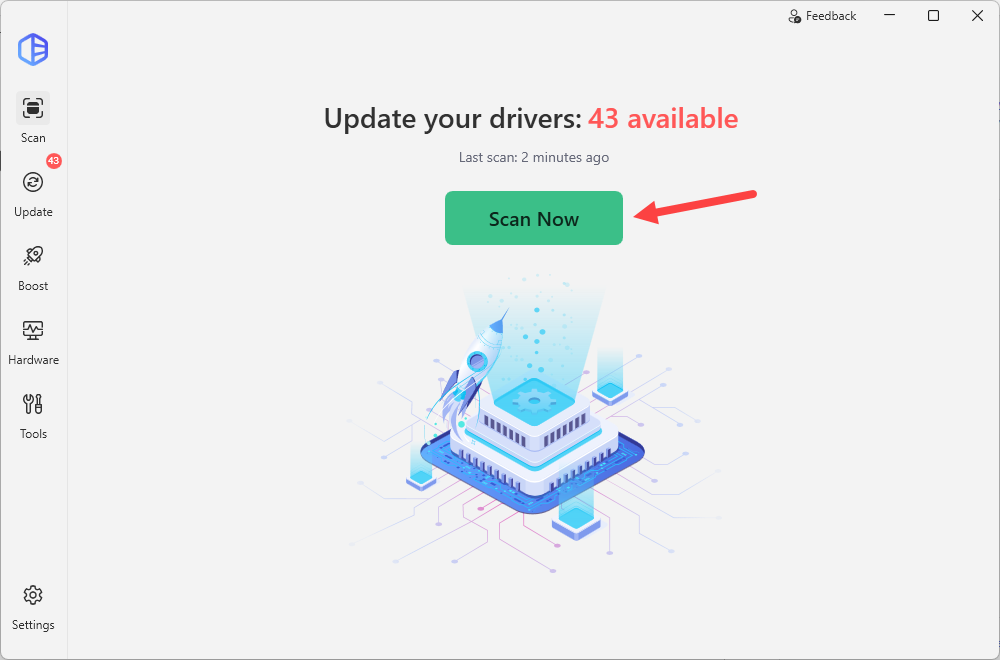
Driver Easy's home screen after a scan: "Update your drivers: 43 available", the Scan Now button, and Scan, Update, Boost, Hardware and Tools in the sidebar. The arrow is the vendor's.
2. Start the trial or activate Pro
Installing drivers needs Driver Easy Pro. Under the Scan Now button, choose Activate Pro now to enter a license key, or Start 7-day trial. The trial asks for a payment method and renews at $39.95 a year unless you cancel before it ends. If you already know you'll keep it, the 3-PC license at $29.95 a year costs less than the 1-PC trial plan.

The "Already have a license key? Activate Pro now or Start 7-day trial" line under Driver Easy's Scan Now button. The red marks are the vendor's.
3. Review the list, then Update All
Open the Update tab. Each driver shows its version, download size and certification (Microsoft WHQL and Driver Easy). Untick anything you don't want touched, such as the graphics driver if you update it from NVIDIA or AMD. Then press Update All, or Update next to a single driver.
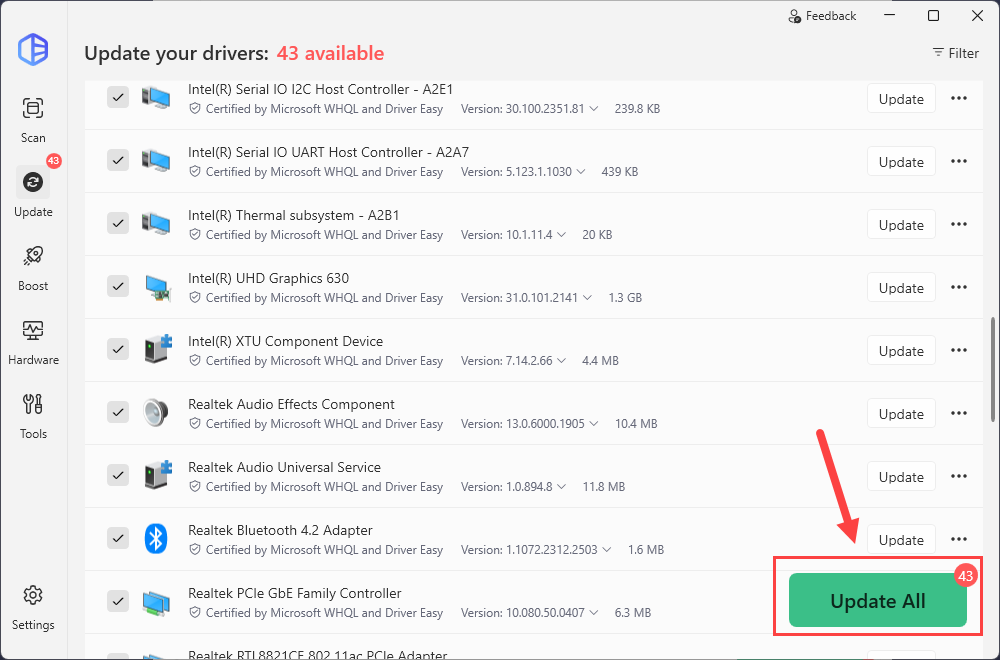
Driver Easy's Update tab: Intel serial IO, thermal and UHD Graphics 630 drivers and Realtek audio, Bluetooth and Ethernet drivers, each with a tick box, version and size, and the Update All button.
If you have an NVIDIA card, set the driver branch first under Settings > Scan & Update > NVIDIA driver type: Auto, Game Ready (for games) or Studio (for creative apps). This setting arrived in version 7.3.0.
4. Read the warning and start the updates
Driver Easy shows a Before you update notice: the screen may flicker or go black and the internet may drop for a moment, so save your work and don't restart until it's done. It also prepares Driver Recovery information so each change can be undone, and tells you if it can't. Press Start driver updates.
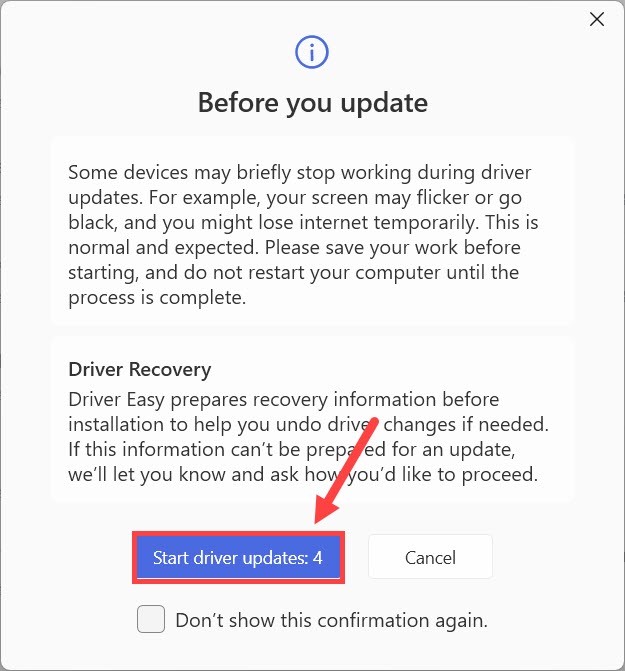
The "Before you update" dialog: a warning about flickering screens and dropped connections, the Driver Recovery note, and the Start driver updates: 4 button. The red marks are the vendor's.
5. Restart, and check the devices you care about
When the updates finish, Driver Easy lists which drivers were updated and which need a restart. Save your work, press Restart Now, then test the sound, Wi-Fi or whatever device you set out to fix.
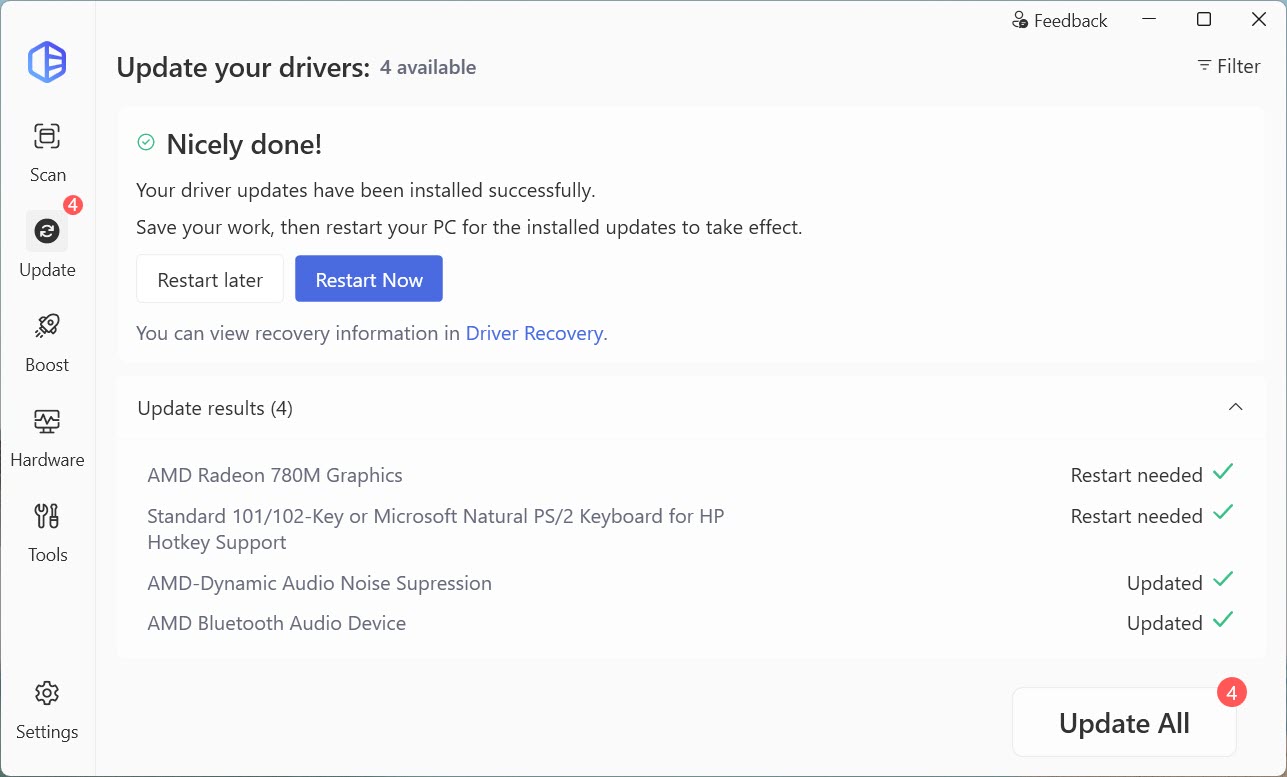
The results screen: "Your driver updates have been installed successfully", Restart later and Restart Now buttons, a link to Driver Recovery, and four AMD and HP drivers marked Updated or Restart needed.
6. If something breaks: roll back or force install
Every driver in Driver Easy's list has a menu (the three dots). Roll back to previous driver undoes an update, All available versions lets you pick an older one, and Don't show this update again stops it coming back. If a driver keeps failing to install, version 7.2.2 added Force install this driver. Tools > Driver Recovery holds the saved drivers, and your own restore point is the last resort.
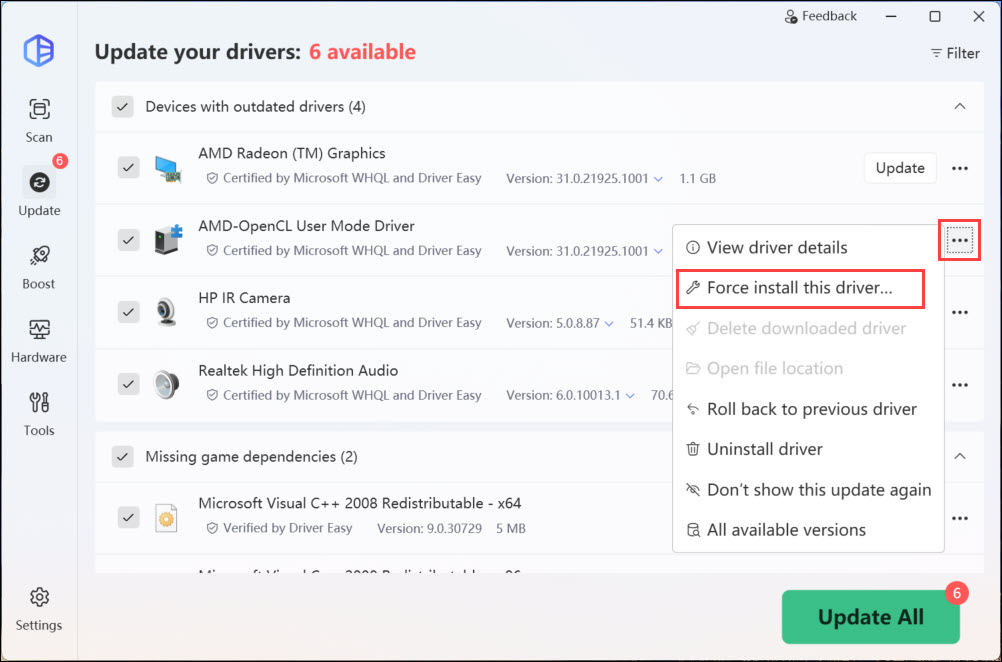
The menu next to a driver in Driver Easy: View driver details, Force install this driver, Roll back to previous driver, Uninstall driver, Don't show this update again and All available versions.
No internet? Use the offline scan
If the PC can't get online because its network driver is the missing one, Driver Easy's Offline Scan (under Tools) scans that PC, then you download the network driver on another computer and copy it across with a USB stick.
Driver Easy: before you buy
- Pick the 3-PC license. At checkout it was $29.95 a year, against $39.95 for 1 PC. The 10-PC license was $99.95.
- It's a subscription. Every plan renews yearly. Turn off renewal if you bought it for one fix. Drivers already installed stay on your PC after it ends.
- The refund is easy. Easeware refunds within 30 days with no questions asked (the Computer Repair Shop License is excluded).
- Criticism to know about. On Trustpilot (4.3 out of 5 from over 22,000 reviews), the one-star reviews describe boot loops and broken laptops after updates, and resentment at paying for drivers that are free elsewhere. Keep Driver Recovery on, and update only what needs it.
Download Driver EasyBuy Driver Easy (3 PCs)
The button above orders the 3-PC license ($29.95 a year). The 1-PC and 10-PC licenses have their own Buy buttons on the Driver Easy page.
A free alternative: DriverMax for one or two drivers
DriverMax by Innovative Solutions
- Free version: unlimited scans and backups, 2 driver installs a day and 10 a month, no account needed
- PRO at checkout: $34.65 a year for 1 PC, $89.40 lifetime
- Runs on: Windows 11, 10, 8.1, 8 and 7, 32-bit and 64-bit
DriverMax is the better choice when you need a driver or two and won't pay. Its free version has no time limit, archives each driver before replacing it, and asks Windows for a restore point. Under each driver it shows how many other DriverMax users installed that exact package successfully, which helps you skip a risky one. The limits: two installs a day, no offline mode, and each paid license covers only one PC.
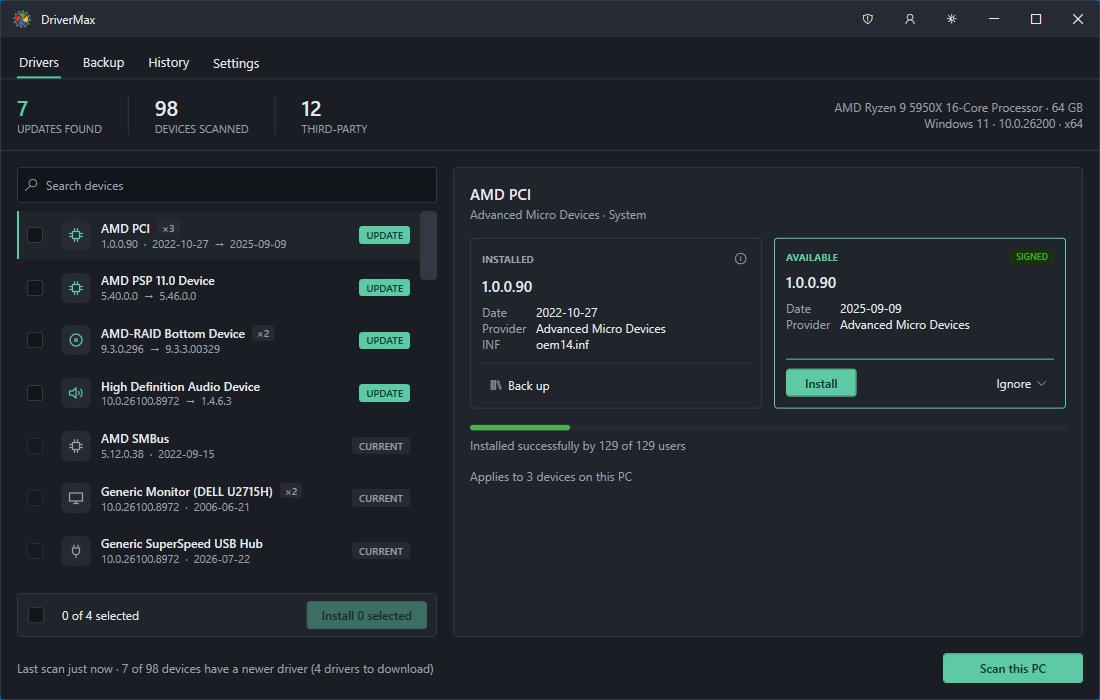
The DriverMax 18 Drivers tab: 7 updates found across 98 devices, installed and available versions side by side, and "Installed successfully by 129 of 129 users".
Download DriverMax FreeBuy DriverMax PRO
Our best driver updater roundup compares these with Driver Booster and Driver Genius, and Driver Easy vs Driver Booster goes deeper on the two most popular.
What commonly goes wrong
- Updating drivers that work. "Outdated" doesn't mean broken. Most horror stories in driver-updater reviews start with updating everything on a PC that was fine.
- Replacing your laptop maker's driver with a generic one. If the hotkeys, touchpad gestures or audio enhancements stop working after an update, roll back and use the driver from your PC maker's site.
- Taking the graphics driver from the wrong place. Windows Update and driver updaters can lag behind NVIDIA, AMD and Intel. Use the GPU maker's app, or set Driver Easy to the NVIDIA branch you need.
- No network driver after a reinstall. Download the Wi-Fi or Ethernet driver from the maker's site on another PC before you wipe, or use Driver Easy's Offline Scan.
- Restarting in the middle. Graphics and chipset drivers can take minutes. Let the update finish, even if the screen goes black for a moment.
- Forgetting the trial. Driver Easy's 7-day trial becomes a $39.95 yearly plan unless you cancel. Put the date in your calendar.
FAQs
How do I update drivers on Windows 11 for free?
Windows 11 updates drivers for free through Settings > Windows Update > Advanced options > Optional updates > Driver updates. For one device, use Device Manager's Update driver, and get graphics drivers from the NVIDIA, AMD or Intel app. DriverMax's free version also installs two drivers a day.
Does Windows 11 update drivers automatically?
Yes, partly. Windows 11 installs many drivers automatically through Windows Update, but it lists others as optional updates you have to choose yourself, and it often offers an older version than the manufacturer's site.
How do I know which drivers need updating?
In Device Manager, a yellow warning sign marks a device with a driver problem. A driver updater such as Driver Easy lists every missing, outdated or mismatched driver in one free scan, but only update the ones causing trouble.
Is Driver Easy safe to use?
Driver Easy is safe for most people when you leave its Driver Recovery backups on. It warns you before each update, prepares a way to undo it, and lets you roll back or pick another version. A minority of Trustpilot reviewers still report boot loops or broken devices after updates, so make a restore point first.
Is Driver Easy free?
No. Driver Easy has had no free version since 6.0. The scan is free, but installing drivers needs Driver Easy Pro or its 7-day trial, which asks for a payment method. Pro costs $29.95 a year for 3 PCs or $39.95 for 1 PC at checkout.
How do I undo a driver update on Windows 11?
Open Device Manager, right-click the device, choose Properties > Driver > Roll Back Driver. If you used Driver Easy, choose Roll back to previous driver from the driver's menu. If Windows won't start properly, use the restore point you made beforehand.
Should I update my BIOS with the drivers?
Not unless the PC maker recommends it for a problem you have. A BIOS update isn't a driver, and a failed one can leave the PC unable to start. Get it only from the maker's own support page or app and follow its instructions.
Conclusion
Start with what Windows 11 gives you for free: the Optional updates page, Device Manager and your PC maker's or graphics card maker's app fix most driver problems. When they don't, or when a fresh install leaves a dozen devices without drivers, Driver Easy is the quickest way through: one scan, one click, and a backup of every driver it replaces. Buy the 3-PC license, which costs less than the 1-PC one, or start with the free scan to see what it would change. For one missing driver and no budget, DriverMax Free is enough.
Download Driver EasyBuy Driver Easy (3 PCs)