Short answer: for most Windows 11 PCs, Driver Easy is the driver updater to buy: it backs up every driver before it changes it, lets you pick any version (including NVIDIA's Game Ready or Studio drivers) and refunds you within 30 days with no questions asked. Get the 3-PC license ($29.95 a year at checkout), which costs less than the 1-PC one ($39.95). Driver Booster PRO ($22.95 for 3 PCs) is the cheaper pick for gamers, DriverMax is the one to use free when you only need a couple of drivers, and Driver Genius Pro ($25.95 for 2 years on 3 PCs) is the best for backing up drivers before a Windows reinstall.
At a glance
| Driver Easy | Driver Booster PRO | DriverMax | Driver Genius Pro |
|---|
| Price at checkout | $39.95 a year (1 PC), $29.95 a year (3 PCs) | $22.95 (3 PCs, an 18-month plan) | $34.65 a year (1 PC), $89.40 lifetime | $25.95 (3 PCs, 2 years) |
| Free version | ✗ Free scan only, 7-day trial needs a payment method | ✓ Manual updates | ✓ 2 drivers a day, 10 a month | ✓ Updates for 5 days |
| Backs up drivers before updating | ✓ Driver Recovery | ✓ PRO only | ✓ Free and PRO | ✓ Restore point and rollback |
| PCs per license | 1, 3 or 10 | 3 (IObit also sells 1 and 2) | 1 | 3 |
| Works on a PC with no internet | ✓ Offline scan | ✓ Offline Driver Updater | ✗ | ✓ Offline driver update |
| Standout feature | Force install, NVIDIA Game Ready or Studio choice | Game components and 680+ game DLL fixes | Install success count for each driver | Backs up drivers as an EXE auto-installer |
| Money-back guarantee | 30 days, no questions asked | 60 days, not for a change of mind | 30 days | 60 days, full refund on request |
| Current version | 7.3.1 | 14.1 | 18.0.326 | 26.0 |
How we picked
- We started from the driver updaters listed in our System Maintenance category and kept the four that are still sold and updated in the last few months.
- We downloaded the current Driver Easy, Driver Booster and DriverMax installers from the vendors and read their versions: Driver Easy 7.3.1.6771 (dated November 9, 2026), Driver Booster 14.1.0.557 (November 12, 2026) and DriverMax 18.0.326 (November 4, 2026). Driver Genius's installer (version 26.0) was unchanged since we downloaded it on October 29, 2026.
- We opened each order page and read the price of every plan in this article, and compared what each free version or trial really lets you do.
- We read the vendors' release notes, refund policies and help pages, and the reviews on Trustpilot and independent tech sites, including the one-star ones.
- What we checked: the installer versions above and the order page prices for all five products on November 12, 2026.
We compared features, prices, free tiers and refund terms. We didn't run the four programs side by side on one PC, so this article doesn't rank them by how many outdated drivers each one finds. The vendors' driver database sizes are their own claims.
Do you need a driver updater on Windows 11 at all?
Often you don't. Windows 11 installs drivers through Windows Update, and the ones it holds back appear under Settings > Windows Update > Advanced options > Optional updates > Driver updates. Your PC maker's own app (such as Dell SupportAssist, HP Support Assistant or Lenovo Vantage) covers its hardware, and NVIDIA, AMD and Intel give away their graphics drivers in their own apps. Our guide How to Update Drivers on Windows 11 (Free Way First) walks through each free method. Our step-by-step guide, How to Speed Up a Slow Windows 11 PC, covers the free Windows tools for general slowdowns.
A driver updater earns its price in a few situations: a fresh Windows install with a page of unknown devices, an older PC whose maker stopped posting drivers, a device that broke after an update and needs an older driver, or several family PCs you'd rather not check one by one. It saves the hunt and adds a safety net. It doesn't make a healthy PC faster, whatever the product pages suggest.
1. Driver Easy: best for most people
- Price at checkout: $39.95 a year for 1 PC, $29.95 a year for 3 PCs, $99.95 a year for 10 PCs
- Runs on: Windows 11, 10, 8 and 7
- Free version: none since version 6.0. The scan is free, and the 7-day trial asks for a payment method
- Best for: anyone who wants driver updates done for them, with an easy way back
Driver Easy scans your PC, lists every missing, outdated or mismatched driver with its version and download size, and installs them all with Update All. Before each update it shows a warning that the screen may flicker or the network drop for a moment, and its Driver Recovery tool saves the old driver so you can roll back. Easeware says its database holds over 30 million drivers.
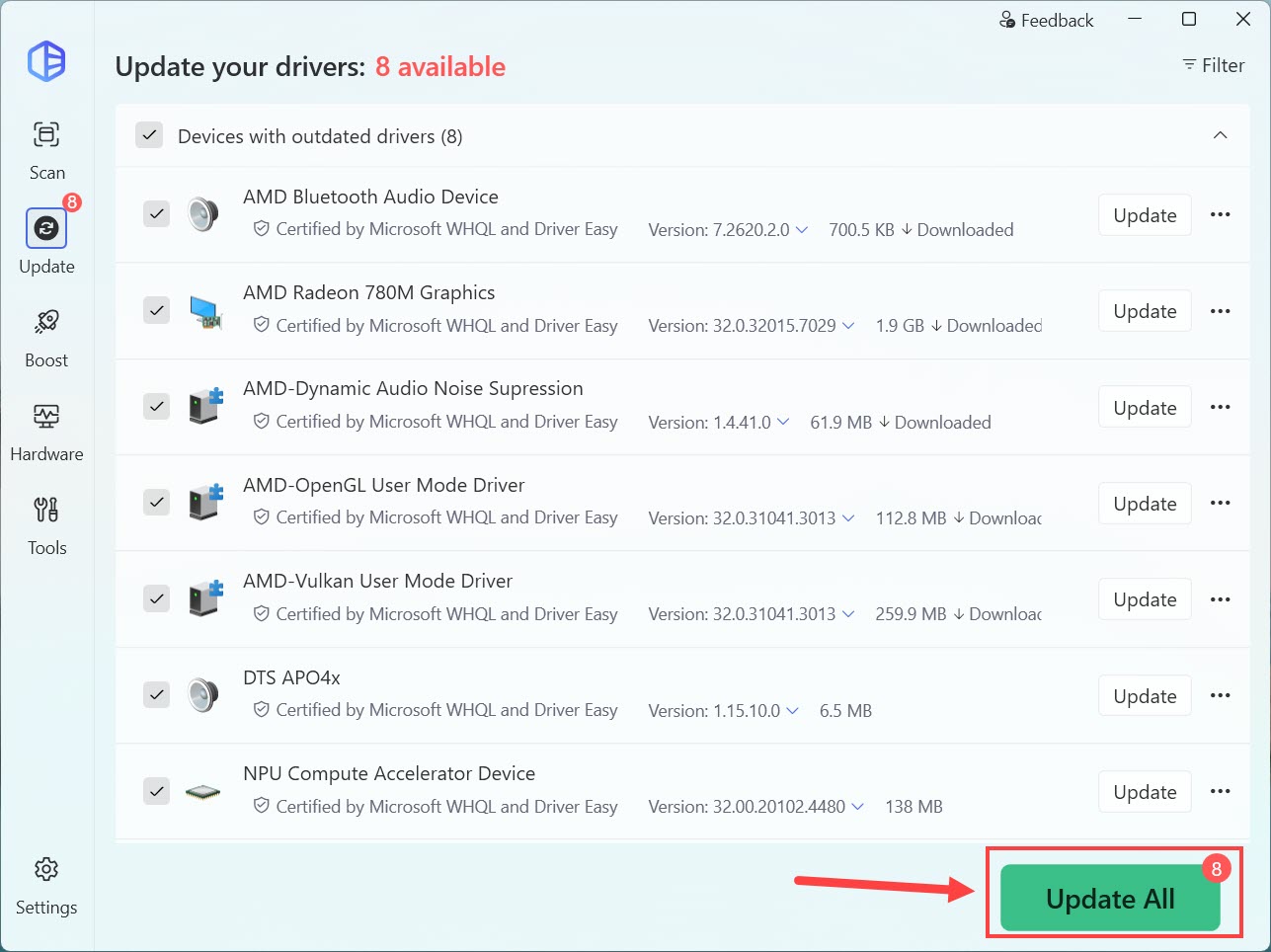
Driver Easy's update list: eight outdated drivers (AMD graphics, audio, OpenGL and Vulkan drivers, an NPU driver), each certified by Microsoft WHQL and Driver Easy, with its version and size. The arrow is the vendor's.
What sets Driver Easy apart is control. The menu next to each driver offers Roll back to previous driver, All available versions, Don't show this update again and, since version 7.2.2, Force install this driver for an update Windows keeps refusing. Version 7.3 added a setting for NVIDIA graphics cards: Auto, Game Ready or Studio drivers. It also has an offline scan for a PC whose network driver is missing, a driver uninstaller for retired devices, and a hardware summary.
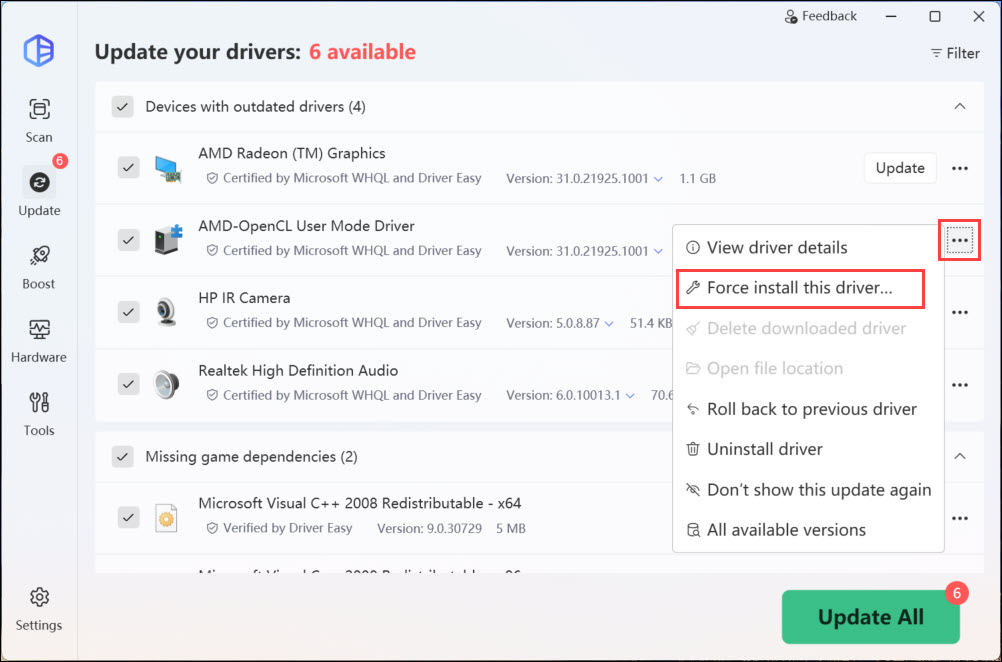
The menu next to a driver in Driver Easy: View driver details, Force install this driver, Roll back to previous driver, Uninstall driver, Don't show this update again and All available versions.
The weak points are about money. There's no free version any more: you can scan for free, but installing a driver needs Pro or the 7-day trial, and the trial asks for a payment method and renews at $39.95 a year unless you cancel. The 1-PC license costs more than the 3-PC one at checkout, so buy the 3-PC plan even for one computer. And on Windows on ARM laptops, the vendor's 7.3 release notes say driver updates and restore are still being tested.
What we like
- Driver Recovery backs up each driver before it's replaced
- Choose any driver version, or force an install that keeps failing
- NVIDIA Game Ready or Studio preference
- 30-day refund with no questions asked
Watch out for
- No free version, and the trial needs a card
- Yearly subscription that renews automatically
- 1-PC plan costs more than the 3-PC plan
- Driver updates on ARM64 PCs still in testing
What users say about Driver Easy
Driver Easy has 4.3 out of 5 on Trustpilot from more than 22,000 reviews. The vendor asks its customers for reviews there, so the low scores are worth reading too.
"It was fast, affordable, and most importantly, I felt safe with the program making changes to my PC." Thea Labuntog, 5 stars, Trustpilot
"Updates caused massive issues, Windows boot loops that took massive amounts of time and pain to fix" Human Race Controverted, 1 star, Trustpilot
"Let's be clear: hardware drivers do not cost money." Bobby Bentsen, 1 star, Trustpilot
Download Driver EasyBuy Driver Easy (3 PCs)
The button above orders the 3-PC license ($29.95 a year). The 1-PC and 10-PC licenses have their own buttons on the Driver Easy page.
2. Driver Booster PRO: best value for gamers and 3 PCs
- Price at checkout: $22.95 for 3 PCs (the order system names it an 18-month plan)
- Runs on: Windows 11, 10, 8.1, 8 and 7, on x64, x86 and Arm64
- Free version: yes, manual updates from a smaller database
- Best for: gamers, and households with three PCs on a budget
Driver Booster PRO updates device drivers and the game components games depend on: DirectX, Visual C++ runtimes, OpenAL and PhysX. IObit says PRO draws on 23 million+ drivers, against 12 million+ in the free edition. Version 14 shows both the latest and the most stable version of a driver, backs drivers up automatically and can create a restore point first. Its Tools tab adds one-click fixes for no sound, network failure, device errors and bad resolution, an offline driver updater, and a Fix Missing Game DLLs tool for 680+ DLLs.
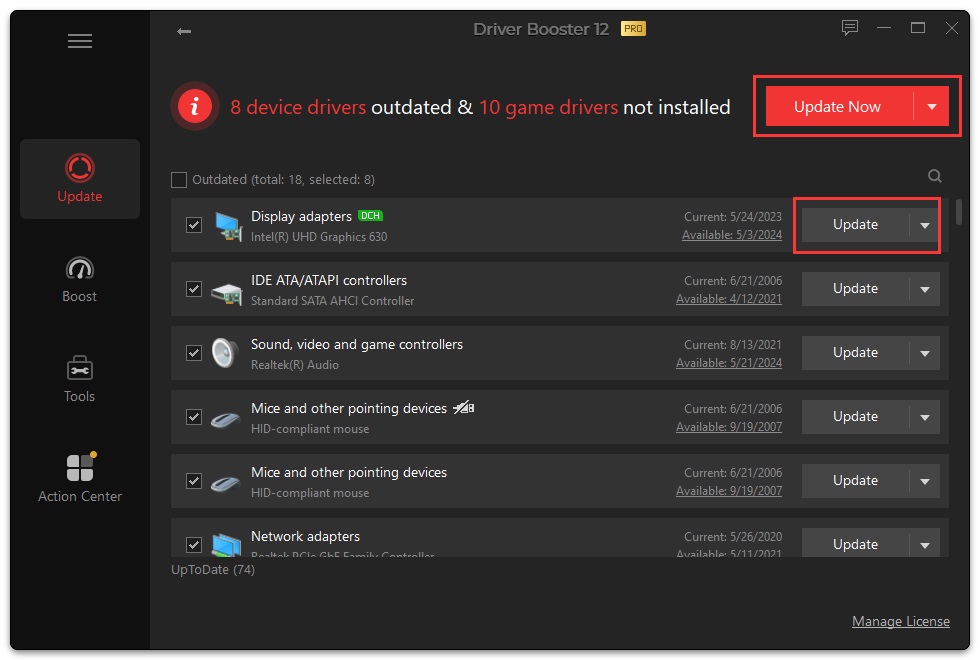
The Update screen of Driver Booster 14 PRO, from IObit's user manual: 2 device drivers outdated and 5 game drivers not installed (Visual C++ redistributables and OpenAL), with the Update Now button.
Driver Booster's free edition installs drivers by hand with no time limit, so you can see what it finds before paying. The catches are IObit's. The app has an Action Center tab that promotes IObit's other programs. PRO renews automatically, and renewal and refund complaints are the most common one-star theme for IObit on Trustpilot. IObit's 60-day money-back guarantee generally doesn't cover a change of mind: it's for cases such as a duplicate purchase, a missing key or a fault support can't fix. Use the free edition to decide.
If you'd also use an uninstaller and a defragmenter, the Driver Booster PRO Valued Pack ($25.95 at checkout) bundles 1-year, 3-PC licenses of Driver Booster 14 PRO, IObit Uninstaller 16 PRO and Smart Defrag 12 PRO.
What we like
- Lowest price here for 3 PCs at checkout
- Free edition installs drivers, with no time limit
- Updates game components and fixes missing game DLLs
- Choice of latest or most stable driver
Watch out for
- Refunds generally refused for a change of mind
- Auto-renewal complaints on Trustpilot
- Promotes other IObit programs inside the app
- Backups and fixes are PRO-only
What users say about Driver Booster
IObit has 4.6 out of 5 on Trustpilot from about 2,500 reviews, across all its products.
"Driver Booster then found the driver I was looking for when no other service did" Robert Fischer, 5 stars, Trustpilot
"for some reason after updating my drivers my tablet wont work anymore." Frost GD, 1 star, Trustpilot
"Auto-renewal was enabled without my consent." Aleksey, 1 star, Trustpilot
Download Driver Booster FreeBuy Driver Booster PRO
3. DriverMax: best if you only need a few drivers
DriverMax by Innovative Solutions
- Price at checkout: $34.65 a year, $89.40 lifetime, $19.90 for 30 days (1 PC each)
- Runs on: Windows 11, 10, 8.1, 8 and 7, 32-bit and 64-bit, and Windows Server
- Free version: yes, 2 driver installs a day and 10 a month, with no time limit
- Best for: fixing one or two drivers for free, and older PCs
DriverMax answers a question the others don't: did this exact driver work for other people? Under each driver it shows a count such as "Installed successfully by 129 of 129 users", says nothing below five installs, and stops offering packages that keep failing. Before each install it archives the current driver and asks Windows for a restore point, and Back up all saves every third-party driver for restoring after a Windows reinstall.
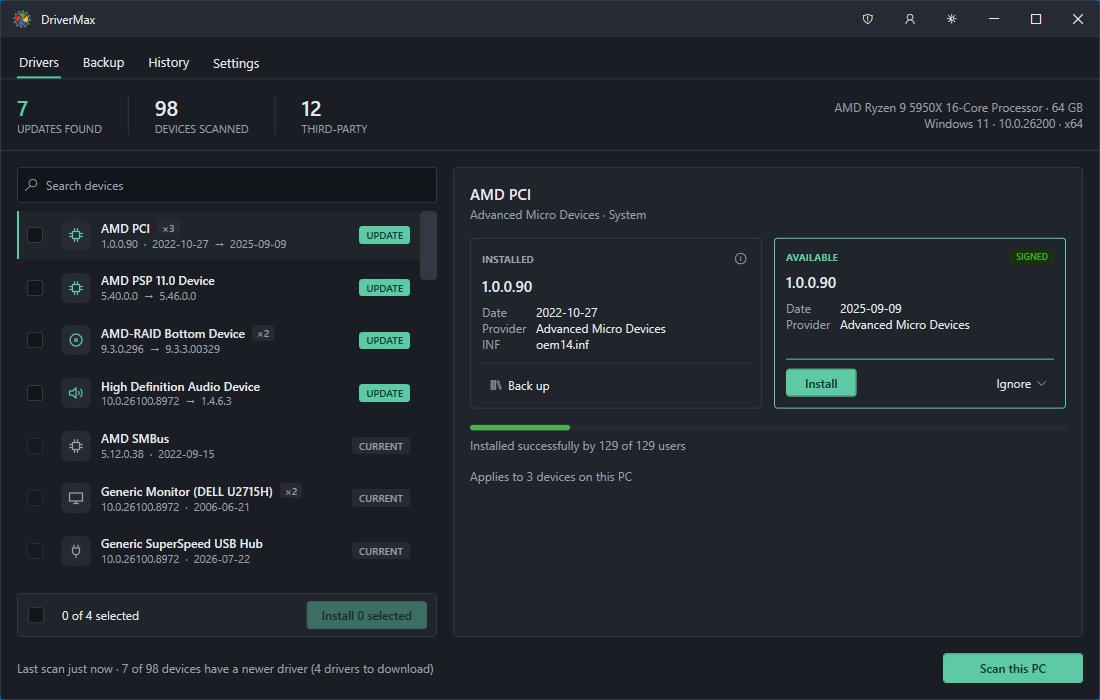
The DriverMax 18 Drivers tab: 7 updates found across 98 devices, the installed and available versions side by side, a Signed badge, and "Installed successfully by 129 of 129 users" under the selected driver.
The free version scans, backs up and restores without limits, and PRO only lifts the install cap. That makes DriverMax the honest free choice when a single device needs a driver. For a full rebuild it's less of a deal: each license covers one PC, and $34.65 a year at checkout is the highest per-PC price here after Driver Easy's 1-PC plan. Its Trustpilot profile is small and unhappy (2.4 out of 5 from 8 reviews), and older versions were flagged as bundleware, though the vendor says the current installer contains only DriverMax and its updater.
What we like
- Free forever for 2 drivers a day
- Install success record for every driver
- Full driver backup, free
- Still supports Windows 7 and 8.1
Watch out for
- One PC per license
- No offline mode for a PC without a network driver
- Few, mostly negative Trustpilot reviews
- Support mainly through the in-app contact form
What users say about DriverMax
FileHorse lists a user rating of 7.6 out of 10 from 319 votes, while Trustpilot shows 2.4 from 8 reviews. Most reviews predate version 18.
"Very good driver update program! Easy to use and found all installed drivers. If you only need to update a few driver, go for the free version. Must-have software!" A FileHorse user, as quoted on the DriverMax site
"DriverMax just crashed my laptop. It installed a incompatible driver that doesn't belong on this machine." Chazz, 1 star, Trustpilot
Download DriverMax FreeBuy DriverMax PRO
4. Driver Genius Pro: best for backing up drivers before a reinstall
- Price at checkout: $25.95 for 2 years on 3 PCs ($19.95 for 1 year)
- Runs on: Windows 11, 10, 8.1, 8, 7 and Vista, 32-bit and 64-bit
- Free version: yes, but driver updates work for 5 days only
- Best for: people who reinstall Windows and want their drivers portable
Driver Genius Pro is the oldest tool here (Driver-Soft has made it since 2002) and the best at backups. It saves your current drivers as a ZIP, a self-extracting archive or a stand-alone EXE auto-installer, so after a clean Windows install one file puts them all back. Its offline driver update gets the network adapter working on a PC that can't go online, and Driver Cleanup removes old driver packages and data from hardware you've removed. It also rolls back single drivers and creates a restore point.

Driver Genius 26's Driver Update screen with two available Intel drivers, each with its date, version, Hide Update and Release Notes links. The vendor's screenshot shows the Platinum Edition title bar.
Over two years on three PCs, Driver Genius Pro is the cheapest per PC here, and the interface has no ads or pop-ups. The trade-off is detection: TechRadar's reviews of versions 20 and 22 both found it caught fewer outdated drivers than IObit Driver Booster. The free edition updates drivers for 5 days only.
Driver Genius Platinum ($25.95 for 1 year plus 60 days on 3 PCs, or $32.95 for 2 years) has the same driver tools and adds SSD Speeder, System Booster and System Cleanup. Those are tune-up tools, not better driver updates, so most buyers only need Pro.
What we like
- Lowest cost per PC per year in this article
- EXE auto-installer driver backup
- Offline driver update and driver cleanup
- Clean interface without pop-ups
Watch out for
- Finds fewer drivers than Driver Booster in TechRadar's tests
- Free edition updates for 5 days only
- Thin help documentation
- No Trustpilot or Capterra review profile
What reviewers say about Driver Genius
"Driver Genius 22 Platinum performs its primary task of managing your device drivers excellently. You can always know which drivers are outdated and update them with one click." Stefan Ionescu, TechRadar, 4.5 out of 5, February 2022
"Driver Genius 20 Platinum has a few useful features, but it doesn't find as many outdated drivers as some of the competition." Richard Sutherland, TechRadar, 3 out of 5, October 2020
Download Driver GeniusBuy Driver Genius ProBuy Driver Genius Platinum
Price compared
The plans run for different terms and numbers of PCs, so the fairest comparison is the cost of one PC for one year on the plan the Buy button orders.
Cost per PC per year at checkout (USD)
Driver Genius Pro ($25.95, 3 PCs, 2 years)$4.33
Driver Booster PRO ($22.95, 3 PCs, 18 months)$5.10
Driver Genius Platinum ($25.95, 3 PCs, 14 months)$7.41
Driver Easy 3-PC license ($29.95, 3 PCs, 1 year)$9.98
DriverMax PRO ($34.65, 1 PC, 1 year)$34.65
Driver Easy 1-PC license ($39.95, 1 PC, 1 year)$39.95
Checkout prices checked on November 12, 2026. Cost per PC per year = price ÷ PCs ÷ years. DriverMax's lifetime license was $89.40.
The chart only counts money. On one PC you'd use for a single fix, DriverMax's free tier costs nothing, and Driver Easy's 30-day no-questions refund makes it the least risky of the paid plans to try.
Which should you choose?
| Your situation | Pick | Why |
|---|
| You want it done for you, with a way back | Driver Easy (3-PC license) | Driver Recovery, any version, force install, 30-day no-questions refund |
| Gaming PC, or three PCs on a budget | Driver Booster PRO | Game components and DLL fixes, $22.95 for 3 PCs |
| One device needs a driver, and you won't pay | DriverMax Free | 2 installs a day free, with an install record for each driver |
| You're about to reinstall Windows | Driver Genius Pro | EXE auto-installer backup and offline network driver update |
| An old Windows 7 or 8.1 PC | DriverMax or Driver Genius Pro | Both still support the older versions in 32-bit |
| A Windows on ARM laptop | Windows Update first, then Driver Booster | Driver Booster lists Arm64 support; Driver Easy's ARM64 updates are still in testing |
| You only care about the graphics driver | None of these | The NVIDIA App, AMD Software or Intel's driver assistant is free and first to get new drivers |
Who should skip each one: skip Driver Easy if you won't give a card number for a trial or only want to pay once. Skip Driver Booster PRO if you might want your money back just because you changed your mind, or dislike in-app offers for other programs. Skip DriverMax if you're setting up several PCs, since each license covers one. Skip Driver Genius if finding the most updates matters more to you than backups.
What commonly goes wrong
- Updating drivers that work. Most one-star reviews for all four tools start with an update the PC didn't need: boot loops, a tablet that stopped being detected, a storage driver that didn't belong. Update the device that has a problem, not the whole list.
- Skipping the restore point. Every tool here can make one, and Driver Easy, DriverMax and Driver Booster PRO back up drivers too. Leave those switched on, and make your own restore point before a big batch.
- Replacing a PC maker's driver with a generic one. Laptops often need the maker's own audio, touchpad or hotkey drivers. If a "newer" generic driver breaks a feature, roll back and get the driver from Dell, HP or Lenovo.
- Using an updater for the graphics card. NVIDIA, AMD and Intel publish graphics drivers first in their own free apps. Driver Easy at least lets you choose NVIDIA's Game Ready or Studio branch, but the GPU maker's app is the safer source.
- Forgetting the renewal. All four paid plans renew automatically. Note the date, and cancel renewal if you bought for one fix.
- No network after a reinstall. Without a network driver, an online updater can't download anything. Driver Easy, Driver Booster PRO and Driver Genius Pro have offline modes, but the easiest fix is a driver backup made before you wipe the PC.
FAQs
What is the best driver updater for Windows 11?
Driver Easy is the best driver updater for most Windows 11 users, because it backs up each driver before changing it, lets you choose or force a specific version, and has a 30-day no-questions refund. Buy its 3-PC license ($29.95 a year at checkout). Driver Booster PRO is the cheaper choice for gamers.
Is there a free driver updater for Windows 11?
Yes. DriverMax Free installs 2 drivers a day and 10 a month with no time limit, and Driver Booster Free installs drivers by hand from a smaller database. Windows 11's own Optional updates page is free too. Driver Easy has had no free version since 6.0, and Driver Genius Free updates drivers for 5 days only.
Is Driver Easy better than Driver Booster?
Driver Easy is better if you want control and an easy refund: it shows every available driver version, can force an install, and refunds within 30 days with no questions asked. Driver Booster PRO is better on price for 3 PCs and for games, with its game component updates and DLL fixes. Our full comparison, Driver Easy vs Driver Booster, goes through each difference.
Are driver updaters safe to use?
Driver updaters are mostly safe when you keep their backups on and update only what needs it. Driver Easy, Driver Booster PRO, DriverMax and Driver Genius all create restore points or driver backups first. The risk is a driver that doesn't suit your hardware, which is why reviews of all four include reports of devices that stopped working after an update.
Does Windows 11 update drivers automatically?
Windows 11 installs many drivers automatically through Windows Update, and offers others under Settings > Windows Update > Advanced options > Optional updates. It doesn't always offer the newest version, especially for graphics cards, and it can't back drivers up or roll several back at once.
Can I use one driver updater license on several PCs?
Yes, with the right plan. Driver Easy sells 3-PC and 10-PC licenses, and Driver Booster PRO and Driver Genius Pro cover 3 PCs. DriverMax licenses cover one PC each, which you can move to another PC from its Settings tab.
Which driver updater has the best refund policy?
Driver Easy has the plainest refund policy: tell Easeware within 30 days and you get your money back, with no questions asked. Driver Genius promises a full 60-day refund on request. IObit's 60-day guarantee for Driver Booster generally excludes refunds for a change of mind.
Do I still need a driver updater for my NVIDIA or AMD graphics card?
No. NVIDIA's and AMD's own apps install their graphics drivers for free and get new versions first. A driver updater helps with the rest of the PC (chipset, audio, network, older devices), and Driver Easy can be set to NVIDIA's Game Ready or Studio drivers if you'd rather manage everything in one place.
Conclusion
Driver Easy is the driver updater we'd buy for a Windows 11 PC. It's not the cheapest, but its Driver Recovery backups, version choice and force install make a bad update easy to undo, and its 30-day no-questions refund means trying it costs little. Choose the 3-PC license, which is cheaper than the 1-PC one at checkout. If you game or watch every dollar, Driver Booster PRO covers 3 PCs for $22.95, but start with its free edition, since IObit won't usually refund a change of mind. For a single missing driver, DriverMax Free is enough, and before a Windows reinstall, Driver Genius Pro's EXE backup is the tool to have.
Download Driver EasyBuy Driver Easy (3 PCs)