Driver Booster PRO: IObit's Windows Driver Updater, With Backups and One-Click Fixes
Driver Booster PRO is IObit's paid driver updater for Windows 11, 10, 8 and 7: it finds outdated, missing or faulty drivers, updates them automatically from a database of more than 23 million, backs them up first, and adds one-click fixes for no sound, network failures, device errors and missing game DLLs. It's a subscription, with IObit's own store listing a year for 3 PCs at $22.95 on sale, and the free edition lets you scan first.
It's for the person whose Wi-Fi vanished after a Windows update, whose game won't start because of a missing DLL, or who simply doesn't want to visit five manufacturers' websites to keep a PC's drivers current.
Quick facts
- Current version: Driver Booster 14 (installer 14.0.1.462). Version 14 launched on September 16, 2026.
- Developer: IObit
- Runs on: Windows 11, 10, 8.1, 8 and 7, on x64, x86 and Arm64
- Driver database: 23 million+ drivers from 1,200+ brands in PRO (12 million+ in the free edition)
- Price: subscription. IObit's product page listed 3 PCs at $16.95 for 3 months, $21.95 for 6 months plus 6 free, and $22.95 for 12 months (regular price $74.85). The Buy Now button below goes to that 12-month, 3-PC plan at $22.95.
- Free edition: one-click scan and manual updates only
- Money-back guarantee: 60 days
- Download: 32.6 MB installer
- What we checked: the installer we downloaded from IObit on October 20, 2026 is Driver Booster 14, file version 14.0.1.462 (32.6 MB), digitally signed by IObit. IObit's product page showed the plan prices above on October 20, 2026. We couldn't load the order page from our location to confirm the final checkout price, and we didn't update drivers on a test PC.
Before you buy
Driver Booster PRO is a subscription that renews automatically. Several Trustpilot reviewers say they were charged for a renewal they didn't expect or couldn't find how to cancel, so note the renewal date and switch off auto-renewal in your IObit account if you only want one term. Also run the free scan first: it shows what Driver Booster would update before you pay, and Windows Update already installs many drivers on its own.
Download Free TrialBuy Now
Overview
Driver Booster opens on a big SCAN button. A sidebar holds four areas: Scan/Update (the driver list), Boost (game mode), Tools (the fix-it utilities) and Action Center (IObit's other programs). After a scan, the Update screen lists every outdated device driver and missing game component with its available version, and one Update Now button installs them all. Up-to-date drivers are listed below with their current dates.
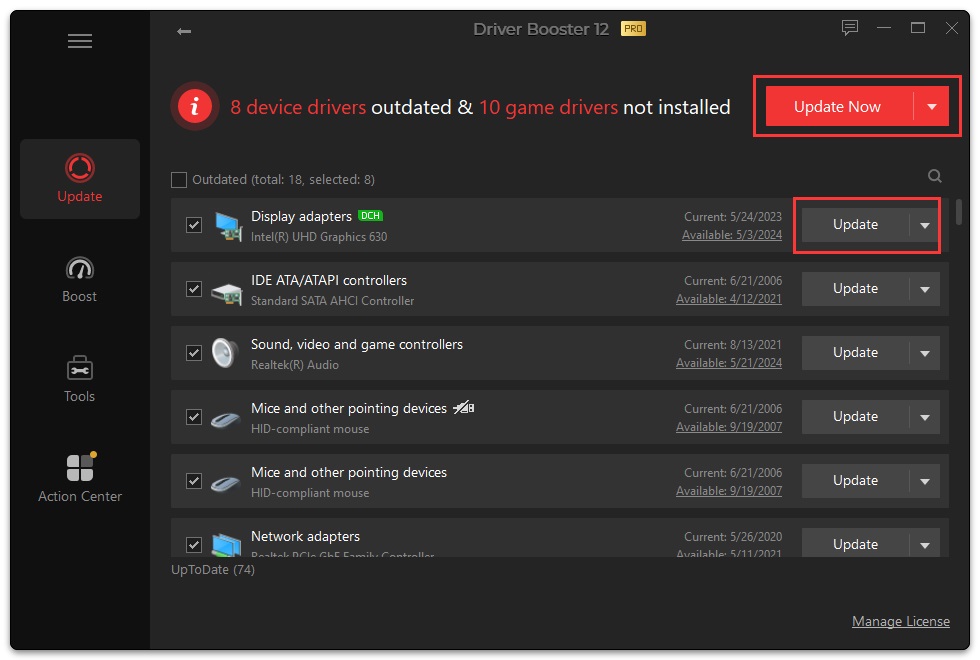
The Update screen of Driver Booster 14 PRO, from IObit's user manual: 2 device drivers outdated and 5 game drivers not installed (Visual C++ redistributables and OpenAL), the Update Now button, and the up-to-date Intel graphics and management engine drivers below.
Features
Automatic updates from 23 million+ drivers
Driver Booster PRO matches your hardware against a database of more than 23 million drivers from over 1,200 brands, twice the free edition's 12 million, and installs updates automatically. Version 14's rebuilt scanning engine shows both the Latest and the Most Stable version of a driver, so you can choose caution over novelty, and it can keep several versions. It also updates Game Ready graphics drivers and game components such as DirectX, Visual C++ runtimes, PhysX and OpenAL.
Backups and restore points before every change
Driver Booster PRO backs up drivers automatically, in several versions, and can create a Windows restore point before updating, so a bad driver can be rolled back. The Backup & Restore tool also lets you back up every installed driver yourself, restore an earlier one, or return to a system restore point.
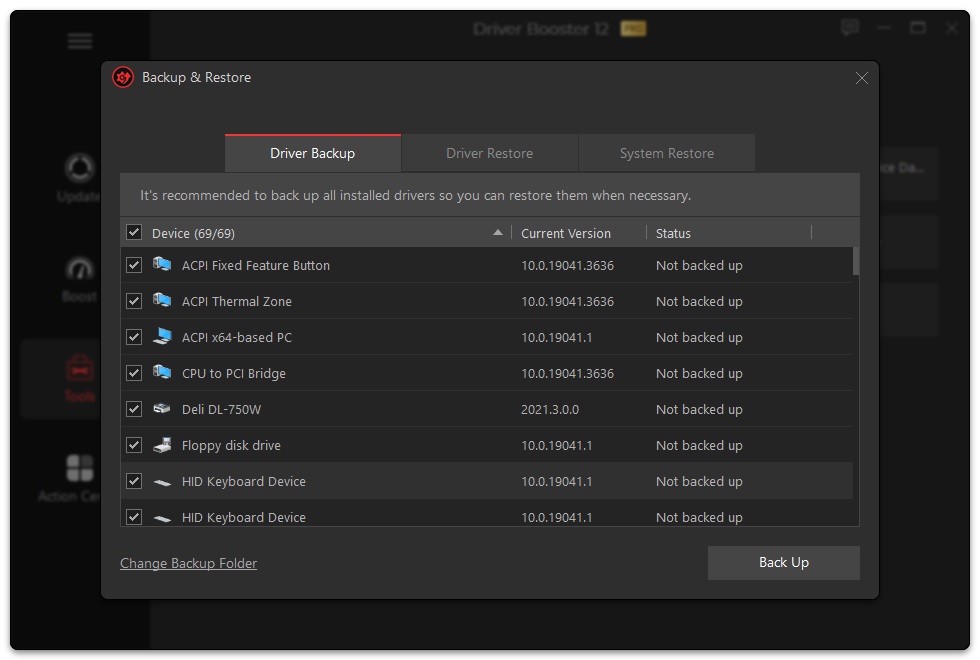
Backup & Restore, from IObit's user manual: the Driver Backup tab with 21 devices selected, their current versions and "Not backed up" status, plus Driver Restore and System Restore tabs.
One-click fixes for sound, network and device problems
Driver Booster PRO's Tools tab collects quick repairs: Fix No Sound, Fix Device Error, Fix Network Failure, Fix Bad Resolution, Clean Invalid Device Data and Fix Incompatible Drivers. The Offline Driver Updater helps when a PC has no internet because its network driver is the problem, and System Information shows your hardware details.
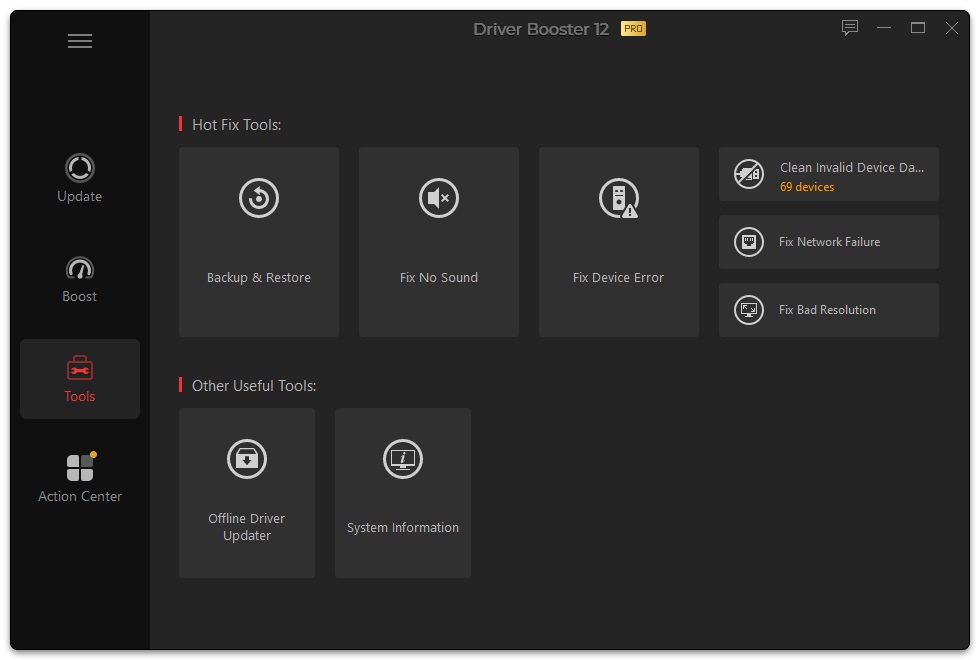
The Tools tab, from IObit's user manual: Hot Fix Tools (Backup & Restore, Fix No Sound, Fix Device Error, Clean Invalid Device Data, Fix Network Failure, Fix Bad Resolution) and Other Useful Tools (Fix Missing Game DLLs, Fix Incompatible Drivers, Offline Driver Updater, System Information).
Fix Missing Game DLLs (new in version 14)
Driver Booster 14 PRO adds a tool for the classic "XXX.dll not found" error when a game won't launch. It scans for and repairs 680+ missing DLLs across 60+ game components, including DirectX, Visual C++ Redistributable, XAudio, OpenAL and PhysX, and its Real-Time DLL Detection pops up an alert with a one-click repair when a DLL goes missing.
Game Boost and silent mode
Driver Booster PRO's Boost tab is a Game Boost mode for when you play, and silent mode holds back its notifications whenever a full-screen program or a game you choose is running. Version 14 also adds SOCKS5 proxy support and 38 interface languages.
Benefits
- Less hunting. One scan covers the graphics card, audio, network, chipset and printer instead of a visit to each maker's support site.
- A safety net. Automatic backups and restore points mean a bad update can be undone.
- Fixes when things break. Sound, Wi-Fi and display problems after a Windows update often come down to a driver, and the Tools tab targets exactly those.
- Games that start. Missing runtime DLLs get repaired without searching DLL download sites, which are a malware risk.
Real-World Uses
- After a Windows feature update the speakers go silent: run Fix No Sound, or roll back the audio driver from the backup.
- A new game crashes on launch with a missing DLL message: Fix Missing Game DLLs restores the Visual C++ or DirectX component.
- A laptop lost Wi-Fi after a driver update: the Offline Driver Updater and Fix Network Failure get it back online.
- A family with three PCs keeps all of them current with one 3-PC subscription.
Who It's For, and Who Should Skip It
Driver Booster PRO suits home users and gamers who want drivers kept current without effort, and people who help friends and family with their PCs.
Skip it if your PC works fine and Windows Update already handles your drivers, if you build or tune workstations and prefer to install drivers straight from NVIDIA, AMD, Intel or the PC maker, or if you don't want another subscription. Business fleets are better served by the PC maker's own management tools. And if you only want an occasional check, the free Driver Booster scan costs nothing.
Usage Guide
- Install and launch. Download the trial and double-click driver_booster_setup.exe.
- Activate PRO. Click Manage License at the bottom left and enter your license code.
- Scan. Click SCAN. Driver Booster lists outdated drivers and missing game components.
- Review and update. Untick anything you'd rather leave alone, choose the latest or most stable version where offered, and click Update Now. Accept the restore point.
- Reboot if asked, then check the devices you care about.
- Use Tools when something breaks. Open the Tools tab for sound, network, device and DLL fixes, or Backup & Restore to roll back.
Where it falls short
- A new driver can break a device. One Trustpilot reviewer's tablet stopped being detected after a driver update. Keep the automatic backups on and prefer the "most stable" version for critical hardware.
- License problems. One reviewer reported a still-valid license disappearing from Driver Booster twice, and another couldn't install it on a new PC until support stepped in.
- Renewals and refunds. Complaints about auto-renewal and refused refunds are the most common one-star theme for IObit on Trustpilot, despite the 60-day guarantee.
- Not a cure-all. Many slowdowns and crashes aren't driver problems at all, and the product page's promises of "faster PC performance" depend on what was actually out of date.
What Users Say
IObit has a TrustScore of 4.6 out of 5 on Trustpilot from 2,491 reviews (69% five-star, 18% one-star), and it replied to all of its negative reviews, usually within 24 hours. Reviews cover all IObit products.
Trustpilot: the praise
- Robert Fischer (5 stars, October 2026): "Driver Booster then found the driver I was looking for when no other service did"
- Bernd Ziegler (5 stars, October 2026): "My issue (a missing license key after purchasing Driver Booster) was handled quickly and competently."
Trustpilot: the complaints
- Frost GD (1 star, September 2026): "for some reason after updating my drivers my tablet wont work anymore."
- Harry (1 star, July 2026): "Still valid license disappeared from Driver Booster without any warning."
- Aleksey (1 star, August 2026): "Auto-renewal was enabled without my consent."
- Stephanie Woods (1 star, September 2026): "When you contact them for refunds, THEY REFUSE!"
Quoted on IObit's product page
- Tim Fisher (September 2024): "If you're looking for an easy-to-use driver updater, Driver Booster is likely your best bet. I use this program all the time, on my computer and other PCs I service, and I have yet to encounter any problems downloading or installing drivers. Unlike reports I've read, it's never caused BSOD errors for me."
- Colin Murphy (October 2025): "I used iobit driver booster 12 pro for a long time before upgrading to Driver Booster 13 pro this year. The scans feel much faster, driver matching is more accurate, and my PC has been noticeably more stable after updates."
The pattern
People who like Driver Booster say it finds drivers they couldn't find themselves and that it's easy to use, and IObit's support gets credit for fixing license problems quickly. The complaints are about billing (renewals and refunds) far more than the software, with occasional reports of a device that stopped working after an update, which is what the backups are for.
Comparisons
Driver Booster PRO vs. Driver Booster Free
Both scan with one click. Free covers 12 million+ drivers and you update them by hand. PRO doubles the database to 23 million+, updates automatically and up to twice as fast, backs up drivers automatically, and adds the crash prevention, offline network fix, sound and device fixes, game DLL repair, Game Boost, incompatible driver repair and premium support. If you only check drivers now and then, Free is enough.
Driver Booster PRO vs. Windows Update
Windows Update installs many drivers for free, but often not the newest graphics drivers or game runtimes, and it has no one-click fixes for sound or network problems. Driver Booster PRO is the convenience layer on top: newer drivers, backups and repairs in one place.
Editions and Pricing
| Plan (3 PCs) |
Sale price |
Regular price |
Extras |
| 3 months | $16.95 | $28.95 | All PRO features |
| 6 months + 6 months free | $21.95 | $37.99 | Share with family members |
| 12 months | $22.95 | $74.85 | Family sharing, dedicated support for all your PCs |
Prices from IObit's Driver Booster PRO page on October 20, 2026, a limited-time sale. A 1-PC option is also offered. All plans renew automatically and come with a 60-day money-back guarantee.
FAQs
Is Driver Booster PRO safe to use?
Driver Booster PRO installs drivers from its verified database and creates backups and a restore point before updating, so a problem driver can be rolled back. It's signed by IObit. As with any driver update, back up first and avoid updating critical hardware right before an important task.
Does Driver Booster PRO work on Windows on ARM?
Yes. Driver Booster 14 lists support for Arm64 as well as x64 and x86 editions of Windows 11, 10, 8.1, 8 and 7.
How do I stop Driver Booster PRO from renewing?
Driver Booster PRO renews automatically at the end of each term, so cancel the auto-renewal before the renewal date if you don't want another term. IObit's support center (Renew License, Refund Request and Online Feedback) handles license and billing questions.
Can I get a refund for Driver Booster PRO?
IObit offers a 60-day money-back guarantee on Driver Booster PRO and has a Refund Request page in its support center. Some buyers report refusals, so request it promptly and keep your order number.
Can I move my Driver Booster PRO license to a new PC?
Yes. IObit's support center has a Transfer to Another PC page for moving a license, and a 3-PC plan covers three computers at once.
What can I do if a driver update breaks something?
Open Driver Booster PRO's Tools tab, choose Backup & Restore, and restore the previous driver from Driver Restore or roll back the whole system from System Restore.
Does Driver Booster PRO need internet access?
Driver Booster PRO downloads drivers from the internet, but its Offline Driver Updater and Fix Network Failure tool are meant for a PC whose network driver is the problem.
System Requirements
- Operating system: Windows 11, 10, 8.1, 8 or 7 (x64, x86 or Arm64)
- Disk space: 1 GB free, mainly for driver downloads and installation
- Screen: 1024 x 768 or higher
Conclusion
Driver Booster PRO is worth its low yearly price if you want drivers and game components kept current on up to three Windows PCs without effort, with backups and quick fixes for the sound, network and device problems that often follow a Windows update. The one reason to buy it is convenience with a safety net. The main reason not to is that many PCs run fine on Windows Update alone, and IObit's auto-renewals are the top complaint from its customers. Run the free scan first, and if you buy, keep an eye on the renewal date.
Download Free TrialBuy Now