Bitdefender Total Security: Antivirus, Ransomware Protection and Privacy Tools for 5 Devices
Bitdefender Total Security is a security suite for Windows, Mac, Android and iOS that costs $54.99 for the first year on up to 5 devices, then renews at up to $109.99 a year. It's for households that want top-scoring malware protection plus extras like a secure banking browser, a firewall, parental control and a PC cleanup tool, all managed from one online account.
If you've ever run a free antivirus alongside a separate VPN, a separate cleaner and a parental-control app, Total Security is Bitdefender's answer: one subscription, one dashboard per device, and one web account where you see every phone and PC you've covered.
Quick facts
- Current Windows version: 27.0.63.360, released October 6, 2026 (it updates itself, and Bitdefender rolls new builds out gradually)
- Developer: Bitdefender, Romania
- Platforms: Windows 7 SP1, 8.1, 10 and 11, macOS Big Sur 11.3 or later, Android 7.0 or later, iOS 14 or later
- Plans: Individual (1 account, up to 5 devices) or Family (5 accounts, up to 25 devices)
- Price: $54.99 for the first year of the Individual plan, then billed at the renewal price, up to $109.99 a year
- VPN: included, but capped at 200 MB per day per device
- Trial: 30-day full trial with no credit card, activated through a free Bitdefender Central account
- Guarantee: 30-day money-back guarantee
What we checked: on October 18, 2026 we confirmed the $54.99 first-year price for the 5-device Individual plan (regular price $109.99) and the Family, two-year, Premium Security and Antivirus Plus prices on the order page, and the current Windows build, 27.0.63.360 dated October 6, 2026, on Bitdefender's support site. Bitdefender doesn't offer a public installer file: the trial and the purchased product are both downloaded from a Bitdefender Central account. We didn't install the suite or run our own malware or speed tests, so the protection and performance results below come from independent labs and reviewers.
Before you buy
- The price doubles at renewal. $54.99 is a first-year price. The subscription renews automatically at the renewal price, up to $109.99 a year for 5 devices, unless you turn auto-renewal off in Bitdefender Central.
- The VPN is a sample, not a full VPN. 200 MB per day per device covers some public Wi-Fi browsing, not streaming. Unlimited VPN is in Premium Security.
- Not every feature is on every device. Safepay, the firewall, OneClick Optimizer and the file shredder are Windows features. The Mac, Android and iOS apps each get their own smaller set.
Download Free TrialBuy Now
Overview
Bitdefender Total Security is two things at once. On Windows it's a specific program: Bitdefender's full desktop suite, which adds cryptomining protection and optimization tools on top of everything in Bitdefender Internet Security. As a subscription, it's a license that also covers Bitdefender's Mac, Android and iOS apps, so the same plan protects a family's laptops and phones.
The Windows app opens on a Dashboard with a large status shield, a recommendation card and six customizable quick-action tiles. A left-hand menu splits everything else into Protection, Privacy and Utilities. Most of the time you won't open it at all: Autopilot makes routine decisions on its own, and the shield turns red only when something needs you.
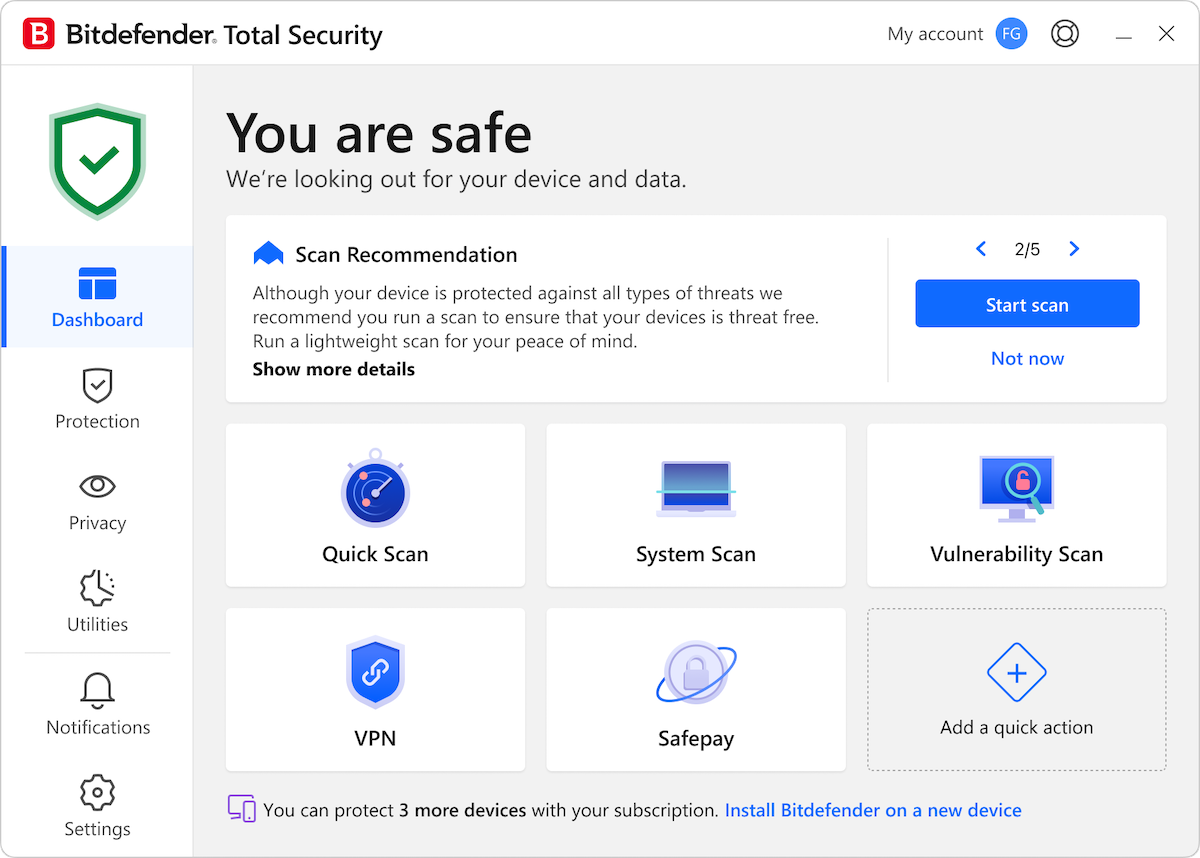
The Windows Dashboard: a green "You are safe" status, a scan recommendation with Start scan and Not now, and quick-action tiles for Quick Scan, System Scan, Vulnerability Scan, VPN and Safepay. The footer shows how many more devices the subscription can cover.
Features
Layered malware protection that catches new threats
Bitdefender Total Security combines real-time antivirus scanning with Advanced Threat Defense, which watches how running apps behave and stops one the moment it acts like malware, even if no signature exists for it yet. Most of the heavy scanning happens in Bitdefender's cloud (the Global Protective Network), which checks file fingerprints rather than uploading your files. A Rescue Environment reboots Windows into a clean mode to remove rootkits that hide while Windows is running.
Ransomware Remediation restores encrypted files
Bitdefender Total Security keeps a protected copy of files that ransomware starts encrypting, and Ransomware Remediation puts the originals back once the attack is blocked. It works alongside Advanced Threat Defense, which stops the encrypting process. You can see it on the Protection page next to Antivirus, Online Threat Prevention, Vulnerability and Firewall.
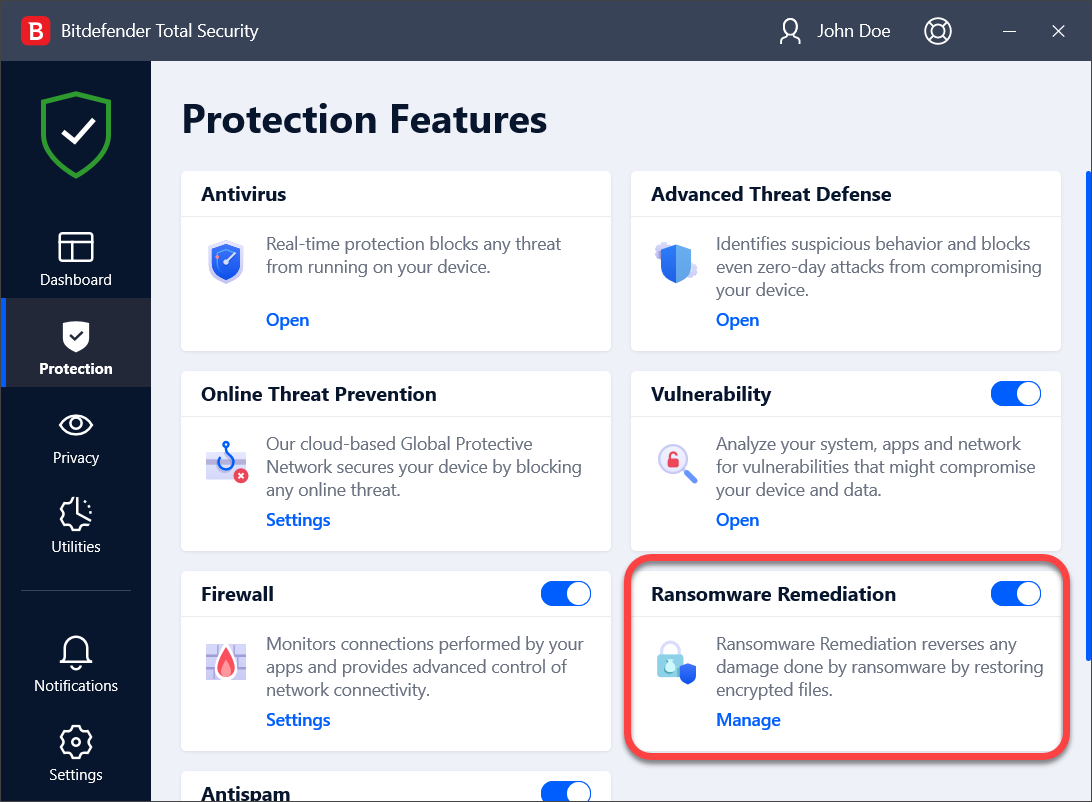
The Protection Features page in an earlier, dark-sidebar version of the Windows app, with Ransomware Remediation highlighted and switched on. The current version shows the same panels in a light theme.
Web, phishing and network attack blocking
Bitdefender Total Security's Online Threat Prevention blocks known malicious pages, phishing sites and fake shops before they load, and its network threat prevention stops exploits, botnet connections and brute-force attempts at the network level. A Vulnerability Scan checks for missing Windows patches, outdated apps and weak settings, and the firewall controls which apps may connect. Antispam filters the inbox in Outlook and Thunderbird.
Safepay, webcam protection and other privacy tools
Bitdefender Total Security includes Safepay, a sandboxed browser kept separate from the rest of Windows for online banking and shopping. It offers to open known banking sites automatically. Privacy also covers the 200 MB-per-day Bitdefender VPN, the Anti-tracker browser extension, and webcam and microphone protection, which tells you when an app tries to use them and lets you block it.
OneClick Optimizer and other Windows utilities
Bitdefender Total Security's Utilities page holds the extras that set it apart from Internet Security. OneClick Optimizer removes Windows cache and junk files, registry leftovers and browser data in one pass, then shows a report of what it cleaned and what it skipped. Profiles hold back pop-ups and background tasks while you game, watch a movie or work. File Shredder deletes files beyond recovery, and Anti-Theft lets you locate, lock or wipe a lost Windows laptop from Bitdefender Central.
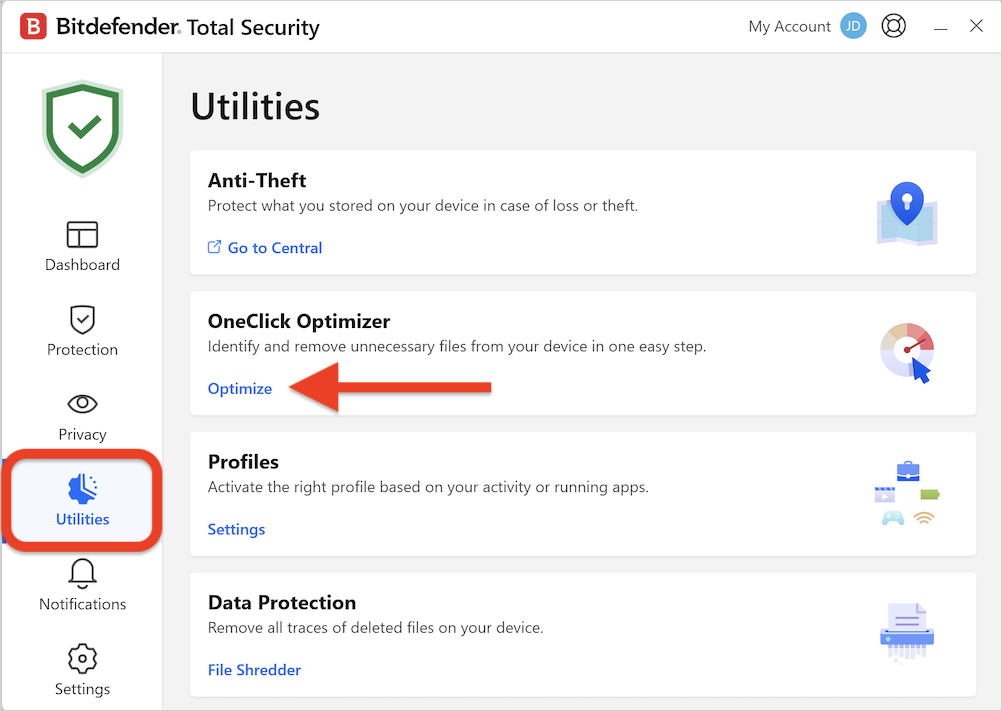
The Utilities page with Anti-Theft, OneClick Optimizer, Profiles and Data Protection (File Shredder). The red arrow and outline are Bitdefender's own help-article markings.
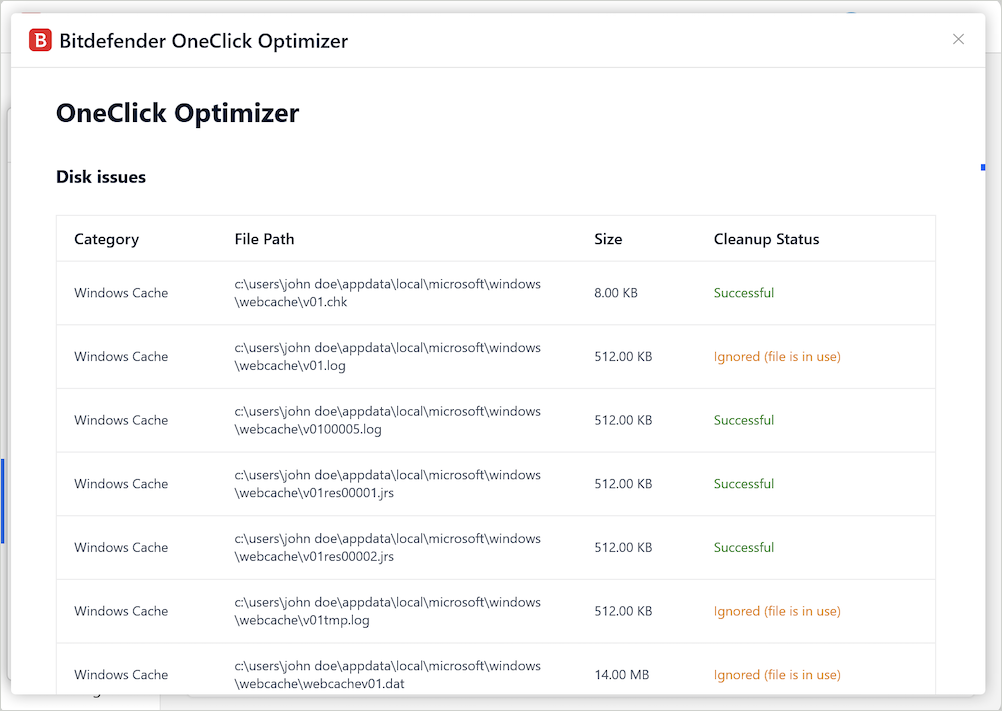
An OneClick Optimizer report: each Windows cache file with its path, size and status, marked Successful or Ignored when the file was in use.
Parental control and the Family plan
Bitdefender Total Security's parental control is part of the Family plan only. It filters content categories, sets daily screen-time limits and routines such as Focus time and Bedtime, shows a child's location and sends activity reports, all from Bitdefender Central. Children can ask for more time from their device, and you approve or decline it. The Family plan gives up to 5 members their own accounts, with a Family Manager who sees everyone's protection status.
Benefits
- Protection you don't have to manage. Autopilot, hourly updates and behavior-based detection mean the suite handles most decisions without asking.
- One bill for mixed devices. A Windows laptop, a MacBook, an Android phone and an iPhone all count against the same 5 slots.
- A safer place for banking. Safepay gives money-related browsing its own isolated window, which most antivirus suites don't offer.
- Fewer separate tools. A firewall, cleanup tool, file shredder and anti-theft come in the same Windows app.
Real-World Uses
- A family with mixed devices: the parents' Windows PC and Mac, a teenager's Android phone and a child's iPad on the Family plan, with screen-time routines set for the younger ones.
- Online banking on a shared PC: Safepay opens the bank's site in its own window, away from browser extensions and anything else running.
- A small home office: ransomware protection on the work laptop, the firewall controlling which apps reach the internet, and the vulnerability scan flagging out-of-date software.
- A laptop that travels: the VPN's daily 200 MB covers checking email and a few sites on hotel Wi-Fi, and Anti-Theft can lock the laptop if it's left behind.
Who It's For, and Who Should Skip It
Bitdefender Total Security suits people who want strong malware protection on several devices with as little fiddling as possible, and households that will use the extras: Safepay for banking, parental control on the Family plan, and the Windows cleanup tools.
Skip it if you want a full VPN for streaming or daily use: the 200 MB cap is too small, and Premium Security or a separate VPN is the better buy. If you only protect one or two Windows PCs and don't need the extras, Bitdefender Antivirus Plus covers the core protection for less. And if you dislike auto-renewing subscriptions, be ready to switch auto-renewal off in Bitdefender Central right after you buy.
Usage Guide
- Create or sign in to a Bitdefender Central account. The trial button and your purchase email both lead to Central, where the subscription is activated.
- Install on the first device. In Central, choose to install Bitdefender on this device, run the downloaded installer and accept the subscription agreement. The installer downloads the rest of the program.
- Run a System Scan from the Dashboard once installation finishes, then let Autopilot take over day-to-day decisions.
- Check the Protection page. Make sure Ransomware Remediation, the firewall and the vulnerability scan are switched on the way you want.
- Add your other devices. From Central's My Devices, send yourself an install link for each phone, tablet or Mac.
- Turn off auto-renewal in Central under My Subscriptions if you'd rather decide at the end of the year.
Where It Falls Short
- Full scans can slow mid-range PCs. PCWorld measured PCMark 10 scores dropping by almost 20 percent and UL Procyon by 35 percent while a continuous full scan ran, though idle impact was light.
- Anti-Theft is weak. PCWorld found the location inaccurate on a laptop and missing for a phone, and the lock didn't override a phone's own PIN.
- Not every attack is stopped. In a MalwareTips forum test of the 2026 version, a destructive GDI malware sample overwrote the test machine's boot record without a reaction from Bitdefender.
- Billing complaints are common. Most of Bitdefender's 1-star Trustpilot reviews are about auto-renewal and cancelling it, not about the protection itself.
What Users Say
Bitdefender's protection scores are consistently high in lab tests and reviews. Customer reviews split sharply: most people are happy with the protection and support, while a sizable minority complain about renewals and billing.
Independent lab tests (as reported by PCWorld, April 2026)
- AV-Test, January and February 2026: caught 100 percent of 285 zero-day attack samples and 12,728 widespread malware samples.
- AV-Comparatives Real-World Protection, February and March 2026: 99.5 percent of 200 test cases, with one false positive.
- AV-Comparatives Malware Protection, March 2026: 99.94 percent offline detection and 97.6 percent online protection, with four false positives.
- AV-Comparatives Advanced Threat Protection, November 2025: 15 of 15 targeted threats stopped.
PCWorld (Alaina Yee, April 27, 2026)
PCWorld's pros were "Superb antivirus and malware protection", "Strong online threat protection" and "Customizable dashboard". The cons were "VPN limited to 200MB per day, per device", "Can have notable performance impact on some PCs" and "Anti-theft tools aren't effective".
"Bitdefender Total Security packs superb antivirus defenses into an easy-to-use app, giving it a strong edge despite a couple of features falling flat."
On the VPN: "You can burn through that by browsing just a few websites." On anti-theft: "But in practice, I found this feature to fall flat."
MalwareTips (Shadowra, Bitdefender Total Security 2026 test, October 23, 2025)
"Everything is very straightforward, and AutoPilot provides advice on choices to be made (activating ransomware remediation, blocking cryptojacking, etc.)." "The software is lightweight but becomes resource-intensive when in use." The tester's web-protection test blocked 7 of 7 links, but a GDI malware sample got through and damaged the virtual machine:
"Despite this misstep, which cost the virtual machine its life, Bitdefender remains a very good antivirus software. However, I would have preferred it to add protection against MBR modifications, as the GDI malware was able to carry out its actions without any problems."
Trustpilot: 4.4 out of 5 from 12,715 reviews
Bitdefender's Trustpilot page (all Bitdefender products) shows 69 percent 5-star and 17 percent 1-star reviews, as of October 18, 2026. Recent excerpts:
- "It just works, and has for many years." (Mike S, 5 stars, "It just works", October 15, 2026)
- "Bitdefender is easy to use, it works well and the technical support is excellent." (Daniel Leclerc, 5 stars, October 15, 2026)
- "Bitdefender has been for me almost an install and forget package, particularly in the last couple of years" (James, 5 stars, October 13, 2026)
- "This is a good product with deceptive billing." (Sue Schultz, 2 stars, "Deceptive Billing", October 17, 2026)
- "Unable to install. Could not start install becuase hung up on cookie issues in Chrome." (Michael Monical, 1 star, October 15, 2026)
- "My purchased package didn't work on my Mac, nor my iPhone." (Tracey Spicer, 1 star, "Worst customer service ever", October 15, 2026)
- "Forced to enter payment details for AutoRenewal & now they've removed the links for disabling it." (JXL7, 1 star, October 7, 2026)
Reviews Bitdefender shows on its own page
Bitdefender's Total Security page reprints Trustpilot reviews it chose, all positive, such as: "Frequently highly rated in industry tests. In benchmarking etc. Very easy to set up. I find it gives hard and proficient real-time protection. Without the false positives. Simple graphical interface. Lightweight on the system. Highly recommend after using for +7 years." (Dr Paresh Gadhavi, June 15, 2026)
The recurring themes: reviewers and long-time users praise the detection rates, the quiet Autopilot behavior and the support staff. The complaints are about the 200 MB VPN cap, slowdowns during full scans on modest PCs, and above all automatic renewals that some customers found hard to switch off.
Comparisons
Total Security vs Antivirus Plus
Bitdefender Antivirus Plus covers the core malware, ransomware and web protection at a lower price, $34.99 for the first year on 3 devices. Total Security adds the firewall, cryptomining protection, parental control and the OneClick Optimizer, and covers up to 5 devices. Choose Antivirus Plus if you only need the protection itself.
Total Security vs Premium Security
Bitdefender Premium Security includes everything in Total Security plus unlimited Premium VPN, the AI-powered Scam Protection Pro and Premium Support, for $64.99 for the first year on 5 devices. If you would otherwise pay for a separate VPN, Premium Security is the better value.
Editions and Pricing
| Plan |
Accounts and devices |
First-term price |
Regular price |
What it adds |
| Total Security Individual, 1 year |
1 account, 5 devices |
$54.99 |
$109.99 |
The full suite |
| Total Security Individual, 2 years |
1 account, 5 devices |
$119.99 |
$219.99 |
Two years paid up front |
| Total Security Family, 1 year |
5 accounts, 25 devices |
$79.99 |
$139.99 |
Parental control, a password manager and VPN for each member |
| Premium Security Individual, 1 year |
1 account, 5 devices |
$64.99 |
$129.99 |
Unlimited VPN, Scam Protection Pro |
| Antivirus Plus, 1 year |
1 account, 3 devices |
$34.99 |
$69.99 |
Core protection only |
Prices are from the order page on October 18, 2026, before sales tax. The regular price is what Bitdefender lists as the full price, and renewals may be billed at it.
FAQs
How much does Bitdefender Total Security cost after the first year?
Bitdefender Total Security renews automatically at the renewal price, which may be up to the regular price of $109.99 a year for the 5-device Individual plan or $139.99 for the 25-device Family plan. Bitdefender emails you before it bills, starting 30 days before the expiry date.
How do I turn off auto-renewal for Bitdefender Total Security?
Bitdefender Total Security's auto-renewal is managed in your Bitdefender Central account under My Subscriptions, then My Payments, as long as you activated the subscription with the email address you bought it with. You can also ask Bitdefender's customer support to cancel it.
Can I get a refund on Bitdefender Total Security?
Yes. Bitdefender Total Security has a 30-day money-back guarantee from the purchase date. According to PCWorld's review, refunds are also allowed within 30 days of an automatic renewal.
Does Bitdefender Total Security work on a Mac and an iPhone?
Yes. Bitdefender Total Security's subscription covers macOS Big Sur 11.3 or later and iOS 14 or later, but each gets a smaller app. The Mac version adds Safe Files and Time Machine protection against ransomware, an adware blocker and the Traffic Light browser extension, and the iOS app covers web protection, scam alerts, a security scan, the VPN and account-breach checks.
Is a password manager included with Bitdefender Total Security?
Bitdefender's Total Security page lists a password manager among the plan's features (one for the Individual plan, five for the Family plan). PCWorld's April 2026 review found the password manager was a separate paid service, so if it matters to you, check that it's listed on the order page before you pay.
Can I install Bitdefender Total Security without an internet connection?
No. Bitdefender Total Security is installed and activated through a Bitdefender Central account, and the installer downloads the program during setup. After that, it updates itself every hour while you're online.
What happens when I replace my computer?
Bitdefender Total Security moves with you: sign in to Bitdefender Central, open My Devices and install it on the new computer. If the old one is no longer in use, it doesn't take up an extra device slot.
Does Bitdefender Total Security still support Windows 7?
Yes. Bitdefender Total Security lists Windows 7 with Service Pack 1 as supported, along with Windows 8.1, 10 and 11. Bitdefender notes that performance may suffer on PCs with older-generation processors.
System Requirements
- Windows: Windows 7 SP1, 8.1, 10 or 11, 2 GB RAM, 2.5 GB free disk space
- Mac: macOS Big Sur (11.3) or later, 1 GB free disk space, Safari, Firefox or Chrome
- iOS: iOS 14 or later
- Android: Android 7.0 or later
- All platforms: an internet connection and a Bitdefender Central account
Conclusion
Bitdefender Total Security is worth $54.99 if you want some of the best-tested malware protection available on several devices and will use at least one of its extras, such as Safepay, parental control on the Family plan, or the Windows firewall and cleanup tools. The one reason to buy it is protection that independent labs keep scoring near the top, with very little effort from you.
The main reason to hesitate is the renewal: the price can double in year two, and the auto-renewal is the most common complaint about Bitdefender. Buy it, set a reminder or switch auto-renewal off in Central, and decide next year at the renewal price. If you need a full VPN, step up to Premium Security, and if you only need the antivirus, Antivirus Plus costs less.
Download Free TrialBuy Now