Short answer
Most people should buy Advanced SystemCare 20 PRO: $19.99 for one PC for a year on the order page, it adds the deep junk cleaning, registry cleaning, automatic RAM release, AutoCare and Safe Folder that the Free edition leaves out, and it's on IObit's newest version. Keep using Microsoft Defender (or your current antivirus) alongside it.
Choose Advanced SystemCare Ultimate 18 ($28.99 a year for 2 PCs) only if you want IObit's cleaner and a Bitdefender-powered antivirus in one program, so you can drop your other antivirus. Stay on Advanced SystemCare Free if all you need is a junk clean and a faster startup now and then.
At a glance
|
Free |
PRO |
Ultimate |
| Current version |
20.0.1 |
20.0.1 |
18.5 |
| Price |
$0 |
$19.99 a year, 1 PC (order page) |
$28.99 a year, 2 PCs (order page) |
| Junk clean and quicker startup |
✓ Basic |
✓ Deep clean of hidden junk |
✓ Deep clean of hidden junk |
| Registry clean |
✗ |
✓ |
✓ |
| RAM release |
One click |
Automatic |
Automatic |
| Safe Folder (ransomware) |
✗ |
✓ |
✓ |
| Real-time antivirus |
✗ |
✗ (anti-spyware only; checks your antivirus is on) |
✓ Bitdefender engine |
| Custom Clean (junk, duplicate and large files) |
Not in IObit's Free list |
✓ |
✗ (separate duplicate and large file finders in the Toolbox) |
| Modules in the Care scan |
Fewer (registry clean and deep clean need PRO) |
16 |
12 |
| Trial |
Free for good |
Free edition, or IObit's 30-day PRO trial that becomes a paid subscription unless cancelled |
30 days with every feature |
| Installer |
58.3 MB (same as PRO) |
58.3 MB |
150.65 MB |
| Windows |
11, 10, 8.1, 8, 7, Vista, XP |
11, 10, 8.1, 8, 7, Vista, XP |
11, 10, 8.1, 8, 7, Vista, XP SP3 |
How we compared them
- We downloaded both installers from IObit and read their file versions: Advanced SystemCare 20.0.1.256 (58.3 MB, the same file installs Free and PRO) and Advanced SystemCare Ultimate 18.5.0.120 (150.65 MB), both signed by IObit Co., Ltd.
- We took the feature differences from IObit's own Free vs PRO tables and from the two user manuals, which IObit updated with Advanced SystemCare 20 screens in October 2026.
- We checked the prices on the order page behind this site's Buy Now buttons and every plan on IObit's two product pages.
- We read IObit's refund policy, since it changes how you should try these products.
- We collected professional reviews and IObit's Trustpilot reviews, good and bad.
- What we checked: the Advanced SystemCare 20.0.1.256 installer, the $19.99 PRO order page and IObit's plan prices on October 27, 2026, and the Ultimate 18.5.0.120 installer and its $28.99 2-PC order page on October 24, 2026. We compared features, prices and trials from IObit's documentation, and didn't measure boot times or test the antivirus against malware.
What the three editions have in common
All three editions share the same engine and the same layout: a big Scan button on the Care screen that checks a list of cleanup and repair modules, a Speed Up page with Turbo Boost and a Startup Optimizer, a one-click Software Updater, a Toolbox of 23 small utilities, and Rescue Center, which keeps dated backups so you can undo registry, startup and internet changes. They also share the same habits: an Action Center that recommends other software, and Speed Up cards that offer to install IObit's Driver Booster and IObit Uninstaller.
The difference is how much of that toolkit you can use, and whether a real-time antivirus comes with it.
Advanced SystemCare Free
The basic cleanup, at no cost
Advanced SystemCare Free gives you a quicker startup, junk file cleaning, one-click RAM release and email protection for Gmail, Outlook and Yahoo Mail, according to IObit's comparison table. It's the same download as PRO: you install Advanced SystemCare 20, use it free, and enter a license code later if you want the rest.
Best for: a PC that's in decent shape and only needs an occasional junk clean. Not for: anyone who wants maintenance to happen by itself, since automatic RAM release and AutoCare are PRO-only.
Advanced SystemCare 20 PRO
- Price: $19.99 for one PC for one year on the order page (list price $29.99)
- Version: 20.0.1.256, the release that replaced Advanced SystemCare 19 on September 9, 2026
- Windows: 11, 10, 8.1, 8, 7, Vista and XP, with 300 MB of free disk space
- Best for: home users who already have an antivirus they like and want the cleanup to run itself
Advanced SystemCare 20 PRO adds everything the Free edition holds back. The Care scan runs all 16 modules (Privacy Sweep, Junk File Clean, Shortcut Fix, Registry Clean, System Optimization, Internet Boost, Registry Defrag, Disk Optimization, Antivirus Protection, Firewall, Hardware Health, Software Health, Spyware Removal, Security Reinforce, Vulnerability Fix and Disk Check). PRO also adds automatic RAM release and AutoCare in the background, registry cleaning, the PC health check that fixes issues by itself, Safe Folder for ransomware protection, one-click updating of all outdated software, automatic sweeping of online traces, Access Protection that blocks untrusted programs from your data, fingerprint protection, and premium technical support.
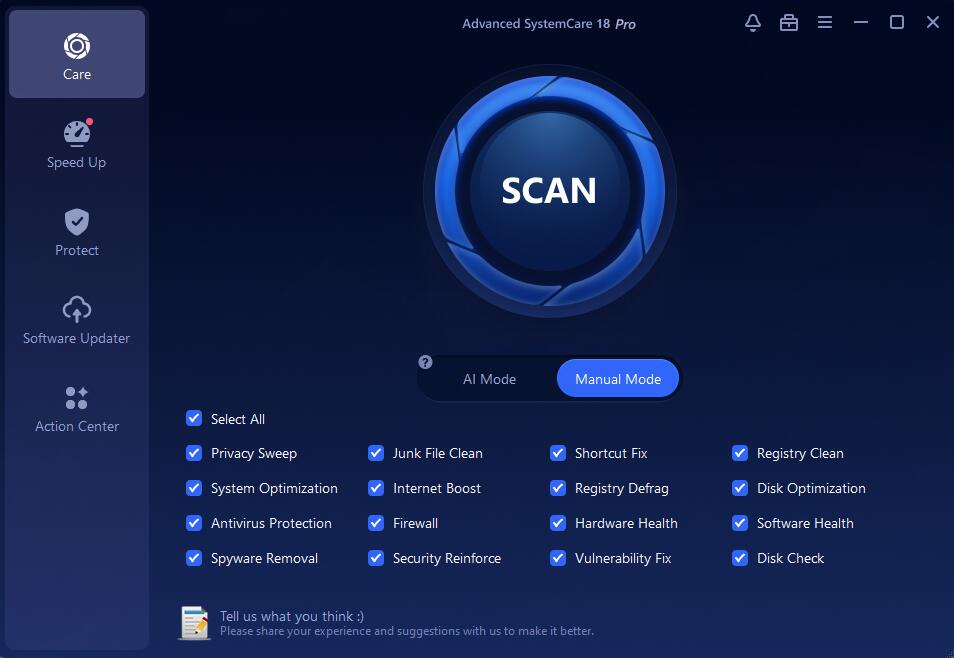
Advanced SystemCare 20 Pro in Manual Mode, with all 16 Care modules ticked under the Scan button.
Version 20's headline addition is Custom Clean, a separate screen that scans one drive for junk files, duplicate files and large files and lets you review each list before you click Clean Now. IObit also added a faster Smart Scan engine that runs modules in parallel, and network speed and disk temperature readings in the Performance Monitor.

Custom Clean in IObit's manual: 982 junk files (889.9 MB), 29,964 duplicates (4.0 GB) and 158 large files (5.3 GB), with duplicates and large files marked Review before cleaning.
What PRO doesn't do is replace your antivirus. Its Antivirus Protection and Firewall modules only check that Windows Security (or whatever you use) is switched on, and its real-time protection is anti-spyware. That's fine for most people, because Microsoft Defender is already in Windows 10 and 11.
What we like
- Cheapest paid edition, at $19.99 a year
- Newest version, with Custom Clean
- 16-module scan, the most of the three
- Works beside the antivirus you already have
- Rescue Center can undo its changes
Watch out for
- A subscription that renews
- Offers for other IObit products inside the app
- No real-time antivirus
- "2× faster" is IObit's claim, not a measurement
Download Advanced SystemCare FreeBuy Advanced SystemCare 20 PRO
Advanced SystemCare Ultimate 18
- Price: $28.99 a year for 2 PCs on the order page. IObit's store lists 1 PC at $25.99 and 3 PCs at $29.99
- Version: 18.5.0.120 (installer dated September 28, 2026)
- Windows: 11, 10, 8.1, 8, 7, Vista and XP SP3, with 500 MB of free disk space
- Best for: people who want one program for cleanup and antivirus, especially on several family PCs
Advanced SystemCare Ultimate is the cleanup toolkit plus a full antivirus. Its first tab is Antivirus, with Quick, Full and Custom scans built on Bitdefender's engine, which IObit says detects more than 220 million threats. Protection Details adds real-time protection, anti-ransomware, Safe Folder, access, fingerprint and browser protection, and the virus database updates.
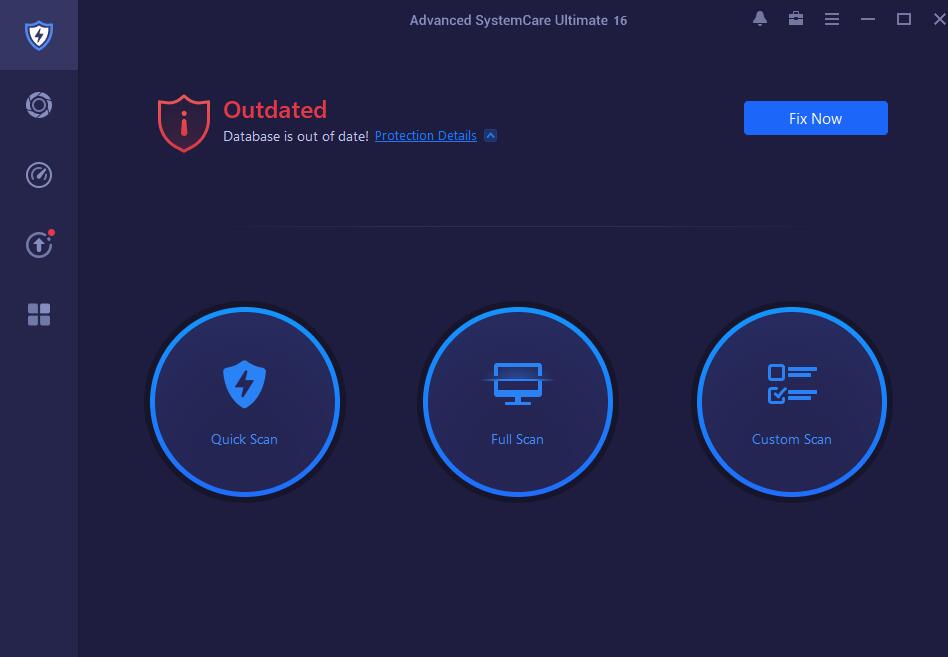
The Antivirus tab in Advanced SystemCare Ultimate 18, warning that real-time protection is off, with Fix Now and the three scan types.
The catch is that Ultimate is a version behind. It's still on 18, so it doesn't have version 20's Custom Clean screen, and its Care scan has 12 modules instead of PRO's 16. The Antivirus Protection, Firewall, Hardware Health (drivers) and Disk Check modules aren't in Ultimate's list, though the antivirus itself covers the first of those.
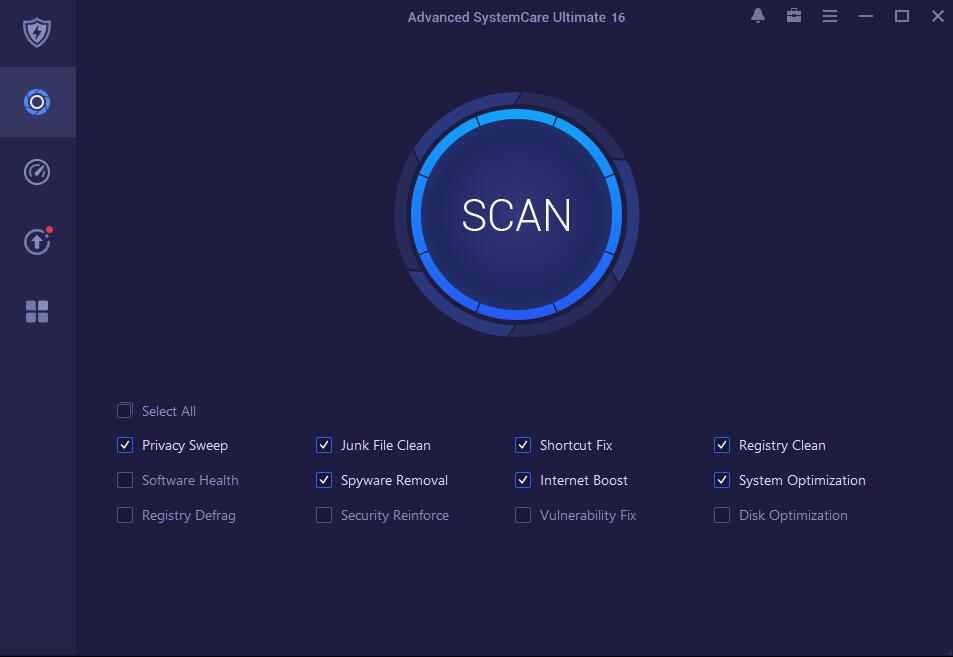
Ultimate 18's Care tab: 12 modules, from Privacy Sweep to Disk Optimization.
Ultimate replaces your antivirus rather than sitting beside it. Two real-time scanners on one PC slow it down and can conflict, so if you keep Norton, McAfee or another paid antivirus, Ultimate is the wrong edition.
What we like
- Antivirus and cleaner in one license
- 30-day trial with every feature
- The 2- and 3-PC plans cost barely more than 1 PC
- Still supports Windows 7 and XP SP3
Watch out for
- Version 18: no Custom Clean, 12-module scan
- Can't run alongside another antivirus
- 150 MB installer, more than twice the size of PRO's
- Same upselling and renewal habits as PRO
Download Advanced SystemCare Ultimate TrialBuy Advanced SystemCare Ultimate
Price and licensing
Advanced SystemCare 20 PRO is the cheapest way to get the full toolkit on one PC, and Ultimate is the better value once you count several PCs and the antivirus you'd otherwise pay for. Both are yearly subscriptions that renew, and IObit's own store runs promotions that change often.
Yearly price on IObit's store, by plan (USD)
Advanced SystemCare PRO, 1 PC$16.77
Advanced SystemCare PRO, 2 PCs + 1 free$18.99
Advanced SystemCare PRO, 5 PCs$29.99
Advanced SystemCare Ultimate, 1 PC$25.99
Advanced SystemCare Ultimate, 2 PCs$28.99
Advanced SystemCare Ultimate, 3 PCs$29.99
Prices on IObit's product pages on October 27, 2026, during a sale (list prices: PRO $29.99 for 1 PC, Ultimate $36.99 for 1 PC). PRO's 3-PC plan, $19.99, runs for 18 months. The Buy Now buttons on this page go to PRO for 1 PC at $19.99 and Ultimate for 2 PCs at $28.99.
The money-back guarantee isn't a trial. IObit advertises a 60-day money-back guarantee on both editions, but its refund policy says it generally won't refund "a customer suddenly changes his mind after purchase" or dissatisfaction from not reading the product description. It does refund buying the wrong product or the same product twice, an auto-renewal you got no reminder email for, and a license code that never arrives. So try before you pay: use the Free edition before PRO, and the 30-day trial before Ultimate. If you take IObit's 30-day PRO trial instead, note the date it ends, because it turns into a paid subscription.
Security: do you need the antivirus?
Advanced SystemCare Ultimate only makes sense if its antivirus replaces one you'd otherwise run. On Windows 10 and 11, Microsoft Defender is built in and free, and Advanced SystemCare PRO works alongside it: PRO's scan checks that Defender and the firewall are on, removes spyware and patches missing Windows updates. If you're paying for a separate antivirus already and want to stop, Ultimate lets you swap it for one IObit subscription. If you're on an old Windows 7 or XP machine that modern antivirus products no longer support, Ultimate's support for those versions is a real reason to choose it.
What reviewers and users say
Tech Advisor on Advanced SystemCare Pro
Chris Martin, Managing Editor of Tech Advisor, reviewed version 14 Pro and called it "A comprehensive PC cleaner application covering all the bases at a reasonable price making it easy to recommend." His complaint: "Elsewhere things get a bit convoluted as the software asks you to install other separate tools like IObit Uninstaller, Smart RAM and Internet Booster."
TechRadar and TechJury on Advanced SystemCare Ultimate
Stefan Ionescu reviewed Ultimate 15 for TechRadar in March 2022: "Advanced SystemCare Ultimate is a helpful tool to maintain, repair, and optimise your PC. It has the proper selection of tools to ensure your computer performs maximally and delivers that for a relatively low price." He also noted that "IObit inserts ads into the installation menu, which feels intrusive."
Maxym Chekalov tested Ultimate 14 for TechJury on a PC that hadn't been cleaned in a year: "Overall, we were able to clean up a nice 2.5GBs of useless data with no negative consequences after several reboots and general use." His main criticism: "there's a little too much upselling of other premium products that we feel should be left only on the free version."
Trustpilot (IObit as a company: 4.6 out of 5 from 2,526 reviews)
Long-time users are loyal. Chaplain Lori (5 stars, September 2026): "I have used ASC Ultimate for years, as well as the Malware Fighter and more." The one-star reviews are mostly about billing and ads. Aleksey (August 2026): "IObit charged me for a subscription I cancelled a year ago. Auto-renewal was enabled without my consent." Michael Hill (October 2026): "Watch a film and an IObit ad pops up in the middle of the screen."
The pattern: reviewers agree all three editions are cheap and easy and find plenty to clean. Every one of them complains about upselling, and users complain about renewals. Nobody's complaint is that the cleanup broke their PC.
Which should you choose?
| Your situation |
Pick |
Why |
| Windows 10 or 11 with Microsoft Defender |
PRO |
Full cleanup toolkit on the newest version, and no second antivirus to fight Defender |
| A nearly full C: drive |
PRO |
Version 20's Custom Clean finds junk, duplicate and large files in one scan |
| Paying for a separate antivirus you'd like to drop |
Ultimate |
One subscription covers the antivirus and the cleaner |
| Three family PCs, including an old Windows 7 one |
Ultimate, 3 PCs |
$29.99 a year covers all three, with an antivirus that still supports Windows 7 |
| An occasional clean on a PC in good shape |
Free |
Junk clean, quicker startup and RAM release cost nothing |
| You keep Norton, McAfee or another paid antivirus |
PRO |
Ultimate's real-time scanner would conflict with it |
Who should skip all three: people who are comfortable with Windows' own tools (Storage Sense, the Startup apps page in Settings and Windows Security cover the basics for free), anyone who won't tolerate in-app offers for other products, and Mac users, since Advanced SystemCare is Windows-only.
What commonly goes wrong
- Buying first and expecting a refund if you don't like it. IObit's refund policy excludes a change of mind. Use Free or the Ultimate trial to decide.
- Forgetting the renewal. Both paid editions renew. Note the date, and if you're charged for a renewal you got no reminder email for, IObit's policy does refund that within 60 days.
- Running Ultimate beside another antivirus. Pick one real-time scanner.
- Letting Privacy Sweep clear what you wanted. IObit's manual recommends checking the settings before the first scan, so saved logins and cookies you rely on aren't deleted.
- Deleting "duplicates" that weren't junk. Custom Clean marks duplicates and large files "Review before cleaning" for a reason. Open each list before you click Clean Now.
- Accepting every offer. The Speed Up cards for Driver Booster and IObit Uninstaller install separate programs. Skip them unless you want them.
FAQs
Is Advanced SystemCare Free really free?
Yes. Advanced SystemCare Free doesn't expire: you keep the junk clean, quicker startup, one-click RAM release and email protection for as long as you like. It's the same installer as PRO, so upgrading later only takes a license code.
Is there an Advanced SystemCare PRO free trial?
Yes, but read the terms. IObit's own site offers a 30-day Advanced SystemCare 20 PRO trial where you "Pay $0 to order now, cancel anytime": it's a subscription that starts charging when the 30 days end unless you cancel. The Free edition is the no-strings way to try the program. Advanced SystemCare Ultimate installs with a 30-day trial of every feature, with no order needed.
Does Advanced SystemCare 20 PRO include an antivirus?
No. Advanced SystemCare 20 PRO removes spyware and checks that your antivirus and firewall are turned on, but it isn't a real-time antivirus. Keep Microsoft Defender or your current antivirus, or buy Advanced SystemCare Ultimate, which adds a Bitdefender-based antivirus.
Is Advanced SystemCare Ultimate the same as PRO plus antivirus?
Mostly, but not exactly. Advanced SystemCare Ultimate is still on version 18, so it lacks version 20's Custom Clean and runs 12 Care modules instead of PRO's 16. It adds the Antivirus tab with Quick, Full and Custom scans and real-time protection.
How many PCs does one Advanced SystemCare license cover?
The Advanced SystemCare PRO plan behind this page's Buy Now button covers one PC for one year. IObit also sells PRO for 2 PCs plus 1 free, 3 PCs (18 months) and 5 PCs, and Ultimate for 1, 2 or 3 PCs.
I have Advanced SystemCare 19 PRO. Do I need to buy version 20?
No. Advanced SystemCare PRO updates itself to the latest version while your subscription is active (Update automatically is ticked in Settings by default), so a current 19 PRO license runs version 20.
Can I switch from Advanced SystemCare PRO to Ultimate later?
Yes, but it's a separate product with its own license code and its own installer. IObit's support pages say each paid IObit product needs its own code, so a PRO code won't activate Ultimate.
Does Advanced SystemCare work on Windows 7 and XP?
Yes. IObit lists Windows 11, 10, 8.1, 8, 7, Vista and XP for Advanced SystemCare Free and PRO, and XP SP3 and later for Ultimate.
Conclusion
Advanced SystemCare 20 PRO is the edition to buy for most Windows 10 and 11 PCs: at $19.99 a year it's the cheapest way to get the full 16-module scan, automatic maintenance, Safe Folder and version 20's Custom Clean, and it works alongside the free Microsoft Defender you already have. Advanced SystemCare Ultimate earns its higher price only when its antivirus replaces one you'd otherwise pay for, or when you're covering several family PCs, including older ones. Start with the Free edition either way, because IObit's refund policy doesn't cover a change of mind.
Download Advanced SystemCare FreeBuy Advanced SystemCare 20 PRO