Short answer
The best PC optimizer for most Windows 11 users is Advanced SystemCare 20 PRO: $19.99 for a year on one PC, it has the widest one-click scan here (16 modules), finds duplicate and large files, runs maintenance automatically, and works beside the free Microsoft Defender.
If you want an antivirus built in, choose Advanced SystemCare Ultimate 18 ($28.99 a year for 2 PCs), or System Mechanic Pro if you have many PCs: $59.94 for the first year covers up to 10. Choose Wise Care 365 Pro if you hate subscriptions (a lifetime license is $69.95 list), and Auslogics BoostSpeed 14 if you like hands-on tweaking tools.
At a glance
|
Price checked October 27, 2026 |
Antivirus |
Free version or trial |
Refund window |
Advanced SystemCare 20 PRO
Best for most people |
$19.99 a year, 1 PC (order page) |
✗ (works with Defender) |
✓ Free edition |
60 days, not for a change of mind |
Advanced SystemCare Ultimate 18
Cheapest with antivirus |
$28.99 a year, 2 PCs (order page) |
✓ Bitdefender engine |
✓ 30-day full trial |
60 days, not for a change of mind |
System Mechanic Pro
Best for many PCs |
$59.94 first year, then $74.95, up to 10 devices |
✓ System Shield |
✓ Free edition (3 scans and fixes) |
30 days, by phone |
Wise Care 365 Pro
Best without a subscription |
$29.95 a year or $69.95 lifetime (list), 1 PC |
✗ |
✓ Free version |
60 days, not for a change of mind |
Auslogics BoostSpeed 14
Best for tinkerers |
$50.96 a year, 3 PCs (list $59.95) |
✗ |
✓ Free version |
30 days |
How we picked
- We started with the PC optimizers listed on this site that are still sold and updated in 2026, and dropped discontinued ones such as TuneUp Utilities.
- For each, we checked the current version and installer on the vendor's site, every plan's price on the vendor's store or our order page, what the free version includes, and the refund policy's conditions.
- We took features from each vendor's own product pages and manuals, not from other reviews.
- We collected professional reviews and each company's Trustpilot score, good and bad.
- What we checked: installers for Advanced SystemCare 20.0.1.256, Wise Care 365 8.0.7 and Auslogics BoostSpeed 14.2.0.6, and System Mechanic's download manager, plus every price in this article, all on October 27, 2026 (Advanced SystemCare Ultimate 18.5.0.120 and its $28.99 order page on October 24, 2026). We compared features, prices, trials and refund terms, and didn't run speed benchmarks or antivirus detection tests.
What a PC optimizer can and can't do
A PC optimizer bundles jobs Windows 11 can mostly do by hand: deleting junk files, disabling startup items, uninstalling apps, updating software and clearing browsing traces. What you pay for is doing them in one scan, on a schedule, with an undo button. None of these programs can make up for a spinning hard drive or too little RAM, and every vendor's "faster PC" figure is its own claim. If you'd like to try the free route first, our guide on how to speed up a slow Windows 11 PC walks through Windows' built-in fixes.
1. Advanced SystemCare 20 PRO: best for most people
- Price: $19.99 for one PC for a year on the order page (list price $29.99)
- Version: 20.0.1.256 (version 20 released September 9, 2026)
- Windows: 11, 10, 8.1, 8, 7, Vista and XP
- Best for: home PCs that already run Microsoft Defender and need cleanup that runs itself
Advanced SystemCare 20 PRO is the cheapest paid optimizer here and has the broadest one-click scan: 16 modules covering junk files, privacy traces, shortcuts, registry cleaning and defragmenting, system and internet settings, disk optimization, antivirus and firewall status, outdated drivers and software, spyware, security weaknesses, missing Windows patches and disk errors. Version 20 adds Custom Clean, which scans a drive for junk, duplicate and large files and lets you review them first. Speed Up adds Turbo Boost and a Startup Optimizer that covers services and scheduled tasks too, and PRO runs AutoCare and automatic RAM release in the background. Safe Folder guards chosen folders against ransomware, and Rescue Center undoes registry, startup and internet changes.
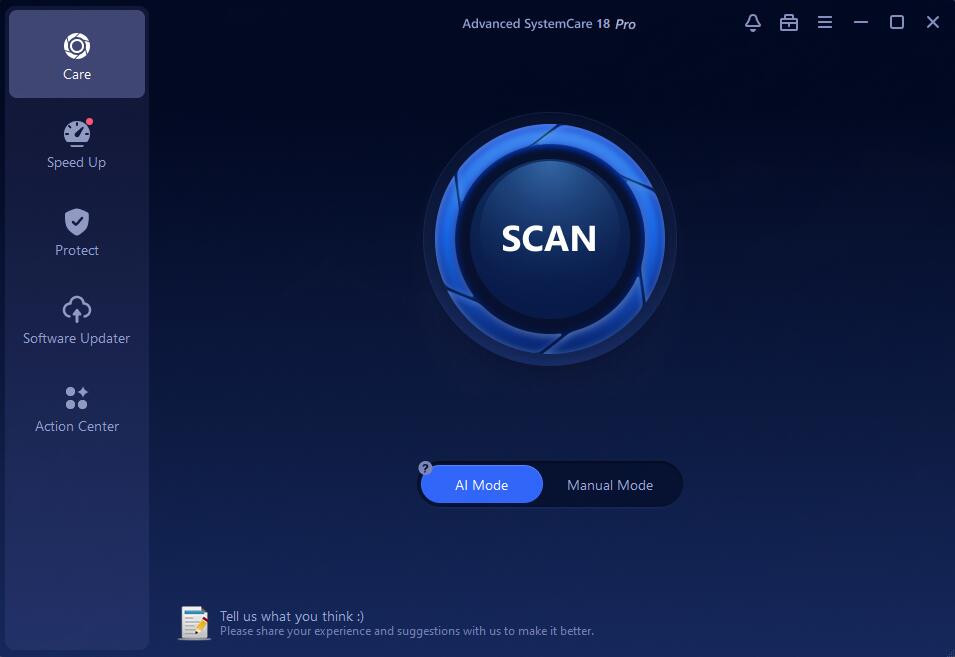
Advanced SystemCare 20 Pro's Care screen: one Scan button, AI Mode or Manual Mode, and the six sections down the left, including the new Custom Clean.
Where it falls short: it isn't an antivirus (it checks that yours is on and removes spyware), it promotes other IObit products inside the app, and it's a subscription that renews. IObit's refund policy excludes a change of mind, so try the Free edition before paying.
What we like
- Lowest price here, at $19.99 a year
- 16-module scan plus Custom Clean
- Automatic maintenance with an undo
- Supports Windows 7 and XP as well as 11
Watch out for
- In-app offers for other IObit products
- No real-time antivirus
- Auto-renewing subscription
"A comprehensive PC cleaner application covering all the bases at a reasonable price making it easy to recommend." — Chris Martin, Tech Advisor (review of version 14 Pro)
"Elsewhere things get a bit convoluted as the software asks you to install other separate tools like IObit Uninstaller, Smart RAM and Internet Booster." — the same review
Download Advanced SystemCare FreeBuy Advanced SystemCare 20 PRO
2. Advanced SystemCare Ultimate 18: cheapest with an antivirus
- Price: $28.99 a year for 2 PCs on the order page. IObit's store lists 1 PC at $25.99 and 3 PCs at $29.99
- Version: 18.5.0.120 (installer dated September 28, 2026)
- Windows: 11, 10, 8.1, 8, 7, Vista and XP SP3
- Best for: replacing a separate antivirus with one cleanup-plus-security subscription
Advanced SystemCare Ultimate 18 puts a real-time antivirus built on Bitdefender's engine in front of the Advanced SystemCare cleanup tools. Its Antivirus tab has Quick, Full and Custom scans, and Protection Details adds anti-ransomware, Safe Folder, access, fingerprint and browser protection. It's still on version 18, so it lacks version 20's Custom Clean, and its Care scan has 12 modules instead of PRO's 16. At $29.99 for three PCs, it's the cheapest way here to get a cleaner and an antivirus for a household. For the full breakdown, see our Advanced SystemCare Free vs Pro vs Ultimate comparison.
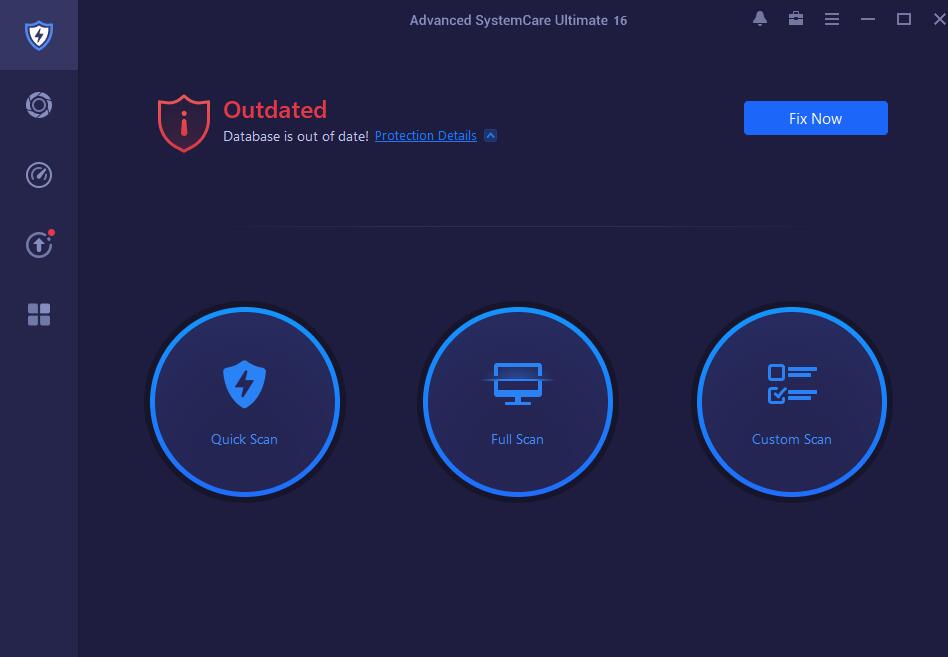
The Antivirus tab in Advanced SystemCare Ultimate 18, warning that real-time protection is off, with Fix Now and three scan types.
What we like
- Antivirus and cleaner in one license
- 30-day trial with every feature
- 3 PCs for $29.99 a year
Watch out for
- A version behind PRO (18 vs 20)
- Can't run beside another antivirus
- Same upselling and renewal habits as PRO
"Advanced SystemCare Ultimate is a helpful tool to maintain, repair, and optimise your PC. It has the proper selection of tools to ensure your computer performs maximally and delivers that for a relatively low price." — Stefan Ionescu, TechRadar (review of Ultimate 15, March 2022)
Download Advanced SystemCare Ultimate TrialBuy Advanced SystemCare Ultimate
3. System Mechanic Pro: best for a house full of PCs
- Price: $59.94 for the first year on iolo's store, then $74.95 a year, for up to 10 devices
- Version: 26.3.0.123 (March 2026)
- Windows: 11, 10, 8.1, 8 and 7
- Best for: households with many PCs that want cleanup and antivirus on one license
System Mechanic Pro covers the most PCs per license here: one subscription is for up to 10 devices. iolo's Smart ActiveCare scans and repairs automatically when the PC is idle, LiveBoost frees CPU, RAM and drive resources, and the Performance tools clean junk, remove bloatware, speed up startup and optimize the registry. Pro adds System Shield real-time antivirus, Malware Killer for existing infections, NetBooster internet tuning, secure data wiping and file recovery.
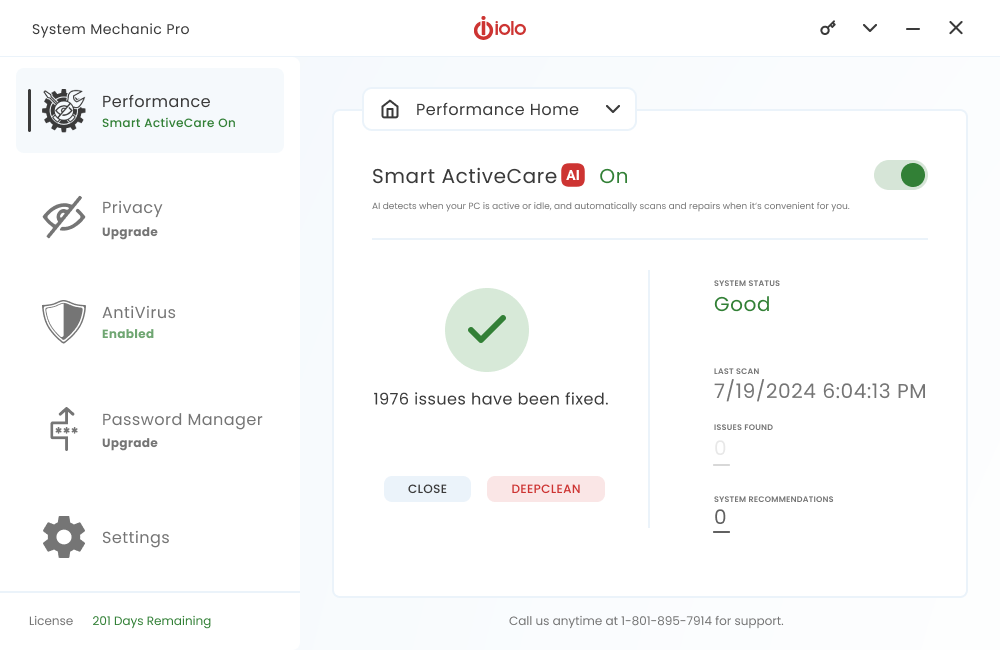
System Mechanic Pro's Performance Home with Smart ActiveCare on, 1,976 issues fixed and the AntiVirus section enabled, from iolo's product page.
Where it falls short: it costs the most here, and the checkout needs care. iolo's cart pre-adds LiveTech support, free for the first month and then billed at $19.95 a month unless you remove it, and the renewal is charged at the full $74.95. Refunds must be requested by phone within 30 days. iolo publishes no version number or release notes on its own site.
What we like
- Up to 10 devices on one license
- Real-time antivirus and malware removal included
- File recovery and secure wipe
Watch out for
- LiveTech support at $19.95 a month pre-added in the cart
- Renews at $74.95
- Refunds by phone only, within 30 days
- No Windows Vista or XP support
"A truly effective PC tune-up tool that's a cut above the competition. Automatic cleanup tools and a superb malware scanner make it easy to recommend." — Cat Ellis, TechRadar (4.5 out of 5)
TechRadar's own update to that review warns: "A recent change to Iolo's checkout process means you will be automatically subscribed to a $19.99 (about £15 / AU$25) per month support package when you purchase a product. This is a very large extra charge, so make sure to double-check before entering your payment details." iolo's Trustpilot score is 4.0 from about 4,000 reviews.
Download System Mechanic Free
4. Wise Care 365 Pro: best if you don't want a subscription
- Price (list): $29.95 a year or $69.95 lifetime for 1 PC, $39.95 a year or $89.95 lifetime for 3 PCs. WiseCleaner's store was discounting all of them on October 27, 2026
- Version: 8.0.7 (October 22, 2026)
- Windows: 11, 10, 8.1, 8 and 7
- Best for: people who'd rather pay once, and want a small, quick cleaner
Wise Care 365 Pro is the only optimizer here sold with a lifetime license. Its one-click PC Checkup finds junk files, invalid registry entries, privacy traces and weak security settings, and the program also cleans browser data, defragments disks and the registry, manages startup items and services, and shows hardware and Windows details. Pro adds privacy protection, real-time monitoring that blocks hidden registry, homepage, startup and context-menu changes, and automatic cleaning in Silent Mode on a daily, weekly, monthly, idle or login schedule. The installer is 36 MB.
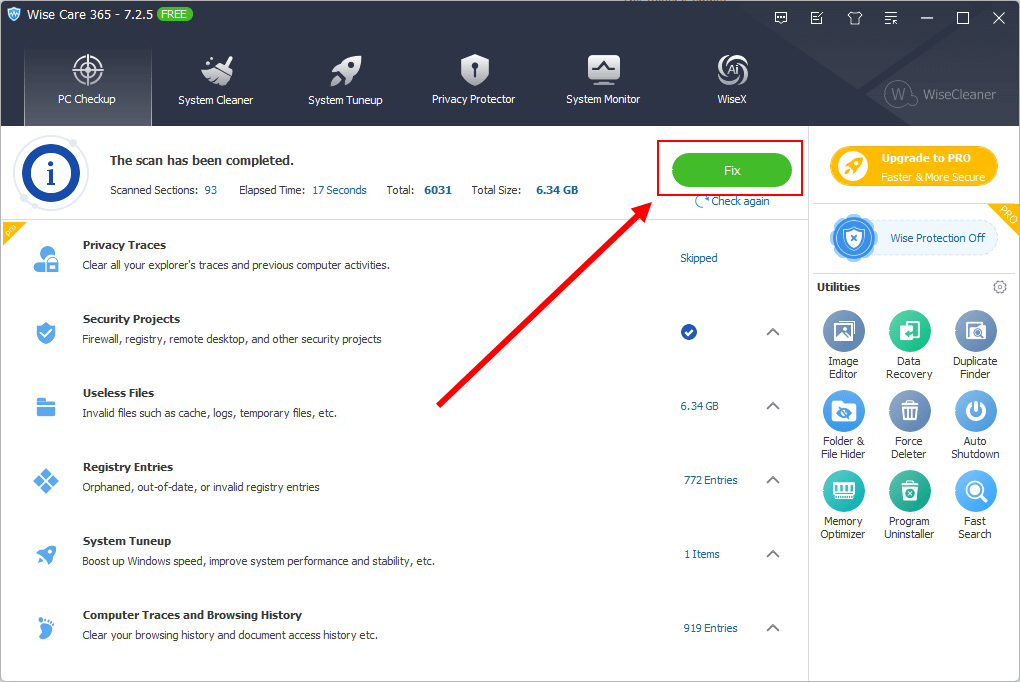
Wise Care 365 7.2.5 Free in WiseCleaner's user guide (the red box and arrow are WiseCleaner's): a completed checkup finding 6.34 GB of useless files and 772 registry entries, with the Fix button. Version 8 looks similar.
Where it falls short: there's no antivirus, the Duplicate Finder is a separate utility rather than part of the checkup, and WiseCleaner's refund policy excludes a change of mind. The newest screenshots WiseCleaner publishes are still from version 7.
What we like
- Lifetime license available
- Small installer, quick scans
- Real-time blocking of hidden system changes
Watch out for
- Yearly plans renew automatically
- No antivirus
- Store discounts vary from page to page
"Wise Care 365 is a practical tool to get the best out of your PC. It's versatile and cost-effective relative to the suite of features it offers." — Stefan Ionescu, TechRadar (4.5 out of 5, May 2022)
TechRadar's listed cons were "Windows-only" and "Free version has limited features". WiseCleaner's Trustpilot score is 4.6 from 97 reviews.
Download Wise Care 365
5. Auslogics BoostSpeed 14: best for tinkerers
- Price: $50.96 a year for 3 PCs on Auslogics' product page (list $59.95). There's no 1-PC or lifetime plan
- Version: 14.2.0.6 (April 29, 2026)
- Windows: 11, 10, 8.1, 8 and 7
- Best for: people who want a toolbox of individual tweaks as well as a one-click scan
Auslogics BoostSpeed 14 has the most hands-on tools of the five. Beside a one-click scan, it has an Uninstall Manager that shows when each program was last used, a Startup Manager, an Internet Optimizer, disk and SSD optimization, Windows 11 tweaks, browser anti-tracking, a Rescue Center to undo changes, scheduled automatic maintenance, and a status bar with live CPU, GPU, drive and network readings, including CPU temperature warnings.
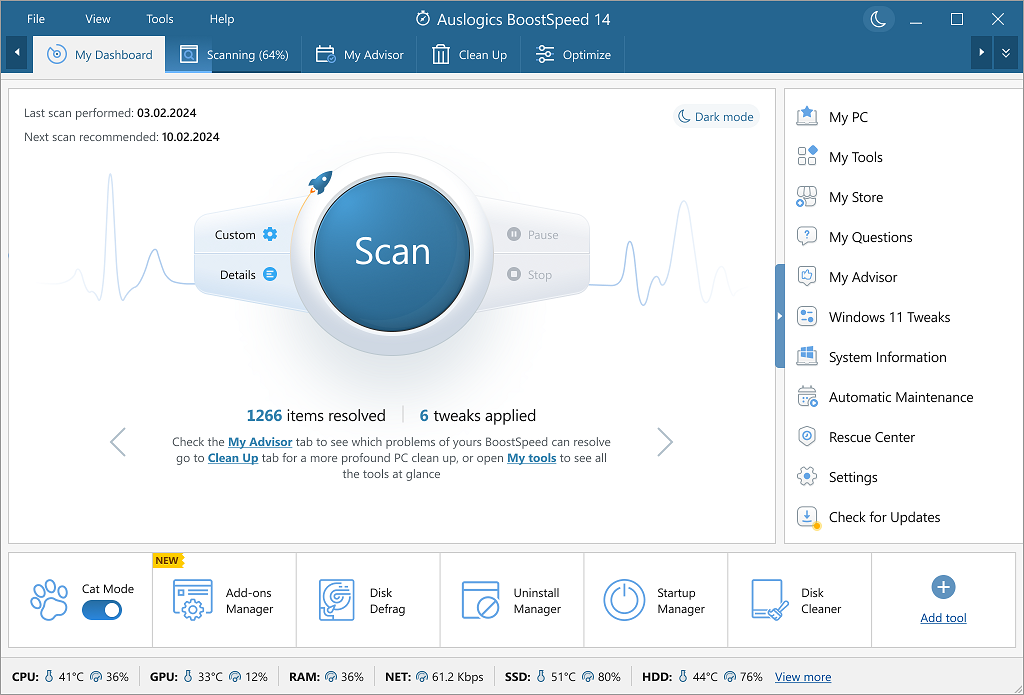
Auslogics BoostSpeed 14's dashboard: the Scan button, the Advisor, Clean Up and Optimize tabs, a tool bar along the bottom and live CPU, GPU, RAM, network, SSD and HDD readings.
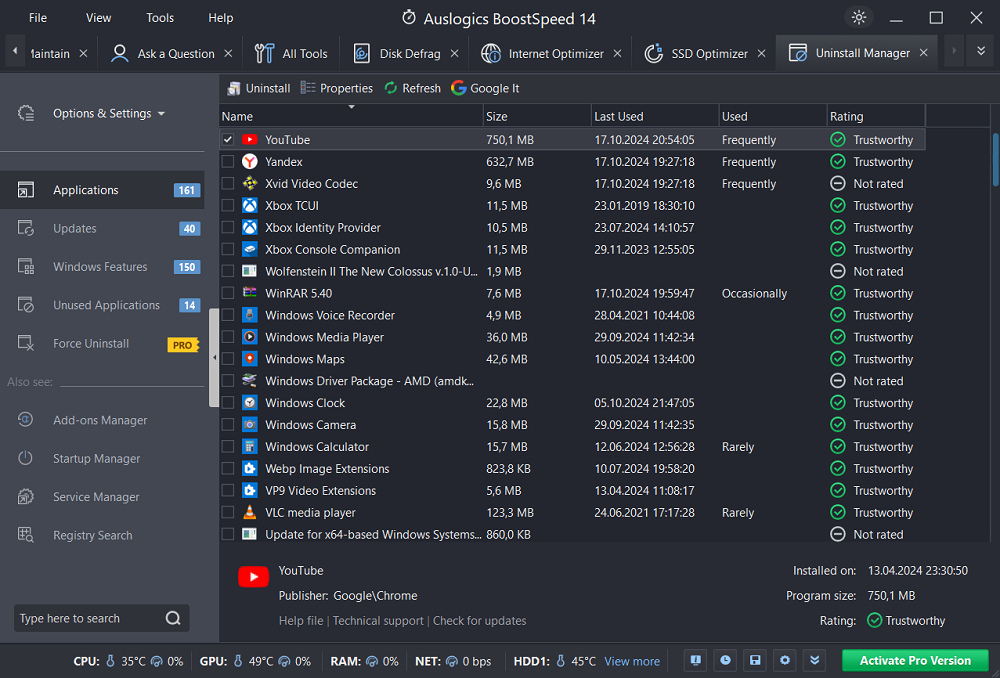
BoostSpeed 14's Uninstall Manager in dark mode: 161 applications with their size, last-used date, how often they're used and a trust rating, plus a Force Uninstall option marked PRO.
Where it falls short: it's the second most expensive here, sold only as a 3-PC yearly subscription that renews automatically and is cancelled by email. TechRadar found the free version's features limited.
What we like
- The most individual tools and tweaks
- Uninstall Manager shows unused apps
- Live hardware readings with temperature warnings
Watch out for
- 3-PC plan only, $50.96 a year
- Auto-renews, cancel by email
- No antivirus
"Auslogics BoostSpeed 12 is a handy tool that helps you achieve your PC performance goals. However, it has certain drawbacks, such as its free version having minimal functionality and availability only on Windows OS." — Stefan Ionescu, TechRadar (4.5 out of 5, February 2022) Auslogics' Trustpilot score is 4.3 from about 2,000 reviews.
Download Auslogics BoostSpeed
Price compared
Advanced SystemCare 20 PRO is the cheapest paid optimizer for one PC, and System Mechanic Pro is the cheapest per device if you really have ten PCs. List prices are what to compare, because every vendor here discounts the first year and renews closer to list.
List price for one year (USD)
Wise Care 365 Pro (1 PC)$29.95
Advanced SystemCare 20 PRO (1 PC)$29.99
Advanced SystemCare Ultimate 18 (1 PC)$36.99
Auslogics BoostSpeed 14 (3 PCs)$59.95
System Mechanic Pro (10 devices)$74.95
List prices on each vendor's site on October 27, 2026. Prices actually charged that day: Advanced SystemCare 20 PRO $19.99 (order page), Ultimate $25.99 for 1 PC on IObit's store, BoostSpeed $50.96 and System Mechanic Pro $59.94 for the first year, with Wise Care 365 discounted on WiseCleaner's store.
Company Trustpilot scores (out of 5)
IObit (Advanced SystemCare), 2,526 reviews4.6
WiseCleaner (Wise Care 365), 97 reviews4.6
Auslogics (BoostSpeed), about 2,000 reviews4.3
iolo (System Mechanic), about 4,000 reviews4.0
Trustpilot TrustScores for each company, covering all its products, as shown in October 2026. WiseCleaner's score rests on far fewer reviews than the others.
Which should you choose?
| Your situation |
Pick |
Why |
| One Windows 11 PC with Microsoft Defender |
Advanced SystemCare 20 PRO |
Cheapest, broadest scan, works beside Defender |
| 2 or 3 family PCs, want antivirus too |
Advanced SystemCare Ultimate 18 |
$28.99 to $29.99 a year for cleanup plus antivirus |
| 5 to 10 PCs in the house |
System Mechanic Pro |
One license covers up to 10, antivirus included. Remove LiveTech at checkout |
| You won't pay a subscription |
Wise Care 365 Pro lifetime |
The only lifetime license here |
| You like adjusting things yourself |
Auslogics BoostSpeed 14 |
The most separate tools, tweaks and live hardware readings |
| An old Windows 7, Vista or XP PC |
Advanced SystemCare 20 PRO or Ultimate |
The only ones here that still list Vista and XP |
Who should skip all five: anyone comfortable with Windows 11's own Storage Sense, Startup apps list and Windows Security, PCs whose real problem is a hard disk or too little RAM, and Mac users, since every program here is Windows-only.
What commonly goes wrong
- Treating the money-back guarantee as a trial. IObit's and WiseCleaner's refund policies exclude a change of mind, and iolo's needs a phone call within 30 days. Use the free versions and trials first.
- Missing an add-on at checkout. iolo pre-adds LiveTech support, billed monthly after the first month. Read every line of the cart before paying, with any vendor.
- Forgetting the renewal. Every yearly plan here renews automatically, usually closer to list price than the first year's discount.
- Running two antivirus programs. If you buy Ultimate or System Mechanic Pro for the antivirus, let it replace your current one rather than run beside it.
- Accepting every recommendation. Review startup items, duplicate files and privacy-clean settings before you click Fix, and keep the undo feature (Rescue Center in Advanced SystemCare and BoostSpeed, registry backup in Wise Care 365) switched on.
FAQs
What is the best free PC optimizer for Windows 11?
The best free PC optimizer is the one already in Windows 11: Storage Sense, the Startup apps list in Task Manager and Windows Security cover the basics. Of the programs here, Advanced SystemCare Free, Wise Care 365 Free, BoostSpeed's free version and System Mechanic Free all add a one-click scan, with the deeper cleaning kept for the paid editions.
Do PC optimizers really make a computer faster?
PC optimizers make a computer faster when it's slowed by clutter: startup items, background apps, a full drive or outdated software. They can't fix a slow hard disk or a lack of RAM, and vendor claims such as "2× faster" are their own figures.
Which PC optimizer includes an antivirus?
Advanced SystemCare Ultimate 18 (Bitdefender engine) and System Mechanic Pro (System Shield) include a real-time antivirus. Advanced SystemCare 20 PRO, Wise Care 365 Pro and Auslogics BoostSpeed 14 don't, so keep Microsoft Defender running with them.
Is there a PC optimizer with a lifetime license?
Yes. Wise Care 365 Pro is sold with a lifetime license, $69.95 list for 1 PC or $89.95 for 3 PCs. Advanced SystemCare, System Mechanic and BoostSpeed are yearly subscriptions only.
Do I need a PC optimizer if I have Windows 11?
Not necessarily. Windows 11's Storage Sense, Startup apps list and Windows Security do the basics for free. A PC optimizer such as Advanced SystemCare 20 PRO is worth paying for when you want the cleanup in one scan, on a schedule and with an undo button, or when you need duplicate and large file cleanup Windows doesn't offer.
Is it safe to use a registry cleaner?
A registry cleaner is generally safe when it backs up its changes first. Advanced SystemCare and BoostSpeed keep backups in a Rescue Center, and Wise Care 365 has registry backup and restore. Don't expect a big speed-up from registry cleaning alone.
Can I use one license on several PCs?
It depends on the plan. System Mechanic Pro covers up to 10 devices, BoostSpeed's only plan covers 3 PCs, Advanced SystemCare and Wise Care 365 sell 1-PC and multi-PC plans, and Advanced SystemCare Ultimate's Buy Now plan on this page covers 2 PCs.
Conclusion
For most Windows 11 PCs, Advanced SystemCare 20 PRO is the one to buy: at $19.99 a year it's the cheapest paid optimizer here, its 16-module scan and Custom Clean cover the most ground, and it runs beside the free Microsoft Defender. Pick Advanced SystemCare Ultimate 18 for a cleaner and antivirus on two or three family PCs, System Mechanic Pro for up to ten PCs (and remove LiveTech at checkout), Wise Care 365 Pro if you'd rather buy a lifetime license, and Auslogics BoostSpeed 14 if you enjoy individual tweaks. Whichever you choose, start with its free version, because the refund policies don't cover a change of mind.
Download Advanced SystemCare FreeBuy Advanced SystemCare 20 PRO