Wise Care 365 Pro: One-Click Cleanup, Privacy Tools and Real-Time Protection for Windows
Wise Care 365 Pro is a $39.95-a-year Windows PC cleaner and tune-up suite for 3 PCs from WiseCleaner that clears junk files and invalid registry entries, erases privacy traces, manages startup programs and blocks unwanted changes to your system, mostly with one Checkup button. It's for home users who want a tidy, private PC without learning a dozen separate tools.
The free version already handles the basic cleanup. Pro is what you pay for when you want the privacy cleaning, the real-time protector and automatic updates, on up to three household PCs.
Quick facts
- Version: 8.0.7, released October 22, 2026
- Developer: WiseCleaner (Lespeed Technology)
- Runs on: Windows 11, 10, 8.1, 8 and 7, 32-bit and 64-bit
- Price: $39.95 for a 1-year subscription on 3 PCs. A 1-PC year is $29.95 and a lifetime license for 3 PCs is $89.95.
- Free version: PC Checkup, junk and registry cleaning, tune-up and system monitor. Privacy cleaning, the real-time protector and automatic updates need Pro.
- Guarantee: 60-day money-back guarantee
What we checked: the price on the order page ($39.95 for Wise Care 365 Pro, 1-year subscription for 3 PCs) and the 36.1 MB installer from WiseCleaner's download server (file version 8.0.7), both on October 29, 2026. We didn't run a cleanup with it ourselves.
Download Free TrialBuy Now
Overview
Wise Care 365 bundles several of WiseCleaner's single-purpose tools into one window with five tabs: PC Checkup, System Cleaner, System Tuneup, Privacy Protector and System Monitor, plus a panel of extra utilities on the right. The Checkup button scans privacy traces, security settings, useless files, registry entries, tune-up items and browsing history in one pass, and Fix cleans the lot.
Version 8 introduced WiseCleaner's new Wise XUI interface, which fixes the blurry scaling of earlier versions: it adapts to Windows display scaling from 100% to 200% and stays sharp on 4K monitors. Updates arrive about monthly, mostly adding cleaning rules for more applications.

The PC Checkup tab with the green Checkup button, the five main tabs along the top and the Utilities panel on the right. From WiseCleaner's user guide, showing version 7.2.5 Free with an Upgrade to PRO button. Version 8 has a refreshed interface.
Features
One-click PC Checkup, on a schedule
Wise Care 365's PC Checkup scans six areas (privacy traces, useless files, registry entries, system tune-up, computer traces and security settings) and fixes them with one click. You can review each result first, ignore items, choose exactly what the Checkup covers, and schedule it daily, weekly, monthly, on idle or at login, silently in the background.
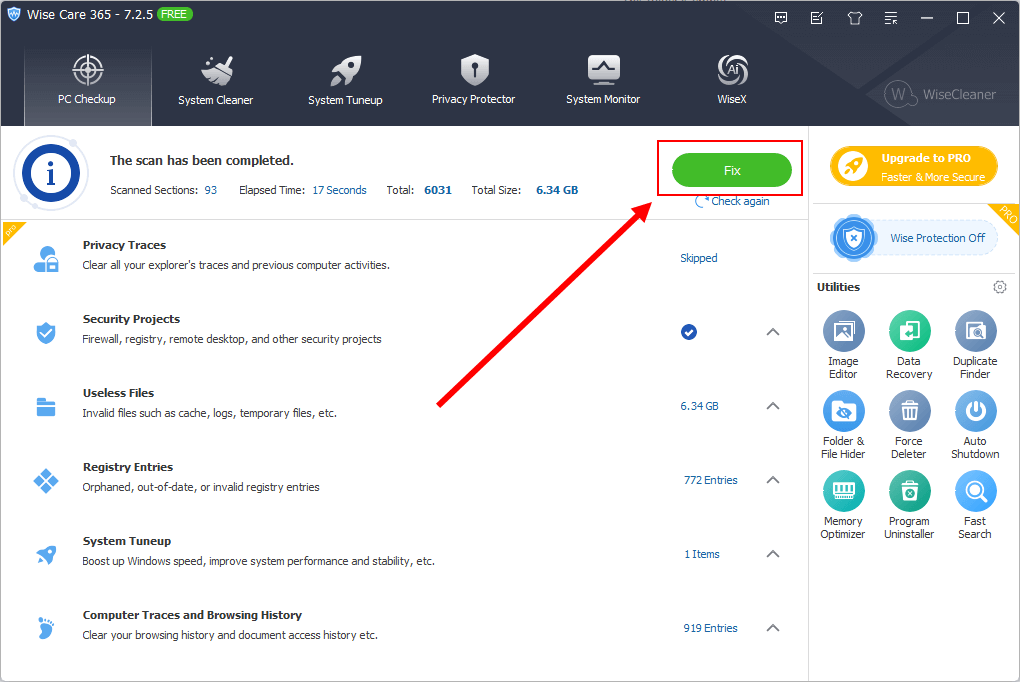
A finished Checkup: 93 sections scanned in 17 seconds, 6.34 GB of useless files, 772 registry entries and 919 browsing-history entries. In this free version, Privacy Traces is marked PRO and shows "Skipped".
Junk file and registry cleaning
Wise Care 365's System Cleaner removes temporary files, browser caches, download and browsing history, cookies and saved passwords for Edge, Chrome, Firefox, Opera, Safari and others, plus leftovers from many applications and Windows Delivery Optimization files. Its registry cleaner removes invalid entries and can back up and restore the registry first.
Privacy Eraser, Disk Eraser and File Shredder
Wise Care 365 Pro's Privacy Protector removes traces of what you've done on the PC, shreds files so they can't be recovered, and wipes free disk space so deleted files can't be brought back. It also manages which websites may send you browser notifications. In the free version you can see privacy risks but not clean them.
Real-time protection against unwanted changes (Pro)
Wise Care 365 Pro's protector watches for programs that try to change the Windows registry without permission, change your browser homepage or default browser, add themselves to startup, or add items to the right-click menu, and blocks them. It's the feature that stops bundled installers from quietly rearranging your PC.
Tune-up and system monitor
Wise Care 365 defragments disks and the registry, manages startup programs and services, and shows running processes, hardware details and a Windows overview that includes your Windows product key, edition, build and installation date.
Real-World Uses
- A slow family laptop: run Checkup, trim the startup list, and set a weekly silent cleanup.
- Selling or handing on a PC: shred personal files and wipe free space so they can't be recovered.
- Freeware installs that bring extras: the real-time protector blocks the new homepage and startup entries.
- Need the Windows key: System Monitor shows it before a reinstall.
Who It's For, and Who Should Skip It
Wise Care 365 Pro fits home users with up to three Windows PCs who want routine cleanup and privacy wiping handled in one place, on a schedule, without fuss.
Skip it if you only want occasional cleanup: the free version and Windows' own Storage Sense and Disk Cleanup do much of that. Skip the registry cleaning entirely if your PC runs fine: modern Windows gains little from it, and removing entries carries some risk. And if you don't want ads for other WiseCleaner tools in the window, note TechRadar's complaint below.
Usage Guide
- Install: download the 36 MB installer, run it, and open Wise Care 365.
- Activate Pro: enter the license key from your order email to turn on the Pro features.
- Run a Checkup: click Checkup, review each category, click Ignore on anything you want kept, then click Fix.
- Customize: under Menu > Settings > Custom Checkup, choose which items the Checkup cleans.
- Schedule: turn on the scheduled cleanup and pick daily, weekly, monthly, on idle or at login.
- Protect: switch on the real-time protection and use Startup Manager to disable programs you don't need at boot.
Where it falls short
- Ads for other WiseCleaner tools. TechRadar found the in-app promotions "feel pushy", and the Utilities panel links to other WiseCleaner products.
- Antivirus alerts about passwords. WiseCleaner's own FAQ addresses Avast warning that Wise Care 365 tries to access Chrome passwords, most likely because the cleaner can remove saved browser passwords. Check what's selected before cleaning.
- Email-only support. There's no phone or chat support, just email, an FAQ and a forum.
- Subscription by default. The license sold here renews yearly. The lifetime license costs more up front but avoids renewals.
- Registry cleaning has limited value. It tidies up, but rarely makes a modern PC noticeably faster.
What Users Say
TechRadar: 4.5 out of 5 (Stefan Ionescu, March 2024)
"Wise Care 365 has the proper set of features to ensure your PC works as efficiently as possible."
"Upon launching Wise Care 365, we observed a neat, uncluttered interface making it easy to find and execute any feature. All the features fit into just five menus, ensuring easy access."
The criticism: "WiseCleaner inserts advertisements for other software tools and these ads feel pushy." On value: "Wise Care 365 is a practical tool to get the best out of your PC. It's versatile and cost-effective relative to the suite of features it offers."
TheWindowsClub (HemantS, updated February 2025)
"During my testing, I found, the scans were not only quick but thorough and with good results."
On the free version's privacy tab: "You can view the details but not clean the risks as the feature is available in the pro version only. Upon hitting the 'Start Clean' button, you are prompted to upgrade to the Pro version."
WiseCleaner's site and awards
WiseCleaner's product page shows a 4.7 rating from 545 ratings and mentions a Softpedia editor's 4-star review and a Software Informer Editor's Pick award. These are the vendor's own figures.
The pattern: reviewers like the speed, the thorough scans and the clean five-tab layout, and consider it good value. The common complaints are the in-app ads and the free version's pushes to upgrade.
Comparisons
Wise Care 365 Pro vs the free version
Free covers the Checkup, junk and registry cleaning, tune-up and System Monitor. Pro adds privacy cleaning, the real-time protector, automatic updates and premium support, and covers 3 PCs with this license. If you don't care about privacy wiping or the protector, the free version is enough.
Wise Care 365 Pro vs Windows' built-in tools
Storage Sense and Disk Cleanup remove Windows junk for free, and Task Manager handles startup apps. Wise Care 365 adds browser and application cleaning, file shredding, free-space wiping, the change protector and one-click scheduling across all of it.
Editions and Pricing
| License |
Price |
Covers |
| Free | $0 | Basic cleanup and tune-up |
| Pro, 1 year, 1 PC | $29.95 | One PC, renews yearly |
| Pro, 1 year, 3 PCs | $39.95 | Three PCs, renews yearly (this page's Buy Now) |
| Pro, lifetime, 3 PCs | $89.95 | Three PCs, no renewal |
WiseCleaner also sells an Enterprise edition for businesses. Every purchase has a 60-day money-back guarantee, and annual subscriptions can be cancelled at any time.
FAQs
Can I get a refund on Wise Care 365 Pro?
Yes. WiseCleaner offers a 60-day money-back guarantee on Wise Care 365 Pro.
Can I cancel the Wise Care 365 Pro subscription?
Yes. WiseCleaner says annual subscriptions can be cancelled at any time, and its support pages have a Manage My Subscription section.
Can I move my Wise Care 365 license to a new PC?
Yes. WiseCleaner's support center has a Transfer License section for moving a license to another computer.
Why does my antivirus say Wise Care 365 is accessing Chrome passwords?
Wise Care 365 can clean saved browser passwords as part of its privacy cleaning, which some antivirus programs such as Avast flag. WiseCleaner's FAQ covers the warning. Review what the cleaner will remove before you click Fix if you want to keep your saved passwords.
Does Wise Care 365 work on Windows 7?
Yes. Wise Care 365 runs on Windows 11, 10, 8.1, 8 and 7, 32-bit and 64-bit.
System Requirements
- Operating system: Windows 11, 10, 8.1, 8 or 7, 32-bit or 64-bit
- Download: 36.1 MB installer
- Display: scales from 100% to 200%, 4K monitors supported
Conclusion
Wise Care 365 Pro is worth $39.95 a year if you look after two or three home PCs and want cleanup, privacy wiping and protection against unwanted changes on a schedule, from one tidy window. The main reason not to buy it is that the free version, plus Windows' own tools, already covers basic cleanup, and the ads for other WiseCleaner products may annoy you. Start with the free version, and upgrade if you want the privacy tools and the protector, ideally the lifetime license if you plan to keep it.
Download Free TrialBuy Now