Wise Data Recovery Pro: Simple Undelete for Windows Without the 2 GB Cap
Wise Data Recovery Pro is a $39.97-a-year Windows program from WiseCleaner (half its $79.95 list price, with the coupon applied at checkout) that finds files you deleted, emptied from the Recycle Bin or lost to a quick format, on PC drives, USB sticks and memory cards, and copies them back. It's the paid edition of the free Wise Data Recovery: the program is the same, and Pro removes the free edition's 2 GB total recovery limit.
You know the moment. You emptied the Recycle Bin last night, and this morning the folder of scanned receipts or the SD card's holiday photos is gone. Wise Data Recovery is built for exactly that kind of recent, ordinary loss: pick the drive, let it scan for a few minutes, tick the files you want, and save them somewhere else.
Quick facts
- Version: 6.2.2, released July 18, 2025
- Developer: WiseCleaner (Lespeed Technology Co., Ltd., Beijing)
- Platform: Windows 11, 10, 8/8.1 and 7, 32-bit and 64-bit; the portable version also runs on Windows XP. There's a separate Mac product.
- File systems: FAT12/16/32, exFAT, NTFS, HFS, HFS+, HFSX, Ext2, Ext3
- Installer size: 11.4 MB
- License: 1 year, 1 PC, with automatic updates and premium support
- Free edition: the same program, limited to 2 GB of recovered files in total, on any number of PCs, with no time limit
- Money-back guarantee: 60 days under WiseCleaner's refund policy, for technical problems it can't fix, not for a change of mind
- What we checked: the installer from WiseCleaner's download link reports file version 6.2.2 and is 11.4 MB (11,965,080 bytes), and the setup file is signed by Lespeed Technology Co., Ltd. The download link in this listing's trial offer pointed at version 6.0.3 and returned "not found", so the button below uses WiseCleaner's current installer. The rest was checked on October 29, 2026. The 1-year, 1-PC license cost $39.97 on the order page with coupon B7B52FE0 applied (50% off the $79.95 list price), checked on October 30, 2026. We didn't run a recovery with it ourselves.
Before you buy
Run the free edition first. It scans exactly like Pro and shows you every file it can find, with previews, and it recovers up to 2 GB before asking for a key. If your files fit in 2 GB, you don't need to pay at all. If the scan doesn't show the files you need, Pro won't find them either, because the two editions use the same scanner.
Install it on a different drive from the one you lost files on, or use the portable version from a USB stick. Writing anything new to the damaged drive can overwrite the very files you want back.
Download Free TrialBuy Now
Overview
When Windows deletes a file, it only marks the space as free. The data stays on the disk until something new is written over it. Wise Data Recovery reads the drive directly, finds those orphaned files, and lists them with their names, sizes, dates and original folders where it can still work them out.
The program has stayed deliberately small. There's one screen: choose a location at the top left, watch the scan fill the list, narrow it down with the filter or the search box, and click Recover. The results appear while the scan runs, so you can start looking before it finishes.
Updates come slowly. Version 6.1.8 (May 2024) added exporting and importing scan reports, 6.2.0 (September 2024) added scanning the Recycle Bin, and 6.2.2 (July 2025) started saving the last scan automatically. There has been no release since.
Features
Scan any drive, folder or the Desktop
Wise Data Recovery shows every connected drive as a tile, including SSDs, external disks and card readers, plus a Desktop tile and Select Path for a single folder. A drive that has lost its partition and no longer shows in File Explorer appears as a "Lost Drive". Click a tile and the scan starts straight away.
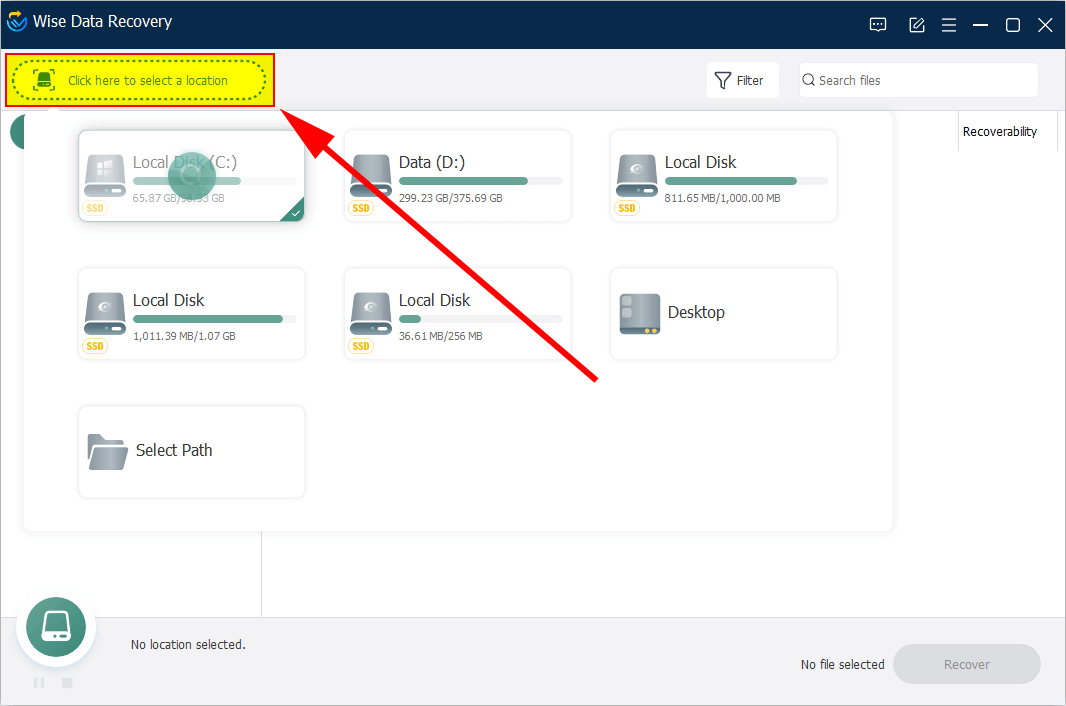
The location picker: each drive as a tile with its used space, plus Desktop and Select Path for one folder.
Results sorted by file type or by folder
Wise Data Recovery groups what it finds into categories such as graphic, video, audio, document, email, database and Office files, then by extension (.JPG, .PNG, .PSD and so on). Switch to File Path to browse the drive's old folder tree instead. A progress ring shows the percentage, the time left and how many files it has found so far, and you can pause or stop at any point.
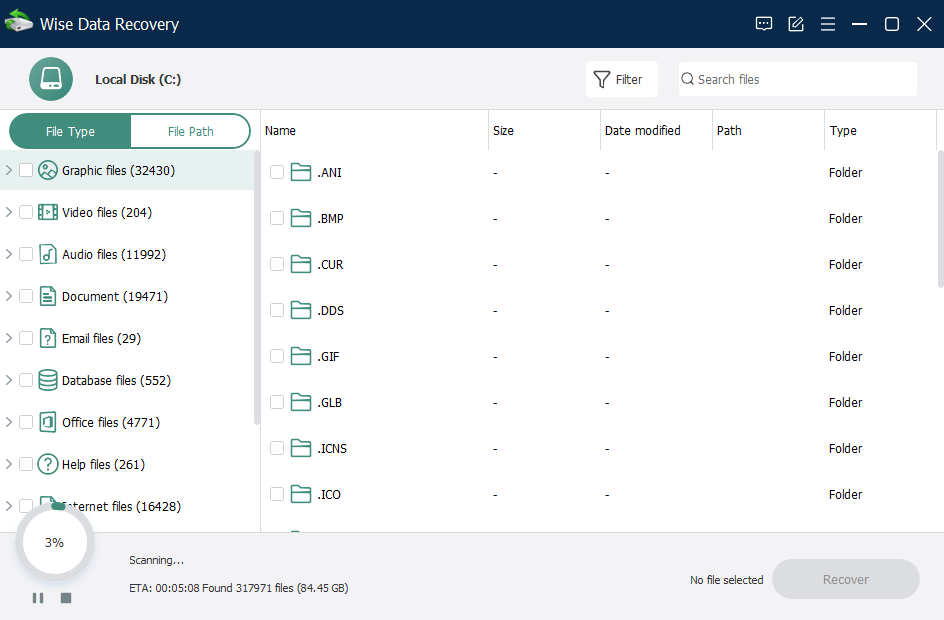
A scan of drive C: at 3%, with an ETA of about five minutes and found files grouped by type in the left pane.
Filters and search to cut 300,000 results down to ten
Wise Data Recovery's scan of a busy system drive turns up hundreds of thousands of files, most of them old program leftovers. The Filter bar narrows them by file type, file size and date modified, and the search box matches names and extensions. Filenames are only complete once the scan finishes, so search after it's done.

The filter bar open above the results: All files, All size, Anytime, and a Reset button.
Preview before you recover
Wise Data Recovery opens a preview of pictures, Office documents, text files and other common formats when you double-click them, so you can check a photo is the right one, and not a corrupted shell, before you spend part of the free 2 GB on it. Previews can be partial until the scan has finished.
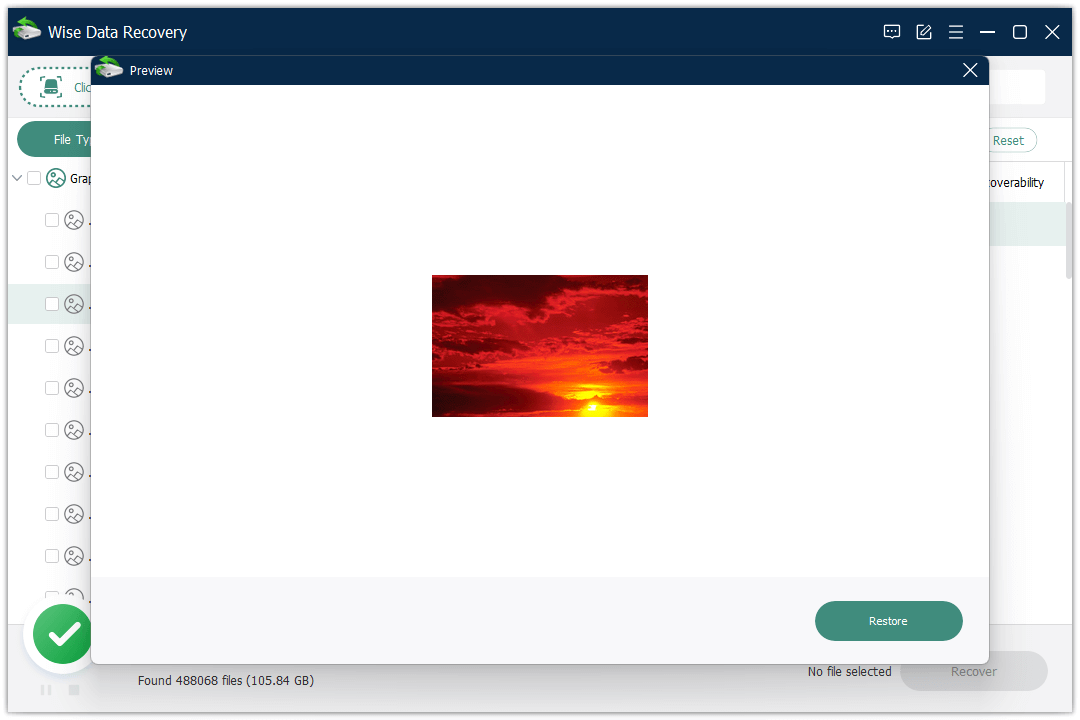
The preview window over a finished scan (488,068 files, 105.84 GB found), with a Restore button for the photo shown.
More than 1,000 file types, including camera RAW and Outlook mail
Wise Data Recovery recognizes Office documents and PDFs, InDesign and EPS files, JPG, PNG, PSD and camera RAW formats (CR2, NEF, ORF, SR2, RAF, DNG), videos (MP4, MOV, MKV, AVI and more), audio (MP3, WAV, WMA, M4A, OGG, AAC), Outlook and Outlook Express mailboxes (PST, DBX), Apple Mail EMLX files, and archives such as ZIP, RAR and ISO.
Saved scans you can reload later
Wise Data Recovery can export a scan's results and import them again, so you can recover files later without scanning the whole drive a second time, as long as nothing new has been written to it. Since version 6.2.2 it saves the last scan of each drive by itself and offers to load it when you pick that drive again. Right-click a result to recover just that file, preview it, or export the list as a text file.
A portable version that writes nothing to your drive
Wise Data Recovery comes as a ZIP that runs without installation. Unpack it on another computer, copy it to a USB stick, and run it on the PC that lost the files. Nothing gets installed on the drive you're trying to rescue. It isn't a boot disk, though: if Windows itself won't start, connect the drive to a working PC instead.
Benefits
- You find out for free whether it works. The scan and preview are identical in both editions, so you only pay once you can see your files.
- Little to learn. No scan modes, partition maps or hex views. If you can use File Explorer, you can use this.
- Light on an ailing PC. TechRadar's tests measured about 253 MB of memory during a scan of a 185 GB drive.
- Pro is for big jobs. A camera card full of RAW files or a laptop's worth of documents runs past 2 GB quickly, and that's the point at which a key is worth buying.
Real-World Uses
- The emptied Recycle Bin. A folder of invoices was deleted last week and the bin emptied since. Scan the drive, search for ".pdf" or the folder name in File Path view, and recover them to a USB stick.
- The SD card you formatted by mistake. Put the card in a reader, pick it from the tiles, and filter by .CR2 or .JPG. Preview a few photos first to see whether they come back whole.
- A USB stick Windows asks to format. Don't format it. Open Wise Data Recovery, choose the drive (or the "Lost Drive" entry), and copy what it finds to your PC.
- Lost Outlook archive. Filter to Email files to find a deleted PST, then open the recovered file in Outlook.
Who It's For, and Who Should Skip It
It's a good fit for home users and small offices on Windows who've just deleted or quick-formatted something and want a plain, fast tool that shows results without jargon. Most people with a few photos or documents to get back will stay inside the free 2 GB and never need Pro.
Skip it if:
- Your drive is physically failing (clicking, disappearing, very slow). Every scan stresses it further. Stop using the drive and talk to a recovery lab, or use a tool that can image the disk first.
- You've formatted a drive and copied lots of new data onto it, or you need RAID, NAS or partition rebuilding. Professional tools with sector-level imaging and RAID support are the right class of software.
- You're on a Mac. This edition is Windows-only. WiseCleaner sells a separate Mac product.
- You want a perpetual license. Pro is sold by the year only.
Usage Guide
- Download and install the free version (or unpack the portable ZIP) on a drive other than the one you lost files from. Click Yes on the Windows prompt and follow the installer.
- Connect any external device before you start the program, so it's detected.
- Click "Click here to select a location" at the top left and choose the drive, the Desktop or a folder. The scan starts by itself.
- Narrow the results with File Type or File Path on the left, the Filter button, or the search box once the scan is done.
- Preview a file by double-clicking it.
- Tick the files you want and click Recover, then choose a folder on a different drive.
- To upgrade, open the menu (three lines at the top right), click Register, and paste your license key.
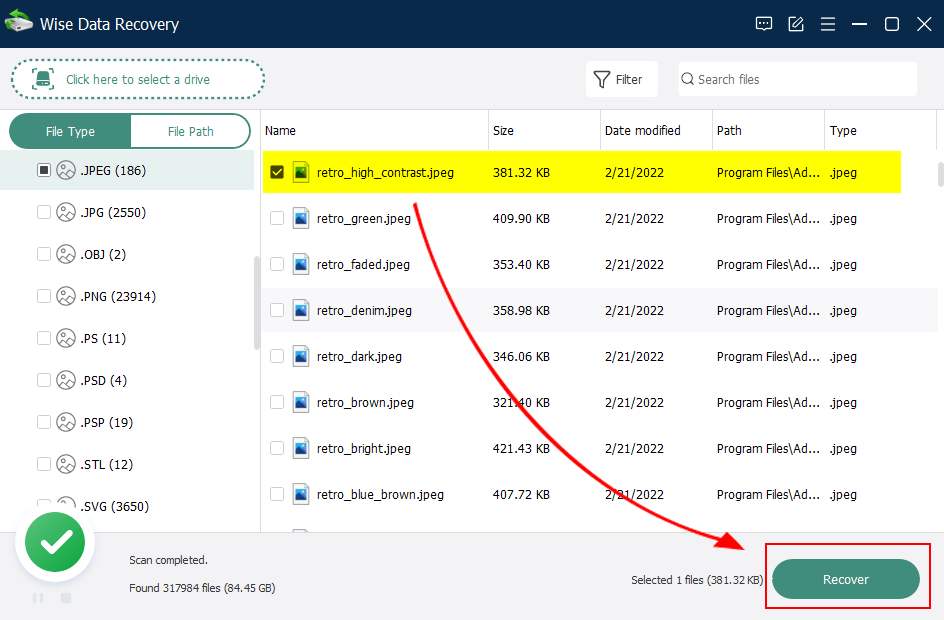
After the scan: one .jpeg ticked in the .JPEG group and the Recover button at the bottom right.
Where it falls short
- Formatted drives are hit and miss. In TechRadar's 2023 test it got back all 25 files after a simple delete and from a drive with a wiped volume header, but only 13 of 25 after a quick format.
- "Recoverable" isn't always recoverable. A G2 reviewer said the list sometimes marks files as recoverable that can't be restored, and Digital Camera World's recovered videos from an overwritten SD card were partly just muffled audio. Use the preview before you rely on a result.
- No separate deep scan. Older versions had Quick and Deep Scan buttons. The current one has a single scan, and TechRadar couldn't find the deep scan the help pages still mention.
- Email-only support. There's no chat or phone. Pro users get faster replies than free users.
What Users Say
Reviews of Wise Data Recovery are split along a clear line: testers like how easy and quick it is for ordinary deletions, and the criticism is about harder cases like formatted or unmountable drives. Independent user reviews are scarce, so the magazine tests carry most of the weight here.
Tech magazines
TechRadar (Michael Graw, with Mike Jennings and Nate Drake, last updated June 6, 2023): "Wise Data Recovery is a good free option for recovering deleted files. But, if you have a damaged hard drive, you may get more bangs for your buck from other data recovery tools." The review lists "Free for recovering recently deleted files" and "Works with most file types and Windows file systems" as reasons to buy, and "Pro subscriptions are somewhat pricey" and "Seemingly no 'Deep Scan' feature" as reasons to avoid it. On the free tier: "During our tests we noticed that the utility played extremely fair with us, measuring this 2GB limit only on files we actually chose to recover."
Digital Camera World (Paul Hatton, March 8, 2024): "Wise Data Recovery delivers great results on almost every front. A modern and intuitive interface helps guide users through every step of the recovery process, with the flexibility to stop or even pause a scan while it's in process." On a formatted SD card: "For photos, there were no problems, with all data restored. Videos, on the other hand, included a mix of results, with some videos losing all video data and leaving just muffled audio." Cons listed: "Slow scanning process" and "Cheaper alternatives available".
The most critical test
TechRadar (Christian Cawley, June 15, 2021, an older version with Quick and Deep Scan): "While WiseCleaner Wise Data Recovery looks like modern, slick, and competent recovery software, it is sadly lacking." Testing an unmountable 16 GB USB stick, he found that "WiseCleaner Wise Data Recovery didn't seem to restore anything in a usable form," and called the deep scan that only asked for a key at the recover step "a nasty bit of bait-and-switch". The current version lets free users recover up to 2 GB instead.
User review sites
G2 (1 review, 4 out of 5; read through SaaSworthy, which reposts it): Lisandro G., June 17, 2019, "Efficient, easy and fast": "The scan is very fast and you can work while the software executes it. Pleasant and useful." And on the downside: "The report after the hard disk scan is sometimes inaccurate and sometimes it shows as recoverable some files that can not be recovered."
Techjockey (1 review, 4.7 out of 5): Asif Shakir, February 12, 2021, "easy to recover data": "good tool for data recovery".
SnapFiles (2 reviews, average 4 out of 5, both for old 3.x versions): millerlucas90986, May 26, 2016: "Thanks for it, I get back the lost photos in my PC, that is so valuable." gimpguy, August 19, 2013, "Don't expect much": "fast yes, thorough, no. As stated no deep scan and even the ones it did find it wouldn't recover most, maybe 25 percent as to where two others recovered near 100 percent".
Trustpilot rates WiseCleaner as a company 4.6 out of 5 from 97 reviews, but none of the English reviews there mention Wise Data Recovery (read through a summarizer).
On WiseCleaner's site
WiseCleaner's product page shows an average of 4.8 out of 5 from 313 ratings, and quotes three users:
- Samuel: "Pretty straightforward to use when I need to get some files I lost."
- Kogaku: "I've used Wise Data Recovery to get back files I accidentally deleted, and it's pretty straightforward to use."
- Guryev: "This tool searches and filters results by file name, type, size, or location for quicker file retrieval."
The recurring themes: almost everyone praises the clean interface, the speed of a simple undelete and the generous free tier. The complaints repeat too: results after a format or on a corrupted device range from patchy to poor, the results list can promise more than it delivers, and there's no deeper scan to fall back on. That fits a tool designed for recent, everyday deletions rather than serious data disasters.
Comparisons
Wise Data Recovery Pro vs. the free edition
Wise Data Recovery Free and Pro are the same download with the same scanner, filters and preview. Free stops after 2 GB of recovered files in total and gets slower support (TechRadar reports up to three days, against 24 hours for Pro). Pro removes the cap and adds automatic updates. Buy Pro only once the free scan has shown you the files you need and they add up to more than 2 GB.
Wise Data Recovery vs. Windows File Recovery
Microsoft's free Windows File Recovery has no size limit but runs from the command line, with no file list to browse and no previews. Wise Data Recovery's point-and-click results and previews make it far easier for most people, which is what you pay for with Pro.
Editions and Pricing
| Edition | Price | License term | PCs | Recovery limit |
|---|
| Wise Data Recovery Free | $0 | Unlimited | Unlimited | 2 GB in total |
| Wise Data Recovery Pro (this listing) | $39.97 on the order page (coupon applied, list $79.95) | 1 year | 1 | Unlimited |
| Wise Data Recovery Pro, 3 PCs | $49.99 on WiseCleaner's site ($99.98 list) | 1 year | 3 | Unlimited |
Prices as seen on October 29, 2026. Coupon B7B52FE0 is applied automatically when you buy through the button on this page, bringing the 1-PC license to $39.97, the same price as on WiseCleaner's own pricing page. WiseCleaner's refund policy doesn't cover price differences between its store and other sellers.
FAQs
Does Wise Data Recovery Pro renew automatically?
Wise Data Recovery Pro is a 1-year license, and WiseCleaner's refund policy mentions auto-renew orders, so check the renewal option at checkout and in WiseCleaner's "Manage My Subscription" page. WiseCleaner will refund a renewal you didn't know about if it didn't send a reminder first.
Can I get a refund if Wise Data Recovery doesn't find my files?
Wise Data Recovery Pro is covered by a 60-day money-back guarantee for technical problems that WiseCleaner's support can't solve, and for duplicate or wrong purchases. Changing your mind, or not reading the product description, isn't covered, which is why running the free scan first matters.
Can Wise Data Recovery recover files from a phone?
Wise Data Recovery lists mobile phones among its supported devices, and it scans what Windows shows as a drive, such as a phone's memory card in a card reader. If your phone doesn't appear as a drive in File Explorer, it won't appear in Wise Data Recovery's list either.
Why won't a recovered file open?
Wise Data Recovery can only copy back what's still on the disk. If part of the file has been overwritten since it was deleted, the copy comes back damaged even though its name was found. Previewing first shows you which files are intact.
Can Wise Data Recovery read Mac or Linux drives on Windows?
Yes, within limits. Wise Data Recovery for Windows reads HFS, HFS+ and HFSX (older Mac formats) and Ext2/Ext3 (Linux) drives. APFS, the format of current Macs, isn't on its list.
Can I move my Pro license to a new PC?
Wise Data Recovery Pro's 1-PC license is for one computer at a time. WiseCleaner has a "Transfer License" page in its support center for moving a key to another PC.
System Requirements
- Windows 11, 10, 8/8.1 or 7, 32-bit or 64-bit (Windows XP with the portable version only)
- 1 GHz Pentium processor or faster
- 4 GB of RAM
- 50 MB of free disk space for the program, plus room on another drive for recovered files
- Available in English and about 40 other languages
Conclusion
Wise Data Recovery is one of the friendliest undelete tools on Windows, and the free edition is genuinely useful. Pro, though, is only worth buying in one situation: the free scan has already shown you the files you need, they preview correctly, and together they're more than 2 GB. The reason to buy is that combination of a no-risk test and an easy, fast workflow for everyday deletions. The main reason not to is that it's weak on formatted, corrupted or failing drives, with no deeper scan to try. If that's your situation, a more powerful recovery tool is a better use of the money.
Download Free TrialBuy Now