Wise Folder Hider Pro: Hide, Lock and Encrypt Private Files on a Shared PC
Wise Folder Hider Pro is a Windows program that hides files, folders and USB drives, locks files against opening or deleting, and keeps sensitive files in encrypted, password-protected lockers. It costs $29.95 a year for 3 PCs at checkout, and there's a free edition with smaller limits.
If you share a family or office PC, you probably have a few folders you'd rather nobody opened: tax papers, scans of your passport, private photos. Wise Folder Hider makes them disappear from File Explorer or puts them behind a password, without you having to learn encryption software.
Quick facts
- Version: 5.1.1, released May 25, 2026
- Developer: WiseCleaner
- Platforms: Windows 11, 10, 8/8.1 and 7, 32-bit and 64-bit. No Mac version.
- Three ways to protect a file: hide it, lock it, or put it in an encrypted locker
- Passwords: a login password for the program, plus an optional second password per item
- Price: $29.95 for 1 year on 3 PCs, renewing yearly
- Free edition: encrypted lockers up to 50 MB, up to 5 locked files, no password recovery
- Guarantee: 60-day money back
What we checked: the installer from WiseCleaner reports version 5.1.1 and is 6.6 MB (downloaded October 17, 2026). The Pro license cost $29.95 for 1 year on 3 PCs on the order page on October 17, 2026. We didn't test how well hidden or locked files resist other tools.
Before you buy
- It's a subscription. Pro is billed every year and you can cancel anytime. There's no one-time license.
- Try the free edition first. It hides files, folders and USB drives with no limit, so if hiding is all you need, you may never need Pro.
- Keep your passwords safe. Pro adds automatic password recovery for the login password. Reviewers of the free edition warn that a lost password can mean lost access.
Download Free TrialBuy Now
Overview
The program opens on three tabs: Hide File, Encrypt File and Lock File. Each one lists what you've protected, with its password status and an operation button to undo it. You add items by dragging them in, with the buttons at the bottom, or by right-clicking them in File Explorer. Before any of that, the program asks for its own login password, so nobody else can open it and unhide your files.
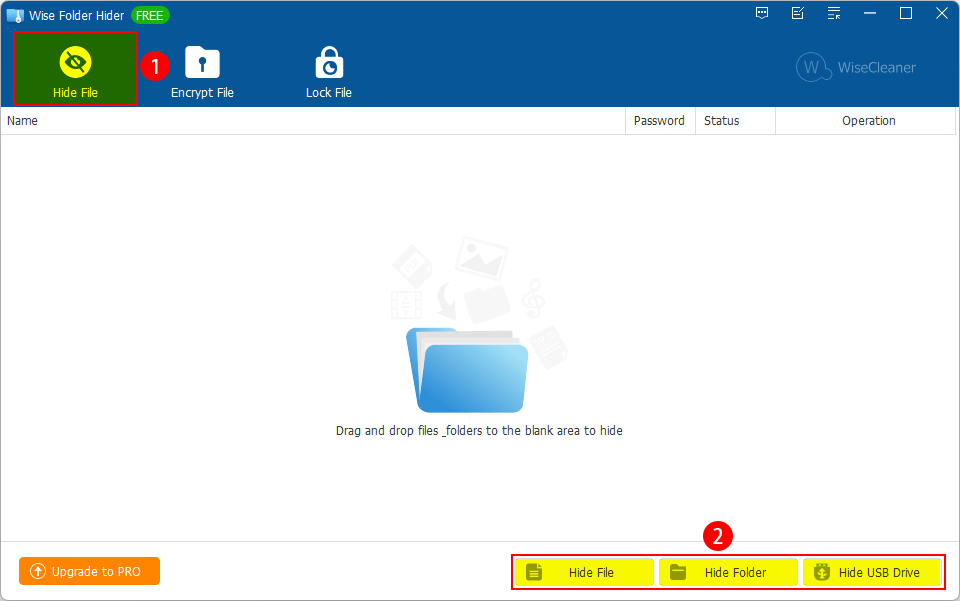
The Hide File tab, with the drop area and the Hide File, Hide Folder and Hide USB Drive buttons. This screenshot from WiseCleaner's guide shows the free edition's title bar.
Features
Hide files, folders and whole USB drives
Wise Folder Hider removes hidden items from File Explorer, so someone browsing your PC simply doesn't see them, and they can't be opened, copied, moved or deleted. You can hide a whole USB drive's private area too, protected by a password even when the stick is plugged into another computer. To get everything back, unhide items one by one or all at once from the right-click menu.
Encrypted lockers that mount as a drive
Wise Folder Hider creates encrypted, password-protected lockers: a file of the size you choose that opens as a drive letter when you mount it. Put files inside, unmount it, and the contents stay encrypted, even if someone boots the PC in Safe Mode or copies the locker file to another computer. Each locker can have its own password, and you can keep lockers on a USB drive to carry them with you. Pro removes the free edition's 50 MB limit on locker size.
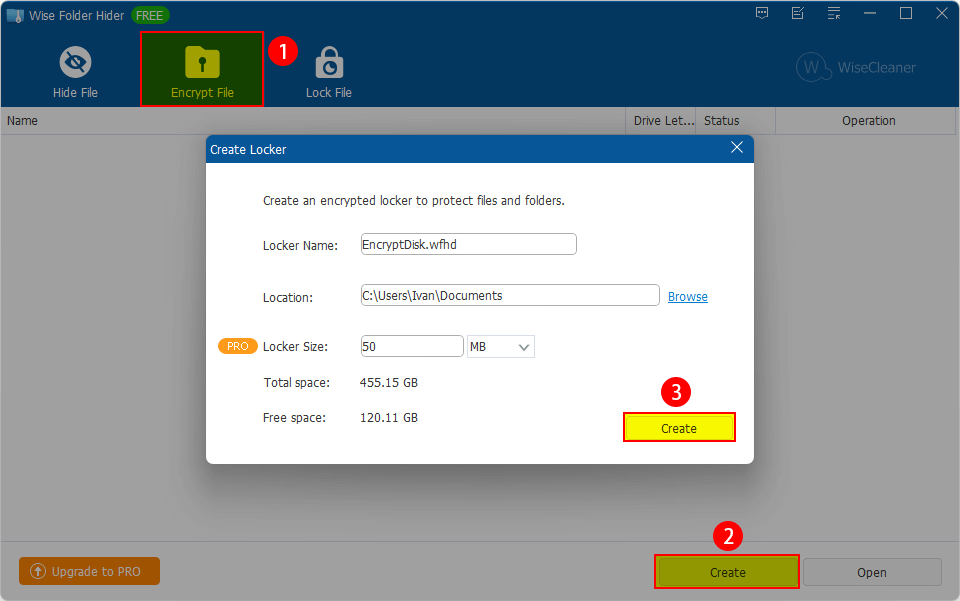
Creating an encrypted locker: name, location and size (50 MB here, marked PRO), with the disk's total and free space shown.
Lock files that stay visible
Wise Folder Hider's Lock File keeps a file in its usual place in File Explorer but blocks what can be done with it: reading, writing, renaming, copying or moving, deleting, and running a program. That's useful for a file other people need to see exists but mustn't change, or for an app you don't want the kids launching. You can add an optional password to it. Pro removes the free edition's limit of 5 locked files.
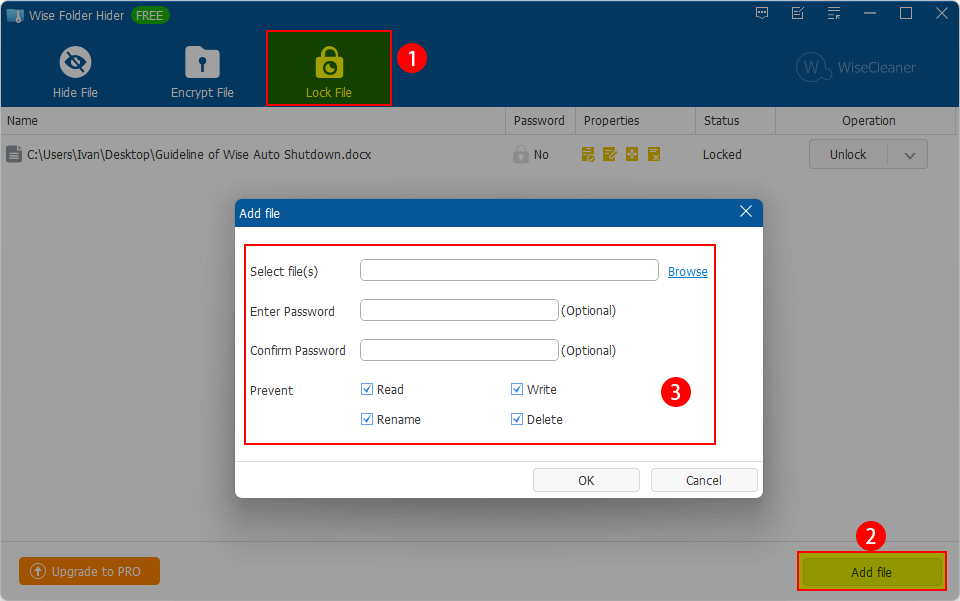
Adding a file to lock, with an optional password and Read, Write, Rename and Delete ticked under Prevent. A Word document above it is already locked.
Two layers of passwords
Wise Folder Hider asks for a login password every time the program opens, and lets you add a second password to individual hidden items, locked files and lockers. Even someone who gets into the program can't open those without the second password. In Pro, a forgotten login password can be reset through a link sent to your registered email address.
Benefits
The appeal is that it's quick. Hiding a folder is a right-click and a password, not a lesson in encryption. For most home users the threat isn't a skilled attacker; it's a family member, a coworker or a repair technician opening the wrong folder, and that's what this handles well.
The three methods also fit different needs. Hide what nobody should know is there, lock what people can see but mustn't touch, and put what really matters inside an encrypted locker.
Real-World Uses
- A family PC: hide your tax returns and ID scans so the kids don't open or delete them.
- A shared office computer: lock a template or spreadsheet so colleagues can see it but can't rename or overwrite it.
- A USB stick you carry: keep an encrypted locker on it, so a lost stick doesn't expose your files.
- Keeping kids out of apps: lock a program's file so it can't be run without your password.
Who It's For, and Who Should Skip It
It suits home users and small offices on Windows who share a PC and want simple, password-based privacy for personal files.
Skip it if:
- You only need to hide things. The free edition does unlimited hiding. Pay only if you need bigger lockers, more locked files or password recovery.
- You need business-grade encryption. FileHorse recommends it for home and personal use rather than confidential business data. Full-disk encryption such as BitLocker, or a dedicated encryption tool, fits that better.
- You use a Mac. It's Windows only.
- You dislike subscriptions. Pro renews every year.
Usage Guide
- Install and set a login password: run the 6.6 MB installer and start Wise Folder Hider. The first time, it asks you to create the login password that opens the program.
- Hide something: on the Hide File tab, drag files or folders into the window, or click Hide File, Hide Folder or Hide USB Drive. You can add a second password to each.
- Create a locker: on the Encrypt File tab, click Create, name the locker, choose where it goes and how big it is, then click Create. Mount it to add files, unmount it to lock them away.
- Lock a file: on the Lock File tab, click Add file, browse to it, tick what to prevent (read, write, rename, delete) and optionally set a password.
- Undo: use each item's Operation button (Unhide, Unmount, Unlock), or right-click to unhide everything at once.
Where it falls short
- Hiding isn't encryption. Hidden and locked files are protected by the program, not encrypted. Only lockers encrypt their contents, so put truly sensitive files in a locker.
- Antivirus conflicts. FileHorse lists possible conflicts with antivirus software among its cons.
- Weak password rules. Windows Report found the program doesn't enforce a strong password policy, so choosing a strong password is up to you.
- Moving hidden USB drives between old Windows versions. A 2013 Snapfiles user couldn't unhide a USB drive hidden on Windows 7 when using Windows XP. WiseCleaner replied that XP was the exception. It doesn't matter on current Windows, but test before relying on a hidden USB drive across PCs.
What Users Say
Trustpilot (all WiseCleaner products)
WiseCleaner has a TrustScore of 4.5 from 96 reviews, across all its products. Several are about Wise Folder Hider:
Ameya Nangle (5 stars, September 19, 2026, "They have excellent folder hiding service(Wise Folder Hider)"): "They have excellent folder hiding service . Once folder is locked Believe me there is no way to open the folder"
Zahra Heidarii (5 stars, July 23, 2026, "useful and reliable software"): "I've been using Wise Folder Hider for a while now, and it works perfectly for keeping my private files hidden."
Harsha Jimmy (5 stars, April 6, 2026, "Very Good Application to hide & encrypt personal files"): "From past few years I've been using wise folder hider, I'm very happy with the software."
thilothmaa (5 stars, June 29, 2026): "Wise Folder Hider is a really great way to hide and lock private folders."
Software sites
FileHorse (Michael Reynolds, version 5.1.1) lists as pros "Effective Folder Encryption", "Easy-to-Use Interface", "Password Protection for Files", "Supports USB File Hiding" and "Lightweight and Fast Performance", and as cons "Limited Free Features", "No Recovery for Lost Passwords", "May Conflict with Antivirus Software", "No MacOS Compatibility" and "Relies on Third-Party Software Trust". It reports a clean scan by more than 70 antivirus engines on VirusTotal.
Snapfiles users rate it 4 out of 5 from 6 reviews. msmeal673 (5 stars, "Finally no longer have to zip and encrypt") had been encrypting OneDrive files with 7-Zip before switching. melen1717 (5 stars): "Installation is fast and no hidden adware." daienle (4 stars): it "does exactly what it says in the description." The one 2-star review was the Windows 7 to XP USB problem above.
Software Informer users give it 4.4 from 53 votes, and Uptodown 4.3 from 7 reviews.
Users on WiseCleaner's site
WiseCleaner's product page shows 331 reviews. Two short ones: Willock: "Easy access management to show or hide protected files whenever needed." Diyue: "The password system and file encryption features give me double protection."
The pattern: people like how simple it is and that hidden folders really can't be opened. The criticism is about the free edition's limits, lost passwords, password strength rules, and that it's a home privacy tool rather than serious encryption.
Comparisons
Wise Folder Hider vs BitLocker
BitLocker, built into Windows Pro editions, encrypts a whole drive and protects you if the PC is stolen. Once you're logged in, everything on the drive is open to anyone using the computer. Wise Folder Hider does the opposite job: it protects particular files from other people using the same logged-in PC. Many people use both.
Wise Folder Hider vs zipping with a password
A password-protected 7-Zip archive works, but you have to extract files to use them and re-zip them afterwards. Wise Folder Hider's lockers mount as a drive you work in directly, and hiding or locking takes a right-click.
Editions and Pricing
| Feature | Free | Pro |
|---|
| Price | $0 | $29.95 a year, 3 PCs |
| Hide files, folders and USB drives | Yes | Yes |
| Encrypted lockers | Up to 50 MB | Unlimited |
| Locked files | Up to 5 | Unlimited |
| Double password protection | Yes | Yes |
| Automatic password recovery, updates, premium support | No | Yes |
WiseCleaner's own store sometimes discounts Pro (it showed $19.95 on October 17, 2026). The checkout price above is what the Buy Now button on this page charges.
FAQs
I forgot my Wise Folder Hider password. What now?
Wise Folder Hider's login screen has a Forgot Password button that sends a reset link to your registered email address. Automatic password recovery is a Pro feature, so free users who lose a password may lose access.
Can I use Wise Folder Hider Pro on more than one PC?
Yes. The Wise Folder Hider Pro license covers 3 PCs for one year.
Can someone see my hidden files from Safe Mode or another computer?
Wise Folder Hider's encrypted lockers stay encrypted in Safe Mode and on other computers. For files that must stay private in those cases, keep them in a locker rather than only hiding them.
Does Wise Folder Hider work with OneDrive or other cloud folders?
A Snapfiles reviewer uses Wise Folder Hider to keep OneDrive files private instead of zipping and encrypting them. For files that sync to the cloud, an encrypted locker keeps the contents unreadable wherever the file goes.
Is there a refund if Wise Folder Hider Pro doesn't suit me?
Yes. WiseCleaner offers a 60-day money-back guarantee on its purchases.
Which languages does Wise Folder Hider support?
Wise Folder Hider is available in more than 40 languages, including English, French, German, Spanish, Japanese, Chinese, Russian and Vietnamese.
System Requirements
- Windows 11, 10, 8/8.1 or 7, 32-bit or 64-bit
- 1 GHz Pentium CPU or faster
- 4 GB RAM
- 30 MB free disk space
Conclusion
Worth it if you share a Windows PC and want encrypted lockers bigger than 50 MB or more than 5 locked files. Wise Folder Hider is one of the simplest ways to keep private files out of other people's reach on a family or office computer, and the Pro edition's unlimited lockers and password recovery are what make it dependable for real use.
The main reason to hold off: the free edition already hides files, folders and USB drives without limit, and Pro is a yearly subscription. Start free, and upgrade when you need the bigger encrypted lockers.
Download Free TrialBuy Now