Wise Duplicate Finder: A Plain Duplicate File Cleaner With a Very Useful Free Version
Wise Duplicate Finder is a small Windows tool that finds identical files by name, size or content so you can delete the spare copies. It's free for manual cleanup, and the Pro plan costs $14.95 for one year on up to three PCs at checkout. It suits anyone whose photo, music or download folders have grown out of control.
Here's the plain truth about the paid version: WiseCleaner says the only difference between Free and Pro is the Keep One function, which ticks all but one copy in every group for you. If you have 50 duplicates, the free version is enough. If you have 5,000, that one button is what you'd be paying for.
Quick facts
- Developer: WiseCleaner
- Version: 2.1.9, November 2025
- Platform: Windows 11, 10, 8.1, 8 and 7
- Download size: 9.95 MB
- Compare modes: file name and size, part of the content, or the entire content
- Price: $14.95 for one year and three PCs at checkout, with the $5 discount code SAVE5D already applied by the Buy Now button (regular price $19.95)
- Renewal: the renewal box is ticked by default, and the order page shows $12.99 for the next year
- Free version: everything except Keep One
- Guarantee: 60 days, with exclusions such as a simple change of mind
- What we checked: the 9.95 MB installer's file version is 2.1.9, and the Pro plan was $14.95 on the order page with code SAVE5D ($19.95 without it), with a $12.99 renewal, on November 6, 2026. We didn't run a scan ourselves, so the workings described here come from WiseCleaner's guide and FAQ.
Before you buy
Start with the free version. The same scan, compare modes and backup are in it, so you lose nothing by trying it on your own folders. Buy Pro only if selecting duplicates by hand becomes the bottleneck.
Untick renewal if you only need one cleanup. The renewal option is on by default on the order page. Since duplicates tend to be a once-a-year chore, you may want to switch it off.
The guarantee isn't a free pass. WiseCleaner's refund policy says it generally won't refund a buyer who "suddenly changes his mind," so use the free version as your trial.
Download Free TrialBuy Now
Overview
Version 2 looks like an Office program, with Home, View, Options and Upgrade tabs on a ribbon. You set a compare mode and any size or file-type filter on the Home tab, pick a location and click Scan. Matches land in a list, grouped by alternating background colors, with a preview pane on the right that shows the file's path, size and dates.
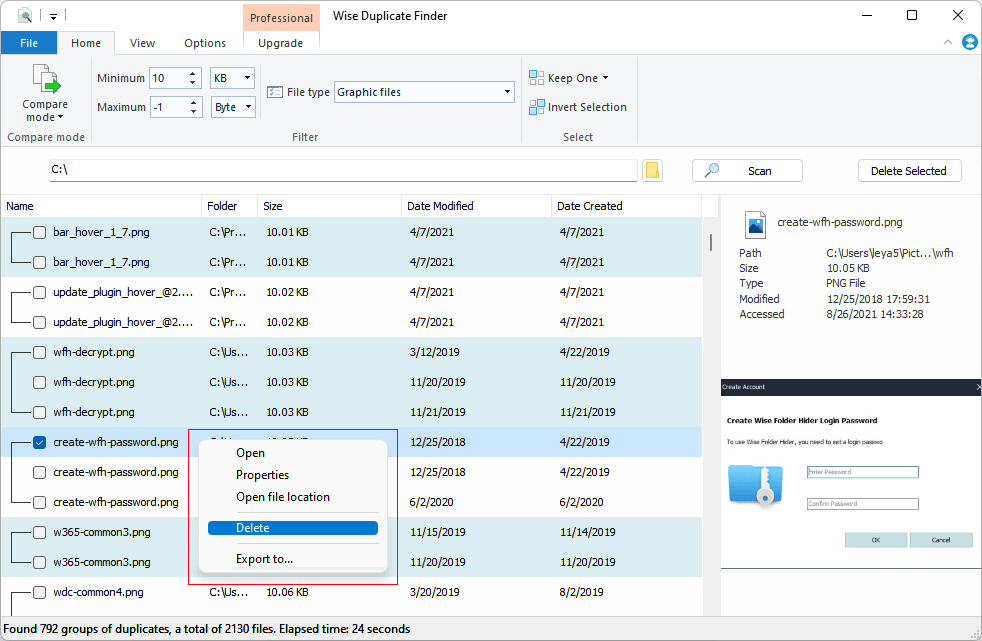
Scan results: 792 groups found in 24 seconds in the vendor's example, with the right-click menu open.
Features
Wise Duplicate Finder compares files three ways
Wise Duplicate Finder gives you a choice between speed and certainty. Match Name and Size is the fastest but can flag false matches. Partial Match compares size and a sample of the content, with almost no false positives, and it's the default. Exact Match reads every byte, so it's the slowest and the safest.
For photos and documents you can't replace, use Exact Match and let it run.
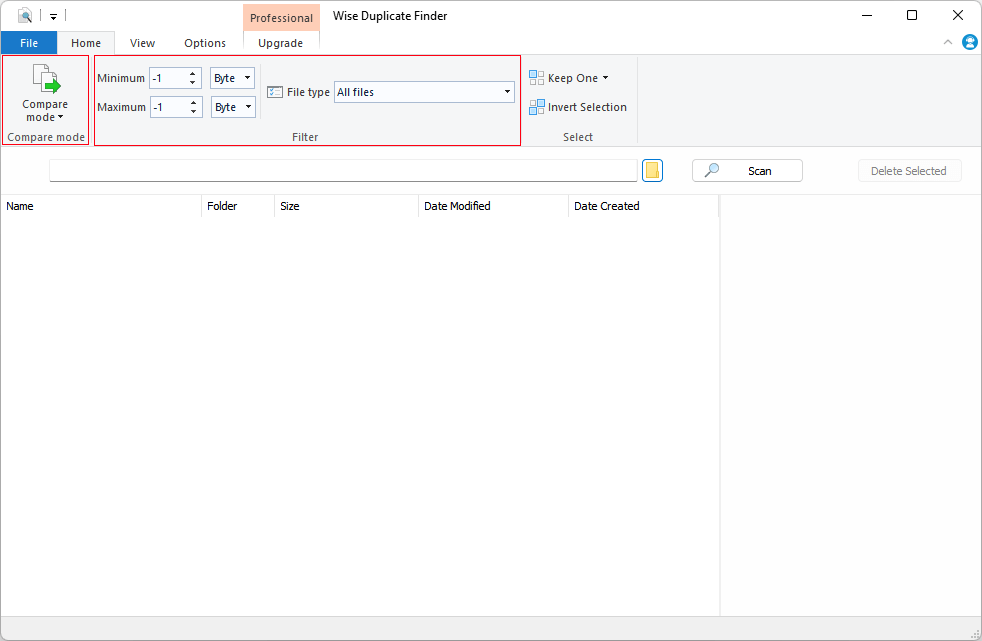
The Home tab, with the compare mode and filters marked.
Wise Duplicate Finder narrows the search with filters
Wise Duplicate Finder can limit a scan by minimum and maximum size, and by file type, so you can look only for graphics, or skip anything under 10 KB. The Locations list covers your drives, My Documents and the Desktop, and you can add any folder, including a mapped network drive that you have access to.
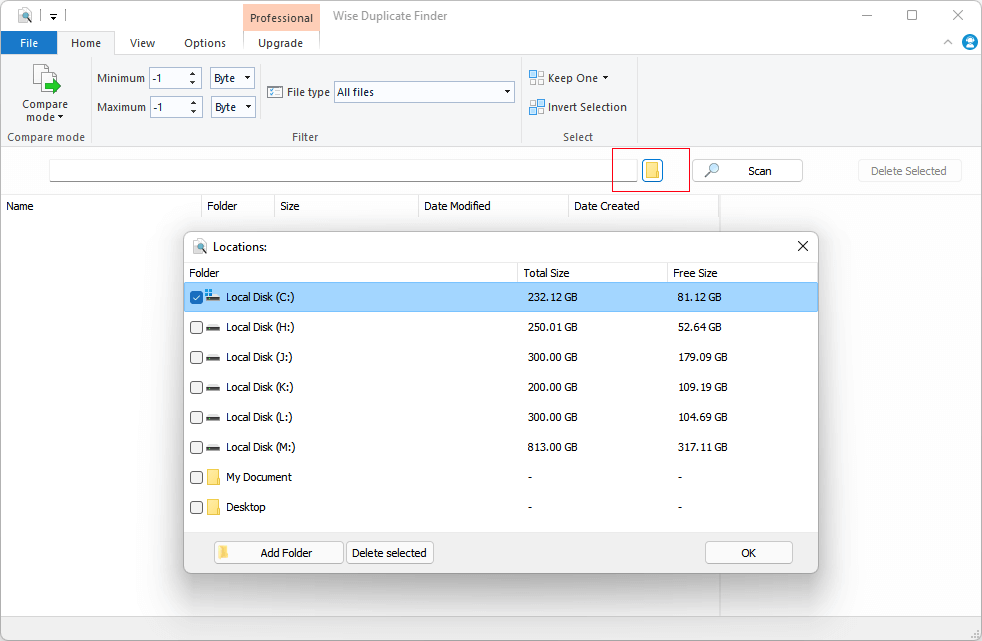
Choosing which drives and folders to scan.
Wise Duplicate Finder clears out empty files
Wise Duplicate Finder also finds empty, zero-byte files, the leftovers that pile up after failed downloads and old cleanups. They take no real space, but they clutter folders and turn up in searches.
Wise Duplicate Finder Pro selects the spare copies for you
Wise Duplicate Finder Pro's Keep One keeps one file in each group and selects the rest for deletion. That's the entire paid feature, and it's worth having only when there are too many groups to tick by hand.
Wise Duplicate Finder gives you a way back
Wise Duplicate Finder sends deleted files to the Recycle Bin by default. You can also have it back files up to a folder before deleting them, then bring them back with the Restore button on the Options tab. The backup only works with the Delete Selected button, so a right-click delete skips it.

The Options tab, with the delete and backup settings marked.
Benefits
- A low-risk cleanup. The Recycle Bin default and optional backup mean a wrong click isn't a disaster.
- Space back on a small SSD. Video and photo copies are usually where the gigabytes are hiding.
- A tidier library. Fewer copies make it easier to find, and back up, the right version of a file.
Real-World Uses
- A photo library imported twice: filter to graphics files, run Exact Match on the Pictures folder, and use Keep One.
- A Downloads folder full of repeat installers: sort by size and clear the big ones by hand.
- Backups copied across drives: scan two external drives together to see what's stored twice.
- Music collected over the years: match by content, because the same track often has a different file name.
- A shared network folder: scan a mapped drive before buying more storage.
Who it's for, and who should skip it
Get it if you want a small, simple Windows cleaner and don't need anything clever. Most people should stay on the free version, and the Pro plan makes sense only for very large cleanups. Skip it if you want to find similar photos, such as burst shots or resized copies, because it only finds exact matches: a visual tool such as VisiPics or Duplicate Cleaner is the right kind for that. Mac users need a different app, and anyone who'd rather not pay a yearly fee can look at the open-source dupeGuru.
Usage Guide
- Install Wise Duplicate Finder and launch it.
- On the Home tab, choose a compare mode. Use The entire content for important files.
- Set a size range or a file type if you want to narrow the scan.
- Click the folder button next to Scan to pick drives or folders, then click Scan.
- Review the groups. The preview pane helps you check that the files really match.
- Tick the copies to remove, or use Keep One on Pro, then click Delete Selected.
- Empty the Recycle Bin once you're sure, or use Restore on the Options tab if you turned on backups.
Where it falls short
- Exact matches only. It won't catch an edited, resized or re-encoded copy of a photo or a song.
- A thin Pro upgrade. MajorGeeks noted in its listing that "we can't find its limitations," and the vendor's FAQ confirms that there's only one Pro feature.
- Keep One needs care. It chooses which copy stays, so check that the survivor is in the folder you want. Don't run it on system or program folders, where apps can rely on their own copies of a file.
- Backups take time. WiseCleaner warns that the backup step can run long with many files, and it needs disk space of its own.
- A plain look. Top10PCSoftware's complaint is about the interface, not the results.
What Users Say
Wise Duplicate Finder is a small free utility, so it has few long reviews. WiseCleaner's page shows 219 reviews on its count, and the text below is what we could read from other sources.
MajorGeeks (download site)
MajorGeeks rated it 4 out of 5 from 23 votes on November 6, 2026, and sums it up: "Wise Duplicate Finder can free up drive space by finding and deleting duplicate files by name, size, or contents." On the paid version it says: "There is a pro version available in the $15.00 range, but we can't find its limitations."
Top10PCSoftware (review)
This undated review calls the interface "very plain and simple," then complains: "What we found odd about Wise Duplicate Finder is that the developers have not worked on making its interface attractive." It still ends on a recommendation: "Otherwise, we would suggest using Wise Duplicate Finder, as it is a comparably good product."
Comments on WiseCleaner's site
These are chosen by the vendor. Savion: "I was surprised how many duplicate files had piled up on my PC, and Wise Duplicate Finder made it much easier to track them down and free up space." Jeyri Ueiueo: "The straightforward design makes it easy to select folders, start a scan, review results, and remove unwanted duplicates." Figueroa: "Smart selection options to automatically keep one copy while selecting the rest for deletion."
Trustpilot (WiseCleaner as a company)
WiseCleaner scored 4.6 out of 5 from 97 reviews on November 6, 2026, with 86% five-star and 9% one-star. None of the reviews we read named this tool. The praise is for easy programs and support. Andrew Freeman, five stars, September 2026: "THE APPLICATION IS SMOOTH, THE UI IS EASY TO FOLLOW." Ameya Nangle, five stars, September 2026: "Absolutely loved the customer support as well replied within minutes." The complaints are about follow-up. Naldo, two stars, May 2026: "the service and follow up is very poor."
The themes: people find it simple and quick, and they use it without much drama. The recurring reservation isn't about accuracy but about value and looks: a plain window and a Pro upgrade that adds one function.
Comparisons
Wise Duplicate Finder Free vs Pro
The scan, compare modes, filters, backup and restore are the same in both. Pro adds Keep One. Treat the $14.95 as paying to skip hours of ticking boxes.
Wise Duplicate Finder vs dupeGuru
dupeGuru is free and open source, and it has modes for music and fuzzy matches of pictures. Wise Duplicate Finder is easier for a beginner, and its backup and restore are more forgiving. If you're comfortable with a plainer tool, dupeGuru covers more ground for nothing.
Editions and Pricing
| Edition | Price | Term | What you get |
|---|
| Free | $0 | No expiry | Everything except Keep One |
| Pro (this listing) | $14.95 at checkout with code SAVE5D | 1 year, up to 3 PCs | Adds Keep One. Next year shows at $12.99 |
| Pro on WiseCleaner's own store | $14.95 with its coupon | 1 year, up to 3 PCs | The same plan, price seen November 6, 2026 |
FAQs
Is Wise Duplicate Finder free?
Yes, Wise Duplicate Finder is free for scanning, comparing and deleting duplicates by hand. Only the automatic Keep One selection needs Pro.
Is Wise Duplicate Finder safe to use?
Wise Duplicate Finder is safe if you check what you delete. Files go to the Recycle Bin by default, and you can turn on a backup too. Stay out of the Windows and Program Files folders.
Does Wise Duplicate Finder work on Windows 11?
Yes, WiseCleaner lists Wise Duplicate Finder as compatible with Windows 11, 10, 8.1, 8 and 7. There's no Mac version.
Can Wise Duplicate Finder scan an external or network drive?
Yes, Wise Duplicate Finder can scan any folder you add, and WiseCleaner says that mapped network drives work if you have access to them.
Can Wise Duplicate Finder find similar photos?
No, Wise Duplicate Finder compares names, sizes and content, so it finds only true copies. Resized or edited pictures count as different files.
What happens when the Wise Duplicate Finder Pro year ends?
WiseCleaner sells Wise Duplicate Finder Pro as a yearly subscription, so Keep One is what you'd lose if you don't renew. The free features are there either way, on the version you have.
Why didn't Wise Duplicate Finder back up a file?
Wise Duplicate Finder only backs up files removed with the Delete Selected button, with the backup option on and enough disk space in the backup folder. A right-click delete isn't backed up.
System Requirements
- Windows 11, 10, 8.1, 8 or 7
- 10 MB download, plus free disk space for any backups
- Access to the drives and folders you scan
Conclusion
The free version is an easy recommendation, and Pro is worth $14.95 only for big cleanups. Wise Duplicate Finder is a simple way to get rid of true duplicates, with the Recycle Bin and backups as a safety net. The one reason to pay is Keep One, which saves a lot of clicking when a scan turns up thousands of groups. The main reason not to is that it's the only thing you'd be paying for. Try the free version first.
Download Free TrialBuy Now