Movavi Video Suite: Video Editor, Converter and Screen Recorder in One Windows Package
Movavi Video Suite is a Windows bundle of three Movavi programs, Video Editor, Video Converter and Screen Recorder, plus a webcam and VHS capture tool, a disc burner and a media player, all opened from one launcher. The yearly plan, Video Suite Plus, costs $99.95. It's for families, YouTubers and teachers who record, edit and convert video and would rather learn one simple set of tools than three unrelated ones.
If you only ever edit, Movavi Video Editor on its own is cheaper. The suite earns its price when you also record your screen and convert files, which is exactly what a tutorial or a channel needs every week.
Quick facts
- Current version: Movavi Video Suite 27.0.0, updated September 29, 2026
- Developer: Movavi
- Includes: Video Editor, Video Converter, Screen Recorder, capture from cameras, VHS and TV, a CD/DVD/Blu-ray burner, a media player and stock content
- Runs on: Windows 10 and 11, 64-bit (a Mac version is sold separately)
- Price: $99.95 a year for Video Suite Plus, $29.95 for one month of Video Suite, $104.95 a year with Movavi Photo Editor added
- Free trial: 7 days, with a "Trial" watermark on output videos
- Refunds: a 14-day money-back guarantee for technical problems that can't be solved
What we checked: Movavi's Video Suite page (version 27.0.0, update dated September 29, 2026), the Video Suite order page (Video Suite $29.95 for one month, Video Suite Plus $99.95 a year, Video Suite + Photo Editor $104.95 a year), Movavi's trial limitations page, the installer link (MovaviVideoSuiteSetup.exe, 3,038,528 bytes, an online installer) and the Video Suite 27 user guide, all on October 31, 2026. We didn't record, edit or convert a project with it ourselves.
Before you buy
- Prices change often. TechRadar called Movavi's suite prices "wildly fluctuating", with a limited-time discount most of the time. Check the order page on the day you buy.
- Subscriptions renew automatically. Cancel before the renewal date if you only need the suite for one project.
- Effects packs and templates cost extra. The suite includes hundreds of effects and a starter set of templates. The full Movavi Effects and Movavi Templates libraries are separate subscriptions.
- The trial is short. Seven days with a watermark, and the converter only converts half of each audio file. Plan a real project for that week.
Download Free TrialBuy Now
Overview
Video Suite opens to a launcher. Its Video tab shows a tile for each program, Video Editor, Video Converter, Screen Recorder, capture from cameras, VHS and TV, and Watch video, each with a Launch button. Audio, Photo and Data tabs hold the other tools, and a Recent projects and files strip gets you back to your last work. Each program opens in its own window, so the editor stays as uncluttered as the standalone Movavi Video Editor.

The Video tab of the Movavi Video Suite launcher, with tiles for Video Editor, Video Converter, Screen Recorder, capture from cameras, VHS and TV, and Watch video.
Features
The full Movavi Video Editor
Movavi Video Suite includes the same Video Editor Movavi sells on its own: a timeline for cutting, trimming and joining clips, titles, transitions, filters and overlays, chroma key, picture-in-picture, stabilization and motion tracking. The one-click AI tools are the highlights: automatic subtitles, silence removal that cuts pauses out of speech, noise removal, background removal and an auto crop that keeps the speaker centered when you turn a horizontal clip into a vertical one. Version 27 added templates built from Blocks, pre-edited segments you can rearrange and fill with your own clips.
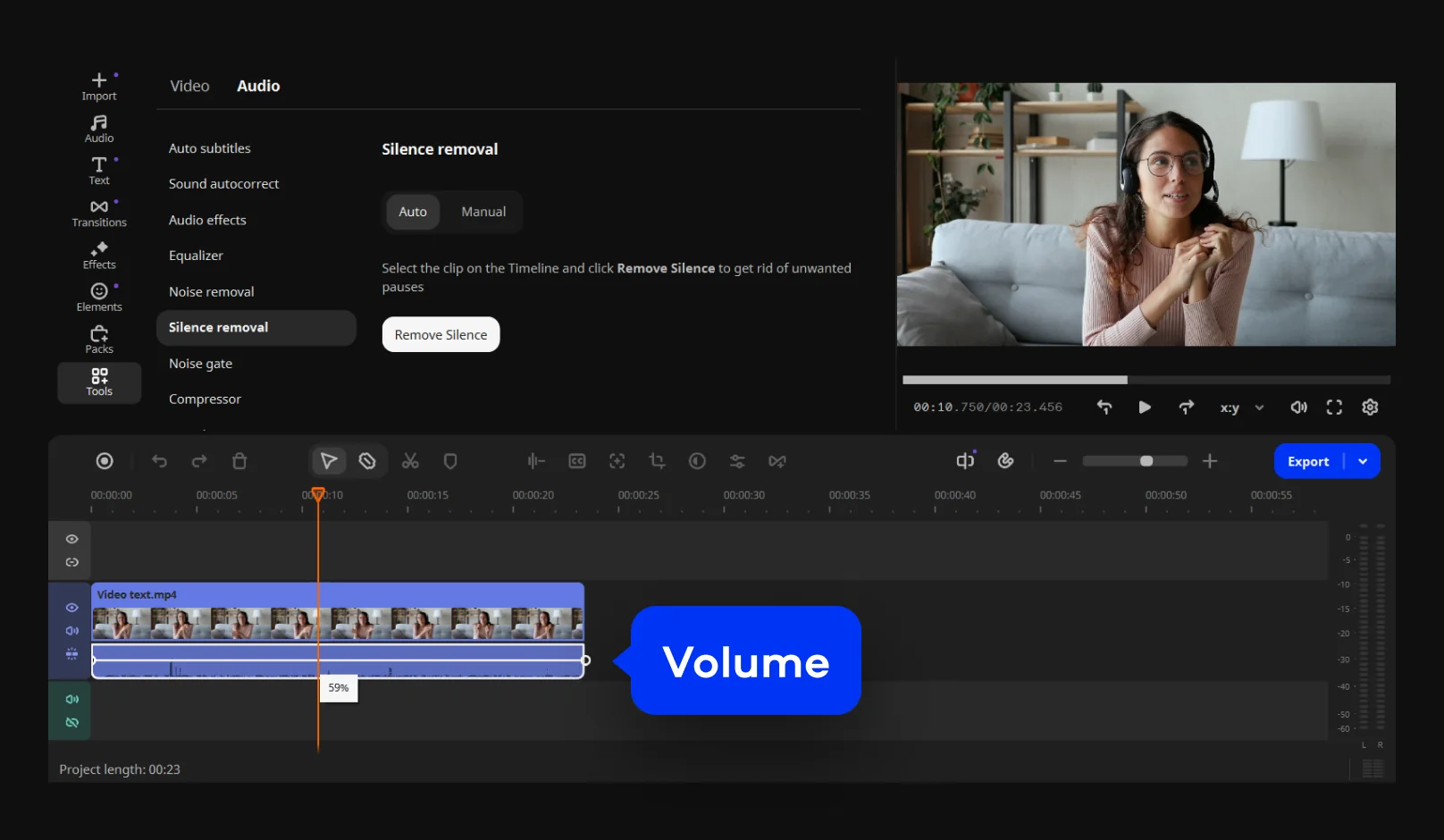
Movavi Video Editor, the editor included in Video Suite, with the Silence removal tool open above the timeline.
Video Converter for any format or device
Movavi Video Converter, also included, converts video, audio and images between formats and device presets (MP4, AVI, MOV, WMV, HEVC, 4K, DVD-compatible video and more). SuperSpeed mode converts without re-encoding when the codec allows it, which is much faster. TechRadar found it "unexpectedly full featured": you can also adjust audio, correct color, add subtitles or a watermark, and crop and trim before converting.

Movavi Video Converter with three clips queued, the format tabs (Video, Devices, Audio, Images) and presets such as MP4, AVI, MOV, HEVC and 4K, labeled in Movavi's guide.
Screen Recorder for lessons, demos and webinars
Movavi Screen Recorder captures the full screen, a window or an area you draw, along with system audio, your microphone and your webcam. You can highlight mouse clicks and keystrokes and draw on the screen while recording, and take screenshots. TechRadar noted that the webcam is "burned" into the recording, so you can't move or remove it afterward.
Capture from webcams, VHS and TV, then burn to disc
Movavi Video Suite's capture tool records from a webcam, a camcorder, or a VHS player or TV tuner connected to your PC, with settings for the device, resolution, frame rate and audio source. That makes the suite a practical way to digitize old family tapes. The suite also includes a CD/DVD/Blu-ray burner and a simple media player.

The capture window in Movavi Video Suite 27: a Logitech webcam selected as the video capture device, resolution and frame rate settings, and the Start Capture button.
Benefits
- One purchase covers the whole video workflow. Record, capture, edit, convert and burn without hunting for separate tools from different companies.
- The tools look and work alike. Once you've learned the editor, the converter and recorder feel familiar.
- The AI tools save real time. Auto subtitles, silence removal and noise removal turn an hour of cleanup into a few clicks.
Real-World Uses
- A weekly tutorial: record the screen with your webcam and mic, remove the pauses and add subtitles in the editor, and export for YouTube.
- Digitizing family tapes: capture a VHS tape through a USB capture device, trim the blank parts, then burn a DVD for the grandparents.
- A phone that won't play a file: drop the clip into Video Converter and pick the device preset.
- A school project: start from a Block-based template, swap in your own clips and add captions.
Who It's For, and Who Should Skip It
Good fit: beginners and home users who record, edit and convert video, YouTubers and teachers making screen-based lessons, and anyone with old tapes to digitize.
Skip it if:
- You only edit. Movavi Video Editor on its own costs $69.95 a year, $30 less than Video Suite Plus.
- You already have a screen recorder and converter you like. TechRadar's advice exactly: don't buy it if you "already have similar products or don't need them".
- You edit professionally. Premiere Pro or DaVinci Resolve go much deeper.
- You use a Mac. This listing is the Windows version; Movavi sells a separate Mac suite.
Usage Guide
- Install: run MovaviVideoSuiteSetup.exe. It's a 3 MB online installer that downloads the suite, so stay online and allow about 600 MB of disk space.
- Open the launcher: start Movavi Video Suite and pick the Video tab.
- Pick a tool: click Launch on Video Editor, Video Converter, Screen Recorder or the capture tile.
- Activate: enter your activation key after you buy to remove the trial limits.
Where it falls short
- The wrong language on first launch. TechRadar's copy opened entirely in Japanese and listed "Default language may not be English" among its reasons to avoid.
- It wants a reasonably powerful PC. TechRadar also listed "Need a decently powerful machine" as a con.
- Pricing complaints. Most negative Trustpilot reviews of Movavi are about subscriptions, the free version's limits found too late, and refunds, not about the software itself.
- Webcam overlays are fixed. Screen Recorder burns the webcam into the video, so plan its position before you record.
What Users Say
TechRadar: 4.5 out of 5 (August 2025)
Steve Paris reviewed Movavi Video Suite 2025 and scored it 4.5 out of 5: "Movavi Video Suite 2025 offers a good range of tools to edit your project, and also comes with dedicated apps to convert video and photos, as well as one for screen capture. Everything works well, with elegant interfaces that are designed for ease of use - including powerful AI tools that simplify complex tasks."
On the editor: "It's unlikely to trouble the likes of Premiere Pro and Resolve any time soon, but it's superior to the likes of Apple iMovie or ClipChamp." On the converter: "It's unexpectedly full featured."
Reasons to buy: "Good interface", "Easy to use", "Well designed", "Multi-platform". Reasons to avoid: "Default language may not be English" and "Need a decently powerful machine". The getting-started section scored only 2.5 out of 5 because of the language problem.
Digital Camera World on the editor inside the suite
George Cairns tested Movavi Video Editor (July 2026, 4.25 out of 5). On noise removal: "One click on this tool's icon, and the background noise disappeared from Maryna's audio track, and her voice sounded much clearer too!" On subtitles: "It only took a few seconds for Movavi's AI-powered Auto subtitles tool to generate accurate subtitles from Maryna's interview and place them above the appropriate footage in the timeline." His criticism was pricing: "you do have to pay extra to access additional effects."
Trustpilot: 3.5 out of 5 from 22,156 reviews
Movavi's Trustpilot page (all products) showed a TrustScore of 3.5 from 22,156 reviews on October 31, 2026. The praise:
- Wayne K (5 stars, October 2026), "First I use Movavi Screen Recorder": "First I use Movavi Screen Recorder, and I find it is excellent for what I wanted to do with audio files."
- Graham Voss (5 stars, September 2026): "So easy to use, especially for a pensioner like me. You can do so much like, brightening, cropping, adding titles, etc."
- Mark Anderson (5 stars, September 2026): "I particularly like the effects and how easy it is to use."
The complaints, mostly about paying:
- Alexis Gagnon (1 star, October 2026), "paywall bs": "had i known before working 8h+ on my video that i had to pay 60$ SIXTY DOLLARS to download it"
- Valentin Mladinescu (3 stars, October 2026): "Dissapointed on the subscription model for payment."
- Felipe Borges (1 star, October 2026): "I wanted to get a refund that same day and at that very hour, but according to their Terms of Service, that's not possible."
The pattern: reviewers who test the tools praise how easy and well designed they are, and rank the suite above iMovie and Clipchamp but well below Premiere Pro and Resolve. Complaints focus on the business side (watermarks discovered late, subscriptions, refunds, paid add-ons) and on a first launch in the wrong language.
Comparisons
Movavi Video Suite vs Movavi Video Editor
Movavi Video Editor alone costs $69.95 a year and does all the editing. Video Suite Plus costs $99.95 a year and adds Video Converter, Screen Recorder, capture from cameras, VHS and TV, the disc burner and the media player. Bought separately, Movavi's converter is $54.95 a year and its screen recorder $44.95 a year, so the suite is the better deal as soon as you need either one.
Movavi Video Suite vs free tools
Clipchamp, OBS Studio and HandBrake together cover editing, recording and converting for free, but they're three unrelated programs with three learning curves. Video Suite trades money for one consistent set of tools and the AI subtitles, silence removal and noise removal the free ones lack.
Editions and Pricing
Movavi's Windows order page showed these options on October 31, 2026:
| Plan | Price | Term | What you get |
|---|
| Video Suite | $29.95 | 1 month | The whole suite for one month |
| Video Suite Plus | $99.95 | 1 year | The whole suite for a year |
| Video Suite + Photo Editor | $104.95 | 1 year | Adds Movavi Photo Editor |
| Video Suite + Photo Editor | $199.95 | Lifetime | One payment, minor updates within the version |
Movavi's store explains that a lifetime license lets you use the version you bought forever with free minor updates, while a newer version is a paid upgrade. Subscriptions include updates for as long as you pay. Movavi also sells a business license for commercial use.
FAQs
Is Movavi Video Suite a one-time purchase or a subscription?
Both. Movavi Video Suite is sold as a monthly or yearly subscription, and Movavi also offers lifetime licenses, such as the $199.95 lifetime Video Suite + Photo Editor bundle. A lifetime license doesn't include the next major version.
Can Movavi Video Suite convert VHS tapes to digital?
Yes, with a capture device. Movavi Video Suite's capture tool records from cameras, VHS players and TV tuners connected to your PC, and the editor and burner then let you trim the footage and put it on DVD.
Does Movavi Video Suite work on Windows 7 or 8?
No. Movavi Video Suite 27 needs 64-bit Windows 10 or 11, a dual-core 1.5 GHz processor, 4 GB of RAM and Intel HD Graphics 2000 or better.
Is Gecata included in Movavi Video Suite?
No. Movavi's Gecata game recorder appears in the Video Suite launcher with Buy and Try Out buttons, which means it's sold separately.
What if Movavi Video Suite opens in the wrong language?
It can happen: TechRadar's copy of Movavi Video Suite opened entirely in Japanese and didn't follow the computer's language. Check the interface language as soon as you install the trial, and contact Movavi support through its Help Center if you can't switch it.
Can I get a refund on Movavi Video Suite?
Only in limited cases. Movavi offers a 14-day money-back guarantee for technical problems its support can't solve. Use the 7-day trial to check the suite works for you before you pay.
System Requirements
- Windows: 10 or 11, 64-bit, with current updates
- Processor: Intel, AMD or compatible dual-core, 1.5 GHz
- Graphics: Intel HD Graphics 2000, NVIDIA GeForce 8 series, AMD Radeon R600 or better, with current drivers
- RAM: 4 GB
- Display: 1280 × 768, 32-bit color
- Disk: 600 MB to install, 1,350 MB for ongoing work
Conclusion
Movavi Video Suite is worth $99.95 a year if you record, edit and convert video, not just edit it. You get Movavi's easy editor with its excellent AI subtitles, silence removal and noise removal, plus a capable converter, a screen recorder and a tape-capture tool that all work the same way. TechRadar's 4.5 out of 5 reflects that.
The main reason to pass is if editing is all you do: Movavi Video Editor alone is $30 a year cheaper. Watch the renewal date, and use the 7-day trial on a real project before you buy.
Download Free TrialBuy Now