HitPaw VoicePea: A Real-Time Voice Changer and Soundboard for Discord, Streams and Calls
HitPaw VoicePea (formerly HitPaw Voice Changer) is a Windows real-time voice changer that turns your microphone into a robot, a cartoon character, a deeper or higher voice or one of its AI voices, live in Discord, Twitch, Zoom, Teams and games, with a hotkey soundboard on top. The Standard plan costs $29.95 a year ($9.95 a month or $49.95 once), and Pro, which removes the limits on AI voices, covers and music, is $39.95 a year.
It's built for gamers, streamers and people who want to prank friends or keep their real voice private in a call. It's not a studio voice tool, and its AI features run in HitPaw's cloud, which means a queue and an internet connection.
Quick facts
- Developer: HitPaw (installer signed by HITPAW CO., LIMITED, Hong Kong)
- Version: 2.4.0
- Platform: Windows. The Mac version is sold separately, and licenses don't cross platforms
- Price: Standard $9.95/month, $29.95/year or $49.95 perpetual; Pro $15.95/month, $39.95/year or $65.95 perpetual (1 PC each)
- Free version: real-time voice changing with one free voice effect, plus limited AI voices, sounds and downloads
- Works with: Discord, Twitch, YouTube, Kick, Zoom, Microsoft Teams, Google Meet, Skype and games, through a virtual microphone
- Refunds: 30-day guarantee for technical problems HitPaw can't solve; no refund for a change of mind or an uncancelled renewal
- What we checked: the 2.4 MB Windows download is a downloader signed by HITPAW CO., LIMITED; the six plan prices on HitPaw's order page, unchanged from a copy of that page dated October 22, 2026; checked on November 23, 2026. We didn't test the voices in a live call.
Before you buy
- Black Friday: until November 30, 2026, code HP-BFS-30 takes 30% off the yearly and perpetual plans. Monthly plans aren't included.
- Standard or Pro? Standard includes every voice and sound effect. Pro adds unlimited AI voice, AI cover and AI music use, a longer audio enhancer and more text to speech. If you only want live voice effects for games and Discord, Standard is enough.
- Yearly and monthly plans renew automatically. The perpetual license, $49.95, costs less than two years of Standard.
- Trustpilot has suspended HitPaw's rating for breaching its guidelines; see What Users Say.
Download Free VersionBuy Now
Overview
VoicePea installs a virtual microphone called HitPaw Virtual Audio. You pick your real microphone and headset in VoicePea's settings, then select the virtual microphone as the input in Discord, Zoom or your game. Whatever voice is active in VoicePea is what the other side hears. A switch at the bottom turns the effect on and off, and "Hear myself" lets you monitor the result.
The window has a column of tools on the left: Real-time Voice, Soundboard, AI Voice (for files), AI Music and AI Cover. Voices are grouped by Female, Male, Horror, Anime and other tags, and each can get its own keybind so you switch mid-game without alt-tabbing.
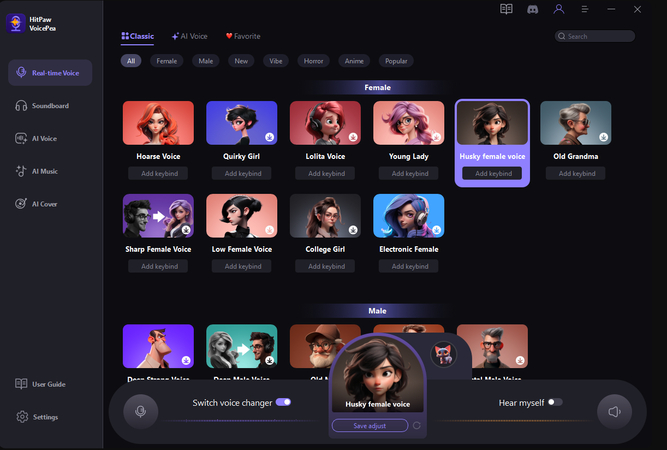
The Real-time Voice screen: voice effects grouped under Female and Male with an Add keybind button under each, the Classic, AI Voice and Favorite tabs, and the voice changer switch and Hear myself toggle at the bottom.
Features
Live voice effects with keybinds
HitPaw VoicePea changes your voice while you talk, with classic effects (female, male, old, robot, monster, cartoon) and AI voices that sound more like a real person or a known character. Each voice has volume, pitch and timbre sliders, and you can save your adjusted version. Keybinds switch voices instantly, and built-in noise reduction cuts background hum before the effect is applied.
A meme soundboard on hotkeys
HitPaw VoicePea's soundboard plays sound effects into the same virtual microphone: animal noises, applause, drums, game sounds and memes, sorted by category, each with up to two hotkeys and its own volume. You can add your own sound files too.

The Soundboard: Animals category with Capybara, Angry Cat, Wolf, Tiger and other effects; the selected sound shows two Add keybind slots and a volume slider.
Change the voice in recorded audio and video
HitPaw VoicePea's AI Voice tool takes an audio or video file, from MP3, WAV and FLAC to MP4, MOV and MKV, and re-voices it with a chosen AI voice, with pitch and voice-similarity controls. Free users can upload 30 seconds; members get up to 10 minutes per file. Processing runs in HitPaw's cloud, so at busy times you wait in a queue.

AI Voice for files: the upload area with the 30-second limit for free users and 10 minutes for members, free and character voices, pitch and voice similarity sliders, and the save format and Download button (marked Pro).
AI covers, AI music, audio enhancer and text to speech
HitPaw VoicePea also makes AI song covers from a file or a pasted YouTube link using singer-style models, generates royalty-free background music from a prompt or genre, cleans up recordings with an AI audio enhancer (noise, echo and volume), and reads text aloud. These extras are where Standard and Pro differ: Standard gets the AI enhancer for up to 10 minutes and text to speech up to 1,500 characters without downloads, Pro gets 20 minutes, 3,000 characters and downloads.
Benefits
- Works everywhere a microphone works, because it's a virtual audio device rather than a plugin for one app.
- Privacy in calls: a neutral changed voice keeps your real voice out of random game lobbies and online meetings.
- Cheap for what it does: a perpetual Standard license is under $50.
- Quick to set up: choose input and output once, then switch voices with hotkeys.
Real-World Uses
- Gaming: roleplay a character in Fortnite, GTA or Minecraft lobbies, with soundboard reactions on a hotkey.
- Streaming: switch voices for bits on Twitch, YouTube or TikTok live without stopping the stream.
- Discord nights: prank friends with a cartoon or monster voice and meme sounds.
- Video voiceovers: re-voice a narration file or generate a text-to-speech voiceover for a short video.
Who It's For, and Who Should Skip It
It's for gamers, streamers and Discord users who want a fun, easy voice changer with a soundboard, and for anyone who wants to mask their voice in calls.
Skip it if you need broadcast-quality vocal processing (a DAW with proper vocal plugins does that), if you want a free tool for occasional use (the free version gives you just one voice effect), or if you're on Mac and expect your Windows license to carry over.
Usage Guide
- Download the installer from HitPaw, run it, choose the folder and language, and let it download the program.
- Sign in with your HitPaw account (the avatar icon at the top right) to activate a purchased plan.
- Open Settings and select your real microphone as input and your headset as output. Use the detect button to check both.
- In Discord, Zoom or your game, set the microphone to HitPaw Virtual Audio.
- Pick a voice, adjust volume, pitch and timbre, and turn on Switch voice changer. Turn on Hear myself to monitor it.
- Add keybinds to your favorite voices and sounds.
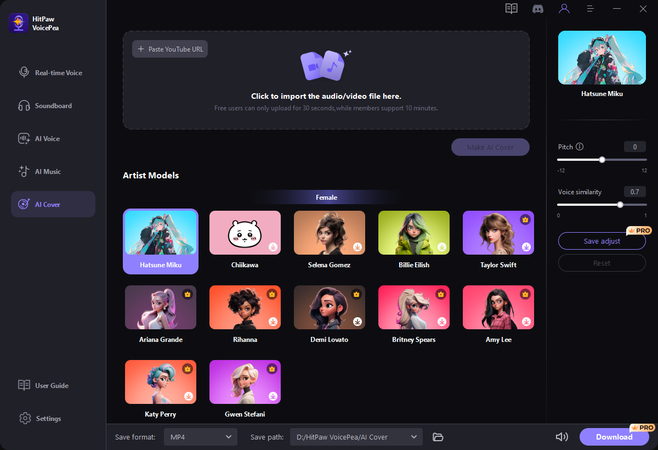
AI Cover: paste a YouTube URL or import a file, choose an artist model, and set pitch and voice similarity before downloading the cover.
Tips
- If people can't hear you, the usual cause is that the app is still using your real microphone. Select HitPaw Virtual Audio as the input, and check Windows microphone permissions.
- Use headphones. Speakers feed the changed voice back into the microphone.
- Keep voice clones to friends who know. Celebrity-style voices and covers are for fun; posting them as real is a quick way to get a channel or account in trouble.
Where it falls short
- Cloud queue for AI features. AI Voice processing runs one job at a time on HitPaw's servers, so files can wait in line.
- Not every voice works for every speaker. One Trustpilot reviewer found the old man and old woman voices didn't work for them.
- Strict refunds. HitPaw refuses refunds for a change of mind or a renewal you didn't cancel.
What Users Say
Trustpilot reviews of the voice changer
Trustpilot shows no TrustScore for hitpaw.com: the rating is unavailable because of a breach of its guidelines, and Trustpilot says it removed a number of fake reviews. Of 2,762 remaining reviews across all HitPaw products, 80% are 5-star and 17% are 1-star. The ones about the voice changer:
- DB Cooper (5 stars, October 2023), "It's a cool voice changer": "It's a cool app, which works awesome at changing the sound of your voice but I just don't use it enough."
- black joe (5 stars, July 2025): "Hitpaw voice changer is simply the best out there."
- A reviewer posting as "do not use hitpaw" (1 star, May 2025), "dishonest company": "the voice changer doesn't work for old men/old women. young ones maybe."
- Sandro Kuparashvili (1 star, April 2026): "I used VOICE CHANGER software for 30 minutes which CRASHED my high end 870, AMD 9 PC"
Billing complaints across HitPaw
The most common 1-star theme on Trustpilot isn't any one product but billing. Stephen Carey (November 2026): "This company took automatic payment which did not know was turned on". William Yong (November 2026): "I bought the software but everytime I want to use a feature it tells me I have to buy credits." On the other side, Louis Loong (October 2026): "The tech support was fantastic. They usually replied to my email within 24 hours."
Tutorial sites
EDUCBA's walkthrough (updated October 2025) sums up the core feature plainly: "VoicePea changes your voice instantly while you speak." It also notes that the voice "Options depend on your plan, free or paid."
The pattern: people who use VoicePea for fun in games and Discord like it and find it easy. The negatives are a mix of voices that don't suit every speaker, occasional stability problems, and HitPaw's billing and refund practices, so turn off auto-renewal or buy the perpetual license.
Comparisons
HitPaw VoicePea vs Voicemod
Voicemod is the best-known voice changer for Windows gamers, with a free tier that rotates voices and a large community. VoicePea is similar in purpose and adds file voice changing, AI covers, AI music and text to speech in the same app, and it sells a perpetual license, which suits people who dislike subscriptions.
HitPaw VoicePea vs MorphVOX Pro
MorphVOX Pro is an older one-time-purchase voice changer focused on classic voice effects and backgrounds. VoicePea's AI voices sound more realistic and it has the soundboard and AI extras, but more of its work depends on HitPaw's online services.
Editions and Pricing
| Edition | Monthly | Yearly | Perpetual | What you get |
|---|
| Free | $0 | $0 | $0 | 1 voice effect, free sound effects, limited AI use, no TTS downloads |
| Standard | $9.95 | $29.95 | $49.95 | All voice and sound effects, limited AI voice/cover/music, audio enhancer up to 10 min |
| Pro | $15.95 | $39.95 | $65.95 | Unlimited AI voice, cover and music, enhancer up to 20 min, TTS downloads |
| Team | - | $109.95 (5 PCs), $229.95 (10), $559.95 (100) | - | Company use, multi-user control |
Prices are per PC and exclude tax. Yearly plans can also be paid monthly over a 12-month commitment ($19.92 a year for Standard, $25.92 for Pro). The Buy Now button opens HitPaw's order page, where you pick Standard or Pro and the term.
FAQs
Is HitPaw VoicePea free?
HitPaw VoicePea has a free version that changes your voice in real time with one free voice effect and limited access to the AI voices and sounds. All other voices and unlimited use need a Standard or Pro plan.
Does HitPaw VoicePea work with Discord?
Yes. HitPaw VoicePea works with Discord by selecting HitPaw Virtual Audio as the input device in Discord's voice settings; the same method works for Zoom, Teams, Google Meet and games.
Why can't others hear my changed voice in HitPaw VoicePea?
HitPaw VoicePea's own FAQ lists the usual causes: the wrong virtual microphone selected in the chat app, Windows microphone access disabled, muted system volume or an audio driver problem. Selecting HitPaw Virtual Audio and restarting the app fixes most cases.
Can I use my HitPaw VoicePea license on a Mac?
No. HitPaw VoicePea's Windows and Mac versions are sold as separate licenses, and HitPaw licenses can't be moved between platforms.
Can I upgrade HitPaw VoicePea from Standard to Pro later?
Yes. HitPaw VoicePea lets you upgrade from Standard to Pro by paying the difference, from a Pro feature or the personal center inside the app.
What file formats does HitPaw VoicePea accept for voice changing?
HitPaw VoicePea's file tools accept common audio formats such as MP3, WAV, FLAC, M4A, AAC and OGG and video formats such as MP4, MOV, MKV, AVI and WMV.
Can I get a refund on HitPaw VoicePea?
HitPaw VoicePea is covered by HitPaw's 30-day guarantee only for cases like a technical problem support can't fix or a duplicate purchase. Changing your mind or forgetting to cancel a renewal doesn't qualify.
System Requirements
- OS: Windows (a separate Mac version exists)
- Hardware: a microphone; headphones recommended
- Internet: needed to install, sign in and use the cloud AI voice, cover and music features
Conclusion
HitPaw VoicePea is a good buy for gamers and streamers who want a fun voice changer with a soundboard, and the $49.95 perpetual Standard license is the smart way to buy it: no renewal to forget, and every live voice and sound included. Pick Pro only if you'll really use AI covers, music and text to speech.
The reason to hold back is HitPaw itself: a suspended Trustpilot rating, billing complaints and a narrow refund policy. Try the free version with your own microphone and chat app first, then buy.
Download Free VersionBuy Now