HitPaw Edimakor: A Beginner's Timeline Editor Built Around AI Subtitles, Voices and Avatars
HitPaw Edimakor is a Windows video editor with a multi-track timeline plus a large set of AI tools: automatic subtitles and translation, text to speech and voice cloning, talking avatars, and AI video generation from a script, text or image. A year costs $49.95, a month $19.95 and a perpetual license $69.95, each with AI credits included; the free version exports with a watermark.
It's aimed at people making YouTube videos, TikToks, tutorials and small-business ads who want captions, voiceovers and quick AI clips without learning Premiere Pro. The editing basics are solid; the AI side runs on a credit meter you need to understand before you choose a plan.
Quick facts
- Developer: HitPaw
- Version: 5.3.0 for Windows (September 2026)
- Platform: Windows 11, 10 and 8.1, 64-bit. The Mac edition is sold separately with its own license
- Price: $19.95 a month, $49.95 a year, or $69.95 perpetual (1 PC)
- AI credits included: 300 a month, 3,000 a year, or 10,000 with the perpetual license
- Free version: full editor with a watermark on exports, 30 AI credits and 3 video downloads
- Paid plans add: no watermark, 4K export, all creative assets, commercial use rights
- What we checked: the Windows download is a 2.0 MB web installer (Last-Modified September 15, 2026) that fetches the program; the plan prices in copies of HitPaw's order page from August 26 and October 3, 2026, and the order page itself on November 23, 2026. We didn't edit a project ourselves.
Before you buy
- The perpetual license costs only $20 more than a year and includes more AI credits (10,000, valid for life) and lifetime free upgrades. For most buyers it's the plan to pick.
- AI features spend credits. Subtitles cost 5 credits a minute, text to speech 1 credit per 20 characters, and talking avatars 20 credits per second, so avatars use credits fast.
- Extra credits need an active plan. You can't buy credits on their own.
- Windows only. A Windows license doesn't work in the Mac edition.
- Edimakor's own Trustpilot page scores 2.9 out of 5, split almost evenly between 5-star and 1-star reviews.
Download Free TrialBuy Now
Overview
Edimakor looks like most consumer editors: a media panel on the left with your files, stock media and AI tools, a player in the middle, a properties panel on the right, and a timeline along the bottom. Above the media panel sit tabs for Media, AI Avatar, Text, Subtitles, Audio, Elements, Transitions, Filters and Effects.
What sets it apart is how much of the work AI can do for you. You can generate captions for a whole talking-head video and restyle them as lyric subtitles, cut filler words by deleting them from the transcript, dub the video into another language, or start from a script and let Edimakor assemble clips, voiceover and music. All of that consumes credits; the editing itself doesn't.
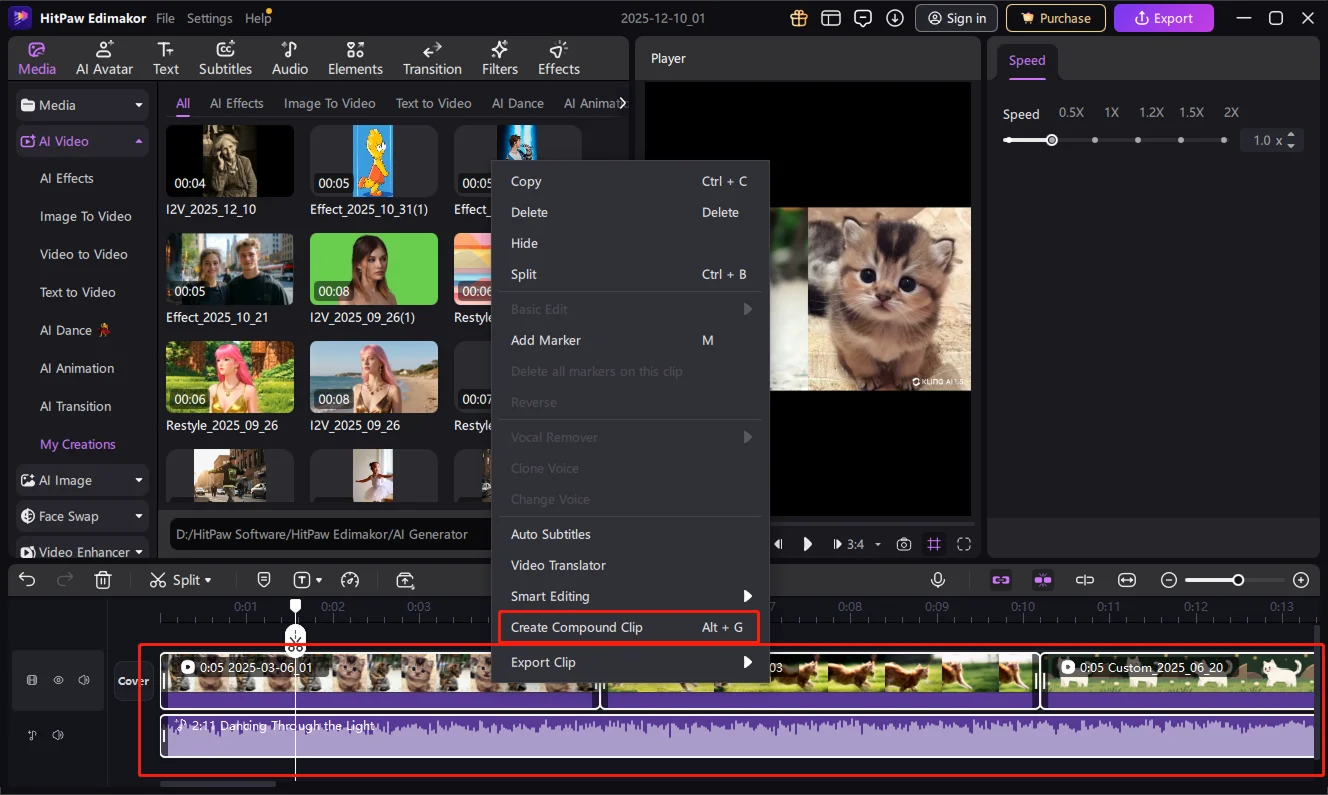
The Edimakor editor: the media library with AI video sections on the left, the player, the Speed panel on the right, and several clips selected on the timeline with the right-click menu open on Create Compound Clip.
Features
Multi-track timeline editing
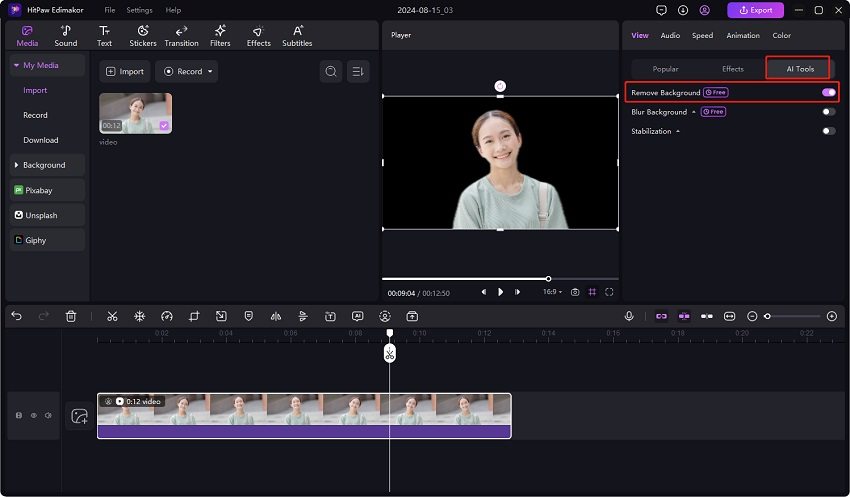
HitPaw Edimakor edits on a multi-track timeline with splitting, speed control, keyframe animation, compound clips, masks and background removal, plus motion tracking that pins text or stickers to a moving subject. Version 5.3 added custom LUT import (Cube and 3DL files) and safe-zone guides for 9:16 TikTok, Shorts and Reels videos.
Text, effects and stock assets
HitPaw Edimakor comes with 1,000+ text styles and effects, 500+ filters, 200+ transitions, 500+ stickers and GIFs, video templates and a library of stock photos and clips, all available on paid plans for commercial use.
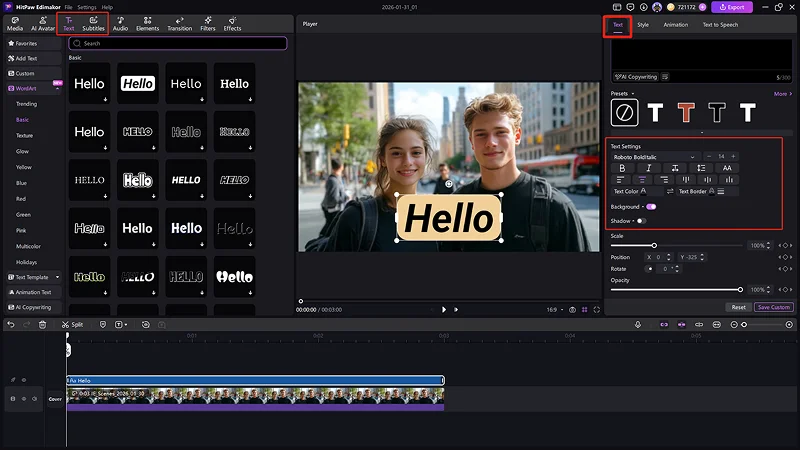
Adding a title: text style presets on the left, the "Hello" title placed over the video in the player, and the font, color, background and shadow settings on the right.
Auto subtitles, lyrics and text-based editing
HitPaw Edimakor transcribes speech into subtitles, generates timed lyrics for music, and translates subtitles into more than 130 languages. Its text-based editing removes the matching video when you delete words or silences from the transcript, and version 5.2 added filler-word removal and AI correction of subtitles.
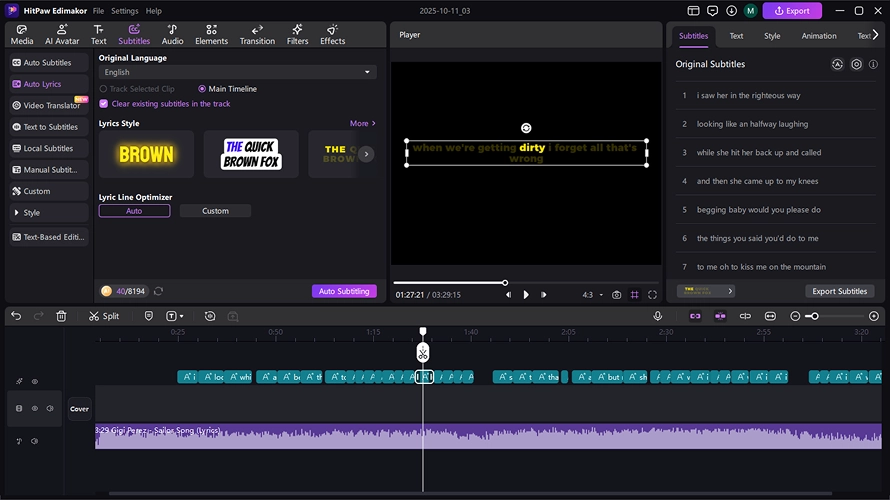
Auto Lyrics: language and lyric style options in the middle, the generated lines listed under Original Subtitles on the right, and the subtitle track above the song on the timeline.
Voices: text to speech, voice cloning and dubbing
HitPaw Edimakor turns text into voiceover with a large set of AI voices, clones a voice from a short recording in over 35 languages, changes voices, removes vocals and background noise, and dubs whole videos into other languages.
AI video generator and avatars
HitPaw Edimakor generates videos from a story idea, a script, text or an image using models such as Kling, Vidu and Hailuo, and creates talking avatars and talking photos with lip sync. Version 5.3 integrated HeyGen Avatar IV for up to 10 minutes of continuous avatar video and added AI object removal. These are the most credit-hungry tools.
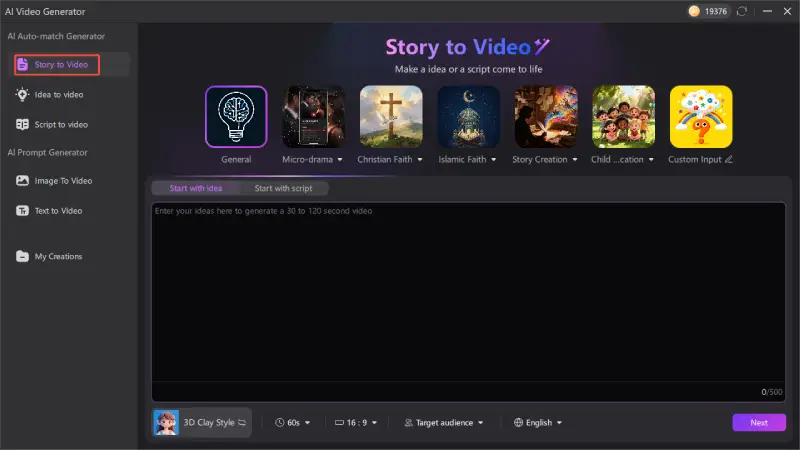
The AI Video Generator's Story to Video page: story templates, a box for an idea or script, and settings for style, length (60 s), 16:9 aspect ratio, audience and language. The credit balance shows at the top right.
Screen recorder, downloader and clip maker
HitPaw Edimakor includes a screen recorder, a video downloader (three uses on the free plan, unlimited on paid plans) and an AI clip maker that cuts long videos into short vertical clips for YouTube Shorts, TikTok and Instagram. Download only videos you own or have permission to use.
Benefits
- Captions in minutes. Auto subtitles and styled lyrics save the slowest part of making social video.
- No separate voiceover or translation tools. TTS, cloning and dubbing live inside the editor.
- Low cost for a full editor. $69.95 once, including credits and upgrades, is cheap next to subscription editors.
- Commercial rights on paid plans, so ads and client work are covered.
Real-World Uses
- YouTube tutorials: screen recording, cut by transcript, captioned automatically.
- Short-form repurposing: a long podcast or stream split into vertical clips with safe zones checked.
- Multilingual content: one video dubbed or subtitled for Spanish, Hindi or Japanese viewers.
- Small-business ads: a product clip with text, music and an AI voiceover, or a script turned into a draft video.
- Online courses: narration written as text and turned into speech.
Who It's For, and Who Should Skip It
It's for beginner and intermediate creators on Windows who publish regularly and want captions, voiceovers and quick AI visuals in one place.
Skip it if you need professional color grading and audio mixing (DaVinci Resolve is free and far deeper), if you plan to generate lots of AI avatar or AI video footage (credits will run out fast), or if you edit on both Windows and a Mac, since each needs its own license.
Usage Guide
- Download the installer from HitPaw, run it and let it fetch the program, then launch Edimakor.
- Import your clips in the Media tab and drag them to the timeline.
- Trim with Split, add text from the Text tab, and transitions, filters and music from their tabs.
- Open Subtitles and choose Auto Subtitles to caption the video; edit the lines on the right.
- Use the AI tools (voice, avatar, video generator) as needed; each shows its credit cost before it runs.
- Click Export and pick resolution and format. Sign in with your purchase email first to remove the watermark.
Background removal: the Image > Remove BG panel with Auto removal on, edge feathering and zoom sliders, and the cut-out subjects in the player.
Tips
- Check the credit cost before AI avatar or video generation. One minute of avatar video at 20 credits a second is 1,200 credits.
- Use an SSD and 16 GB of RAM for 4K. HitPaw's own specs ask for both for HD and 4K editing.
- Proofread auto subtitles before export, especially names and technical words.
- Cancel auto-renewal in your HitPaw account if you bought a monthly or yearly plan for one project.
Where it falls short
- Credits limit the headline features. The AI tools that sell Edimakor all draw on credits, and topping up requires an active plan.
- Heavy projects need a strong PC. HitPaw lists 8 GB of RAM as the minimum and 16 GB plus a 4 GB graphics card for HD and 4K.
- Internet required for registration, assets and all AI features.
- Refunds are hard to get. Several Trustpilot reviewers describe cancelling quickly and still not getting money back; HitPaw's policy excludes change of mind and uncancelled renewals.
- One OS per license, with up to two resets if you change computers.
What Users Say
Trustpilot: Edimakor's own page
Edimakor's Trustpilot page scores 2.9 out of 5 from 23 reviews: 52% are 5-star and 44% are 1-star, with almost nothing in between. The praise is about the features and support:
- Milos Mancic (5 stars, June 2026), "Very useful software for video editing": "The software has many useful features, especially for video projects, subtitles, audio and text-to-speech."
- Ron Campbell (5 stars, April 2026), "Thank you for great support": "Their customer support was beyond reproach in my opinion."
- Ronkybabe (5 stars, July 2025): "I found it superbly excellent for all my video creation and editing."
The 1-star reviews are about refunds and support:
- Shasha G (1 star, March 2026), "Immediate cancellation, zero usage, 7+ days no refund — chargeback filed": "I received only 2 AI auto-responses — zero human reply, zero refund action."
- nessa rah (1 star, October 2026), "A Complete Waste of Time and Money": "Customer support has been unhelpful and has done nothing to resolve the issue."
- RFA (1 star, June 2026): "Some of their software do not deliver what they promised."
Trustpilot: HitPaw overall
HitPaw's main Trustpilot page (hitpaw.com) shows no TrustScore at all: the rating is unavailable because of a breach of Trustpilot's guidelines, and Trustpilot says it removed a number of fake reviews. One Edimakor buyer there, PATRICIA PRIEUR (5 stars, September 2026), was "Very satisfied with the customer service," praising "the solution found by Annie from HitPaw Edimakor to add another PC to my account".
The pattern: people who use Edimakor for its subtitles, text to speech and general editing tend to like it and often mention helpful support. The negative reviews rarely criticise the editor itself; they're about refunds, auto-renewal and slow replies. Test the free version fully before paying, because getting money back afterwards is where buyers run into trouble.
Comparisons
HitPaw Edimakor vs Wondershare Filmora
Filmora is the closest rival: a beginner-friendly timeline editor with AI tools on a credit system. Filmora has a longer track record and a bigger effects ecosystem; Edimakor puts more weight on AI voice, dubbing and avatar features and has a cheaper perpetual license. Try both free versions on the same project.
HitPaw Edimakor vs CapCut
CapCut's desktop app offers similar auto captions and templates with a free tier, with its premium features on a subscription. Edimakor's perpetual license is the draw if you'd rather pay once.
Editions and Pricing
| Plan | Price | AI credits | Upgrades |
|---|
| Free | $0 | 30 (no AI avatar) | watermark on export |
| 1 Month | $19.95/month | 300 per month | while subscribed |
| 1 Year | $49.95/year | 3,000 per year | while subscribed |
| Perpetual | $69.95 once | 10,000 for life | lifetime free upgrades |
Paid plans are for one Windows PC and prices exclude tax; all paid plans remove the watermark and include 4K export, all assets and commercial rights. HitPaw also sells business plans for more users. The Buy Now button opens the order page with every plan.
FAQs
Is HitPaw Edimakor free?
HitPaw Edimakor is free to download and every non-AI editing feature works, but exports carry a watermark, and new users get only 30 AI credits to try the AI tools.
What happens when my HitPaw Edimakor AI credits run out?
HitPaw Edimakor's editing keeps working, but AI features stop until you buy a credit pack, which requires an active paid plan. Monthly and yearly plans refill their allowance each period; perpetual credits are a one-time 10,000.
Does a HitPaw Edimakor license work on Mac?
No. HitPaw Edimakor licenses are tied to one operating system; the Mac edition needs its own purchase.
Can I use HitPaw Edimakor videos commercially?
Yes. HitPaw Edimakor's paid plans include commercial rights, and HitPaw says videos made with it can be used for marketing, advertising and training content.
Is there a HitPaw Edimakor mobile app?
Not yet. HitPaw Edimakor runs on Windows and Mac, and there's a browser version; HitPaw says the mobile app is still in development.
Can I move HitPaw Edimakor to a new PC?
HitPaw resets the Edimakor registration up to two times when you change computers, as long as the new one runs Windows too.
Can I get a refund on HitPaw Edimakor?
HitPaw Edimakor has a 30-day money-back guarantee for unsolved technical problems and duplicate purchases. HitPaw refuses refunds for a change of mind and for automatic renewals you didn't cancel.
System Requirements
- OS: Windows 11, 10 or 8.1, 64-bit
- Processor: Intel i3 or better, 2 GHz; 6th-generation Intel or newer recommended for HD and 4K
- Graphics: Intel HD Graphics 5000, NVIDIA GeForce GTX 700 or AMD Radeon R5 or later; 2 GB VRAM (4 GB for HD and 4K)
- RAM: 8 GB (16 GB for HD and 4K)
- Disk: 10 GB free; SSD recommended
- Internet: required for registration, assets and AI features
Conclusion
HitPaw Edimakor is a good-value editor for Windows creators who caption, narrate and repurpose video every week. The $69.95 perpetual license, with 10,000 AI credits and lifetime upgrades, is the reason to choose it over subscription-only rivals.
The reason to hold back is the credit system and HitPaw's refund record: if you expect to generate a lot of AI avatar or AI video footage, the included credits won't last, and you won't easily get your money back if it disappoints. Use the free version on a real project first, then buy the perpetual plan if it fits.
Download Free TrialBuy Now