HitPaw Univd: A Fast Batch Video Converter With a Compressor and AI Extras
HitPaw Univd (formerly HitPaw Video Converter) is a Windows program that converts video, audio and images between 1,000+ formats with GPU acceleration, and adds a compressor, a basic editor and a handful of AI tools such as speech to text and vocal removal. It costs $39.95 a year, $19.95 a month or $79.95 once for a perpetual license on one PC.
If you've got a folder of MKV files your TV won't play, iPhone HEVC clips an old editor rejects, or a 2 GB screen recording you need to email, Univd is the kind of tool that handles it in a few clicks. The free version only converts a third of each file, so it's a try-before-you-buy demo rather than a free converter.
Quick facts
- Developer: HitPaw
- Version: 5.0.2 for Windows
- Platform: Windows 11, 10, 8.1, 8 and 7, 64-bit. The Mac edition is a separate product and license
- Price: $19.95 a month, $39.95 a year, or $79.95 for a perpetual license (1 PC)
- Free trial: converts one third of each file's length; other tools have limited free uses
- Formats: 1,000+ video, audio and device formats, including MP4, MKV, MOV, AVI, HEVC, WebM, MP3, FLAC and AAC
- Refunds: 30-day guarantee for technical problems and duplicate purchases, not for a change of mind
- What we checked: the Windows download is a 1.5 MB web installer that fetches the program; the plan prices on HitPaw's order page, and the same $39.95 yearly price in a copy of that page from October 6, 2026, before the holiday sale; prices checked on November 23, 2026. We didn't run conversions ourselves.
Before you buy
- Black Friday: until November 30, 2026, HitPaw's code HP-BFS-30 takes 30% off Univd's yearly and perpetual plans at checkout. The monthly plan isn't included.
- The perpetual license is the better deal if you'll keep converting: $79.95 once, with free updates for all major versions, against $39.95 every year.
- Subscriptions renew automatically. HitPaw doesn't refund a renewal you forgot to cancel.
- No streaming downloader in the current version. Older reviews describe a Download tab; HitPaw now presents Univd as a converter, compressor and editor.
- Trustpilot has suspended HitPaw's rating for breaching its guidelines. More below.
Download Free TrialBuy Now
Overview
Univd opens on three tabs: Home for the toolbox, Converter for format conversion and Editor for quick edits. You drag files in, pick an output format or a device preset for everything at once ("Convert all to"), and press Convert. Each file shows its source format and size next to the target format and estimated size, so you see roughly how big the result will be before you start.
The selling point is speed. Univd uses your graphics card (NVIDIA, AMD or Intel) to encode, and HitPaw quotes conversions up to 170 times faster than CPU-only processing. The real gain depends on your hardware and codec, but GPU encoding is what makes batch jobs of dozens of files bearable.
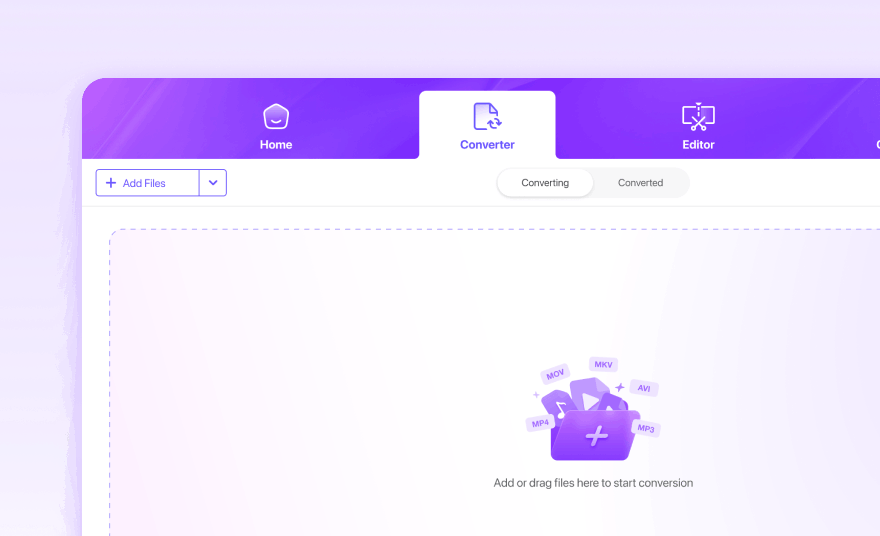
The Converter tab before any files are added: Home, Converter and Editor tabs at the top, Add Files, and the drop area for videos and audio.
Features
Format conversion with device and social presets
HitPaw Univd converts between more than 1,000 video and audio formats, including MP4, MKV, MOV, AVI, HEVC MP4 and MKV, WebM, MP3, WAV, FLAC and AC3, and has presets for recent phones, GoPro cameras and social video. You can keep the source resolution or pick a preset, and edit codec and bitrate per format.
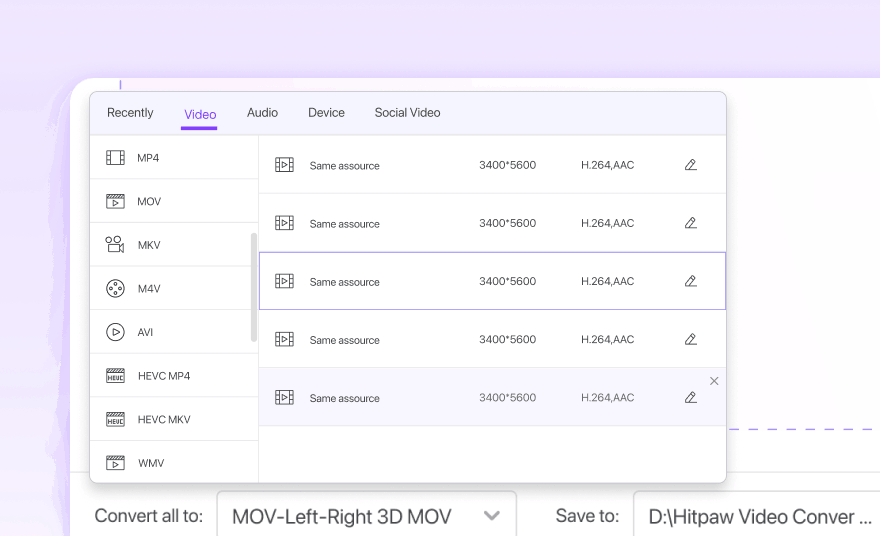
Picking the output format: the Recently, Video, Audio, Device and Social Video tabs, video formats from MP4 to WMV, and the "Convert all to" and "Save to" fields at the bottom.
Batch conversion with GPU acceleration
HitPaw Univd queues as many files as you add and converts them together, using NVIDIA (GT 630 or newer), AMD (Radeon HD 7700 or newer) or Intel (HD Graphics 2000 or newer) hardware encoding. HitPaw also advertises lossless conversion when the target format allows it.
Video and image compressor
HitPaw Univd's compressor shrinks videos and photos in batches, with settings for the size-quality balance, which helps when an email attachment limit or a chat app rejects a large clip.
Basic editor and GIF maker
HitPaw Univd cuts, merges, crops and rotates clips, adds filters, watermarks and subtitles, changes speed, and turns a video segment into a GIF. It also converts and edits images (JPG, PNG, TIFF, BMP, WebP). It's for quick fixes, not timeline editing.
AI tools: speech to text, vocal and noise removal, face blur
HitPaw Univd transcribes speech to text or subtitles, separates vocals from music for karaoke tracks, removes background hum and hiss, blurs faces automatically, auto-reframes video for vertical formats and upscales video with an AI enhancer. Paid plans include bonus AI credits: 300 a month, 800 a year, or 1,600 with the perpetual license.
Benefits
- One tool instead of four. Converting, compressing, trimming and making GIFs happen in the same window.
- Batch jobs finish quickly on any PC with a reasonably modern graphics chip.
- No settings expertise needed. Device and social presets pick sensible codecs for you.
- A cheap perpetual option. $79.95 once is less than two years of most converter subscriptions.
Real-World Uses
- TV and media player playback: MKV or AVI files converted to MP4 that a smart TV or console accepts.
- Editing prep: iPhone HEVC footage converted to H.264 for an older editor.
- Sharing: a long screen recording compressed below an email or chat size limit.
- Interviews and lectures: spoken audio transcribed to text or subtitles.
- Karaoke and covers: vocals split from a song you own to practice over the instrumental.
Who It's For, and Who Should Skip It
It's for Windows users who convert or compress video regularly and want a simple, fast tool with presets, plus a few AI helpers on the side.
Skip it if you convert a file once in a while: HandBrake and VLC are free and handle most conversions. Skip it too if you need a real editor (a timeline editor such as HitPaw Edimakor or Filmora fits better), or if you're on a Mac, where you need the separate Univd for Mac license.
Usage Guide
- Download the installer from HitPaw, run it and let it fetch the program, then launch Univd.
- Open the Converter tab and click Add Files, or drag videos and audio into the window.
- Choose a target in Convert all to, or a different format per file with the format button on each row.
- Pick the output folder in Save to.
- Click Convert on one file or Convert All; finished files move to the Converted list.
- After buying, sign in with the email you used at checkout to switch on full-length conversion.
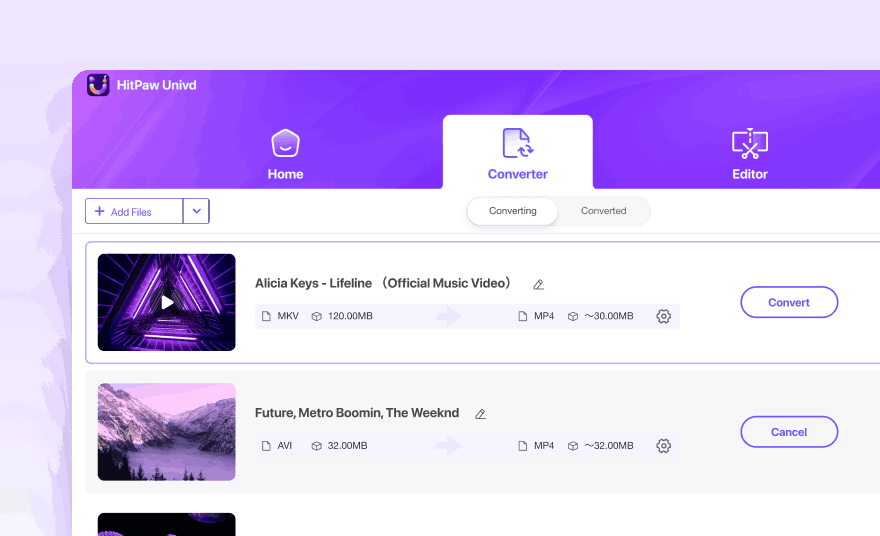
Two files in the conversion queue: a 120 MB MKV going to MP4 (about 30 MB) and a 32 MB AVI going to MP4, each with its own Convert or Cancel button.
Tips
- Check GPU acceleration is on in the settings before a big batch; it's where the speed comes from.
- Use "Same as source" resolution unless you need a smaller file; upscaling in a converter adds size, not detail.
- Test the trial on a short clip. Since it converts a third of each file, a full-length test tells you nothing extra.
- Only convert media you have the rights to. Univd isn't meant for copy-protected discs or streams.
Where it falls short
- Slow release notes. HitPaw's own update log for Univd stops at version 5.0.0 from March 2025; later builds arrived without published notes.
- The editor is basic. No multi-track timeline, so anything beyond trimming and merging needs another program.
- AI tools run on credits once the bonus credits in your plan are used up.
- Strict refunds. No refund for a change of mind, for renewals you didn't cancel, or after you've finished your job with the program.
- Licenses are tied to one OS. A Windows license can't move to a Mac.
What Users Say
FileHorse
Sophia Jones's FileHorse review describes Univd's interface as easy for people new to converters and notes about the installer that "It doesn't come bundled with any unwanted software or adware, ensuring a clean installation process." Her pros list an easy interface, wide format support, batch conversion and device presets; her one con: "Some advanced features found in competitors are missing." Her review also describes a Download tab for online video, which the current version no longer advertises.
Trustpilot (all HitPaw products)
Trustpilot shows no TrustScore for hitpaw.com: the rating is unavailable because of a breach of its guidelines, and Trustpilot says it removed a number of fake reviews. Of the 2,762 reviews left, 80% are 5-star and 17% are 1-star. Two recent ones are about this converter:
- Juan Martinez (5 stars, November 2026): "Been using HitPaw Video converter for years, it a must tool with all my social media content work, love it!"
- Colorado Gal (1 star, October 2026), titled "Fraudulent": "tried new Univd for 5 minutes - did not do what was promised"
Most other 1-star reviews are about billing. Stephen Carey (November 2026): "This company took automatic payment which did not know was turned on". Louis Loong (5 stars, October 2026) had the opposite experience with support: "The tech support was fantastic. They usually replied to my email within 24 hours."
The pattern: people who use Univd as a converter and compressor are generally happy with its speed and simplicity, and installers have been clean. The complaints that recur are about HitPaw's subscriptions and refunds rather than conversion quality, so the perpetual license, which never renews, avoids most of them.
Comparisons
HitPaw Univd vs HandBrake
HandBrake is free and open source and very good at converting to MP4 and MKV, but its settings are technical, it doesn't write AVI, MOV or audio-only formats, and it has no compressor presets, GIF maker or AI tools. Univd is the easier choice if you'd rather pick a device than a codec.
HitPaw Univd vs Wondershare UniConverter
Wondershare UniConverter covers the same ground (conversion, compression, editing, AI tools) with a bigger feature list, including DVD burning and screen recording on Windows. Univd for Windows is the leaner option if conversion and compression are what you need.
Editions and Pricing
| Plan | Price | AI credits | Updates |
|---|
| 1 Month License | $19.95/month | 300 bonus | while subscribed, renews monthly |
| 1 Year License | $39.95/year | 800 bonus | while subscribed, renews yearly |
| Perpetual License | $79.95 once | 1,600 bonus | free updates for all major versions |
Every plan is for one PC and prices exclude tax. HitPaw also sells yearly team plans for 5, 10 or 100 PCs. The Buy Now button opens the order page with all three plans.
FAQs
Is HitPaw Univd the same as HitPaw Video Converter?
Yes. HitPaw Univd is the new name of HitPaw Video Converter; the product page and order page still call it HitPaw Video Converter in places.
Is HitPaw Univd free?
HitPaw Univd installs for free, but the trial converts only one third of each video or audio file, and the other tools have a limited number of free uses. Full conversion needs a paid license.
Does HitPaw Univd still download videos from websites?
HitPaw Univd's current product page presents it as a converter, compressor and editor, with no video downloader. Older versions and reviews describe a Download tab; don't buy it for that.
Can I use my HitPaw Univd license on a Mac?
No. HitPaw Univd licenses are tied to one operating system: a Windows license can't be used in Univd for Mac, which is sold separately.
What happens if I change computers?
HitPaw resets the registration for a new computer up to two times on request, as long as it runs the same operating system as the original.
Does HitPaw Univd work on older PCs?
HitPaw Univd's minimum requirements are modest (a 750 MHz CPU, 256 MB of RAM and 100 MB of disk space on 64-bit Windows 7 or later), but conversion is much faster with a supported NVIDIA, AMD or Intel graphics chip.
Can I get a refund on HitPaw Univd?
HitPaw Univd has a 30-day money-back guarantee for unsolved technical problems, duplicate or wrong purchases and missing license codes. HitPaw refuses refunds for a change of mind, for automatic renewals you didn't cancel, and once you've finished your task with the program.
System Requirements
- OS: Windows 11, 10, 8.1, 8 or 7, 64-bit
- Processor: Intel or AMD, 750 MHz or faster
- RAM: 256 MB or more
- Disk: 100 MB free
- GPU acceleration: NVIDIA GeForce GT 630 or newer, AMD Radeon HD 7700 series or newer, Intel HD Graphics 2000 or newer
Conclusion
HitPaw Univd is worth it if you convert or compress video often and want presets and batch speed instead of codec settings. The $79.95 perpetual license is the one to buy: it costs about two years of the subscription, never renews, and keeps the major-version updates.
If you only convert the odd file, free tools like HandBrake will do, and if you need a downloader or a real editor, look elsewhere. Try the free version on a short clip first; it shows the speed and output quality even though it stops a third of the way through.
Download Free TrialBuy Now