HitPaw Univd for Mac: Converter, Compressor, DVD Burner and Screen Recorder in One Mac App
HitPaw Univd for Mac (formerly HitPaw Video Converter for Mac) converts video and audio between 1,000+ formats on macOS, including H.264, HEVC and ProRes, and adds a compressor, a clip editor, a screen recorder and a DVD converter and burner. It runs on Intel and Apple silicon Macs with macOS 10.13 or later and costs $39.95 a year, $19.95 a month or $79.95 once for one Mac.
On a Mac the usual pain points are different from Windows: QuickTime won't open an MKV or AVI, Final Cut and iMovie prefer ProRes or H.264 over whatever your camera or download produced, and the free HandBrake doesn't write MOV. Univd for Mac exists for those jobs, with a few extras Windows users don't get in their edition.
Quick facts
- Developer: HitPaw
- Version: 5.0.3 for Mac
- Platform: macOS 10.13 High Sierra or later, Intel and Apple silicon (M1 and later)
- Price: $19.95 a month, $39.95 a year, or $79.95 for a perpetual license (1 Mac)
- Free trial: converts one third of each file's length; other tools have limited free uses
- Outputs: H.264, H.265, ProRes, MPEG-4 and presets for iPhone, iPad, Apple TV, PS4 and Xbox One
- Refunds: 30-day guarantee for technical problems and duplicate purchases, not for a change of mind
- What we checked: the Mac download is a 6.4 MB installer app (dated September 18, 2026) that fetches the program; the plan prices on HitPaw's Mac order page, and the same $39.95 yearly price in a copy of that page from September 19, 2026, before the holiday sale; prices checked on November 23, 2026. We didn't run conversions or burn a disc ourselves.
Before you buy
- Black Friday: until November 30, 2026, HitPaw's code HP-BFS-30 takes 30% off Univd's yearly and perpetual plans at checkout.
- Buy the Mac license. HitPaw licenses don't cross platforms: the Windows edition's license won't activate the Mac app.
- Subscriptions renew automatically. The $79.95 perpetual license avoids renewals and includes free updates for all major versions.
- Trustpilot has suspended HitPaw's rating for breaching its guidelines. More below.
Download Free TrialBuy Now
Overview
The Mac app is organised in four tabs: Home (the toolbox), Converter, Editor and Compressor. You drop files into the Converter, choose a format or device preset for each file or for all of them, set where to save, and click Convert All. Conversion uses the Mac's hardware encoders, and HitPaw quotes speeds up to 120 times faster than software encoding on its Mac page.
Around that core sit tools that matter more to Mac users: a screen recorder with webcam and audio, DVD ripping and burning (Macs haven't had a disc drive for years, but plenty of people still have an external one and a box of discs), and conversion of 2D video to side-by-side 3D for VR headsets.
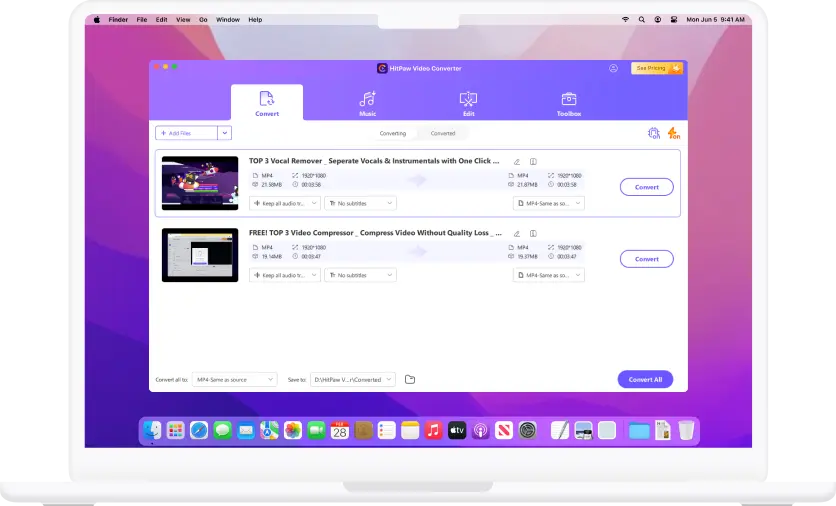
Univd on macOS: the Home, Converter, Editor and Compressor tabs, the Add Files button and drop area, and the "Convert all to" and "Save to" fields at the bottom.
Features
Conversion with Apple-friendly presets and ProRes
HitPaw Univd for Mac converts between more than 1,000 video and audio formats, including MP4, MOV, MKV, AVI, MPG, TS, MP3, WMA, AIFF, WAV and FLAC, and encodes to H.264, H.265, ProRes and MPEG-4 for editing in Final Cut Pro or iMovie. Presets cover iPhone, iPad and Apple TV as well as PS4 and Xbox One, and you can add subtitles before converting.
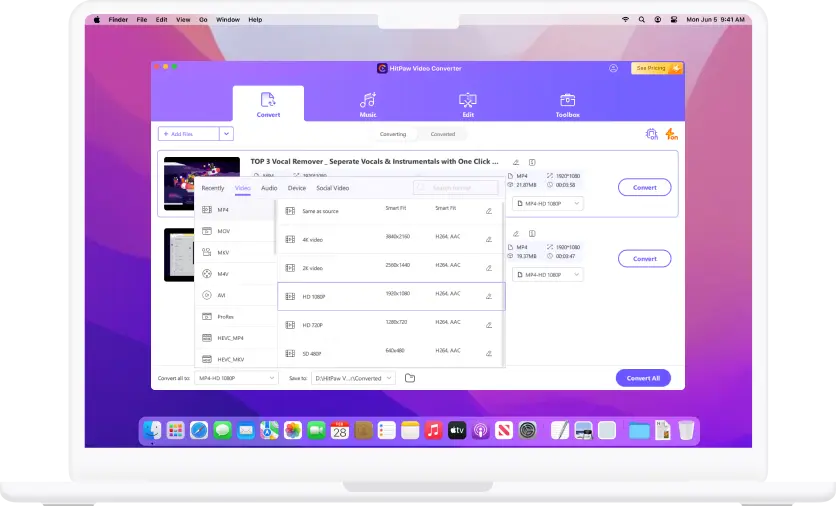
Choosing an output for one file: the Video tab lists MP4, MOV, MKV, M4V, AVI, ProRes and HEVC formats, with "Same as source", 4K, 2K, 1080p, 720p and 480p options on the right.
Compressor with a real-time preview
HitPaw Univd for Mac's Compressor tab shrinks videos, audio and photos in batches and shows a live preview of the compressed result, so you can check the quality before committing to a file size for AirDrop, Mail or Messages.
Editor: cut, merge, crop, stabilize, blur faces
HitPaw Univd for Mac's Editor tab cuts and merges clips, crops and rotates, adds filters and watermarks, changes speed from 0.25x to 4x, stabilizes shaky footage and blurs faces automatically. Each tool opens in its own window rather than on a shared timeline.
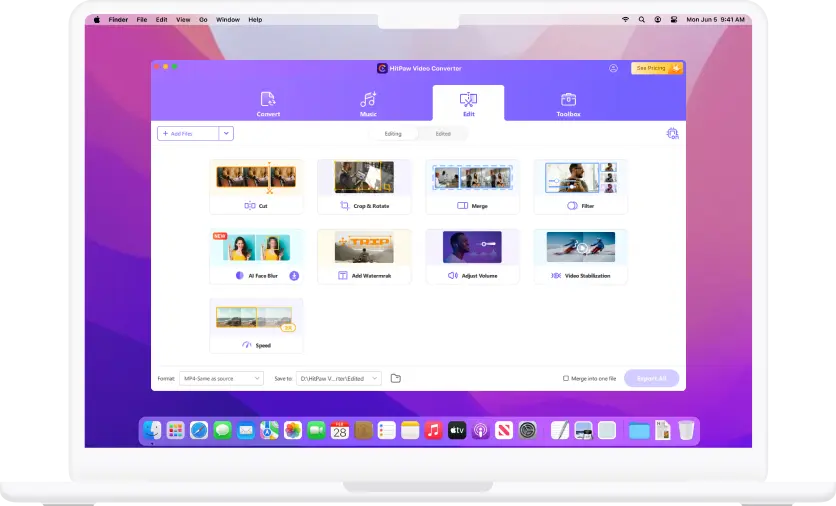
The Editor tab: Cut, Merge, Crop & Rotate, Filter, AI Face Blur, Add Watermark, Adjust Volume and Speed tiles.
Screen recorder
HitPaw Univd for Mac records any area of the screen with system audio and webcam at once, up to 4K, with hardware acceleration and a real-time monitor, and sends recordings to the built-in editor.
DVD converter and burner
HitPaw Univd for Mac converts your own DVDs to digital formats or device presets, and burns videos to DVD discs, ISO files or DVD folders with menu templates.
AI and image tools
HitPaw Univd for Mac transcribes speech to text, separates vocals from music, removes wind and crowd noise, removes image backgrounds, converts and edits images in bulk (JPG, PNG, TIFF, BMP, WebP), makes GIFs from video and turns 2D video into 3D. The paid plans include 300, 800 or 1,600 bonus AI credits.
Benefits
- Files that macOS apps refuse become usable in QuickTime, Photos, iMovie and Final Cut without hunting for codecs.
- Several Mac utilities in one purchase: converter, compressor, screen recorder and DVD burner.
- Native on Apple silicon, with hardware-accelerated encoding.
- A one-time option at $79.95, which is rare for Mac media tools now.
Real-World Uses
- Final Cut prep: camera or phone footage converted to ProRes so editing stays smooth.
- Old MKV and AVI files turned into MP4 or MOV that QuickTime and Apple TV play.
- Family DVDs converted to files before the discs or the drive give out.
- Tutorial recording: screen plus webcam captured, trimmed and compressed in one app.
- iMovie exports converted to MP4 in bulk for sharing.
Who It's For, and Who Should Skip It
It's for Mac users who regularly hit format walls, especially people moving footage into Apple's editors, digitizing DVDs or recording quick tutorials, and who'd rather buy one tool than four.
Skip it if you convert a file now and then (HandBrake is free for MP4 and MKV), if you need a proper multi-track editor, or if you also work on Windows: each platform needs its own HitPaw license.
Usage Guide
- Download the installer from HitPaw, open the zip and run HitPaw Univd Installer, which fetches the app; then open Univd from Applications.
- In Converter, click Add Files or drag clips into the window.
- Click the format button on a file, or use Convert all to at the bottom, and pick a format, resolution or device preset.
- Choose the destination in Save to, then click Convert All.
- Find finished files under the Converted list, where you can open the folder or send them to the editor.
- After buying, sign in with the email you used at checkout.
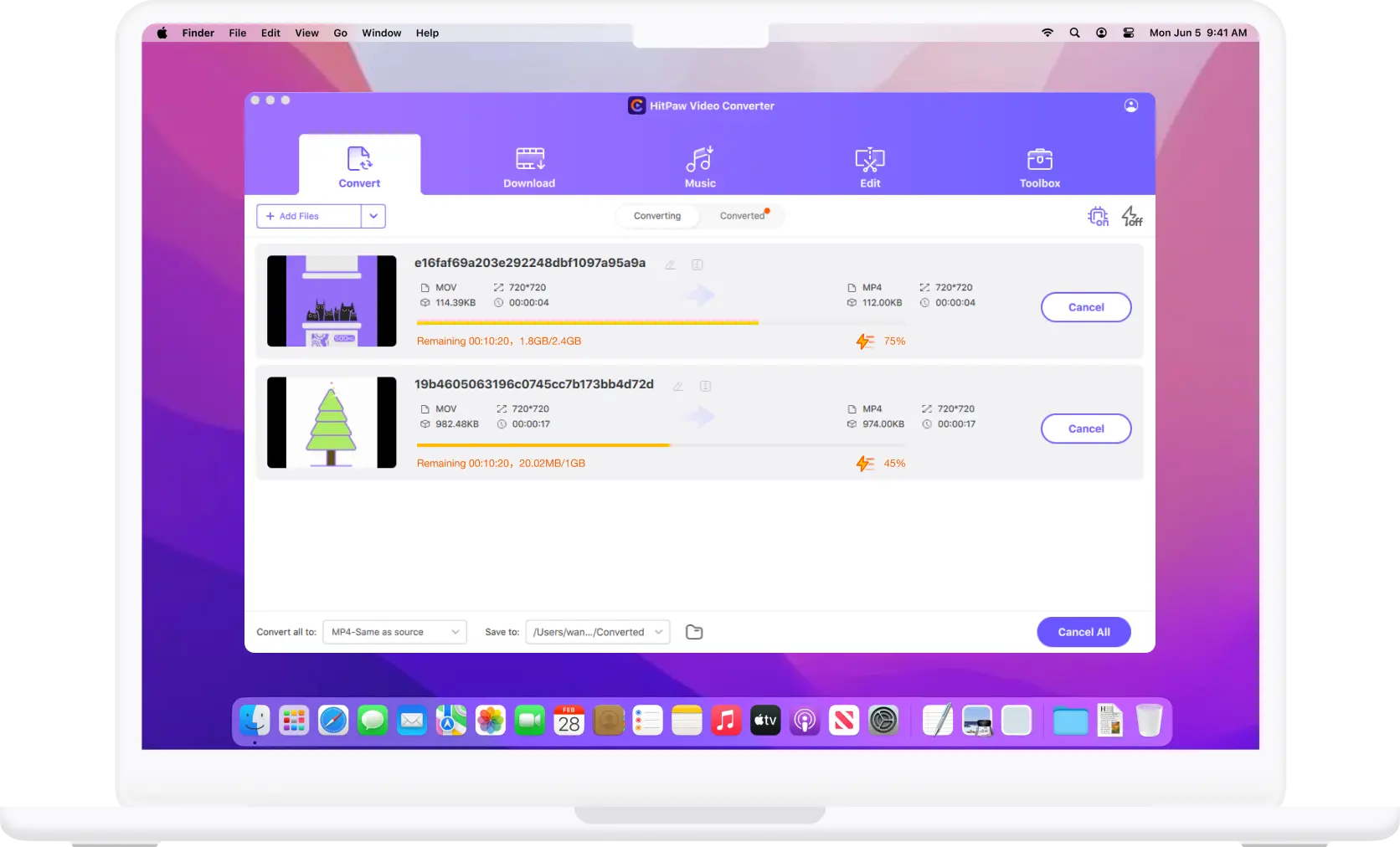
The Converted list after a batch: two MP4 files with resolution, size and duration, and buttons to open the folder or edit them.
Tips
- Pick ProRes only for editing. It makes very large files; use H.264 or HEVC for anything you'll share.
- Use HEVC for iPhone and Apple TV to get the same quality at a smaller size than H.264.
- Allow screen recording in System Settings, Privacy & Security, before using the recorder, or macOS will capture a blank screen.
- Only rip and convert discs and media you own or have the rights to.
Where it falls short
- Few published release notes. HitPaw's update log for the Mac edition stops at version 4.7.0 from January 2025, although newer builds exist.
- The editor isn't a timeline editor. Each tool works on its own; combine them for anything more involved.
- AI tools use credits after the bonus credits in your plan run out.
- Strict refunds and auto-renewal, as with all HitPaw products.
- One OS per license. No moving a Mac license to a Windows PC.
What Users Say
FileHorse (Mac edition)
Sophia Jones's FileHorse review of the Mac edition lists as pros an "Easy-to-use interface", support for a wide range of formats, high-quality output, basic editing tools, device presets, batch conversion and a "Clean installation process". Her only con: "Some advanced features found in competitors are missing." Her description of a Download tab for online video dates from an older version; the current Mac app's tabs are Converter, Editor and Compressor.
Trustpilot (all HitPaw products)
Trustpilot shows no TrustScore for hitpaw.com: the rating is unavailable because of a breach of its guidelines, and Trustpilot says it removed a number of fake reviews. Of the 2,762 remaining reviews, 80% are 5-star and 17% are 1-star.
- Juan Martinez (5 stars, November 2026): "Been using HitPaw Video converter for years, it a must tool with all my social media content work, love it!"
- Colorado Gal (1 star, October 2026): "tried new Univd for 5 minutes - did not do what was promised"
- Stephen Carey (1 star, November 2026), on billing: "This company took automatic payment which did not know was turned on"
- Louis Loong (5 stars, October 2026): "The tech support was fantastic. They usually replied to my email within 24 hours."
The pattern: users who need a straightforward Mac converter and compressor like how simple and quick Univd is. Complaints focus on HitPaw's billing, auto-renewal and refund handling more than the app, which is why the perpetual license is the safer buy.
Comparisons
HitPaw Univd for Mac vs HandBrake
HandBrake is free and excellent for MP4 and MKV, but it can't output MOV or ProRes, has no DVD burner, screen recorder or compressor presets, and expects you to understand encoder settings. Univd for Mac is the easier, broader tool; HandBrake is enough if you only need MP4.
HitPaw Univd for Mac vs Apple Compressor
Apple Compressor is the professional companion to Final Cut Pro for encoding and batch export settings. It doesn't record the screen, compress with a live preview or burn DVDs. Univd for Mac is aimed at everyday conversions rather than broadcast deliverables.
Editions and Pricing
| Plan | Price | AI credits | Updates |
|---|
| 1 Month License (1 Mac) | $19.95/month | 300 bonus | while subscribed |
| 1 Year License (1 Mac) | $39.95/year | 800 bonus | while subscribed |
| Perpetual License (1 Mac) | $79.95 once | 1,600 bonus | all major versions |
| Team plans | $119.95/year (5 Macs), $259.95 (10), $999.95 (100) | not listed | company use |
Prices exclude tax. The Buy Now button opens the Mac order page with every plan.
FAQs
Does HitPaw Univd for Mac run natively on Apple silicon?
Yes. HitPaw Univd for Mac supports Apple M1 and later chips as well as Intel Macs, and uses hardware acceleration on both.
Which macOS versions does HitPaw Univd support?
HitPaw Univd for Mac requires macOS 10.13 High Sierra or later, so it also covers older Intel Macs that can't run current macOS.
Can one HitPaw Univd license cover my Mac and my Windows PC?
No. HitPaw Univd licenses are tied to one operating system; the Windows edition is sold separately, and a perpetual or yearly license covers one Mac.
Can HitPaw Univd for Mac convert video for Final Cut Pro?
Yes. HitPaw Univd for Mac encodes to ProRes and H.264, the formats Final Cut Pro and iMovie handle best, so you can convert MKV, AVI or other footage before importing it.
Is the HitPaw Univd for Mac trial free?
HitPaw Univd for Mac's trial is free to download, but it converts only one third of each file and limits the other tools, so it's a preview of speed and quality rather than a free converter.
What if I replace my Mac?
HitPaw resets the registration for a new computer up to two times on request, as long as the new machine is also a Mac.
System Requirements
- OS: macOS 10.13 High Sierra or later
- Processor: Intel, or Apple silicon M1 or later
- RAM: 256 MB or more
- Disk: 100 MB free
Conclusion
HitPaw Univd for Mac is a good buy for Mac users who keep running into format problems and would also use a screen recorder, a compressor or a DVD burner. Those extras make it better value on the Mac than the Windows edition, and the $79.95 perpetual license keeps it simple.
If MP4 conversion is all you need, HandBrake costs nothing. And since HitPaw's billing draws more complaints than its software, avoid surprises by choosing the perpetual license or switching off auto-renewal after you buy.
Download Free TrialBuy Now