WonderFox DVD Ripper Pro: Turn Your DVD Shelf into Files You Can Play Anywhere
WonderFox DVD Ripper Pro is a $39.95 Windows program that copies DVDs, ISO images and DVD folders to MP4, MKV, MOV and hundreds of other formats and device presets, including discs with common copy protection. It suits anyone with a box of DVDs and no DVD drive left in their laptop, TV room or phone.
Discs scratch, players disappear, and a season of a TV show takes up a shelf. Ripping it once gives you files that play on a phone, a smart TV or a Plex server, and the disc can go back in the box. WonderFox DVD Ripper Pro is built for exactly that job and little else, which keeps it simple: load the disc, pick a format, press Run.
Quick facts
- Version: 24.3, released April 16, 2026
- Developer: WonderFox Soft, Inc. (making video software since 2009)
- Platform: Windows 11, 10, 8.1, 8 and 7. Version 24 and later is a 64-bit program. There is no Mac version
- Input: DVD discs, ISO images and DVD (VIDEO_TS) folders
- Output: MP4, MKV, MOV, AVI, WMV, M4V, MPG, H.264, H.265, AV1, VP9, WebM, ISO, DVD folder, audio formats and 300+ device presets
- Price: $39.95 on the order page for a lifetime license on one PC, with free lifetime upgrades
- Free trial: rips the first 15 minutes of each DVD or ISO, without the 1:1 copy to ISO or folder and without advanced decryption
- Refund: 30-day money-back for technical problems, double charges or a missing license code. A change of mind does not qualify
- Installer: 92.7 MB
- What we checked: installer file version 24.3.0.0 (97,171,096 bytes) downloaded from WonderFox on October 15, 2026, and a price of $39.95 for WonderFox DVD Ripper Pro on the order page on October 15, 2026
Before you buy
- Use the trial on your own discs first. The 15-minute trial is long enough to see whether WonderFox DVD Ripper Pro reads your copy-protected discs, picks the right title and gives you the quality you want. Advanced decryption is locked in the trial, so a disc that fails in the trial may still work in the full version, but you only find out after paying.
- Check the law where you live. Ripping discs you own for personal backup is treated differently from country to country. In some countries, including the United States, breaking a DVD's copy protection is restricted even for discs you bought.
- Support reviews are mixed. WonderFox Soft holds 2.8 out of 5 on Trustpilot from 12 reviews, and several of them complain about unanswered support requests or refused refunds (more under What Users Say). Keep your order email and license code somewhere safe.
Download Free Trial
Buy Now
Overview
WonderFox DVD Ripper Pro opens on three big buttons: DVD Disc, ISO Image and DVD Folder. Pick one and the program scans the disc, lists every title with its length and size, and tags the one it thinks is the main movie. On the right sits the output profile, and at the bottom the output folder and a large RUN button. That is the whole workflow, and most rips need nothing more.
Underneath, there is more than the three-step screen suggests. WonderFox DVD Ripper Pro reads discs protected with CSS, region codes, RCE, Sony ARccOS, UOP, CPRM, Disney X-Project DRM and Cinavia, has an Enhanced Decryption mode for discs that fail the first time, uses Intel and NVIDIA graphics cards to speed up encoding, and can copy a whole disc to an ISO image instead of converting it. Version 24.0 (October 2025) moved the program to 64-bit and added support for NVIDIA RTX 50 series cards and 8K output. Version 24.3 (April 2026) fixed a license-check problem and made large files more stable.
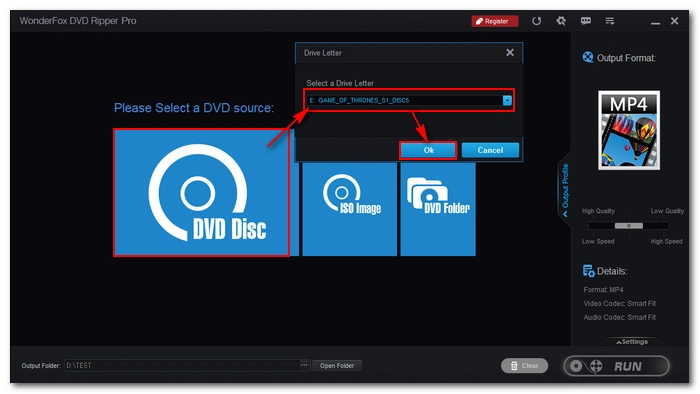
The start screen with the Drive Letter dialog open over the DVD Disc button. The dialog has an Enhanced Decryption checkbox, and MP4 is selected as the output format on the right. The red and yellow markings are WonderFox's.
Features
Reads copy-protected commercial discs
WonderFox DVD Ripper Pro removes the protection on most commercial DVDs as it rips them: CSS, region codes, RCE, Sony ARccOS, UOP, CPRM, Disney X-Project DRM and Cinavia. If a disc won't load or the result has problems, tick Enhanced Decryption in the drive dialog. It is slower but handles harder discs. Since version 23.6 the enhanced mode can also write the result straight to an ISO image or DVD folder. Advanced decryption is a paid feature and isn't in the trial.
Finds the main movie on discs with dozens of titles
WonderFox DVD Ripper Pro marks the real feature with a Main Movie label, even on "99-title" discs that hide it among dozens of fake titles. Each title in the list shows its source format, length and size next to the expected output size, so you can tick bonus features or TV episodes as well, or untick everything except the film.
300+ formats and device presets
WonderFox DVD Ripper Pro groups its output profiles into Video, UHD, Web, Audio and Device tabs. Video covers MP4, MKV, AVI, WMV, MPG, MOV, M4V, VOB, ASF, TS, MTS, M2TS, WebM, OGV, F4V, FLV, SWF, DV and 3GP, plus H.264, H.265, VP9, DivX, Xvid and AV1 encoders. The Device tab has presets for Apple, Samsung, Microsoft, Google, Amazon, Sony, Huawei, Honor, Asus, Motorola, Lenovo, HTC, Xiaomi, OnePlus, Nokia, BLU, ZTE, Alcatel and TVs, and the audio side covers MP3, FLAC, ALAC, WAV, AAC, AC3, DTS, M4A, M4B and more. You can also export DVD-NTSC or DVD-PAL video.
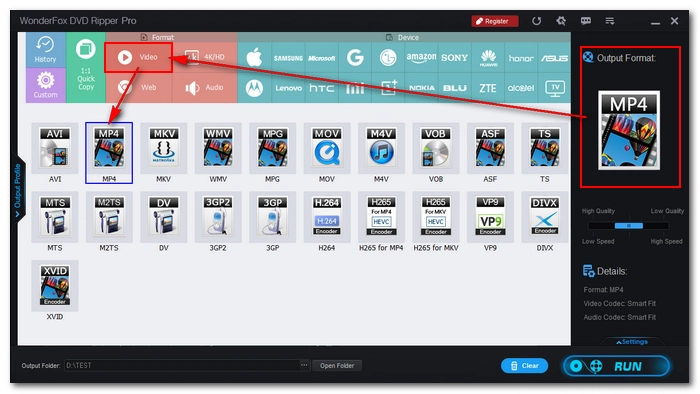
The output profile window: format tiles for MP4, MKV, AVI, MOV, H.264, H.265, VP9, AV1 and others, with tabs for 1:1 Quick Copy, UHD, Web, Audio and phone and TV brands along the top.
Hardware acceleration for faster encodes
WonderFox DVD Ripper Pro uses Intel Quick Sync (QSV) and NVIDIA NVENC when it encodes to H.264, H.265 and AV1, and supports NVIDIA RTX 50 series cards since version 24.0. WonderFox says a two-hour DVD takes about 20 minutes to MP4, MKV or MOV with acceleration, and about 5 minutes for a straight copy to MPEG-2. A quality-versus-speed slider sits under the output profile if you would rather wait longer for a better file.
Smaller files without obvious quality loss
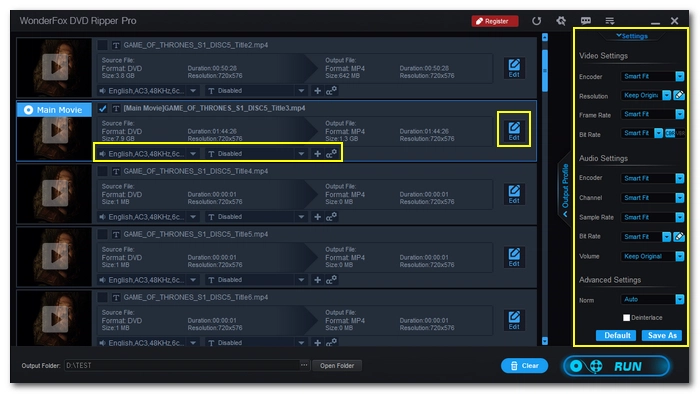
WonderFox DVD Ripper Pro aims to shrink a full 7.5 GB disc to a 1 to 2 GB file while keeping the picture close to the original. You can override its choice of resolution, video quality, frame rate, aspect ratio and encoder in the settings, and it can upscale standard-definition DVD to 720p, 1080p, 4K or 8K output if your TV handles that better.
1:1 Quick Copy to ISO or DVD folder
WonderFox DVD Ripper Pro can also make an exact backup of a disc instead of converting it. The 1:1 Quick Copy tab offers three choices: the main movie as one MPG file, an ISO image of the whole disc, or a DVD folder. An ISO keeps the menus, every audio track and every subtitle, and you can burn it back to a blank DVD later. This mode isn't available in the trial.
The 1:1 Quick Copy tab with Main Movie (MPG), ISO and DVD Folder options, and ISO selected as the output format on the right.
Subtitles, audio tracks and basic editing
WonderFox DVD Ripper Pro lets you pick the audio track and subtitle for each title, hardcode subtitles into the picture or keep them as soft subtitles you can switch off, and keep several audio and subtitle tracks in one MKV file. It handles up to 8 audio channels, so 5.1 and 7.1 soundtracks survive the rip. A built-in editor trims, crops and flips video and applies filters before you rip.
Benefits
The main reason to pay for WonderFox DVD Ripper Pro rather than use a free tool is that it handles the discs free tools stumble on, without making you understand why. Commercial discs with deliberately broken title structures, region-locked imports and old discs with odd subtitle formats mostly just load. You don't need to pair a decrypter with a separate encoder or learn what a bitrate is.
It also saves real time when you have a lot of discs. With a recent NVIDIA or Intel graphics chip doing the encoding, a film takes minutes rather than an evening, and the automatic main-title pick means you aren't checking every rip. And because the license is a one-time purchase with free upgrades, a collection ripped over several years doesn't turn into a yearly bill.
Real-World Uses
- Clearing the DVD shelf into Plex or Jellyfin: rip each film to MKV with every audio track and subtitle kept, drop the files on a NAS, and your media server shows them with posters on every TV in the house.
- Movies for a flight or a long drive: pick the iPhone, iPad or Android preset and copy a handful of compact MP4 files to the device, so the kids' films play without a portable DVD player.
- Backing up a disc before it gets scratched: use 1:1 Quick Copy to save an ISO of a children's favorite or a rare out-of-print disc, and burn a fresh copy if the original fails.
- Keeping a workout or concert DVD on the TV: rip it to MP4 on a USB stick that plugs into the smart TV, so there's no disc to swap.
- Saving the soundtrack: export a concert or musical to FLAC or MP3 and listen to it like an album.
Who It's For
WonderFox DVD Ripper Pro is for Windows users who want their DVDs as files with as little fuss as possible: families with a shelf of children's films, people moving to a media server, and anyone whose new laptop has no disc drive. It is less suited to video hobbyists who want frame-by-frame control of every encoder setting, to Mac users (there is no Mac version), and to anyone who needs Blu-ray. It only handles DVDs.
Usage Guide
- Download the installer (about 93 MB) and run it. If you already have an older version, you don't need to uninstall it first.
- Launch WonderFox DVD Ripper Pro and choose DVD Disc, ISO Image or DVD Folder. For a disc, pick the drive in the Drive Letter dialog and click Ok. Tick Enhanced Decryption only if a normal load fails.
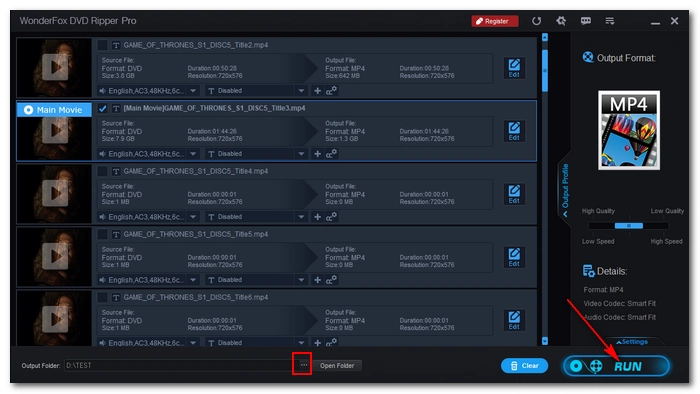
- Wait for the scan. The title list appears with the main movie labeled. Untick titles you don't want, and choose the audio track and subtitle for each title from the menus under it.
- Click the output format on the right to open the profiles, and choose a format (MP4 is the safe choice) or a device preset. For an exact copy, open the 1:1 Quick Copy tab instead.
- Optionally open Settings to change resolution, bitrate or encoder, or move the quality slider toward speed or quality.
- Set the output folder at the bottom (a drive with plenty of free space) and click RUN.
The title list after a scan: each title shows its source format, length and size and the expected MP4 size, the Main Movie title is ticked, and the output folder and RUN button are at the bottom.
Tips
- Rip to MKV if you want to keep several audio and subtitle tracks in one file. MP4 is better for phones and older TVs.
- Turn on GPU acceleration on a computer with a recent NVIDIA card or Intel graphics. It makes the biggest difference to H.265 and AV1 rips.
- If a rip has problems, try again with Enhanced Decryption ticked before contacting support.
- Keep your license email. Registration changed in version 24.0, and WonderFox asks owners with registration problems to email order@videoconverterfactory.com.
What Users Say
Reviews of WonderFox DVD Ripper Pro split into two camps. Tech sites that tested the program praise its speed, its automatic title detection and how simple it is. Customer reviews of WonderFox as a company are much more critical, mostly about support and refunds. Most press reviews are several years old and tested earlier versions, so the interface and speeds have changed since.
TechRadar
Sofia Elizabella Wyciślik-Wilson reviewed version 9 for TechRadar in September 2017 and listed no cons.
"WonderFox DVD Ripper Pro does an excellent job of simplifying what could otherwise be quite a complicated task."
Sofia Elizabella Wyciślik-Wilson, TechRadar
"The main movie will be identified and selected automatically, but you can opt to rip other material as well (or instead) if you want."
Sofia Elizabella Wyciślik-Wilson, TechRadar
"With your output settings selected, hitting the 'Run' button will furnish you with ripped video in a matter of minutes. Quick, painless and perfect."
Sofia Elizabella Wyciślik-Wilson, TechRadar
The review opens with a warning worth repeating:
"Let's get this out of the way right from the start – DVD ripping software like this can be used for both legal and illegal purposes."
Sofia Elizabella Wyciślik-Wilson, TechRadar
The Windows Club and LetsGoDigital
"It is a great tool for ripping DVDs – and it is simple to use and blazingly fast as well."
Lavish Thakkar, The Windows Club (updated February 2019)
"The 3-step mechanism is really easy to understand, and you can start ripping your old DVDs in no time."
Lavish Thakkar, The Windows Club
"Remember that as you increase the quality, the tool will relatively take longer to complete ripping your DVD."
Lavish Thakkar, The Windows Club
"During our test period, we found the software to be very good in terms of the ripping speed and the output quality."
Mark Peters, LetsGoDigital (September 2019)
LetsGoDigital's only listed drawback was "Windows systems only."
Trustpilot (WonderFox Soft as a company)
WonderFox Soft has a TrustScore of 2.8 out of 5 from 12 reviews on Trustpilot. Only one names DVD Ripper Pro: a 2-star review from Frans Graven in December 2024, titled "WonderFox DVD Ripper Pro: anything but professional". The review says the program doesn't detect interlaced video automatically, so some rips had to be redone, and that ripping subtitles only worked in MKV H.264 mode.
The other reviews cover the company or its other products. Several 1-star reviews from 2022 to 2026 say support emails went unanswered or a refund was refused, and one HD Video Converter Factory Pro owner says the promised free lifetime upgrade to version 28 was refused. On the positive side, Richard Goegan, in a 5-star review from February 2026, wrote "Best out there. VERY cost effective.", and a 3-star reviewer says a refund was granted when they asked.
On WonderFox's own pages
WonderFox's tech specs page quotes two customers:
"Despite the boring appearance, the ripping speed and ripped video’s quality satisfy me, ah, I think it is worth trying this software."
Aikawa, Japan, quoted by WonderFox
"WonderFox DVD Ripper does leave a good impression to me. What I appreciate most is the fast ripping speed, it helps me rip DVD in a short time."
Johnson, USA, quoted by WonderFox
The recurring themes
What people like: fast rips, especially with GPU acceleration, the automatic main-movie pick, the three-step interface and good quality at small file sizes. What they complain about: Windows only, a plain-looking interface, no automatic deinterlacing in one user's experience, and slow or missing replies from WonderFox support. Test your own discs with the trial before buying, since a disc that rips well is the best review you will get.
Comparisons
WonderFox DVD Ripper Pro vs WonderFox Free DVD Ripper Speedy
WonderFox DVD Ripper Pro is the paid version of WonderFox's free ripper. The free Speedy edition also decrypts common protections, finds the main title and rips without a watermark, but it saves mainly to MPG. GPU acceleration, MKV output with all audio and subtitle tracks kept and the wider choice of formats and device presets are in Pro. If you only need a few unprotected discs as MPG files, the free one may be enough.
WonderFox DVD Ripper Pro vs HandBrake
WonderFox DVD Ripper Pro handles copy-protected commercial discs on its own, while HandBrake, the free open-source converter, doesn't remove copy protection and needs another tool for most commercial DVDs. HandBrake runs on Windows, Mac and Linux and gives you finer control of the encoder, so it suits homemade discs and people who like tuning settings. WonderFox suits people who want commercial discs to just work.
WonderFox DVD Ripper Pro vs HD Video Converter Factory Pro
WonderFox DVD Ripper Pro is only for DVDs. WonderFox's HD Video Converter Factory Pro converts video files, downloads online videos and records the screen, but it is not a DVD ripper. WonderFox also sells the two together as a discount pack on its own store.
Editions and Pricing
| License | Price | Computers | Term |
|---|
| WonderFox DVD Ripper Pro (on our order page) | $39.95 | 1 PC | Lifetime, free upgrades |
| Family License | Sold on WonderFox's store | 3 PCs | Lifetime, free upgrades |
| DVD Ripper Pro + HD Video Converter Factory Pro pack | Sold on WonderFox's store | 1 PC | Lifetime |
The license code arrives by email within minutes of paying, and the trial you already installed turns into the full version once you enter it. WonderFox runs frequent promotions, so its own store prices change during the year.
FAQs
Is it legal to rip a DVD with WonderFox DVD Ripper Pro?
It depends on where you live. WonderFox DVD Ripper Pro is legal software, but in some countries, including the United States, breaking a DVD's copy protection is restricted even when you own the disc, while others allow a private copy. WonderFox asks users to follow local copyright law and use it for personal purposes.
Does WonderFox DVD Ripper Pro rip Blu-ray discs?
No. WonderFox DVD Ripper Pro handles DVD discs, ISO images and DVD folders only. It can convert DVD video up to 4K or 8K output, but it can't read Blu-ray or 4K UHD discs.
Is there a Mac version of WonderFox DVD Ripper Pro?
No. WonderFox DVD Ripper Pro runs on Windows 11, 10, 8.1, 8 and 7 only. On a Mac you would need Windows in a virtual machine or Boot Camp, and an external DVD drive.
Do I need a DVD drive to use WonderFox DVD Ripper Pro?
Only for physical discs. WonderFox DVD Ripper Pro also converts ISO images and VIDEO_TS folders already on your hard drive, so a disc ripped elsewhere or copied from an old backup works without a drive. Most new laptops need an external USB DVD drive for discs.
How long does the WonderFox DVD Ripper Pro license last?
The WonderFox DVD Ripper Pro license on our order page is a one-time purchase for one PC with free lifetime upgrades, not a subscription. WonderFox's buy page notes that its separate 1-year subscription licenses don't include lifetime upgrades.
What does the WonderFox DVD Ripper Pro trial leave out?
The WonderFox DVD Ripper Pro trial rips only the first 15 minutes of each DVD or ISO, can't make 1:1 copies to an ISO image or DVD folder, and doesn't include the advanced decryption. Everything else, including formats and presets, works so you can judge the output.
Can I get a refund for WonderFox DVD Ripper Pro?
WonderFox DVD Ripper Pro is covered by a 30-day money-back policy, but only in set cases: a technical problem that support can't fix, a double charge, a license code that never arrived, or buying the wrong WonderFox product and then the right one within 30 days. Changing your mind or buying a competitor instead doesn't qualify, and WonderFox expects you to work with support on a technical problem first.
Will an older WonderFox DVD Ripper Pro license work with version 24?
Usually yes, since upgrades are free, but WonderFox changed its registration system in version 24.0 for security reasons. If your old code isn't accepted, email order@videoconverterfactory.com with your order details and WonderFox will sort it out.
System Requirements
- Operating system: Windows 11, 10, 8.1, 8 or 7 (version 24 and later is a 64-bit program)
- Processor: 1 GHz Intel or AMD CPU or faster
- Memory: 512 MB RAM or more
- Disk space: 50 MB for the program, plus room for your rips (1 to 2 GB per compressed film, 4 to 9 GB per ISO)
- Optional: an Intel graphics chip with Quick Sync or an NVIDIA card with NVENC (RTX 50 series supported) for hardware acceleration, and a DVD drive for discs
Conclusion
WonderFox DVD Ripper Pro does one job and does it with very little effort from you: put in a DVD, let it find the movie, pick a format and get a file that plays anywhere, usually in minutes with a modern graphics card. It handles copy-protected discs that free tools won't touch, and the one-time $39.95 license with free upgrades is fair if you have more than a handful of discs. The weak spots are the company's support record and the Windows-only design, so run the 15-minute trial on a few of your own discs first. If they rip cleanly, it is an easy way to empty the DVD shelf.
Download Free Trial
Buy Now