Movavi Video Editor: An Easy Timeline Editor With AI Subtitles, Noise Removal and Templates
Movavi Video Editor is a beginner-friendly video editor for Windows (with a separate Mac version) that adds one-click AI tools for subtitles, noise and silence removal, background removal and motion tracking. It costs $69.95 a year for Video Editor Plus, $19.95 a month, or $149.95 for a lifetime license, and the free version watermarks your exports.
Picture the usual weekend project: an hour of phone footage from a family trip, a talking-head clip for your YouTube channel with a fridge humming in the background, and no patience for Premiere Pro. Movavi is built for exactly that. You drag clips onto a timeline, trim them, drop in titles and music, and let the AI tools clean up the sound and write the captions.
Quick facts
- Version: 27.1.0, released October 12, 2026 (version 27 arrived September 29, 2026)
- Developer: Movavi Software Limited, Limassol, Cyprus
- Runs on: Windows 10 and 11, 64-bit. A Mac version is sold separately
- Price: $19.95 per month ($14.95 for the first month), $69.95 per year for Video Editor Plus, or $149.95 for a Video Editor Plus lifetime license
- Free version: adds a watermark and limits exports to 60 seconds of video or half the audio length
- Guarantee: 14-day money-back guarantee
- Updates: Movavi says it ships 25+ updates a year
What we checked: on October 17, 2026 we confirmed version 27.1.0 on Movavi's product page and release notes, and read every plan and price on Movavi's order page ($19.95 monthly, $69.95 yearly, $149.95 lifetime). We also checked the free version's limits on Movavi's trial-limitations page. We didn't edit or export a project ourselves.
Before you buy: watch the add-ons and the free-version limits
- Movavi Effects is a separate subscription. Each plan on the order page offers a free 7-day trial of Movavi Effects (10,000+ stickers, transitions, titles and 1,500 music tracks) that auto-renews at $49.95 a month unless you cancel. Untick it at checkout if you don't want it.
- Premium effects watermark your video. You can drop crown-marked effects into a project without paying, but the export gets a Movavi watermark unless you subscribe to Effects.
- Test export before you edit for hours. The free version only exports 60 seconds with a watermark. Two recent Trustpilot reviewers were caught out after finishing their videos.
Download Free TrialBuy Now
Overview
Movavi Video Editor uses the standard layout of a non-linear editor: your media and tools at the top left, a preview player at the top right, and a multi-track timeline along the bottom for video, audio, titles and overlays. A sidebar on the left opens Import, Audio, Text, Transitions, Effects, Elements (stickers), Packs and Tools. Most work is drag and drop: a clip onto the timeline, a transition between two clips, a filter onto a clip.
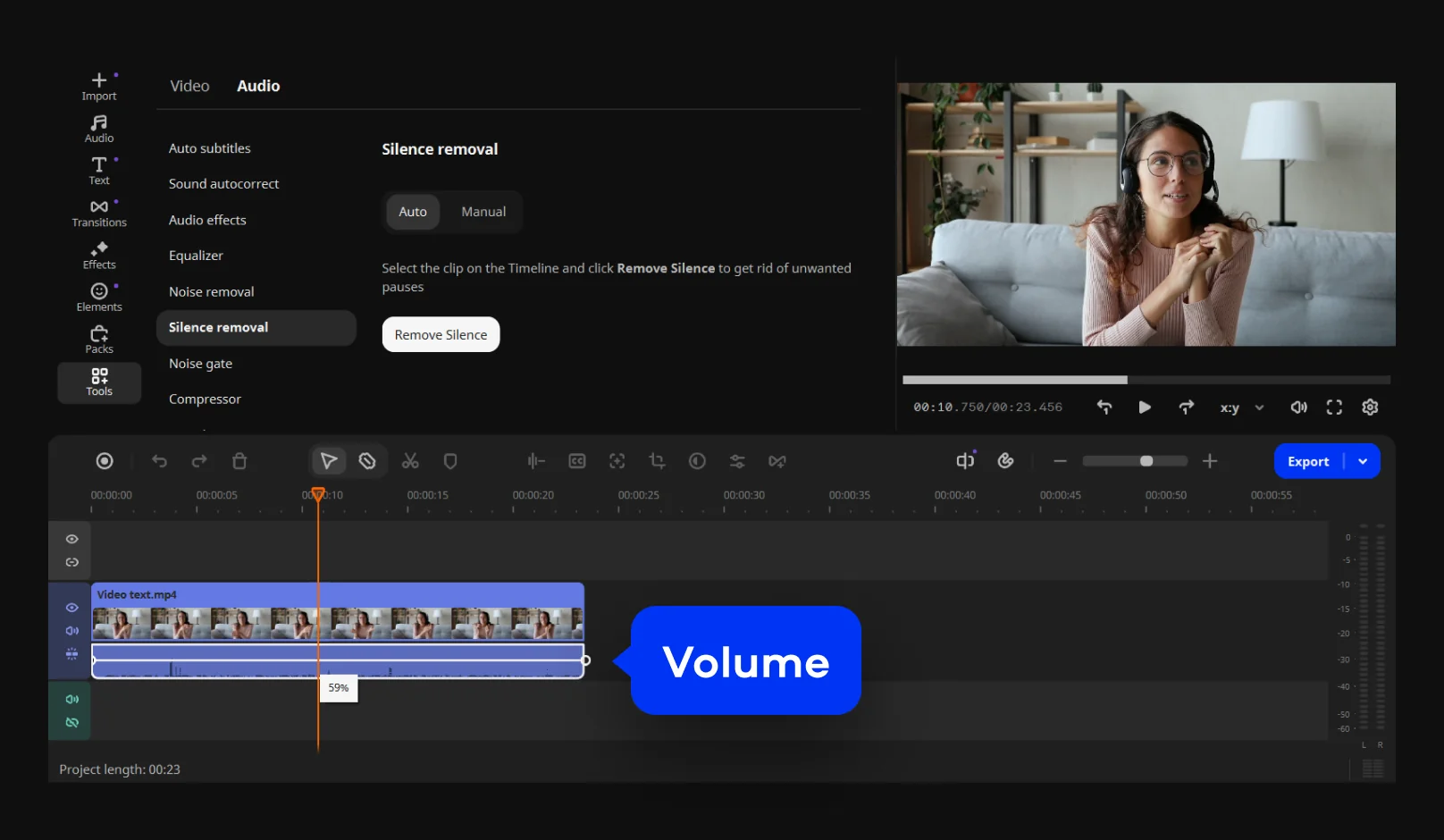
The current Movavi Video Editor window: the left sidebar, the Audio tools list with Silence removal selected, the preview player and the timeline with one clip. Movavi added the blue "Volume" label for its tutorial.
Version 27 added Movavi Templates: ready-made videos with editing, music, transitions and text built in, made of Blocks (short pre-edited segments such as intros, countdowns and animated collages). You can use a template as it is, swap in your own clips, or build a video Block by Block.
Features
Automatic subtitles with word-by-word highlighting
Movavi Video Editor transcribes speech into captions in one click, in 13 languages according to the order page. You can then fix mistakes, pick from 30+ subtitle styles, and turn on karaoke-style highlighting that lights up each word as it's spoken (added in version 26.15, May 2026). For anyone who posts talking-head videos, this alone saves hours.
Cleaner audio: noise removal, silence removal and an equalizer
Movavi's AI noise removal takes out hum, traffic and room noise, and Sound autocorrect tries to make a location recording sound like it was made in a studio. Silence removal cuts pauses automatically, or lets you set the volume threshold and minimum pause length yourself. The Audio tools also include an equalizer with presets, a noise gate, a compressor and reverb.
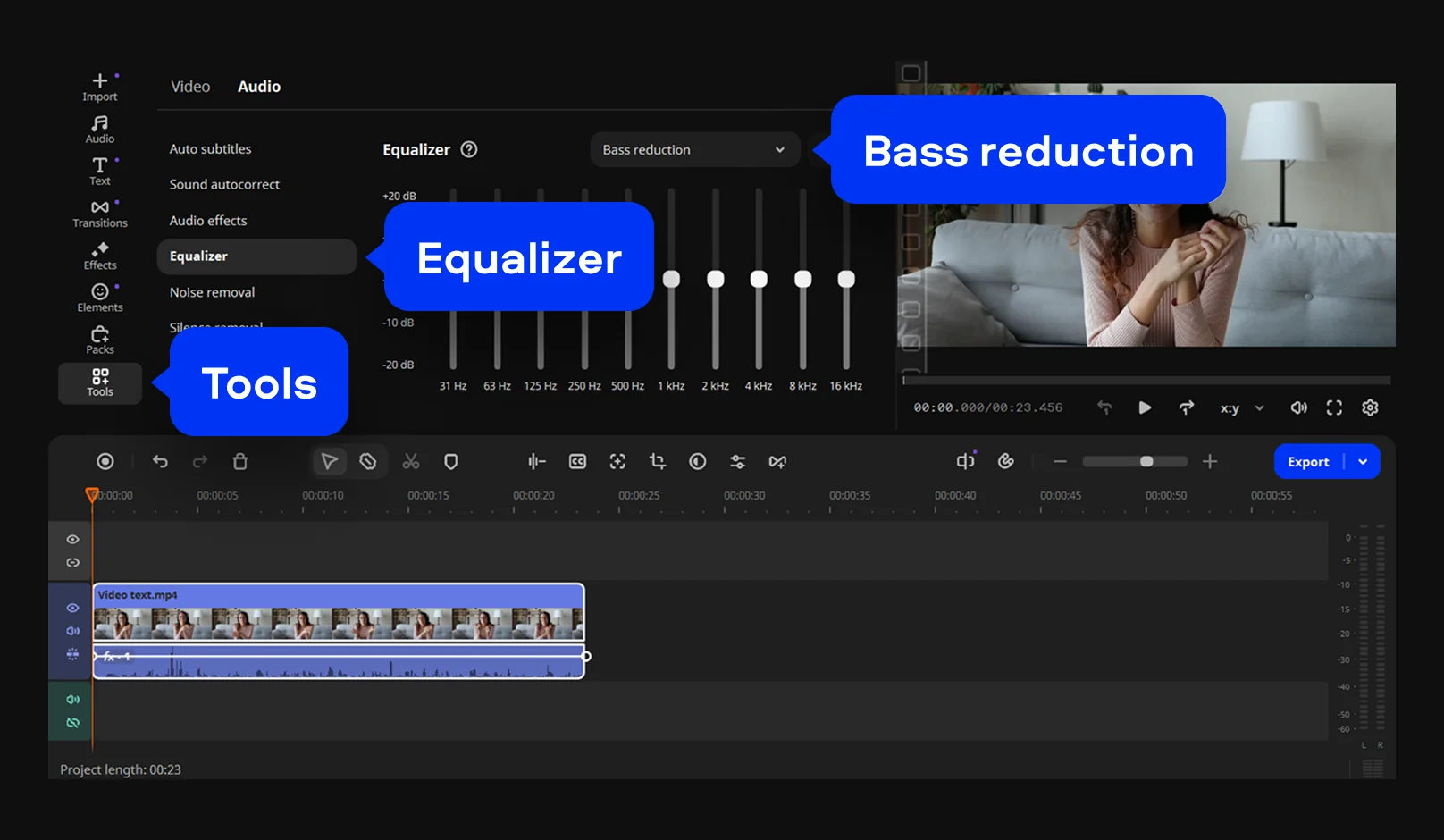
The 10-band equalizer under Tools > Audio, set to the Bass reduction preset. The blue labels were added by Movavi.
AI cropping, tracking and background removal
Movavi Video Editor's auto crop turns a horizontal clip into a vertical one for Reels, Shorts or TikTok and follows the speaker or product so it stays centered. Motion tracking makes a title, sticker or blur follow a moving subject without keyframes, and background removal cuts a person out of a scene without a green screen. A classic chroma key is there too, along with picture-in-picture, stabilization, slow motion and a video denoise tool for grainy low-light clips (added in March 2026).
Fast everyday editing
Movavi Video Editor covers the basics quickly: the Blade tool for cuts, cropping, rotation, color correction, filters and LUTs, speed changes, and trimming a clip before it even reaches the timeline. Fast effect copying copies effects, color tweaks and audio settings from one clip to others, and hovering over any effect previews it on your footage before you apply it.
Export to almost anything
Movavi Video Editor exports to MP4, AV1 MP4, AVI, MOV, MKV, WMV, WebM and more, with Draft, Good and High quality settings and an estimate of the file size. There are presets for phones and TVs, and you can upload straight to YouTube, Vimeo or TikTok. Music from Movavi's library can go on YouTube if you mention Movavi in the video's title, description or tags.
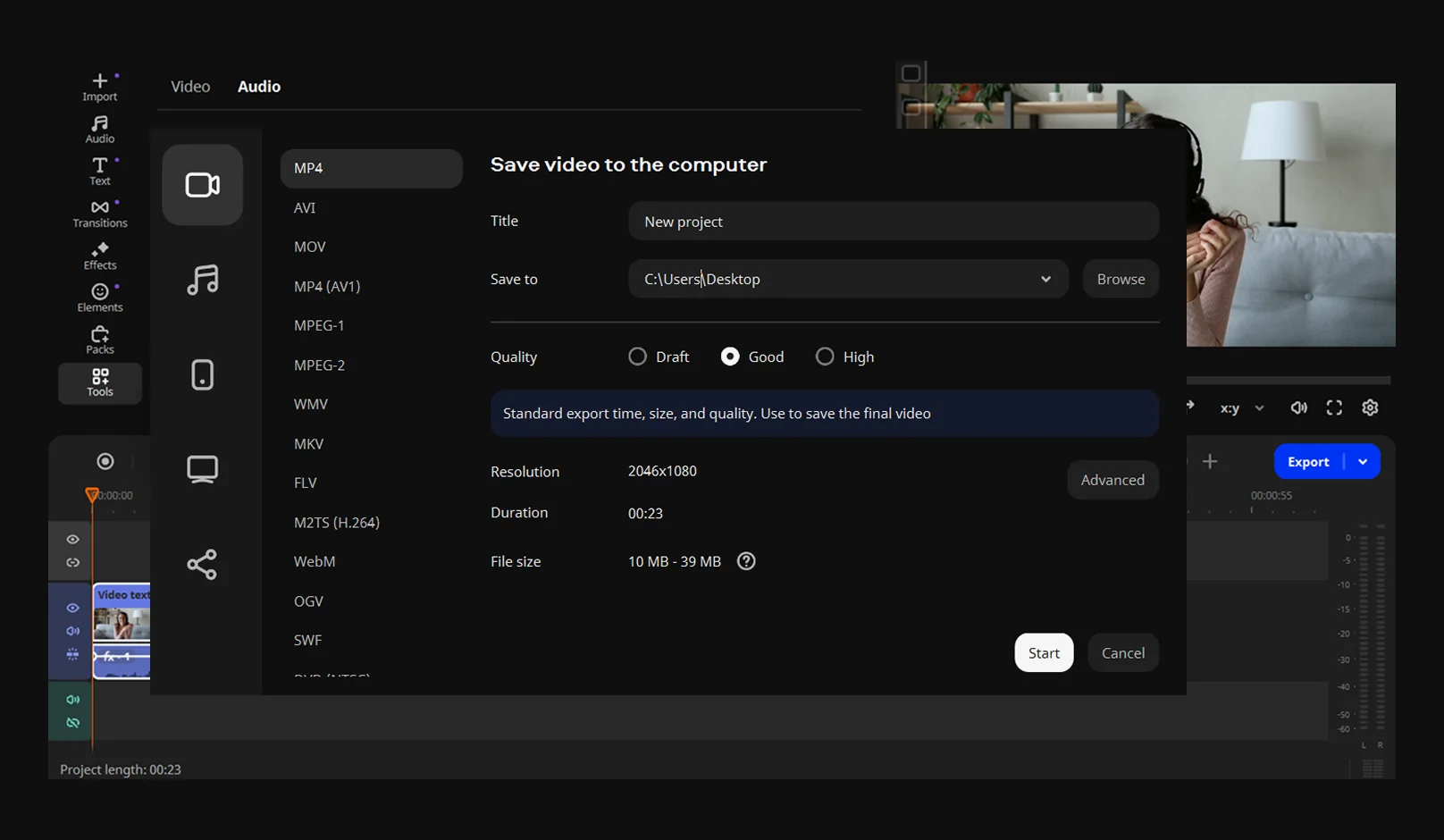
The Export window: pick a format on the left, then the folder, quality (Draft, Good or High), and see the resolution, duration and estimated file size.
Benefits
- A short learning curve. If you've used iMovie or any timeline editor, you can start cutting in Movavi within minutes.
- AI does the tedious jobs. Captions, pause trimming and noise cleanup are the slow parts of making talking videos, and Movavi makes them one-click tasks.
- Social formats are built in. Auto-crop to vertical, templates and direct uploads mean one recording can become a YouTube video and a Short without starting over.
- Frequent updates. The release notes show a new version roughly every two weeks through 2026.
Real-World Uses
- YouTube talking-head videos: record, remove silences and noise, add auto subtitles with word highlighting, export to YouTube.
- Reels and Shorts from long videos: auto-crop the best moments to 9:16 with the speaker kept in frame.
- Family movies: pick a family template, drop in birthday or holiday clips and photos, and get a finished video with synced music.
- Small business promos: start from a business template and change the text, colors and logo.
- Lessons and tutorials: combine a screen recording with a webcam clip using picture-in-picture and captions.
Who It's For, and Who Should Skip It
Movavi Video Editor suits beginners, YouTubers, social media creators, teachers and small businesses who want polished results fast and value the AI shortcuts more than deep control.
Skip it if you edit professionally or grade color seriously: DaVinci Resolve is free and far deeper, and Premiere Pro or Final Cut Pro are the industry tools. If you only trim a clip now and then, a free editor like Clipchamp or iMovie is enough. And if you dislike subscriptions and add-on stores, Movavi's pricing, with paid effects packs on top, may annoy you.
Usage Guide
- Install: run the downloader from Movavi. It's a small 2.7 MB file that downloads and installs the full program (about 400 MB of disk space; administrator rights needed).
- Start a project: click Add Files or drag your clips, photos and music into the import area.
- Build the timeline: drag clips onto the timeline in order, trim the ends, and split clips with the Blade tool.
- Polish: add titles, transitions and filters from the sidebar, then use Tools for subtitles, noise removal or auto-crop.
- Export: click Export, choose a format or device, set the quality and click Start. Save the project from the File menu as you go.

From Movavi's Quick Start guide: add files with the Add Files button or drag them onto the timeline. This image shows an earlier layout of the import area.
Tips
- Set the effects browser's "All items" filter to Free so you only see effects that won't watermark your video.
- AI motion tracking only works on clips on the main video track, not on extra video layers above it.
- If the app opens in the wrong language, change it in the settings. TechRadar's reviewer found it launched in Japanese.
- Check Help > About to see which version you have, and update before following a tutorial for a newer feature.
Where it falls short
- Common export problems: Movavi's own knowledge base has articles for audio out of sync after export, black bars, no sound, lower quality than the original and "an unknown error occurred" on export, plus slow preview playback and projects that won't open.
- Timeline habits: Digital Camera World's reviewer had to click the bar above the timeline to move the playhead, instead of clicking anywhere in the timeline as in Final Cut Pro.
- Not a pro tool: color grading, multi-cam and advanced audio mixing are well behind DaVinci Resolve or Premiere Pro.
- Upsells: the effects store, auto-renewing Effects trial and promotional emails come up again and again in user complaints.
What Users Say
Movavi has a huge user base and plenty of reviews. Editors at photo and tech magazines like it, while user reviews split between people who find it easy and people unhappy with the pricing model.
Digital Camera World: 4.25 out of 5 (July 2026)
George Cairns, a video editor since the late 1980s, tested Movavi Video Editor 2026 on a "day in the life" shoot. On noise removal: "One click on this tool's icon, and the background noise disappeared from Maryna's audio track, and her voice sounded much clearer too! This tool did a much better job than Final Cut Pro's Voice Isolation tool when applied to the same footage."
On subtitles: "It only took a few seconds for Movavi's AI-powered Auto subtitles tool to generate accurate subtitles from Maryna's interview and place them above the appropriate footage in the timeline."
His criticism was about pricing: "You can buy it outright, but the app won't be updated. The subscription models are relatively comparable with other apps, though you do have to pay extra to access additional effects."
TechRadar: 4.5 out of 5 for Movavi Video Suite (August 2025)
Steve Paris reviewed the suite that includes Video Editor: "It's unlikely to trouble the likes of Premiere Pro and Resolve any time soon, but it's superior to the likes of Apple iMovie or ClipChamp." He was "really impressed" by the editor: "It's clean, simple, well organised, and gives you access to all the tools you need quickly and efficiently."
He also found the AI Tracker gave "excellent results with the user barely doing anything to make it work." His complaint: on first launch "everything was in Japanese," and the app didn't default to his computer's language.
Digital Camera World: 4 out of 5 for version 24.6 (July 2024)
The earlier review praised the graphics as "slick and contemporary" and "far better than Adobe Premiere Elements graphical assets which look more like old 'clip art'." Its main workflow complaint was that "In Movavi Video Editor I had to apply the effects to each clip one by one which slowed down my workflow unnecessarily." Movavi has since added Fast effect copying, which addresses exactly that.
Trustpilot: 3.5 out of 5 from 22,132 reviews
Trustpilot covers all Movavi products. Recent reviews are split. The praise (excerpts):
- Graham Voss, 5 stars, "So easy to use" (September 2026): "So easy to use, especially for a pensioner like me. You can do so much like, brightening, cropping, adding titles, etc."
- Mark Anderson, 5 stars, "Big fan of Movavi" (September 2026): "I particularly like the effects and how easy it is to use."
- Cinzia Mossa, 5 stars, "Great technical assistance" (October 2026): "They solved my problem in just a few hours, a special mention goes to Bilal for being so helpful with my case."
And the complaints, mostly about paying:
- Alexis Gagnon, 1 star, "paywall bs" (October 2026): "had i known before working 8h+ on my video that i had to pay 60$ SIXTY DOLLARS to download it"
- Valentin Mladinescu, 3 stars (October 2026): "Dissapointed on the subscription model for payment."
- Felipe Borges, 1 star, "Bad purchasing experience, product bad." (October 2026): "I wanted to get a refund that same day and at that very hour, but according to their Terms of Service, that's not possible."
The pattern: reviewers who test the editing itself rate it highly, especially the AI audio and subtitle tools, and find it easier than Premiere Pro or Resolve. The complaints are about the business side: the free version's watermark and 60-second cap discovered too late, add-on effects that cost extra, subscriptions and refunds.
Comparisons
Movavi Video Editor vs DaVinci Resolve
DaVinci Resolve is free and far more powerful, with professional color grading and audio tools, but it takes real time to learn. Movavi costs money but gets a beginner to a finished, captioned video much faster.
Movavi Video Editor vs Adobe Premiere Pro
Premiere Pro is the professional standard at $22.99 a month. Movavi's yearly plan works out much cheaper and its interface is simpler, but it lacks Premiere's depth, plug-in ecosystem and team workflows.
Movavi Video Editor vs Clipchamp and iMovie
Clipchamp (bundled with Windows) and iMovie (free on Mac) handle simple trims and titles at no cost. Movavi adds multi-track editing, AI audio cleanup, motion tracking and a much bigger effects library, which matters once you publish regularly.
Editions and Pricing
| Plan | Price | Term | What it adds |
|---|
| Free version | $0 | Free download | Watermark, 60-second video or half-length audio exports |
| Video Editor | $19.95 ($14.95 first month) | 1 month | No watermark, no length cap, all AI tools, updates while subscribed |
| Video Editor Plus | $69.95 | 1 year | Everything above plus 3 effects packs (gradients, cinematic LUTs, VHS) |
| Video Editor Plus | $149.95 | Lifetime | One payment, same 3 effects packs |
| Video Suite Plus | $99.95 | 1 year | Video Editor plus Movavi Video Converter and Screen Recorder |
| Movavi Effects (add-on) | $49.95 | 1 month, after a 7-day trial | 10,000+ effects and 1,500 music tracks |
Prices are from Movavi's order page on October 17, 2026, in USD including VAT. Business licenses are sold separately.
FAQs
Is Movavi Video Editor free?
Movavi Video Editor has a free version, but it adds a watermark and limits exports to 60 seconds of video (or half the audio length). To export full videos without a watermark you need a paid plan.
Does the Movavi Video Editor lifetime license get updates?
The Movavi Video Editor Plus lifetime license is a one-time $149.95 payment. Movavi's order page promises updates "throughout the subscription period" for subscriptions, and Digital Camera World's 2026 review says the outright purchase "won't be updated," so expect to pay again for future major versions.
Does Movavi Video Editor work on Mac?
Yes, but as a separate product. Movavi sells Movavi Video Editor for Mac alongside the Windows version, and the order page has separate Mac buy buttons.
Can I get a refund from Movavi?
Movavi offers a 14-day money-back guarantee if you have technical or other problems that can't be solved. Check Movavi's refund policy for the conditions before you rely on it, since some Trustpilot reviewers were refused.
Will music from Movavi Video Editor get my YouTube video flagged?
Movavi says you can upload videos with its music to YouTube without restrictions if you mention Movavi in the video's title, description or tags (since version 26.8, February 2026).
Will Movavi Video Editor run on an older laptop?
Movavi Video Editor needs 64-bit Windows 10 or 11, a 1.5 GHz dual-core processor, 4 GB of RAM and Intel HD Graphics 2000 or better. That runs on most laptops from the last decade, but AI tools and 4K footage will be slow on low-end hardware.
How do I cancel a Movavi subscription?
Movavi subscriptions renew automatically. Movavi's site has a "Cancel subscription" page under Support, and payments go through 2Checkout, whose 24/7 support also handles billing questions. Cancel the Effects trial within 7 days if you don't want the $49.95 monthly charge.
System Requirements
- Windows 10 or 11, 64-bit, with current updates
- Intel, AMD or compatible dual-core processor, 1.5 GHz
- 4 GB RAM
- Intel HD Graphics 2000, NVIDIA GeForce 8 series, AMD Radeon R600 or better, with current drivers
- 1280 x 768 display, 32-bit color
- 400 MB free disk space to install, 600 MB for ongoing work
- Administrator rights to install
Conclusion
Movavi Video Editor is worth it for beginners and social media creators who want good-looking videos fast, and the $69.95 yearly plan is the sensible way to buy it. The one reason to choose it is the AI toolkit: automatic subtitles, noise and silence removal and auto-crop turn hours of cleanup into minutes, and reviewers who tested it found them genuinely good.
The main reason to hesitate is the business model. Effects are an extra subscription, the bundled Effects trial auto-renews at $49.95 a month, and the free version's 60-second, watermarked export catches people out. Test an export first, untick add-ons you don't want, and if you need professional depth, take the time to learn the free DaVinci Resolve instead.
Download Free TrialBuy Now