Short answer
For most people on a Windows PC, the best video editing software is Wondershare Filmora: $79.99 once for a perpetual license, with Camera Tracking, automatic subtitles, multicam and built-in screen and game recording. On a Mac, the same editor is sold as Wondershare Filmora for Mac, also $79.99 once.
Choose Movavi Video Editor ($69.95 a year) or Movavi Video Editor for Mac ($54.95 a year) if your computer is older or you want the simplest editor here: it needs only 4 GB of RAM against Filmora's 8 GB. And if you can't spend anything, VideoProc Vlogger is free, adds no watermark and runs on 1 GB of RAM.
At a glance
|
Price and license term (checked October 30, 2026) |
Runs on |
Free version |
Minimum RAM |
Wondershare Filmora
Best for Windows |
$79.99 one-time (Windows only), or $49.99 a year for Windows and Mac |
Windows 11, 10, 8.1, 7 (64-bit), Windows on ARM |
✓ Exports carry a watermark |
8 GB (16 GB for HD/4K) |
Movavi Video Editor
Easiest on Windows |
$69.95 a year, or $149.95 lifetime |
Windows 10 and 11 (64-bit) |
✓ Watermark, video capped at 60 seconds |
4 GB |
Wondershare Filmora for Mac
Best for Mac |
$79.99 one-time (Mac only) |
macOS 10.15 to 26, Intel and Apple silicon |
✓ Exports carry a watermark |
8 GB (16 GB for HD/4K) |
Movavi Video Editor for Mac
Easiest on Mac |
$54.95 a year, or $119.95 lifetime |
macOS 12 or later, Intel and Apple silicon |
✓ "Trial" watermark on videos |
4 GB |
VideoProc Vlogger
Best free editor |
Free |
Windows 7 to 11 (64-bit), Mac OS X 10.11 or later |
✓ No watermark, no time limit |
1 GB (8 GB for 4K/8K) |
How we picked
- We looked for editors that a beginner or a YouTuber can learn in an evening, that are still updated, and that run on both Windows and Mac (as one product or as a sister edition).
- We compared each one's editing tools (timeline, tracking, subtitles, audio cleanup, recording, export) from the vendors' feature pages, user guides and release notes.
- We read each price and license term on the order page or the vendor's store, and each free version's limits on the vendor's own pages.
- We checked each vendor's system requirements, because an editor that stutters on your laptop is the wrong editor however good its feature list.
- We gathered reviews from PCMag, TechRadar, Digital Camera World, Creative Bloq and Trustpilot, the good and the bad.
What we checked: Filmora 16.0 for Windows and Mac and Movavi Video Editor 27.1.0 in the vendors' release notes, VideoProc Vlogger's installer (file version 1.4.0.0, 151,092,536 bytes), Filmora's $79.99 price on the order page for both platforms, and Movavi's Windows and Mac prices on its store pages, all on October 30, 2026. We compared features, prices, free-version limits and requirements; we didn't edit and export a test project in each editor or time their renders.
Wondershare Filmora: best for most Windows users
- Price: $79.99 one-time at checkout (perpetual, Windows only, updates within Filmora 16, 1,000 AI credits granted once). Subscriptions covering Windows and Mac: $49.99 or $59.99 a year.
- Runs on: 64-bit Windows 11, 10, 8.1 and 7, and natively on Windows 11 and 10 on ARM
- Best for: YouTubers, gamers, teachers and small businesses who want room to grow and would rather pay once
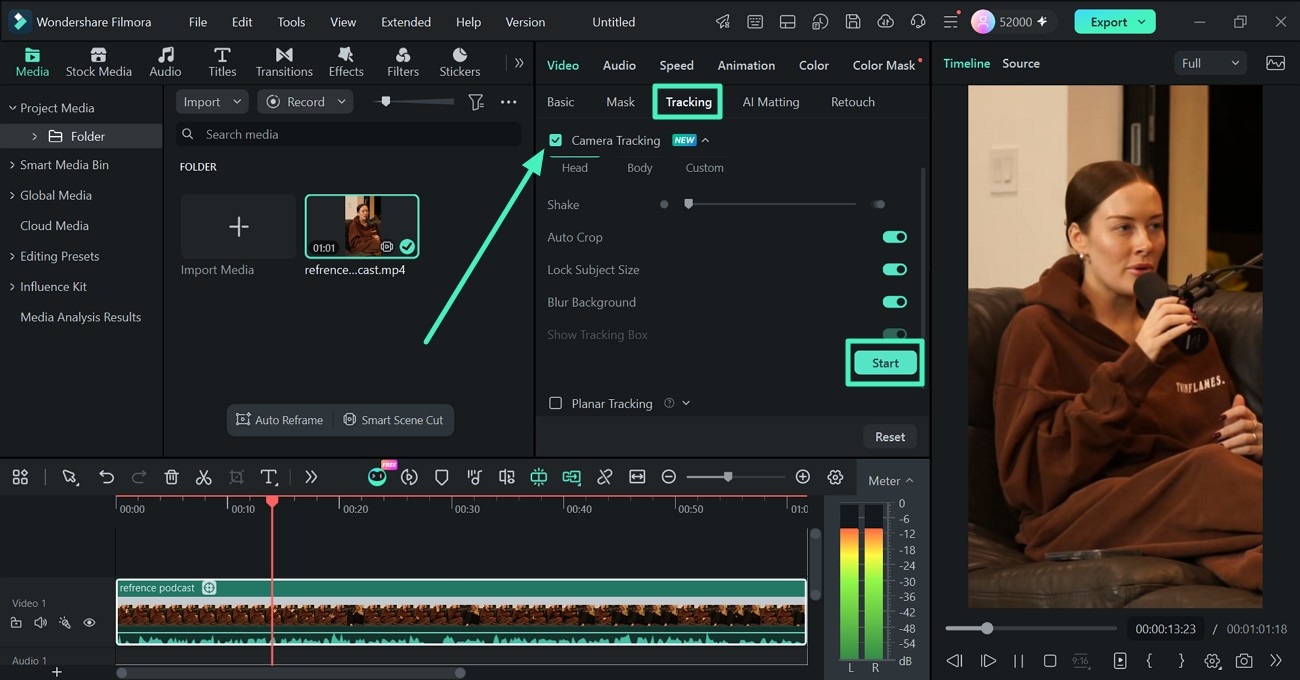
Filmora for Windows with a podcast clip loaded: the Media panel (left), the Video > Tracking tab with Camera Tracking switched on (center), the Player (right) and the timeline with an audio meter (bottom).
Wondershare Filmora is the most complete editor in this roundup that a beginner can still learn quickly. Beyond the usual cut, trim, titles and transitions, it has keyframes with motion blur, speed curves, multicam editing, compound clips and track mattes. Version 16 added Camera Tracking, which follows a head or body and reframes a landscape shot into a vertical clip for Shorts or Reels, plus color masks that correct only part of the frame.
Filmora also saves you buying a second program. Multi-Source Recording captures the screen, webcam, microphone and system audio in one take, Game Recording finds your game window automatically, and speech-to-text puts subtitles on their own track, with Dynamic Captions that highlight words as they're spoken. Silence detection and auto ducking handle the audio chores.
The catches are licensing and hardware. The $79.99 perpetual license stays on Windows and on Filmora 16, its AI credits don't refill, and Filmora asks for 8 GB of RAM and a graphics card with 2 GB of video memory at minimum.
What we like
- Pay once: $79.99 for the version you buy
- Camera Tracking, multicam, masks and track mattes
- Screen, game and webcam recording built in
- Auto subtitles on their own track
Watch out for
- The perpetual license won't move to a Mac
- Filmora 17 will be a paid upgrade
- 8 GB RAM minimum, 16 GB for HD and 4K
- Premium effects and AI credits cost extra
What reviewers say about Filmora
PCMag (Michael Muchmore, July 31, 2026) rated Filmora 4.0 out of 5 after testing it on a Windows PC: "Wondershare's Filmora video editing software offers a wealth of AI tools, fast rendering speeds, and a clear user experience for a reasonable one-time or annual rate." Its cons: "Some AI features are hard to find" and "Lacks DVD authoring and VR capabilities".
On Trustpilot (4.1 out of 5 from 15,718 reviews on October 29, 2026), Jim Wilde (4 stars, April 2026) called it "Quite simply, one of the best products of its type. Easy to use, with plenty of functionality."
The complaints are about big projects and licensing. Karol Lang (2 stars, October 2026): "This program can't handle complex projects longer than 10 minutes." Matthew Parker (1 star, March 2026): "I then changed over to a Mac computer and they wouldn't let me licence the product on the Mac."
Download Filmora Free TrialBuy Wondershare Filmora
Movavi Video Editor: easiest on Windows, and kind to older PCs
- Price: $69.95 a year (Movavi's bestseller), $19.95 a month, or $149.95 for a lifetime license, with a 14-day money-back guarantee
- Runs on: 64-bit Windows 10 and 11, on a dual-core 1.5 GHz CPU with 4 GB of RAM and Intel HD Graphics 2000 or better
- Best for: first-time editors, older laptops, and anyone who wants captions and clean audio with the fewest clicks
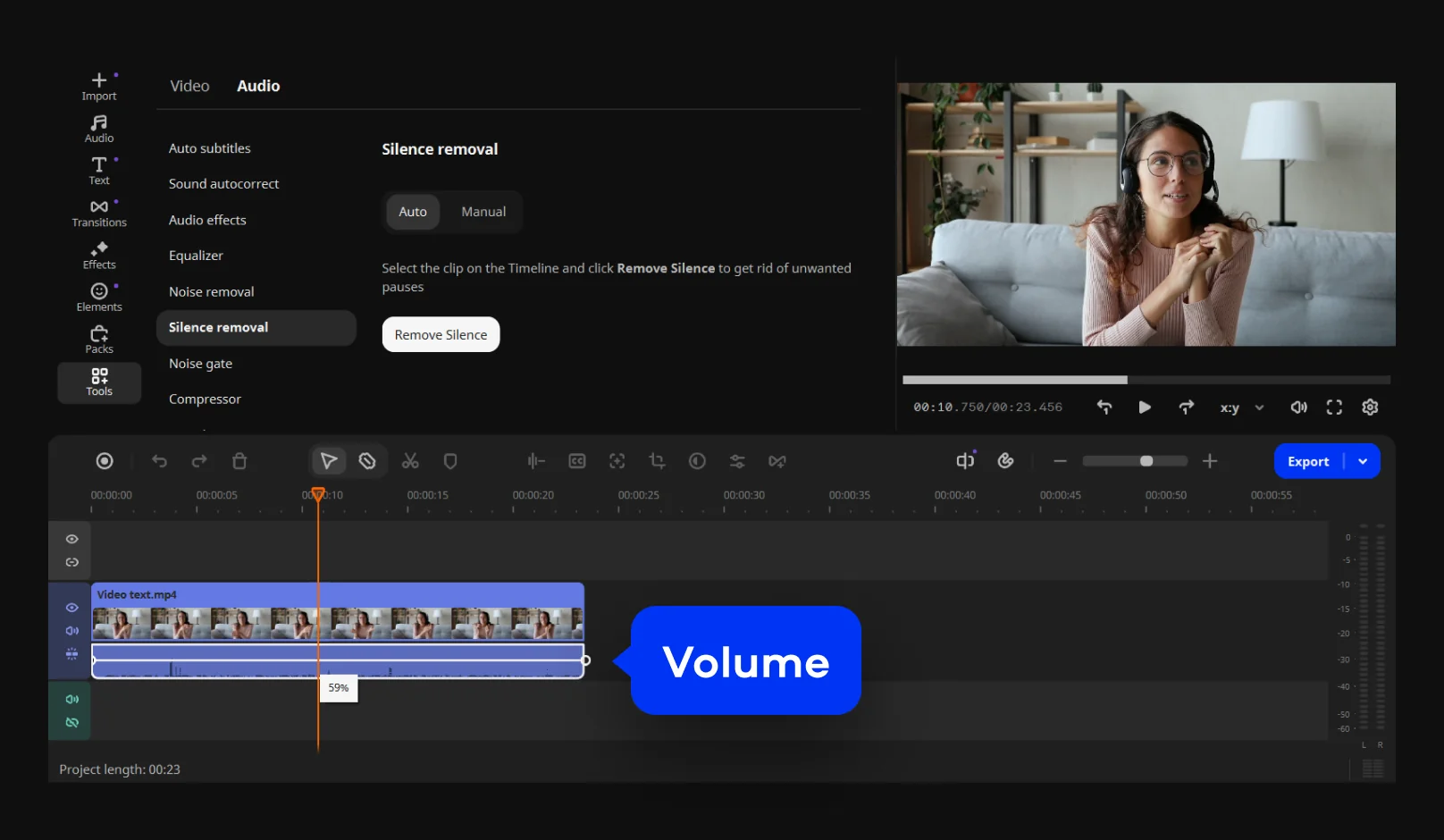
The current Movavi Video Editor window: the left sidebar, the Audio tools list with Silence removal selected, the preview player and the timeline with one clip. Movavi added the blue "Volume" label for its tutorial.
Movavi Video Editor is the simplest editor in this roundup, and the one most likely to run smoothly on a modest PC: its minimum is 4 GB of RAM, half of Filmora's. Its strength is one-click fixes. Automatic subtitles in 13 languages, noise reduction, one-click silence removal and background removal each take a single click, and motion tracking, chroma key, stabilization and screen recording are included. Version 27 added templates built from editable Blocks, and fast effect copying applies one clip's look and audio settings to another.
Where Movavi trails Filmora is depth: Movavi's feature list has no equivalent of Filmora's multicam editing, color masks or track mattes. Its pricing also leans on subscriptions: the lifetime license costs $149.95, almost twice Filmora's one-time price, and Digital Camera World notes the outright purchase "won't be updated."
What we like
- Very easy to learn
- Runs on 4 GB of RAM
- One-click subtitles, noise and silence removal
- 14-day money-back guarantee
Watch out for
- Free version caps video at 60 seconds
- Lifetime license costs $149.95
- Extra effects packs cost more
- Fewer advanced tools than Filmora
What reviewers say about Movavi Video Editor
Digital Camera World (George Cairns, July 2026, 4.25 out of 5) on noise removal: "One click on this tool's icon, and the background noise disappeared from Maryna's audio track, and her voice sounded much clearer too! This tool did a much better job than Final Cut Pro's Voice Isolation tool when applied to the same footage."
TechRadar (Steve Paris, August 2025, 4.5 out of 5 for Movavi Video Suite): "It's unlikely to trouble the likes of Premiere Pro and Resolve any time soon, but it's superior to the likes of Apple iMovie or ClipChamp."
On Trustpilot (3.5 out of 5 from 22,132 reviews), Graham Voss (5 stars, September 2026) wrote: "So easy to use, especially for a pensioner like me." The complaints are about paying late: Alexis Gagnon (1 star, October 2026): "had i known before working 8h+ on my video that i had to pay 60$ SIXTY DOLLARS to download it".
Download Movavi Free TrialBuy Movavi Video Editor
Wondershare Filmora for Mac: best for most Mac users
- Price: $79.99 one-time at checkout (perpetual, Mac only, 1,000 AI credits granted once)
- Runs on: macOS 10.15 Catalina to macOS 26 Tahoe, on Intel and Apple silicon Macs, with 8 GB of RAM (16 GB for HD and 4K)
- Best for: Mac users who've outgrown iMovie but don't want Final Cut Pro's learning curve or price
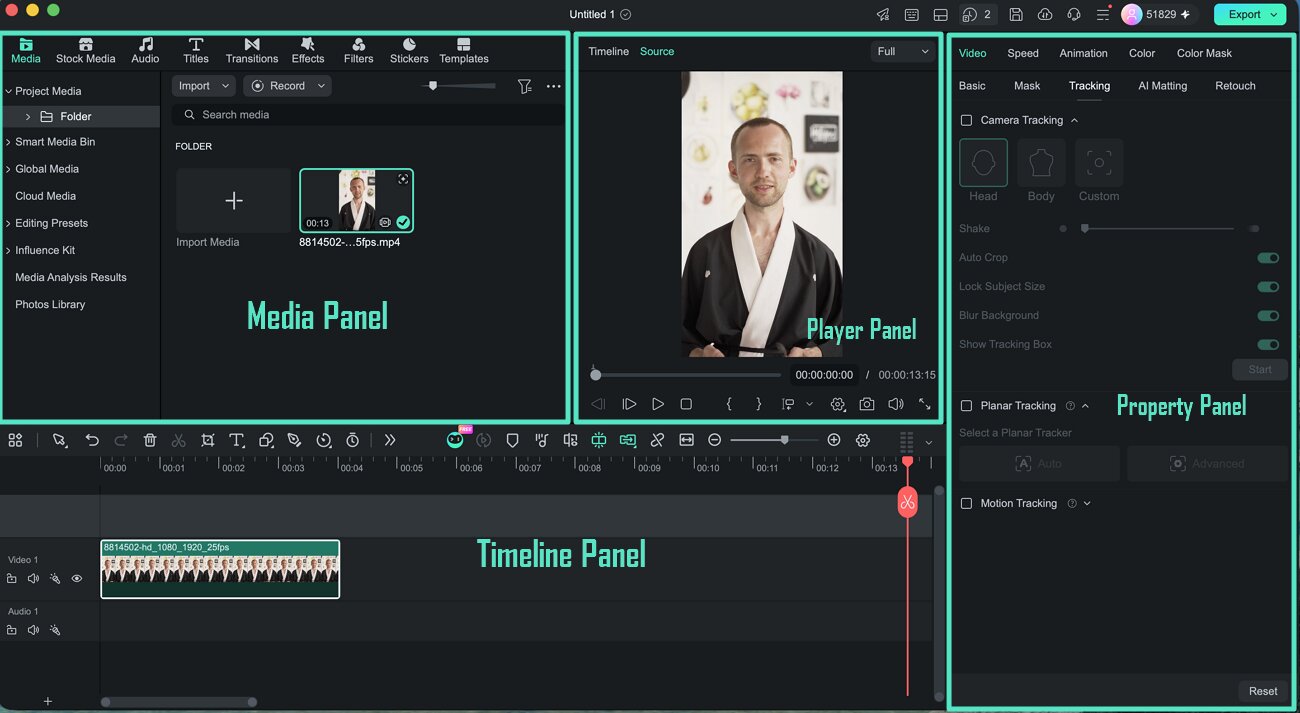
Filmora for Mac's main window: the Media panel (top left), the Player (center), the Property panel with its Tracking tab open (right) and the Timeline (bottom).
Wondershare Filmora for Mac has the same toolset as the Windows edition, built for macOS with Metal rendering, Apple silicon support, ProRes and HDR footage. It's the natural step up from iMovie: a 100-track timeline, keyframes, Camera Tracking, color masks, auto subtitles and screen recording, at $79.99 once instead of Final Cut Pro's $299.99.
The Mac reviews add one warning the Windows ones don't stress as much: performance on long projects. Several Mac users on Trustpilot report lag on longer, effect-heavy timelines, even with plenty of RAM. And the license is tied to the Mac, so a Windows-to-Mac switcher pays twice.
What we like
- Far more than iMovie for $79.99 once
- Native on Apple silicon, ProRes and HDR
- Supports macOS back to 10.15 Catalina
Watch out for
- Slowdowns reported on long Mac projects
- Mac-only license, major upgrades cost extra
- The order page still says "Filmora 14"
What Mac users say about Filmora
claudio terzoli (4 stars, June 2025, on Trustpilot): "Performance-wise, it runs smoothly on my Mac (Intel chip), and I like that it handles large files without too much lag."
Ganesh Kombe (2 stars, July 2025), on a Mac mini M4: "the software occasionally gets stuck or becomes unresponsive, which interrupts the workflow."
Download Filmora for Mac Free TrialBuy Filmora for Mac
Movavi Video Editor for Mac: the cheapest yearly plan on a Mac
- Price: $54.95 a year or $119.95 lifetime for one computer, on Movavi's Mac price page
- Runs on: macOS 12 Monterey or later, Intel or Apple M1 and later, 4 GB of RAM
- Best for: Mac users who make social or family videos and want templates and one-click tools rather than a big toolset

Adding a filter, from Movavi's Mac user guide: filter categories on the left, thumbnails in the middle, and a filter dragged onto a clip on the timeline below.
Movavi Video Editor for Mac is the lightest paid option for a Mac and the cheapest yearly plan in this roundup at $54.95. Version 27 brought Movavi Templates and Blocks, pre-edited segments you rearrange and fill with your own clips, alongside automatic subtitles, silence removal, auto-tracked cropping for vertical video, chroma key and more than 10,000 effects. Its lifetime license, $119.95, is also cheaper than the Windows edition's.
The trade-off is the same as on Windows: fewer advanced tools than Filmora, and a free version that's only for testing, since every export carries a "Trial" watermark. One long-time user on Trustpilot, Ronan Wilson (2 stars, October 2026), complained: "Many of the old 2021 effects have been stripped out leaving a very basic offering".
What we like
- $54.95 a year, the lowest yearly price here
- Templates and Blocks for fast social videos
- Runs on 4 GB of RAM
Watch out for
- Needs macOS 12 or later
- Fewer pro tools than Filmora for Mac
- Subscription and refund complaints on Trustpilot
Download Movavi for Mac Free TrialBuy Movavi Video Editor for Mac
VideoProc Vlogger: the best free video editor here
- Price: free, with no watermark and no time limit
- Runs on: 64-bit Windows 7 to 11 and Mac OS X 10.11 or later, native on Apple silicon, from 1 GB of RAM
- Best for: students, hobbyists and anyone on a very old or very cheap computer
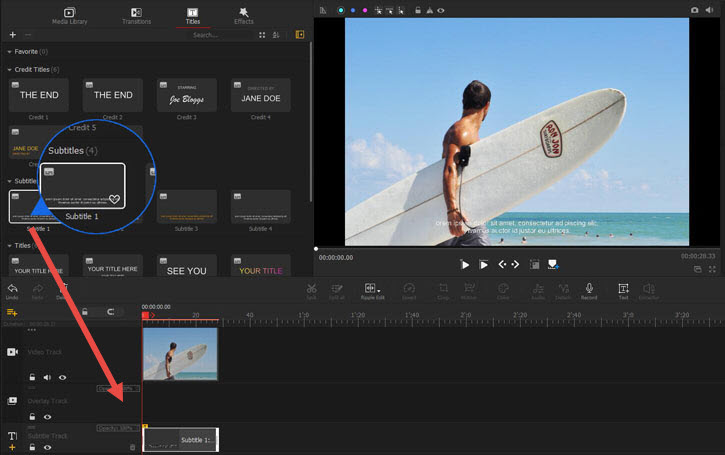
VideoProc Vlogger on Windows, from Digiarty's user guide: the Titles library with its Subtitles presets (top left), the preview (top right), and the timeline with video, overlay and subtitle tracks. The arrow and circle were added by Digiarty.
VideoProc Vlogger, from Digiarty, is a genuinely free editor rather than a trial: exports have no watermark and no length cap. It has a few tools that paid beginner editors charge for, including speed ramping on a visual curve, motion crop with automatic keyframes, camera-movement effects, 3D LUTs, green screen, lens correction, blend modes and a 10-band audio equalizer with beat analysis. It edits 4K, 8K and HDR footage with hardware acceleration, yet Digiarty lists just 1 GB of RAM as the minimum.
What you give up is the AI convenience the paid editors sell: there are no automatic subtitles from speech, no silence removal and no built-in screen recorder in its feature list. It's also older software: version 1.4 came out in March 2022, and while the installer was rebuilt in May 2026, the product page lists no feature updates since then.
What we like
- Free, with no watermark or time limit
- Speed ramping and motion keyframes
- Runs on very modest hardware
Watch out for
- No automatic subtitles or AI audio cleanup
- Feature updates stopped at version 1.4
- No collaboration or 3D tools
What reviewers say about VideoProc Vlogger
Creative Bloq (Paul Hatton, June 15, 2023, 4 out of 5): "Vlogger has taken all the main features of a more advanced video editor and packed them into a simple and intuitive interface that is completely free to use." Its reasons to buy were "Easy to use", "Powerful features" and "A tonne of presets"; its reasons to avoid were "No collaboration capability" and "Lacks 3D tools". Digiarty's own page shows 4.5 out of 5 from 631 reviews.
Download VideoProc Vlogger Free
Price compared: pay once or pay every year
Filmora is the cheapest way to own an editor outright; Movavi's Mac editor and Filmora's Basic plan are the cheapest yearly options. The two kinds of license aren't comparable dollar for dollar, so here they are separately.
One-time (perpetual or lifetime) license, one computer (USD)
Wondershare Filmora (Windows)$79.99
Wondershare Filmora for Mac$79.99
Movavi Video Editor for Mac (lifetime)$119.95
Movavi Video Editor (Windows, lifetime)$149.95
Filmora prices on the order page, Movavi prices on Movavi's store pages, checked October 30, 2026. VideoProc Vlogger is free.
Yearly subscription (USD per year)
Wondershare Filmora Basic (Windows and Mac)$49.99
Movavi Video Editor for Mac$54.95
Wondershare Filmora Advanced (Windows and Mac, with AI credits)$59.99
Movavi Video Editor (Windows)$69.95
Filmora subscription prices on Wondershare's store, Movavi prices on Movavi's store pages, checked October 30, 2026. Subscriptions renew automatically.
Minimum RAM each editor asks for (GB, lower is easier on old computers)
Movavi Video Editor (Windows and Mac)4 GB
Wondershare Filmora (Windows and Mac)8 GB
From each vendor's published system requirements, October 30, 2026. Filmora recommends 16 GB for HD and 4K, VideoProc Vlogger 8 GB for 4K and 8K.
Which should you choose?
| Your situation |
Pick |
Why |
| Windows PC with 8 GB of RAM or more, YouTube or gaming videos | Wondershare Filmora | Most tools, built-in recording, $79.99 once |
| Older Windows laptop, or your first editor | Movavi Video Editor | Runs on 4 GB of RAM, simplest one-click tools |
| Mac, outgrown iMovie | Wondershare Filmora for Mac | Deeper toolset, $79.99 once |
| Mac, short social videos, lowest yearly cost | Movavi Video Editor for Mac | $54.95 a year, templates and Blocks |
| You use both Windows and a Mac | Filmora Basic or Advanced subscription | One license covers both, from $49.99 a year |
| No budget at all | VideoProc Vlogger | Free, no watermark, speed ramps and keyframes |
Who should skip each one: skip Filmora if your PC or Mac has less than 8 GB of RAM or you regularly edit long, effect-heavy projects. Skip Movavi Video Editor (either edition) if you want multicam, masks or the cheapest way to own an editor outright. Skip VideoProc Vlogger if you need automatic subtitles or AI audio cleanup, because it has neither. And if you edit films or client work for a living, none of these replace Premiere Pro, Final Cut Pro or DaVinci Resolve.
What commonly goes wrong
- Finding the free version's limit after the work is done. Filmora and Movavi watermark every export from the free version, and Movavi's Windows free version stops video at 60 seconds. Movavi's Trustpilot complaints are full of people who learned this after hours of editing. Check the limit before you start a real project.
- Buying a one-time license for the wrong platform. Filmora's perpetual licenses are Windows-only or Mac-only and don't transfer, and Trustpilot reviewers who switched computers had to buy again. If a Mac might be in your future, a subscription is safer.
- Expecting "lifetime" to include future versions. Filmora's perpetual license covers updates within Filmora 16, and Digital Camera World says Movavi's outright purchase "won't be updated." Major upgrades cost extra or don't come at all.
- Underpowered hardware. The most common Filmora complaint is lag on long projects. Check the RAM and graphics requirements against your computer, and test the free version with your longest typical video.
- Add-ons you didn't plan for. Premium effects packs (both vendors) and Filmora's AI credits cost extra. The core editing tools don't need them.
FAQs
What is the best video editing software for beginners?
Movavi Video Editor is the easiest for a complete beginner: its tools are one click each, and it runs on 4 GB of RAM. Wondershare Filmora is almost as easy and gives you more room to grow, so it's the better pick if you plan to edit regularly.
Is there a good video editor without a watermark for free?
Yes. VideoProc Vlogger is free and exports without a watermark or time limit on Windows and Mac. The free versions of Filmora and Movavi Video Editor are trials: both add a watermark, and Movavi's Windows version also caps video at 60 seconds.
Can I buy video editing software once instead of subscribing?
Yes. Wondershare Filmora sells a $79.99 perpetual license for Windows or Mac, the cheapest one-time option here. Movavi sells lifetime licenses at $149.95 (Windows) and $119.95 (Mac). Both one-time licenses cover only one platform and don't include future major versions.
Which video editor works on both Windows and Mac with one license?
Wondershare Filmora's Basic ($49.99 a year) and Advanced ($59.99 a year) subscriptions cover both Windows and Mac. Filmora's perpetual licenses and Movavi's licenses are sold per platform.
What's the best video editor for an old or low-spec laptop?
VideoProc Vlogger asks for only 1 GB of RAM and is free. Among paid editors, Movavi Video Editor needs 4 GB of RAM and Intel HD Graphics 2000, far less than Wondershare Filmora's 8 GB of RAM and 2 GB of video memory.
Which editor adds subtitles automatically?
Wondershare Filmora and Movavi Video Editor both create subtitles from speech automatically. Movavi lists 13 languages, and Filmora puts captions on their own Subtitle Track with animated Dynamic Captions. VideoProc Vlogger has subtitle presets, but you type the text yourself.
Can I record my screen in these editors?
Wondershare Filmora and Movavi Video Editor both include screen recording. Filmora 16 can also record the screen, webcam, microphone and system audio in one take and detect a game window for Game Recording.
Can I get a refund if I don't like the editor?
Movavi offers a 14-day money-back guarantee for technical problems that can't be solved. Wondershare's 30-day refund covers cases like duplicate purchases or unfixable technical problems, not a change of mind. With either, test the free version on your own footage before you buy.
Conclusion
For most people, Wondershare Filmora is the best video editing software to buy: $79.99 once gets you Camera Tracking, auto subtitles, multicam and built-in screen and game recording on Windows, and the Mac edition is the same price. Make sure your computer has 8 GB of RAM or more and test the free version on a long project first.
If your computer is older or you want the gentlest start, Movavi Video Editor is easier and lighter, and its Mac edition has the cheapest yearly plan here. If you can't spend anything, VideoProc Vlogger is free without a watermark, as long as you can live without automatic subtitles.
Download Filmora Free TrialBuy Wondershare Filmora