Short answer: choose Wondershare Filmora (or Wondershare Filmora for Mac) if you want the deeper editor and would rather pay once: $79.99 buys a perpetual license with multicam, Camera Tracking, color masks and built-in screen and game recording. Choose Movavi Video Editor (or Movavi Video Editor for Mac) if your computer is older or you want the simplest path to a captioned video: it needs half the RAM (4 GB against 8 GB) and its templates and one-click AI tools are easier to learn.
At a glance
| Fact |
Wondershare Filmora |
Movavi Video Editor |
| Current version | 16.0 (September 2026), Windows and Mac | 27.1.0 (October 12, 2026), Windows and Mac |
| One-time license, Windows | $79.99 perpetual (updates within Filmora 16) | $149.95 lifetime (Video Editor Plus) |
| One-time license, Mac | $79.99 perpetual | $119.95 lifetime, one computer |
| Yearly plan | $49.99 a year Basic or $59.99 a year Advanced, each covering Windows and Mac | $69.95 a year on Windows (Video Editor Plus), $54.95 a year on Mac |
| Free version | Full editor, watermark on export | Watermark, Windows video exports capped at 60 seconds |
| Minimum RAM | 8 GB (16 GB for HD and 4K) | 4 GB |
| Oldest system | Windows 7 (64-bit), macOS 10.15 | Windows 10 (64-bit), macOS 12 |
| Auto subtitles | ✓ with a Subtitle Track and Dynamic Captions | ✓ 13 languages, word-by-word highlighting |
| Multicam editing | ✓ | ✗ |
| Ready-made video templates | ✓ | ✓ Templates built from Blocks |
| Paid extras | AI credits; Creative Assets add-on | Movavi Effects add-on, $49.95 a month after a 7-day trial |
| Refund | 30 days, duplicate purchase or unfixable technical problem only | 14 days, for technical or other problems that can't be solved |
| Trustpilot | 4.1 out of 5, 15,718 reviews | 3.5 out of 5, 22,138 reviews (all Movavi products) |
How we picked and what we checked
- We compared the editions people actually buy: Filmora's perpetual license and yearly plans against Movavi's yearly and lifetime licenses, on Windows and on Mac.
- We read each vendor's current release notes, tech specs, plan pages and refund terms, and matched every price to its license term and platform.
- We collected reviews from PCMag, TechRadar, Digital Camera World and Trustpilot, keeping the complaints next to the praise.
- We used each vendor's own user-guide screenshots of the current versions.
What we checked: Filmora's checkout price for Windows ($79.99 one-time) and for Mac ($79.99, no discount), Wondershare's Windows plan page and release notes (Filmora 16.0), Movavi's Windows order page ($69.95 a year, $149.95 lifetime) and Mac price page ($54.95 a year, $119.95 lifetime), and Movavi's product page showing version 27.1.0, all on October 30, 2026. We compared features, prices, requirements and licensing; we didn't edit and export the same test project in both editors, so this article has no speed test.
Wondershare Filmora (Windows and Mac)
Wondershare Filmora and Wondershare Filmora for Mac, version 16.0
Price: $79.99 one-time per platform (perpetual), or $49.99 / $59.99 a year for both platforms
Runs on: Windows 11, 10, 8.1 and 7 (64-bit) and Windows on ARM; macOS 10.15 or later on Intel and Apple silicon
Best for: YouTubers, gamers and small businesses who want room to grow and would rather pay once
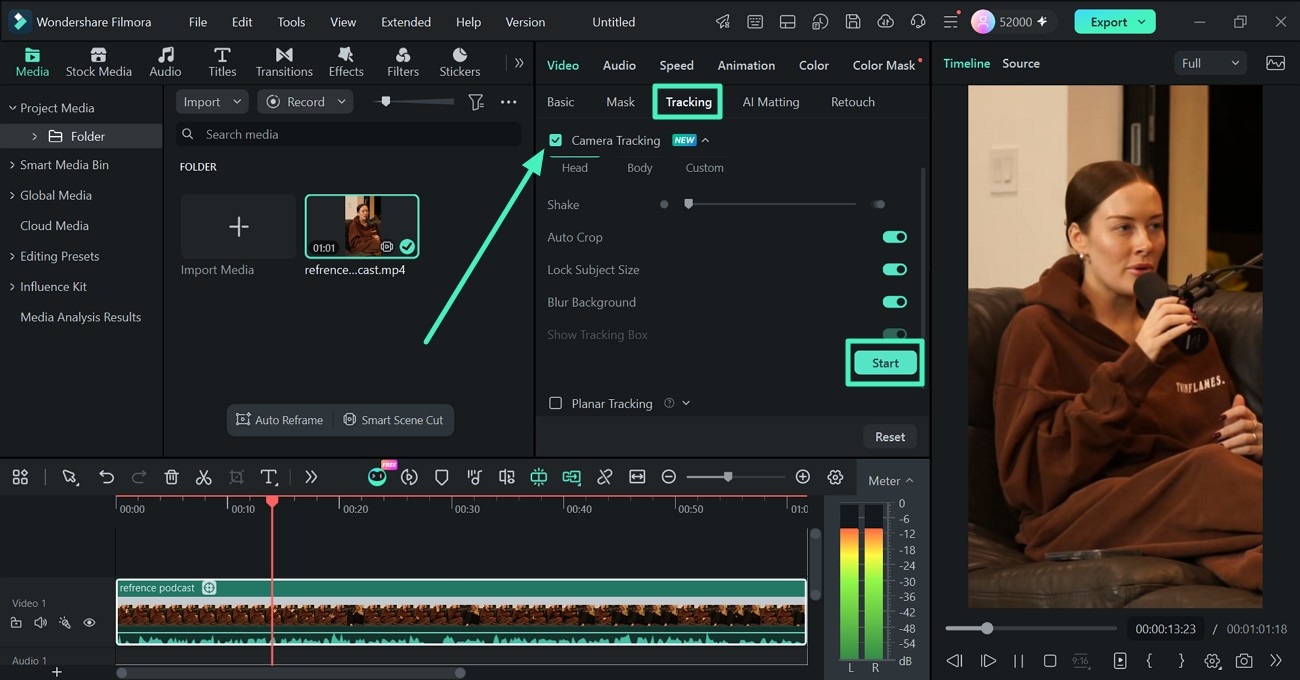
Filmora for Windows with a podcast clip loaded: the Media panel (left), the Video > Tracking tab with Camera Tracking switched on (center), the Player (right) and the timeline with an audio meter (bottom).
Wondershare Filmora is the deeper of the two editors. Beyond cutting, titles and transitions, Filmora gives you keyframes with motion blur, speed curves, multicam editing, compound clips, Track Matte, planar tracking and, new in version 16, Camera Tracking, which follows a head or body and reframes a wide shot into a vertical one. Color goes from Auto Color to LUTs and a Color Mask that corrects only part of the frame. Filmora also records for you: Multi-Source Recording captures screen, camera, mic and system audio in one take, and Game Recording finds your game window on its own.
Where Filmora falls short is weight and extras. It wants 8 GB of RAM and a GPU with 2 GB of video memory at minimum, and 16 GB for HD and 4K. The AI tools run on credits (the perpetual license includes 1,000, once), and premium effects and stock sit in a separate Creative Assets add-on, which PCMag puts at $19.99 a month or $79.99 a year.
What we like
- $79.99 one-time, the cheapest way to own either editor
- Multicam, Camera Tracking, color masks and track mattes
- Screen, webcam and game recording built in
- Runs on Windows 7 and on Windows on ARM laptops
Watch out for
- Needs 8 GB RAM, 16 GB for HD and 4K
- Perpetual license stays on one platform and one major version
- AI credits don't refill on the perpetual license
- Lag on long, effect-heavy projects is a common complaint
What reviewers say about Filmora
PCMag (Michael Muchmore, July 31, 2026, 4.0 out of 5): "Wondershare's Filmora video editing software offers a wealth of AI tools, fast rendering speeds, and a clear user experience for a reasonable one-time or annual rate." Its cons: "Some AI features are hard to find" and "Lacks DVD authoring and VR capabilities".
Jim Wilde on Trustpilot (4 stars, April 2026): "Quite simply, one of the best products of its type. Easy to use, with plenty of functionality."
Karol Lang on Trustpilot (2 stars, October 2026): "This program can't handle complex projects longer than 10 minutes."
Download Filmora for WindowsBuy Filmora for WindowsDownload Filmora for MacBuy Filmora for Mac
Movavi Video Editor (Windows and Mac)
Movavi Video Editor and Movavi Video Editor for Mac, version 27.1.0
Price: Windows $69.95 a year or $149.95 lifetime; Mac $54.95 a year or $119.95 lifetime
Runs on: Windows 10 and 11 (64-bit); macOS 12 or later on Intel and Apple silicon
Best for: beginners, talking-head YouTubers and anyone editing on a modest laptop
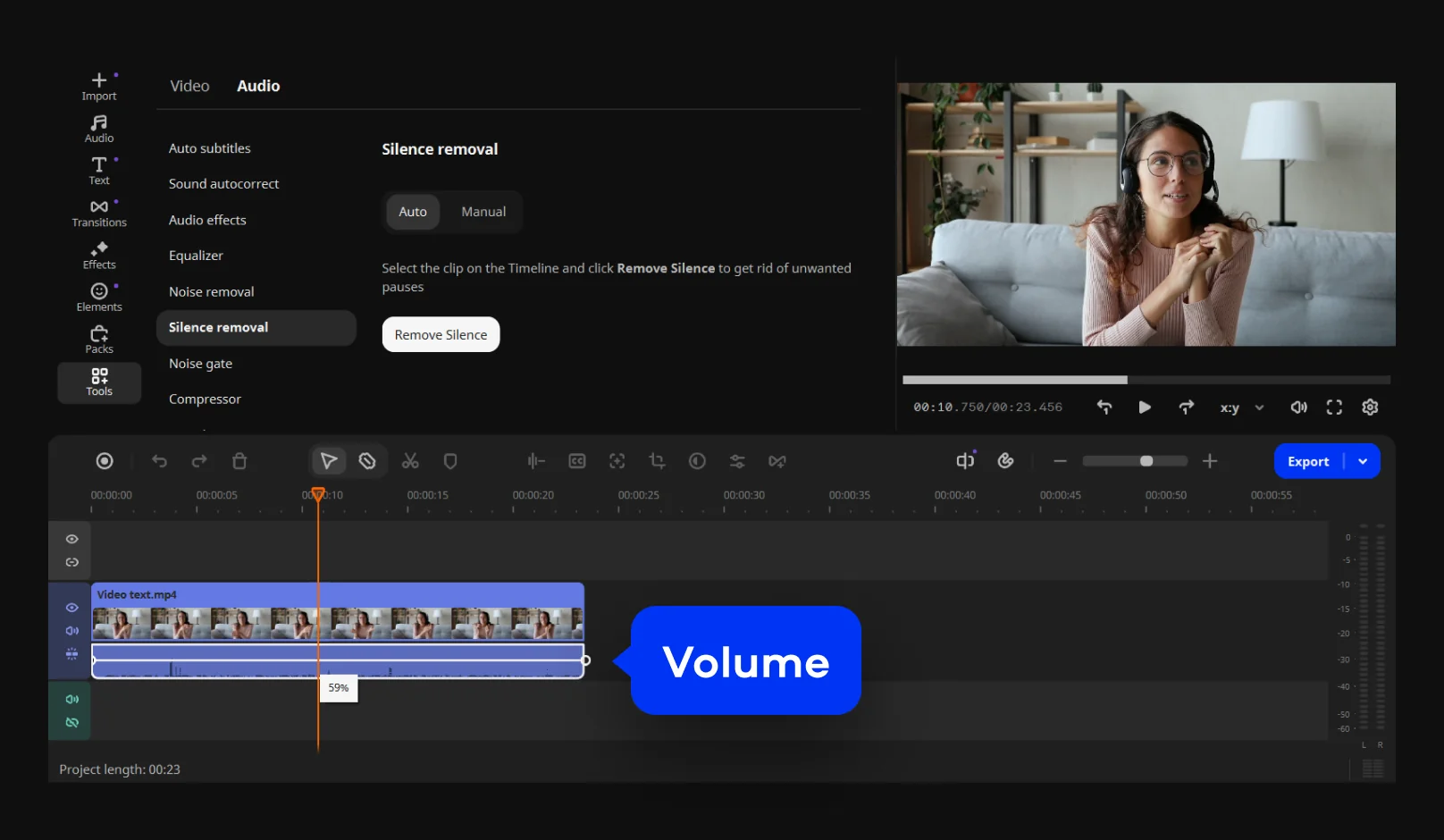
The current Movavi Video Editor window: the left sidebar, the Audio tools list with Silence removal selected, the preview player and the timeline with one clip. Movavi added the blue "Volume" label for its tutorial.
Movavi Video Editor is the easier and lighter of the two. It runs on 4 GB of RAM and Intel HD Graphics 2000, and its strength is one-click jobs: automatic subtitles in 13 languages with word-by-word highlighting, AI noise removal, silence removal, background removal without a green screen, motion tracking and an auto crop that turns a horizontal clip into a vertical one while keeping the speaker centered. Version 27 added Templates built from Blocks, pre-edited segments such as intros and countdowns you fill with your own clips.
Movavi's weak spots are depth and the store. There's no multicam, and color and audio tools stay well behind professional editors. The free version on Windows exports only 60 seconds of video with a watermark, the Movavi Effects add-on is a separate subscription, and each plan on the order page comes with a 7-day Effects trial that renews at $49.95 a month unless you untick it.

Adding a filter, from Movavi's Mac user guide: filter categories on the left, thumbnails in the middle, and a filter dragged onto a clip on the timeline below.
What we like
- Runs on 4 GB of RAM
- One-click subtitles, noise and silence removal
- Templates and Blocks for fast, finished videos
- Frequent updates, roughly every two weeks through 2026
Watch out for
- Lifetime license costs more than Filmora's ($149.95 on Windows)
- No multicam, lighter color and audio tools
- Auto-renewing Effects trial at checkout
- Free Windows version stops at 60 seconds of video
What reviewers say about Movavi
Digital Camera World (George Cairns, July 2026, 4.25 out of 5), on noise removal: "This tool did a much better job than Final Cut Pro's Voice Isolation tool when applied to the same footage." On pricing: "You can buy it outright, but the app won't be updated."
TechRadar (Steve Paris, August 2025, 4.5 out of 5 for Movavi Video Suite): "It's clean, simple, well organised, and gives you access to all the tools you need quickly and efficiently."
Alexis Gagnon on Trustpilot (1 star, October 2026): "had i known before working 8h+ on my video that i had to pay 60$ SIXTY DOLLARS to download it"
Download Movavi for WindowsBuy Movavi for WindowsDownload Movavi for MacBuy Movavi for Mac
Features: Filmora does more, Movavi does the basics faster
Filmora wins on features. Both editors cut, trim, add titles and transitions, track motion, remove green screens, write subtitles automatically and export straight to YouTube or TikTok. Filmora adds what Movavi doesn't have: multicam editing, compound clips, Track Matte, Keyframe Motion Blur, a Color Mask, 360° video reframing and XML import and export for moving a timeline to another editor. Filmora also records the screen, webcam, mic and system audio together and has a dedicated game recorder.
Movavi wins on ready-made shortcuts. Its Templates and Blocks turn a pile of clips into a finished video with music and transitions, its effects preview on your footage when you hover over them, and Fast effect copying copies a look from one clip to the rest.
Ease of use and hardware: Movavi is lighter
Movavi Video Editor is easier to learn and runs on weaker computers. Movavi lists 4 GB of RAM, a 1.5 GHz dual-core processor and 400 MB of disk to install. Filmora asks for 8 GB of RAM, an Intel 6th Gen or Ryzen 3 1300X processor, a GPU with 2 GB of video memory and 10 GB of free disk space. TechRadar called Movavi "clean, simple, well organised", while PCMag found Filmora's interface pleasant but noted that "Some AI features are hard to find".
Filmora is the one for older operating systems, though: it still supports 64-bit Windows 7 and 8.1 and macOS 10.15, where Movavi needs Windows 10 or macOS 12.
Minimum RAM (GB, lower is easier to run)
Wondershare Filmora (Windows and Mac)8 GB
Movavi Video Editor (Windows and Mac)4 GB
From each vendor's system requirements, checked on October 30, 2026. Filmora recommends 16 GB for HD and 4K editing.
AI tools and add-ons: Movavi includes more, Filmora generates more
Movavi's paid plans include its AI tools outright: subtitles, noise and silence removal, background removal, auto crop and motion tracking don't use credits. Filmora's AI tools run on credits. Its perpetual license includes 1,000 credits once, and the Advanced plan adds 1,000 every 30 days, reclaiming unused ones. In return, Filmora has more AI: media analysis that labels your clips, Smart Scene Cut, text-based editing, object removal and generative text-to-video and image-to-video.
Both sell effects separately. Filmora's Creative Assets add-on is $19.99 a month or $79.99 a year according to PCMag. Movavi Effects is $49.95 a month after a 7-day trial that the order page attaches to each plan, so untick it at checkout if you don't want it.
Price and licensing: Filmora is cheaper to own
To pay once, Filmora is clearly cheaper: $79.99 on Windows against Movavi's $149.95, and $79.99 on Mac against $119.95. Filmora's perpetual license includes updates within Filmora 16; Digital Camera World says Movavi's outright purchase "won't be updated". On yearly plans the picture is closer: Filmora Basic at $49.99 is the cheapest and covers Windows and Mac together, Movavi for Mac at $54.95 a year comes next, and Movavi for Windows at $69.95 a year is the most expensive yearly option.
One-time license price (USD)
Wondershare Filmora, Windows perpetual$79.99
Wondershare Filmora for Mac, perpetual$79.99
Movavi Video Editor for Mac, lifetime$119.95
Movavi Video Editor Plus, Windows lifetime$149.95
Filmora: price at checkout. Movavi: Movavi's order and Mac price pages. All checked on October 30, 2026.
Yearly plan price (USD per year)
Filmora Basic (Windows and Mac)$49.99
Movavi Video Editor for Mac, 1 year$54.95
Filmora Advanced (Windows and Mac, 1,000 AI credits a month)$59.99
Movavi Video Editor Plus, Windows, 1 year$69.95
From Wondershare's and Movavi's own plan pages on October 30, 2026. Subscriptions renew automatically.
One licensing catch applies to both: a one-time license covers one platform. Filmora's perpetual Windows license won't activate the Mac version, and Movavi's Windows and Mac editors are separate products. Only Filmora's Basic and Advanced subscriptions cover both.
Support and refunds: neither forgives a change of mind
Movavi's guarantee is shorter but a little broader; Filmora's is longer but narrow. Movavi offers a 14-day money-back guarantee "If you experience technical or other problems that cannot be solved". Wondershare's refund window is 30 days, but only for cases such as a duplicate purchase or a technical problem support can't fix, not a change of mind. On Trustpilot, Filmora scores 4.1 out of 5 from 15,718 reviews (October 29, 2026), and Movavi 3.5 out of 5 from 22,138 reviews across all its products (October 20, 2026), where Movavi replies to 98% of negative reviews. Complaints about both center on billing, renewals and refunds more than on the editors themselves.
Trustpilot score (out of 5)
Wondershare Filmora (15,718 reviews)4.1
Movavi, all products (22,138 reviews)3.5
Bars are out of 5. Filmora read on October 29, 2026, Movavi on October 20, 2026.
Which should you choose?
| Your situation |
Pick |
Why |
| You want to pay once | Filmora | $79.99 against $119.95 to $149.95, with updates within Filmora 16 |
| Your laptop has 4 GB of RAM | Movavi Video Editor | Filmora's minimum is 8 GB |
| Talking-head YouTube videos, first time editing | Movavi Video Editor | Subtitles, noise and silence removal are one click and use no credits |
| Podcasts or interviews filmed with two cameras | Filmora | Multicam editing; Movavi has none |
| Gaming or screen tutorials | Filmora | Game Recording and Multi-Source Recording built in |
| You use a Windows PC and a Mac | Filmora Basic or Advanced | The only plans here that cover both platforms |
| Family videos from templates | Movavi Video Editor | Templates and Blocks give a finished video fastest |
Our pick for most buyers is Wondershare Filmora, because it does more and costs less to own outright. Pick Movavi Video Editor instead if your computer has less than 8 GB of RAM or you want the gentlest start.
Who should skip Filmora: people on older laptops with 4 GB of RAM, anyone who might switch platforms on a perpetual license, and heavy users of generative AI who don't want to buy credits. Who should skip Movavi: anyone who needs multicam or serious color work, buyers who want a cheap one-time license, and people who'd rather not deal with an add-on store.
What commonly goes wrong
- Editing for hours in the free version. Movavi's free Windows version exports only 60 seconds with a watermark, and Trustpilot reviewers found out after finishing their videos. Test an export first in either editor.
- Buying the wrong platform. One-time licenses for both editors are tied to Windows or Mac. A Filmora buyer on Trustpilot moved to a Mac and "they wouldn't let me licence the product on the Mac."
- Missing a renewal or add-on trial. Movavi's Effects trial renews at $49.95 a month, and both vendors' subscriptions renew automatically.
- Running out of power on long projects. Lag on long, complex timelines is the most common Filmora complaint, and both vendors recommend more memory for HD and 4K. Try your longest typical project in the free version.
- Expecting a refund for a change of mind. Neither vendor's refund terms cover it.
FAQs
Is Filmora or Movavi better for beginners?
Movavi Video Editor is slightly easier for a first-time editor, thanks to its templates, hover previews and one-click AI tools. Filmora is also beginner-friendly, and Christy Darlington on Trustpilot called it "perfect for beginners", but it has more panels and tools to learn.
Which is cheaper, Filmora or Movavi?
Filmora is cheaper to own: its perpetual license is $79.99 on Windows or Mac, against $149.95 (Windows) and $119.95 (Mac) for Movavi's lifetime license. On yearly plans, Filmora Basic is $49.99 for both platforms, Movavi is $54.95 on Mac and $69.95 on Windows.
Will Filmora or Movavi run on a laptop with 4 GB of RAM?
Movavi Video Editor will: its minimum is 4 GB of RAM and Intel HD Graphics 2000. Filmora's minimum is 8 GB of RAM plus a graphics card with 2 GB of video memory, so a 4 GB laptop is below its requirements.
Do Filmora and Movavi add a watermark?
Both free versions add a watermark to exported videos. Movavi's free Windows version also limits video exports to 60 seconds. Any paid plan of either editor removes the watermark.
Can one license cover both Windows and Mac?
Only Filmora's subscriptions can: the Basic ($49.99 a year) and Advanced ($59.99 a year) plans cover Windows and Mac. Filmora's perpetual license and all of Movavi's licenses cover one platform.
Do Filmora's AI tools cost extra?
Filmora's AI tools use credits. The perpetual license comes with 1,000 credits once and the Advanced plan adds 1,000 every 30 days. Movavi's AI subtitles, noise removal, silence removal and auto crop are included in its paid plans without credits.
Which editor is better for YouTube Shorts and TikTok?
Both handle vertical video well. Filmora's Camera Tracking reframes a wide shot around a moving subject, and Movavi's auto crop follows the speaker while turning a clip vertical. Filmora adds built-in screen and game recording; Movavi adds templates for quick, finished clips.
Does a one-time license get the next major version?
No. Filmora's perpetual license includes updates within Filmora 16, and the next major version is a paid upgrade. Digital Camera World says Movavi's outright purchase "won't be updated", while its subscriptions include minor and major updates while they run.
Conclusion
Buy Wondershare Filmora if your computer has 8 GB of RAM or more. It's the more capable editor, with multicam, Camera Tracking, color masks and built-in recording, and at $79.99 one-time it costs less to own than Movavi's lifetime license on either platform. Its catches are the hardware it needs, credits for AI tools and a perpetual license tied to one platform and one major version.
Movavi Video Editor is the better choice for an older laptop or a first-time editor who mostly needs clean audio and captions, and its $54.95 Mac plan is a fair yearly price. Whichever you choose, export a full test video from the free version before you pay.
Download Filmora for WindowsBuy Filmora for WindowsDownload Filmora for MacBuy Filmora for Mac