Leawo DVD Ripper: Digitize a DVD Collection to MP4, MKV or MP3 on Windows
Leawo DVD Ripper is a Windows program that decrypts DVDs and converts them to MP4, MKV, AVI and 180+ other video and audio formats, for $29.95 a year or $39.95 for a lifetime license. It's the low-cost choice for people whose collection is DVDs, not Blu-rays: family films, old TV box sets and discs bought abroad that you'd like to keep on a hard drive or watch on a phone.
DVD players are disappearing from living rooms and most laptops no longer have a disc drive. Ripping your discs while you still have a drive that reads them keeps the films watchable after the hardware is gone.
Quick facts
- Current version: 13.0.1.6, a module of Leawo Prof. Media 13 (installer updated October 10, 2026)
- Developer: Leawo Software Co., Ltd.
- Runs on: Windows 7, 8, 8.1, 10 and 11. A Mac version is sold separately.
- Reads: DVD discs, DVD folders (VIDEO_TS) and DVD ISO files. Not Blu-ray.
- Removes: CSS protection and region codes 1 to 6
- Writes: MP4, MKV, AVI, WMV, MOV and 180+ formats or device presets, plus MP3, AAC and WAV audio
- Price: $29.95 per year (auto-renews) or $39.95 lifetime, 1 PC
- Languages: English, German, Japanese, Simplified Chinese, Russian, Hungarian, Armenian, Spanish, French, Portuguese and Dutch
What we checked: the installer Leawo's DVD Ripper download page serves (the shared Prof. Media 13 installer, file version 13.0.1.6, dated October 10, 2026) and the order page prices ($29.95 for 1 year with a 5-day money-back guarantee, $39.95 lifetime with 14 days), on October 31, 2026. We didn't rip a disc with it ourselves.
Before you buy
- Buy the lifetime license. At $39.95 it costs $10 more than one year of the subscription, and the subscription renews automatically.
- DVDs only. If you have even a few Blu-rays, Leawo Blu-ray Ripper's $99.95 lifetime license includes DVD Ripper as well, so you won't need both.
- Don't expect HD from a DVD. A DVD holds standard-definition video (720 x 480 or 720 x 576). Leawo itself marks 4K output from DVD as "not recommended": upscaling makes bigger files, not sharper pictures.
- Personal use only. Leawo's site says its software is for content "that you have lawfully obtained" and not for rental-disc copying or redistribution. Copyright rules differ by country.
Download Free TrialBuy Now
Overview
Leawo DVD Ripper installs as part of Leawo Prof. Media 13. The home screen shows every Prof. Media module as a tile, and only the ones you've paid for are registered. DVD Ripper opens into the Convert tab, where you load a disc, choose a format and convert.

The Prof. Media 13 home screen: one tile per module (Blu-ray Copy, Blu-ray Ripper, UHD Copy, UHD Ripper, UHD Creator, DVD Copy, DVD Ripper, DVD Creator), each marked Registered and Lifetime in this example.
Besides discs, it accepts DVD folders and ISO files, which helps if you ripped discs years ago into VIDEO_TS folders and now want smaller MP4 files.
Features
Rips protected DVDs from any region
Leawo DVD Ripper removes the CSS encryption on commercial DVDs and the region code (1 to 6), so a disc bought in Europe rips on an American PC. It recognizes discs from the major studios, such as Disney, Warner Bros., Universal and Paramount, and homemade discs.
Formats and device presets
Leawo DVD Ripper converts to common video formats (MP4, MKV, AVI, WMV, MOV), H.265 for smaller files, and audio-only MP3, AAC or WAV for concerts and musicals. The Device tab picks the right settings for an iPhone, Android phone, TV or game console, and you can set codec, bit rate, resolution, frame rate and aspect ratio by hand, including keeping them identical to the DVD.
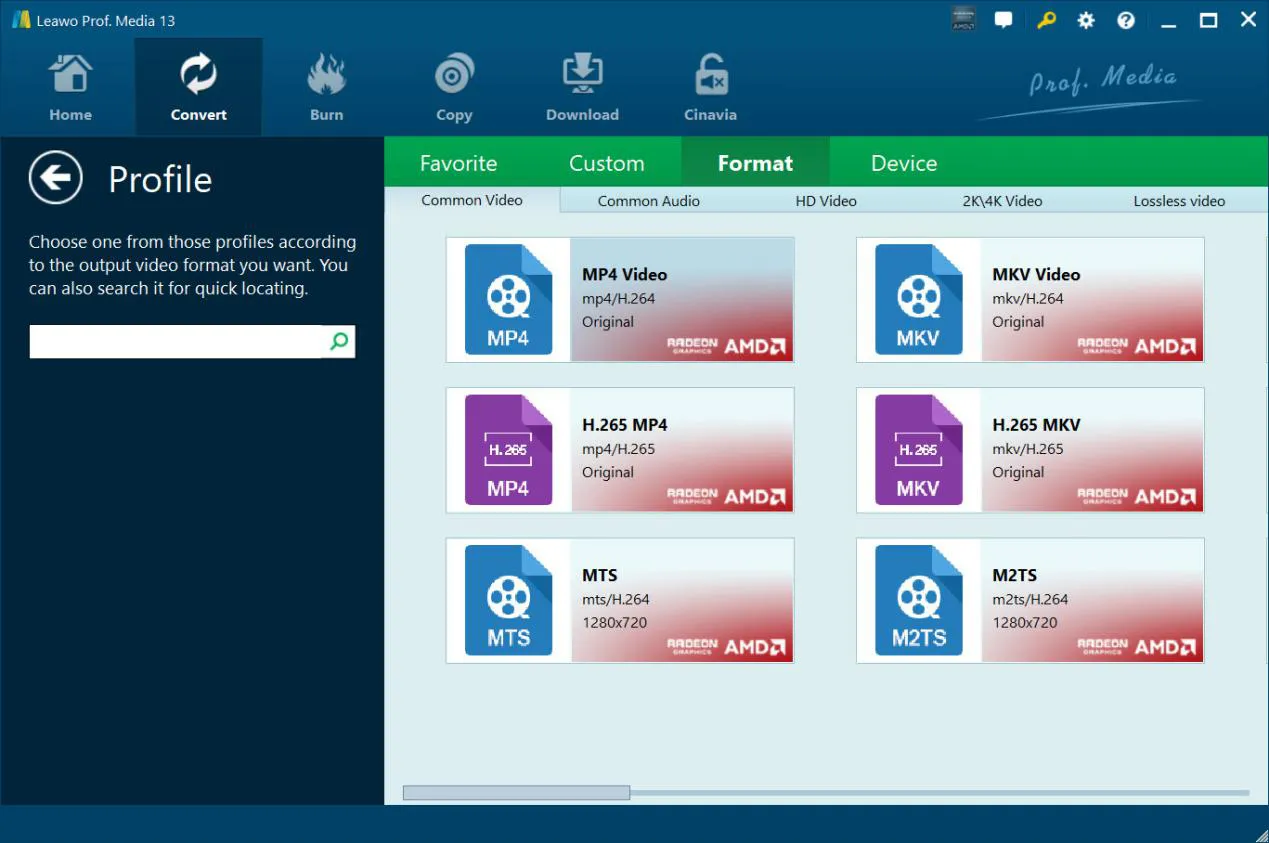
The Profile window's Format tab, with Common Video, Common Audio, HD Video, 2K/4K Video and Lossless Video groups along the top.
Choose subtitles, audio track and angle
Leawo DVD Ripper lets you pick the subtitle, audio track and, on multi-angle discs, the angle for each title before converting. The built-in region-free player previews titles and grabs screenshots.
Trim, merge and crop before converting
Leawo DVD Ripper's editor trims a title to the part you want, merges several titles into one file, crops black bars, adjusts brightness and contrast, adds a text or image watermark, and can apply a 3D effect.

The Trim tab of the shared Prof. Media editor, trimming a DVD title (Title_1(main).vob) with start time, end time and clip length fields; Watermark, Crop, Effect and 3D tabs sit on the left.
Batch ripping with graphics acceleration
Leawo DVD Ripper queues several discs or titles in one batch and can use NVIDIA CUDA, AMD and Intel Quick Sync acceleration. Leawo claims it rips "6 times faster" than other DVD rippers, a vendor figure we didn't test.
Benefits
- Low cost for a lifetime license. $39.95 once is less than many rivals charge for a year.
- Old discs get a second life. Files on a hard drive or NAS outlast scratched, aging discs and disappearing DVD drives.
- Smaller files. H.265 output keeps DVD quality at a fraction of the disc's size.
Real-World Uses
- A family archive: rip home-recorded DVDs of birthdays and weddings to MP4 before the discs degrade.
- A TV box set: use Custom Mode to rip each episode as its own file for Plex or Jellyfin.
- Music DVDs: extract a concert's audio to MP3 or AAC for the car.
- Old VIDEO_TS backups: convert folders you saved years ago into one MP4 per film.
Who It's For, and Who Should Skip It
Good fit: Windows users with a DVD-only collection who want a cheap, simple, preset-driven ripper, including discs from other regions.
Skip it if:
- You also own Blu-rays. Leawo Blu-ray Ripper's lifetime license includes DVD Ripper.
- You own 4K Ultra HD discs. That's Leawo UHD Ripper.
- You want a disc-to-disc copy. Leawo DVD Copy burns 1:1 backups to blank DVDs.
Usage Guide
- Install: download and run the Prof. Media installer from Leawo's DVD Ripper download page.
- Add the DVD: in the Convert tab, click Add UHD/Blu-ray/DVD and choose the disc, a folder or an ISO file.
- Pick titles: choose Full Movie, Main Movie or Custom Mode, then subtitles and audio for each title.
- Choose the output: click Output Profile, then Change, and pick a format or device.
- Convert: click Convert, set the output folder, and start.
Where it falls short
- Trial limits aren't spelled out on the DVD Ripper page. Leawo's Blu-ray Ripper trial converts only the first 5 minutes of each title, and buyers on Trustpilot have been caught out by limits like that, so check what the DVD Ripper trial does on your own disc before relying on it.
- Basic editing. The editor trims, crops and adds watermarks; it isn't a video editor.
- Short refund window on the yearly plan. 5 days, against 14 for the lifetime license.
- Damaged discs. No ripper can read a badly scratched disc; clean it first, and rip important discs early.
What Users Say
Trustpilot: DVD rippers
Leawo's Trustpilot page for leawo.org showed 4.4 out of 5 from 151 reviews on October 31, 2026, and the leawo.com page 4.3 from 158 reviews. Reviewers who ripped DVDs:
- Paul K (5 stars, October 2024, "What started out bad"): "I've already ripped almost all of my DVD collection in just a couple of days!"
- Mark Hollier (5 stars, February 2022): "I use the Prof Media for converting old DVDs to a digital format, and they do a perfect job at that."
- Robert (5 stars, August 2025): "I have used Leawo Prof. Media 13 for many years ripping DVDs and Blue-ray disks; it has worked flawlessly."
- Ron (5 stars, April 2021): "I found the ripper to be VERY effective and fast."
Trustpilot: the complaints
- Jason (1 star, January 2022), about Leawo's Blu-ray Copy trial: "But it only copies the first 5 minutes of video/audio."
- Dave (1 star, September 2023): "Leawo refused to refund my money and even disabled the product on my computer!"
From Leawo's own product page
Chuck Guilford (5 stars, January 2019, on Leawo's DVD Ripper review page): "This worked very well for me. I used it to copy a DVD to an MP4. The instructions were clear and easy to follow, and the resulting file was excellent. Highly recommended." Leawo's product page quotes the same words as a testimonial but credits them to "Jay Lykins", so read the product page's quotes as marketing rather than as separate customers.
The pattern: long-time users describe ripping whole DVD collections reliably and praise Leawo's support. The complaints are mostly about trial limits and refunds, not the rips themselves.
Comparisons
DVD Ripper vs Leawo Blu-ray Ripper
Leawo Blu-ray Ripper ($44.95 a year, $99.95 lifetime) reads Blu-rays and DVDs, and its lifetime license includes DVD Ripper. Buy DVD Ripper only if you're sure you'll never rip a Blu-ray; it saves $60 on the lifetime license.
DVD Ripper vs the DVD Pack bundle
Leawo's DVD Pack bundle ($99.94 lifetime) adds DVD Copy, DVD Creator, Video Converter and CleverGet Video Downloader. It's worth it only if you also want to burn DVDs or download online video.
Editions and Pricing
Leawo's order page showed these options on October 31, 2026 (one license for one PC):
| Plan | Price | Includes | Money-back window |
|---|
| DVD Ripper, 1 Year (auto-renews) | $29.95 | DVD Ripper | 5 days |
| DVD Ripper, Lifetime | $39.95 | DVD Ripper | 14 days |
| Blu-ray Ripper, Lifetime | $99.95 | Blu-ray Ripper, DVD Ripper, Blu-ray Recorder Ripper | 14 days |
| Prof. Media DVD Pack + CleverGet Video Downloader, Lifetime | $99.94 | DVD Ripper, DVD Copy, DVD Creator, Video Converter, CleverGet Video Downloader | 14 days |
FAQs
Can Leawo DVD Ripper rip Blu-ray discs?
No. Leawo DVD Ripper reads DVD discs, DVD folders and DVD ISO files only. For Blu-rays you need Leawo Blu-ray Ripper, whose lifetime license also includes DVD Ripper.
Can Leawo DVD Ripper convert a DVD to MP4?
Yes. MP4 is Leawo DVD Ripper's default output profile, and H.265 MP4 makes smaller files at the same quality.
Does Leawo DVD Ripper work with region 2 DVDs in the US?
Yes. Leawo DVD Ripper removes region codes 1 to 6, so discs from other regions rip on any PC with a DVD drive.
Can I rip only the main movie and skip the extras?
Yes. Leawo DVD Ripper's Main Movie mode loads just the feature film; Custom Mode lets you choose individual titles such as episodes.
Will ripping to 1080p or 4K make my DVDs look like Blu-ray?
No. A DVD holds standard-definition video, so Leawo DVD Ripper can upscale it but can't add detail; Leawo itself calls 4K output from DVD "not recommended". Keep the original resolution for the best size-to-quality balance.
Which languages does Leawo DVD Ripper's interface support?
Leawo DVD Ripper is available in 11 languages: English, German, Japanese, Simplified Chinese, Russian, Hungarian, Armenian, Spanish, French, Portuguese and Dutch.
System Requirements
- Windows: 7, 8, 8.1, 10 or 11
- Processor: 1 GHz Intel or AMD or faster
- Memory: 512 MB RAM, 1 GB or more recommended
- Graphics: NVIDIA GeForce GTX 260 or better for acceleration
- Disk: 5 GB free
- Other: a DVD drive and an internet connection
Conclusion
Leawo DVD Ripper is a good buy at $39.95 lifetime if your collection is DVDs only. It handles protected and foreign-region discs, folders and ISO files, offers presets for every common device, and runs on modest Windows PCs. Users who ripped whole collections with it report reliable results.
The one reason to pick something else is Blu-ray: if you own any, Leawo Blu-ray Ripper's lifetime license covers both disc types. Skip the yearly plan either way; the lifetime license costs only $10 more.
Download Free TrialBuy Now