HD Video Converter Factory Pro (Free WonderFox DVD Ripper Pro)
Overview
HD Video Converter Factory Pro is a Windows desktop program built around a simple idea: keep the most common video jobs in one place. Instead of using one tool to convert a file, another to shrink it, and yet another to capture or save a clip, this package groups those tasks into a single interface. The product description covers conversion, online video saving, compression, editing, and recording for HD, 4K, and 8K video. It also includes WonderFox DVD Ripper Pro as a free companion inside the package.
The current version covered here is 28.9, and the listed price is $69.95. The program is aimed at people who regularly deal with video files and want a practical workflow for preparing them for playback, storage, sharing, or further use. That could mean converting a large camera file into a more manageable format, compressing a video so it takes less space, saving an online clip for offline viewing, recording something happening on your screen, or ripping a DVD with the bundled companion tool.
What makes this software worth a look is its range. Many video tools focus on one narrow job. HD Video Converter Factory Pro tries to reduce the friction of moving between separate utilities. If your video work usually involves several small tasks rather than one specialized production step, that all-in-one approach can save time and keep your file management simpler.
Key Features
HD, 4K, and 8K Video Conversion
The core of HD Video Converter Factory Pro is video conversion. You can bring in video files and prepare them for a different use. The product description specifically mentions HD, 4K, and 8K video, which matters if you work with high-resolution footage and do not want to move it through a tool that only handles basic clips. Conversion is useful when a file is too large, when a device does not accept the original format, or when you simply need a more convenient version for everyday playback.
Device and Format Selection Grid
One of the most practical parts of the interface is the device format selection grid. Rather than forcing you to think only in technical terms, the program gives you a visual set of choices. You can pick a target based on the kind of device or output you need, then let the program handle the conversion direction. This is especially helpful if you know where the video is going but do not want to research the exact output details every time.
Online Video Saving
HD Video Converter Factory Pro also includes a function for saving online video to your computer. This is useful when you want a local copy for offline viewing, archiving, or later editing. Instead of keeping the video tied to a browser session, you can store it as a file on your own system. For people who collect reference clips, training material, or project footage from the web, this can make the workflow much more predictable.
Video Compression
Large video files create real problems: they fill up storage, take longer to move, and can be harder to share. The compression feature in HD Video Converter Factory Pro is designed to reduce file size so your videos are easier to manage. This is one of the most practical features for anyone dealing with frequent recordings, long clips, or high-resolution source files. If your main issue is not the format itself but the size of the file, compression is the tool you will probably use often.
Built-in Editing Support
The program also includes editing functions as part of the same workflow. That matters because many video tasks are not just about changing a file from one state to another. You may need to make a few adjustments before the final output. Having editing inside the same environment means you can prepare the video without jumping into a separate application for minor changes. This keeps the process more direct, especially for simple jobs where a full editor would be overkill.
Screen Recording
Another part of the package is screen recording. This lets you capture what is happening on your display, which is useful for demonstrations, tutorials, presentations, troubleshooting steps, or any situation where you need to preserve on-screen activity as a video file. Because recording sits alongside conversion and compression in the same program, you can capture a clip and then prepare it for use without switching tools.
Free WonderFox DVD Ripper Pro Included
The package also includes WonderFox DVD Ripper Pro at no extra cost inside the bundle. This companion tool is intended for DVD ripping tasks, which makes the overall product more useful if you still have physical media and want to turn that content into digital files. For users who need both general video processing and DVD ripping, this inclusion adds value without requiring a separate purchase for that companion program.
Windows Compatibility
HD Video Converter Factory Pro supports Windows 11, Windows 10, Windows 8.1, Windows 8, and Windows 7. That broad compatibility makes it suitable for a wide range of PCs, including newer systems and older machines that are still in regular use. If you run Windows as your main desktop operating system, this product is designed with your environment in mind.
Tip
Before starting a task, decide what matters most: device compatibility, smaller file size, offline access, or on-screen capture. HD Video Converter Factory Pro is organized around different jobs, so choosing the right module first will make the rest of the process easier.
Practical Benefits
Fewer Tools, Less Switching
The biggest benefit is consolidation. If you normally convert in one app, compress in another, and record with a third utility, you end up repeating the same import/export steps over and over. HD Video Converter Factory Pro puts several of those jobs in one place. That means fewer context switches, fewer folders to manage, and less time figuring out which program is best for each small task.
Device-Ready Output With Less Guesswork
The device format selection grid helps you aim at a practical result instead of guessing what settings to use. If you know the video needs to work on a certain type of device, you can choose from the grid and move forward. This is useful if you want a result that is ready for playback without spending time hunting through technical options.
Better Control Over Large Files
Video files grow fast, especially when you work with HD, 4K, or 8K material. Compression gives you a way to keep your library under control without simply deleting content. This is helpful if you store a lot of footage, keep backups, or need to move files between machines without excessive delays.
Local Copies for Offline Use
Saving online video to your own computer gives you more control. You are not dependent on a browser tab, a network connection, or the availability of the original page. Once the file is local, you can organize it, compress it, convert it, or use it in the next stage of your workflow.
A Useful Bundle for DVD Work
Including WonderFox DVD Ripper Pro makes the package more complete. If you have DVDs and want to move that content into digital form, you do not need to look for a separate ripping tool. That makes the product more attractive for users who want both general video handling and DVD-related work in one purchase.
How to Use HD Video Converter Factory Pro
-
Install and launch the program
Install HD Video Converter Factory Pro on your Windows computer, then open it from the desktop shortcut or the Start menu. The first step is simply getting the program running so you can choose the task you want to perform.
-
Choose the module that matches your task
Decide what you need to do first: convert a video, save an online clip, compress a file, edit footage, record the screen, or use the DVD ripping companion. Starting with the right module keeps the workflow clean and prevents unnecessary steps.
-
Add your source video
Bring in the file or source you want to work with. If you are converting or compressing, this will usually be a video file already stored on your computer. If you are recording, prepare the screen content you want to capture. If you are saving an online video, provide the source you want to store locally.
-
Select the output target from the device format grid
When you are converting video, use the device format selection grid to choose the target that fits your needs. If the goal is playback on a specific type of device, choose that option. If your goal is simply to produce a more usable file, choose the output direction that best matches your project.
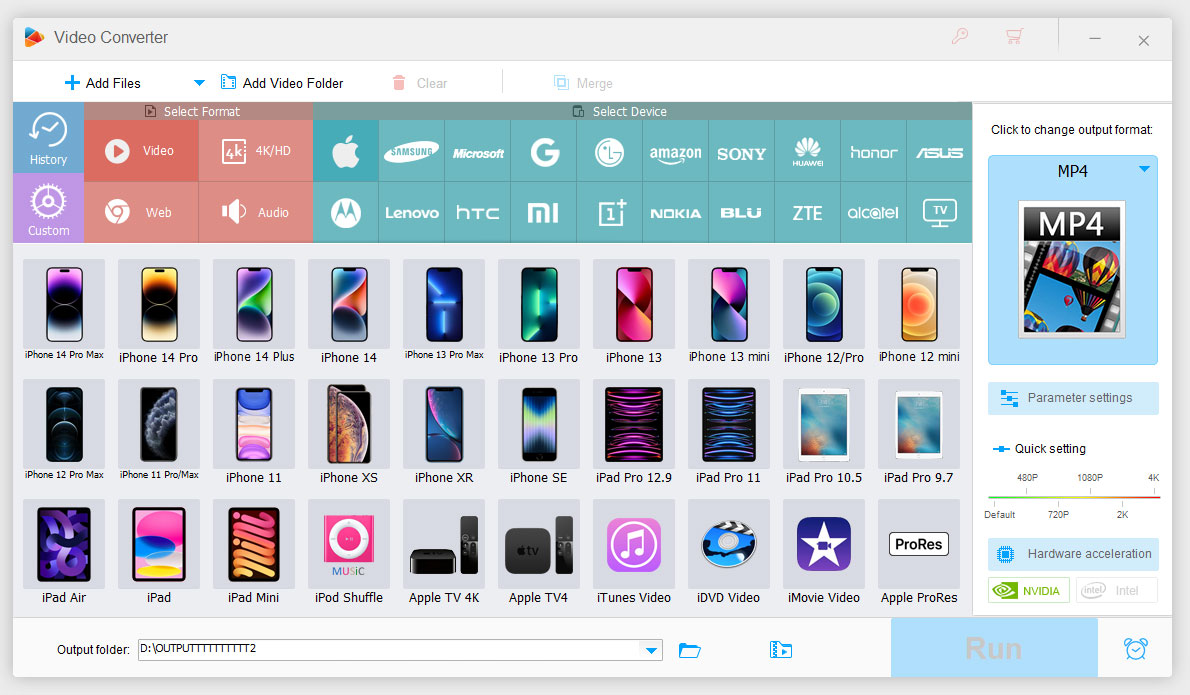
HD Video Converter Factory Pro interface showing device format selection grid
-
Apply compression or editing if needed
If the file is too large, use the compression function before finalizing it. If the video needs minor adjustments, use the editing part of the workflow instead of moving the clip into another program. This step is optional, but it can save time when the output needs more than a simple format change.
-
Start the process and monitor the result
Once your source, target, and optional adjustments are set, start the task. When it finishes, check the output file to make sure it meets your needs. If it does not, you can go back and choose a different target or adjust the task based on what you are trying to achieve.
-
Use the recorder or online saving feature when the task requires it
If your goal is not conversion but capture or local storage, switch to the appropriate module. Record the screen when you need to preserve on-screen activity, or save online video when you want a local copy. After that, you can still compress or convert the result if needed.
-
Use the bundled DVD Ripper Pro for DVD tasks
When your source is a DVD rather than a standard video file, use the included WonderFox DVD Ripper Pro companion. This keeps DVD ripping inside the same overall package instead of forcing you to find a separate utility.
What Users Say
"Very fast conversion and easy to use interface. Perfect for my YouTube projects." -- Alice Johnson, 2025-07-20
"Great all-in-one tool. Downloads and compression work smoothly, though the trial is a bit limited." -- David Roberts, 2025-08-02
Comparisons
Compared With Using Separate Single-Purpose Tools
If you convert with one program, compress with another, and record with a third, you spend extra time moving files between applications. HD Video Converter Factory Pro reduces that overhead by keeping several common video tasks together. The benefit is not just convenience; it also means fewer intermediate files and less confusion about which version of a clip is the final one.
Compared With Manual Trial-and-Error Conversion
Trying to choose the right output without guidance can lead to repeated attempts. The device format selection grid gives you a more direct path to a usable result. Instead of guessing what works, you can choose a target from the grid and proceed. That is especially useful if you do this kind of work often but do not want to become an expert in video specifications.
Compared With Keeping Videos Only Online
Leaving videos only in an online location limits your control. If you need offline access, local organization, or a file you can compress and reuse, saving the video locally is more practical. HD Video Converter Factory Pro supports that approach by letting you store the video on your own system and then process it further if necessary.
Compared With Ignoring File Size Until Storage Runs Out
Many users only think about compression after their drive is full. That usually leads to rushed decisions. Having compression built into your regular video workflow makes it easier to manage file size as part of the process, not as an emergency cleanup step later. This is one of the more practical advantages of having a compressor in the same tool you already use for conversion and saving.
FAQs
What is HD Video Converter Factory Pro?
It is a Windows video utility that combines several common video tasks in one program. The product description includes conversion, online video saving, compression, editing, and recording for HD, 4K, and 8K video. It also comes with WonderFox DVD Ripper Pro as a free companion in the package.
What kinds of video can it handle?
The product description states support for HD, 4K, and 8K video. That makes it suitable for users who need more than basic standard-definition processing and who want to work with higher-resolution material in one desktop environment.
Does it include DVD ripping?
Yes. The package includes WonderFox DVD Ripper Pro as a free companion. If you need to rip DVDs as part of your video workflow, this inclusion makes the overall product more complete than a converter-only tool.
Which operating systems are supported?
HD Video Converter Factory Pro supports Windows 11, Windows 10, Windows 8.1, Windows 8, and Windows 7. It is a Windows-focused product, so users on other desktop operating systems should not assume it will run on their system.
What hardware do I need?
The listed requirements are a 1.5 GHz Intel or AMD CPU or above, at least 1 GB of RAM, and at least 300 MB of free disk space. These are the minimum stated requirements. As with most video work, larger files and higher resolutions may feel more comfortable with additional practical headroom.
Is it suitable for beginners?
The interface appears oriented toward practical use rather than only expert control. The device format selection grid helps reduce guesswork, and one user review specifically mentions an easy-to-use interface. If you want a tool that focuses on common tasks instead of deep technical setup, it should be approachable.
Is it good for people who work with online video?
It can be. The program includes a function for saving online video to your computer, which is useful if you want local copies for offline viewing, organization, or later processing. One user review also mentions using it for YouTube projects, which suggests it can fit that kind of workflow.
Does it help with large files?
Yes, compression is one of the listed functions. If your main problem is that video files are too large to store, move, or manage conveniently, the compression feature is likely to be one of the most useful parts of the program.
Can I record my screen with it?
Yes. Screen recording is part of the product description. This makes it useful for capturing on-screen activity when you need a local video file for tutorials, demonstrations, or other purposes.
How much does it cost?
The listed price is $69.95. That is the price associated with the product information provided here.
Is this a Mac application?
No. The supported operating systems listed are Windows 11, Windows 10, Windows 8.1, Windows 8, and Windows 7. If you use macOS, this product is not aimed at your platform.
Who is this software best for?
It is best for Windows users who want one practical desktop tool for common video jobs: converting files, saving online clips locally, compressing large videos, making basic edits, recording the screen, and handling DVD ripping through the included companion. If your needs are spread across several of those tasks, the all-in-one design is the main appeal.
System Requirements
- Operating system: Windows 11 / 10 / 8.1 / 8 / 7
- Processor: 1.5 GHz Intel or AMD CPU or above
- RAM: 1 GB or above
- Disk space: 300 MB free disk space
Conclusion
HD Video Converter Factory Pro is built for people who want a practical, Windows-based answer to everyday video tasks. Its value comes from combining conversion, online video saving, compression, editing, and screen recording in one package, while also including WonderFox DVD Ripper Pro as a free companion. If you often need to prepare videos for devices, reduce file size, keep local copies, or capture on-screen content, this gives you a single place to handle those jobs.
The product is especially worth considering if you prefer a task-oriented workflow over juggling multiple utilities. The device format selection grid helps reduce guesswork, the compression feature addresses storage and transfer concerns, and the bundled DVD ripper adds extra usefulness for anyone still working with physical media. For Windows users who need a broad video toolkit rather than a single narrow function, HD Video Converter Factory Pro presents a clear and practical option.