WonderFox DVD Video Converter: Your DVD Shelf, Your Video Files and Your Downloads in One Place
Somewhere there's a box of DVDs you haven't touched in years. Your laptop has no disc drive anymore, the TV box in the living room doesn't either, and half your other videos are in formats your phone refuses to play. Meanwhile you keep three different free tools around: one to convert, one to download, one to trim a clip.
WonderFox DVD Video Converter rolls all of that into one Windows program. It rips DVDs to modern files like MP4 and MKV, converts video and audio between hundreds of formats and devices, downloads videos and music from YouTube and 1,000+ other sites, and handles quick edits like trimming, merging and cropping. NVIDIA and Intel hardware acceleration keep it fast.
Quick facts
- Version: 31.5
- Developer: WonderFox
- Runs on: Windows 11, 10, 8.1, 8 and 7
- Rips: DVD discs, ISO images and VIDEO_TS folders
- Formats: 500+ video, audio and device profiles, including MP4, MKV, H.265, AV1, MP3 and FLAC
- Downloads from: YouTube and 1,000+ websites, in up to 12K
- Price: $59.95 USD for a lifetime license (1 PC) with free upgrades
- Download size: about 135 MB
Before you rip
Most commercial DVDs are copy-protected, and WonderFox advertises that this program removes that protection, from CSS and region codes to Cinavia. Whether that's allowed depends on where you live. In the US, for example, breaking DVD copy protection isn't permitted even for personal backups. Ripping discs that aren't protected, such as your own home videos, and the program's converting, downloading and editing features don't raise that question.
Overview
The main window is laid out around what you want to do. Across the top: Add Files to convert videos you already have, Download Video to grab something from the web, and Load DVD to rip a disc, ISO or VIDEO_TS folder. Below that, you pick an output: a format (Video, 4K/HD, Web, Audio) or a device brand, from Apple and Samsung to Sony, Huawei and smart TVs. Then you choose the output folder and click Run.
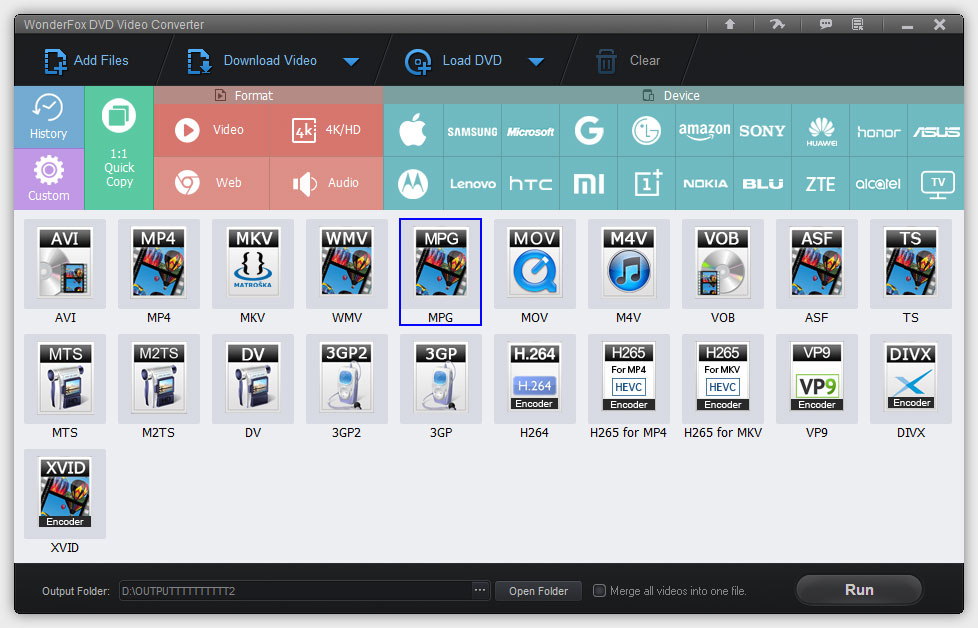
The main window: Add Files, Download Video and Load DVD across the top, a grid of output formats and device profiles, and the output folder with Run at the bottom.
Behind that simple layout is a lot of control: bit rate, resolution, frame rate, aspect ratio and encoder settings when you want them, and sensible defaults when you don't.
Features
Rip DVDs to files that play anywhere
Turn a DVD, an ISO image or a VIDEO_TS folder into MP4, AVI, MKV, H.264, H.265, AV1, Apple ProRes, MP3, WAV and 100+ other formats, or pick one of 400+ device profiles for iPhones, Samsung phones, LG TVs, PS5, Xbox Series X and more. There's also 1:1 Quick Copy, which makes an exact digital copy of the disc.
Rip a whole TV series disc in one go
On multi-episode DVDs, with up to 99 titles, the program detects the main titles automatically, so you can rip every episode in one batch. You can keep the audio and subtitle tracks you want, or all of them, in MKV, MP4 or MOV.
Convert video and audio, up to 8K and beyond
Convert HD, 4K, 8K and even 12K video to H.265, H.264, AV1, VP9, MP4, MKV, MOV, WEBM and more. It also works as an audio converter, with MP3, AAC, FLAC, ALAC, WAV, AC3 and DTS among the options, plus Dolby 5.1/7.1 support. Smart Fit balances quality against file size for you.
Download videos, whole playlists and music
Paste a link from YouTube, Vimeo, Dailymotion, Facebook, Twitch, VIKI or 1,000+ other sites and save the video in resolutions up to 12K, with subtitles. Grab an entire playlist or channel at once (up to 99 videos at a time), or music from SoundCloud, Bandcamp, Mixcloud and similar sites. Then convert the download straight to your phone's format, or pull out just the audio.
Quick edits without a separate editor
Trim out unwanted parts, merge clips or DVD titles into one file, rotate and flip, crop away black bars, and add effects such as mosaic, blur, sharpen or old film.
Fast, with your graphics card doing the heavy lifting
With a recent NVIDIA card (NVENC) or Intel graphics (QSV), encoding to H.264, H.265 and AV1 runs on the GPU. WonderFox says a 2-hour 720p H.264 video converts in 3-7 minutes with NVENC. When you only change the container, for example H.264 MKV to H.264 MOV, Flash Mode skips re-encoding entirely.
Handy extras
- Subtitles: keep, add or remove subtitles in PGS, DVD OCR, ASS and SRT formats, as soft or hard-coded subtitles
- Multiple audio tracks kept or added in MKV, MP4 and MOV
- Ringtone maker with ready-made Android and iPhone profiles
- Built-in player for video, audio and DVDs
- PAL to NTSC conversion and back
Real-World Uses
Digitizing family videos on DVD
Those DVDs from the wedding videographer or the old camcorder can be ripped to MP4, trimmed, merged into one file per event, and stored on a hard drive or shared with family, before the discs get scratched.
Making videos play on the device you have
The TV won't play an MKV, the phone balks at an old AVI, the editing app needs ProRes. Pick the device profile or format, and the settings are handled for you.
Saving tutorials and lectures for offline viewing
Download a whole course playlist before a trip, convert it to a phone-friendly size, and watch without Wi-Fi.
Shrinking big 4K files
Re-encode large phone or camera footage to H.265 or AV1 with Smart Fit, and get much smaller files that still look sharp.
Who it's for
- Anyone with a stack of personal DVDs to digitize
- Home users who want one tool instead of separate converter, downloader and trimmer apps
- Students and learners saving online lessons for offline viewing
- Windows users who want GPU-accelerated conversion without a steep learning curve
Usage Guide
- Install and launch WonderFox DVD Video Converter on your Windows PC.
- Choose your source. Click Load DVD for a disc, ISO or VIDEO_TS folder, Add Files for videos on your computer, or Download Video to paste a web link.
- For a DVD, let the program find the main titles, then tick the ones you want.
- Pick an output from the Format grid (Video, 4K/HD, Web, Audio) or a device brand. Open the settings if you want to adjust resolution, bit rate or encoder.
- Edit if needed: trim, crop, rotate, merge or add effects, and choose audio and subtitle tracks.
- Set the output folder and click Run.
Tip: use Flash Mode when you can
If you only need a different container, such as MKV to MP4 with the same H.264 or H.265 video inside, choosing a matching format lets Flash Mode copy the streams instead of re-encoding. It's much faster and there's no quality loss.
What Users Say
"If you're looking to recover some shelf space, consider ripping that big DVD library so you can stow those discs away in a box with WonderFox DVD Video Converter (Win). It's good for not only DVD ripping, but also DVD copying, video downloading, video editing, and more..."
Rick Broida, CNET editor review
"The installation was smooth and quick, it took about a minute to download. The installation was very straightforward with few standard screens. I spend a good amount of time with the video converter and tried to convert videos from few formats to various other formats. The conversion was much faster than many other video converters I have used in the past. In fact, I was very impressed with the ease of use and quick video conversions."
Robert (user review on WonderFox's site)
"Good converter with many features. UI could be more modern, but overall worth the price."
Mark Johnson, 4 out of 5 (review on WonderFox's site)
Comparisons
vs. WonderFox's other products
WonderFox also sells DVD Ripper Pro, which focuses only on ripping DVDs, and HD Video Converter Factory Pro, which focuses on converting and downloading. DVD Video Converter combines DVD ripping, conversion, downloading and editing in one program, so it suits you if you need a bit of everything.
vs. free tools
Free converters and downloaders can do pieces of this job, but you end up juggling several programs with different interfaces. Here it's one window, ready-made device profiles, GPU acceleration and a single license with lifetime upgrades.
Editions and Pricing
- Lifetime License (1 PC): $59.95 USD. One-time payment, lifetime free upgrades.
- 1-Year Subscription (1 PC): also sold by WonderFox, with upgrades for one year.
- Family Pack (5 PCs, lifetime) for households with several computers.
WonderFox often runs time-limited discounts on its own store. The license code arrives by email within minutes of payment.
FAQs
Is there a Mac version?
No. WonderFox DVD Video Converter is a Windows program, supporting Windows 11, 10, 8.1, 8 and 7.
Can it rip Blu-ray discs?
WonderFox lists DVD discs, ISO images and VIDEO_TS folders as sources, not Blu-ray.
What's the difference between the lifetime license and the subscription?
The lifetime license is a one-time payment with free upgrades for life. The subscription includes upgrades for one year. WonderFox notes that retrieving a lost registration code for free is a lifetime-license benefit.
How many computers can I use it on?
One per license. The Family Pack covers 5 PCs.
Do I need a powerful graphics card?
No. It runs on a 1.5 GHz processor with 1 GB of RAM. A recent NVIDIA or Intel GPU makes conversions much faster, but isn't required.
Will a DVD rip lose quality?
You control the trade-off: Smart Fit balances size and quality, you can set the output up to 8K, and 1:1 Quick Copy keeps the disc exactly as it is.
Can I keep the director's commentary and the subtitles?
Yes. You can keep several audio tracks and subtitle tracks when ripping to MKV, MP4 or MOV, or keep all of them.
System Requirements
- Operating system: Windows 11, 10, 8.1, 8 or 7
- Processor: Intel or AMD, 1.5 GHz or higher
- Graphics: NVIDIA GeForce, Intel HD Graphics or AMD Radeon
- Memory: 1 GB RAM or more
- Disk space: 300 MB for installation
- For ripping: a DVD drive
Conclusion
WonderFox DVD Video Converter is a practical all-rounder for Windows. It gets old DVDs off the shelf and onto your devices, fixes "this file won't play" problems with a click, saves online videos and playlists for offline viewing, and handles quick edits, all in one program. The interface isn't the most modern, as one reviewer notes, but it's straightforward and fast. A lifetime license with free upgrades means you pay once.