RecoveryFox AI: Windows Data Recovery That Rebuilds Fragmented Files
RecoveryFox AI is a Windows data recovery program from WonderFox Soft that gets back deleted, formatted and lost files from hard drives, SSDs, USB sticks and SD cards. The lifetime license for one PC costs $84.96 with our coupon code IVERTECH15 (normally $99.95), and the free download lets you scan and preview your files before you pay anything.
You emptied the Recycle Bin, formatted the wrong USB stick, or Windows now calls a drive "RAW" and wants to format it. The files are usually still on the disk until something overwrites them. RecoveryFox AI's job is to find them, show you what they look like, and copy them to a safe place.
Quick facts
- Version: 2.5.0, released July 20, 2026 (first release, 1.0.0, came out April 1, 2025)
- Developer: WonderFox Soft
- Platform: Windows 11, 10, 8.1, 8, 7 and Vista, plus Windows Server 2003 to 2022. There's no Mac version
- Recovers from: HDDs, SSDs, USB flash drives, SD and TF cards, the Desktop, the Recycle Bin, and lost, unallocated or RAW partitions
- Price: lifetime license $99.95, or $84.96 with coupon IVERTECH15. Week, month and year plans also available
- Free version: full scan (Quick Scan and AI Scan) and preview. Recovering files needs a license
- Money-back guarantee: 30 days on the yearly and lifetime plans, 7 days on the monthly plan, none on the weekly plan
- What we checked: installer recoveryfoxai.exe, file version 2.5.0.0 (38.9 MB), downloaded from the vendor on November 11, 2026; lifetime price $99.95 and $84.96 with coupon IVERTECH15 on the order page on November 11, 2026. We didn't run a recovery on a damaged drive
Exclusive coupon: 15% off RecoveryFox AI
IVERTECH15
Lifetime license $99.95 $84.96
Works on the weekly, monthly, yearly and lifetime plans, with no expiry date. The Buy Now buttons on this page add the code for you. If the order page doesn't show the discount, type IVERTECH15 in its coupon box. It can't be combined with other discount codes.
Buy NowDownload Free Trial
Before you buy
Run the free scan first. RecoveryFox AI shows every file it can find, and you can preview photos, documents and short clips of audio and video before you pay, so you know whether your files are there. Don't treat the money-back guarantee as a trial: WonderFox's refund policy excludes refunds once the software has done its job, and so are refunds because it didn't suit your needs. Refunds are mainly for cases where RecoveryFox AI can't do the task and support can't fix it.
Overview
RecoveryFox AI works in three steps: pick a location, scan, then preview and recover. The start window lists your drives with their size, free space and file system, and has shortcuts for the Recycle Bin and the Desktop, the two places most accidental deletions happen.
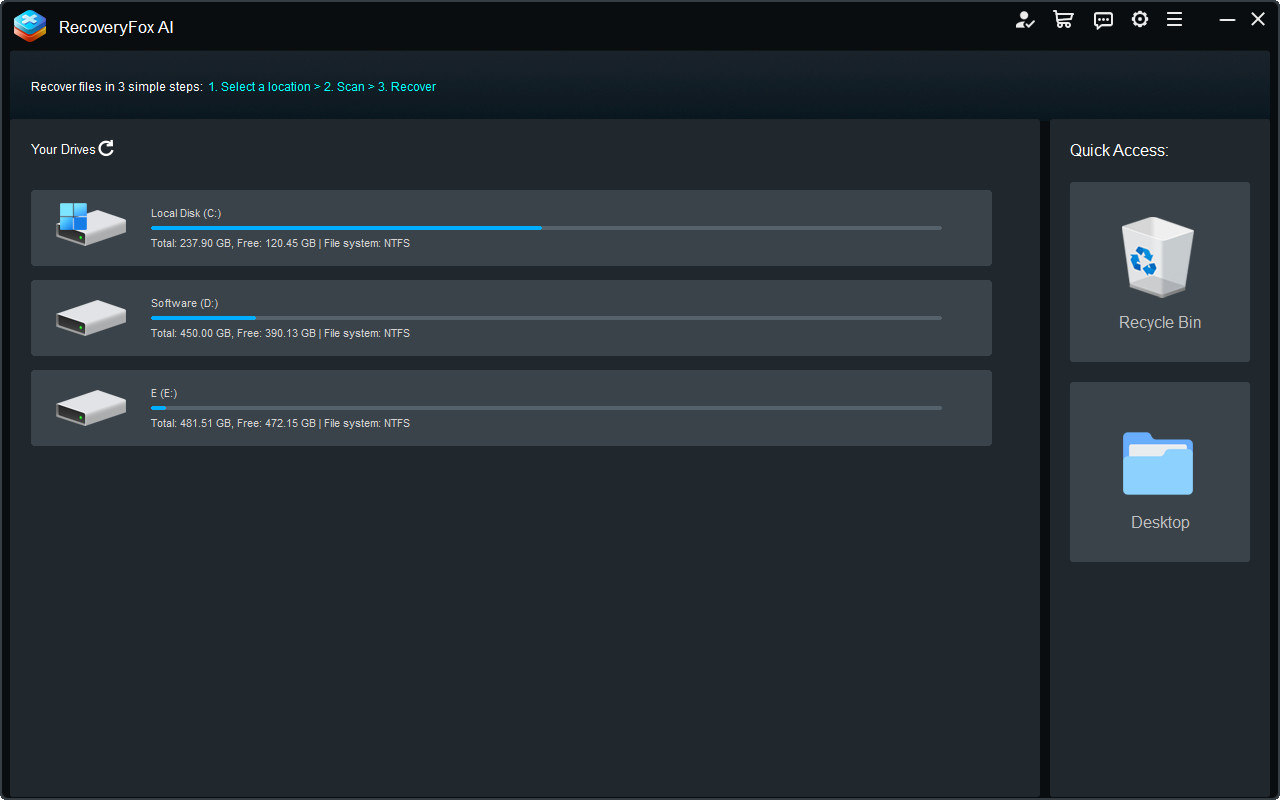
The start window: your drives on the left, Recycle Bin and Desktop shortcuts on the right, and the three steps along the top.
Each scan runs in two passes. Quick Scan reads the file system's records of recently deleted files, so it finishes fast and brings files back with their original names and folders. AI Scan then searches the raw disk for file fragments, recognizes file types from their content, and pieces them back together. That second pass is what finds files after a format, on a RAW drive, or in a partition that no longer exists, and it's where the "AI" in the name comes from.
The product is young. Version 1.0 came out in April 2025, version 2.0 in June 2026 added AI Scan to Desktop recovery, scanning of lost partitions and unallocated space, and recognition of more file systems, and version 2.5 in July 2026 raised the preview limit from 10 MB to 100 MB.
Features
Two-pass scanning: Quick Scan, then AI Scan
RecoveryFox AI runs a Quick Scan for recently deleted files, with names and folder paths intact, then an AI Scan that deep-searches the drive and rebuilds files from scattered fragments. You can look through AI Scan results while it's still running, and pause, resume or stop it. AI Scan also sorts out files whose original names it could recover from metadata, and groups files whose names it had to reconstruct.
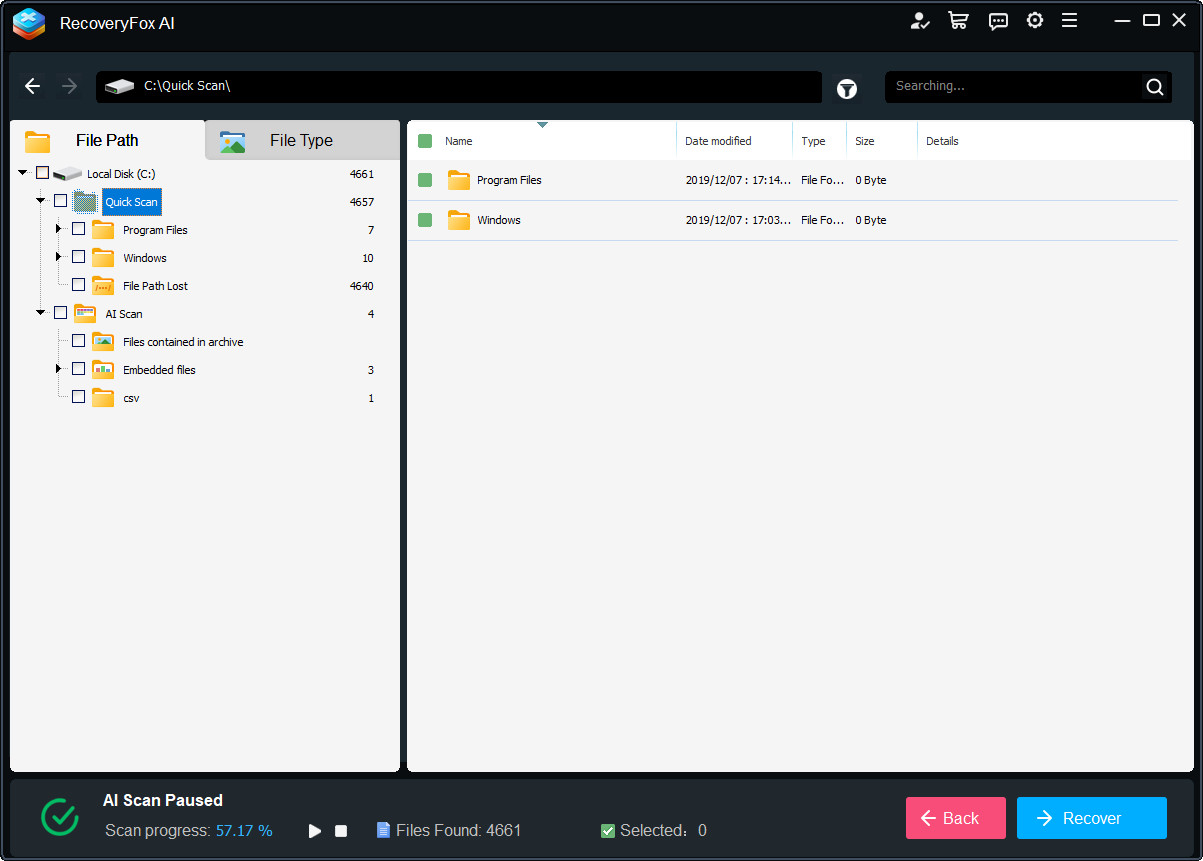
Scan results for drive C: Quick Scan finds with their folders (plus a "File Path Lost" group), and AI Scan finds such as files inside archives and embedded files.
Recovery from formatted, RAW and lost partitions
RecoveryFox AI can scan a deleted or lost partition, unallocated space or a RAW drive directly, without you formatting it or rebuilding the partition first. Quick Scan works on NTFS, exFAT and FAT32. AI Scan also reads FAT12/16, EXT2/3/4, XFS, HFS+ and APFS, and can still pull files out of a file system it doesn't recognize.
Preview before you recover
RecoveryFox AI previews files up to 100 MB: Word, Excel and PowerPoint with their formatting (Excel with worksheet switching), text formats such as TXT, CSV and XML, web files, camera RAW photos (CR2, CR3, DNG, ORF, CRW), up to 15 seconds of audio and video, and even 3ds Max, CAD and Revit files. The preview works in the free version, which is the best way to judge whether your file came back intact.
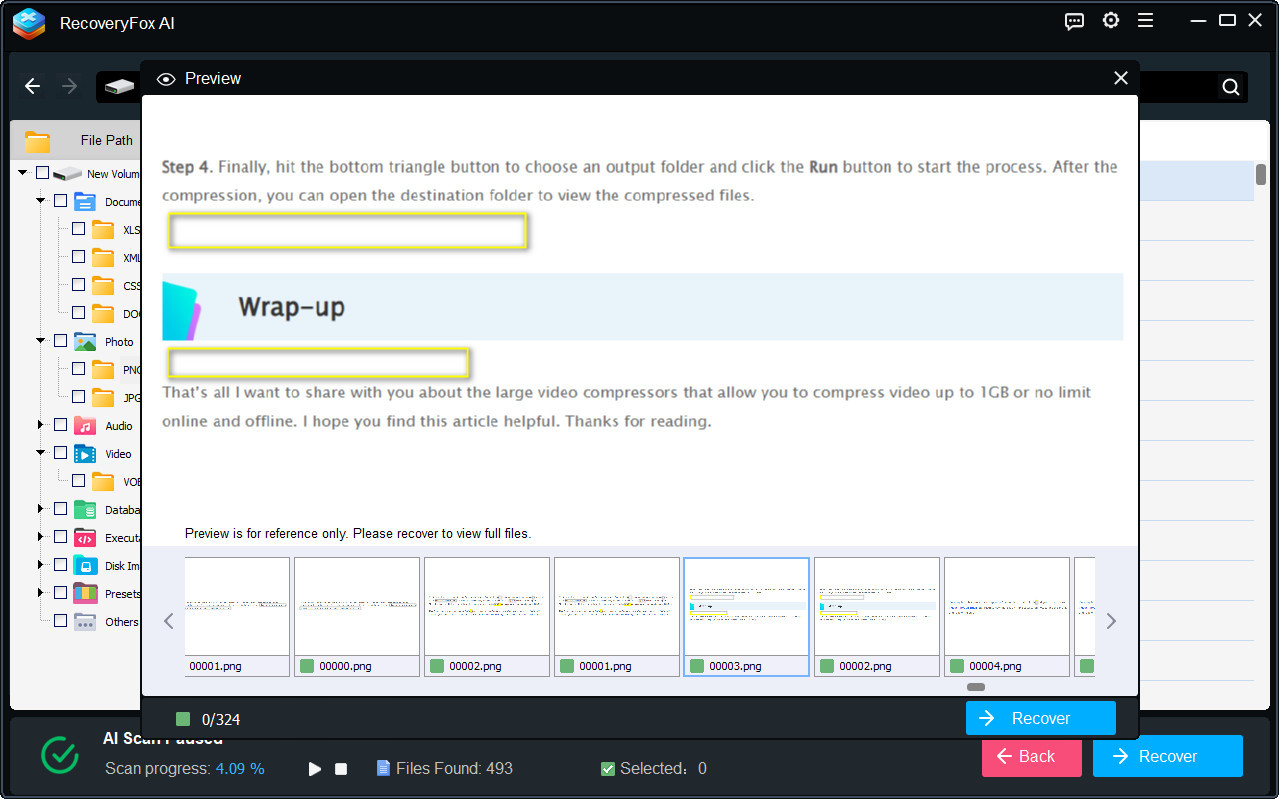
The preview window open over the scan results, with a found PNG image and a strip of thumbnails below it.
Filters and search for big result lists
RecoveryFox AI lets you browse results by File Path or by File Type (Archives, Audio, Document, Photo, Video, Database, Disk Images and more), and filter by type, modification date, size and name. Version 2.5 sped up the search box, and version 2.0 started hiding system temp files and app caches so the list isn't buried in junk.
Partial repair of damaged files
RecoveryFox AI's Quick Scan can repair lightly corrupted files, and AI Scan rebuilds the structure of 100+ common file formats from fragments, so a partly overwritten document or photo may still come back usable. It also reconstructs ZIP, RAR and 7Z archives, or extracts the intact files from a damaged one.
Works offline and doesn't write to the source drive
RecoveryFox AI processes everything locally and uploads nothing, which matters if your lost files are private. Recovery is read-only on the damaged drive: you save the recovered files to a different drive.
Benefits
- You know before you pay. The free scan and preview tell you which files are recoverable, so you're never buying blind.
- Short-term plans for one-off disasters. Most people need data recovery once. A week or month license (from $42.46 with the coupon) costs less than a lifetime license from many competitors.
- Original names when possible. Quick Scan restores files with their folder structure, which saves hours compared with sorting thousands of files named 0000001.jpg.
- No upload of private data. Everything stays on your PC.
Real-World Uses
- Shift+Delete by mistake: a folder of client documents skipped the Recycle Bin. Quick Scan on that drive finds them with their names and folders.
- Emptied Recycle Bin: the Recycle Bin shortcut scans the hidden $Recycle.Bin folders on every drive, including partitions that have since been removed.
- Camera card formatted in the camera: AI Scan on the SD card looks for JPG and RAW (CR2, CR3, DNG, ORF) photos by their content, and the preview shows which ones are intact.
- External drive shows as RAW: instead of letting Windows format it, scan the RAW drive directly and copy the files to another disk.
- Lost partition after reinstalling Windows: AI Scan reads lost and unallocated space without rebuilding the partition first.
Who It's For, and Who Should Skip It
RecoveryFox AI suits Windows home and small-office users who lost files to deletion, formatting or a partition problem and want a simple three-step tool with a good preview. The short plans make sense if you need one recovery now; the lifetime plan makes sense if you look after family PCs, cameras or client machines.
Skip it if:
- You use a Mac. There's no macOS version. Look for a Mac data recovery app instead.
- Your drive clicks, grinds or isn't detected. That's physical damage. Power it off and go to a professional recovery lab; any software scan can make it worse.
- You need RAID reconstruction or forensic imaging. RecoveryFox AI doesn't rebuild RAID arrays. Tools built for RAID and NAS recovery fit better.
- You want to recover on several PCs with one license. Each license covers one PC and can't be moved to another computer.
Usage Guide
- Install it on a different drive from the one you're recovering, so the installer doesn't overwrite your lost files. The installer is about 39 MB.
- Launch RecoveryFox AI and pick the drive, partition, Recycle Bin or Desktop where the files were.
- Let the scan run. Quick Scan results appear first; AI Scan keeps going and adds more. On a large drive, AI Scan can take hours.
- Filter and preview. Switch to File Type, search by name, and preview the files you care about.
- Register (click Register at the top of the start window and paste the license code from your email), then tick the files and click Recover.
- Save to another drive. Never recover to the drive you're scanning.

Recovering 50,549 selected files from drive D:, sorted by file type, while the data fragments are reassembled.
Where It Falls Short
- AI Scan is slow on big drives. WonderFox says large drives can take hours or even days; zPlatform.ai measured about 45 minutes for 500 GB.
- Overwritten data is partly gone. In zPlatform.ai's test on a formatted USB stick with about 20 GB written over it, 31 of 50 checked files were intact, 11 partial and 8 unrecoverable.
- SSDs with TRIM. WonderFox notes recovery may fail on an SSD where TRIM has already erased the deleted data, a limit shared by every recovery tool.
- Preview has limits. Files over 100 MB can't be previewed, and some file types can't be previewed at all even though they can be recovered.
- One PC per license, no transfer. Moving the license to a new computer isn't supported. Five or more licenses need a quote from support.
- Few user reviews yet. The product is about 18 months old, and the big review sites have almost nothing on it.
What Users Say
zPlatform.ai hands-on test (8/10, "Buy")
Alston Antony of zPlatform.ai ran RecoveryFox AI on three drives (review published April 2026, updated September 2026). On a formatted 500 GB external hard drive, Quick Scan found 12 files while AI Scan found 4,287 in about 45 minutes, and 47 of 50 spot-checked files opened correctly. On a formatted 128 GB USB stick that then had about 20 GB written to it, AI Scan found 1,893 files, with 31 of 50 checked intact.
His verdict: "The AI Scan legitimately improves recovery rates compared to Quick Scan alone, especially on formatted drives." Among the pros he lists that the AI Scan "recovers files Quick Scan and rivals like Recuva miss entirely, especially on formatted drives." His cons: "AI Scan is slow, roughly 45 minutes for 500GB and over an hour for 1TB" and "No macOS support at all, and no announced timeline."
The site says WonderFox had no editorial input, though it does carry referral links.
On the review sites
RecoveryFox AI is listed on G2, Capterra, Software Advice, GetApp, Product Hunt and AlternativeTo, but as of November 2026 none of them shows user reviews of it: Product Hunt and AlternativeTo say no one has reviewed it yet, and G2 says there are not enough reviews for buying insight. Several YouTube creators have published walkthroughs, which show the scan and recovery process but aren't long-term tests.
In short, the one independent test we found is positive about the AI Scan on formatted drives and critical of its speed and the missing Mac version. There isn't yet a body of user reviews to confirm how it does over time, which is one more reason to run the free scan and preview your own files before buying.
Comparisons
Free version vs full version
The free version of RecoveryFox AI includes AI fragment scanning, NTFS/exFAT/FAT32 support, 500+ file formats and preview. The full version adds the actual recovery (unlimited), professional technical support and the money-back guarantee. Every paid plan keeps "lifetime scan and preview access" after it ends.
Short plans vs lifetime
All four RecoveryFox AI plans have the same features, unlimited recovery and one PC. They differ only in length and refund terms, and none renews automatically. With the coupon, the lifetime license ($84.96) costs $25.50 more than the 1-year plan and $42.50 more than the week, so if you might need recovery again, lifetime is the better value. It also gets priority support.
Editions and Pricing
| Plan | Regular price | With IVERTECH15 | Money-back guarantee | Support | Buy |
|---|
| 1-Week | $49.95 | $42.46 | None (except unresolvable issues) | Free updates and support | Buy 1-Week |
| 1-Month | $59.95 | $50.96 | 7 days | Free updates and support | Buy 1-Month |
| 1-Year | $69.95 | $59.46 | 30 days | Free updates and support | Buy 1-Year |
| Lifetime | $99.95 | $84.96 | 30 days | Free updates and priority support | Buy Lifetime |
Prices are for one PC, checked on the order page on November 11, 2026. Each Buy button opens the order page for that plan with the IVERTECH15 coupon already applied. Teachers and students can get an education discount from WonderFox instead (it can't be combined with the coupon).
FAQs
Can RecoveryFox AI recover files for free?
No. The free version of RecoveryFox AI scans your drive and previews what it finds, but saving the files needs a paid license. The preview is still worth running first, because it shows exactly what a license would get back.
Do the weekly and monthly plans renew automatically?
No. RecoveryFox AI's weekly, monthly and yearly plans are marked "No automatic renewal," so you won't be charged again unless you buy again.
What happens when my RecoveryFox AI plan ends?
RecoveryFox AI keeps scanning and previewing after a plan ends ("lifetime scan and preview access"), but recovery stops until you buy another license.
When does the license period start?
A RecoveryFox AI license code stays valid until you activate it; the week, month or year only starts counting when you register the code. You can buy now and activate when you need it.
Can I move my RecoveryFox AI license to a new computer?
No. Each RecoveryFox AI license is for one computer, and transferring it to another device isn't supported.
Can RecoveryFox AI recover files from a Mac-formatted drive?
Partly. RecoveryFox AI only runs on Windows, but its AI Scan can read HFS+ and APFS drives connected to a Windows PC, as well as Linux EXT2/3/4 and XFS. Quick Scan is limited to NTFS, exFAT and FAT32.
Is the RecoveryFox AI installer safe?
RecoveryFox AI's installer is digitally signed by Chengdu Yimige Technology Co., Ltd., and WonderFox says it has no bundled software or ads. The program works offline and doesn't upload your files.
How do I get my RecoveryFox AI license code?
RecoveryFox AI license codes are emailed by 2Checkout right after payment. If it hasn't arrived, check your spam folder and allow mail from @2checkout.com; WonderFox support at support@wonderfoxrecovery.com resends lost codes within 24 hours.
System Requirements
- OS: Windows 11, 10, 8.1, 8, 7, Vista; Windows Server 2022, 2019, 2016, 2012, 2008, 2003
- CPU: 1 GHz or faster x86 or x64 Intel or AMD processor
- RAM: 4 GB minimum, 8 GB or more recommended
- Disk space: 1 GB to install, plus room on a separate drive for the recovered files
Conclusion
RecoveryFox AI is worth it for Windows users who lost files to deletion, formatting or a broken partition and want a straightforward tool with a strong preview. The reason to buy is the free scan: you see your files before you spend anything, and with coupon IVERTECH15 the lifetime license is $84.96, with short plans from $42.46 if you only need it once. The reason to hold back is its short track record: few user reviews yet, no Mac version, and a refund policy that won't help if you simply change your mind. Run the free scan; if your files show up in the preview, it's a fair price to get them back.
Buy NowDownload Free Trial