Hetman Partition Recovery: Get Files Back From Formatted, RAW and Lost Partitions
Hetman Partition Recovery is a $67.95 one-time data recovery program for Windows, macOS and Linux that scans hard drives, SSDs, USB sticks and memory cards after deletion, formatting, partition loss or file system damage, and lets you preview what it found for free before you pay. It suits home users with a drive that suddenly shows as RAW or asks to be formatted. Businesses need the pricier Office edition, and the $67.95 Home edition doesn't open virtual machine disks or encrypted volumes.
The moment you need it is usually unpleasant: Windows says a disk must be formatted, a partition vanished after a resize, or CHKDSK finished and half a folder is gone. The rule that matters most is to stop writing to that drive, then scan it.
Quick facts
- Version: 5.5, released October 9, 2026
- Developer: Hetman Software, Ukraine
- Platforms: Windows, macOS, Linux (installer or portable version on Windows)
- File systems: NTFS, ReFS, FAT, exFAT, APFS, HFS+, Ext2/3/4, XFS, Btrfs, ReiserFS, ZFS, UFS, VMFS5/6, HikvisionFS
- Price: $67.95 Home, one-time lifetime license for 1 computer
- Trial: full scan and preview for free, saving files needs a registration key
- Guarantee: 30-day conditional money-back guarantee
- What we checked: Windows installer 93.5 MB, dated October 9, 2026, and the Home, Office and Business prices on the order page on November 6, 2026. We didn't run a recovery on a damaged drive.
Before you buy
Run the free scan first and open the files you care about in the preview. It matters more here than with most software: Hetman's refund policy says refunds are usually not given if you skipped the trial, if the trial already showed the files were missing or damaged, if the result is partial, or once your key has saved files. The Home edition can't recover from virtual machine disks, Apple disk images, forensic images or encrypted storage; those need Office or Business. If your problem involves a VMDK, BitLocker or VeraCrypt, plan on the higher price.
Download Free TrialBuy Now
Overview
Partition Recovery is Hetman's best-selling program and the middle of its range. Uneraser only handles plain deletions on a healthy file system, and RAID Recovery rebuilds multi-disk arrays. This one covers the large space between: any single storage device, or disk image of one, whose files, partitions or file system structures have been lost.
It offers two kinds of scan. Fast Scan reads the existing file tables and is the right first try after a deletion. Full Analysis goes sector by sector looking for old partitions, file tables, journals and backup metadata, and can add a content-aware search that finds files by their internal signatures when the directory information is gone. The source drive is opened read-only throughout.
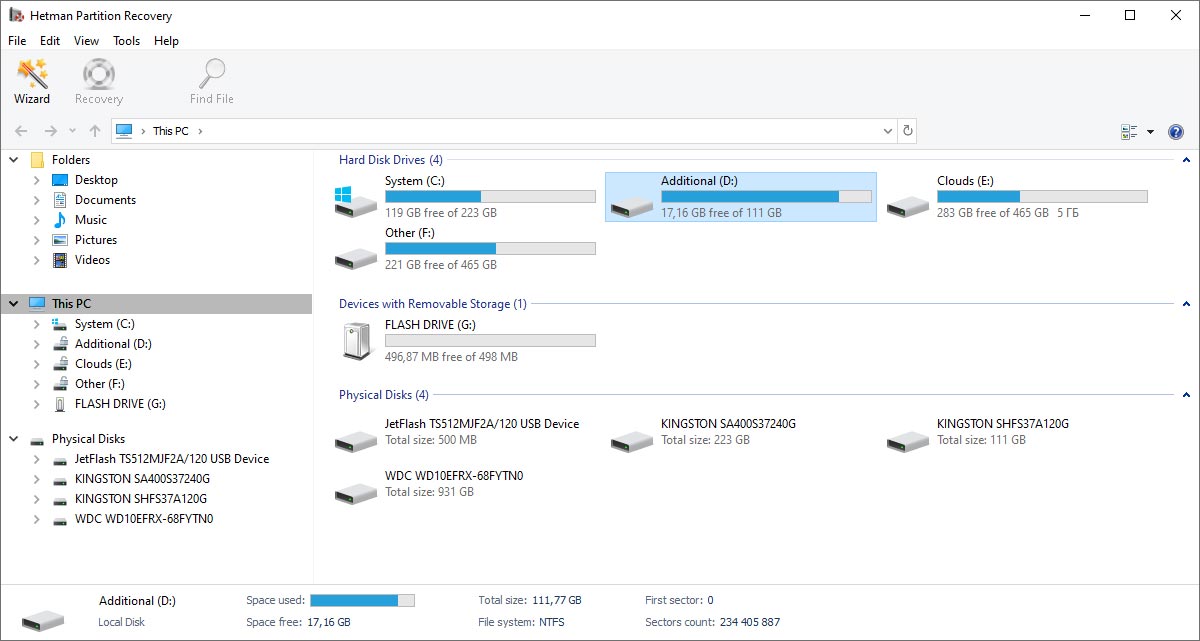
The main window: logical drives, removable storage and physical disks in one Explorer-style view, with details of the selected disk at the bottom.
Features
Hetman Partition Recovery finds partitions the operating system no longer shows
Full Analysis looks for earlier volumes after formatting, disk initialization, repartitioning, resizing or merging, then rebuilds folders and original file names when enough metadata survives. Files found only through signatures may lose their names, paths and dates.
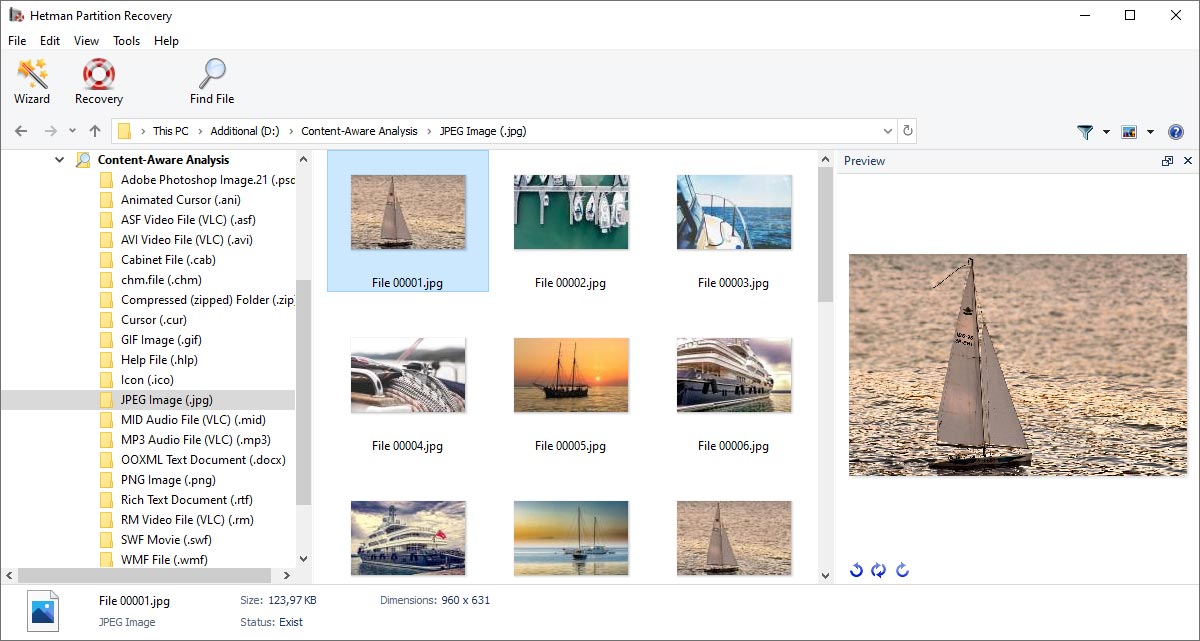
Content-aware analysis results: files sorted by type in the left tree, thumbnails in the center and a preview on the right. Names are numbered because signature search can't recover the originals.
Hetman Partition Recovery reads other platforms' disks
The operating system running the program doesn't have to match the disk. A Windows PC can scan a Linux Ext4 or a Mac APFS drive, which is useful when a NAS single disk or a dead MacBook's SSD ends up on your desk. Snapshots on APFS, Btrfs, ZFS and UFS are supported too.
Hetman Partition Recovery works from a disk image for failing drives
You can take a sector-by-sector image of a disk with bad sectors and scan the image rather than hammering the original. Scan results can also be saved and reloaded, so a long analysis on a big drive doesn't have to be repeated after you buy or reboot.

The File menu's Save Analysis Information and Load Analysis Information commands keep a finished scan for later.
Hetman Partition Recovery shows drive health and raw sectors
Built-in diagnostics read the disk model, serial number, S.M.A.R.T. attributes and temperature. A HEX editor opens physical disks, partitions, file system structures and individual files, and on NTFS it jumps straight to the boot sector or MFT. Most home users will never open it, but technicians will.
Hetman Partition Recovery opens virtual disks and encrypted volumes (Office and Business)
These editions mount VMDK, VHD/VHDX, VDI, QCOW2 and Parallels disks along with snapshots, plus EnCase and AFF forensic images and Apple DMG and sparse images. They also work with BitLocker, LUKS, VeraCrypt, FileVault and encrypted APFS when you have the password or recovery key. It doesn't crack encryption.

A VirtualBox VDI file mounted as a disk, ready to scan. This needs the Office or Business edition.
Benefits
- You pay after you see the result. The scan and preview cost nothing, so a drive that's beyond software recovery costs you only time.
- Your disk stays with you. Hetman's own price list puts typical lab recovery of this kind at $250 to $900 or more. Software won't fix physical damage, but for a logical problem it's far cheaper and your private files never leave the house.
- You can stop and come back. Saved scans and disk images make multi-hour jobs on large drives much less stressful.
Real-World Uses
- An external drive shows as RAW and Windows offers to format it. Decline, scan it with Full Analysis, and copy the folders to a different disk.
- A resize in a partition manager goes wrong and a volume disappears. Full Analysis looks for the old file system and rebuilds its folder tree.
- CHKDSK "repaired" a damaged volume and files went missing. Hetman specifically warns against running repair tools first, and the scan can often find what the repair orphaned.
- A camera SD card was formatted in the camera. Partition Recovery handles it, though Hetman's cheaper Photo Recovery is enough if the card held only photos.
- A Hikvision DVR drive needs footage pulled from it. HikvisionFS is on the supported list, so the disk can be read on a PC.
Who It's For, and Who Should Skip It
Buy it if you have one drive with a logical problem and you want more than a plain undelete tool: formatted, RAW, lost partition, mixed Windows, Mac and Linux disks. It's also a fair tool for an IT person who buys the Office edition for virtual disks and encrypted volumes.
Skip it if the drive clicks, isn't detected, or a RAID array needs rebuilding. Software can't fix hardware, so that's a lab job, and failed arrays need RAID Recovery. If you only emptied the Recycle Bin, try a free undelete tool or the cheaper Hetman Uneraser first. If you need a free option for a simple partition job, TestDisk and PhotoRec exist, though PhotoRec works mainly from signatures and may not keep file names and folders.
Usage Guide
- Download and install the program on a different drive from the one with the lost data. On Windows the portable version can run from a USB stick. You need administrator or root rights.
- Pick the disk or partition in the main window and start the wizard. Choose Fast Scan after a plain deletion, or Full Analysis after formatting or damage. Add content-aware analysis if Full Analysis comes up short.
- Browse the results, filter deleted from existing files, and click each important file to preview it.
- Buy a key only if the preview looks right. You enter it in the same installed copy, with no reinstall and no rescan.
- Choose a save method and send the files to another physical disk, a ZIP archive or an FTP server. Never save back to the source.

The final step of the wizard offers saving to a hard disk, to a ZIP archive or uploading by FTP.
Where it falls short
- Corrupted output is the most common complaint. Several Trustpilot reviewers say recovered files wouldn't open. Hetman says a file that displays correctly in the preview can be recovered, so don't buy on file names alone.
- SSDs with TRIM may hold nothing to recover. Once the SSD has discarded the blocks, no software can bring them back.
- Fragmented big files suffer most from signature search, which doesn't know where the pieces belong. Files found that way also lose names, folders and dates.
- Refunds are narrow. Beyond the limits above, a change of mind or finding another product doesn't qualify. See the Hetman complaints below.
- Updates are extra. Your version keeps working forever, but newer versions after your coverage need a paid plan or a new key.
What Users Say
Hetman Software holds a 3.8 out of 5 TrustScore on Trustpilot from 88 reviews on November 6, 2026, a split result: 74% five-star and 24% one-star, with almost nothing between. Many of the five-star reviews were posted within a few weeks in spring 2025. Trustpilot covers the company rather than one program, so these excerpts name Partition Recovery where the reviewer did. Trustpilot blocks direct access, so the excerpts below reached us through a page summarizer and are short extracts.
Praise on Trustpilot
"Hetman Partition Recovery helped me recover files from a formatted disk in just a few steps." Robert Davis, March 2025
"By my own mistake I lost data of an external USB disk and with Partition Recovery I was able to recover all data fully." Stefan Feeser, June 2022
"I spent more than three months trying to recover important files from my hard drive" Margarita Budzinskaya, "5 stars - Finally recovered my files", August 2026
Complaints on Trustpilot
"all recovered files were corrupted and unusable." AMINE NDF, Hetman Partition Recovery, 1 star, March 2026
"recovering files from virtual machines requires the Office version or higher." 정창영, 1 star, May 2026, after buying the Home edition for a VMDK and being refused a refund
"They refused it, because there is a free try you can download." Leo Blok, 1 star, October 2025, on a refund request
"All files supposedly recovered were Corrupt, but Disk Drill WORKED so don't use Hetman Software it sucks!" dslman, 1 star, September 2025
On Hetman's own review page
The vendor's site shows 627 moderated reviews averaging 4.77, with 43 about this program, so treat it as a friendly sample. It does contain useful detail:
"I was able to *easily* recover over 50gb of data I accidentally deleted off one of my VeraCrypt encrypted drives. Other products simply failed to recognize the existence of the Mounted encrypted partition" Adrian H, September 2023
"I had a complicated problem: a Linux LVM on an M.2 drive used to store virtual machine VDI files. I accidentally deleted a critical VDI file." Larry, September 2023, who then reports the program found it
The pattern: people who previewed their files and saw them open tend to be delighted, often after other tools failed. The unhappy ones bought first, then hit corrupted output, an edition limit or the refund policy. Reading the two groups together is the best argument for using the free preview.
Comparisons
Partition Recovery vs Hetman Uneraser
Uneraser costs $37.95 and handles deleted files on a readable file system, with no Full Analysis. Partition Recovery costs $30 more and adds formatted, RAW and lost-partition recovery. If you don't know what went wrong, this is the safer pick.
Partition Recovery vs Hetman RAID Recovery
If a server or NAS still presents its RAID as a healthy volume, Partition Recovery can scan that volume, including over SSH or iSCSI. When the array itself is broken and must be rebuilt from member disks, you need RAID Recovery at $197.95.
Partition Recovery vs Stellar and DMDE
Stellar Data Recovery Professional for Windows lists at $79.99 on this site, a similar price for a similar single-disk job. That listing is the Windows version; Hetman also has macOS and Linux downloads and reads Linux file systems such as Ext4, XFS and Btrfs. The free edition of DMDE limits you to files from the selected directory, up to 4,000 per operation.
Editions and Pricing
| Edition | Price | Allowed use | Adds |
|---|
| Home | $67.95 | Personal, non-commercial | Physical drives and cards, all listed file systems |
| Office | $237.95 | Internal company use | Virtual machine disks, Apple and forensic images, encrypted storage |
| Business | $397.95 | Data recovery services for clients | Same as Office, with client work allowed |
Every license is lifetime for one computer, and a virtual machine counts as a computer. Office and Business are picked from the Licenses menu on the same order page. If Home turns out too small, Hetman lets you upgrade by paying the difference. An Unlimited License for a whole company is also sold.
FAQs
Does Hetman Partition Recovery need a subscription?
No. Hetman Partition Recovery is a one-time purchase, and the version you buy works indefinitely. A one-year updates and priority support plan is optional at $19.95, and the vendor also sells it to existing owners. Without it, a newer version needs a new key.
Is the free version of Hetman Partition Recovery enough to get my files back?
No. The free version of Hetman Partition Recovery scans and previews everything, but saving recovered files requires a paid registration key. Its value is showing you what's recoverable before you spend anything.
Can I move my Hetman Partition Recovery license to a new PC?
Yes. A Hetman Home, Office or Business license can move to another computer as long as you stop using it on the old one. One key can't run on two computers at once.
Can Hetman Partition Recovery fix a physically damaged hard drive?
No. Hetman Partition Recovery can read a drive that is detected and at least partly readable, including one with bad sectors. A drive that isn't detected needs a lab.
Should I run CHKDSK before using Hetman Partition Recovery?
No. Repair tools such as CHKDSK, fsck and First Aid change file system structures that recovery depends on. Scan the drive or image it first, save your files, and only then attempt repairs.
Will Hetman Partition Recovery restore original file names and folders?
Often, yes. Hetman Partition Recovery restores names, folders and dates when file system metadata survives. Files found only by content signature come back with generic names and no folder.
How much free space do I need to save files from Hetman Partition Recovery?
You need a separate destination at least as big as the files you select, and Hetman says it can exceed the original used space, because results may include several versions of a file.
System Requirements
- Windows, macOS or Linux (the vendor doesn't publish minimum versions)
- Administrator or root rights for low-level disk access; root on the remote side for SSH access
- About 94 MB for the Windows installer, 89 MB for macOS, 49 MB for Linux
- A separate drive, network location or FTP server with room for the recovered files
Conclusion
Hetman Partition Recovery is worth $67.95 for a home user with a formatted, RAW or partition-damaged drive, provided the free preview shows your files opening correctly. That preview is the one reason to choose it: you see the result before paying, on Windows, Mac or Linux. The main reason not to is the strict refund policy, combined with a real share of buyers reporting corrupted files. Treat the preview as the deal, and if it doesn't show your data intact, keep your money. Anyone needing virtual disks or encrypted volumes should budget for the $237.95 Office edition from the start.
Download Free TrialBuy Now