UFS Explorer Standard Recovery for Windows: Serious File Recovery for Single Drives
UFS Explorer Standard Recovery for Windows is a $69.95 data recovery tool from SysDev Laboratories that gets back deleted files, formatted drives and lost partitions from hard drives, SSDs, USB sticks, memory cards and virtual disks. It reads almost every file system you'll meet (NTFS, exFAT, APFS, Ext4, XFS, Btrfs, ZFS and more), opens BitLocker drives when you have the key, and includes a proper disk imager for drives that are starting to fail.
It's the tool for the jobs where a simple undelete utility gives up: a drive that Windows suddenly shows as RAW, a Linux or Mac disk you need to read on a PC, a BitLocker-encrypted laptop drive pulled from a dead machine, or a disk with bad sectors that has to be copied before anyone dares scan it.
Quick facts
- Version: 10.23, released October 29, 2026
- Developer: SysDev Laboratories
- Runs on: Windows 7 SP1 through Windows 11, 32-bit, 64-bit and ARM64. macOS and Linux versions are separate licenses.
- File systems: NTFS, ReFS, FAT32, exFAT, APFS, HFS+, Ext2/3/4, XFS, Btrfs, JFS, ReiserFS, UFS, ZFS, ISO 9660 and UDF
- Encryption: decrypts BitLocker, BitLocker To Go and encrypted APFS with your key or password
- Price: $69.95 for the Personal license, a perpetual license with a year of free updates
- Free trial: no time limit, full scanning, preview and disk imaging, but it only saves files up to 256 KB each
- What we checked: the Windows installer downloaded from SysDev on November 3, 2026 is ufsxsci.exe, file version 10.23.0.7982 (20.6 MB), and the order page charged $69.95 for the Personal license on November 3, 2026. We didn't run a recovery on a damaged drive.
Before you buy: run the trial, because refunds are narrow
SysDev only refunds a license when you tested the trial first, a function failed because of a software bug (not a hardware problem), and SysDev couldn't fix it within 7 days. A refund for changing your mind or buying the wrong edition isn't offered; a wrong edition is exchanged under the upgrade policy instead. So scan your drive with the free trial before buying: if your files are listed and the previews open, the license will save them. Also note the license covers one operating system.
Download Free TrialBuy Now
Overview
UFS Explorer Standard Recovery opens on a list of your Windows drive letters and every connected physical drive with its partitions, including ones Windows can't read, such as an Ext4 partition from a Linux machine. Select one and the right-hand panel shows its file system, whether it passed a basic test, and its size and geometry. From there you Explore a volume that still works, or Start scan to dig for what's missing.
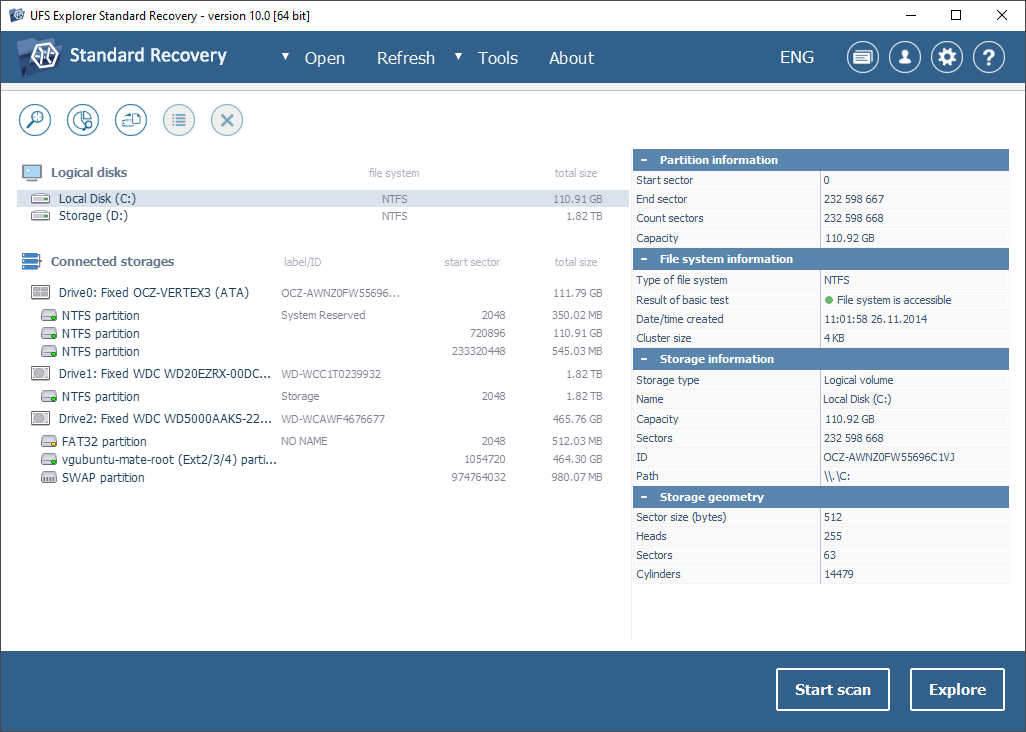
The main window in version 10.0 on Windows: drive letters at the top, three physical drives below with NTFS, FAT32, Ext2/3/4 and swap partitions, and partition, file system and storage details for drive C: on the right.
SysDev aims it at two kinds of user: computer repair shops and data recovery services, and home users with something important to get back. The interface is plainer and more technical than consumer recovery apps, with no wizard, and every operation is read-only, so the program never writes to the drive you're recovering from. SysDev's beginner-oriented line, Recovery Explorer, uses the same engine with a wizard on top.
Features
Three scan modes, with pause and resume
UFS Explorer Standard Recovery offers a quick scan that uses what's left of the file system's metadata, a deep scan that reads the drive sector by sector, and an IntelliRAW scan that recognizes files by their content when the file system is gone. Any scan can be paused so you can look at what it has found, and its state can be saved and resumed later, so a twelve-hour scan of a big disk doesn't have to start over after a reboot.
Lost partition search
UFS Explorer Standard Recovery searches a drive for partitions that have vanished from the partition table, aligns them automatically, and lets you define one by hand when you know where it was. You choose which file systems to look for, which speeds things up on a large disk.
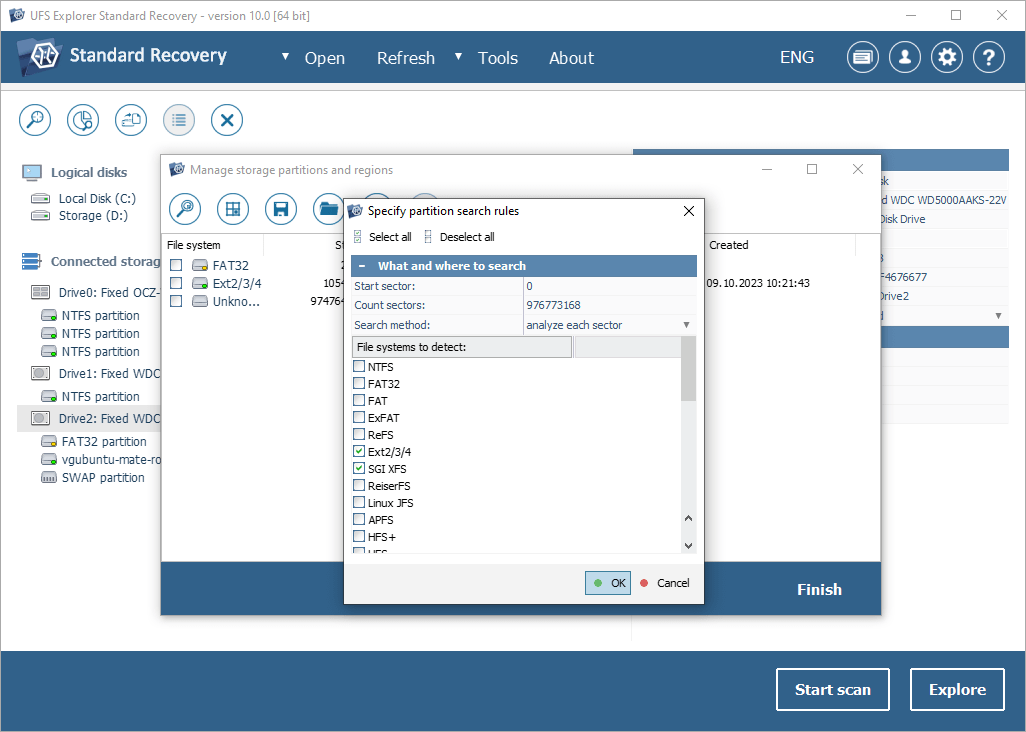
The partition search rules in version 10.0: sector range, search method "analyze each sector", and a list of file systems to detect with Ext2/3/4 and SGI XFS ticked.
Reads Linux, Mac and BSD disks on Windows
UFS Explorer Standard Recovery covers Windows file systems (NTFS, ReFS, FAT, exFAT), Mac (APFS, HFS+), Linux (Ext2/3/4, XFS, Btrfs, JFS, ReiserFS), BSD and Solaris (UFS, UFS2, ZFS) and optical discs (ISO 9660, UDF). It also assembles simple spanned volumes automatically: Linux LVM and mdadm, Windows dynamic disks and Apple RAID. For a lot of users, that alone is the reason to buy it: you can browse a Linux server's disk or a Mac drive on a Windows PC and copy files off without installing anything else.
BitLocker and encrypted APFS
UFS Explorer Standard Recovery decrypts BitLocker, BitLocker To Go and encrypted APFS volumes when you give it the recovery key, password or passphrase, then scans and recovers from the decrypted content as usual. It doesn't crack or bypass encryption: without valid credentials, the data stays locked.
A disk imager built for failing drives
UFS Explorer Standard Recovery's imager makes a sector-by-sector copy of a drive using several passes and configurable handling of bad blocks, then maps the areas it couldn't read so you can see which files they affect. You recover from the image instead of the original disk, which saves a dying drive from the repeated reads of a long scan. The imager is fully working in the free trial, with no size limit.
Search, filter and preview before saving
UFS Explorer Standard Recovery shows recovered folders as a normal tree and lets you filter by name mask, size and modification date, sort the results, estimate the size of what you've selected, and preview images, PDFs and documents. There's also a hex viewer for drives, partitions and files.
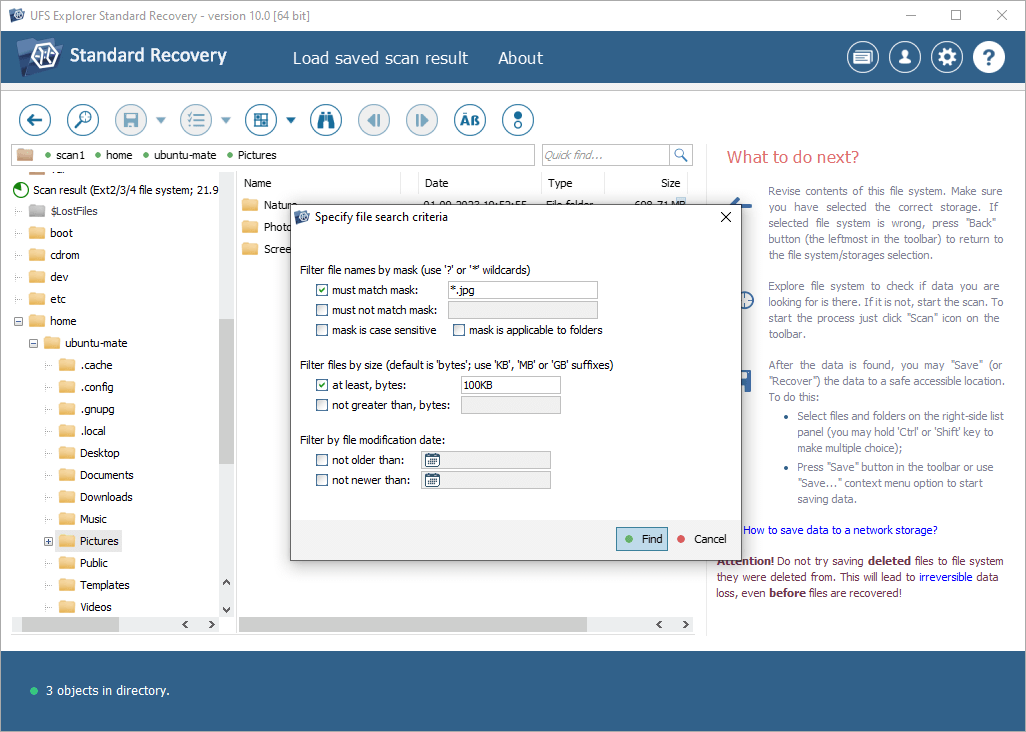
The file search filter in version 10.0, set to find .jpg files of at least 100 KB in an Ext2/3/4 scan result from an Ubuntu home folder.
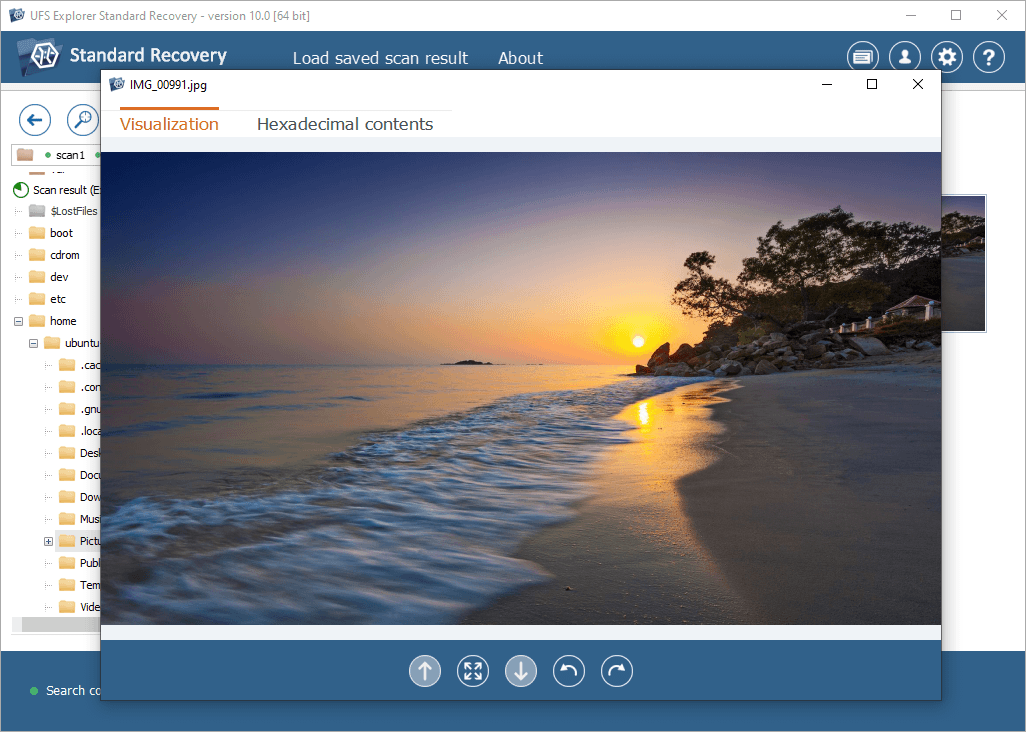
The built-in viewer in version 10.0 showing a recovered JPEG photo, with a tab to switch to its hexadecimal contents.
Virtual disks and images
UFS Explorer Standard Recovery opens VMware VMDK, Hyper-V VHD/VHDX, VirtualBox VDI, QEMU/XEN QCOW2, Parallels and Apple DMG files directly, including snapshots, so you can pull files out of a virtual machine that won't boot without starting it.
Benefits
- One tool for every disk in the house. Windows, Mac, Linux and NAS-style disks all open in the same program on the same PC.
- A safer path with a dying drive. The imager plus read-only scanning means you can stop before you make things worse, and hand the image to a lab later if needed.
- No wasted money. The trial has no time limit and shows exactly what's recoverable, so you only pay for a recovery you've seen.
- Bought once. There's no subscription; the license keeps working after the update year ends.
Real-World Uses
- The RAW external drive. Windows says an external drive "needs to be formatted." Instead, you open it in UFS Explorer Standard Recovery, which rebuilds access to the damaged NTFS volume so you can copy the folders off.
- The single-disk NAS. A one-bay NAS dies. Its XFS or Ext4 disk goes into a USB dock on a Windows PC, and the program reads it directly.
- The BitLocker laptop. A laptop's motherboard fails. With the BitLocker recovery key from the owner's Microsoft account, the drive is decrypted and copied in an external enclosure.
- The clicking-before-it-dies drive. A disk reads slowly and logs errors. You image it first with multi-pass reading, then recover from the image.
Who It's For, and Who Should Skip It
UFS Explorer Standard Recovery suits repair technicians, IT staff and confident home users who want a dependable, technical recovery tool for single drives and don't need hand-holding. It's especially strong for anyone dealing with non-Windows file systems or encrypted drives.
Skip it if:
- You want a guided experience. SysDev's Recovery Explorer Standard ($47.95) uses the same engine with a wizard, but without encryption support.
- Your data was on a RAID or multi-bay NAS. UFS Explorer Standard Recovery only assembles simple spanned volumes. Striped and parity arrays need UFS Explorer RAID Recovery.
- The drive is physically dead. Clicking, not detected or no power means a lab, not software.
Usage Guide
- Stop writing to the drive. Every new file can overwrite deleted data.
- Install it on another disk. Run ufsxsci.exe and install to a drive other than the one you're recovering.
- Open the drive. Launch the program, select the volume or physical drive, and check the file system status on the right.
- Image it first if it's unstable. For slow or error-prone drives, create a disk image and open that instead.
- Explore or scan. Explore an accessible volume, or start a quick scan, moving to a deep or IntelliRAW scan if files are still missing.
- Filter, preview, save. Narrow the results, check the previews, and save the files to a separate drive.
Where It Falls Short
- The interface is technical. There's no wizard, and the results tree and settings assume you know what a partition and a file system are.
- The trial saves very little. At 256 KB per file, you can save a document but not a typical photo, so you're mostly judging by previews.
- SSD recovery is a gamble. SysDev itself warns that TRIM and garbage collection can erase deleted data on SSDs and flash drives within seconds, so results there are less predictable than on hard drives.
- Names can be lost. When the metadata is gone and only the IntelliRAW scan finds files, original names and folders may not come back.
What Users Say
From SysDev's testimonials page
These come from the vendor's own feedback page, so they're its happiest customers rather than a balanced sample.
Gregory Gibbons: "Unbelievable - the Standard Edition of your software is working, I am recovering my data - you guys are the absolute best. Buffalo would have me spending $2000+ on data recovery, that's their only advice."
Rodrigo Eggea, COPEL Telecom: "I have a Iomega Home Media Network and all files disapeared suddenly, and Iomega support doesn't help! It uses XFS filesystem and UFS 4 Standard Edition recovered the lost filesystem and I could recover all my important data with path and filenames!"
Both stories match what the product is best at: reading a Linux file system (XFS here) from a home NAS on an ordinary PC.
UFS Explorer Standard Recovery vs Recovery Explorer Standard
Both come from SysDev and share one recovery engine. The choice is about how much control you want and what kind of drive you have:
| Feature |
UFS Explorer Standard Recovery |
Recovery Explorer Standard |
| Personal license | $69.95 | $47.95 |
| Ease of use | Moderate, full controls | High, optional wizard |
| BitLocker and encrypted APFS | Yes | No |
| Spanned volumes (LVM, mdadm, dynamic disks, Apple RAID) | Yes | No |
| Bad-sector maps, configurable read retries | Yes | No |
| ZFS volumes | Yes, simple volumes | No |
For a deleted folder on a healthy USB drive, Recovery Explorer Standard saves you $22. For an encrypted drive, a disk with bad sectors or a spanned Linux volume, UFS Explorer Standard Recovery is the one that can do the job. For a striped or parity RAID, step up to UFS Explorer RAID Recovery ($149.95).
FAQs
Can UFS Explorer Standard Recovery open a BitLocker drive without the recovery key?
No. UFS Explorer Standard Recovery decrypts BitLocker and APFS volumes only with valid credentials (the password, passphrase or recovery key). It doesn't crack or bypass encryption. For BitLocker, the recovery key is often saved in the owner's Microsoft account.
Does UFS Explorer Standard Recovery run on Windows on ARM?
Yes. UFS Explorer Standard Recovery lists ARM and ARM64 among its supported architectures, alongside 32-bit and 64-bit x86, and runs on Windows 7 SP1 and later.
Can I use one license on Windows and on my Mac?
No. A UFS Explorer Standard Recovery license is for the operating system you choose when ordering. The macOS and Linux versions need their own licenses.
What happens after the year of updates ends?
UFS Explorer Standard Recovery keeps working indefinitely. After the free update period you can renew updates at a discount or simply keep the version you have.
Can I upgrade to UFS Explorer RAID Recovery later?
Yes. SysDev upgrades UFS Explorer Standard Recovery to a more advanced edition for the same operating system at a discount, on request through its contact form. The credit for your current license is its full price within 30 days of buying, falling to 50% after a year.
Can UFS Explorer Standard Recovery recover a formatted drive?
Usually, yes. A quick format mostly removes file system metadata, so UFS Explorer Standard Recovery can often rebuild the old structure or find files by content. A full format that overwrites the disk makes recovery much harder or impossible.
Is there an older version for Windows XP?
The current UFS Explorer Standard Recovery needs Windows 7 SP1 or later. SysDev keeps download links for earlier versions, back to version 7, in the product's changes log, and the older version 5.25.1 is in its software store.
System Requirements
- Windows 7 SP1, 8, 8.1, 10 or 11
- 32-bit (x86), 64-bit (x64) or ARM64 processor, 4 logical cores recommended
- At least 1 GB of RAM, 8 GB recommended
- 30 MB of disk space for the program, over 1 GB recommended
- A separate drive to save recovered files to
Conclusion
UFS Explorer Standard Recovery is worth $69.95 if you want one dependable tool for single-drive recovery on Windows that doesn't stop at NTFS: it reads Linux, Mac and BSD disks, decrypts BitLocker with your key, and handles failing drives the careful way, by imaging first. The reason not to buy it is the learning curve. If you just need a deleted folder back from a healthy USB stick, the wizard-driven Recovery Explorer Standard is cheaper and friendlier, and if your data was on a RAID, you need the RAID edition. Either way, run the trial first, since SysDev's refund terms are narrow.
Download Free TrialBuy Now