Hetman Uneraser: Undelete Files After Shift+Delete or an Emptied Recycle Bin
Hetman Uneraser is a $37.95 one-time undelete program for Windows, macOS and Linux that brings back files removed with Shift+Delete, emptied from the Recycle Bin or Trash, or deleted from a USB stick or memory card. It's for one specific accident: files were deleted, and the drive itself is fine. If the drive was formatted or shows as RAW, this is the wrong tool.
Hetman calls it its best-value product, and it's the cheapest in the range. You pressed the wrong key, the file is gone, and nothing has happened to the disk beyond that.
Quick facts
- Version: 7.5, released October 9, 2026
- Developer: Hetman Software, Ukraine
- Platforms: Windows, macOS, Linux (installer or portable version on Windows)
- Recovers: any file type through file system records; supported formats through signature search
- Price: $37.95 Home, one-time lifetime license for 1 computer
- Trial: scan and preview for free, saving files needs a registration key
- Guarantee: 30-day conditional money-back guarantee
- What we checked: Windows installer 93.4 MB, dated October 9, 2026, and the three edition prices on the order page on November 6, 2026. We didn't run a recovery ourselves.
Before you buy
Check two things first. Was the partition formatted, deleted or damaged? Then Uneraser won't help, because it has no Full Analysis: you need Partition Recovery. Is it an SSD? TRIM can erase deleted blocks within a short time, so scan straight away and don't count on it. Run the free scan and preview your files, since Hetman usually refuses refunds when the trial already showed the file was missing or damaged, or once the key has saved anything.
Download Free TrialBuy Now
Overview
Uneraser does one job. It reads the current file system, finds the records of deleted items, and restores them with their names, paths and dates when those records are intact. Since the job is limited, the scan is quick: it doesn't walk every sector looking for lost partitions the way the larger Hetman tools do.
It's more capable than the price suggests in one way: it reads file systems your computer can't. Windows can't normally open an Ext4 or APFS disk, but Uneraser reads those directly, along with XFS, Btrfs, ZFS and ReFS.
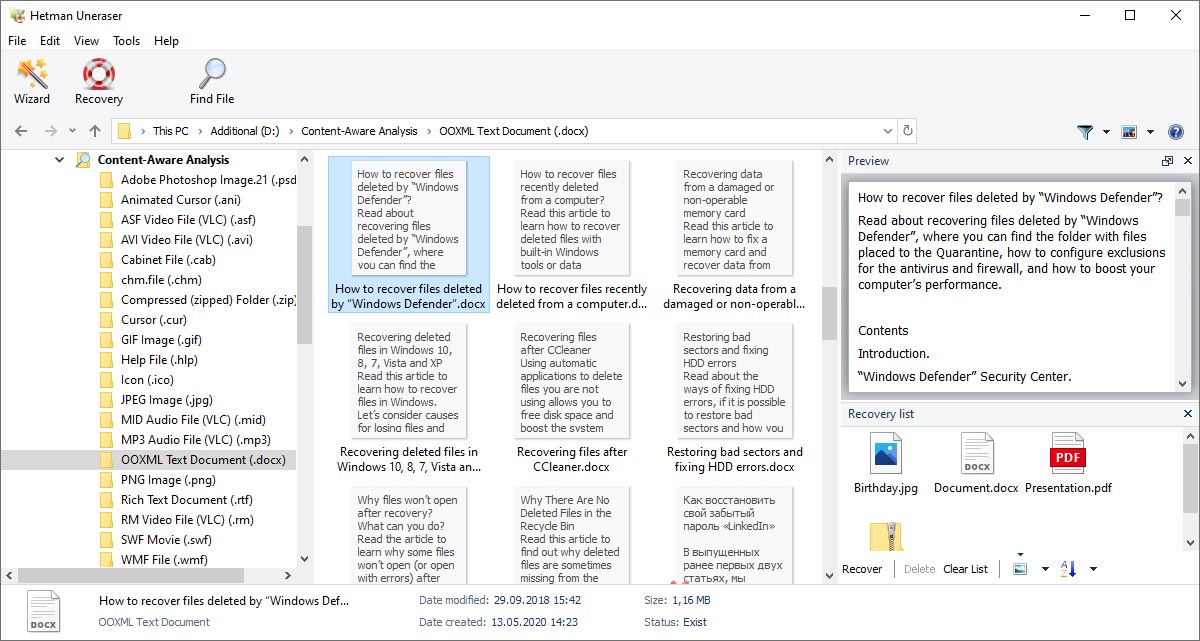
Results view: file types on the left, document thumbnails in the center, a text preview at top right and the recovery list below it.
Features
Hetman Uneraser recovers files of any type from file system records
Fast Scan isn't limited to a format list. If the file system still has the record, Uneraser can restore documents, video, databases, source code or disk images, and it can reassemble fragmented files because the record says where the pieces are.
Hetman Uneraser adds signature search when records are gone
Content-aware analysis scans for known file formats by their internal structure. It's a fallback: such files lose their original names, folders and dates, and a fragmented file may come back partial or damaged.
Hetman Uneraser catches deletions the Recycle Bin never saw
Files deleted directly from USB sticks, memory cards and external drives skip the Recycle Bin on many devices. So do command-line deletions with DEL, Remove-Item, rm or unlink, and files removed by cleanup tools or antivirus software. Uneraser looks for all of these.
Hetman Uneraser can find originals deleted by some ransomware
Some malware writes an encrypted copy and deletes the original. If the original's data and file system record haven't been overwritten, Uneraser can restore it. Treat this as a possibility, as it depends entirely on what the malware did next.
Hetman Uneraser reads single-disk NAS and server layouts
On a disk pulled from a one-bay NAS or a Linux server, it follows supported layers such as a controller single-disk volume, LVM, thin pools and snapshots down to the file system. Anything spanning several physical disks needs RAID Recovery.
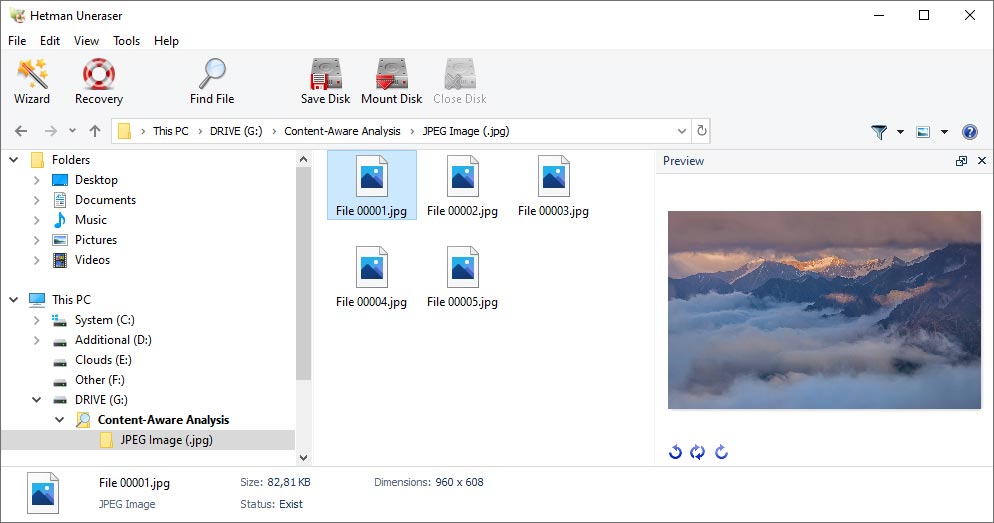
The preview pane shows a recovered file's contents before you pay. Hetman's advice is that a file displayed correctly here can be fully restored.
Benefits
- The cost matches the accident. Under $40 is a sensible price for a one-off deletion, if the preview shows your file.
- A proper interface. It behaves like File Explorer, with folders, a preview pane and a recovery list you add files to.
- Cross-platform use. One product covers a Windows laptop, a Mac and a Linux box, and it can read each other's disks.
Real-World Uses
- You pressed Shift+Delete on a project folder in Windows. Install Uneraser on another drive, run Fast Scan on that volume, and copy the folder out.
- Antivirus quarantined a file you need and removed the original. Uneraser looks for the deleted original on disk.
- A photographer deleted a folder directly from an SD card, so no Recycle Bin was involved.
- A disk from a single-bay NAS sits in a USB dock on a Windows PC. Uneraser reads its Ext4 or Btrfs volume and finds what was deleted.
Who It's For, and Who Should Skip It
Buy it if you know the files were simply deleted, the disk still mounts normally and you want a straightforward tool with a paid-only-if-it-works flow.
Skip it if the drive was formatted, reinitialized or shows as RAW, or if the volume is encrypted: Uneraser doesn't cover those, and Partition Recovery does. For very large or fragmented files like long videos, databases and virtual disks, Hetman itself recommends Partition Recovery. And if your deleted file is small and on a Windows hard disk, free tools such as Recuva or Microsoft's command-line Windows File Recovery are worth a try first.
Usage Guide
- Stop using the affected drive. Install Uneraser on a different one, or run the portable version from a USB stick.
- Select the volume or disk and run Fast Scan.
- Browse the deleted items, search by name, and preview what you want.
- If the file isn't there, run content-aware analysis, knowing it won't keep names or folders.
- Enter your key once you've seen the file. No reinstall or rescan is needed.
- Add files to the recovery list and save them to another disk, a ZIP archive or an FTP server.
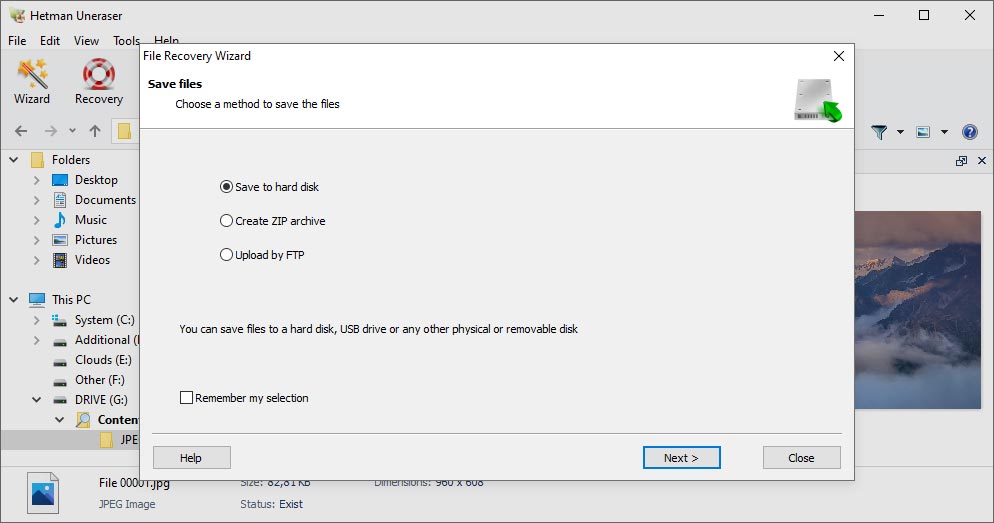
The save step of the wizard: to a hard disk, as a ZIP archive, or uploaded by FTP.
Where it falls short
- No Full Analysis. Hetman's own comparison table gives Uneraser no support for formatted drives, lost partitions, RAW volumes or malware-damaged file systems, only deletions.
- No virtual disks or encrypted storage. It can't mount VM disks, Apple images or forensic images directly.
- Little independent testing exists. We found no recent independent review of this version, so the free preview is your best evidence.
- Updates are separate. Newer versions after your coverage need a paid plan or a new key.
What Users Say
Reviews of Uneraser specifically are scarce. Hetman Software as a company scores 3.8 out of 5 on Trustpilot from 88 reviews on November 6, 2026, with 74% five-star and 24% one-star, and the complaints there are mostly about corrupted output and refunds. Trustpilot blocks direct access, so its excerpts here reached us through a page summarizer.
Trustpilot
"I've had a great experience of using Hetman Uneraser recently." Mark, "Very Convenient Tool", June 2016
"Don't trust this company the products work, but they put an advanced authorization on your paypal" BRIAN, 1 star, updated September 2024, a complaint about billing rather than the software
"I contacted their support 3 times! It's been 12 hours and still no response!" Luz Bunčeková, 1 star, July 2021
On Hetman's own review page
The vendor shows five Uneraser reviews averaging 4.2. The page is moderated, and these are old, so read them as a small friendly sample.
"Hetman Uneraser is the only data recovery program that managed to help me. It recovered a file that had been deleted over a week before that." Dmitry Pomogalov, October 2012
"I downloaded a few similar tools and tried them on several computers. Hetman Uneraser is amazing – it completely restored the files deleted for testing purposes…" Ilya Konovalov, May 2014
"I have been trying it and it did seem to report a drive that don't exist in this PC? But it did seem to give a lot of information." Knut Norman, 3 stars, April 2020
The pattern: simple deletions caught early go well. Praise centers on ease of use. One older reviewer found its disk listing confusing.
Comparisons
Uneraser vs Hetman Partition Recovery
Partition Recovery costs $67.95 and adds Full Analysis for formatted, RAW and lost partitions, plus virtual and encrypted storage in its Office and Business editions. Uneraser is enough only if the file system is intact. If you're unsure what happened, spend the extra $30, or run both free scans first.
Uneraser vs free undelete tools
Recuva and Windows File Recovery cost nothing and handle basic deletions on Windows. Uneraser earns its price through the preview-first workflow, a full graphical interface on all three desktop systems, and reading Linux and Mac file systems from Windows.
Editions and Pricing
| Edition | Price | Allowed use |
|---|
| Home | $37.95 | Personal, non-commercial |
| Office | $137.95 | Internal company use |
| Business | $237.95 | Data recovery services for clients |
Each is a lifetime license for one computer, chosen from the Licenses menu on the order page. The editions differ in permitted use. Paying the difference moves you to a higher one.
FAQs
How long after deleting a file can Hetman Uneraser still recover it?
There is no fixed limit for Hetman Uneraser. A file deleted months ago may survive if nothing overwrote it, while a recent one can vanish quickly on a busy disk. On an SSD, TRIM can shorten that window a lot.
Can Hetman Uneraser recover a formatted drive?
No. Hetman Uneraser works on existing, readable file systems. A formatted, RAW or lost partition needs Hetman Partition Recovery.
Does Hetman Uneraser work on an SSD?
Yes, but with less certainty. If the SSD has already erased the blocks through TRIM and garbage collection, Hetman Uneraser can't bring the file back, so stop using the drive and scan it as soon as you can.
Does Hetman Uneraser include updates?
Hetman Uneraser's license covers the version you buy. A one-year updates and priority support plan is optional at $19.95, and the version you own keeps working without it.
Do I need to rescan after buying a Hetman Uneraser license?
No. Enter the registration details in the installed copy of Hetman Uneraser and carry on from the existing scan results.
Can a business use the $37.95 Hetman Uneraser license?
No. Hetman Uneraser's Home edition is for personal, non-commercial use. Company use needs the Office edition, and work for paying clients needs Business.
System Requirements
- Windows, macOS or Linux (the vendor doesn't publish minimum versions)
- Administrator or root rights for low-level disk access
- About 93 MB for the Windows installer
- A separate drive or location for saving recovered files
Conclusion
Hetman Uneraser is worth $37.95 for one situation: files were deleted, the disk is healthy, and the free preview shows them intact. The one reason to buy it is that low price with proof up front. The main reason not to is its narrow scope, as anything beyond a plain deletion means buying Partition Recovery instead, so if you're unsure what happened, start there.
Download Free TrialBuy Now