SIM Card Text Messages Recovery Tool: Read Texts, Contacts and Card Details Straight off a SIM
SIM Card Text Messages Recovery Tool (the program window says Data Doctor Recovery - SIM Card) is a $69 Windows program that reads a phone's SIM card through a USB SIM card reader and lists the text messages, phonebook numbers, dialed numbers and card identity details stored on it. It's for people who need what is on the SIM itself: an old phone's card, a card from a phone that no longer starts, or a card that has to be examined for an investigation.
The idea is simple. You take the SIM out of the phone, push it into a small USB reader, and the program shows you everything the card holds, including message slots the phone marked as deleted but hasn't overwritten yet. It doesn't touch the phone's own memory, and that matters more than anything else on this page, so read the "Before you buy" box first.
Quick facts
- Program name: Data Doctor Recovery - SIM Card, sold on techddi.com as Windows Data Recovery Software for SIM Card
- Developer: Pro Data Doctor Pvt. Ltd. (Data Doctor / DRPU), Ghaziabad, India
- Version: 5.4.1.2
- Runs on: Windows
- Hardware you need: a USB SIM card reader that follows the PC/SC standard (most modern readers) or the older Phoenix standard
- Reads: SMS (inbox, outbox, drafts and deleted slots), phonebook numbers, last dialed and fixed dialed numbers, own number, service provider, ICCID, IMSI, location and PLMN lists
- Price: $69, a one-time payment with no renewal
- Trial: a free demo version
- What we checked: the demo installer (sim-card.exe, 1.5 MB, file version 5.4.1.2, digitally signed by Pro Data Doctor Pvt. Ltd.) downloaded from the vendor, and the $69 one-time price on the order page, both on November 4, 2026. We didn't have a SIM card reader, so we didn't read a card with it.
Before you buy
- It only sees what's on the SIM. Today's Android phones and iPhones save text messages, chats and most contacts in the phone's own memory or a cloud account, not on the SIM. If your lost texts lived on a smartphone, this program won't find them. It's the right tool for messages and numbers actually stored on the card: older feature phones, phones set to save to SIM, and contacts copied to the SIM.
- A SIM holds very little. The card in the vendor's own screenshot has room for 20 text messages and 200 phonebook entries. Deleted messages can only come back if their slot hasn't been reused.
- You need a USB SIM card reader. The program doesn't work through a phone connected by cable. Buy a PC/SC reader first and check that Windows sees it.
- It's an old program. The installer's signing certificate dates from 2010 to 2013 and the vendor hasn't published a version history, so don't expect support for newer card features or a modern interface.
Download Free TrialBuy Now
Overview
A SIM card is a tiny smart card with its own small file system. Besides the subscriber identity the network needs, it has fixed slots for text messages, a phonebook, and lists of recently and fixed dialed numbers. When a phone "deletes" a text stored on the SIM, it usually just marks the slot as free. Until a new message lands in that slot, the old bytes are still there.
SIM Card Text Messages Recovery Tool talks to the card through a USB reader and reads those slots directly. The left panel is a tree of what the card holds (SMS, PhoneBook Number, Last Dialed Number, Fixed Dialed Number, Service Provider Name, Card Identification, Location, IMSI, Forbidden PLMN, User PLMN and Own Number), and the right side shows the records and the details of the one you pick. It reads only. Nothing is written back to the card.
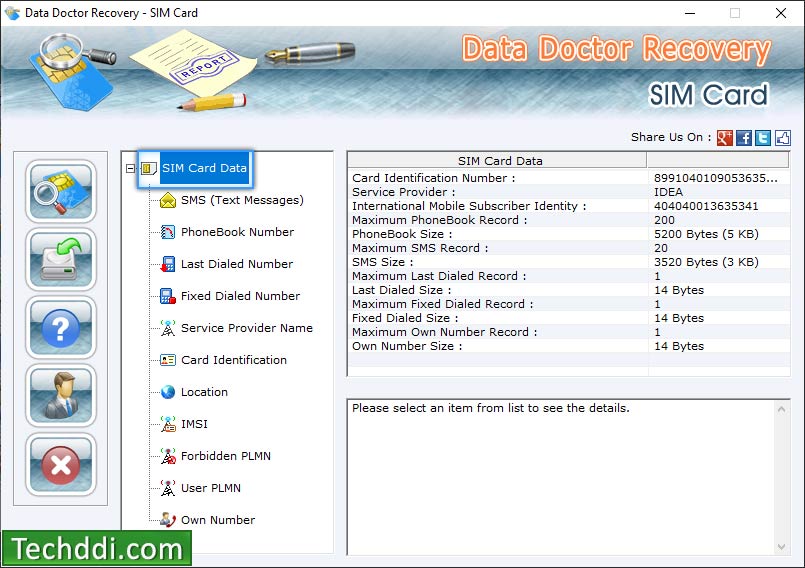
The SIM Card Data summary: card identification number, service provider, IMSI, and how many phonebook and SMS records the card can hold (200 and 20 on this card).
Features
Text messages, including deleted ones still on the card
SIM Card Text Messages Recovery Tool lists every SMS slot on the card with the sender, date, time, folder (Inbox, Inbox unread, Outbox, Draft, or DEL for a deleted slot) and the message text. Pick a row and the bottom pane shows the full message and how many of the card's SMS slots are used and free. Messages in other scripts, such as Hindi or Gujarati, are shown as they were sent.
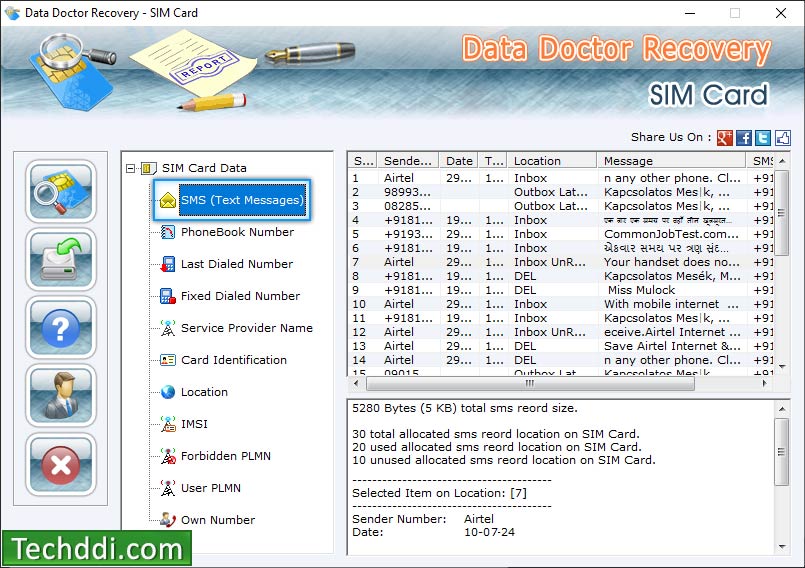
The SMS view: inbox, unread, outbox and DEL (deleted) slots with sender and date, and the slot counts for the card below.
Phonebook and dialed numbers
SIM Card Text Messages Recovery Tool reads the contacts saved to the SIM (name and number), the last dialed numbers, the fixed dialing list and the card's own number. For each list it reports the total slots, used slots and free slots, which tells you at a glance whether there's room for deleted entries to have survived.
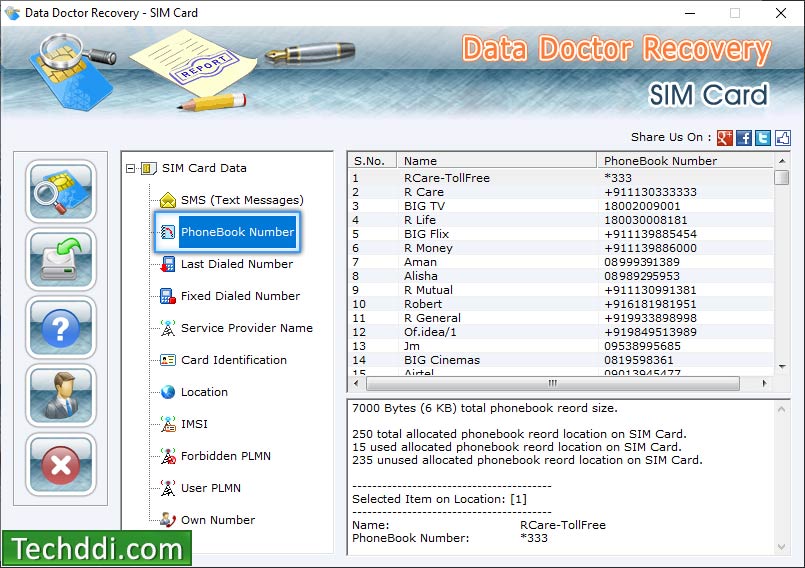
The PhoneBook Number view, with 15 of the card's 250 phonebook slots in use.
Card identity details
SIM Card Text Messages Recovery Tool shows the card identification number (ICCID) printed on the card, the IMSI that identifies the subscriber to the network, the service provider name, the last network location, and the forbidden and user-preferred network (PLMN) lists. That's useful for identifying a card whose packaging is long gone, and for documenting a card in an investigation.
Read only, with a text report
SIM Card Text Messages Recovery Tool doesn't write to the card, so examining a SIM doesn't change it. It can save what it reads as a text report, which gives you a copy of the messages and numbers to keep or hand over.
Benefits
- No phone needed. A broken, locked or lost-charger phone doesn't matter. If the SIM is intact, the reader gets to it.
- You see the card as it is. The program shows every slot, used and free, instead of only what the phone chooses to display.
- Nothing changes on the card. Read-only access is what you want when the card may be evidence.
- Pay once. $69 with no subscription is cheap next to forensic suites that cover phones as well as SIMs.
Real-World Uses
- The old feature phone in a drawer. A parent's or grandparent's phone kept its messages on the SIM. The phone is dead, but the card still holds the last texts and the phonebook.
- Contacts copied to the SIM before a phone switch. You saved contacts to the SIM years ago and the new phone didn't import them. Read them on the PC and save the report.
- Identifying a stack of old SIMs. The ICCID, provider and own number tell you which card belonged to which line before you shred them.
- Documenting a card for a case. An investigator or a company security team records a SIM's identity, messages and numbers without changing it.
Who It's For, and Who Should Skip It
It's for people who know the data they want is on the SIM card: owners of older phones, people who saved contacts to the SIM, and small investigation or security teams who need a cheap way to read a card.
Skip it if you're trying to get back WhatsApp chats, iMessages or texts from a modern smartphone. Those were never on the SIM. Check the phone's own backup (Google or iCloud) first, or use a phone recovery tool that works on the phone's storage. Skip it too if you don't have a Windows PC or don't want to buy a SIM card reader.
Usage Guide
- Download the demo and run the installer. It adds Data Doctor Recovery - SIM Card to the Start menu and the desktop.
- Plug in your USB SIM card reader and let Windows install it, then put the SIM in the reader.
- Start the program and click the search button at the top of the left toolbar. It asks which kind of reader you have: PC/SC (most modern readers) or Phoenix.
- Pick your reader in the list (it shows the readers Windows found) and click OK. The program reads the card and fills the tree on the left.
- Click SMS (Text Messages), PhoneBook Number or any other item to see its records. Select a record to see its details in the bottom pane.
- Save a text report if you want a copy of everything the program read.
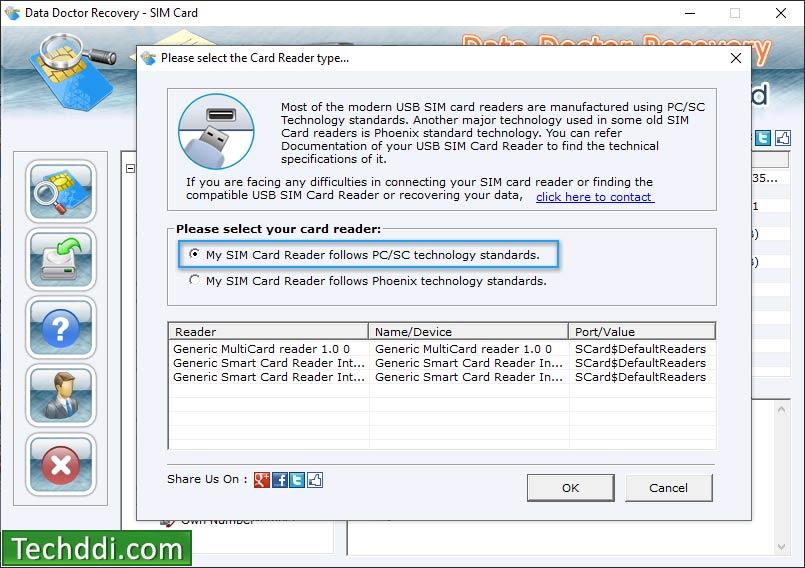
Choosing the card reader type. PC/SC readers appear in the list with the names Windows gave them.
Tips
- Take the SIM out of the phone as soon as you notice missing texts. Every new message the phone saves to the SIM can take the slot of a deleted one.
- Try the demo with your reader before you pay. If the program can't see the reader or the card, the full version won't either.
- Nano SIMs need an adapter to fit most USB readers. Many readers come with one.
Where it falls short
- No guarantee for deleted texts. A deleted message is only readable while its slot is free. A card that kept receiving messages may have nothing left to recover.
- Reader trouble is on you. The vendor's answer to readers that don't work is to email support for a list of compatible reader makers.
- Thin documentation. There's a short online guide and a few screenshots, but no manual, version history or list of tested readers.
- No reviews to lean on. There are no user reviews on Capterra, G2 or Trustpilot, only download-site listings, so the demo is your best way to judge it.
Comparisons
SIM card reader software vs phone recovery software
SIM Card Text Messages Recovery Tool and phone recovery programs answer different questions. This program reads the SIM chip through a card reader and sees only the few dozen messages and few hundred contacts the card can store. Phone recovery tools connect to the phone itself and scan its internal storage or backups, which is where a smartphone keeps texts and chat apps keep everything. If the phone works and the messages were on the phone, a phone recovery tool is the right buy. If the phone is gone and the SIM is all you have, or you know the data was saved to the SIM, this one is.
Editions and Pricing
| Edition | Price | License | What you get |
|---|
| Demo | Free | Evaluation | Checks that your reader and card work with the program |
| Full version | $69 | One-time payment | The full program and its text reports |
FAQs
Can SIM Card Text Messages Recovery Tool recover deleted texts from my iPhone or Android phone?
SIM Card Text Messages Recovery Tool can't, in most cases. iPhones never store texts on the SIM, and Android phones save them to the phone's memory unless you've told the phone to use the SIM. The program only reads the card.
Which SIM card reader do I need for SIM Card Text Messages Recovery Tool?
SIM Card Text Messages Recovery Tool needs a USB SIM card reader that follows the PC/SC standard, which covers most readers sold today, or the older Phoenix standard. A memory card reader won't do. It has to be a smart card or SIM reader.
Does SIM Card Text Messages Recovery Tool work with SIMs from any country or carrier?
SIM Card Text Messages Recovery Tool reads SIM cards of any country and network, according to the vendor, whether or not the number is still active.
Will SIM Card Text Messages Recovery Tool change anything on my SIM card?
SIM Card Text Messages Recovery Tool is read only, according to the vendor, so examining a card leaves its contents as they were.
Is SIM Card Text Messages Recovery Tool a subscription?
SIM Card Text Messages Recovery Tool is a one-time $69 purchase. There's no yearly renewal on the order page.
Does SIM Card Text Messages Recovery Tool run on a Mac?
SIM Card Text Messages Recovery Tool is Windows only. On a Mac you'd need Windows in a virtual machine with the USB reader passed through to it.
System Requirements
- Windows PC
- USB SIM card reader (PC/SC or Phoenix standard), plus an adapter for micro and nano SIMs if the reader needs one
- About 2 MB for the installer
Conclusion
SIM Card Text Messages Recovery Tool is worth $69 only if you know the data is on the SIM. For an old feature phone's messages, contacts saved to the card, or a cheap read-only look at a SIM for an investigation, it does a narrow job in a plain, easy window, and you pay once. The reason not to buy it is just as clear: it can't reach anything a smartphone keeps in its own memory, which today is nearly everything, and it's an old program with little documentation. Run the demo with your reader and your card first, and buy only if the messages you want show up there.
Download Free TrialBuy Now